
Published Jul 4, 2026
Meta Ads Dynamic URL Parameters for UTM Tracking: Practical Guide for Advertisers
A practical guide to Meta Ads dynamic URL parameters for UTM tagging: supported tokens, campaign compatibility, recommended GA4 mapping, ready-to-use templates, CRM capture, troubleshooting, and validation rules.
Category: Online advertising · By Mikalai Sasau
Meta Ads dynamic parameters help advertisers pass campaign, ad set, ad, placement, and platform data into UTM tags without manually editing every URL. This guide explains which Meta parameters are safe to use, where to place them, how they work across campaign types, and how to build a clean tracking template for GA4, CRM, and BI reporting.
Practical default: for most website campaigns, keep utm_medium static, use {{site_source_name}} for utm_source, use {{campaign.name}} for readable campaign reporting, use {{campaign.id}} as a stable join key in utm_id, and pass ad/ad set IDs as custom parameters.
Executive summary
Meta Ads supports a relatively small but useful set of public dynamic URL parameters for campaign tagging. The practically verifiable set is built around campaign, ad set, and ad identifiers/names, plus two delivery-context tokens: {{placement}} and {{site_source_name}}. Meta describes dynamic URL parameters as a way to populate URL values automatically based on ad setup and delivery context. Google Analytics also recommends using consistent campaign parameters and dynamic values where an ad platform supports them.
The safest tracking architecture is not to put every possible value into the five classic UTM fields. Use UTMs for traffic classification and readable reporting, and use custom parameters for stable technical IDs. In practice, this means utm_source, utm_medium, utm_campaign, utm_content, and utm_id should stay clean, while values such as ad_id, adset_id, placement, and site_source_name can be captured separately for deeper analysis.
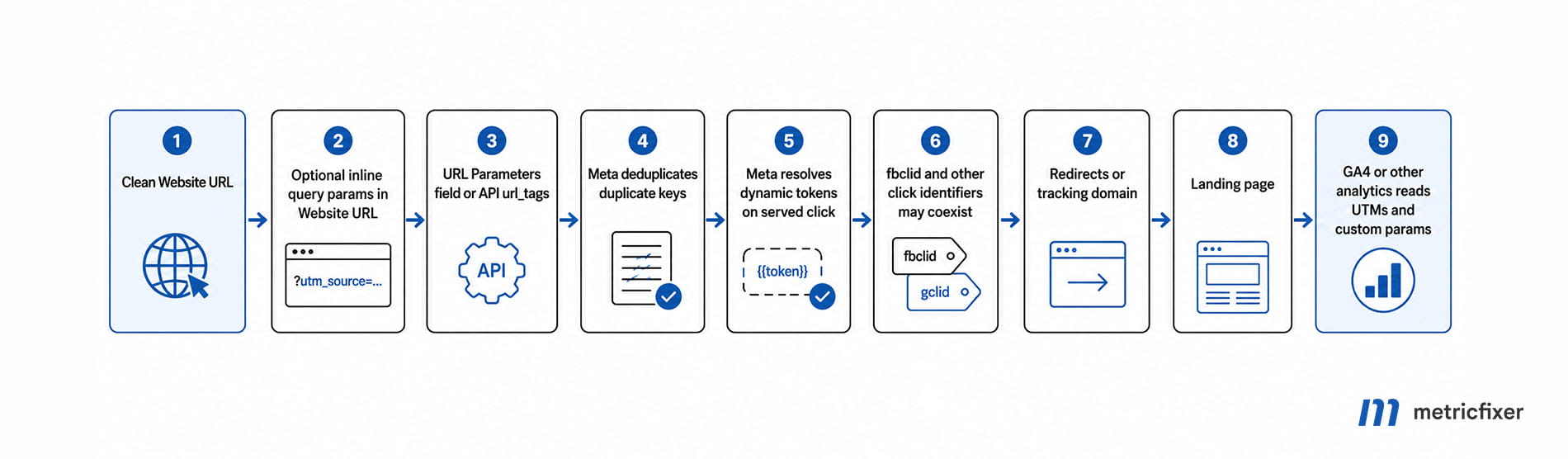
The canonical place to add these tags in Meta Ads Manager is the URL Parameters field at ad level. Meta also allows query parameters inside the Website URL field, but if the same key appears in both places, Meta states that parameters from the URL Parameters field are appended only when they are not duplicates. For API-based workflows, the relevant creative-level field is url_tags.
Dynamic UTMs are most useful when an ad click lands on a normal website URL. They are much less useful as the primary measurement method for direct app-install campaigns, messaging-only campaigns, and Instant Forms, because those flows may not create a normal website landing session. In those cases, Meta reporting, CRM lead data, a mobile measurement partner, SKAN/AEM, Conversions API, or app-event mapping usually becomes more important than final URL parameters.
What Meta dynamic URL parameters are
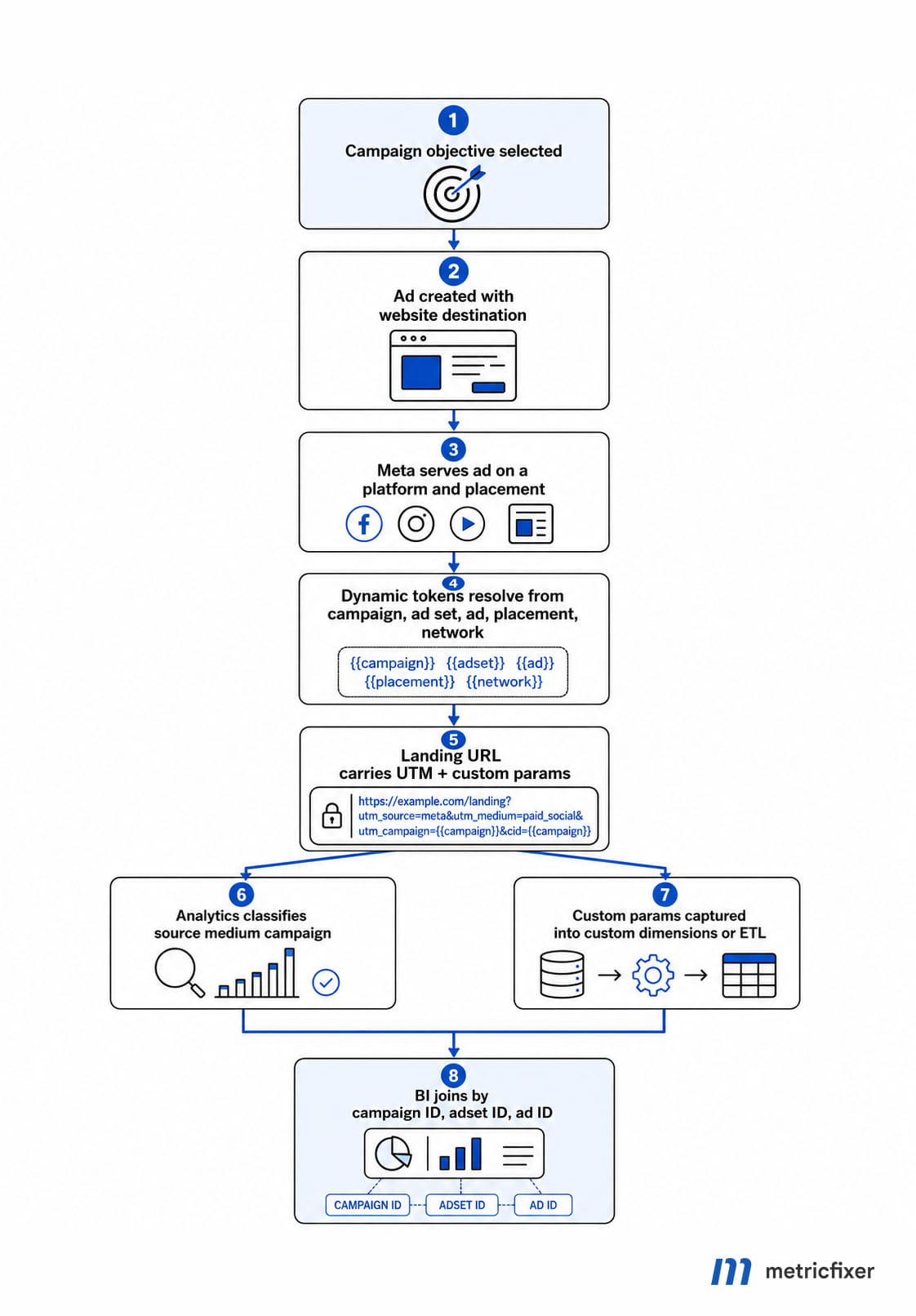
A dynamic URL parameter is a placeholder that Meta replaces when the ad is delivered and clicked. Instead of manually writing a campaign name or ad ID into every link, you place a token such as {{campaign.name}} or {{ad.id}} in the URL parameter string. Meta then resolves that placeholder into the relevant campaign, ad set, ad, placement, or platform value.
The important limitation is that Meta dynamic parameters are not a full tracking-template language like Google Ads ValueTrack. There are no public lowercase filters, string-replacement functions, product-level macros, or creative-format macros in the standard documented set. This is why the strongest setup combines dynamic values with a disciplined naming convention and static taxonomy values.
Current Meta Ads dynamic parameter reference
| Parameter | Syntax | What Meta inserts | Typical value | Best use |
|---|---|---|---|---|
| Campaign ID | {{campaign.id}} |
Numeric campaign identifier | 120206190123450001 |
Stable join key; usually best for utm_id |
| Campaign name | {{campaign.name}} |
Campaign name from Meta | summer_sale_emea |
Readable value for utm_campaign |
| Ad set ID | {{adset.id}} |
Numeric ad set identifier | 120206190123460001 |
Custom parameter such as adset_id |
| Ad set name | {{adset.name}} |
Ad set name from Meta | retargeting_30d_viewers |
Optional value for utm_term or a custom audience field |
| Ad ID | {{ad.id}} |
Numeric ad identifier | 120206190123470001 |
Custom parameter such as ad_id |
| Ad name | {{ad.name}} |
Ad name from Meta | ugc_hook_a_v3 |
Readable value for utm_content |
| Placement | {{placement}} |
Served placement | feed, story, reels |
Custom parameter such as placement |
| Site source name | {{site_source_name}} |
Meta property or network where the ad was served | fb, ig, an, msg |
Best dynamic candidate for utm_source |
The two most useful delivery-context parameters are often the two most underused ones. {{site_source_name}} can separate Facebook, Instagram, Audience Network, and Messenger traffic in analytics. {{placement}} can help analysts compare feeds, stories, reels, marketplace, search-related placements, and other delivery locations outside Meta Ads Manager.
Recommended UTM mapping for Meta Ads
A strong Meta Ads tracking template should do two things at the same time: keep GA4 traffic-source reports clean and preserve enough stable IDs for CRM, warehouse, or Looker Studio joins. For most advertisers, the recommended default is:
utm_source={{site_source_name}}&utm_medium=paid_social&utm_campaign={{campaign.name}}&utm_content={{ad.name}}&utm_id={{campaign.id}}&adset_id={{adset.id}}&ad_id={{ad.id}}&placement={{placement}}&utm_source_platform=meta_ads| Field | Recommended value | Why it works | When to change it |
|---|---|---|---|
utm_source |
{{site_source_name}} |
Separates Facebook, Instagram, Audience Network, and Messenger instead of grouping everything as one undifferentiated meta source. |
Use static meta only if your reporting standard intentionally groups all Meta inventory together. |
utm_medium |
paid_social |
Keeps paid Meta traffic classified as paid social rather than organic social or referral traffic. | Use cpc only if your organization uses cpc consistently for all paid media. |
utm_campaign |
{{campaign.name}} |
Readable campaign reporting in GA4 and other analytics tools. | Use {{campaign.id}} only if naming discipline is weak and readability is less important than stability. |
utm_content |
{{ad.name}} |
Usually the best human-readable creative label. | Use {{ad.id}} if ad names are inconsistent, too long, duplicated, or frequently renamed. |
utm_term |
Blank or {{adset.name}} |
Social ads do not have keywords. Ad set name can work only when it clearly describes the audience or targeting logic. | Leave blank if ad set names are operational, unstable, or not useful for analytics. |
utm_id |
{{campaign.id}} |
Stable campaign-level join key for reporting and imported cost/performance data. | There is rarely a good reason to omit it for paid campaigns. |
utm_source_platform |
meta_ads |
Creates a stable buying-platform field independent of the source split by fb, ig, an, or msg. |
Omit only if your analytics stack does not use this parameter. |
utm_creative_format |
Static value such as image, video, carousel, or collection |
Useful for internal reporting, but Meta does not provide a verified public dynamic macro for creative format. | Use only if your team can maintain it consistently through naming or automation. |
utm_marketing_tactic |
Static value such as prospecting, remarketing, or crm |
Useful when acquisition strategy matters more than ad set name. | Omit if the team cannot keep the taxonomy consistent. |
A practical rule is simple: use names where humans need to read reports, and use IDs where systems need to join data reliably. Campaign names, ad set names, and ad names can be useful for marketers. Campaign IDs, ad set IDs, and ad IDs are better for CRM matching, warehouse joins, and long-term auditability.
Custom parameters worth adding
Do not overload UTM fields with every value you might need later. Most analytics tools can read additional query parameters, and Google Tag Manager can capture them through URL variables. The custom parameters below are often more useful than forcing everything into utm_campaign, utm_content, or utm_term.
| Custom parameter | Recommended value | Why it matters |
|---|---|---|
campaign_id |
{{campaign.id}} |
Useful if downstream tools ignore utm_id or if your data model prefers explicit Meta field names. |
adset_id |
{{adset.id}} |
Stable ad set-level key for audience, optimization, and budget analysis. |
ad_id |
{{ad.id}} |
Stable ad-level key for creative reporting and CRM attribution. |
placement |
{{placement}} |
Shows where the click was served when the user came to the website. |
site_source_name |
{{site_source_name}} |
Preserves the platform/network code separately even when utm_source is normalized. |
Compatibility by campaign and destination type
Compatibility depends less on the campaign objective and more on whether the ad sends the user to a normal website URL. If a website landing page exists, dynamic URL parameters are usually useful. If the conversion happens inside Meta or in an app-install flow without a normal website session, UTMs become secondary or irrelevant.
| Scenario | Normal website URL? | Entity tokens | {{placement}} |
{{site_source_name}} |
Recommended approach |
|---|---|---|---|---|---|
| Website traffic, website sales, website conversions | Yes | Yes | Yes | Yes | Use full UTM template in the URL Parameters field. |
| Awareness or engagement ad with outbound website CTA | Yes | Yes | Yes | Yes | Use website tagging if the click goes to your site. |
| Promoted existing post with outbound link | Usually yes | Yes | Yes | Yes | Use URL parameters, but test because the base link may come from the post. |
| Catalog or dynamic product ads to website | Yes | Yes | Yes | Yes | Use the standard token set; do not assume product-level macros unless your setup explicitly supports them. |
| Lead ads with Instant Form only | No primary website session | Not useful for the form step | Not useful for the form step | Not useful for the form step | Use Meta lead export/API fields and CRM mapping; tag only post-submit website CTAs if present. |
| Messaging-only, Messenger, or WhatsApp destination | Often no | Limited use | Limited use | Limited use | Use UTMs only if there is an outbound website CTA. |
| Direct app promotion to app store or app | Usually no | Not primary measurement | Not primary measurement | Not primary measurement | Use MMP, SKAN/AEM, SDK, App Events API, and in-app event mapping as the primary measurement layer. |
| Web-to-app landing page before app store | Yes for the web leg | Yes for the web leg | Yes for the web leg | Yes for the web leg | Tag the landing page visit, but keep app attribution separate. |
The safest way to think about this is: Meta dynamic parameters describe the ad click URL, not the entire conversion journey. They can explain where a website session came from. They do not replace Meta Pixel, Conversions API, app attribution, CRM lead reconciliation, or offline conversion imports.
Where to place the template in Meta Ads Manager
For day-to-day ad setup, the best practice is to keep the Website URL clean and place the query string in the URL Parameters field. Do not add a leading question mark when using that field. Meta appends the parameters to the destination URL for you.
This field separation makes QA easier. It also reduces accidental double-tagging, because the landing page remains a clean destination while all campaign tracking lives in one predictable place.
Ready-to-use Meta UTM templates
Standard website campaign template
utm_source={{site_source_name}}&utm_medium=paid_social&utm_campaign={{campaign.name}}&utm_content={{ad.name}}&utm_id={{campaign.id}}&adset_id={{adset.id}}&ad_id={{ad.id}}&placement={{placement}}&utm_source_platform=meta_adsThis is the best default for most advertisers. It gives readable campaign and creative values, keeps utm_medium stable, preserves campaign ID in utm_id, and adds ad set/ad/placement details outside the classic UTM fields.
Lead generation to website template
utm_source={{site_source_name}}&utm_medium=paid_social&utm_campaign={{campaign.name}}&utm_term={{adset.name}}&utm_content={{ad.name}}&utm_id={{campaign.id}}&adset_id={{adset.id}}&ad_id={{ad.id}}Use this only when {{adset.name}} contains useful audience or funnel information. If ad set names are operational labels, leave utm_term blank and keep adset_id as a custom parameter.
Catalog or dynamic product ad template
utm_source={{site_source_name}}&utm_medium=paid_social&utm_campaign={{campaign.name}}&utm_content={{ad.name}}&utm_id={{campaign.id}}&adset_id={{adset.id}}&ad_id={{ad.id}}&placement={{placement}}This template works at campaign, ad set, ad, and placement level. Do not assume a public product-level token is available in the standard Meta dynamic parameter set. If product-level attribution is required, connect ad click data with catalog, feed, Pixel/CAPI, or ecommerce event data in your analytics model.
Existing post promotion template
utm_source={{site_source_name}}&utm_medium=paid_social&utm_campaign={{campaign.name}}&utm_content={{ad.name}}&utm_id={{campaign.id}}&placement={{placement}}Use this when promoting an existing post that contains an outbound website link. Always test the final click path, because the base destination may be inherited from the original post setup.
Web-to-app landing page template
utm_source={{site_source_name}}&utm_medium=paid_social&utm_campaign={{campaign.name}}&utm_content={{ad.name}}&utm_id={{campaign.id}}&placement={{placement}}&ad_id={{ad.id}}This tags the website visit before the user continues to an app store or app. It should not be treated as a substitute for app attribution. Use your MMP, SKAN/AEM configuration, SDK, App Events API, and in-app event mapping for the app part of the journey.
API implementation with url_tags
When creating Meta ad creatives through the Marketing API, use the creative-level url_tags field for the same URL parameter string that you would paste into Ads Manager. The following example is a simplified implementation pattern; adapt it to your own account, authentication, creative format, and API version.
curl -X POST "https://graph.facebook.com/v26.0/act_<AD_ACCOUNT_ID>/adcreatives" \
  -F "access_token=<ACCESS_TOKEN>" \
  -F "name=Metricfixer UTM Creative" \
  -F 'object_story_spec={
    "page_id":"<PAGE_ID>",
    "link_data":{
      "link":"https://www.example.com/landing-page",
      "message":"Example ad copy",
      "call_to_action":{"type":"LEARN_MORE","value":{"link":"https://www.example.com/landing-page"}}
    }
  }' \
  -F 'url_tags=utm_source={{site_source_name}}&utm_medium=paid_social&utm_campaign={{campaign.name}}&utm_content={{ad.name}}&utm_id={{campaign.id}}&adset_id={{adset.id}}&ad_id={{ad.id}}&placement={{placement}}&utm_source_platform=meta_ads'
For Python SDK workflows, the same idea can be expressed through AdCreative.Field.url_tags:
from facebook_business.api import FacebookAdsApi
from facebook_business.adobjects.adcreative import AdCreative

FacebookAdsApi.init(
    access_token="<ACCESS_TOKEN>",
    app_id="<APP_ID>",
    app_secret="<APP_SECRET>"
)

creative = AdCreative(parent_id="act_<AD_ACCOUNT_ID>")
creative.update({
    AdCreative.Field.name: "Metricfixer UTM Creative",
    AdCreative.Field.object_story_spec: {
        "page_id": "<PAGE_ID>",
        "link_data": {
            "link": "https://www.example.com/landing-page",
            "message": "Example ad copy",
            "call_to_action": {
                "type": "LEARN_MORE",
                "value": {"link": "https://www.example.com/landing-page"}
            }
        }
    },
    AdCreative.Field.url_tags:
        "utm_source={{site_source_name}}&utm_medium=paid_social&"
        "utm_campaign={{campaign.name}}&utm_content={{ad.name}}&"
        "utm_id={{campaign.id}}&adset_id={{adset.id}}&ad_id={{ad.id}}&"
        "placement={{placement}}&utm_source_platform=meta_ads"
})
creative.remote_create()
print(creative[AdCreative.Field.id])
Implementation note: the SDK example is shown as a text code block because the CMS code-block standard for this site supports only text, html, css, javascript, php, json, bash, and sql.
GA4 and CRM considerations
GA4 will use standard UTM parameters for traffic-source reporting, but it will not automatically expose every custom query parameter in standard reports. If you need ad_id, adset_id, placement, or site_source_name in GA4 explorations, you usually need to capture them as event parameters and register them as event-scoped custom dimensions.
| Layer | Recommended setup | Why it matters |
|---|---|---|
| GA4 traffic acquisition | Use utm_source, utm_medium, utm_campaign, utm_content, and utm_id. |
Keeps campaign traffic readable in standard GA4 acquisition reports. |
| GA4 custom dimensions | Capture ad_id, adset_id, placement, and site_source_name from the landing URL. |
Allows ad-level and placement-level analysis beyond default UTM dimensions. |
| CRM hidden fields | Store the original landing URL, UTM values, and Meta ID parameters on form submission. | Preserves attribution after the user moves through the funnel. |
| Warehouse / BI | Join website leads and purchases to Meta exports by campaign_id, adset_id, and ad_id. |
Names can change or be duplicated; IDs are more reliable. |
| Consent-aware tracking | Respect consent state before storing analytics or advertising identifiers where required. | UTM capture should be aligned with privacy, consent, and regional compliance settings. |
A useful GA4 custom channel rule is to classify traffic as Paid Social - Meta when session source matches fb, ig, an, msg, facebook, or instagram and session medium matches paid_social, paid-social, or cpc. This reduces the risk of Meta paid traffic being split across Paid Social, Organic Social, Referral, or Unassigned buckets.
Common mistakes and how to avoid them
| Mistake | Why it causes problems | Better approach |
|---|---|---|
Using utm_source=facebook for all Meta inventory |
Instagram, Messenger, and Audience Network traffic becomes hidden under one source. | Use utm_source={{site_source_name}} or add site_source_name={{site_source_name}} as a custom parameter. |
Making utm_medium dynamic |
Channel grouping becomes fragmented and harder to maintain. | Keep utm_medium=paid_social or another consistent static value. |
Putting ad set and ad names inside utm_campaign |
Campaign reporting becomes high-cardinality and hard to compare. | Use utm_campaign={{campaign.name}}, utm_content={{ad.name}}, and custom ID parameters. |
| Depending only on name-based tokens | Names are less reliable for joins and can create reporting drift. | Always include numeric IDs where reconciliation matters. |
Using mixed casing such as Paid_Social, paid-social, and paid_social |
Analytics tools treat different values as different rows. | Define a lowercase naming standard and enforce it. |
| Adding the same parameter in the Website URL and the URL Parameters field | Duplicate governance creates confusion, even if Meta avoids appending duplicate keys from the URL Parameters field. | Keep the Website URL clean and put tracking in one canonical field. |
| Testing only the saved ad preview | Dynamic tokens may still appear as placeholders before real delivery/click resolution. | Test the final click path and inspect the landing URL after redirects. |
| Forgetting redirects | Tracking domains, short links, CMS redirects, or MMP handoffs can strip UTMs. | Validate every hop and confirm that the final landing URL still contains the full query string. |
Testing and validation checklist
- [ ] Confirm the Website URL is clean and does not already contain conflicting UTM keys.
- [ ] Paste the parameter string into the Meta Ads URL Parameters field without a leading
?. - [ ] Check that every key is separated by
&and every value follows a single=. - [ ] Verify that all dynamic tokens use Meta’s double-curly syntax, for example
{{campaign.id}}. - [ ] Use lowercase static values for
utm_source,utm_medium, taxonomy fields, and custom tactic fields. - [ ] Click through a real or testable ad path and confirm the final landing URL after redirects.
- [ ] Confirm that no redirect, tracking domain, consent tool, or CMS rule removes the query string.
- [ ] Check GA4 Realtime or DebugView for source, medium, campaign, and custom parameters where configured.
- [ ] Submit a test lead and verify that CRM hidden fields store UTM and Meta ID values.
- [ ] Join at least one test record back to Meta campaign/ad set/ad export using numeric IDs.
Advanced practical tips
Keep one canonical template per account or client. Small differences in parameter names create long-term reporting debt. For example, adset_id, ad_set_id, and adsetid may all look understandable to humans, but they create separate fields in data pipelines.
Use campaign IDs for joins and names for dashboards. A marketer wants to read spring_sale_pl_leads. A warehouse model wants 120206190123450001. A good template gives both.
Do not rely on UTMs for app attribution. If the campaign objective is app installs or app events, UTMs may still describe a web pre-landing step, but the primary attribution model belongs in your MMP, SKAN/AEM setup, SDK, App Events API, and app-event postback configuration.
Use placement data as a diagnostic signal, not as the only optimization source. {{placement}} can help identify suspicious website behavior from specific placements, but Meta’s in-platform breakdowns, conversion modeling, and delivery optimization still need to be reviewed separately.
Protect high-cardinality fields. Putting too many dynamic values into standard UTM dimensions can make reports noisy. Keep the standard UTM layer simple and move granular technical detail into custom dimensions or the warehouse.
A practical template standard for teams
For most teams, the cleanest internal standard is:
utm_source: where the ad was served, using{{site_source_name}}.utm_medium: the channel type, usually staticpaid_social.utm_campaign: the readable campaign name, using{{campaign.name}}.utm_content: the readable ad/creative name, using{{ad.name}}.utm_id: the stable campaign ID, using{{campaign.id}}.adset_idandad_id: custom technical IDs for joins.placementandsite_source_name: custom delivery-context fields if you want them outside standard UTMs.
This gives advertisers a balanced setup: readable enough for daily marketing reports, stable enough for BI, and simple enough for QA.
Methodology and sources
This article is based on a review of Meta Business Help materials, Meta Marketing API and SDK references, Google Analytics campaign-tagging documentation, GA4 debugging and custom-dimension guidance, app attribution documentation from AppsFlyer, Apple App Tracking Transparency materials, Matomo and Adobe Analytics campaign-tracking references, and current practitioner documentation on Meta Ads UTM implementation. Official Meta and Google documentation was weighted most heavily; third-party sources were used mainly to identify practical UI behavior, implementation patterns, and common operational issues.
- Meta Business Help Center: Add custom and dynamic URL parameters
- Meta Business Help Center: Placement
- Meta Business Help Center: Choose placements for an ad
- Meta Python Business SDK: AdCreative fields
- Meta Python Business SDK: Campaign objective fields
- Meta Facebook Marketing API Postman workspace
- Google Analytics Help: Collect campaign data with custom URLs
- Google Analytics Help: Campaigns and traffic sources
- Google Analytics Help: DebugView
- Google Tag Manager Help: URL variables
- Google Analytics Help: Create event-scoped custom dimensions
- AppsFlyer Help Center: OneLink Smart Script and Meta ads context
- Meta Business Help Center: Why Meta does not recommend deep links as stand-alone measurement
- Apple Developer Documentation: App Tracking Transparency
- Matomo: Campaign tracking overview
- Adobe Experience League: Attribution overview
This article is for technical and operational information only. metricfixer is not affiliated with Meta, Facebook, Instagram, Messenger, WhatsApp, Google, Apple, AppsFlyer, Matomo, Adobe, or other third-party platforms mentioned in the article. Ad platform interfaces, API fields, dynamic parameter behavior, analytics attribution rules, privacy requirements, and app measurement frameworks may change after publication. Always validate your final click URLs, analytics reports, consent setup, and CRM capture logic in your own environment before relying on the data for reporting or optimization.