
Published Jul 2, 2026
Manual UTM Tagging in GA4: Recommended Values That Preserve Default Channels
A practical GA4 UTM taxonomy for clean acquisition reporting: recommended source, medium, campaign, content, and term values that preserve Default Channel Groups and avoid source/medium fragmentation.
Category: Analytics & Conversion Tracking · By Mikalai Sasau
Manual UTM tagging in Google Analytics 4 is not just a naming exercise. The values you put into utm_source, utm_medium, utm_campaign, utm_content, and utm_term become reporting dimensions, influence Default Channel Groups, and determine whether acquisition reports remain readable after months of campaigns.
Practical default: keep the source as the real platform or sender, keep the medium as the traffic type, and let GA4 classify the channel from a stable source/medium pair. In most cases, google / cpc and google / organic are easier to analyze than a mixed taxonomy such as google-ads / cpc, google / organic, and ga / display.
Executive summary
UTM parameters tell GA4 where a visit came from, how the user arrived, and which campaign or creative was responsible. They are also one of the easiest ways to damage reporting quality. A campaign can be technically tracked and still be analytically messy if the same platform appears as google, google_ads, google-ads, adwords, and ga in different links.
The most important principle is simple: utm_source should describe the source, and utm_medium should describe the channel type. The source is the platform, site, app, sender, or partner that sent the visit. The medium is the way the visit was generated: paid search, organic social, email, display, affiliate, referral, SMS, push, audio, and so on.
GA4 has the strongest expectations for utm_medium. The Default Channel Group rules recognize values and patterns such as cpc, ppc, values beginning with paid, display, banner, cpm, organic, social, email, affiliate, referral, sms, audio, ai-assistant, and push-related values. utm_source also matters because GA4 compares source values with lists of known search, social, video, shopping, and AI assistant sources. utm_campaign is mostly a campaign label, but it can affect channel grouping in specific cases, for example when the campaign name contains cross-network or matches shopping-related patterns.
The safest manual taxonomy is conservative: use platform names that GA4 can understand, use a limited dictionary of medium values, keep campaign names business-readable, and never use UTM tags on internal links. If the business needs reporting categories that GA4 does not provide by default, create a Custom Channel Group instead of distorting UTM values.
Scope of this guide
This article focuses on manual UTM tagging only: destination URLs where a marketer, agency, CRM, email system, partner, or content platform adds UTM parameters directly to the link. It does not cover advertising click identifiers, platform URL templates, or dynamic macro syntax inside ad platforms. Those topics require separate implementation rules because they interact with ad-platform integrations and campaign metadata in a different way.
The examples below are intentionally simple. They are meant to define a clean taxonomy, not to replace a full campaign naming convention for every platform.
What GA4 does with UTM parameters
When a user lands on a tagged URL, GA4 reads the UTM values from the page URL and maps them into traffic-source dimensions. Google’s GA4 documentation lists the standard parameters as utm_source, utm_medium, utm_campaign, utm_id, utm_source_platform, utm_term, utm_content, utm_creative_format, and utm_marketing_tactic. The classic five are still the operational core for most teams: utm_source, utm_medium, utm_campaign, utm_content, and utm_term.
https://www.example.com/landing-page?utm_source=google&utm_medium=cpc&utm_campaign=2026-q3-search-audit&utm_term=analytics-audit&utm_content=text-ad-01In GA4 reports, these values appear at different scopes. A First user dimension describes how a user first arrived. A Session dimension describes how a new session started. Event-scoped source and medium dimensions are used in attribution and key-event reporting. This is why the same UTM taxonomy affects more than one report: it can change User acquisition, Traffic acquisition, Explorations, audience conditions, and attribution views.
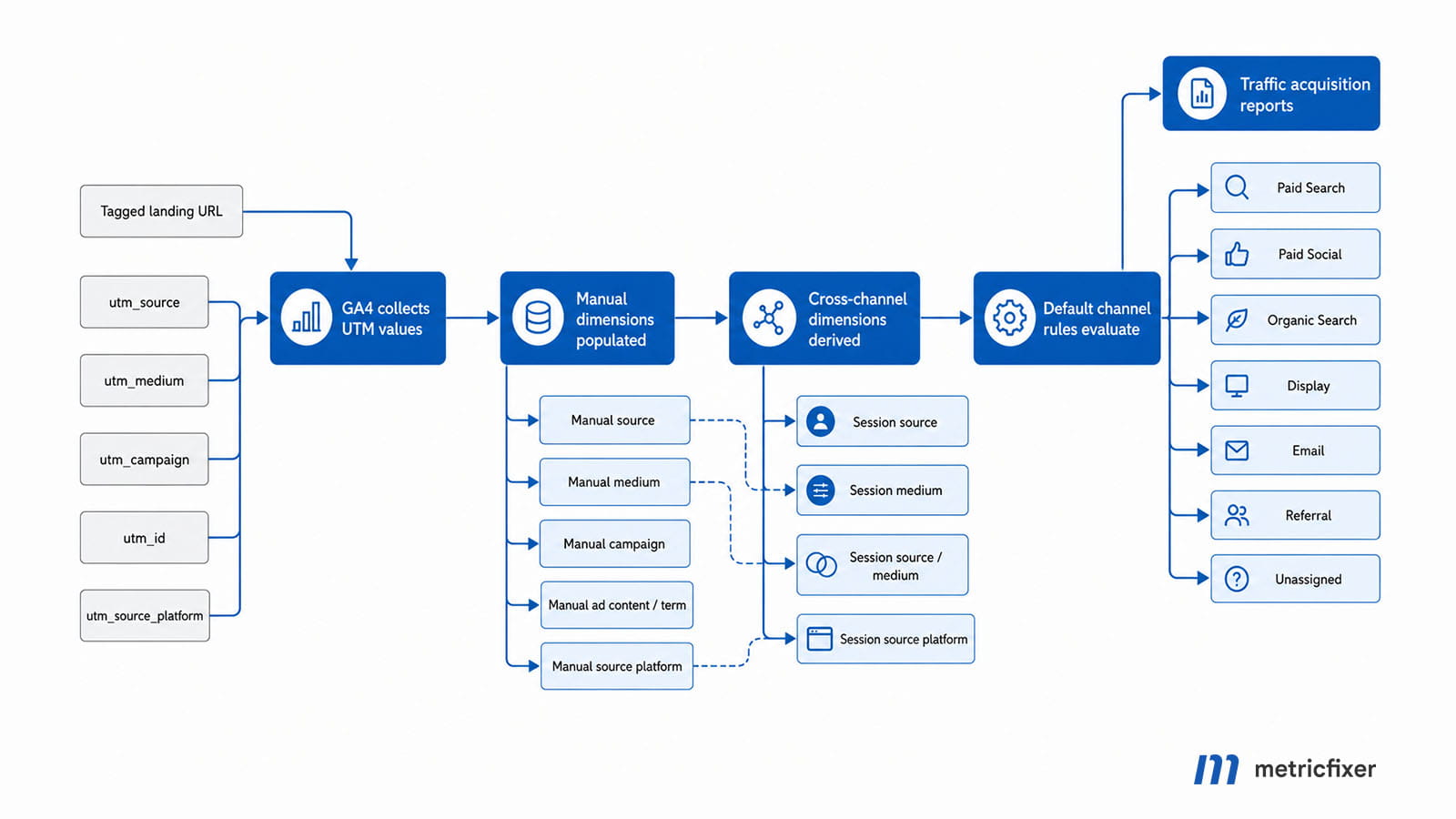
Manual UTM processing flow: user clicks a tagged URL → GA4 reads utm_source, utm_medium, utm_campaign, utm_content, and utm_term from the landing URL → GA4 populates manual traffic-source dimensions at user, session, and event scopes → Default Channel Group rules evaluate source, medium, and sometimes campaign name → reports show source/medium, campaign, and channel values.
The diagram below condenses the documented path from manual UTM tagging to GA4 reporting.
Recommended meaning of each UTM parameter
The table below shows the recommended role of each parameter. The main idea is to keep each field responsible for one type of information. Do not put the campaign name into utm_source, do not put the platform name into utm_medium, and do not put creative names into utm_campaign.
| Parameter | Recommended meaning | GA4 channel impact | Good values | Values to avoid |
|---|---|---|---|---|
utm_source |
The platform, website, app, sender, or partner that sent the visit. | High. GA4 compares sources with lists of known search, social, video, shopping, and AI assistant sources. | google, bing, facebook, instagram, linkedin, youtube, newsletter, partner-name |
google-ads, ga, summer-sale, paid, banner, inconsistent abbreviations |
utm_medium |
The type of traffic or delivery mechanism. | Very high. This is the most channel-sensitive UTM field. | cpc, paid_social, social, email, display, affiliate, referral, video, paid_video, sms |
social-organic, organic-social, facebook, newsletter_june, paidsearch, display_ads |
utm_campaign |
The business campaign, promotion, content push, or strategic initiative. | Medium. Mostly a label, but some Default Channel Group rules check campaign names for cross-network or shopping-related patterns. | 2026-q3-ga4-audit, black-friday-2026, cookieless-measurement-guide |
google, cpc, banner-01, accidental use of shopping or cross-network when not intended |
utm_content |
The clicked creative, placement, CTA, link variant, or message version. | Low. It is a reporting dimension, not a default channel classifier. | hero-cta, footer-link, single-image-01, video-15s |
Email addresses, user IDs, full ad copy, long uncontrolled text, values that duplicate utm_campaign |
utm_term |
Keyword, query theme, audience term, or targeting descriptor when useful. | Low. It is useful for analysis, but not normally a channel classifier. | analytics-audit, brand-keyword, remarketing-30d |
Personal data, raw search queries containing identifiers, campaign names, creative names |
utm_id |
A stable campaign identifier, especially useful when campaign data or cost data is imported. | Low for channel grouping; useful for joining and governance. | c-2026-q3-001, bf-2026-uk-001 |
Random values generated differently for each URL, values that change after launch |
utm_source_platform |
The platform responsible for managing or directing traffic when that is useful as a separate dimension. | Usually not a substitute for clean utm_source and utm_medium in manual tagging. |
mailchimp, hubspot, partner-platform when intentionally governed |
Using it to “fix” bad source/medium values or to replace utm_source |
utm_creative_format and utm_marketing_tactic |
Optional GA4-documented fields for creative format and tactic. | Do not rely on them for standard reporting; Google notes that these fields are not currently reported in Analytics properties. | Only use if your measurement design explicitly stores and validates them elsewhere. | Using them as the only place where critical campaign information exists |
Which UTM values GA4 expects for Default Channels
GA4 Default Channel Groups are rule-based. You cannot edit the Google-maintained Default Channel Group itself, although you can create Custom Channel Groups and, where appropriate, configure a Primary Channel Group. Because the default rules are shared across properties and can evolve over time, manual UTM values should stay close to Google’s documented channel logic.
The strongest “expected values” exist for utm_medium. utm_source is more flexible, but not completely free-form: for several channels, GA4 needs the source to match a known search, social, video, or shopping source category. utm_campaign can also influence channel classification in a few specific cases.
| GA4 channel | Recommended manual values | Why this works | Implementation note |
|---|---|---|---|
| Paid Search | utm_source=google or another known search source + utm_medium=cpc |
Manual Paid Search depends on a search-source match and a paid medium pattern such as cpc, ppc, retargeting, or values beginning with paid. |
Use cpc as the default paid-search medium. Avoid google-ads as the source because it can fragment or misclassify search traffic. |
| Paid Social | Known social source + utm_medium=paid_social |
The source should match a social source and the medium should match a paid pattern. | paid_social is clear in reports and starts with paid, which fits the paid-medium pattern. |
| Organic Social | Known social source + utm_medium=social |
GA4 recognizes known social sources and also recognizes social medium values such as social, social-network, social-media, sm, social network, and social media. |
Use social. Avoid social-organic and organic-social unless you also maintain a Custom Channel Group. |
| Display | utm_medium=display, banner, or cpm |
Display can be classified by medium alone when the value is one of the documented display-style values. | Use display for display campaigns. Use the source to identify the platform or network, not the campaign type. |
utm_medium=email |
Email is recognized when the source or medium matches email-style values. | Use email consistently. Put list, sender, or system identity into utm_source. |
|
| Organic Search | Usually no manual UTMs. GA4 normally derives google / organic, bing / organic, and similar pairs from referrers. |
Organic Search can be recognized from known search referrers or from utm_medium=organic. |
Do not tag normal organic search results. Manual utm_medium=organic should be used carefully because it forces Organic Search-like classification. |
| Organic Video | Known video source + utm_medium=video |
GA4 can classify Organic Video from known video sources or from a medium that contains video. |
Use for non-paid links from video descriptions, profile links, or organic video placements. |
| Paid Video | Known video source + utm_medium=paid_video |
The source should match a video source and the medium should match a paid pattern. | Useful for manual video placements outside integrated ad-platform reporting. |
| Affiliates | utm_medium=affiliate |
GA4 recognizes affiliate as the affiliate medium. |
Use utm_source for the partner or affiliate network. |
| Referral | utm_medium=referral |
GA4 recognizes referral, app, and link as referral-style mediums. |
Use only for non-ad referral links. Do not hide paid placements as referrals. |
| SMS | utm_medium=sms |
GA4 recognizes SMS when the source or medium is sms. |
Use the source for the provider, list, or message program if useful. |
| Mobile Push Notifications | utm_medium=push or mobile_push |
GA4 recognizes push when the medium ends with push, contains mobile or notification, or when the source is firebase. |
Use a small controlled dictionary because push naming can become fragmented quickly. |
| Audio | utm_medium=audio |
GA4 recognizes audio as the audio medium. |
Useful for podcast, streaming, and audio-network links. |
| AI Assistants | utm_medium=ai-assistant |
GA4 has an AI Assistants channel and recognizes ai-assistant as the medium. |
Use only when you intentionally distribute tagged links through controlled AI assistant or AI answer surfaces. |
| Paid Other | Uncategorized paid source + medium beginning with paid, for example paid_other |
If the medium is paid but the source is not recognized as search, social, video, or shopping, traffic can fall into Paid Other. | Useful for paid placements that do not belong to a more specific default channel. |
| Unassigned | No recommended value. | Unassigned appears when no channel rule matches the event data. | Treat this as a QA signal. Investigate source/medium values that land here. |
Recommended source/medium taxonomy
The following table gives practical source/medium pairs that usually preserve GA4 Default Channel Grouping and keep source-level reports readable. The exact source list should be adapted to the business, but the pattern should stay stable.
| Scenario | Recommended source / medium |
Expected GA4 channel | Why this is preferable |
|---|---|---|---|
| Google paid search | google / cpc |
Paid Search | Source remains the Google ecosystem; medium shows that the visit was paid search. |
| Bing paid search | bing / cpc |
Paid Search | Consistent with GA4’s search-source logic and common reporting language. |
| Organic search | Usually untagged; GA4 derives values such as google / organic |
Organic Search | Organic search should normally come from referrer processing, not manual campaign tagging. |
| Facebook paid social | facebook / paid_social |
Paid Social | Source is the platform; medium separates paid from organic. |
| Instagram organic social | instagram / social |
Organic Social | Uses a documented social medium instead of a non-standard hybrid value. |
| LinkedIn paid social | linkedin / paid_social |
Paid Social | Works cleanly when the source is recognized as social and the medium starts with paid. |
| YouTube organic link | youtube / video |
Organic Video | Useful for links in video descriptions, channel profiles, and non-paid video placements. |
| YouTube paid video placement | youtube / paid_video |
Paid Video | Separates paid video from organic video without inventing a new source. |
| Display banner campaign | google / display or network-name / display |
Display | Medium handles the channel. Source identifies the platform or network. |
| Email newsletter | newsletter / email, klaviyo / email, or mailchimp / email |
Choose whether source means list, sender, or email system, then keep that choice stable. | |
| Affiliate partner | partner-name / affiliate |
Affiliates | Partner performance remains visible while channel grouping stays standard. |
| Editorial partner link | partner-domain / referral |
Referral | Appropriate for non-paid referral partnerships and tracked editorial placements. |
| SMS campaign | sms-provider / sms |
SMS | Simple and recognizable in both source/medium and channel reports. |
| Mobile push | app / mobile_push |
Mobile Push Notifications | mobile_push is readable and satisfies push-related channel logic. |
| Podcast or audio placement | spotify / audio or podcast-name / audio |
Audio | Audio gets its own channel instead of being hidden under referral or paid other. |
| Paid placement that does not fit search, social, video, shopping, or display | publisher-name / paid_other |
Paid Other | It is better to be honestly “paid other” than to force a wrong channel. |
Why google / cpc and google / organic are easier to analyze
The pair source / medium should answer two separate questions:
- Source: who or what sent the user?
- Medium: what kind of traffic was it?
When paid Google traffic is tagged as google / cpc and organic Google traffic appears as google / organic, the source dimension can still answer a useful question: “How does traffic from Google behave overall?” The medium dimension then answers the next question: “Was it paid search, organic search, display, or something else?” This keeps analysis layered and intuitive.
When paid search uses google-ads / cpc, organic search uses google / organic, and display uses ga / display, the source dimension stops describing the real source. It becomes a mix of platform names, product names, internal abbreviations, and campaign types. The result is reporting fragmentation: filters, comparisons, dashboards, audiences, and exports all need extra cleanup before anyone can answer a basic acquisition question.
| Inconsistent tagging | Problem created | Cleaner alternative |
|---|---|---|
google-ads / cpc |
The source is no longer the search platform. It may fragment Google traffic and can fail source-category logic that expects a known search source. | google / cpc |
google / organic |
This is clean when it comes from real organic search, but it becomes hard to compare with paid Google traffic if paid uses google-ads or adwords. |
Keep as google / organic for organic search and use google / cpc for paid search. |
ga / display |
ga is an internal abbreviation, not a useful source for business reporting. The channel may still become Display, but source-level reports become unclear. |
google / display or the real display network/source. |
facebook-paid / social |
Paid status is hidden in the source while medium suggests organic social. | facebook / paid_social |
instagram / social-organic |
The medium is not one of the documented organic-social medium values. It may still work if the source is recognized, but the medium dimension becomes non-standard. | instagram / social |
newsletter-june / summer-sale |
The medium is not a channel type, so GA4 may not classify the visit as Email. | newsletter / email with utm_campaign=summer-sale |
Practical naming rules for clean GA4 reports
A good UTM taxonomy is boring by design. It should be predictable enough that a marketer, analyst, developer, and agency partner would create the same URL without asking each other what a field means.
- Use lowercase values. GA4 report values are case-sensitive, so
Google,google, andGOOGLEcan become separate rows even if a channel rule still classifies them similarly. - Use one delimiter style. For campaign and content names, choose either hyphens or underscores and use them consistently. For medium values that are already conventional, such as
paid_socialandpaid_video, do not “prettify” them into uncontrolled variants. - Do not use spaces. Spaces make URLs harder to read and more error-prone. Use
black-friday-2026rather thanBlack Friday 2026. - Do not include personal data. Campaign parameters should never contain email addresses, phone numbers, user names, customer IDs, or other values that can identify a person.
- Do not use UTMs on internal links. Internal UTM links can overwrite the original acquisition context and make sessions look as if they came from your own banners, menus, or homepage modules.
- Do not create a new medium for every campaign type.
emailshould stayemail; the campaign name should carry the difference between a newsletter, onboarding sequence, sale reminder, or product launch. - Do not change source names midstream. If the source is
linkedin, do not later switch tolinkedin.com,li, orlinkedin_adsunless you have a migration plan. - Use Custom Channel Groups for business-specific categories. Do not distort default UTM values just to create a custom executive dashboard. Keep raw acquisition data clean first.
Example UTM patterns
Below are examples of clean manual URL patterns. They are not a requirement to use the same campaign names; they show how the fields should stay separated.
Paid search example
https://www.example.com/ga4-audit?utm_source=google&utm_medium=cpc&utm_campaign=2026-q3-ga4-audit&utm_term=analytics-audit&utm_content=text-ad-01Why it is clean: google identifies the source, cpc identifies the paid-search medium, 2026-q3-ga4-audit identifies the campaign, analytics-audit identifies the keyword or term theme, and text-ad-01 identifies the creative variant.
Paid social example
https://www.example.com/publications/analytics-conversion-tracking?utm_source=linkedin&utm_medium=paid_social&utm_campaign=2026-q3-measurement-content&utm_content=single-image-01Why it is clean: linkedin remains the platform source. paid_social describes the traffic type. The campaign name describes the content initiative rather than the channel.
Organic social example
https://www.example.com/guides/consent-mode-checklist?utm_source=instagram&utm_medium=social&utm_campaign=2026-q3-consent-education&utm_content=story-linkWhy it is clean: social is a documented organic-social style medium. The fact that this is Instagram belongs in utm_source, not in utm_medium.
Email example
https://www.example.com/support-areas/ga4-server-side-tracking?utm_source=newsletter&utm_medium=email&utm_campaign=2026-q3-server-side-education&utm_content=top-ctaWhy it is clean: the channel is Email because the medium is email. The source describes the sending context. The campaign describes the editorial or commercial initiative.
How to handle utm_source values
GA4 uses source values in two ways. First, it reports them directly in dimensions such as Session source, First user source, and Manual source. Second, for several default channels, it checks whether the source belongs to a known category such as search, social, video, or shopping.
This creates a practical rule: use the platform name users and GA4 are most likely to recognize. Prefer google over google-ads, bing over microsoft-ads when the traffic is search traffic, facebook over fb-paid, and youtube over yt-campaign. If you need to distinguish the buying system, account, business unit, or placement, use utm_campaign, utm_content, a governed custom dimension, or a platform-specific report outside the basic UTM taxonomy.
For email, decide what “source” means before campaigns start. Some teams use newsletter, lifecycle-email, or crm. Others use a sending platform such as klaviyo, mailchimp, or hubspot. Both approaches can work, but mixing them creates confusing rows such as newsletter / email, mailchimp / email, weekly_digest / email, and crm / email for the same program.
How to handle utm_medium values
utm_medium is where most UTM mistakes become channel mistakes. Treat medium values as a short controlled dictionary, not as a free text field.
| Use case | Recommended medium | Acceptable alternatives | Do not use |
|---|---|---|---|
| Paid search | cpc |
ppc where already standardized |
paidsearch, search-paid, google |
| Paid social | paid_social |
paid-social only if your Custom Channel Group explicitly supports it |
social-paid, paidsocial, ads |
| Organic social | social |
social-media, social-network, sm |
social-organic, organic-social, insta |
| Display | display |
banner, cpm |
display_ads, gdn as medium, programmatic unless custom-governed |
email |
e-mail only if legacy data requires it |
newsletter, crm, mailchimp as medium |
|
| Affiliate | affiliate |
None recommended | partner, referral for paid affiliate traffic |
| Referral | referral |
link or app only when deliberately defined |
blog, partner, pr as medium |
| Organic video | video |
Other values containing video if governed |
youtube as medium |
| Paid video | paid_video |
Other paid-prefixed values if source is a known video source |
video-paid, cpv unless your team has standardized on it |
| SMS | sms |
None recommended | text, message as uncontrolled variants |
| Push | mobile_push |
push, notification |
app-alert, crm-push as medium |
| Audio | audio |
None recommended | podcast as medium if it should be the source or campaign |
When to use Custom Channel Groups
Default Channel Groups are designed as a common language. They are useful precisely because they let teams compare acquisition performance without rebuilding definitions every time. But real businesses often need extra categories: influencer, PR, marketplace, partner newsletter, creator affiliate, lifecycle email, paid content syndication, or regional social communities.
Use a Custom Channel Group when the business needs a reporting layer that GA4 does not provide by default. Do not overload utm_medium with invented values just to force a new row in standard reports. For example, creator_social may be a useful business channel, but it should not replace social or paid_social unless your custom group explicitly maps it and your team accepts the reporting consequences.
Recommended governance flow: preserve GA4 default-friendly source and medium values → create Custom Channel Groups for business-specific categories → document the rule order and conditions → test historical and new traffic → update dashboards to show both default and custom views where needed.
UTM governance workflow
A clean UTM system needs governance, not just examples. The workflow below is practical for agencies, in-house teams, and mixed teams where several people create links.
- Define the allowed medium dictionary. Start with values such as
cpc,paid_social,social,email,display,affiliate,referral,video,paid_video,sms,mobile_push,audio, andpaid_other. - Define the source dictionary. Use canonical platform and partner names:
google,bing,facebook,instagram,linkedin,tiktok,youtube,newsletter, and approved partner names. - Create a campaign naming rule. A useful pattern is
year-quarter-topic-marketoryear-season-offer-market. Keep it readable and stable. - Reserve
utm_contentfor creative and placement details. Use it forhero-cta,footer-link,single-image-01,carousel-02, orvideo-15s. - Reserve
utm_termfor keyword or targeting descriptors. Do not use it as a dumping ground for audience IDs, user IDs, or raw personal data. - Validate links before launch. Check that the final URL resolves, the query string is preserved after redirects, and the source/medium pair appears as expected in GA4 DebugView, Realtime, and later in Traffic acquisition.
- Audit reports weekly during the first month. Look for
Unassigned,(not set), unexpectedPaid Other, capitalization variants, and duplicate source names.
QA checklist before publishing tagged links
- [ ] Every external campaign link has at least
utm_source,utm_medium, andutm_campaign. - [ ] The source value comes from the approved source dictionary.
- [ ] The medium value comes from the approved medium dictionary.
- [ ] Paid vs organic status is expressed in
utm_medium, not hidden inutm_source. - [ ] The same platform does not appear under multiple source names without a documented reason.
- [ ] Campaign values are lowercase and use the agreed delimiter.
- [ ]
utm_campaigndoes not accidentally includecross-networkor shopping-related wording unless that classification is intentional. - [ ]
utm_contentidentifies the creative, CTA, placement, or link variant. - [ ]
utm_termis used only where it adds analytical value. - [ ] No UTM parameter contains email addresses, phone numbers, user IDs, names, or other personal data.
- [ ] UTMs are not used on internal links.
- [ ] The final URL keeps UTM parameters after redirects, language routing, consent routing, and mobile-app routing.
Common mistakes and practical fixes
| Mistake | Why it hurts GA4 reporting | Better approach |
|---|---|---|
Using utm_source=google-ads for paid search |
It separates paid Google traffic from google / organic and may not match GA4’s known search-source category. |
Use utm_source=google and utm_medium=cpc. |
Using utm_medium=social-organic |
The value is readable to humans but is not one of the documented organic-social medium values. | Use utm_medium=social and keep the platform in utm_source. |
Using utm_medium=newsletter |
GA4 may not classify the traffic as Email because the medium does not say email. |
Use utm_medium=email and put newsletter identity into utm_source, utm_campaign, or utm_content. |
| Using internal links with UTMs | Internal UTMs can overwrite the real acquisition context and pollute session attribution. | Use internal event tracking, content groups, or click events instead. |
Changing facebook to fb mid-year |
Dashboards, exports, and audiences split the same source into multiple rows. | Choose one source value and keep aliases mapped in a governance sheet. |
Putting ad copy or personal data into utm_content |
Long, user-specific, or personal values increase privacy risk and reporting cardinality. | Use short creative IDs such as single-image-01 and store full creative metadata outside GA4. |
| Sending only one UTM parameter | Missing parameters can produce (not set) values and make source/medium/campaign analysis incomplete. |
Set all relevant campaign parameters together, especially source, medium, and campaign. |
| Using campaign names to force channel grouping | Campaign names containing terms such as cross-network or shopping can affect channel rules in specific cases. |
Use such words only when they describe the real campaign type. Otherwise keep channel logic in source/medium or Custom Channel Groups. |
Recommended operating model
For a small website, a spreadsheet-based UTM builder may be enough. For a larger content, ecommerce, SaaS, or lead-generation site, UTM governance should be treated as part of the analytics implementation.
- Maintain one source dictionary. Each approved source should have a canonical value, aliases to avoid, and notes about the platforms or partners it covers.
- Maintain one medium dictionary. Keep it short. The more medium values you allow, the harder acquisition reporting becomes.
- Keep a campaign register. Store
utm_campaign,utm_id, launch date, owner, market, channel, landing page, and status. - Review new source/medium rows monthly. A simple report of new values can catch mistakes before they become long-term data debt.
- Document exceptions. Some partners or tools may force a value. Document those exceptions and map them in Custom Channel Groups or downstream BI if needed.
- Version the taxonomy. If values change, record the effective date so analysts understand why reports differ before and after the change.
Final recommendation
The best GA4 UTM taxonomy is not the one with the most information in every URL. It is the one that puts the right information in the right field. Use utm_source for the real source, utm_medium for the traffic type, utm_campaign for the marketing initiative, utm_content for the creative or link variant, and utm_term only when keyword or targeting-level analysis is useful.
For default-channel accuracy, protect utm_medium most carefully. For source-level analysis, protect utm_source from internal abbreviations and product names. A consistent taxonomy such as google / cpc, google / organic, facebook / paid_social, facebook / social, and newsletter / email will usually produce clearer GA4 reports than a highly customized naming system that only its creator understands.
Methodology and sources
This article is based on a review of current Google Analytics documentation for URL builders, traffic-source dimensions, manual UTM tagging, Default Channel Groups, source categories, traffic-source scopes, Custom Channel Groups, and Google’s policy guidance on avoiding personal data in Analytics parameters. The recommendations are operational: they are designed to preserve GA4’s default reporting logic while keeping source/medium reports readable for marketing teams, agencies, and analysts.
- Google Analytics: URL builders and custom campaign URLs
- Google Analytics: campaigns and traffic sources
- Google Analytics: about traffic-source dimensions
- Google Analytics: traffic-source dimensions and manual tagging
- Google Analytics: scopes of traffic-source dimensions
- Google Analytics: Default Channel Group
- Google Analytics: GA4 source categories list
- Google Analytics: Custom Channel Groups
- Google Analytics: best practices to avoid sending personally identifiable information
This article is for technical and operational information only. metricfixer is not affiliated with Google or Google Analytics. GA4 channel definitions, source-category lists, reporting dimensions, and interface behavior may change after publication. Always validate important campaign tagging rules in your own GA4 property before relying on them for reporting, optimization, or client-facing dashboards.