
Published Jul 7, 2026
Google Ads ValueTrack Parameters: Practical Guide to Tracking Templates and UTMs
A practical guide to Google Ads ValueTrack parameters in tracking templates and final URL suffixes, with campaign compatibility notes, UTM mapping recommendations, GA4 examples, parallel tracking logic, and common troubleshooting checks for advertisers.
Category: Online advertising · By Mikalai Sasau
This practical guide explains how to use Google Ads ValueTrack parameters in tracking templates, final URL suffixes, custom parameters, and UTM tagging. It is written for advertisers, PPC specialists, analysts, and agencies that need reliable click-level context without breaking landing pages, GA4 attribution, Google Ads conversion tracking, offline conversion workflows, or third-party click measurement.
Practical default: keep Google Ads auto-tagging enabled, preserve gclid, wbraid, and gbraid through redirects, and use manual UTM parameters mainly as a clean cross-platform reporting layer. Put simple analytics tags in the final URL suffix. Use a tracking template only when a third-party click tracker, redirect, or advanced click-measurement system must wrap the landing page through {lpurl} or an escaped landing-page placeholder.
Executive summary
ValueTrack parameters are Google Ads placeholders that are replaced at click time. A placeholder such as {campaignid}, {adgroupid}, {creative}, {device}, {matchtype}, {targetid}, or {assetgroupid} is written into a URL field, and Google Ads substitutes the value that belongs to the actual click. ValueTrack is especially useful in tracking templates, but supported parameters can also be used in final URL suffixes, final URLs, and custom parameters where Google Ads allows them.
The safest architecture separates three jobs. The final URL should describe the landing page. The final URL suffix should carry ordinary analytics query parameters that need to reach the landing page, such as utm_source, utm_medium, utm_id, utm_content, and platform-specific diagnostic fields. The tracking template should be reserved for click trackers, redirects, or cases where the final landing page must be inserted through {lpurl}, {escapedlpurl}, {lpurl+2}, or another landing-page placeholder.
For GA4 and most analytics stacks, do not try to make every UTM field dynamic. Use stable source and medium values such as utm_source=google and utm_medium=cpc. Put the stable campaign ID in utm_id={campaignid}. Use a controlled custom parameter such as {_campaign} or {_cmp} for readable campaign names if your team maintains a naming convention. Store detailed click diagnostics in separate parameters such as g_campaignid, g_adgroupid, g_targetid, g_matchtype, g_network, g_device, and g_assetgroupid.
Manual UTMs are not a replacement for Google auto-tagging. Auto-tagging keeps Google-native measurement, linked Google Ads and GA4 reporting, offline conversion workflows, and click identifiers such as gclid, wbraid, and gbraid intact. UTMs make cross-platform reports readable; click IDs and platform IDs make attribution, reconciliation, and troubleshooting more reliable.
Campaign compatibility is the main trap. Search campaigns can populate keyword and match-type values. Dynamic Search Ads, Performance Max, AI Max keywordless traffic, Shopping, Demand Gen, Video, App, and Hotel campaigns do not behave like ordinary keyword campaigns. Some parameters return blank values, some are limited to specific inventory, and some are unsupported in a campaign type. A single account-level template can be useful, but it must tolerate blank values and campaign-type differences.
Two implementation details matter more than most advertisers expect. First, tracking templates at higher levels such as account, campaign, or ad group should include a landing-page insertion parameter such as {lpurl}; otherwise dynamic landing pages and final URLs can break. Second, parallel tracking sends the visitor directly to the final URL while click measurement runs in the background. This improves speed, but every third-party click-measurement provider and redirect chain must be tested for compatibility before rollout.
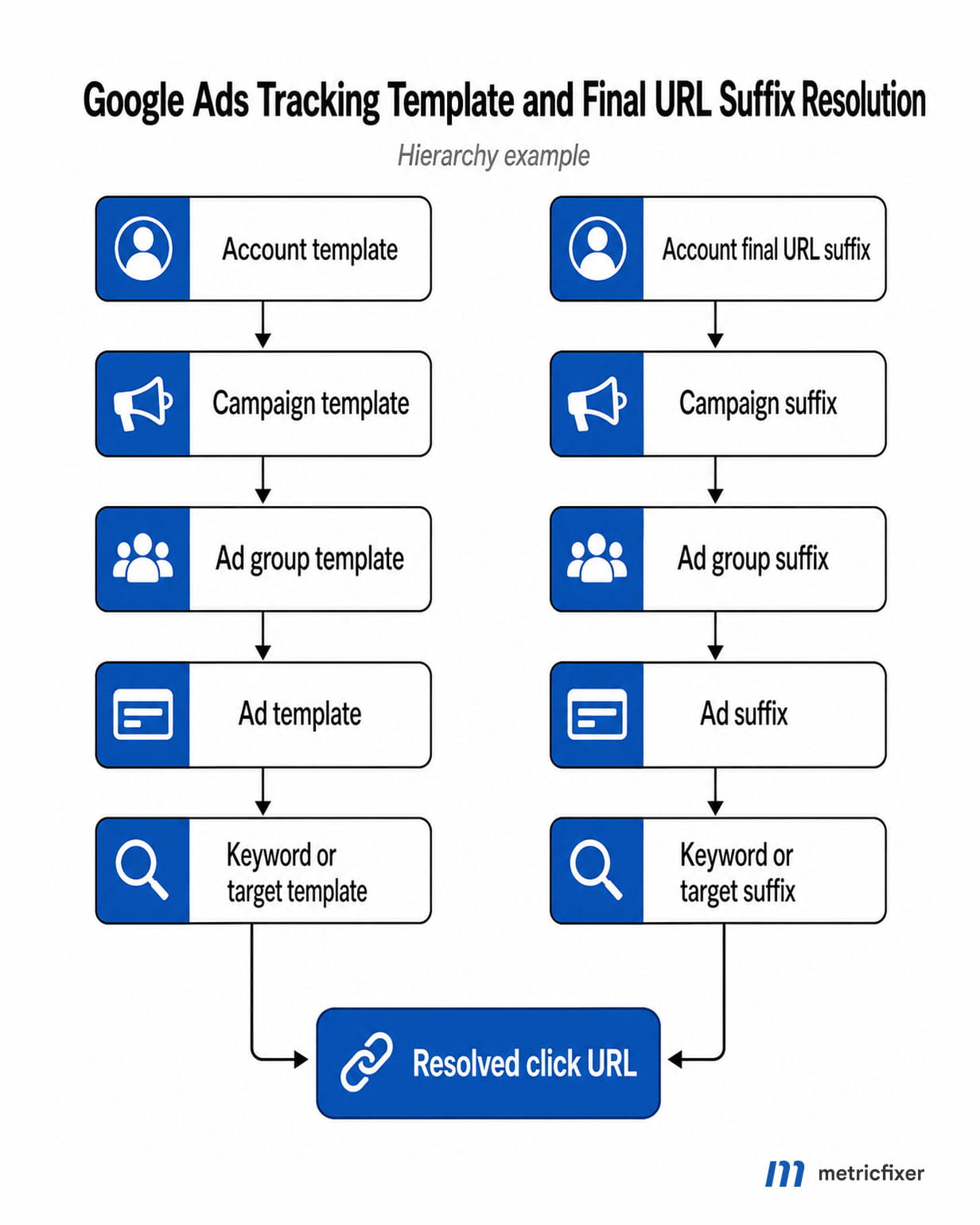
How Google Ads URL tracking works
Google Ads URL tracking is built from a small set of URL fields. They look similar in the interface, but they are not interchangeable. Keeping each field responsible for one job is the easiest way to avoid broken landing pages, duplicate analytics parameters, and click URLs that are impossible to debug.
| Field | What it is for | Best practical use | Common mistake |
|---|---|---|---|
| Final URL | The landing page URL that users should reach after the click. | Keep it clean and focused on the destination page. Use tracking query strings here only if they are truly page-level and stable. Use {ignore} only when tracking-only query strings in the final URL should not change crawl interpretation. | Putting long analytics logic directly in every ad URL and creating review, QA, and maintenance overhead. |
| Tracking template | A template that combines the landing page with tracking parameters or a tracking redirect. | Use it for third-party click trackers, redirect logic, or account/campaign templates that must insert the final URL through {lpurl}, {escapedlpurl}, or another landing-page placeholder. | Using a static tracker URL without {lpurl}, which can send all clicks to the wrong page or break dynamic landing pages. |
| Final URL suffix | A suffix appended to the landing page URL after Google Ads resolves the final URL. | Use it for normal UTMs, GA4-friendly parameters, and diagnostic fields that need to reach the landing page when no redirect is needed. | Starting the suffix with an unnecessary ?, duplicating parameters already present in the final URL, or trying to use suffixes as redirect templates. |
| Custom parameters | Advertiser-defined placeholders such as {_campaign}, {_cmp}, {_region}, or {_funnel}. | Use them for stable readable names, internal taxonomy, business regions, funnel stages, or values that Google does not expose as native ValueTrack parameters. | Referencing a custom parameter in a template but forgetting to define it at the level that served the click. |
| Auto-tagging | Google’s automatic click identifier layer, primarily gclid and privacy-related variants such as wbraid and gbraid. | Keep it enabled for Google Ads conversion tracking, GA4 linking, offline conversion workflows, and Google-native attribution unless there is a documented technical reason not to. | Turning it off because manual UTMs are present. Manual UTMs and auto-tagging can coexist, but their roles and reporting precedence must be understood. |
Google Ads click-tracking flow: user clicks an ad → Google Ads resolves the final URL and applicable URL options → ValueTrack placeholders are substituted with click-specific values → the final URL suffix is appended or the tracking template wraps the landing page → the visitor is sent to the final URL while parallel tracking loads click-measurement URLs in the background → analytics tools read UTMs, platform IDs, and click identifiers from the landing page URL.
When several URL options exist, Google Ads uses the most specific applicable setting. In an ordinary Search-style hierarchy, keyword-level URL options override ad-level settings, ad-level settings override ad group settings, ad group settings override campaign settings, and campaign settings override account settings. Shopping product groups, Performance Max asset groups, sitelinks, dynamic ad targets, and other specialized entities add their own lower levels. The practical rule is simple: when tracking looks inconsistent, inspect the URL option closest to the served click entity first.
Changes at broad levels are usually easier to maintain. A baseline account-level or campaign-level suffix can reduce manual work and prevent duplicate UTM logic inside every ad. Lower-level overrides should be documented and used only when a campaign type, product group, asset group, keyword set, sitelink, or tracker genuinely needs different behavior.
Landing page placeholders and URL encoding
Every tracking template that wraps or modifies the landing page needs a landing-page insertion parameter. These placeholders are not diagnostic fields; they are how the real final URL gets inserted into the click URL.
| Parameter | Use | When to choose it |
|---|---|---|
{lpurl} | Inserts the final URL. When placed at the beginning of the tracking template, it behaves like the landing page itself. When placed later, Google may escape certain characters. | Default choice for most templates. Use patterns such as {lpurl}?, {lpurl}&, {lpurl}#, or plain {lpurl} depending on whether you append parameters. |
{lpurl+2} and {lpurl+3} | Insert the final URL escaped two or three times. | Use only when a redirect chain or click-measurement provider requires double or triple escaping. |
{unescapedlpurl} | Inserts the final URL without escaping. | Useful for some redirect systems that explicitly expect a raw URL value. Test carefully because unescaped values can break query-string parsing. |
{escapedlpurl}, {escapedlpurl+2}, {escapedlpurl+3} | Insert escaped versions of the final URL. | Use when the landing page is passed as a parameter value to a tracker and the tracker expects encoded input. |
{ignore} | Marks tracking-only parts of the final URL so Google can understand that those parameters do not change page content. | Use only in final or final mobile URLs, not inside other ValueTrack parameters. It is useful when query parameters are tracking-only and should reduce unnecessary crawl variation. |
The safest pattern is to put {lpurl} at the beginning of the template whenever possible. If {lpurl} starts the tracking template, a literal ? can be used before appended parameters. If the landing page is passed inside a tracker URL, use the encoded separator pattern required by the tracker, such as %3F for an encoded question mark and %26 for an encoded ampersand. If the landing page is double-escaped, the separator can become %253F; if it is triple-escaped, it can become %25253F.
A simple final URL suffix does not need {lpurl} at all:
utm_source=google&utm_medium=cpc&utm_id={campaignid}&utm_source_platform=google_ads&g_campaignid={campaignid}&g_device={device}A third-party tracking template usually does need {lpurl} or an escaped variant:
https://tracker.example.com/click?cid={campaignid}&agid={adgroupid}&target={targetid}&device={device}&url={lpurl}If the tracker must append UTM parameters to the landing page inside an encoded url value, do not guess the separators. Test the resolved URL with final URLs that contain no query string, existing query strings, fragments, and URL-encoded characters.
{lpurl}?utm_source=google&utm_medium=cpc&g_device={device}

https://tracker.example.com/click?url={lpurl}&cid={campaignid}

https://tracker.example.com/click?url={lpurl}%3F%26utm_source=google%26utm_medium=cpc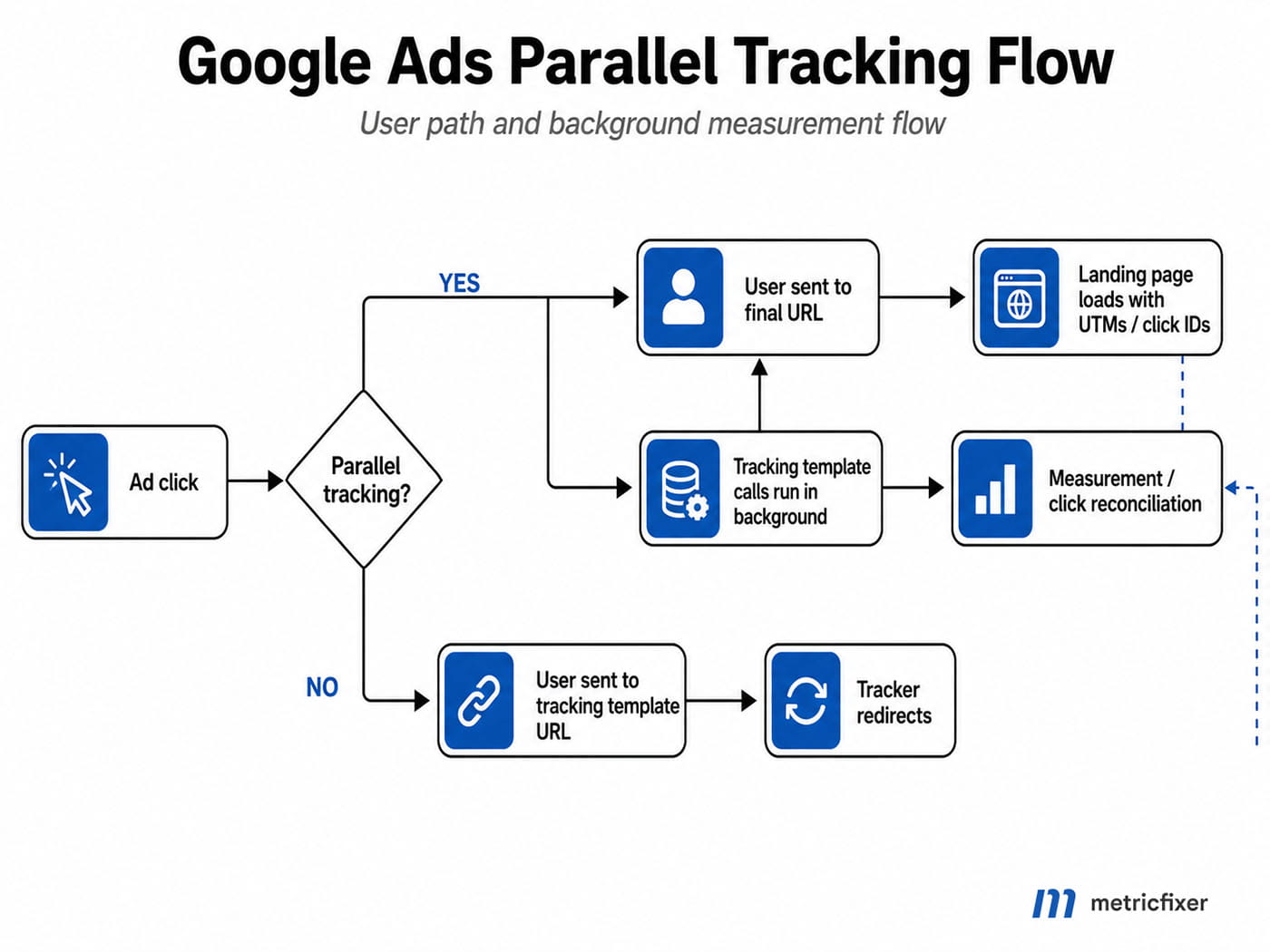
Parallel tracking and click IDs
Parallel tracking sends the user directly to the final URL while click-measurement calls run in the background. For advertisers, the benefit is speed: the landing page is not forced to wait for every tracker in the chain. The risk is that legacy trackers, unusual redirects, or brittle URL parsers may not behave as expected when they no longer control the visible browser redirect path.
Preserve Google click identifiers through all redirects and server-side routing. If a CDN, consent layer, redirect service, CMS plugin, payment flow, or web application strips unknown query parameters, Google Ads and GA4 measurement can become fragmented even when UTMs look correct. A tracking setup that produces readable UTMs is still not production-ready if gclid, wbraid, or gbraid disappears before the landing page and conversion flow can use it.
Parallel tracking also changes how teams should test templates. Do not validate only the visible landing page. Validate the final landing page, the tracking call, the tracker response, the click ID preservation, and analytics ingestion. The Google Ads test tool is useful, but production QA should also include real landing-page requests, redirects, consent behavior, cross-domain flows, and conversion pages.
Recommended UTM mapping for Google Ads
UTM parameters should create clean reporting dimensions. ValueTrack parameters should add click-level detail. Mixing those jobs too aggressively creates noisy GA4 reports with fragmented campaign, term, content, source, or medium values. The table below is a practical mapping that works well for most advertiser accounts.
| Analytics field | Recommended value | Why | Notes |
|---|---|---|---|
utm_source | google | Source should identify the platform, not the ad network code. Keeping it static prevents fragmented acquisition reports. | Do not use {network} as utm_source. Store it in a separate field such as g_network. |
utm_medium | cpc or your controlled paid-click medium | cpc is widely understood by analytics platforms and channel groupings. | Use one value consistently. Do not switch between cpc, ppc, paid_search, and paid inside the same reporting system without a channel-grouping plan. |
utm_campaign | {_campaign}, {_cmp}, or a static normalized campaign name | Google Ads does not provide a native campaign-name ValueTrack parameter. A custom parameter lets you control naming. | If you cannot maintain campaign-name custom parameters, use a readable static value at campaign level or rely on utm_id={campaignid}. |
utm_id | {campaignid} | Stable campaign ID for GA4, warehouse exports, cost-data joins, and CRM reconciliation. | This is often the best field for joining ad-platform data to analytics sessions and leads. |
utm_source_platform | google_ads | Separates buying platform from traffic source in GA4’s newer UTM model. | Keep it static unless you have a strict taxonomy across Google Ads, SA360, DV360, and other platforms. |
utm_term | {keyword} for keyword-based Search only | GA4 defines utm_term as the paid keyword field. | It can be blank for Performance Max, DSA, AI Max keywordless matches, Shopping, Demand Gen, and many automated formats. Do not use it as a universal targeting field. |
utm_content | ad-{creative}, ag-{assetgroupid}, or a controlled creative slug | Creative, asset, or asset-group context is better suited to content than to campaign or term fields. | For Performance Max, {assetgroupid} helps split traffic that otherwise shares campaign-level reporting. |
| Custom diagnostics | g_campaignid, g_adgroupid, g_targetid, g_matchtype, g_network, g_device, g_assetgroupid, g_product_id | These fields preserve PPC context without polluting default UTM reports. | Use your own prefix such as g_, ads_, or mf_ consistently. |
A strong account-level final URL suffix for Search-heavy accounts can look like this:
utm_source=google&utm_medium=cpc&utm_campaign={_campaign}&utm_id={campaignid}&utm_source_platform=google_ads&utm_content=ad-{creative}&utm_term={keyword}&g_campaignid={campaignid}&g_adgroupid={adgroupid}&g_targetid={targetid}&g_matchtype={matchtype}&g_network={network}&g_device={device}This template assumes that {_campaign} is defined where the suffix is used. If you cannot maintain a campaign-name custom parameter, replace utm_campaign={_campaign} with a campaign-level static value or use utm_campaign=cid-{campaignid}. Leaving an undefined custom parameter in production is a data-quality risk.
Auto-tagging and manual tagging can coexist, but they do not have equal roles. Auto-tagging gives Google Ads and GA4 richer Google-native dimensions and click identifiers. Manual UTM values are useful for cross-platform reporting, non-Google analytics tools, and readable manual dimensions. The practical rule is to keep utm_source and utm_medium stable, avoid trying to override Google-native attribution with manual tags, and use auxiliary parameters for details.
ValueTrack parameter reference for practical tracking
The list below focuses on parameters that advertisers most often use in analytics, CRM, offline conversion, lead-routing, QA, and troubleshooting workflows. Google can change support details, so the official parameter table should remain the final source before deployment.
| Parameter | What it returns | Best use | Important caveat |
|---|---|---|---|
{campaignid} | Campaign ID. | utm_id, CRM joins, cost-data joins, clean analytics imports. | It is an ID, not a campaign name. |
{adgroupid} | Ad group ID. | Search and Display diagnostics, ad group joins, bid-management exports. | Not all campaign types expose ordinary ad groups. |
{assetgroupid} | Performance Max asset group ID. | Performance Max segmentation, landing-page analysis, asset-group reporting. | Use mainly in Performance Max. Do not expect it in ordinary Search campaigns. |
{creative} | Ad creative ID. | utm_content, creative-level tests, ad-level troubleshooting. | It gives an ID, not the visible headline, image, video, or asset text. |
{feeditemid} | Legacy feed-based asset ID that was clicked. | Legacy asset tracking and older extension workflows. | Not available for Display ads; upgraded assets use {extensionid}. |
{extensionid} | Asset-based or upgraded asset ID that was clicked. | Sitelink, callout, image, price, or other asset click diagnostics where supported. | Not available in every format. Do not make it the only content field. |
{targetid} | Targeting object ID, such as keyword, DSA target, audience, product partition, hotel partition, or AI Max keywordless source. | Advanced troubleshooting, AI Max segmentation, target-level reporting. | Can contain multiple target IDs in one value. Some audience types and Hotel tROAS workflows have limitations. |
{keyword} | The keyword from the account that matched, where keyword matching exists. | utm_term in keyword-based Search campaigns and keyword diagnostics. | Blank for keywordless traffic such as Performance Max, DSA, AI Max keywordless matches, Shopping, and Demand Gen. |
{matchtype} | Match-type code, commonly e for exact, p for phrase, b for broad, and a for AI Max keywordless. | Search segmentation and query-matching analysis. | The value describes the matching context, not the user’s raw search query. |
{network} | Traffic network code. | Store in g_network for Search, partners, Display, YouTube, Performance Max, and App diagnostics. | Performance Max can collapse to broad network codes. Do not map directly into utm_source unless you intentionally want fragmented source reporting. |
{device} | Device code: m for mobile, t for tablet, c for computer. | Device-specific landing-page QA and conversion analysis. | Use conditional parameters or downstream lookups if analysts need full words. |
{devicemodel} | Phone or tablet model. | Display campaign diagnostics and device-specific QA. | Use only where the campaign type supports it. |
{loc_interest_ms} | ID of the location of interest that helped trigger the ad. | Separating interested-in location from physical location. | Returned only where location-of-interest targeting context exists. |
{loc_physical_ms} | ID of the user’s physical location at click. | Regional analysis, lead-routing audits, location mismatch checks. | It is a location ID, not a human-readable city name. |
{placement} | Placement or content site context for eligible campaigns. | Display and Video placement diagnostics. | Unsupported in Demand Gen and not meaningful for many automated campaign types. |
{target} | Placement category for placement-targeted campaigns. | Placement-targeted Display analysis. | Campaign-specific and unsupported in Demand Gen. |
{sourceid} | Source or publisher context in eligible Video and partner inventory. | YouTube, video, and partner diagnostics where available. | Validate by campaign subtype. |
{gclid} | Google click identifier value. | Debugging, offline conversion matching, verifying auto-tagging behavior. | Do not replace auto-tagging with a manual {gclid} strategy. Preserve Google-generated click identifiers through redirects. |
{random} | Random unsigned 64-bit integer. | Cache busting or special tracker deduplication logic. | Do not use it as a user identifier or business join key. |
{param1} and {param2} | Creative parameters used with ad parameters through API-driven workflows. | Legacy or API-driven ad customizer workflows. | Do not use unless your account intentionally populates them. |
{ifmobile:[value]} | Your chosen value only when the click comes from a mobile phone. | Readable device buckets and mobile-only analytics values. | The bracketed value is advertiser-defined text; keep it URL-safe. |
{ifnotmobile:[value]} | Your chosen value when the click is from computer or tablet. | Desktop/tablet grouping. | Use with care if tablet needs its own segment. |
{ifsearch:[value]} | Your chosen value for Search Network clicks. | Readable network labels in Search-compatible campaigns. | Unsupported for Demand Gen ads. |
{ifcontent:[value]} | Your chosen value for Display Network clicks. | Display/content segmentation. | Unsupported for Demand Gen ads. |
{lpurl}, {lpurl+2}, {lpurl+3} | Landing-page insertion placeholders. | Tracking templates and redirect chains. | Use only where a template needs to insert the final URL. |
{escapedlpurl} and {unescapedlpurl} | Escaped or raw landing-page insertion placeholders. | Specific tracker requirements. | Wrong escaping is one of the most common causes of broken tracking URLs. |
Shopping, Video, Hotel, and specialized parameters
Specialized campaign types have parameters that are much more useful than generic keyword fields. For ecommerce, video, app, and travel advertisers, these fields usually belong in custom diagnostic parameters, not in standard UTM fields.
| Campaign area | Useful parameters | Recommended analytics use | Caveat |
|---|---|---|---|
| Shopping and product inventory | {adtype}, {merchant_id}, {product_channel}, {product_id}, {product_country}, {product_language}, {product_partition_id}, {store_code} | Use {product_id} as g_product_id, {merchant_id} as g_merchant_id, and {product_channel} as g_product_channel. Keep product diagnostics outside utm_term. | Shopping ads are product-driven. Keyword fields can be blank or irrelevant. |
| Performance Max with product inventory | {assetgroupid} plus product-related parameters such as {product_id}, {merchant_id}, {product_channel}, {product_country}, and {product_language} | Combine utm_content=ag-{assetgroupid} with product diagnostics. Accept empty product values when the click is not product-related. | Product parameters have limited support and may populate only for relevant formats. |
| Assets and extensions | {extensionid}, {feeditemid} | Track sitelink, upgraded asset, and legacy feed-based asset clicks separately from primary ad clicks. | Availability varies by asset type and campaign format. |
| Display | {placement}, {target}, {devicemodel}, {creative}, {ifcontent:[value]} | Use placement and targeting context in custom fields such as g_placement and g_target. | Do not force Display traffic into keyword-oriented UTM logic. |
| Video and YouTube | {campaignid}, {adgroupid}, {creative}, {device}, {network}, {placement}, {sourceid}, and location parameters where available | Use video-specific network, source, and placement context in custom diagnostic fields. | Validate each template against the campaign subtype. |
| Demand Gen | Use general entity and click fields that are supported for the format. | Build Demand Gen-specific suffixes that do not require keyword, placement, or target diagnostics. | Do not rely on unsupported fields such as {keyword}, {network}, {placement}, {targetid}, {ifsearch:[value]}, or {ifcontent:[value]}. |
| App campaigns | Campaign, device, network, click IDs, and mobile measurement partner parameters where supported. | Coordinate Google Ads URL parameters with the app attribution partner, app store URL, deep-linking setup, and install attribution callbacks. | Website UTM behavior does not automatically mirror app-install attribution behavior. |
| Hotel and travel | {hotelcenter_id}, {hotel_id}, {hotel_partition_id}, {hotel_adtype}, {travel_start_day}, {travel_start_month}, {travel_start_year}, {travel_end_day}, {travel_end_month}, {travel_end_year}, {advanced_booking_window}, {date_type}, {number_of_adults}, {price_displayed_total}, {price_displayed_tax}, {user_currency}, {user_language}, {rate_rule_id} | Use these fields for booking-window analysis, hotel ID joins, language/currency diagnostics, and landing-page QA. | Keep revenue attribution and booking confirmation data in your conversion layer, not only in click URLs. Test Hotel-specific edge cases separately. |
Compatibility by Google Ads campaign type
| Campaign type | What usually works well | What to avoid | Recommended template pattern |
|---|---|---|---|
| Search | {keyword}, {matchtype}, {targetid}, {creative}, {campaignid}, {adgroupid}, {device}, {network}. | Do not assume {keyword} is the user’s exact query. It is the matched account keyword. | Use utm_term={keyword}, g_matchtype={matchtype}, and g_targetid={targetid}. |
| Responsive Search Ads | The same practical set as Search. | Do not manually edit every ad just to add tracking values that can be handled at campaign or account level. | Treat as standard Search from a tracking perspective. |
| AI Max for Search | Use {matchtype}, {targetid}, and {keyword} together. A {matchtype} value of a can identify AI Max keywordless matching. | Do not rely on {keyword} alone because keywordless matches can return blank keyword values. | Keep g_matchtype and g_targetid. Test dynamic landing pages before enabling final URL expansion. |
| Dynamic Search Ads | {lpurl}, {targetid}, {campaignid}, {adgroupid}, {device}. | Do not use static tracking URLs without a landing-page placeholder. Google automatically generates the final URL. | Use templates that always include {lpurl} at every relevant level and do not require {keyword}. |
| Performance Max | {assetgroupid}, {campaignid}, {device}, location fields, {lpurl}, {lpurl+2}, {lpurl+3}, {random}, and product parameters in relevant product formats. | Do not expect keyword, placement, or ordinary ad group logic to behave like Search. {network} can be broad rather than inventory-specific. | Use utm_content=ag-{assetgroupid}, g_assetgroupid={assetgroupid}, and product fields only as optional diagnostics. |
| Shopping | Product and Merchant Center parameters such as {product_id}, {merchant_id}, {product_channel}, and {product_partition_id}. | Do not use {keyword} as a required field. | Use product diagnostics and product-group or campaign-level tracking templates. |
| Display | {placement}, {target}, {device}, {devicemodel}, {creative}, {ifcontent:[value]}. | Do not treat Display as keyword search traffic in UTMs. | Use g_placement and g_target custom diagnostics. Keep source and medium consistent with your channel taxonomy. |
| Video / YouTube | Campaign, ad group, creative, device, network, placement, source, and location parameters where supported. | Do not assume Search-only IF functions and keyword fields will be populated. | Use video network, source, and placement fields in custom diagnostics. |
| Demand Gen | Use general click and entity fields that Google marks as available for the format. | Do not rely on fields commonly unsupported in Demand Gen, such as {placement}, {target}, {keyword}, {ifsearch:[value]}, {ifcontent:[value]}, {network}, or {targetid}. | Build Demand Gen-specific suffixes that do not require unsupported parameters. |
| App campaigns | ValueTrack can be used with App campaigns when the app measurement partner and confirmed-install workflow support the setup. | Do not assume ordinary website UTMs or auto-tagging behavior will mirror web campaigns. | Coordinate with the app measurement partner and test deep links, install links, and attribution callbacks. |
| Hotel campaigns | Hotel, travel-date, booking-window, price, currency, language, and rate-rule parameters. | Do not use ordinary Search target logic as the primary travel analytics model. Some target-level workflows have Hotel-specific limitations. | Use hotel-specific fields and test travel-date values against booking-engine URLs. |
| Smart or call-focused formats | Implementation-specific. | Do not assume URL-based tracking captures pure call interactions. | Use website UTMs only where a final URL exists. Use platform call reporting for call-only interactions. |
Ready-to-use Google Ads templates
The following examples are designed as starting points, not copy-and-paste law. Replace custom parameter names, internal prefixes, and static taxonomy values with your own naming convention before publishing. Test every major campaign type before account-wide rollout.
Account-level GA4 suffix for Search-heavy accounts
utm_source=google&utm_medium=cpc&utm_campaign={_campaign}&utm_id={campaignid}&utm_source_platform=google_ads&utm_content=ad-{creative}&utm_term={keyword}&g_campaignid={campaignid}&g_adgroupid={adgroupid}&g_targetid={targetid}&g_matchtype={matchtype}&g_network={network}&g_device={device}Use when: most traffic is keyword-based Search and your team maintains {_campaign} as a custom parameter. Avoid when: the account is dominated by Performance Max, Shopping, Demand Gen, or App campaigns and you cannot tolerate blank keyword values.
Cross-network suffix for mixed Google Ads accounts
utm_source=google&utm_medium=cpc&utm_campaign={_campaign}&utm_id={campaignid}&utm_source_platform=google_ads&utm_content=ad-{creative}&g_campaignid={campaignid}&g_adgroupid={adgroupid}&g_assetgroupid={assetgroupid}&g_device={device}Use when: one suffix may be inherited by Search, Performance Max, Shopping, Display, Video, or automated campaign types. Why it is safer: it does not require {keyword}, {targetid}, {placement}, or other campaign-type-specific values.
Performance Max suffix
utm_source=google&utm_medium=cpc&utm_campaign={_campaign}&utm_id={campaignid}&utm_source_platform=google_ads&utm_content=ag-{assetgroupid}&g_campaignid={campaignid}&g_assetgroupid={assetgroupid}&g_network={network}&g_device={device}&g_product_id={product_id}&g_merchant_id={merchant_id}Use when: you need asset-group and product diagnostics. Important: product fields are limited to relevant product formats, so your analytics pipeline should accept empty values.
Shopping suffix
utm_source=google&utm_medium=cpc&utm_campaign={_campaign}&utm_id={campaignid}&utm_source_platform=google_ads&utm_content=shopping-{product_id}&g_campaignid={campaignid}&g_product_id={product_id}&g_product_channel={product_channel}&g_product_country={product_country}&g_product_language={product_language}&g_product_partition_id={product_partition_id}&g_store_code={store_code}Use when: feed product IDs and product groups matter more than keywords. Avoid: utm_term={keyword} as a required Shopping field.
Demand Gen-safe suffix
utm_source=google&utm_medium=cpc&utm_campaign={_campaign}&utm_id={campaignid}&utm_source_platform=google_ads&utm_content=ad-{creative}&g_campaignid={campaignid}&g_adgroupid={adgroupid}&g_device={device}Use when: you need a conservative suffix for Demand Gen or other formats where keyword, placement, network, and target values may be unsupported. Do not add blindly: {keyword}, {targetid}, {placement}, or Search/Display IF functions.
Video or Display diagnostic suffix
utm_source=google&utm_medium=cpc&utm_campaign={_campaign}&utm_id={campaignid}&utm_source_platform=google_ads&utm_content=ad-{creative}&g_campaignid={campaignid}&g_adgroupid={adgroupid}&g_placement={placement}&g_sourceid={sourceid}&g_device={device}Use when: placement or source context matters for Display or Video diagnostics. Validate first: support depends on campaign subtype and inventory.
Third-party click-tracker template
https://tracker.example.com/click?platform=google_ads&cid={campaignid}&agid={adgroupid}&target={targetid}&creative={creative}&device={device}&network={network}&url={lpurl}Use when: an approved click-measurement provider needs a tracking call. Test with parallel tracking, HTTPS redirects, final URLs with existing query strings, and the provider’s exact expected encoding. If the tracker expects an escaped URL, replace {lpurl} with the correct escaped variant rather than guessing.
Best practices and field-tested implementation tips
- Use IDs for joins and names for humans. IDs such as
{campaignid},{adgroupid},{creative}, and{assetgroupid}are stable. Names are readable but can change, contain spaces, or vary by case. Use custom parameters for names only if your naming workflow is disciplined. - Keep auto-tagging on unless there is a documented reason not to. Google Ads conversion tracking, GA4 linking, offline conversions, and several attribution workflows depend on Google click identifiers. Manual UTMs are not a replacement for
gclid,wbraid, orgbraid. - Prefer final URL suffix for ordinary UTMs. If you only need to append analytics parameters, a suffix is easier to maintain than a full tracking template and less likely to break landing-page insertion.
- Reserve tracking templates for redirect logic. A tracking template without a real tracking need adds failure points. If there is no third-party tracker, no redirect, and no special click-measurement requirement, a suffix is usually cleaner.
- Do not map network codes into core UTM fields. Put
{network}ing_network. Otherwise one platform can split into multiple source or medium rows depending on your mapping. - Do not make
utm_termyour only intent key. Pair it withg_targetid={targetid}where supported, especially when DSA, Performance Max, AI Max, audiences, or Shopping partitions are active. - Build templates to tolerate blank values. Blank values are normal in automated and non-keyword campaign types. Your analytics rules should treat blanks as “not applicable,” not as broken tracking by default.
- Use AI Max diagnostics as a bundle. For AI Max, evaluate
{matchtype},{targetid}, and{keyword}together. A keyword-only report will miss keywordless expansion behavior. - Audit final URL expansion before enabling automation. For AI Max, DSA, Performance Max, and other dynamic landing-page features, templates should use standard
{lpurl}patterns. Static tracker URLs or unusual partial{lpurl}placement can cause wrong landing pages or 404s. - Use HTTPS through the full chain. Mixed protocols and old redirect systems are common causes of lost identifiers and failed tests.
- Preserve unknown parameters on the website. CDNs, redirect rules, web frameworks, payment flows, and consent tools should not strip
gclid,wbraid,gbraid, UTMs, or custom diagnostic keys. - Avoid personal data in URLs. URLs can be stored in browser history, server logs, analytics exports, CRM systems, and third-party tools. Do not pass emails, phone numbers, names, or sensitive user data through tracking parameters.
- Keep a template registry. Document every account-level, campaign-level, asset-group-level, product-group-level, ad-level, keyword-level, dynamic-target-level, and sitelink-level URL option. Most tracking mistakes come from forgotten overrides.
Troubleshooting checklist
| Symptom | Likely cause | How to fix |
|---|---|---|
| Clicks go to the wrong landing page. | Tracking template uses a static tracker URL without {lpurl}, or {lpurl} is placed in a non-standard way. | Rewrite the template so the final landing page is inserted through {lpurl} or the correct escaped variant. Test dynamic landing pages separately. |
| Landing-page test fails only for some ads. | A lower-level template or custom parameter overrides the account or campaign default. | Inspect URL options at the most specific entity: keyword, ad, sitelink, product group, dynamic ad target, or asset group. |
UTM values appear as literal {_campaign}, {_cmp}, or another custom placeholder. | Custom parameter is not defined at the level that served the click. | Define the custom parameter at campaign, ad group, ad, keyword, product group, asset group, or sitelink level as appropriate, or replace it with a static fallback. |
utm_term is blank. | The click came from DSA, Performance Max, Shopping, AI Max keywordless, Demand Gen, or another non-keyword context. | Use g_targetid, g_assetgroupid, product IDs, or campaign-specific diagnostics instead of assuming a keyword exists. |
| GA4 reports split the same campaign into many rows. | Campaign name, source, medium, or content values are inconsistent, case-sensitive, too dynamic, or mixed across account levels. | Normalize UTM values, use IDs in utm_id, and move granular click context to custom parameters. |
| Conversions stop after a redirect. | Click identifiers such as gclid, wbraid, or gbraid are dropped during redirect or by landing-page logic. | Allow arbitrary query parameters, preserve all Google click identifiers through redirects, and test with a real landing-page request. |
| Tracking works in Search but not in Demand Gen. | Template uses parameters that are not supported in Demand Gen, such as {keyword}, {network}, {placement}, or {targetid}. | Create a Demand Gen-specific suffix or remove unsupported required fields. |
| Third-party click tracker fails under parallel tracking. | The provider or redirect chain expects sequential browser redirects or a different URL-escaping format. | Confirm the provider supports parallel tracking, use the required {lpurl} variant, and test with final URLs that already contain query strings. |
| Template works for final URLs without parameters but breaks when a final URL already has a query string. | The separator after {lpurl} or escaped {lpurl} is wrong. | Test ?, &, %3F, %26, and deeper escaped variants according to template position and tracker requirements. |
| Landing pages show duplicate UTM parameters. | UTMs exist in both the final URL and final URL suffix, or both manual and automated systems append overlapping fields. | Keep shared UTMs in one place, preferably final URL suffix, and remove duplicates from individual final URLs where possible. |
| SEO crawlers index parameterized paid-click URLs. | Canonical tags, internal links, or sitemap URLs point to decorated URLs rather than clean URLs. | Use clean canonical URLs, clean internal links, and treat UTMs and click IDs as tracking-only parameters. |
Implementation checklist
- [ ] Decide the account-level taxonomy:
utm_source,utm_medium,utm_source_platform, readable campaign names, and diagnostic parameter prefix. - [ ] Keep Google Ads auto-tagging enabled unless there is a documented reason not to.
- [ ] Use
utm_id={campaignid}for the stable campaign join key. - [ ] Use controlled custom parameters such as
{_campaign}or{_cmp}only when they are maintained and documented. - [ ] Use
utm_term={keyword}only where keyword matching is expected. - [ ] Put campaign, ad group, target, match type, network, device, asset group, and product context in custom fields, not in core source or medium fields.
- [ ] Use final URL suffix for ordinary UTMs when no redirect is needed.
- [ ] Use tracking templates only when a tracker or redirect must wrap the landing page through
{lpurl}or an escaped variant. - [ ] Verify that custom parameters are defined at the correct level and do not remain unresolved.
- [ ] Check for lower-level overrides before launch and whenever tracking looks inconsistent.
- [ ] Test final URLs, mobile URLs, existing query strings, fragments, redirects, parallel tracking, click ID preservation, consent behavior, cross-domain flows, and analytics ingestion before applying templates across the account.
- [ ] Test Search, DSA, AI Max, Performance Max, Shopping, Display, Video, Demand Gen, App, and Hotel separately instead of assuming one template behaves the same everywhere.
Migration checklist from manual UTMs to ValueTrack-driven tracking
- Inventory existing final URLs and identify which parts are readable labels, platform IDs, tracker-specific routing, or legacy manual tags.
- Decide which values should remain readable labels and which should become immutable IDs.
- Move shared UTMs from individual final URLs to campaign-level or account-level URL options.
- Create custom parameters such as
{_campaign}or{_cmp}where Google does not provide readable names. - Keep
utm_sourceandutm_mediumstatic unless your organization has a documented channel taxonomy. - Convert
utm_termandutm_contentto dynamic values only where the campaign type supports them. - Add machine fields such as
g_campaignid,g_adgroupid,g_targetid,g_matchtype,g_device, andg_assetgroupid. - Build separate overrides for Search, DSA, AI Max, Performance Max, Shopping, Display, Video, Demand Gen, App, and Hotel where needed.
- Run the Google Ads test tool and inspect the inherited template source.
- Compare GA4, Google Ads, CRM, and BI classification for at least one full reporting cycle before retiring the old tracking scheme.
SEO and crawl implications of tracking parameters
Paid-click URLs often contain many query parameters. That is normal for analytics, but those parameterized URLs should not become canonical SEO URLs. Use clean canonical tags, keep internal links and sitemap URLs clean, and make sure your application treats UTMs, Google click IDs, and custom diagnostic parameters as tracking-only unless a parameter intentionally changes page content.
This is especially important when campaigns generate many URL variants through gclid, wbraid, gbraid, UTMs, product IDs, asset group IDs, and tracker parameters. Clean canonical handling reduces duplicate URL variants, prevents unnecessary crawl load, and makes it easier to separate paid-click measurement from organic indexing.
Methodology and sources
This article is based on the two prepared metricfixer drafts and a review of official Google Ads, Google Ads API, Google Analytics, and Google Search Central documentation referenced in those drafts. The review prioritized parameter behavior, tracking-template requirements, URL option hierarchy, campaign compatibility, auto-tagging, parallel tracking, URL testing, GA4 UTM mapping, and canonical handling. Where documentation is incomplete for a campaign subtype, the article recommends live account testing instead of assuming compatibility.
- Google Ads Help: About ValueTrack parameters
- Google Ads Help: Set up tracking with ValueTrack parameters
- Google Ads Help: About tracking in Google Ads
- Google Ads Help: Learn about final URLs and tracking templates
- Google Ads Help: Set up your tracking template
- Google Ads Help: Test your landing page
- Google Ads Help: About auto-tagging
- Google Ads Help: Create custom parameters for advanced tracking
- Google Analytics Help: URL builders and UTM parameters
- Google Analytics Help: Traffic-source dimensions, manual tagging, and auto-tagging
- Google Analytics Help: Tag your Google Ads final URLs
- Google Ads API: Performance Max ValueTrack parameters
- Google Ads API: Mapping ValueTrack parameters with report fields
- Google Search Central: URL structure best practices
- Google Search Central: Specify a canonical URL
This article is for technical and operational information only. metricfixer is not affiliated with Google, Google Ads, Google Analytics, or any third-party click-measurement provider mentioned or implied in the examples. Google Ads interface labels, ValueTrack support, campaign-type behavior, analytics dimensions, and conversion-tracking requirements may change after publication. Always test tracking templates in the relevant account and campaign type before deploying them at scale.