
Published Jul 14, 2026
Google Maps-Only Ads in Demand Gen: A Guide for Local Businesses
Eligible advertisers can now run Demand Gen ads only on Google Maps. This guide explains Maps-only setup, location assets, targeting, bidding, creative, reporting, and the rollout limits local businesses should know.
Category: Online advertising · By Mikalai Sasau
Google Ads is rolling out one of its most useful local advertising controls in years: eligible advertisers can now select Google Maps as the only channel in a Demand Gen ad group. For businesses whose customers make fast, proximity-based decisions, this creates a practical way to focus a campaign on Maps instead of allowing local inventory to sit inside a broader multi-channel campaign.
Practical takeaway: a Maps-only Demand Gen setup is real and usable in accounts where the option appears, but it is still a staged rollout and is described as beta in some Google documentation. Build it as a separate campaign, connect an owned location asset, and treat it as a controlled local-inventory test rather than a replacement for Search or Performance Max.
Executive summary
Google's current Demand Gen channel controls documentation lists Maps alongside YouTube, Discover, Gmail, and the Google Display Network. Channel selection happens at the ad-group level. In an eligible account, an advertiser can choose Let me choose, leave only Maps selected, and prevent that ad group from serving on the other Demand Gen channels.
For clean budgeting, the better structure is a separate Demand Gen campaign containing only Maps-only ad groups. Demand Gen budgets are managed at campaign level, so placing Maps and non-Maps ad groups in the same campaign does not create a guaranteed budget split between them.
The rollout is especially relevant to local businesses where distance and immediate availability strongly influence the decision: restaurants, bars, petrol stations, EV charging points, tyre shops, car washes, parking operators, convenience stores, salons, gyms, florists, self-storage facilities, and similar consumer services. Google describes the new inventory as a way to reach people in Browse, Directions, and Entity/Place Details modes, using local formats such as Promoted Pins.
However, Demand Gen on Maps is not a keyword-based local search campaign. Demand Gen remains audience-first. The words entered into a custom segment help Google define a type of user; they do not function like Search keywords, and advertisers should not expect a conventional search terms report. For explicit queries such as “tyre repair near me,” Search with location assets may still be the stronger demand-capture format.
There is also a documentation mismatch worth knowing about. The newer channel-controls page and Google's 2026 product announcement describe Maps as selectable, while a broader Google Maps advertising guide still says ads cannot be served exclusively on Maps. Another current Google page labels Maps inventory in Demand Gen as beta. The most reasonable interpretation is that the feature is being rolled out in stages and some help pages have not yet been fully synchronized.
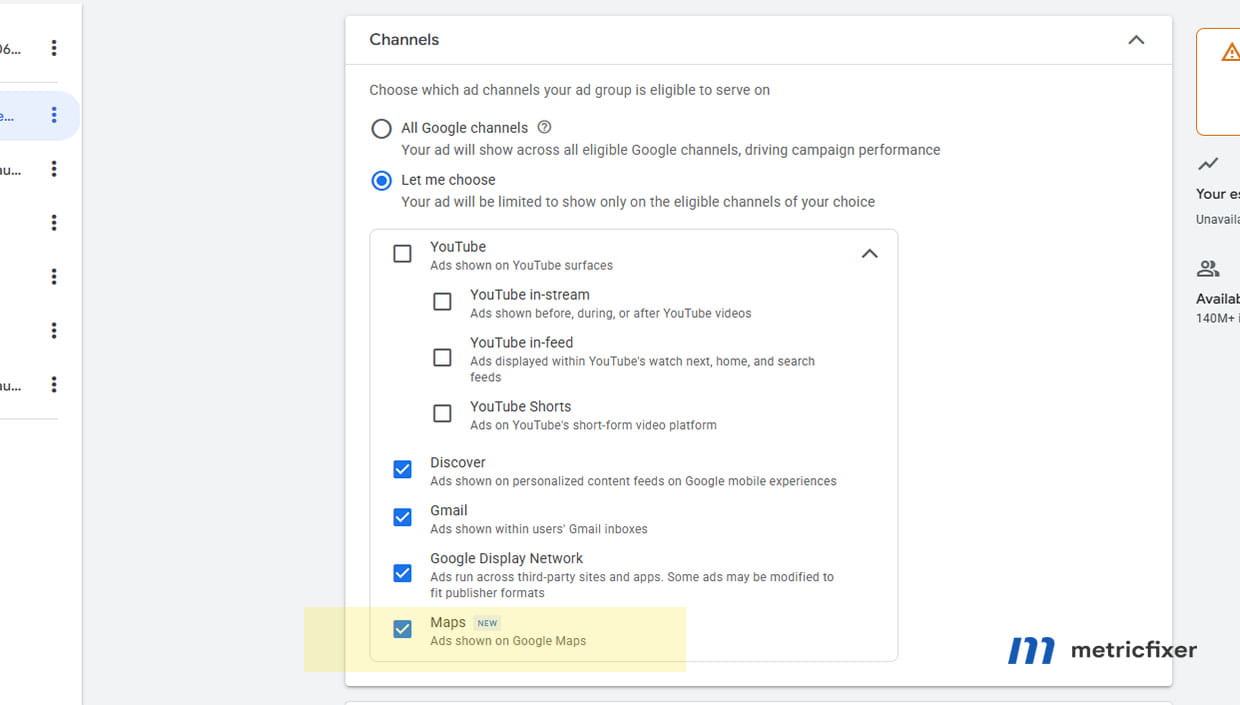
In an eligible Google Ads account, Maps can be left as the only selected channel in a Demand Gen ad group. Interface wording may differ by account language and rollout stage.
What changed in Google Maps advertising
Google announced Maps inventory for Demand Gen at Google Marketing Live 2025, with a focus on Promoted Pins and store traffic. Advertisers began reporting standalone Maps selection during the later rollout, and Google now presents the inventory as a 2026 Demand Gen expansion in its official Maps in Demand Gen announcement.
The important change is not simply that Demand Gen can appear on Maps. Google Ads has supported local inventory through other campaign types for years. The important change is channel choice: an advertiser can now create a Demand Gen ad group that is intentionally limited to Maps.
Technically, this is an ad-group control rather than a campaign-level switch. The phrase “Maps-only campaign” is therefore convenient shorthand. To make it accurate in budget terms, create a dedicated campaign and keep every ad group in that campaign limited to Maps.
Maps-only setup flow: verified Google Business Profile → owned location asset connected to Google Ads → separate Demand Gen campaign → Maps selected at ad-group level → local geography and audience defined → image assets and location-specific destination prepared → conversion and network reporting checked after launch.
Why local advertisers have waited for this control
The control gap became more visible after Google retired the old Local campaign type. In 2022, Google upgraded Local campaigns and Smart Shopping campaigns into Performance Max. It is more precise to say that Local campaigns were absorbed into Performance Max, not that every Smart campaign disappeared: simplified Smart campaigns still exist in Smart mode.
Performance Max for store goals can be very effective when the objective is to maximize store visits, local actions, or omnichannel value across Google. Its weakness for a placement-specific brief is that it is intentionally multi-channel. The advertiser supplies locations, goals, budget, and assets, while Google decides how to distribute delivery across Maps, Search, YouTube, Discover, Gmail, and other eligible inventory.
That model is useful when the brief is “find the most conversions across Google.” It is less satisfying when the brief is “put this local offer in front of people who are actively exploring the area or planning a nearby route.” Demand Gen's Maps control fills part of that gap without requiring the advertiser to hand the entire local strategy to Performance Max.
It does not recreate the old Local campaign product. Demand Gen still uses visual assets, audience targeting, automated bidding, and its own conversion model. The new control solves a where the ads appear problem; it does not turn Demand Gen into a keyword campaign or a fully manual local media buy.
For a wider comparison of Search, Performance Max, Demand Gen, and Display strategy, see Google Ads Formats Compared: Search, Display, Performance Max and Demand Gen.
Where Demand Gen ads can appear on Google Maps
Google's Demand Gen announcement names three Maps contexts: Browse, Directions, and Entity/Place Details. It also highlights Promoted Pins in Browse and Directions. These placements reach people while they are exploring an area, planning a journey, or viewing information about a place.
| Maps context | What the user is doing | Why it can matter to a local advertiser |
|---|---|---|
| Browse | Moving around the map, zooming into an area, or exploring nearby places without necessarily entering a precise query. | A Promoted Pin can introduce a business before the user has selected a destination. |
| Directions | Planning a route or reviewing places along the way. | Useful for businesses chosen during a journey, such as fuel, charging, food, parking, or urgent vehicle services. |
| Entity/Place Details | Viewing information connected with a place or local entity. | Creates an opportunity to appear during local comparison and nearby discovery. Exact layouts can vary by account, device, market, and auction. |
Avoid assuming that Maps-only Demand Gen automatically includes every Google Maps ad product. Google's broader guide to advertising in Google Maps currently associates Demand Gen with Promoted Pins. It lists Map Search ads and Map Suggest ads under other campaign types. This distinction matters:
- Promoted Pins can create discovery while the user is looking at the map or route.
- Map Search ads respond to an explicit Maps search and are closer to traditional demand capture.
- Map Suggest ads can appear as autocomplete suggestions while a user types.
Maps-only Demand Gen should therefore be understood as visual, audience-led local discovery on Maps, not as a new way to buy a particular “near me” query.
Demand Gen Maps-only vs other ways to advertise a local business
| Campaign type | How it reaches local users | Maps control | Best use |
|---|---|---|---|
| Search with location assets | Keywords, search intent, Ad Rank, location signals, and location assets. Eligible ads can appear in Google Search and Maps search contexts. | No reliable Maps-only channel switch. | Capturing explicit, urgent demand when users can describe the need in a query. |
| Performance Max for store goals | Google AI distributes ads across eligible Google channels and local formats using store or omnichannel goals. | Maps is part of a broader automated mix. | Scaling store visits, local actions, and sales when cross-channel optimization is acceptable. |
| Demand Gen with Maps only | Audience-first targeting, visual assets, automated bidding, an owned location asset, and selected Maps inventory. | Yes, in eligible accounts, at ad-group level. | Controlled local discovery and proximity-led promotion on Maps. |
| Smart campaign | Simplified setup using keyword themes, location preferences, and automated management. | Maps may be included, but placement control is limited. | Very small advertisers that prefer a simplified interface over granular campaign management. |
These formats are complementary. A tyre shop, for example, could use Search to capture “puncture repair near me,” Maps-only Demand Gen to stay visible to drivers exploring the area, and Performance Max only if it has enough conversion data and wants Google to optimize across a wider inventory mix.
Which local businesses should test Maps-only Demand Gen
The strongest candidates share three characteristics: customers care about proximity, the decision cycle is short, and the value proposition can be understood quickly from a pin, image, business name, and short message.
Strong test cases include:
- restaurants, cafes, bars, bakeries, and takeaway businesses;
- petrol stations, EV charging locations, parking, car washes, tyre shops, and vehicle repair;
- convenience stores, florists, local retail, and businesses promoting an in-store offer;
- salons, gyms, coworking spaces, self-storage, and other services selected partly by distance;
- hotels, attractions, and visitor-oriented businesses that benefit from route and destination discovery;
- multi-location brands that want to test a defined group of branches rather than open all channels.
The format is less convincing when:
- the business is online-only or has no eligible owned location asset;
- the sales cycle is long and location has little influence on the decision;
- the campaign depends on exact keyword intent or detailed search-query control;
- the advertiser cannot track calls, bookings, orders, qualified leads, or store visits;
- the service area is so small that the audience and auction volume are unlikely to support stable delivery;
- the Google Business Profile contains outdated hours, an incorrect pin, a weak photo set, or an unmonitored phone number.
Pure service-area businesses with a hidden address should be cautious. They may be able to use location-based advertising in other Google Ads formats, but Maps-only Demand Gen is currently built around an owned location asset and Promoted Pin inventory. Confirm eligibility in the account before building the strategy around it. For many mobile trades, Search or an eligible Local Services Ads program may still provide clearer intent.
Prerequisites before creating the campaign
Maps will not serve in Demand Gen merely because an advertiser selects the checkbox. Google's channel-controls documentation says Maps requires a non-affiliated location extension, using the older name for what Google now generally calls an owned location asset.
- Verified Business Profile: the promoted location should be legitimate, open, and correctly represented in Google Business Profile.
- Owned location asset: connect the advertiser's own location through Google Ads Location Manager. Affiliate locations for retailers that sell someone else's products do not meet the stated Demand Gen Maps requirement.
- Approved and active location: check that the asset is eligible and not marked closed, disapproved, or pending.
- Accurate local data: review the map pin, address, phone, business category, opening hours, photos, and website destination before spending.
- Location groups for multi-location accounts: use labels or groups so the campaign promotes only the branches relevant to its geography and offer.
- Conversion tracking: prepare website leads, bookings, purchases, call conversions, offline lead outcomes, or store visits where eligible.
- Local creative and destination: prepare genuine images and a location-specific page that loads quickly on mobile.
Google explains that location-asset data is sourced from Maps and Business Profile. Changes can flow into Google Ads, but they may not appear instantly. The location setup should therefore be completed and checked before campaign launch, not on the same day the ads are expected to start.
How to set up a Google Maps-only Demand Gen campaign
- Confirm that Maps is available in the account. Open or create a Demand Gen campaign and inspect the ad-group channel controls. If Maps is absent, the account may not yet be included in the rollout, the chosen settings may be incompatible, or the location requirement may not be met.
- Connect the advertiser's locations. In Location Manager, choose the option for locations the business owns and connect the correct Google Business Profile or other supported owned-location source. Use a location group when only selected branches should participate.
- Create a separate campaign for the test. This gives Maps its own budget, bid strategy, conversion goals, naming, and reporting. It also prevents a non-Maps ad group from absorbing the campaign budget.
- Choose the goal that matches the real outcome. Depending on account eligibility and setup, Demand Gen creation can offer Sales, Leads, Website Traffic, Local store visits and promotions, or a campaign without goal guidance. Do not choose a local-looking goal merely because it is available; choose the goal connected to a measurable business result.
- Set geography deliberately. Demand Gen normally allows location and language at either campaign or ad-group level. Google currently requires campaign-level location settings when radius targeting is needed, and the level cannot be switched back after publication. Decide this before launch.
- Select bidding and budget. Use a click-based strategy for an exploratory traffic test or a conversion-based strategy when reliable primary conversions already exist. The campaign may not spend its budget if the geography, audience, bid, assets, and Maps inventory create too little eligible volume.
- Open the ad-group Channels panel. Select Let me choose, deselect YouTube, Discover, Gmail, and Google Display Network, and leave only Maps selected.
- Add the audience. Use relevant in-market segments, custom segments, first-party data, or other eligible Demand Gen audiences. Record whether optimized targeting is enabled so the test can be interpreted correctly.
- Create the ads. Add high-quality images, logo, business name, headlines, descriptions, call to action, and a useful local destination. Check the interface's channel-compatibility estimate because not every ad type or audience is eligible for every channel.
- Publish and verify delivery. Allow time for asset and policy review, then use network segmentation to confirm that impressions and spend are attributed to Maps.
Targeting strategy for local business advertising on Maps
Start by deciding between Presence and Presence or Interest
Google's default and recommended Demand Gen location option includes both people who are in or regularly in the target area and people who have shown interest in that area. This broader setting can be useful for hotels, attractions, universities, property, travel, and businesses that want to influence a decision before the person arrives.
For a fast local decision such as fuel, food, parking, a car wash, or emergency tyre repair, Presence is often the cleaner starting point. It limits the test to people Google believes are in or regularly in the selected area rather than including remote users whose behavior suggests interest in it.
This is an editorial testing recommendation, not a universal Google rule. A tourist restaurant may gain value from people planning a trip; a neighbourhood convenience store probably will not. The right setting depends on whether the business can serve someone who is not currently nearby.
Use a commercially realistic radius
A very tight radius can feel precise but may remove too much volume and exclude people approaching the area. Base the radius on how far customers realistically travel, road access, competition, and the urgency of the service. A destination restaurant and a fuel station should not use the same logic.
Google also states that geographic targeting is a best-effort system based on multiple signals and is not 100% accurate. Review geographic performance rather than treating the selected radius as a perfect fence.
Remember that Demand Gen is audience-first
Demand Gen audiences are groups of people inferred from interests, intent, demographics, first-party interactions, and other signals. Custom segments can accept keywords, URLs, and apps, but these inputs define the type of person the advertiser wants to reach. They do not reserve a query in the way Search keywords do.
A useful audience plan for a local business can include:
- high-intent custom segments based on relevant services and problems;
- in-market audiences that align closely with the offer;
- remarketing or customer audiences where collection, consent, and list eligibility are in order;
- separate audience tests only when each ad group can generate enough volume to be evaluated.
Avoid creating many tiny ad groups for small audience variations. Maps-only inventory is already narrower than an all-channel Demand Gen campaign, and excessive segmentation can make learning and comparison harder.
Use location groups instead of unnecessary campaign duplication
For a multi-location business, separate campaigns are justified when branches have different budgets, margins, languages, service areas, or offers. When locations share the same economics and creative, a location group can keep management simpler and preserve more learning volume.
A practical structure might group locations by city, region, store type, or value tier. One campaign per branch is rarely the best starting point unless each branch has enough demand and requires independent budget control.
Creative strategy for Promoted Pins and local discovery
The ad must be understandable in a short local-discovery moment. A polished lifestyle image can work, but for many local businesses the most useful creative is more literal: the storefront, entrance, forecourt, parking access, recognizable sign, key product, or service in progress.
Google's current Demand Gen specifications allow headlines up to 40 characters, descriptions up to 90 characters, and a business name up to 25 characters. Recommended image sizes include 1200 × 628 for landscape, 1200 × 1200 for square, and 960 × 1200 for vertical assets. Video is optional, so an image-led Maps test does not need to wait for video production.
Good local creative usually does the following:
- shows the real location or service rather than a generic stock scene;
- makes the business easy to recognize on arrival;
- communicates one immediate reason to choose it;
- uses a truthful local benefit such as 24-hour access, same-day service, on-site parking, or a current in-store offer;
- keeps important text away from image edges and avoids tiny embedded copy;
- sends users to the relevant branch or offer page rather than a generic homepage.
Do not assume every uploaded asset will appear in every Maps layout. Provide the required set, inspect previews where available, and judge the campaign by the combinations that actually receive impressions. Business Profile photos also matter because users may inspect the location before deciding to visit or call.
Bidding and budget: how to start without forcing volume
There is no fixed “Google Maps advertising price.” Demand Gen delivery is auction-based, and cost will vary with geography, competition, audience, conversion objective, bid strategy, creative eligibility, and available inventory.
| Business objective | Possible starting strategy | What to optimize or evaluate | Main caution |
|---|---|---|---|
| Explore Maps traffic | Maximize Clicks or Target CPC | Qualified visits, engaged sessions, calls, bookings, and assisted local actions | Click-based bidding is not designed to achieve conversion efficiency. |
| Generate leads, bookings, or orders | Maximize Conversions | Primary calls, forms, bookings, purchases, or other meaningful actions | Weak or mixed conversion definitions will train the campaign toward the wrong behavior. |
| Maintain a stable acquisition cost | Target CPA | Conversions at a commercially realistic average CPA | An aggressive target can suppress delivery, especially in a small local market. |
| Optimize different conversion values | Maximize Conversion Value or Target ROAS | Revenue or reliable values assigned to different outcomes | Do not use value bidding when values are arbitrary or disconnected from profit. |
| Drive measured store visits | Maximize Conversions or Target CPA with Store visits | Store visit conversions plus other selected primary goals | Store visit reporting and bidding require account eligibility and sufficient data. |
Google recommends using all Demand Gen channels for most advertisers because more inventory gives its bidding system more opportunities. Google also warns that isolating a channel can reduce efficiency and volume. That does not make a Maps-only test wrong; it means the test should have a clear reason, a separate budget, and realistic expectations.
Google's performance guidance uses 50 conversions as a useful foundation for Demand Gen learning and recommends avoiding major changes during the initial learning period. Many small local businesses will not reach that volume quickly. In that situation, do not keep raising the CPA target simply to make the campaign spend. Consider a broader but still commercially sensible geography, fewer audience splits, a stronger conversion signal, or a Search-led strategy.
How to measure a Maps-only Demand Gen campaign
The new placement control is only valuable if reporting confirms where the campaign served and whether that delivery produced useful business outcomes.
- Segment by network. Google provides Demand Gen channel reporting for Maps at campaign, ad-group, and ad level. A correctly isolated campaign should show Maps delivery rather than spend across the other Demand Gen networks.
- Use primary conversions that represent value. Website bookings, orders, qualified calls, lead forms, and imported offline outcomes are usually stronger bidding signals than a page view or button click.
- Review local actions separately. With active location assets, Google can report actions such as directions, calls, and website visits in local reporting. A directions request is useful, but it is not the same as an arrival or sale.
- Use store visits when eligible. Google supports store-visit bidding in Demand Gen with Maximize Conversions and Target CPA. Eligibility depends on location setup, data volume, privacy thresholds, and other account conditions.
- Compare locations, not only campaign totals. The Stores report and location-level data can reveal whether one branch, area, or store type is driving most of the value.
- Connect advertising to the final outcome. For lead-generation businesses, import qualified and closed outcomes where possible. For retail and hospitality, compare campaign periods with point-of-sale or booking data rather than relying only on clicks.
Important bidding caveat: Google's current local-actions documentation lists Directions bidding for Performance Max, Search, and Shopping, and Clicks-to-call bidding for Performance Max. It does not currently list Demand Gen as a campaign type that can bid directly to local actions. Do not assume a reported directions click is available as a primary Demand Gen bidding goal. Where Store visits are unavailable, optimize toward reliable website, call, booking, purchase, or imported offline conversions and use local actions as supporting evidence.
Overlap also matters. A business may already run Search, Smart, or Performance Max campaigns that serve on Maps. Google Ads attribution can assign conversions across those interactions, but it cannot by itself prove that the new Maps-only campaign created incremental demand. For a stronger test, compare matched locations or periods, keep the budget separate, and avoid changing several local campaigns at the same time.
A practical four-stage pilot
1. Establish a baseline
Record at least the recent level of calls, bookings, online orders, direction requests, store visits where available, and branch-level sales. Note existing Search and Performance Max activity that may overlap with Maps.
2. Launch a clean Maps-only structure
Use one dedicated campaign, a limited number of ad groups, owned location assets, a realistic local area, and one primary commercial objective. Keep naming clear so Maps activity is easy to find in reports.
3. Let the campaign stabilize
Avoid judging the format after a few days or repeatedly changing the bid, audience, budget, geography, and creative at once. Watch eligibility, spend, network segmentation, conversion quality, and whether one location absorbs most delivery.
4. Evaluate business value, then expand
Compare cost per qualified action, estimated or measured store value, and branch-level outcomes against Search, Performance Max, and the baseline period. Expand geography or locations only when the economics support it. If impressions remain low, first check location-asset eligibility, audience size, bid restrictions, and ad compatibility before assuming there is no Maps demand.
Limitations and open questions
- Availability is still uneven. Some Google documentation calls Maps in Demand Gen beta, and the option may not appear in every account, market, or campaign configuration.
- Google's help pages are not fully synchronized. The channel-control documentation enables Maps selection, while a general Maps guide still says exclusive Maps serving is unavailable.
- Maps-only does not guarantee impressions. Location eligibility, auction competition, zoom level, user context, audience size, bids, policy status, and ad compatibility can all limit serving.
- It is not keyword targeting. Advertisers do not receive the same query control and search-term analysis available in Search campaigns.
- It may cover only part of the Maps opportunity. Current documentation most clearly connects Demand Gen with Promoted Pins, not every Map Search, Suggest, or Placesheet format.
- Narrow inventory can make automation unstable. Small radiuses, low budgets, restrictive audiences, and strict CPA targets can leave the campaign without enough auctions or conversions.
- Location targeting is approximate. Google's location signals are useful but not perfectly accurate.
- A weak Business Profile weakens the ad experience. Incorrect hours, poor photos, unanswered reviews, or a misplaced pin can undermine paid visibility.
- Service-area and sensitive-category advertisers need extra checks. Eligibility, local-action reporting, and personalization rules can differ by business type and policy category.
The bottom line
Maps-only Demand Gen is a meaningful addition to Google Maps advertising for local businesses. It gives advertisers a level of placement control that was missing after Local campaigns moved into Performance Max, and it is particularly attractive for businesses chosen quickly because they are nearby or along a route.
The strongest implementation is not “select Maps and hope.” It is a dedicated campaign with an owned and accurate location asset, a commercially realistic geography, a small number of relevant audiences, recognizable local creative, and conversion tracking tied to calls, bookings, sales, qualified leads, or eligible store visits.
Search remains better for explicit keyword demand. Performance Max remains better when the advertiser wants Google to optimize broadly across channels for store or omnichannel goals. Maps-only Demand Gen sits between them: more placement control than Performance Max, more visual discovery than Search, and a clear opportunity to reach local users while they are deciding where to go next.
Methodology and sources
This article was prepared from Google Ads documentation and product announcements reviewed on 14 July 2026, together with the Demand Gen channel-control screenshot supplied for this publication. Official Google sources were prioritized for feature behavior, eligibility, setup, ad formats, bidding, and reporting. Search Engine Land was used as a secondary source for the observed rollout timing. Where Google's current pages conflict, the article identifies the discrepancy rather than treating one page as a complete description of every account.
- Google Ads Help: Channel controls in Demand Gen campaigns
- Accelerate with Google: Google Maps in Demand Gen
- Google Ads Help: How to advertise in Google Maps
- Google Ads Help: Show local search ads on Google Maps
- Google Ads Help: About location assets
- Google Ads Help: How to set up location assets
- Google Ads Help: Create a Demand Gen campaign
- Google Ads Help: Demand Gen audiences overview
- Google Ads Help: About custom segments
- Google Ads Help: About advanced location options
- Google Ads Help: Demand Gen campaign specifications and format requirements
- Google Ads Help: Demand Gen campaign performance guide
- Google Ads Help: Demand Gen campaign metrics and reporting
- Google Ads Help: Smart Bidding for store visits
- Google Ads Help: Local actions conversions
- Google Ads Help: Store visit conversions
- Google Ads Help: Google Display Ads campaigns have a new home in Demand Gen
- Google Ads & Commerce Blog: Local campaign upgrades to Performance Max
- Google Ads Help: Performance Max for store goals
- Search Engine Land: Google adds Maps to Demand Gen channel controls
This article is for advertising, technical, and operational information only. metricfixer is not affiliated with Google, Google Ads, Google Maps, Google Business Profile, or Search Engine Land. Feature availability, beta status, interface wording, eligible inventory, policies, bidding options, and reporting can change after publication and may differ by account or market. Advertising performance is not guaranteed. Advertisers remain responsible for accurate business information, lawful data collection, truthful offers, policy compliance, and compliance with applicable local laws.