
Published Jul 8, 2026
LinkedIn Ads UTM and Dynamic Parameters: Practical Tracking Guide
A practical guide to LinkedIn Ads UTM tagging, dynamic tracking parameters, Lead Gen Form limitations, and QA steps for cleaner GA4, CRM, and Campaign Manager reporting.
Category: Online advertising · By Mikalai Sasau
LinkedIn Ads dynamic parameters can make campaign tracking cleaner, but they can also fragment reporting if they are copied into every utm_* field without a naming model. This guide explains how to use LinkedIn Ads UTM tags, dynamic tracking parameters, Lead Gen Form metadata, and custom li_* fields for reliable GA4, CRM, Campaign Manager, and warehouse reporting.
Practical default: keep utm_source, utm_medium, and the business-level utm_campaign stable. Use LinkedIn dynamic parameters mainly for IDs, creative-level joins, QA, CRM enrichment, and warehouse analysis. For native Lead Gen Forms, use campaign/ad metadata and hidden fields where available instead of expecting website UTMs to explain a form submission that happened inside LinkedIn.
Executive summary
LinkedIn Ads tracking should be designed for more than Campaign Manager. A good setup should also work in GA4, CRM records, landing-page logs, attribution tools, and offline lead review. The common mistake is mixing business campaign names, LinkedIn campaign names, ad set names, creative labels, audience descriptions, and platform IDs inside the same UTM fields. When one of those values changes, historical reporting splits.
The safer architecture separates two layers. UTMs describe the marketing source, medium, campaign, content, and optional audience grouping in a clean cross-channel format. LinkedIn-specific custom parameters store platform IDs and metadata for joins, audits, and QA. That means utm_source=linkedin, utm_medium=paid_social, and a stable business campaign slug in utm_campaign, while IDs such as campaign, ad set, creative, and account values go into utm_id, utm_content, optional utm_term, and custom li_* fields.
LinkedIn's official dynamic URL tracking capability is configured at campaign level through the adTrackingParameters endpoint and supports values such as ACCOUNT_ID, ACCOUNT_NAME, CAMPAIGN_GROUP_ID, CAMPAIGN_GROUP_NAME, CAMPAIGN_ID, CAMPAIGN_NAME, CREATIVE_ID, and, from API version 202606, CREATIVE_NAME. The operational challenge is that the Campaign Manager UI has been moving toward Campaign / Ad Set / Ad wording, while the API documentation still uses the older Sponsored Account → Campaign Group → Campaign → Creative hierarchy.
Lead Gen Forms need a different model. When the user submits a native LinkedIn form without first visiting your website, final URL UTMs are not the primary attribution carrier. Use LinkedIn lead metadata, CRM connector fields, hidden fields where available, and campaign/ad joins. If the thank-you screen or a post-submit CTA sends users to your site, tag that outbound URL normally because it creates a separate website session.
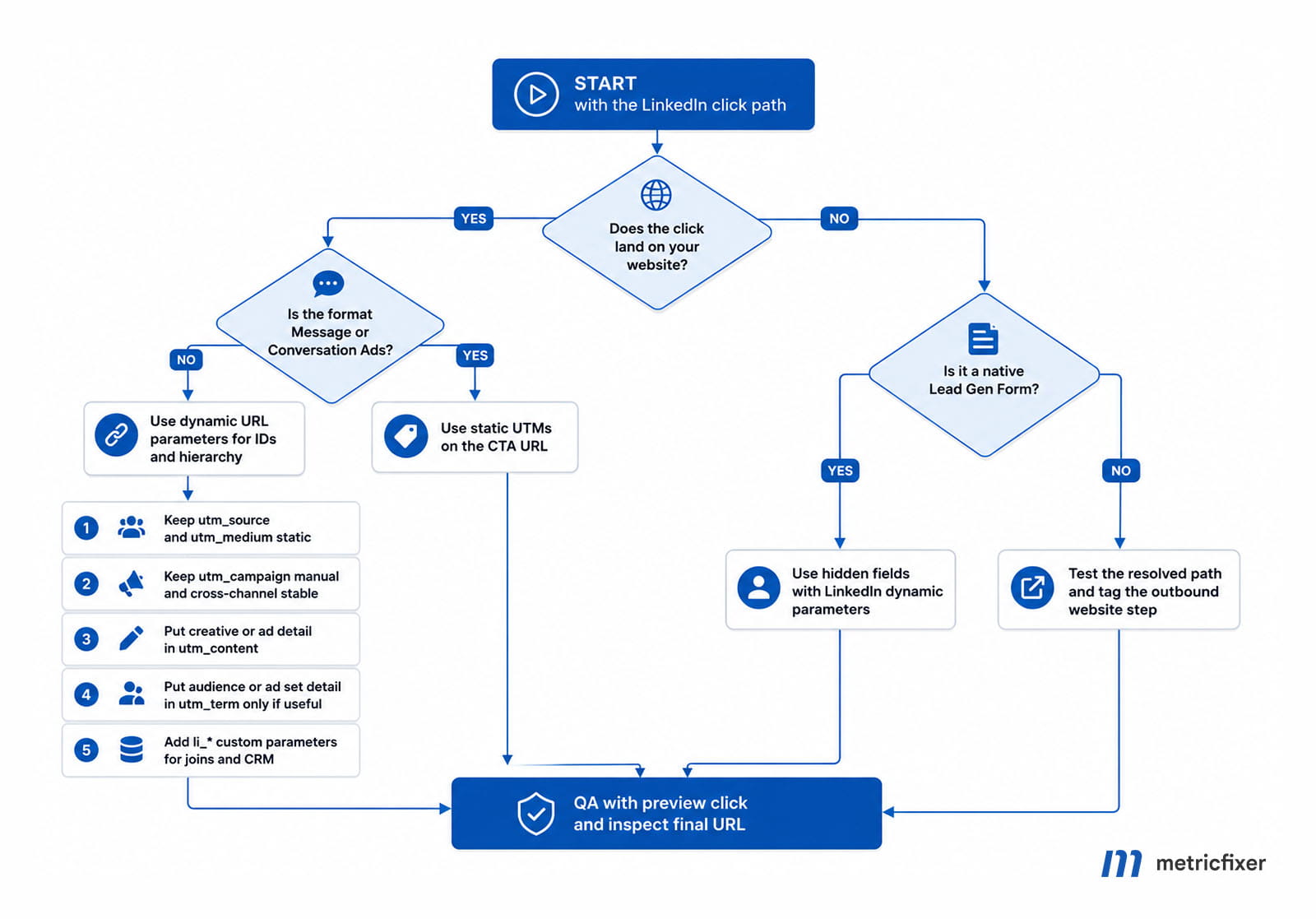
Suggested flow: website click path → format check → dynamic parameters or static UTMs → Lead Gen Form hidden fields → final URL QA.
Why LinkedIn Ads tracking breaks
Tracking problems usually appear after the campaign has already generated traffic or leads. GA4 may show several rows for what the team considers one campaign. CRM records may contain a campaign name but not the ad or creative that generated the lead. Paid-media dashboards may show LinkedIn performance, while the analytics team cannot reconcile those clicks with sessions, form submissions, opportunities, or revenue.
The root cause is usually not one broken parameter. It is a missing naming model. Teams often use utm_campaign as a dumping ground for the platform campaign name, business initiative, audience, geography, creative variant, and funnel stage. That may look convenient in a spreadsheet, but it creates long, mutable, case-sensitive values that are difficult to compare across Google Ads, Meta, email, partners, and LinkedIn.
Parameter consistency matters because analytics tools treat manual campaign values as reporting dimensions. Different casing and spelling can create different rows, so linkedin, LinkedIn, and LINKEDIN should not be used interchangeably unless your reporting taxonomy intentionally separates them.
A practical tracking model for LinkedIn Ads
Before building templates, separate three questions:
- Does the click create a website session? If yes, final URL UTMs matter because GA4 and other analytics tools can read them from the landing URL.
- Does the conversion happen inside LinkedIn? If yes, use Lead Gen Form metadata, hidden fields where available, and CRM/export fields to preserve attribution.
- Which values must survive joins? IDs should be stored in custom parameters or CRM fields because they are more stable than editable names.
The goal is not to put every possible LinkedIn value into GA4. The goal is to keep GA4 channel reporting clean while preserving enough LinkedIn metadata to join traffic, spend, leads, opportunities, and revenue later.
LinkedIn dynamic parameters and what they mean
The official values below are the highest-confidence dynamic values from the LinkedIn documentation reviewed in the source material. Example outputs are illustrative only; they are not fixed official values.
| Official value in LinkedIn docs | Meaning | Example resolved value | Recommended use |
|---|---|---|---|
ACCOUNT_ID |
LinkedIn ad account numeric ID | 508915158 |
li_account_id for multi-account reporting and agency joins |
ACCOUNT_NAME |
Ad account name | metricfixer-emea |
li_account_name for QA, not as a stable join key |
CAMPAIGN_GROUP_ID |
Legacy campaign-group ID | 123456789 |
utm_id or li_campaign_group_id if spend joins happen at campaign-group level |
CAMPAIGN_GROUP_NAME |
Legacy campaign-group name | q3-demand-gen-emea |
Readable QA field; use carefully because names can change |
CAMPAIGN_ID |
Legacy campaign ID | 987654321 |
li_campaign_id or utm_id if campaign-level cost joins are required |
CAMPAIGN_NAME |
Legacy campaign name | retargeting-cfo-audience |
Potential utm_term or li_campaign_name, not usually business-level utm_campaign |
CREATIVE_ID |
Creative / ad ID | 114862845 |
utm_content, li_creative_id, or ad-level joins |
CREATIVE_NAME |
Creative / ad name | ebook-static-v2 |
Readable creative QA and naming diagnostics where available |
The important operational point is that LinkedIn's API documentation still describes the hierarchy as Sponsored Account → Campaign Group → Campaign → Creative. If your reporting model lives in GA4, BigQuery, HubSpot, Salesforce, or another CRM, it should not ignore that API layer just because the UI labels in Campaign Manager have changed.
Legacy API naming versus renamed Campaign Manager naming
Some LinkedIn accounts and practitioner workflows now reflect Campaign / Ad Set / Ad terminology in Campaign Manager. This is useful for day-to-day implementation, but it should be treated as the UI layer unless confirmed in the exact account, picker, bulk workflow, or API tool you are using.
| Legacy / API naming | Practitioner-reported renamed UI naming | Implementation note |
|---|---|---|
CAMPAIGN_GROUP_NAME |
CAMPAIGN_NAME |
Often the business campaign level in the UI |
CAMPAIGN_GROUP_ID |
CAMPAIGN_ID |
Often the best ID for cross-channel campaign joins if cost is grouped there |
CAMPAIGN_NAME |
AD_SET_NAME |
Useful for audience, budget, and targeting grouping |
CAMPAIGN_ID |
AD_SET_ID |
Useful for LinkedIn-side ad set joins |
CREATIVE_NAME |
AD_NAME |
Useful for creative QA and naming diagnostics |
CREATIVE_ID |
AD_ID |
Best ad-level join field when exposed |
In practice, your account may expose a legacy macro family such as {{CAMPAIGN_GROUP_NAME}} and {{CREATIVE_ID}}, or a renamed UI family such as {{CAMPAIGN_NAME}}, {{AD_SET_NAME}}, and {{AD_ID}}. Do not mix these families blindly in one template. First check the Campaign Manager picker or API workflow, then document one approved macro family in your internal tracking specification.
Two implementation details are especially important for live accounts. First, changing dynamic tracking parameters on a running campaign may not require creative re-review according to the source material. Second, if a creative already contains static tracking such as utm_campaign=... and you add a dynamic value using the same key, duplicate query-string keys can appear in the effective URL. That creates attribution risk even when the click technically loads.
Recommended UTM model for LinkedIn Ads
The most reliable LinkedIn Ads tagging model is layered:
- UTMs for marketing reporting: source, medium, business campaign, creative, and optional audience grouping.
- Custom LinkedIn parameters for technical joins: account, campaign, ad set, ad, creative, placement, and platform IDs where supported.
- CRM fields for lead lifecycle: lead source, original campaign, offer, landing page, form, lifecycle stage, opportunity, and revenue outcome.
| Parameter | Recommended LinkedIn Ads use | Keep static or dynamic? | Notes |
|---|---|---|---|
utm_source |
Traffic source, usually linkedin. |
Static | Use one lowercase value across the account. |
utm_medium |
Channel grouping, usually paid_social or your approved paid-social medium. |
Static | cpc can work only if your taxonomy uses it consistently. |
utm_campaign |
Business campaign, offer, or cross-channel initiative. | Usually static/manual | Do not blindly map LinkedIn's current UI campaign name here if it is really an ad set, audience, or budget object. |
utm_id |
Stable LinkedIn ID level used for spend joins or campaign import. | Manual or dynamic | Choose one level: campaign group/campaign/ad set depending on your reporting model. |
utm_content |
Creative, message, ad format, CTA, or variant. | Manual or dynamic | Use ad/creative ID for strict joins; use ad name only if naming is governed. |
utm_term |
Audience, ad set, keyword-like grouping, or targeting theme if useful. | Manual or dynamic | LinkedIn has no paid-search keyword concept, so this field is optional. |
utm_source_platform |
Optional static value such as linkedin or linkedin_ads. |
Static | Useful if your GA4 setup uses source platform dimensions. |
li_* custom parameters |
LinkedIn-specific IDs and platform metadata for joins with Campaign Manager exports, CRM, or a warehouse. | Dynamic where available | Use a consistent prefix and register/capture fields deliberately if you need them in GA4 or CRM. |
The recommendation that prevents the most reporting pain is simple: do not blindly map LinkedIn's current UI field called “Campaign name” into utm_campaign. If utm_campaign means “the marketing initiative” across Google Ads, Meta, email, and LinkedIn, keep it as a manual marketing slug. Push LinkedIn hierarchy into utm_id, utm_content, utm_term, and custom li_* parameters instead.
What should stay static and what can be dynamic
What should stay static
utm_source should normally be static. For LinkedIn Ads, use one lowercase value such as linkedin. Do not alternate between linkedin, linkedin.com, LinkedIn, and ln unless your analytics taxonomy deliberately separates those values.
utm_medium should also be static. Many teams use paid_social because it keeps LinkedIn grouped with paid social platforms. Some organizations use cpc for all paid click media. Either can work, but consistency across the reporting stack matters more than the specific word.
utm_campaign should usually describe the business campaign, not the mutable LinkedIn object name. If the same guide, webinar, product launch, or seasonal campaign runs on LinkedIn, Google Ads, Meta, email, and partners, the campaign value should remain stable enough to compare performance across channels.
What can be dynamic
Dynamic parameters are most useful when they populate values that should not be typed manually. IDs are the best candidates because they are stable, compact, and easy to join with exports. Names can be useful, but they are more fragile because they may change during campaign management.
- Use campaign and ad set IDs for data joins.
- Use creative IDs and ad IDs for creative performance analysis.
- Use placement or format values only where LinkedIn supports them and where the information is useful.
- Use controlled creative labels only when naming is stable and not too long.
A practical rule is: put IDs in custom parameters and readable labels in UTM fields. This keeps GA4 reports understandable while still giving analysts enough keys to reconcile sessions, leads, and Campaign Manager exports.
LinkedIn custom parameter layer
Custom parameters should use a clear prefix so they do not look like standard GA4 campaign fields. A simple convention is li_ for LinkedIn-specific values.
| Custom parameter | Purpose | Where it helps |
|---|---|---|
li_account_id |
Identifies the ad account where the click originated. | Agency reporting, multi-account setups, warehouse joins |
li_campaign_group_id |
Stores the legacy campaign-group identifier where available. | Campaign Manager export joins, spend reconciliation, UI/API mapping |
li_campaign_id |
Stores the LinkedIn campaign or campaign object identifier. | Campaign joins, spend reconciliation, CRM enrichment |
li_adset_id |
Stores the ad set or campaign-level grouping used in the current LinkedIn account structure. | Audience, bidding, budget, and targeting analysis |
li_ad_id |
Stores the ad identifier where available. | Ad-level QA and creative testing |
li_creative_id |
Stores the creative identifier where available. | Creative performance joins |
li_placement |
Stores placement or delivery context where available. | Placement analysis and troubleshooting |
These fields are not a replacement for UTMs. They are a technical layer. GA4 will not automatically treat every li_* parameter as a standard acquisition dimension. If you need these values in GA4 reports, capture them as event parameters, register custom dimensions where appropriate, store them in server-side logs, pass them into CRM hidden fields, or write them into a dedicated attribution table.
Copy-ready tracking templates
Legacy / API-safe family
Use this family if your account still exposes legacy macro names or if you are building through API-oriented tooling.
utm_source=linkedin
&utm_medium=paid_social
&utm_campaign=q3-demo-push-emea
&utm_id={{CAMPAIGN_GROUP_ID}}
&utm_content={{CREATIVE_ID}}
&utm_term={{CAMPAIGN_NAME}}
&utm_source_platform=linkedin
&li_account_id={{ACCOUNT_ID}}
&li_account_name={{ACCOUNT_NAME}}
&li_campaign_group_id={{CAMPAIGN_GROUP_ID}}
&li_campaign_group_name={{CAMPAIGN_GROUP_NAME}}
&li_campaign_id={{CAMPAIGN_ID}}
&li_campaign_name={{CAMPAIGN_NAME}}
&li_creative_id={{CREATIVE_ID}}
If CREATIVE_NAME is available in your account, you can add:
&li_creative_name={{CREATIVE_NAME}}Renamed Campaign Manager UI family
Use this family if your Campaign Manager account exposes Campaign / Ad Set / Ad macros.
utm_source=linkedin
&utm_medium=paid_social
&utm_campaign=q3-demo-push-emea
&utm_id={{CAMPAIGN_ID}}
&utm_content={{AD_ID}}
&utm_term={{AD_SET_NAME}}
&utm_source_platform=linkedin
&li_account_id={{ACCOUNT_ID}}
&li_account_name={{ACCOUNT_NAME}}
&li_campaign_id={{CAMPAIGN_ID}}
&li_campaign_name={{CAMPAIGN_NAME}}
&li_ad_set_id={{AD_SET_ID}}
&li_ad_set_name={{AD_SET_NAME}}
&li_ad_id={{AD_ID}}
&li_ad_name={{AD_NAME}}
Do not deploy both families at the same time unless you have a specific account-level reason and have tested the resolved URL. Mixed macro families are a common source of silent reporting drift.
Generic implementation template
The following version is a taxonomy-first starting point for a website campaign. Replace descriptive placeholders with the exact dynamic tokens offered by LinkedIn Campaign Manager or the API workflow in your account.
utm_source=linkedin
utm_medium=paid_social
utm_campaign={business_campaign_or_offer}
utm_content={ad_format_or_creative_variant}
utm_term={audience_or_ad_set_group_if_useful}
li_campaign_id={linkedin_supported_campaign_id_macro}
li_adset_id={linkedin_supported_adset_id_macro}
li_ad_id={linkedin_supported_ad_id_macro}
li_creative_id={linkedin_supported_creative_id_macro}
For CRM and warehouse work, store the full original landing URL as well as parsed parameter fields. The raw URL helps when a later investigation needs to confirm exactly what the browser received.
Common scenario implementations
Sponsored Content
For single image, carousel, and similar Sponsored Content paths, use dynamic ad detail but keep the business campaign slug manual.
https://www.metricfixer.com/demo?
utm_source=linkedin
&utm_medium=paid_social
&utm_campaign=q3-demo-push-emea
&utm_id={{CAMPAIGN_ID}}
&utm_content={{AD_ID}}
&utm_term={{AD_SET_NAME}}
&li_campaign_name={{CAMPAIGN_NAME}}
&li_ad_set_name={{AD_SET_NAME}}
&li_ad_name={{AD_NAME}}
Example resolved URL:
https://www.metricfixer.com/demo?utm_source=linkedin&utm_medium=paid_social&utm_campaign=q3-demo-push-emea&utm_id=78124563&utm_content=9910022&utm_term=cfo-retargeting&li_campaign_name=q3-demand-gen-emea&li_ad_set_name=cfo-retargeting&li_ad_name=ebook-static-v2This model gives GA4 a stable source, medium, and campaign, while custom LinkedIn fields preserve the values needed for joins and QA.
Video ads
Video ads can use the same structure. If your team needs human-readable creative names more than strict ID joins, you can put the ad name in utm_content and preserve the ID in a custom field.
https://www.metricfixer.com/watch-demo?
utm_source=linkedin
&utm_medium=paid_social
&utm_campaign=q3-demo-push-emea
&utm_id={{CAMPAIGN_ID}}
&utm_content={{AD_NAME}}
&utm_term=video
&li_ad_id={{AD_ID}}
Text Ads
Text Ads are usually simple click-through campaigns, so the template can stay compact.
https://www.metricfixer.com/pricing?
utm_source=linkedin
&utm_medium=paid_social
&utm_campaign=q3-pricing-tests
&utm_id={{CAMPAIGN_ID}}
&utm_content={{AD_ID}}
&utm_term=text-ad
&li_ad_id={{AD_ID}}
Message Ads and Conversation Ads
Because LinkedIn dynamic URL tracking is not supported for Message Ads and Conversation Ads in the source material, use static UTMs on website CTAs and test the resolved click path. If the CTA opens a native Lead Gen Form, place metadata in hidden fields or preserve it through the CRM/export workflow instead.
https://www.metricfixer.com/webinar?
utm_source=linkedin
&utm_medium=paid_social_message
&utm_campaign=q3-webinar-invite
&utm_content=message_ad_invite_a
&utm_term=revops-directors
For a Lead Gen Form path from a Message Ad, use hidden fields such as:
hidden_li_campaign_id = {{CAMPAIGN_ID}}
hidden_li_ad_id = {{AD_ID}}
hidden_li_source = linkedin
hidden_li_medium = paid_social_message
hidden_marketing_campaign = q3-webinar-invite
Native Lead Gen Forms
For native forms, final URL UTMs do not capture the form submission because the conversion happens inside LinkedIn. Use a visible reporting model for humans and hidden fields or CRM/export metadata for attribution.
Visible / reporting model
source = linkedin
medium = paid_social
marketing_campaign = q3-demo-push-emea

Hidden fields
li_campaign_id = {{CAMPAIGN_ID}}
li_campaign_name = {{CAMPAIGN_NAME}}
li_ad_set_id = {{AD_SET_ID}}
li_ad_set_name = {{AD_SET_NAME}}
li_ad_id = {{AD_ID}}
li_ad_name = {{AD_NAME}}
If the thank-you screen or thank-you CTA sends users to your website after submission, tag that outbound button with normal UTMs. That click creates a website session and should be measured as one.
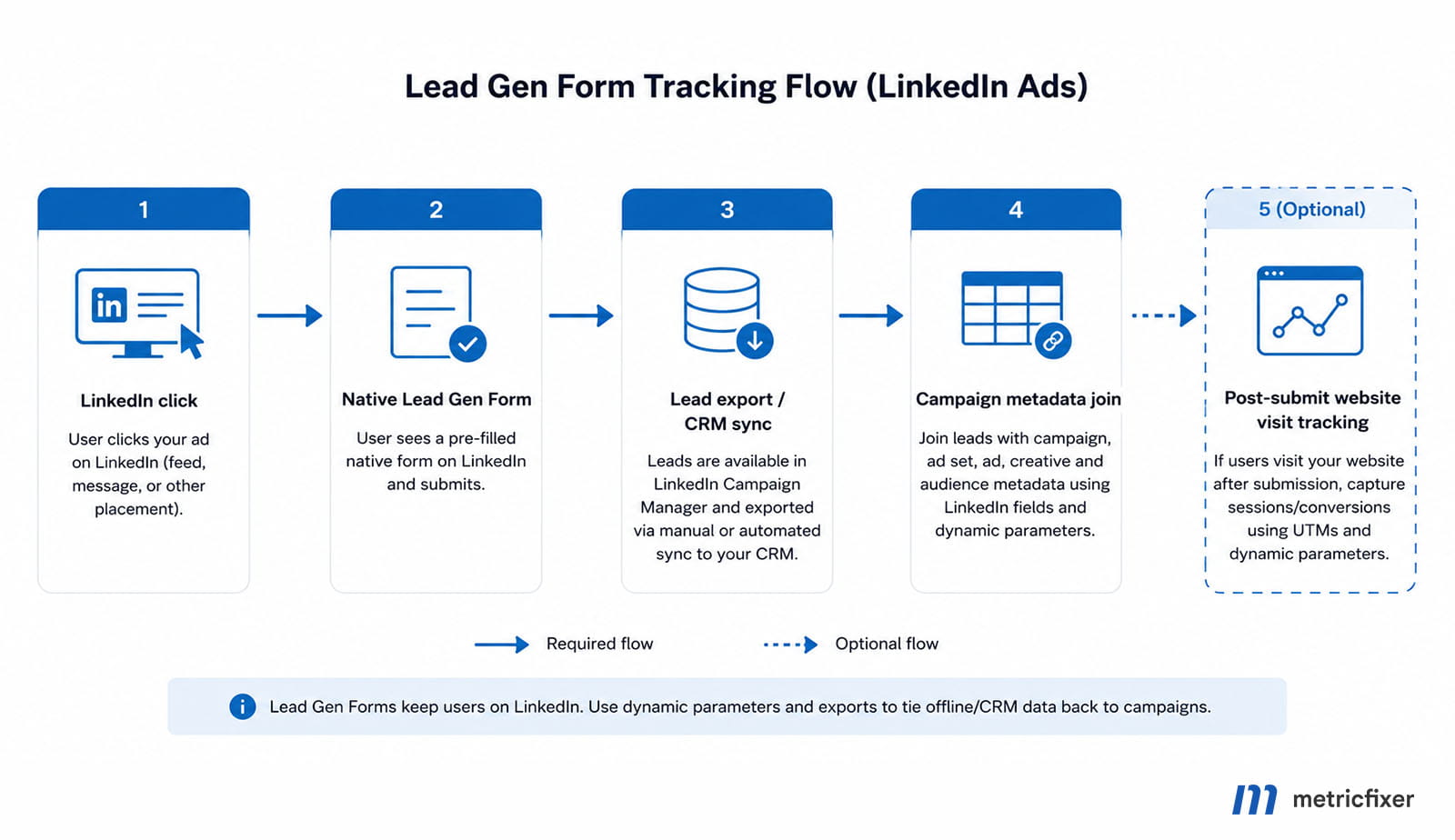
Suggested flow: LinkedIn click → native Lead Gen Form → lead export / CRM sync → campaign metadata join → optional post-submit website visit tracking.
Compatibility by campaign and ad format
Think about compatibility by both format and click path. A feed ad that sends users to your website needs URL tagging. A native form needs CRM/form metadata. A message-based flow may need static CTAs instead of dynamic URL tracking.
| Campaign / ad format | External final URL exists | Dynamic parameters for final URL | Lead Gen Form compatibility | Confidence / notes |
|---|---|---|---|---|
| Single image Sponsored Content | Yes | Yes | Yes | Feed ad with landing pages; good candidate for the baseline model. |
| Carousel Sponsored Content | Yes, per card | Yes | Yes | Carousel ads can use unique destination links per card. |
| Video ads | Yes | Yes | Yes | Use creative/ad detail carefully; video engagement and website sessions are different metrics. |
| Document ads | Usually yes when a CTA or website destination is present | Usually yes when a website URL exists | Yes | Treat final URL tagging as conditional on whether the click actually resolves to your site. |
| Event ads | Conditional | Conditional yes for off-platform website redirects | N/A / indirect | Use UTMs only when the event path sends users to an external URL. |
| Text ads | Yes | Yes | No native form support documented in the reviewed sources | Simple website-click format; compact templates usually work best. |
| Spotlight ads | Yes | Yes | No native form support documented in the reviewed sources | Use final URL tagging when traffic lands on your site. |
| Follower ads | Usually no external-site destination as primary action | Not a typical UTM use case | No | Best treated as a page-growth format rather than website traffic tracking. |
| Job ads | Sometimes external application path | Conditional | No | Use UTMs only if the click lands on your domain or on an application domain you can track. |
| Message ads | Yes | No | Yes | Dynamic URL tracking is unsupported in the reviewed material. Use static UTMs on website CTAs or Lead Gen metadata. |
| Conversation ads | Yes | No | Conditional; test in your account | Dynamic URL tracking is unsupported in the reviewed material; test each click path and form path separately. |
| Native Lead Gen Forms | Often no website visit at submission moment | Not applicable to the form submission itself | Yes | Use hidden fields, export fields, CRM connectors, and campaign/ad joins. |
Compatibility by campaign path
| Campaign path | Tracking recommendation | Main risk |
|---|---|---|
| Website visit to your landing page | Use full UTM tagging plus li_* custom parameters. |
Final URL not resolving as expected; UTM fragmentation. |
| Website conversion campaign | Use UTMs, install and govern the Insight Tag, and configure conversion rules carefully. | Counting wrong URLs or missing consent/tag coverage. |
| Native Lead Gen Form | Use lead metadata, CRM mapping, hidden fields where available, and exports/connectors. | Expecting website UTMs to explain a form submission that never touched the site. |
| Message or Conversation Ads with website CTA | Use static UTMs on the CTA URL and test the resolved click path. | Assuming feed-ad dynamic parameters also apply to message-based flows. |
| Document or content promotion with website follow-up | Track the website destination step separately from the native engagement. | Mixing native engagement metrics with website session metrics. |
Best practices and analytics implications
- Keep the boring fields boring. Standardize
utm_sourceandutm_medium, then reserve dynamic substitution for IDs, creative details, ad set details, and customli_*metadata. - Avoid duplicate keys. If a creative already has static
utm_campaignand you append a campaign-level dynamicutm_campaign, both can appear. Clean up old static UTMs before rolling out dynamic templates. - Preserve
li_fat_id. If you use LinkedIn Insight Tag enhanced conversion tracking or LinkedIn Conversions API, do not stripli_fat_idin redirects, CMS rewrites, or URL cleanup rules. - Test resolved URLs, not templates. Preview or QA-click the ad and inspect the final landing URL in the browser. This is especially important in accounts affected by the Campaign Manager hierarchy rename.
- Do not rely on every custom
utm_*field becoming a GA4 report dimension. GA4 accepts additional parameters such asutm_creative_formatandutm_marketing_tactic, but not every accepted parameter is a first-class reporting dimension. - Capture custom
li_*values deliberately. If you wantli_campaign_id,li_ad_set_id, orli_ad_idin GA4 reports, pass them as custom event parameters and register the relevant custom dimensions. - Use
Page locationfor URL QA in GA4. Some GA4 page dimensions omit UTM strings. For URL-level inspection, usePage locationor manual traffic-source reporting, not only landing-page dimensions. - Treat server-side replay carefully. GA4 Measurement Protocol can supplement automatic collection, but it should not be used to rewrite campaign context unless the server-side event represents a real new campaign interaction.
A practical “hacker but sane” pattern is to duplicate critical LinkedIn metadata into custom backup parameters such as li_campaign_id, li_ad_set_id, and li_ad_id. UTMs remain useful for channel attribution, while custom LinkedIn parameters make CRM joins and warehouse modeling more reliable.
Common mistakes
Using a dynamic campaign name as the only key
Dynamic campaign names are readable but not always stable. A campaign can be renamed for housekeeping, localization, or budget management. If the name is the only key, historical reporting may split. Use a stable campaign naming convention and keep a platform ID in a custom parameter.
Putting everything into utm_campaign
A value such as linkedin_us_webinar_remarketing_video_variant_b_q3 may look useful at first, but it creates long, hard-to-maintain campaign rows. Split the meaning across fields: campaign in utm_campaign, creative in utm_content, audience in utm_term, and platform IDs in li_*.
Tagging internal links with UTMs
Do not add UTMs to internal navigation after the visitor lands on the site. Internal UTMs can overwrite the original acquisition source and make LinkedIn performance look worse or better than it really is. Use internal event tracking instead.
Not testing redirects
Some CMS, redirect plugins, privacy tools, URL shorteners, and security layers remove query parameters. This is one of the easiest problems to miss because the landing page still loads. Always check the final URL after redirects.
Mixing legacy and renamed macro families
A template that combines {{CAMPAIGN_GROUP_ID}}, {{AD_SET_ID}}, {{CREATIVE_ID}}, and {{AD_NAME}} may be valid in a document but unresolved in a live account. Confirm the macro family available in your Campaign Manager account and keep one approved version in the tracking sheet.
Troubleshooting table
| Symptom | Likely cause | How to fix |
|---|---|---|
| GA4 shows several LinkedIn campaign rows for one business campaign. | utm_campaign uses mutable LinkedIn object names, mixed casing, or overloaded values. |
Normalize utm_campaign as a stable business slug and move LinkedIn hierarchy into utm_id, utm_content, utm_term, and li_* fields. |
URL contains literal macro text such as {{AD_ID}}. |
The macro is not supported in the account, field, format, or macro family used. | Check the Campaign Manager picker/API workflow and replace the placeholder with a supported token. |
| CRM has the lead but not the ad or creative that generated it. | Lead Gen Form path did not pass campaign/ad metadata into CRM fields. | Map Lead Gen Form export fields, CRM connector fields, hidden fields where available, or join by campaign/ad IDs after export. |
| Website click loads but UTMs disappear. | Redirect, CMS, consent layer, URL shortener, or web application strips query parameters. | Allow utm_*, li_*, and click IDs through the full redirect chain; inspect the final browser URL. |
| Duplicate UTM keys appear in the landing URL. | Static UTMs already exist on the creative URL and campaign-level dynamic tracking appends the same keys. | Clean up old static UTMs or remove duplicate keys from the dynamic layer before launch. |
| LinkedIn click IDs or first-party attribution fields are missing downstream. | Tracking or redirect rules remove LinkedIn identifiers such as li_fat_id. |
Preserve LinkedIn identifiers in redirects, server-side routing, analytics collection, and CRM capture rules. |
QA checklist before launch
- Confirm whether your Campaign Manager account exposes legacy macros or renamed Campaign / Ad Set / Ad macros.
- Approve one naming standard for
utm_source,utm_medium, andutm_campaign. - Check that parameter values are lowercase where your taxonomy requires lowercase.
- Decide which LinkedIn ID level will be used in
utm_idand cost joins. - Verify that the landing page keeps query parameters after redirects.
- Confirm that no redirect strips
utm_*,li_*, or click identifiers. - Test the final URL from a LinkedIn preview or live low-risk click, not only from a spreadsheet.
- Inspect the browser address bar after all redirects finish.
- Check GA4 DebugView or real-time reports for source, medium, campaign, and landing page.
- Check CRM hidden fields or form submission payloads if the campaign sends traffic to a website form.
- Confirm that Lead Gen Form submissions include enough campaign metadata through LinkedIn export or the CRM connector.
- Document the final template in a shared tracking sheet so campaign managers do not rebuild it from memory.
Recommended governance model
A good LinkedIn tracking setup needs ownership. Paid media, analytics, CRM, and sales operations should not maintain separate naming rules. At minimum, keep one shared UTM specification with these fields:
- approved values for
utm_sourceandutm_medium; - campaign naming convention for
utm_campaign; - rules for
utm_contentandutm_term; - allowed
li_*custom parameters; - the exact LinkedIn dynamic tokens used in the current account;
- owner of QA before launch;
- where the final resolved URL is archived;
- CRM fields that store campaign, ad set, ad, form, lead source, and original landing URL.
This is especially important for agencies and multi-market teams. A technically valid URL can still be a reporting problem if each market uses a different naming style.
SEO, crawl, and internal-link implications
Paid-click URLs can contain UTMs, LinkedIn IDs, and custom li_* fields. That is normal for acquisition tracking, but these parameters should not become canonical SEO URLs or internal navigation URLs. Keep canonical tags, sitemaps, and internal links clean. Do not add UTMs to internal links after the visitor lands, because internal UTMs can overwrite the original acquisition source and distort LinkedIn performance reporting.
The decision principle
The governing principle is simple: use final URL UTMs when there is a website session, use hidden fields or export metadata when the conversion stays native on LinkedIn, and keep your cross-channel reporting model independent from LinkedIn's shifting UI labels.
This is especially important for teams that import LinkedIn cost into GA4, join lead data in a CRM, or build reporting in a warehouse. A clean template should let analysts answer two different questions without mixing them:
- Which marketing campaign drove this visit or lead? This belongs in stable UTM fields.
- Which LinkedIn account, campaign/ad set, and ad created it? This belongs in LinkedIn IDs, names, and custom
li_*fields.
Open questions and limitations
Two documentation gaps matter for implementation. First, the public LinkedIn developer pages reviewed in the source material clearly document API enum values, but they do not provide one definitive public table of all current Campaign Manager UI macro picker names after the hierarchy rename. The renamed UI macro family in this article should therefore be verified inside the specific account before rollout.
Second, the reviewed public LinkedIn documentation does not clearly define a universal maximum length for a tracking template string or a canonical fallback rule for unavailable dynamic values. Because of that, production implementation should include a one-account pilot, resolved-click testing, and final URL inspection before global rollout.
Implementation checklist
- [ ] Confirm whether the campaign creates a website session, a native Lead Gen Form submission, or both.
- [ ] Confirm whether your Campaign Manager account exposes legacy macros or renamed Campaign / Ad Set / Ad macros.
- [ ] Approve one naming standard for
utm_source,utm_medium, andutm_campaign. - [ ] Decide which LinkedIn ID level will be used in
utm_idand cost joins. - [ ] Keep creative detail in
utm_contentor a customli_ad_*/li_creative_*field. - [ ] Use
utm_termonly when audience, ad set, or targeting detail is useful. - [ ] Add custom
li_*fields for CRM and warehouse joins. - [ ] Use hidden fields or export/connector metadata for native Lead Gen Form attribution.
- [ ] Clean up old static UTMs before adding campaign-level dynamic tracking.
- [ ] QA the resolved URL by clicking a preview or test ad.
- [ ] Verify GA4 Manual reports,
Page location, CRM fields, and lead export values before scaling the template. - [ ] Archive the final resolved URL and the approved template in a shared tracking registry.
Methodology and sources
This article is based on the two supplied LinkedIn Ads tracking materials. The final version combines the first article's stronger official dynamic-parameter reference, API-versus-UI hierarchy explanation, format compatibility matrix, Lead Gen Form workflow, scenario templates, open questions, and source list with the second article's clearer explanation of why LinkedIn tracking breaks, layered UTM model, baseline template, static-versus-dynamic guidance, custom parameter layer, QA checklist, common mistakes, and governance model.
The source review weighted official LinkedIn and Google documentation most heavily. Practitioner sources were used mainly for the Campaign Manager rename and operational UTM implementation patterns where official public documentation does not provide a complete UI-level table. Because LinkedIn Ads interfaces, dynamic tokens, campaign objectives, Lead Gen Form behavior, and API versions can vary by account, the practical recommendation remains to verify the exact dynamic tokens in the current Campaign Manager or API workflow before production rollout.
- LinkedIn Marketing API: Dynamic UTM Tracking
- LinkedIn Marketing API: Account Structure and Hierarchy
- LinkedIn Marketing API: Recent Marketing API Changes
- LinkedIn Marketing API: Campaign Objectives
- LinkedIn Marketing API: Campaign Formats
- LinkedIn Marketing API: Enabling Click IDs
- LinkedIn: Understanding ad set settings in Campaign Manager
- LinkedIn: Get started with LinkedIn Conversion Tracking
- LinkedIn: Set up URL parameters for page load conversions in Campaign Manager
- LinkedIn: LinkedIn Insight Tag
- Google Analytics Help: URL builders and custom campaign data
- Google Analytics Help: Traffic-source dimensions, manual tagging, and auto-tagging
- Google Analytics Help: Custom dimensions and metrics
- Google Analytics Developers: Measurement Protocol
- Terrific Digital: Using Dynamic URL Parameters in LinkedIn Ads
- Dataslayer: LinkedIn Campaign Manager Rename Reporting Impact
- UTM.io: How to Build UTMs for LinkedIn Ads
- Terrific Digital: LinkedIn Ads UTM Best Practice Guide
- Attributer: Adding UTM Parameters to LinkedIn Ads
This article is for analytics, advertising operations, and implementation planning only. LinkedIn Ads, GA4, CRM, consent, conversion tracking, and server-side configurations can vary by account, region, data policy, campaign objective, ad format, and product release. Before rolling out tracking templates at scale, test them in your own account, inspect resolved URLs, and confirm that data collection, CRM sync, and consent behavior match your privacy requirements.