
Published Aug 5, 2026
Google Merchant Center Misrepresentation: A 13-Layer Audit and Recovery Guide
Merchant Center Misrepresentation is not one feed error. This 13-layer audit explains how to verify seller identity, pricing, shipping, returns, product data, checkout, business verification, and related accounts before requesting a review.
Category: Online advertising · By metricfixer Expert Team
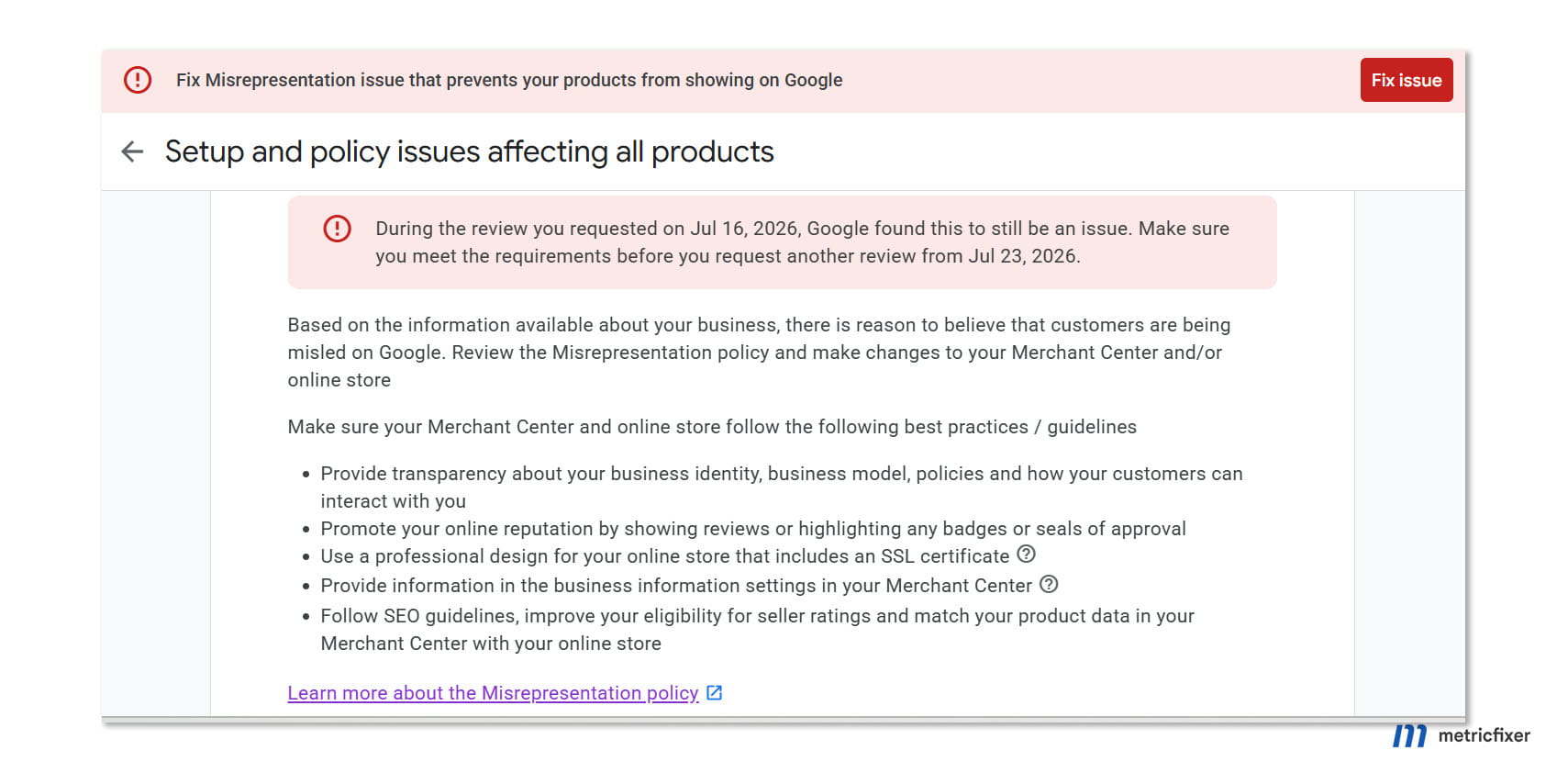
A Google Merchant Center “Misrepresentation” suspension rarely points to one broken field. Google is assessing whether the seller, offer, website, checkout, fulfillment model, policies, and account history describe the same real business. This guide turns that broad trust review into a 13-layer audit and separates popular myths from changes that genuinely improve the quality of a review request.
Practical default: do not request a review after a cosmetic fix. First prove that a shopper can identify the seller, understand the full cost and delivery promise, complete payment, receive the product, and use the published return or refund process—and that Merchant Center data matches every step.
Executive summary
Merchant Center’s Misrepresentation policy is not a narrow feed rule. It covers false or unclear claims about the merchant, the product, commercial terms, affiliation, availability, delivery, payment, and post-purchase support. Google says it may evaluate information from the promotion, website, accounts, and third-party sources. Serious violations can result in immediate suspension without a warning.
Google’s October 2025 policy clarification made two operational risks especially explicit: merchants that do not deliver what was purchased, and return or refund processes that exist on paper but do not work in practice. That clarification matters because it confirms that compliance is not achieved by publishing policy pages alone. The real operation must be capable of honoring them.
As of 3 August 2026, Google also provides a dedicated Merchant Center onboarding and review checklist. It groups trust signals into four broad areas: business transparency, operations and logistics, website quality and uniqueness, and product quality and sourcing. The checklist asks merchants to disclose shipping origins and fulfillment partners, use verifiable contact details, remove fake urgency and placeholder content, clarify brand relationships, and vet suppliers for counterfeit goods.
The strongest recovery pattern is therefore a cross-system audit, not a hunt for one hidden sentence. The merchant must reconcile:
- the legal entity, public store name, domain, contact details, and verification documents;
- the price, currency, taxes, mandatory fees, payment model, shipping cost, and delivery estimate;
- the data source, product page, structured data, cart, and checkout for each important offer and variant;
- the published shipping, return, and refund policies with the business’s actual operating process;
- brand ownership, reseller status, supplier provenance, and product authenticity;
- Merchant Center, Google Ads, website claims, payments profiles, users, and known related-account issues.
A successful review is never guaranteed. Google does not publish a complete scoring model, exact association signals, minimum domain age, appeal success rate, or a universal list of “trust factors.” Treat claims about secret percentages, mandatory trust badges, a fixed 48-hour waiting rule, or a guaranteed reinstatement formula as practitioner speculation unless Google documents them.
Merchant trust audit workflow: identify the real seller → reconcile public identity and verification records → test price, payment, shipping, delivery, returns, and refunds → compare the data source with the product page and checkout → verify brand rights and supplier provenance → resolve linked-account and website-claim conflicts → let updated data become crawlable and processed → submit one accurate, evidence-led review request.
What “misrepresentation” actually means in Merchant Center
Merchants often read the word “misrepresentation” as an accusation that one statement is intentionally false. Google’s policy is wider. It also covers omissions, unclear commercial terms, identity ambiguity, claims that create a false affiliation, products that cannot be supplied, and post-purchase promises that the merchant does not honor.
The policy examples include falsely implying support from a brand or organization, presenting a business identity or name that is not accurate, claiming authorized reseller status without that relationship, offering goods the merchant cannot deliver, hiding the payment model or total cost, and making return or refund information missing, unclear, difficult to find, or operationally ineffective.
This is why a store can look polished and still fail a trust review. A professional theme does not prove who operates the store. A shipping page does not prove the product can arrive in the stated time. A refund page does not prove support answers refund requests. A brand logo does not prove authorization. A feed marked in_stock does not prove the selected variant is purchasable at checkout.
Misrepresentation is not the same as every data-quality error
A single price or availability mismatch commonly appears first as a product-level data issue. Merchant Center can disapprove that offer and recheck it after the website and product data are corrected. An account-level misrepresentation action is broader: it concerns whether Google can trust the merchant and the commercial experience as a whole.
The distinction is important for diagnosis:
| Issue type | Typical scope | Correct response |
|---|---|---|
| Product data mismatch | One or more offers have inconsistent price, availability, currency, variant, or landing-page data. | Fix the source of truth, update the website and data source together, then allow the affected offers to be recrawled. |
| Website or checkout requirement | The store cannot complete a purchase, lacks secure checkout, hides conditions, or sends customers to an unrelated destination. | Repair the customer journey and test the full transaction in every target market. |
| Misrepresentation | Google questions the merchant’s identity, commercial promise, ability to deliver, transparency, affiliation, or post-purchase conduct. | Run a full business, website, product, operational, verification, and account-history audit before requesting review. |
| Abuse of network or bypassed review | The account appears to manipulate products, content, or account structure to evade an enforcement or review. | Restore the complete catalog, fix the original issue, and stop creating or manipulating accounts to bypass the process. |
Published requirements versus hidden-signal speculation
Google publicly confirms that it may review the website, accounts, promotion, and third-party sources. It also publishes specific requirements for business details, product data, checkout, shipping, returns, verification, counterfeit goods, trademarks, and related account suspensions. Those are valid audit inputs.
Google does not publicly disclose a complete internal trust score, the weight of each signal, all methods used to associate accounts, or a universal threshold that guarantees approval. Domain age, WHOIS privacy, theme choice, traffic volume, social follower count, and review count may be discussed in the industry, but none should be presented as a standalone official pass/fail rule.
The audit model below is therefore an editorial framework built from Google’s published requirements and repeat practitioner experience. It is not a reconstruction of Google’s internal scoring system.
| Audit plane | What must agree | Typical trust break |
|---|---|---|
| Seller identity | Legal operator, store brand, domain, address, phone, email, Merchant Center, payments profile, and verification documents. | The brand is visible, but the legal seller is unclear or different records point to different entities. |
| Commercial promise | Price, currency, tax, fees, payment model, promotion terms, shipping cost, delivery estimate, returns, and refunds. | The attractive promise appears before purchase, while restrictions or higher costs appear only at checkout or after payment. |
| Product and operational reality | Feed, product page, structured data, stock, supplier data, fulfillment process, checkout, delivery, and support. | The offer is technically listed but cannot be purchased, delivered, returned, or refunded as represented. |
| Account and external consistency | Merchant Center, Google Ads, claimed website, related accounts, business registration, brand evidence, and public third-party presence. | An unresolved linked suspension, conflicting website claim, unsupported reseller claim, or inconsistent business record remains. |
The 13-layer Merchant Center misrepresentation audit
1. Legal entity and public store name
The public brand and the legal seller do not always have the same name. A store may trade under a brand while invoices, payment records, and registrations use a company name. That is not inherently misleading. The problem begins when the relationship is invisible.
Google’s guidance for the Merchant Center display name allows a short business or website name and applies formatting restrictions. It does not require the display name to include suffixes such as “Inc.”, “LLC,” “Ltd,” or “GmbH.” At the same time, Google’s business-transparency checklist encourages merchants to display the full legal business name where possible and to make the operator verifiable.
Audit checks:
- Identify the legal entity that accepts payment, issues invoices, owns or licenses the store, and is responsible for orders.
- Make the relationship explicit when the storefront uses a trading name: for example, “Store Brand is operated by Legal Entity Name.”
- Use the legal entity consistently in terms, privacy notices, invoices, payment descriptors, tax records, and verification documents where those fields require it.
- Use the public store name consistently in Merchant Center, the header, checkout, order confirmation, and customer communications.
- Explain parent, subsidiary, franchise, marketplace, or multi-brand relationships rather than making users infer them.
- For jurisdictions that require company or tax identifiers on the website, publish the correct identifiers in a clear location. This is a local-law question, not a universal Merchant Center formatting rule.
Common failure pattern: Merchant Center shows Brand A, the footer names Company B, the card statement shows Company C, the support team signs as Brand D, and no page explains the connection.
Successful practice: one short, factual operator statement appears on the Contact, About, Terms, and checkout surfaces, while documents submitted for verification use the exact registered entity name and address.
2. Domain and email
The domain is part of the merchant identity, not only a technical destination. Merchant Center requires the online store to be verified and claimed. The landing-page domain must belong to the claimed website, and customers must be able to purchase through the advertised store rather than being passed to an unrelated merchant.
Google’s current transparency checklist also recommends an email address hosted on the store’s domain. A working domain email makes the relationship between the store and support channel easier to verify than a generic mailbox. It is not a substitute for an actual support process, but it removes an avoidable identity gap.
Audit checks:
- Confirm the canonical
https://domain is verified and claimed in the intended Merchant Center account. - Resolve old Merchant Center claims, agency ownership, Search Console permissions, and platform-generated accounts before review.
- Check that all product links, mobile links, cart links, and checkout entry points remain within the correct commercial journey.
- Remove unexplained redirects to unrelated storefronts, marketplaces, parked domains, URL shorteners, or affiliate bridges.
- Use a working support address such as
support@example.comor another mailbox on the store domain. - Verify that email can receive and send messages, does not bounce, and is monitored during business hours.
- Make the domain used in Merchant Center, customer service, order emails, and public brand materials coherent.
Common failure pattern: a product is advertised on one brand domain, checkout occurs on a second unexplained store, support uses a third-party mailbox, and the Merchant Center website claim belongs to an old account.
Successful practice: the shopper sees one identifiable store journey, while any necessary payment-processor handoff is clearly part of that checkout and does not obscure who the seller of record is.
3. Address and contact details
Google asks merchants to provide basic, verifiable business and customer-service information. The current business-transparency checklist calls for a street address aligned with formal business registration, a working phone number, and a domain-hosted email. The Merchant Center review guidance also asks suspended merchants to ensure that address, phone, and email are visible on the site and match account settings.
A merchant can legitimately have several addresses: registered office, headquarters, warehouse, retail store, and return facility. They do not need to be collapsed into one fictional location. They need to be labeled correctly.
Audit checks:
- Use the registered business address in Merchant Center where Google requests the registered address.
- Publish a clear customer contact page with the seller name, support email, phone number, and an appropriate business address.
- Identify the purpose of each different address: registered office, correspondence, warehouse, store, or returns.
- Do not present a virtual office, mailbox, agent address, or residence as a public retail store or fulfillment warehouse if it is not one.
- Test the phone from outside the company. Confirm it connects, has a professional greeting, and reaches someone able to discuss orders.
- Check that the same core name, address, and phone appear consistently in the footer, Contact page, Merchant Center, invoices, and relevant public business records.
- State the headquarters city, state or region, and country clearly when the full operating structure would otherwise be ambiguous.
- Maintain only genuine, active professional social profiles and external review profiles. Treat them as supporting evidence, not as substitutes for verifiable identity and customer service.
- Set realistic support hours and response expectations rather than claiming continuous support that is not provided.
Common failure pattern: a copied address is used to appear local, the phone is disconnected, the contact form fails silently, or different pages show different countries.
Successful practice: the store explains the real operating structure plainly—for example, a company registered in one country, inventory dispatched from named regions, and returns handled by a specified facility.
4. Payment methods and payment model
Merchant Center’s online-store requirements call for at least one conventional payment method during a secure checkout, such as a card, debit card, invoice, or payment on delivery. More importantly, the user must understand the payment model and the full expense before committing to the purchase.
Payment transparency becomes critical for subscriptions, trials, deposits, installments, buy-now-pay-later services, recurring deliveries, membership pricing, and products that require activation or later charges.
Audit checks:
- Display only payment methods that are genuinely available to customers in the target country.
- Test each visible card logo, wallet, invoice option, cash-on-delivery option, financing method, and buy-now-pay-later flow.
- Disclose recurring billing, renewal frequency, trial conversion, minimum commitment, cancellation method, and any deposit before payment.
- Explain whether the price is a one-time purchase, installment, subscription, or membership price.
- Make the merchant name on the payment page and expected card statement understandable to the shopper.
- Do not collect payment details on an insecure page or through an improvised form.
- Do not display “secure checkout” badges for security controls that are not actually implemented.
Common failure pattern: the product page advertises a low one-time price, but checkout reveals a mandatory subscription, activation charge, or recurring fee.
Successful practice: the exact payment obligation is summarized beside the final order button, and the confirmation email repeats the amount, schedule, merchant, and cancellation or support path.
5. Price, currency, taxes, and additional fees
Google’s price specification requires the amount and currency in product data to match the landing page and checkout. The advertised price must be available to users in the target country and cannot be hidden behind “See price in cart.” Mandatory merchant-imposed charges cannot appear only at the last step.
Tax treatment depends on the target country. For the United States and Canada, Google generally expects sales tax, GST, VAT, or import tax to be excluded from the submitted price according to its country-specific rules. In many VAT markets, the consumer-facing price must include VAT. The safe rule is not “always include tax” or “always exclude tax”; it is to follow the target-country specification and keep the feed, page, and checkout consistent.
Audit checks:
- Compare
price,sale_price, currency, tax treatment, and mandatory charges across the data source, landing page, structured data, cart, and checkout. - Test each target country, language, currency, device, and logged-in or logged-out state that can change the displayed amount.
- Include mandatory processing, service, preparation, handling, or activation charges in the price or an allowed shipping configuration as required by Google’s specifications.
- Disclose import duties, customs charges, brokerage, or destination fees when they may be due and make clear who pays them.
- Configure minimum order value, loyalty pricing, subscriptions, unit pricing, and sale periods with the appropriate Merchant Center mechanisms, including fields such as
loyalty_programandsubscription_costwhere applicable, rather than hiding conditions in small print. - Do not use IP-based price changes that cause Google’s crawler and the target-country shopper to receive different prices.
- Check coupon claims: a submitted discount price must be genuinely available under the stated conditions, not only to a tiny or undisclosed group.
Common failure pattern: Google shows a product at 39.00 EUR, the landing page initially renders 39.00 EUR, JavaScript changes it to 49.00 EUR, and checkout adds a mandatory 7.00 EUR service fee.
Successful practice: one backend price source updates the product page, structured data, data source, cart, and checkout in the same release or synchronization cycle.
6. Shipping policy
A shipping policy must describe the operation that actually exists. Google’s operations checklist asks merchants to state where products ship from, identify fulfillment partners, list warehouse regions or countries, and show handling and transit times on product and checkout pages. These values should match Merchant Center shipping settings.
Shipping speed is the combination of handling time and transit time. A supplier’s dispatch delay cannot be hidden inside an optimistic carrier estimate. “Ships in 2–3 days” is also ambiguous: it may mean dispatched in that time or delivered in that time. Use explicit language.
A complete shipping policy should cover:
- countries and regions served, including exclusions and remote areas;
- where inventory is stored or dispatched from and whether a fulfillment partner is used;
- order cutoff time, business days, handling time, and transit time;
- available carriers or service levels where known;
- shipping-cost calculation, free-shipping thresholds, and oversized-product surcharges;
- estimated delivery range and when it starts;
- tracking availability and when the tracking link is sent;
- customs, duties, import tax, brokerage, and delivery terms for cross-border orders;
- what happens when a parcel is delayed, lost, refused, undeliverable, or returned to sender.
Audit checks:
- Compare the public policy, product-page estimate, checkout estimate, Merchant Center shipping service, and actual fulfillment records.
- Confirm the Merchant Center shipping charge is not lower than the charge users encounter on the website. If an exact match cannot be modeled, Google recommends overestimating rather than underestimating.
- Test free-shipping thresholds with carts immediately below and above the threshold.
- Check products that require special handling, freight, refrigeration, hazardous-goods treatment, or regional restrictions.
- Audit dropshipped and marketplace-supplied products separately because origin and handling time can differ by supplier.
- Where offer-level shipping data is submitted, reconcile
shipping,ships_from_country, handling-time, transit-time, and cutoff values with the public policy and checkout.
Common failure pattern: the policy promises domestic delivery in 3–5 days, but inventory ships from another continent after a 7-day supplier handling period.
Successful practice: the merchant uses conservative, measured handling and transit ranges and updates Merchant Center whenever fulfillment routes or carriers change.
7. Returns and refunds
The return and refund policy must be easy to find, understandable before purchase, and usable after purchase. Google’s 2025 clarification specifically calls out inoperable return or refund processes. A policy link that leads to a dead form, an unanswered mailbox, or an impossible address does not solve the issue.
Google permits merchants to describe restrictive policies, including cases where returns are not accepted, but the policy must be clear and must comply with applicable law. A statement on a website does not override mandatory consumer rights. This article is operational guidance, not a substitute for local legal review.
A complete policy should explain:
- which products and conditions are eligible or excluded;
- when the return window starts and how long it lasts;
- how the customer initiates a return and whether authorization is required;
- available methods, such as mail, drop-off, in-store, or carrier pickup;
- the return address or the method for obtaining it;
- who pays return shipping and whether labels are supplied;
- restocking, handling, or return fees;
- whether original shipping is refunded;
- the difference between refunds, exchanges, replacement, warranty, and store credit;
- the refund-processing timeline and original payment method;
- special rules for damaged, defective, incorrect, personalized, perishable, hygiene-sensitive, digital, or final-sale items.
Audit checks:
- Submit a real test request through every published return channel.
- Confirm the support team follows the written policy and does not invent new conditions after the customer asks to return.
- Check that return windows are realistic for international delivery and do not expire before the product is expected to arrive.
- Align the website policy with Merchant Center return settings and product-level overrides such as
return_policy_labelorreturnswhere used. - Remove copied policy text that refers to another company, address, currency, platform, or jurisdiction.
- Verify that refund timing and method are repeated in customer communications.
Common failure pattern: the footer says “30-day hassle-free returns,” but support requires an undisclosed restocking fee, refuses to provide an address, or does not answer.
Successful practice: the merchant tests the return workflow as seriously as checkout and keeps evidence that requests are acknowledged, authorized, received, and refunded within the published process.
8. Availability and delivery times
The availability value describes whether the exact offer can be purchased. It is not a marketing label. Google supports values such as in_stock, out_of_stock, preorder, and backorder, with additional date information where required. The value must match the landing page and checkout.
Availability and delivery are related but different. A product can be in stock and still require long handling. A product can be backordered with a known availability date. A store can also display “in stock” while the supplier has not confirmed inventory, creating both mismatch and non-delivery risk.
Audit checks:
- Test the exact color, size, material, bundle, condition, and other variant submitted in the offer.
- Confirm the selected variant can be added to cart and purchased in every advertised target location.
- Map supplier stock states to Merchant Center values accurately; do not convert “unknown” or “usually available” to
in_stock. - Use
preorderonly for unreleased products andbackorderfor existing products awaiting replenishment, following Google’s current specification. - Display the relevant availability or release date on the landing page when required.
- Separate handling time from transit time and show an estimated delivery date or range during checkout.
- Introduce a safety stock or inventory buffer when several channels sell from the same limited inventory.
Common failure pattern: all variants share one “In stock” label, but only the default size can be purchased and the promoted variant fails at checkout.
Successful practice: inventory changes trigger synchronized updates to the website and Merchant Center, with automatic item updates used only as a backup rather than the primary inventory system.
9. Data source, product page, and checkout alignment
Google’s landing-page requirements call for the title, description, image, price, currency, availability, and buy action to describe the same product or variant as the submitted offer. Google also recommends providing important price and availability data in the initial HTTP response so that it can be verified quickly.
This layer should be audited as a chain, not as two screenshots:
Offer consistency chain: commerce database → website HTML and visible product state → Product structured data → Merchant Center data source → Shopping listing → cart → shipping and tax calculation → final checkout total → order confirmation.
Audit checks:
- Select a representative sample that includes best sellers, low-stock products, sale items, high-value items, subscriptions, bundles, variants, and products with special shipping.
- Compare the exact
id, title, brand, GTIN or MPN, condition, image, variant,price,sale_price, currency,availability, and landing URL. - Verify that the price and availability visible to a user also appear in server-rendered HTML or another reliable initial response, rather than only after delayed client-side code.
- Keep Product structured data aligned with the visible page. For a deeper implementation comparison, see metricfixer’s server-rendered versus GTM-injected JSON-LD review.
- Do not treat automatic item updates as the source of truth. Google describes them as a safety net and still expects regularly updated product data.
- Coordinate scheduled fetches or Merchant API updates with the website’s inventory and pricing updates.
- Check locale parameters, currency selectors, cookie state, geolocation, login state, and personalization that can change what Google or the shopper sees.
- Confirm that cart and checkout do not silently substitute a different product, bundle, seller, currency, or price.
Common failure pattern: a feed is updated once per day while the site changes stock and prices continuously; the product page then displays one value, structured data another, and checkout a third.
Successful practice: the merchant defines one commerce source of truth and gives every downstream system an update path with known timing, monitoring, and error alerts.
10. Brand rights, reseller claims, and product sourcing
Using a brand name to describe a genuine product is different from claiming to be the brand, an official store, a certified partner, or an authorized reseller. Google’s misrepresentation guidance advises authorized partners to make the relationship clear and, where possible, have the brand confirm it on the brand’s own website. Merchants without authorization should not imply it.
Counterfeit products are a separate egregious policy area. Google defines them as goods using a trademark or logo that is identical or substantially indistinguishable from another brand and attempting to pass as genuine. Labels such as “replica,” “imitation,” or “inspired” do not make a counterfeit offer acceptable.
Audit checks:
- Verify the actual manufacturer and use the correct
brand, GTIN, MPN, condition, and product identity. - Remove “official,” “authorized,” “certified,” “approved,” “partner,” or “exclusive” claims that cannot be documented.
- For compatible accessories, state the actual manufacturer and use “compatible with” language without making the product appear to be made by the referenced brand.
- For private-label products, make the private-label brand and manufacturer relationship accurate.
- Confirm rights or permitted use for product images, logos, packaging, manuals, and manufacturer copy.
- If manufacturer assets are used, disclose the source or authorized-seller status where appropriate rather than presenting generic supplier content as original brand production.
- Vet suppliers and retain commercial invoices, authorization letters, distribution agreements, authenticity records, and traceable purchase documentation.
- Remove products that cannot be authenticated or lawfully sold in the target market.
Common failure pattern: a generic reseller uses a manufacturer’s logo in the header, calls itself an “official store,” copies the brand’s About page, and cannot produce an authorization agreement.
Successful practice: the store describes the relationship exactly as it exists, uses evidence-backed claims, and can trace each branded product to a legitimate supplier.
11. Checkout
Checkout is where many promises are finally tested. Google requires a secure, functional process that allows users to complete the purchase without errors. Account creation, where required, must be free and straightforward; Google’s guidance supports guest checkout or one-time-passcode verification and says users should not need to download an app or switch devices to finish.
A homepage review is not a checkout audit. The merchant should complete real or controlled test orders from product selection to confirmation.
Test matrix:
- desktop and mobile;
- guest and registered user;
- each target country and relevant region or postal code;
- each displayed currency;
- each payment method;
- standard and discounted products;
- single-item, multi-item, minimum-order, free-shipping, and oversized-product carts;
- valid and invalid coupon states;
- low-stock and variant products;
- successful, declined, abandoned, and retried payments.
Audit checks:
- All checkout pages use a valid SSL certificate and return successful responses rather than loops, blank pages, or server errors.
- The final item, variant, quantity, merchant, currency, price, tax, shipping, discount, mandatory fee, and total are visible before the order button.
- The checkout does not add an undisclosed product, warranty, tip, membership, donation, or recurring service.
- Every payment option shown earlier is available when the shopper reaches payment.
- The customer receives immediate confirmation with an order number, item summary, amount paid, seller identity, support path, and delivery estimate.
- Inventory is reserved or decremented correctly so the merchant does not accept orders it cannot fulfill.
- Fraud tools, consent layers, address validation, or third-party scripts do not block legitimate target-market customers.
Common failure pattern: the catalog and cart work, but checkout rejects all target-country addresses, reveals an unexpected total, or fails after payment without confirmation.
Successful practice: test orders are part of release QA, and the team stores a dated evidence pack with screenshots, order IDs, confirmation emails, refunds, and delivery estimates.
12. Business verification
Merchant Center may require identity or business verification before a review can be requested. Google’s current business-document verification guidance says the process confirms the legal existence of the business and the authority of the person managing the account. Depending on the workflow, Google may request a government-issued ID, organization documents, tax or registration records, a selfie or liveness check, or information connected with a Google payments profile.
Verification is not a branding exercise. The values submitted must match the documents exactly enough for the reviewer or verification system to reconcile them.
Audit checks:
- Use the legal name, address, registration number, and authorized representative shown in current official records.
- Update the Google payments profile or Merchant Center business details if they contain an old entity, previous address, misspelling, or unsupported trading name.
- Use current, unexpired documents and follow the requested capture method.
- Provide clear images with all corners visible; avoid edited scans, screenshots, cropped photocopies, or unreadable compression when Google asks for an original document image.
- Ensure the person completing an identity step is authorized and can access the account, email, phone, and required documents.
- Do not repeatedly submit different entities or addresses to discover which one passes.
- Preserve copies of what was submitted, when, by whom, and which account or payments profile it related to.
Common failure pattern: the store is operated by one company, the payments profile belongs to a former owner, the Merchant Center address is a warehouse, and the submitted document shows a different registered office.
Successful practice: the merchant resolves identity data before the appeal, then explains any legitimate trading-name or multi-address structure in one consistent factual statement.
13. History of related and linked accounts
Google explicitly considers account information in policy reviews. It also documents concrete related-account problems. A suspended Google Ads account linked to Merchant Center must be resolved first; simply unlinking it does not remove the Merchant Center issue. Website claims can also conflict with old Merchant Center accounts, agency-created accounts, or platform integrations.
Google does not publish every technical or organizational signal used to associate accounts. Avoid unsupported claims that one particular IP address, device, analytics ID, payment card, or administrator always causes a suspension. The safe operational assumption is simpler: disclose and resolve real relationships rather than trying to conceal them.
Audit checks:
- List all Merchant Center accounts, advanced or multi-client accounts, Google Ads accounts, Business Profiles, payments profiles, Search Console properties, platform integrations, and agencies connected to the business or domain.
- Resolve any linked Google Ads suspension before asking Merchant Center to review a linked-account issue.
- Check who currently claims the website and whether an old account must release or transfer the claim.
- Remove former employees, contractors, and agencies that no longer need access, while preserving an audit trail.
- Document legitimate multi-brand, multi-country, marketplace, franchise, or agency structures.
- Keep the complete affected catalog in the account while fixing the underlying issue. Google warns against significantly reducing products to pass a review and restoring them afterward.
- Do not create a new Merchant Center account, email, company shell, or domain merely to escape an unresolved suspension.
- Review past enforcement emails and issue details so the appeal addresses the original cause rather than only the latest visible symptom.
Common failure pattern: the merchant opens another account after suspension, moves only a small “clean” catalog into it, and leaves the original linked Google Ads or website-claim problem unresolved.
Successful practice: the account map is disclosed internally, ownership is cleaned up, known linked enforcement is resolved in the correct product, and the review request accurately describes the remaining structure.
A cross-cutting website quality and authenticity audit
Google’s current onboarding checklist treats website quality as a trust issue, not only a conversion-rate issue. A store that contains copied text, non-working controls, fake urgency, generic supplier media, or unfinished policy pages can make every other claim harder to verify.
This layer cuts across all 13 audit areas:
- Use a valid HTTPS certificate across product, policy, account, cart, and checkout pages.
- Repair broken navigation, search, filters, forms, buttons, account links, and
404destinations. - Remove “Lorem ipsum,” empty collections, placeholder images, “Under construction” sections, test products, demo reviews, and policy templates that still contain another merchant’s details.
- Write an original About page that explains what the business actually sells, who operates it, where it operates, and how products are sourced or fulfilled.
- Use accurate product images. When manufacturer assets or specifications are used, identify the source or reseller relationship where needed rather than implying that the merchant created or owns them.
- Remove fake countdown timers, artificial stock warnings, fabricated recent-purchase notifications, and urgency claims that do not reflect real inventory or a genuine promotion deadline.
- Check that pop-ups, consent banners, localization tools, and chat widgets do not hide price, policy, contact, or checkout information from users or crawlers.
- Test mobile usability, because a policy that is technically present but unreadable or unreachable on mobile is not practically transparent.
- Keep all policy pages store-specific and mutually consistent. Shipping, returns, Terms, FAQ, product pages, and checkout should not give different answers to the same question.
A new theme is not required, and visual luxury is not a policy. The objective is a complete, functional, and authentic store in which every commercial claim can be followed to a real process.

Merchant Center misrepresentation myths versus successful practice
| Myth | What the evidence supports | Better action |
|---|---|---|
| “There is one hidden reason, and support should tell me the exact line.” | Google publishes a broad trust policy and says it may use the website, promotion, accounts, and third-party sources. A notice may not provide a field-level root cause. | Build a full discrepancy register across all 13 layers and close every material gap before review. |
| “Fix the feed and the suspension will disappear.” | Feed accuracy is necessary, but identity, checkout, shipping, delivery, returns, refunds, verification, affiliation, and related accounts can independently matter. | Test the complete shopper and business journey, not only Diagnostics or a feed export. |
| “Add trust badges, social icons, and reviews.” | Google’s checklist encourages credible external presence and active professional profiles, but decorative badges and empty social accounts do not prove operational trust. | Add only real, verifiable profiles and review channels. Prioritize working contact, checkout, delivery, and refund processes. |
| “Dropshipping is automatically prohibited.” | Google’s published policy does not categorically prohibit the fulfillment model. The risk is unclear sourcing, copied storefronts, unsupported stock, hidden origin, unrealistic delivery, counterfeit goods, and non-delivery. | Disclose fulfillment origin and partners, control supplier quality and stock, use realistic lead times, and retain supplier evidence. |
| “A no-return policy always causes suspension.” | Google requires a clear, accessible policy and operational consistency. Local law may require rights that a merchant cannot waive. | State the real policy plainly, configure Merchant Center consistently, and have local counsel verify mandatory consumer rights where needed. |
| “A new email, domain, or Merchant Center account creates a clean slate.” | Google prohibits attempts to bypass review and documents linked-account enforcement. Unlinking a suspended Ads account does not solve the issue. | Resolve the root cause and known links. Create a new structure only for a legitimate business reason, not to evade enforcement. |
| “Delete most products, pass review, then add them back.” | Google explicitly gives this as an example of bypassing data-quality review. | Keep the catalog and fix the affected offers or remove products only when they genuinely will no longer be sold. |
| “Automatic item updates will correct everything.” | Google calls automatic updates a safety net, not a replacement for current product data. They depend on crawling and correct page markup. | Synchronize the website and data source from the same backend; use automatic updates only to reduce residual mismatch risk. |
| “Request review immediately after every edit.” | Google asks merchants to fix the issue first, complete identity verification when required, and ensure data consistency. Reviews can take up to seven business days, and a cooldown may follow repeated unsuccessful attempts. | Submit only after all changes are live, the data source is processed, key pages are crawlable, checkout is tested, and the evidence pack is complete. |
| “Always wait exactly 48 or 72 hours before review.” | That timing is common practitioner advice, not a universal published rule. Different changes have different processing and crawl timelines; return-policy updates can take longer than a product feed refresh. | Wait for observable readiness: updated Merchant Center data, accessible pages, successful tests, completed verification, and resolved linked issues. |
| “A domain must be old, public in WHOIS, or have a minimum number of reviews.” | Google does not publish universal pass thresholds for these claims. | Do not manufacture age, reviews, or identity signals. Make the current business verifiable through real records and consistent operations. |
| “More policy text is safer.” | Google’s website-quality checklist warns against placeholder and generic policy text. Contradictory or copied clauses create more evidence of unreliability. | Write shorter, store-specific policies that match actual shipping, returns, fees, support, and jurisdictional obligations. |
An evidence-first workflow before requesting review
Step 1: Stop random edits and preserve the starting state
Export the current product data, issue details, account settings, shipping and return configurations, user list, linked accounts, website claim, and enforcement emails. Record the date and time. Without a baseline, teams often make dozens of changes and cannot explain which problem was corrected or whether a new contradiction was introduced.
Step 2: Build a discrepancy register
Create one row for each finding with these fields: layer, current value, expected value, source of truth, affected URLs or products, responsible owner, fix, evidence, status, and date verified. Classify findings as:
- Red: false identity, non-delivery, counterfeit risk, broken checkout, hidden mandatory cost, inoperable refund, unresolved linked suspension, or failed verification;
- Amber: unclear address role, generic policy, weak supplier evidence, inconsistent delivery language, stale product synchronization, or non-working secondary contact;
- Green: verified and evidenced across the site, Merchant Center, checkout, and operations.
Do not request review with unresolved red findings.
Step 3: Test the real customer journey
Run controlled purchases from the countries and devices that matter. Capture the listing, landing page, selected variant, cart, shipping estimate, tax and fees, payment page, final order total, confirmation, support response, cancellation, return authorization, and refund. A test that stops before payment cannot prove checkout or post-purchase functionality.
For a Shopify store, also audit which Google integration owns product and checkout data. metricfixer’s review of Google’s Shopify measurement shift is useful when old scripts, the Google & YouTube app, custom pixels, and legacy checkout customizations overlap.
Step 4: Test a risk-based product sample
Do not sample only five easy products. Include:
- top-revenue and high-click offers;
- all major suppliers and fulfillment routes;
- all target countries and currencies;
- sale products and coupon-dependent prices;
- every unusual payment or subscription model;
- products with variants, low stock, preorder, or backorder;
- branded, compatible, refurbished, private-label, and high-counterfeit-risk products;
- bulky, fragile, regulated, or special-shipping products;
- products with return exceptions.
Step 5: Reconcile policies with operating procedures
Give the shipping and return policies to the people who actually fulfill orders and answer support. Ask them to process several scenarios using only the written policy. Any point where the team needs an unwritten rule is a gap. Update the policy or the operation, then repeat the test.
Step 6: Resolve verification and account links
Complete any identity verification shown in “Needs attention” before requesting review. Resolve linked Google Ads suspensions, website-claim conflicts, obsolete payments profiles, and unauthorized users. Do not assume these issues disappear because a link is removed from the interface.
Step 7: Confirm that Google can observe the fixes
Check that:
- the changed pages are publicly accessible without login, location tricks, or a blocked crawler path;
- the product data source has processed successfully;
- price, availability, and structured data in the HTML are current;
- Merchant Center shipping and return settings show the intended values;
- the complete catalog is present;
- the identity-verification status is complete or no longer blocking review;
- test orders and refunds have succeeded;
- no new account-level or product-level issues have appeared.
Google says a review can take up to seven business days. It also says a one-week cooldown may begin if issues remain unresolved after the second review attempt. This is another reason to treat each request as a formal release, not a quick retry.
Step 8: Choose the correct review statement
Use “I fixed the issue” when the account had a genuine problem and the business has corrected it. Use “I disagree with the issue” only when the merchant has evidence that the decision is wrong. Do not select disagreement merely because Google did not reveal a detailed reason.
What to include in the review or appeal package
The interface may limit text or attachments, but the preparation should still be structured. Keep the explanation concise and factual.
Recommended appeal structure:
- Business identity: legal entity, trading name, registered address, seller-of-record relationship, and completed verification.
- Website transparency: exact URLs for Contact, About, Terms, Shipping, Returns and Refunds, Privacy, and customer-service information.
- Commercial corrections: price, currency, tax, mandatory fees, payment model, shipping cost, and delivery estimate changes.
- Product-data corrections: affected attributes, synchronization method, structured-data fix, and representative product URLs.
- Operations: fulfillment origin, partner disclosure, supplier evidence, checkout tests, delivery tests, return tests, and refund tests.
- Brand and sourcing: authorization, invoices, authenticity evidence, or corrected non-affiliation wording.
- Account relationships: resolved Google Ads suspension, website claim, old account conflict, or legitimate multi-account structure.
- Evidence: dated screenshots, order IDs, test results, policy URLs, data-source exports, and requested official documents.
Avoid emotional arguments, accusations about automation, promises without evidence, invented causes, and long lists of unrelated cosmetic changes. A useful appeal says what was wrong, what changed, where the change is visible, and how the merchant verified that the real process now works.
Condensed pre-review checklist
- [ ] The legal seller, public brand, payment descriptor, invoices, and verification documents form one explainable identity.
- [ ] The claimed domain, product links, cart, checkout, support email, and customer communications belong to the same commercial journey.
- [ ] The registered address, contact page, phone, email, Merchant Center, and relevant public records are accurate and consistently labeled.
- [ ] At least one conventional payment method works, and recurring or conditional payment terms are disclosed before purchase.
- [ ] Product data, visible price, currency, tax treatment, mandatory fees, cart, and final checkout total agree.
- [ ] Shipping origin, fulfillment partner, handling time, transit time, cost, exclusions, and customs treatment are clear and accurate.
- [ ] The return and refund policy is accessible, store-specific, legally reviewed where needed, and proven through a real test.
- [ ] Every submitted offer and variant has accurate availability and a realistic delivery estimate.
- [ ] The data source, product page, server-rendered product information, structured data, cart, and checkout are synchronized.
- [ ] Brand, reseller, partner, certification, compatibility, and authenticity claims are supported by evidence.
- [ ] Checkout works on mobile and desktop for each target country, payment method, and important cart scenario.
- [ ] Required identity or business verification is complete with matching, current documents.
- [ ] Linked Ads suspensions, old website claims, obsolete accounts, and bypass risks are resolved rather than hidden.
- [ ] All red findings in the discrepancy register are closed and independently retested.
- [ ] The review statement and evidence describe the real changes accurately.
What not to change without evidence
Overcorrection can create new inconsistencies. Do not:
- replace a legitimate trading name with a legal name everywhere without explaining the brand relationship;
- publish a private warehouse, home, or return facility as a walk-in retail location when it is not one;
- promise faster shipping or easier returns merely because the wording sounds more trustworthy;
- add payment logos, certifications, security seals, customer reviews, or partner badges that cannot be verified;
- copy a competitor’s legal or policy text;
- change product identity, GTIN, brand, or condition to make an offer appear eligible;
- hide fees, exclusions, supplier origin, or return restrictions in smaller text;
- remove most of the catalog to simplify the review and restore it afterward;
- open a replacement account while the original enforcement remains unresolved;
- claim that Google approved the store, product, partner relationship, or business model unless Google has expressly done so.
Bottom line
Merchant Center misrepresentation is best understood as a broken chain of commercial trust. The account becomes defensible when the same seller identity, product, price, payment obligation, fulfillment promise, return process, and account history can be verified from every relevant surface.
The practical distinction is simple: publishing a claim is not the same as proving that the business can honor it. The strongest review package combines accurate pages and product data with test orders, working support, real delivery capability, usable returns and refunds, valid business documents, legitimate product sourcing, and resolved account relationships.
Fix the operation first, make every system describe that operation accurately, then request review once. That approach cannot guarantee approval, but it is materially stronger than cosmetic redesigns, copied policy templates, repeated appeals, or attempts to start over with a new account.
Open questions and limitations
Google’s policy and help pages describe required outcomes, examples, and review steps, but they do not reveal every enforcement signal or the weight assigned to each signal. A merchant can correct all visible problems and still need to provide additional verification or wait for Google’s review systems to process the changes.
The audit also needs adaptation for marketplaces, local inventory, vehicle ads, regulated products, digital goods, subscriptions, services bundled with products, cross-border tax models, and countries with special consumer-law or business-disclosure requirements. Those cases may have additional policy and legal obligations beyond this general framework.
Finally, “successful practice” in this article means a method that produces a more complete, testable, and credible review package. It does not mean that any consultant, checklist, platform, or wording can guarantee reinstatement.
Methodology and sources
This article was prepared from Google’s current Merchant Center policy, onboarding, website, product-data, checkout, shipping, returns, identity-verification, brand, and account-enforcement documentation available on 3 August 2026. Official sources were used for requirements and review mechanics. ProductHero, FeedArmy, and DataFeedWatch materials were used as secondary practitioner sources for recurring audit and appeal patterns. Practitioner recommendations were excluded or labeled as non-official where Google does not publish the claimed threshold, timing, or guarantee.
- Google Merchant Center: Misrepresentation policy
- Google Merchant Center: Misrepresentation best practices and appeal guidance
- Google Merchant Center: October 2025 Misrepresentation policy clarification
- Google Merchant Center onboarding and review checklist
- Google Merchant Center: Business transparency and trust
- Google Merchant Center: Operations and logistics
- Google Merchant Center: Website quality and uniqueness
- Google Merchant Center: Product quality and sourcing
- Google Merchant Center: Request a review of your issues
- Google Merchant Center: Add your business information
- Google Merchant Center: About adding a business name
- Google Merchant Center: Verify your business documents
- Google Merchant Center: Online store URL domain requirements
- Google Merchant Center: Checkout requirements and best practices
- Google Merchant Center: Price specification
- Google Merchant Center: Landing-page requirements
- Google Merchant Center: Provide high-quality and verifiable product data
- Google Merchant Center: Shipping specification
- Google Merchant Center: Shipping and return configuration best practices
- Google Merchant Center: Set up return policies
- Google Merchant Center: Availability specification
- Google Merchant Center: Counterfeit products policy
- Google Merchant Center: Trademarks policy
- Google Merchant Center: Linked account suspension
- Google Merchant Center: Bypassed account review
- ProductHero: A guide to Misrepresentation in Google Merchant Center
- FeedArmy: Google Merchant Center Misrepresentation audit tips
- DataFeedWatch: Merchant Center Misrepresentation and product-data checks
This article is for technical, ecommerce, and operational information only and is not legal advice. Merchant Center policies, review interfaces, verification methods, product specifications, and enforcement practices can change after publication. Consumer-protection, tax, company-disclosure, trademark, product-safety, and return requirements vary by jurisdiction and product category. metricfixer is not affiliated with Google, Merchant Center, ProductHero, FeedArmy, DataFeedWatch, or other third parties mentioned in the article, and no review outcome or account reinstatement is guaranteed.