
Published Aug 28, 2026
How to Build GA4 Funnels Correctly: Why One Funnel Produces Five Different Results
GA4 funnels can show different numbers without being broken because the counting unit, identity, entry rule, sequence boundary, channel scope, and date window change. This guide compares one paid ecommerce funnel in the standard report, Funnel Exploration, and BigQuery at user, session, and entry-event level.
Category: Analytics & Conversion Tracking · By metricfixer Expert Team
GA4 funnels often look wrong because the chart is shown before the counting rules are made explicit. The same customer journey can produce different totals when it is counted by users, sessions, or entry events; when the funnel is open or closed; when steps may span sessions; when channels use different scopes; or when the selected date range cuts off the beginning or end of a journey.
Practical default: define the funnel as a counting contract before opening GA4. Write down the unit, identity, entry rule, sequence boundary, allowed time, repeat handling, channel scope, and date-cohort rule. Use a closed, indirect, user-based Funnel Exploration to diagnose the customer journey; use BigQuery when the business question requires same-session completion, multiple entries per user, exact order deduplication, or lookback beyond the visible report period.
Executive summary
A GA4 funnel is not simply a list of event names. It is a rule for deciding which entity entered, which ordered sequence qualifies, and how many times that entity may be counted. If those rules change, the number should change.
Google's native funnel engine is fundamentally user-based. The official Funnel Data API describes a funnel as reporting on users moving through a sequence, and its required output metric is activeUsers. In Funnel Exploration, a user who completes the funnel several times during the selected period is reported only for the first qualifying sequence. This is why placing session_start in step 1 does not automatically turn the analysis into a session funnel. Unless the configuration imposes another boundary, a later step may belong to another session of the same user.
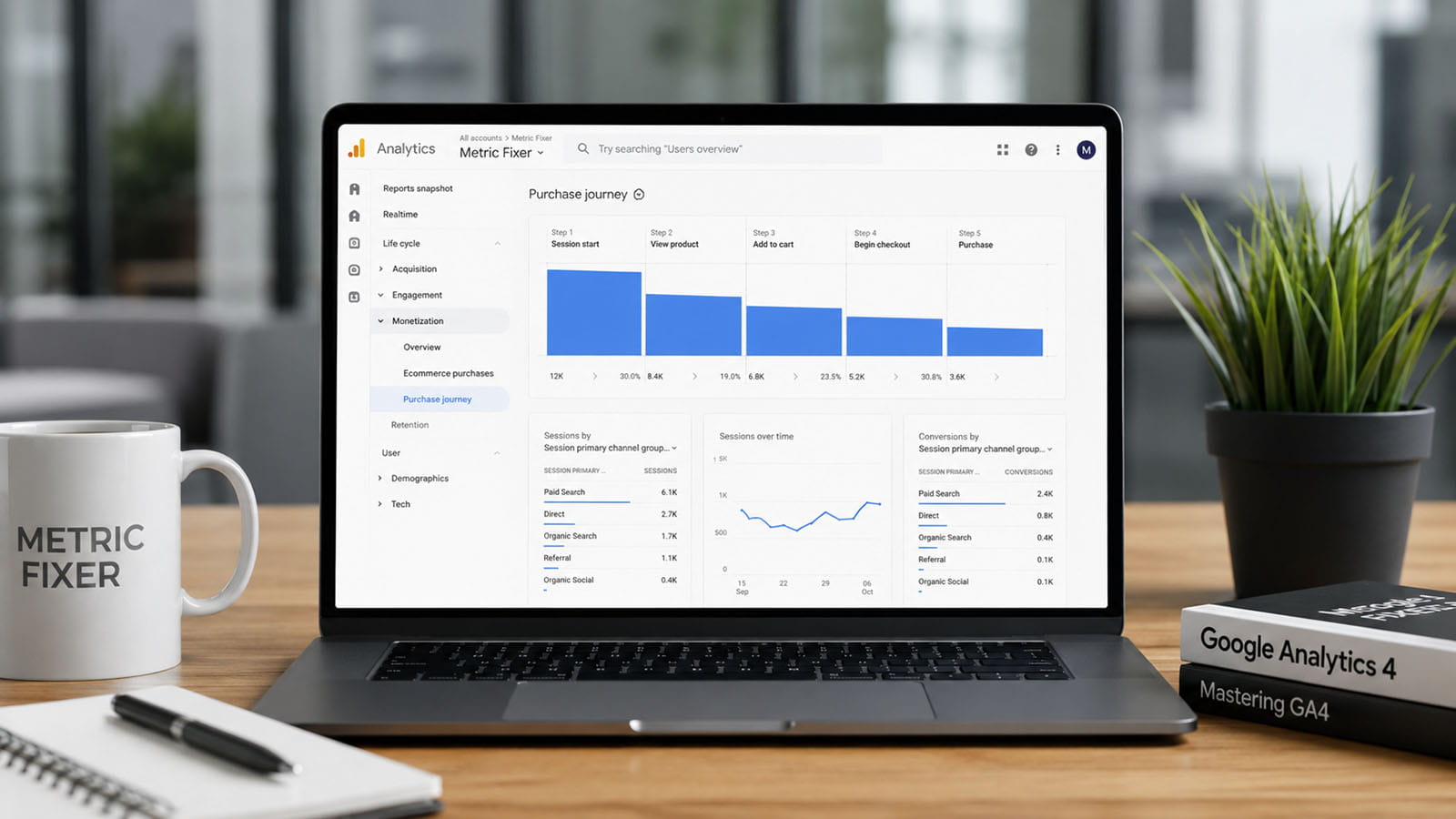
The built-in Purchase journey report is also user-based and uses a fixed sequence: session_start → view_item → add_to_cart → begin_checkout → purchase or in_app_purchase. It is closed by default, can be toggled open, and cannot have its steps edited. It therefore answers a useful standard ecommerce question, but it does not answer every acquisition or session-efficiency question.
BigQuery does not provide one canonical funnel number. It exports event rows, identifiers, timestamps, session parameters, and traffic-source records. The analyst must decide whether one row in the result represents a person, a GA4 session, a paid entry event, or a unique transaction. BigQuery's flexibility is its main advantage and its main risk: a technically valid query can answer a different business question from the chart it is compared with.

The most common causes of apparently incorrect funnel totals are:
- using an ad-platform click as though it were the same thing as a measured GA4 session;
- expecting a user funnel to count sessions or repeated purchases;
- using an open funnel to calculate conversion from a defined acquisition entry;
- using
Directly followed byeven though automatic events occur between business events; - mixing
First user default channel group,Session default channel group, and event-scopedDefault channel group; - treating a breakdown value as though GA4 re-attributed every later step independently;
- comparing raw event counts with sequential funnel counts;
- ignoring users whose first step happened before the selected date range or whose conversion happened after it;
- expecting GA4 reports, Explorations, and raw BigQuery data to use identical identity, estimation, modeling, sampling, and retention rules.
A funnel is a counting contract, not a chart type
Before building the funnel, answer the following nine questions. If two analysts answer any one of them differently, they are not building the same funnel.
| Decision | Example choices | Why it changes the result |
|---|---|---|
| Counting unit | User, session, entry event, order | One user can create several sessions, campaign entries, and purchases. |
| Identity | GA4 reporting identity, user_id, user_pseudo_id, CRM ID | The same person may appear as one user or several devices. |
| Entry rule | Any session_start, paid session, landing-page view, lead creation | The denominator changes before later steps are considered. |
| Sequence boundary | Across the user, within one session, within one campaign entry | A checkout and purchase can occur in a later visit. |
| Order rule | Indirect or direct following | Automatic or unrelated events may sit between business steps. |
| Maximum duration | No limit, 30 minutes, 24 hours, 7 days | Without a limit, distant behavior can be stitched into one journey. |
| Repeat rule | First sequence only, every session, every entry, every unique transaction | Repeat buyers and repeated campaign visits are suppressed or counted. |
| Channel rule | First-user, session, entry-event, conversion attribution | The same user and purchase can legitimately have several channel labels. |
| Date-cohort rule | Entered in period, completed in period, all steps inside period | Journeys crossing the date boundary are included differently. |
A useful naming convention exposes these decisions. Instead of calling a chart “Paid funnel,” name it something like:
Paid-session starters, first user sequence, indirect steps, maximum seven days, entry date in reporting period.
That name is less elegant, but it prevents a marketing team from reading a user-level journey as a same-session conversion rate.
The reference business funnel
The examples below use one ecommerce journey:
Reference workflow: advertising interaction outside GA4 → measured paid session_start → view_item → add_to_cart → begin_checkout → purchase.
The first arrow matters. An ad click exists in the advertising platform. GA4 can count only the traffic and events it actually collects after the landing page or app opens. Consent denial, browser restrictions, navigation failure, redirects, missing tags, lost identifiers, or an interrupted page load can prevent an ad click from becoming a measured GA4 session. The first GA4 step should therefore be named Measured paid session started, not Ad clicked. The distinction is explained in more detail in metricfixer's review of ad clicks, sessions, users, and attributed conversions.
For the controlled example, assume the selected period contains:
- 12 users who have activity relevant to the journey;
- 9 users with at least one paid entry;
- 12 paid entry sessions, because several users return through advertising more than once;
- two non-paid users who complete the full product-to-purchase sequence;
- one non-paid user who appears only at checkout and purchase;
- one paid user who starts product discovery in a paid session but completes checkout and purchase in a later non-paid session;
- one repeat buyer and several repeated product/cart events;
- one duplicate
purchasepayload carrying the sametransaction_id, which should be deduplicated when orders are counted.
These are illustrative test records, not industry benchmarks. Their purpose is to isolate the effect of the counting rules.
One funnel, five different results
| Implementation | Entry | Product view | Add to cart | Begin checkout | Purchase | Entry-to-purchase rate |
|---|---|---|---|---|---|---|
| 1. Standard Purchase journey All traffic, closed, users |
12 | 10 | 10 | 10 | 9 | 75.0% |
| 2. Funnel Exploration Paid entry, closed, users |
9 | 8 | 8 | 8 | 7 | 77.8% |
| 3. Funnel Exploration Paid entry, open, users |
9 | 10 | 10 | 11 | 10 | Not a valid paid-entry conversion rate |
| 4. BigQuery session funnel Paid sessions, all steps in the same session |
12 | 10 | 9 | 8 | 6 | 50.0% |
| 5. BigQuery entry-event funnel Every paid entry, indirect sequence within seven days |
12 | 10 | 9 | 9 | 7 | 58.3% |
None of the five outputs is inherently wrong. Each one answers a different question.
Result 1: the standard Purchase journey reports all-traffic users
The built-in Purchase journey report starts with every user who triggered session_start, not only users whose session was attributed to advertising. In the controlled data, three users entered through non-paid traffic, so the standard denominator is 12 rather than 9.
The report then keeps only users who perform each fixed event in order. Two non-paid users complete the full sequence, while a third non-paid user appears at begin_checkout and purchase without the earlier product and cart steps. In the closed report, that third user falls out and is not counted at checkout or purchase. The result is 12 → 10 → 10 → 10 → 9.
This report is useful as a stable ecommerce health check. It is not the right surface when the first step must mean a paid session, when the business journey uses different events, or when sessions rather than users are the unit.
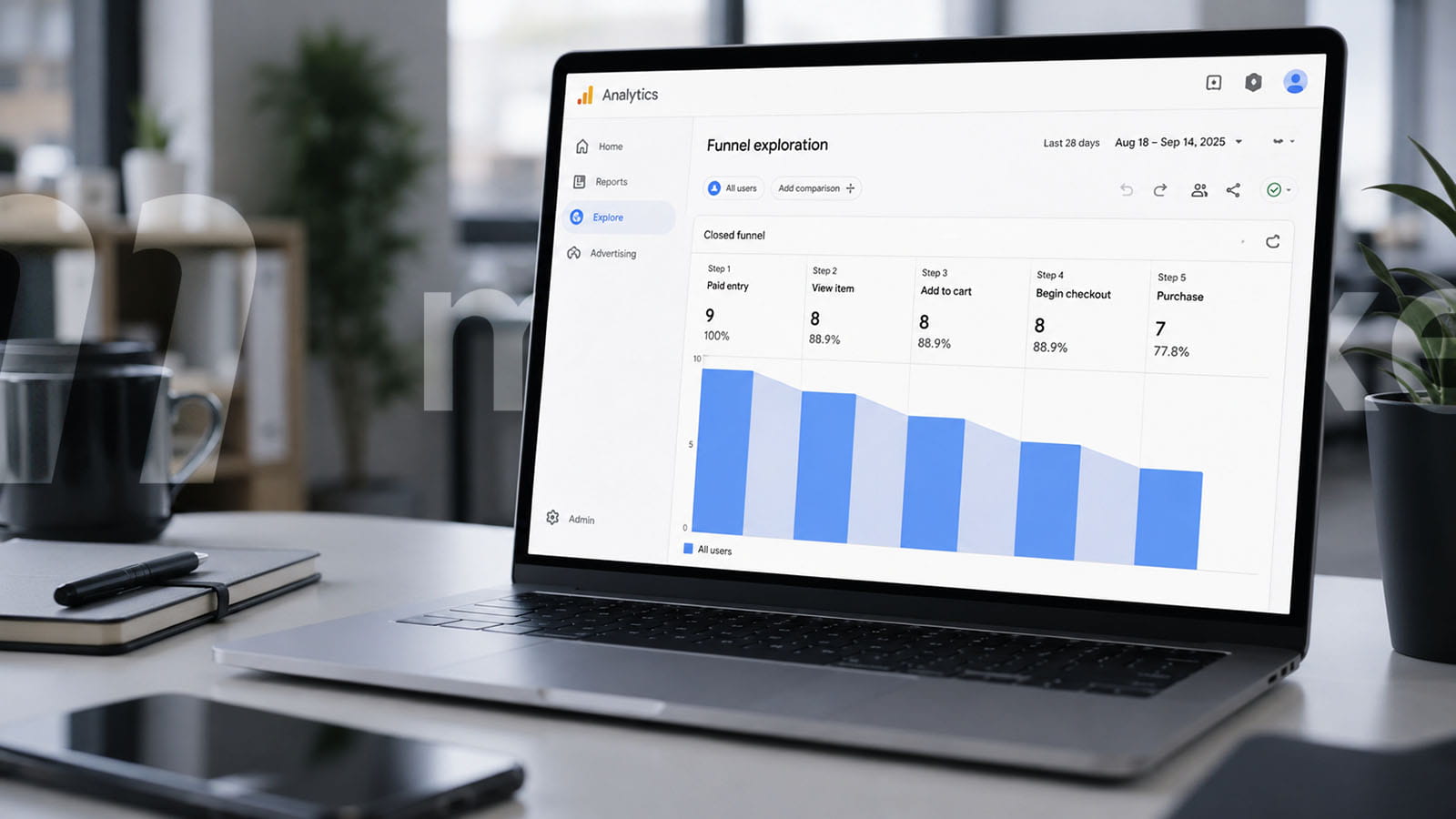
Result 2: a closed paid Funnel Exploration reports first qualifying user journeys
Now step 1 is restricted to a paid session_start. Only nine users qualify. Eight of them reach product view, cart, and checkout; seven eventually purchase. Because the funnel is user-based and the steps are indirect, the paid user who completes checkout in a later non-paid session still qualifies. The result is 9 → 8 → 8 → 8 → 7.
The important interpretation is:
Seven of the nine measured users who entered through a qualifying paid session completed the defined sequence during the available funnel window.
It does not mean seven of nine paid sessions converted. There were 12 paid sessions in the data. It also does not mean the purchase happened in the paid session, because the native sequence can follow the same user across sessions.
GA4 reports only the first qualifying sequence when one user completes a Funnel Exploration multiple times in the selected period. The repeat buyer therefore contributes one user at purchase, not two purchases.
Result 3: the open funnel changes the denominator at every step
The step definitions remain the same, but the funnel is opened. The nine paid-entry users can enter at step 1, while users who do not qualify for the paid entry can enter at the first later step they satisfy.
Two non-paid users join at view_item. A third non-paid user joins at begin_checkout. The result becomes 9 → 10 → 10 → 11 → 10.
This is expected behavior. An open funnel is not a looser version of the same paid-acquisition conversion rate. It is a different question:
Among all observed users, how many can be placed into this ordered journey from the first qualifying step visible for them?
Open funnels are useful for identifying broken instrumentation, imported lower-funnel events, cross-device gaps, deep links, saved carts, and users who legitimately begin partway through a process. They should not be used to divide the final step by the paid-entry step, because later steps include users who never belonged to that entry denominator.
There is another subtle rule: if a user enters an open funnel at an earlier step and then skips a required step, the user does not get a second chance to re-enter at a later step in the same reported sequence. Native funnels are not free-form path reports.
Result 4: the BigQuery session funnel counts visits, not people
The session query uses a key built from user_pseudo_id plus ga_session_id, and requires every later step to carry the same session key as the paid session_start. The 12 paid sessions are now 12 independent attempts.
Ten sessions contain a product view, nine contain an add-to-cart, eight contain checkout, and six contain a deduplicated purchase. The paid user who purchases in a later non-paid session no longer completes the original session funnel. A repeat paid visitor can contribute more than one session. The result is 12 → 10 → 9 → 8 → 6.
This is usually the best definition for questions such as:
- How efficiently does a paid landing session reach checkout?
- Which campaign sessions fail before product view?
- How often does the current visit complete without requiring a return visit?
It is a poor definition for a long-consideration product when later sessions are a normal part of the purchase process. In that case, the lower rate is not necessarily a problem; it is the consequence of a stricter boundary.
Result 5: the BigQuery entry-event funnel counts acquisition attempts
The fifth model gives every qualifying paid session_start its own entry ID, but permits later steps to occur in another session within seven days. The next paid entry, or the end of the seven-day window, closes the current attempt. This prevents one old campaign entry from claiming events indefinitely while still allowing a short return journey.
There are still 12 entries. Ten reach product view, nine reach cart, nine reach checkout, and seven reach a unique transaction. The cross-session buyer is restored at checkout and purchase, but repeated campaign entries remain separate. The result is 12 → 10 → 9 → 9 → 7.
This custom model is useful when the business wants to measure campaign entry attempts, not only distinct people and not only same-session performance. It is not a native GA4 definition, so the window, next-entry rule, and purchase assignment must be documented and version-controlled.
How to use advertising traffic as the first step
“Advertising traffic” is not an event name. The analyst must decide which collected event proves that a measured advertising visit began.
For most web properties, the most defensible native configuration is:
- event name exactly matches
session_start; - the same step also requires a session-scoped traffic value, such as
Session default channel group,Session source / medium, or a session campaign dimension; - paid channels are explicitly listed, for example Paid Search, Paid Social, Paid Shopping, Paid Video, Display, Cross-network, and Paid Other where relevant;
- the funnel name says measured paid session, not ad click.
Do not substitute First user default channel group unless the question is about the channel that originally acquired the user. A user first acquired through organic search can return through paid search and start a paid session while still remaining an organic first-user acquisition.
Do not substitute the unprefixed Default channel group either. Google defines it as event-scoped and tied to key-event attribution, while Session default channel group is session-scoped and First user default channel group is user-scoped. These dimensions are related, but they do not label the same object.
Also remember that GA4 uses paid-and-organic last-click logic for session-scoped acquisition. A session classified as paid is a session attributed to paid under GA4's session rules; it is not always proof that an ad click occurred immediately before that exact visit. For literal landing-click reconciliation, preserve click IDs and campaign parameters through redirects, domains, and external systems. metricfixer's guide to preserving UTM parameters, GCLID, and identifiers across systems covers the implementation risks.
Open versus closed: choose based on the question
| Configuration | What it asks | Good use | Common misuse |
|---|---|---|---|
| Closed | Of the users who qualified for step 1, how many completed every required step in order? | Acquisition cohorts, onboarding, lead processing, checkout conversion | Assuming all steps are in one session |
| Open | At which first qualifying step can each observed user join the sequence? | Deep links, saved carts, imported events, cross-device or tracking gaps | Calculating final-step conversion from the step-1 denominator |
A closed funnel is usually the correct default when the first step defines the population being evaluated. An open funnel is usually a diagnostic or journey-shape tool.
A useful validation method is to build both. If the open funnel contains a large number of checkout or purchase entrants who cannot be connected to product and cart events, investigate whether the behavior is legitimate—saved carts, returning users, phone orders, Measurement Protocol—or an implementation gap.
Events or pages in funnel steps?
GA4 allows funnel steps to use events and dimension conditions. Page-based steps are convenient, but they often describe what was visible rather than what the customer actually did.
| Step style | Strength | Typical failure | Recommendation |
|---|---|---|---|
event_name = add_to_cart |
Represents a business action | Event fires too early, twice, or without required item data | Preferred when the implementation is governed and tested |
page_view plus checkout URL |
Easy to deploy and inspect | Refreshes, redirects, SPA routes, localized URLs, or external checkout break the logic | Use as a fallback or implementation diagnostic |
| Event plus page condition | Confirms both action and context | Page parameter is missing or stale on the event | Useful for high-risk steps after parameter QA |
For ecommerce, prefer Google's recommended events such as view_item, add_to_cart, begin_checkout, and purchase. For the final order count, validate and deduplicate by transaction_id. A user funnel may remain stable when a duplicate purchase event fires because the user is counted once, while event count, revenue, and BigQuery order totals can still be inflated.
Page conditions require special care on single-page applications. Enhanced measurement can send page_view when browser history changes, but route tracking must still reflect the real application lifecycle. A missing, duplicate, or stale virtual page view can move users into the wrong step. See metricfixer's reference architecture for SPA analytics, virtual page views, and state cleanup.
User, session, and event-entry sequences
User sequence
One user is the unit. Later steps can be found in later sessions. Repeated funnel completions are suppressed to the first reported sequence in native Funnel Exploration. This is appropriate for questions about how many people progressed, but it underrepresents repeat attempts and repeat purchases.
Session sequence
One unique session is the unit. Google recommends combining user_id or user_pseudo_id with ga_session_id when identifying sessions outside Analytics. A session funnel must require the same composite key at every step. A duration limit alone is not a reliable substitute because GA4's session timeout is configurable and a session has no fixed maximum length.
Entry-event sequence
One qualifying entry occurrence is the unit. Every paid session_start, lead creation, trial start, or other defined entry can receive an ID. Later events are assigned to that entry until a documented boundary—next entry, session end, maximum lag, conversion, or cancellation. This model is flexible, but it exists only because the analyst defines it.
Order sequence
One unique transaction_id is the unit. This is often the correct grain for revenue and order reporting, but it cannot describe abandonment before purchase because non-buyers have no transaction. Use it as the final-step reconciliation layer, not as the whole funnel denominator.
Direct versus indirect following
In GA4, directly followed by means the next event must be the required funnel step. Indirectly followed by allows other events between the two steps. It does not mean “roughly next” or “next important business action.”
Consider this normal event stream:
session_start
page_view
view_item
user_engagement
scroll
add_to_cart
page_view
begin_checkout
purchase
A direct sequence of session_start → view_item fails because page_view sits between them. A direct sequence of view_item → add_to_cart fails because user_engagement and scroll intervene. The business journey is intact; the direct event adjacency rule is not.
For most conversion funnels, use indirect following and add an explicit Within duration that matches the business cycle. Use direct following for controlled state transitions or instrumentation QA where literal adjacency is part of the requirement.
| Question | Recommended rule |
|---|---|
| Did users eventually progress through the journey? | Indirect, with a business-appropriate maximum duration |
| Did the next emitted event match the expected implementation? | Direct |
| Did the whole journey occur in one visit? | Same session key in BigQuery; directness is a separate decision |
| Did the journey complete before the next campaign entry? | Entry ID plus next-entry boundary in BigQuery |
Repeated events, repeated entries, and repeated purchases
Repeated behavior creates three different questions:
- Did the user ever complete the step?
- How many attempts contained the step?
- How many times did the event fire?
Native Funnel Exploration primarily answers the first. A BigQuery session or entry model can answer the second. The Events report answers the third, but raw event counts are not automatically a funnel.
If one user fires add_to_cart five times and purchase twice:
- a user funnel can show one user at cart and one user at purchase;
- a session funnel can show one or more qualifying sessions;
- an entry-event funnel can show one or more campaign attempts;
- the Events report can show five cart events and two purchase events;
- the valid order count can still be one if both purchase payloads carry the same
transaction_id.
Never diagnose a funnel by placing raw Event count values for five event names next to each other. Those totals may come from different users, different sessions, different channels, and repeated occurrences. They are event-volume metrics, not an ordered cohort.
Why channel breakdowns are especially easy to misread
GA4 has user-, session-, and event-scoped traffic dimensions:
First user default channel grouplabels how the user was first acquired;Session default channel grouplabels the source of a session under session attribution rules;Default channel groupwithout a prefix is event-scoped and relates to key-event attribution.
Choose the scope that matches the object being counted. A paid-session funnel should normally qualify the entry with a session-scoped field. A new-user acquisition funnel may intentionally use a first-user field. A conversion-credit report is a different analysis and may use event-scoped attribution.
Funnel Exploration breakdowns add another rule: GA4 assigns a user to the first applicable value of the breakdown dimension and carries that value through the funnel. If a user enters on mobile and purchases on desktop, a Device category breakdown can continue to show that user under mobile. The same principle can make a channel breakdown look like the purchase was “in” the entry channel when the actual purchase event occurred in another session.
Therefore, a funnel breakdown should be described as cohort labeling, not step-by-step re-attribution. To answer “Which channel did each step occur in?” or “Which session source owned the purchase session?”, use event/session rows in BigQuery or a separate report with the correct scope.
What happens when the same user enters several times?
Native Funnel Exploration reports only the first qualifying sequence for a user in the selected period. This behavior is useful for deduplicating people, but it means:
- a user with three paid sessions still contributes one user at step 1;
- a user who purchases twice still contributes one user at purchase;
- elapsed-time calculations use the first qualifying occurrence when the same step is repeated;
- the chart cannot be interpreted as the number of campaign attempts.
BigQuery can implement any of the following repeat rules:
| Repeat rule | Unit | Typical use |
|---|---|---|
| First sequence per person | person_key | Approximate native user funnel |
| First sequence per session | session_key | Visit-level conversion efficiency |
| Every qualifying entry | entry_id | Campaign or onboarding attempts |
| Every unique order | transaction_id | Orders and revenue |
The correct rule depends on the action you will take. Landing-page optimization often needs sessions. Retention analysis often needs users. Media entry efficiency may need entries. Finance needs unique orders.
Users who started before the selected period
Date ranges create two incomplete edges:
- Left boundary: the user entered before the report started, but completed later steps inside the period;
- Right boundary: the user entered near the end of the period and completed after the report ended.
A closed native funnel can use only the event and user-level data available to the selected query. If step 1 is before the selected period, the user cannot satisfy that closed entry inside the period unless the entry event occurs again. An open funnel may allow the user to join at a later step, but that changes the question rather than recovering the original closed cohort.
Two legitimate monthly reports therefore produce different numbers:
| Cohort | Definition | Required extraction window |
|---|---|---|
| Entry cohort | Users or entries that started during the month; count completion even if it happens later | Reporting month plus a forward completion window |
| Outcome cohort | Purchases during the month; find qualifying entries that may have happened earlier | Reporting month plus a backward lookback window |
| Date-contained funnel | Every required step occurs inside the selected month | Reporting month only |
BigQuery can query a buffer around the reporting period and then classify the result by entry date or conversion date. For a seven-day maximum journey, an entry-cohort report for July should read at least through August 7; an outcome-cohort report should read at least from June 24. The report must state which date owns the conversion.
This boundary rule is one reason a funnel recalculated shortly after month-end can rise later, even though the number of July entries does not change.
Standard reports, Exploration, and BigQuery do not use identical data surfaces
| Dimension | Standard Purchase journey | Funnel Exploration | BigQuery |
|---|---|---|---|
| Primary grain | Users | Active users | Whatever the query defines |
| Steps | Fixed ecommerce sequence | Custom event/dimension conditions, up to the product limit | Fully custom SQL |
| Open/closed | Toggle available | Configurable | Implemented in query logic |
| Same-session requirement | No explicit session-grain output | Not created merely by using session_start | Yes, by enforcing one session_key |
| Repeat sequences | User-oriented | First qualifying sequence per user | First, every session, every entry, or every order |
| Channel handling | Limited fixed-report breakdowns | Entry condition and first-applicable breakdown behavior | User, session, entry, and conversion fields can be separated |
| Historical availability | Aggregated reports are not governed in the same way by event-data retention | Limited by user/event data retention | Limited by when export began and what was exported |
| Sampling/estimation | May use aggregate tables and HLL++ estimates | Can be sampled; user counts can use HLL++ | Raw rows; exact distinct queries unless the analyst chooses approximation |
| Identity/modeling | Can use configured reporting identity and modeling | Can partially include behavioral modeling | Raw exported identifiers; no behavioral or key-event modeling |
| Best use | Standard operational ecommerce monitoring | Interactive user-journey diagnosis | Auditable custom business definitions and reconciliation |
Google documents several expected causes of differences:
- Reports, Explorations, the Data API, and BigQuery can use different processing surfaces.
- Explorations may be sampled when event-level query limits are exceeded.
- Even unsampled user and session metrics can use HyperLogLog++ estimates; Google says discrepancies are usually below 1% but can be higher.
- BigQuery can calculate exact distinct session counts, so small differences from GA4 interfaces are expected.
- GA4 reporting identity can combine User-ID, device ID, and modeling, while Google advises switching to Device-based identity when validating against BigQuery exports.
- Behavioral modeling can be present in reports and partially present in funnel explorations but is not applied to raw BigQuery data.
- Explorations and funnel reports depend on the property's user/event data-retention setting, while standard aggregated reports are affected differently.
- Recent data can differ while processing is still completing. The event lifecycle and reporting delay are discussed in metricfixer's guide to events visible in DebugView or Realtime but missing from reports.
These processing differences explain small residual gaps after the counting contract has been aligned. They do not explain a 50% difference caused by comparing users with sessions or a closed funnel with an open one.
A saved custom funnel report is not a perfect copy of Exploration
GA4 can save a Funnel Exploration as a custom funnel report. Google says the saved report retains filters, step definitions, open/closed type, and the breakdown dimension. However, advanced edits such as elapsed time and next action are not saved. Segments and some unsupported filters or fields can also prevent saving.
The saved report is unlinked from the original Exploration. Editing the Exploration later does not update the existing report; a new report must be saved. This creates a governance risk: two surfaces can have the same name while using different historical definitions.
Use a versioned description such as Paid ecommerce funnel v3 — 7-day indirect user sequence, and record the publication date and owner.
A practical BigQuery foundation
The following pattern creates a canonical event table with a person key, session key, traffic-source fields, and a paid-entry flag. It deliberately scans before and after the visible report period so the final query can implement an entry or outcome cohort. Replace the paid-medium rule with the channel logic used by your organization; a short regex is not a complete reproduction of Google's default channel rules.
DECLARE report_start DATE DEFAULT DATE '2026-07-01';
DECLARE report_end DATE DEFAULT DATE '2026-07-31';
DECLARE max_lag_days INT64 DEFAULT 7;

WITH event_rows AS (
  SELECT
    PARSE_DATE('%Y%m%d', event_date) AS event_date,
    TIMESTAMP_MICROS(event_timestamp) AS event_ts,
    COALESCE(NULLIF(user_id, ''), user_pseudo_id) AS person_key,
    CONCAT(
      user_pseudo_id,
      '.',
      CAST((
        SELECT value.int_value
        FROM UNNEST(event_params)
        WHERE key = 'ga_session_id'
      ) AS STRING)
    ) AS session_key,
    event_name,
    (
      SELECT value.string_value
      FROM UNNEST(event_params)
      WHERE key = 'transaction_id'
    ) AS transaction_id,
    COALESCE(
      session_traffic_source_last_click.cross_channel_campaign.source,
      session_traffic_source_last_click.manual_campaign.source,
      collected_traffic_source.manual_source
    ) AS session_source,
    COALESCE(
      session_traffic_source_last_click.cross_channel_campaign.medium,
      session_traffic_source_last_click.manual_campaign.medium,
      collected_traffic_source.manual_medium
    ) AS session_medium
  FROM `project.dataset.events_*`
  WHERE _TABLE_SUFFIX BETWEEN
    FORMAT_DATE('%Y%m%d', DATE_SUB(report_start, INTERVAL max_lag_days DAY))
    AND FORMAT_DATE('%Y%m%d', DATE_ADD(report_end, INTERVAL max_lag_days DAY))
    AND event_name IN (
      'session_start',
      'view_item',
      'add_to_cart',
      'begin_checkout',
      'purchase'
    )
)
SELECT
  *,
  event_name = 'session_start'
  AND REGEXP_CONTAINS(
    LOWER(COALESCE(session_medium, '')),
    r'^(cpc|ppc|paid_search|paid_social|display|cpm|cpv)$'
  ) AS is_paid_entry
FROM event_rows;
Build separate result tables from this foundation:
- User funnel: partition by
person_key; keep the first qualifying sequence. - Session funnel: partition by
session_key; require every step to have the same non-null key. - Entry-event funnel: assign
entry_idto every paidsession_start; allow events until the next entry or maximum lag. - Order reconciliation: count distinct valid
transaction_idvalues and separately report purchase events with blank or duplicate IDs.
Do not silently use COALESCE(user_id, user_pseudo_id) as though it exactly reproduced GA4's reporting identity. That expression is a custom identity rule. It can join signed-in activity where user_id is present, but it does not reproduce Google's modeled or blended reporting. Keep a device-based version using user_pseudo_id for UI-to-export validation and a business identity version for internal analysis.
Measurement Protocol or imported events may lack session identifiers unless they are supplied correctly. A session funnel should report the number of relevant events with a null session_key rather than discarding them silently.
Three recommended funnel recipes
Recipe A: UX journey diagnosis in Funnel Exploration
- Unit: active user.
- Entry: qualifying measured session or business start event.
- Funnel: closed.
- Following: indirect.
- Duration: aligned with the normal customer decision cycle.
- Repeats: accept native first-sequence behavior.
- Breakdown: treat as entry-cohort labeling, not dynamic re-attribution.
Use this to find where people stop progressing and to compare cohorts.
Recipe B: paid-session conversion in BigQuery
- Unit:
user_pseudo_id+ga_session_id. - Entry: paid
session_startusing session-scoped source logic. - Boundary: same session key at every step.
- Following: normally indirect.
- Repeats: every qualifying paid session.
- Final step: distinct
transaction_idand separate duplicate-event QA.
Use this for landing-page, campaign-session, and current-visit efficiency.
Recipe C: paid-entry attempt funnel in BigQuery
- Unit: one generated
entry_idper paidsession_start. - Boundary: next paid entry or maximum journey duration.
- Cross-session: allowed.
- Repeats: every qualifying entry.
- Cohort: explicitly entry-date or outcome-date based.
- Final step: unique transaction assigned to one entry only.
Use this when campaigns drive repeated consideration and the business wants to evaluate acquisition attempts rather than distinct users.
Funnel QA checklist
- [ ] Write the business question in one sentence before choosing a GA4 surface.
- [ ] State whether one row means a user, session, entry, or transaction.
- [ ] Name the identity rule and test cross-device behavior.
- [ ] Define what proves the first step; do not call a GA4 session an ad click.
- [ ] Use session-scoped traffic fields for a paid-session entry.
- [ ] Confirm whether GA4's non-direct session attribution matches the intended meaning of “paid entry.”
- [ ] Choose open or closed deliberately; never use open-funnel final/first division as a paid-entry conversion rate.
- [ ] Prefer business events over page URLs where the event implementation is reliable.
- [ ] Test SPA route changes, redirects, external checkout, and cross-domain identity.
- [ ] Use indirect following unless literal next-event adjacency is required.
- [ ] Set a maximum duration that matches the customer journey.
- [ ] Decide whether repeated sequences are suppressed or counted.
- [ ] Deduplicate purchases with
transaction_id. - [ ] Document whether the cohort is owned by entry date, completion date, or all-steps-in-range.
- [ ] Query before and after the report period when journeys can cross boundaries.
- [ ] Check the Exploration data-quality indicator for sampling or thresholding.
- [ ] Check data-retention limits before comparing historical standard reports with Explorations.
- [ ] For BigQuery reconciliation, align timezone, exported streams/events, reporting identity, and processing completeness.
- [ ] Keep a definition version, owner, change log, and test cases with known event sequences.
Which number should the business use?
| Business question | Recommended denominator | Recommended surface |
|---|---|---|
| How many people progressed after a paid entry? | Distinct qualifying users | Closed Funnel Exploration |
| How well did paid visits convert in the same visit? | Paid sessions | BigQuery session funnel |
| How many campaign entry attempts reached purchase within seven days? | Paid entry events | BigQuery entry-event funnel |
| How many valid orders were created? | Distinct transaction_id | BigQuery plus backend/order reconciliation |
| Where do users appear when earlier steps are missing? | Users entering at first visible qualifying step | Open Funnel Exploration |
| Is the standard ecommerce journey broadly healthy? | Users in the fixed purchase sequence | Purchase journey report |
The strongest reporting system does not force one number to serve every team. It publishes several clearly named metrics with shared event definitions:
- paid-entry users;
- paid sessions;
- paid entry attempts;
- unique orders;
- same-session conversion rate;
- seven-day entry conversion rate.
When these metrics differ, the difference becomes useful information about repeat visits, delayed decisions, cross-session completion, and instrumentation—not evidence that GA4 is randomly changing the data.
Limitations and open questions
The numerical example is a controlled synthetic dataset designed to demonstrate counting behavior. It is not a claim about typical ecommerce conversion rates.
Exact availability of dimensions, attribution records, modeling, and report controls can depend on property configuration, consent implementation, product updates, linked advertising products, export start date, and whether the property is standard or Analytics 360. BigQuery fields also reflect the schema available for the dates being queried.
GA4's interfaces do not expose every internal processing rule, and a custom SQL query cannot perfectly reproduce modeled or blended reporting. The practical goal is not forced equality. It is to make the remaining difference explainable after the business definition, scope, identity, date range, and data surface are aligned.
Methodology and sources
This article was researched against Google Analytics documentation available on 28 August 2026. The review covered Funnel Exploration behavior, the Funnel Data API, the standard Purchase journey report, custom funnel reports, session identifiers and attribution, traffic-source scopes, reporting identity, sampling, data retention, reporting-surface differences, BigQuery reconciliation, BigQuery traffic-attribution fields, enhanced page-view measurement, and recommended ecommerce events. The five-result example was then tested as a controlled logical dataset so that every change in output follows from a stated counting rule rather than from unexplained platform variance.
- Google Analytics Help: Funnel exploration
- Google Analytics Data API: runFunnelReport
- Google Analytics Help: Purchase journey report
- Google Analytics Help: Create a custom funnel report
- Google Analytics Help: About Analytics sessions
- Google Analytics Help: Scopes of traffic-source dimensions
- Google Analytics Help: Default channel group
- Google Analytics Help: Reporting identity
- Google Analytics Help: About data sampling
- Google Analytics Help: Data retention
- Google Analytics Help: Data differences between reports and explorations
- Google Analytics Help: Reporting surfaces comparison
- Google Analytics Help: Compare reports and BigQuery export
- Google for Developers: Traffic attribution data in BigQuery
- Google for Developers: Basic queries for GA4 event export
- Google Analytics Help: Enhanced measurement events
- Google for Developers: Measure ecommerce
This article is for technical and analytical information only. It does not guarantee parity between Google Analytics interfaces, BigQuery exports, advertising platforms, or backend order systems. Google Analytics features, processing behavior, attribution rules, schemas, limits, and documentation may change after publication. metricfixer is not affiliated with Google. Validate critical funnel definitions against the current product interface, raw event payloads, BigQuery export, and the business source of truth before using them for budgeting, forecasting, or contractual reporting.