
Published Jun 23, 2026
How to Get a 20% Cookiebot Discount When Ordering CMP Setup from metricfixer
Learn how to receive a 20% Cookiebot CMP plan discount when ordering Cookiebot setup from metricfixer, including workflows for new users, existing Cookiebot Manager accounts, and existing Admin Interface accounts with active subscriptions.
Category: Service Delivery Rules and Practical Workflow Guides · Author: metricfixer Expert Team
When you order Cookiebot CMP setup from metricfixer, you can receive a 20% discount on your Cookiebot plan by connecting your account through the Cookiebot Manager invitation sent by Marketlab Analytics LLC. The offer is not limited to new Cookiebot customers: it can also be used when you already have a Cookiebot account, including an account with an active subscription, as long as the account is connected through the correct Manager workflow.
Practical intro: start by creating a Cookiebot CMP setup ticket in metricfixer. After that, you will receive an invitation email from Cookiebot, choose the workflow that matches your current account type, and complete the connection in Cookiebot Manager. If you already have a Cookiebot account, the main rule is simple: log in to the existing account instead of creating a duplicate one.
Quick summary
The 20% discount is applied through a Cookiebot reseller connection workflow. In practical terms, your Cookiebot account needs to be linked to the Marketlab Analytics LLC reseller account used by metricfixer for Cookiebot CMP setup and support. The invitation email usually shows Cookiebot by Usercentrics branding, names Marketlab Analytics LLC as the inviting company, and includes a link similar to “Create a Cookiebot account (20% discount)”.
The workflow is useful in three common cases:
- you have never used Cookiebot and need a new CMP account;
- you already have a Cookiebot account in Cookiebot Manager;
- you already use Cookiebot through the Admin Interface and need to activate or connect Cookiebot Manager before accepting the reseller invitation.
The public Cookiebot entry point for the offer is the Cookiebot Manager Panel. For a service order, however, the safest route is to open a metricfixer setup ticket first and then use the invitation email connected to that ticket. The invitation is what connects the correct account to the discount and support workflow.
First, understand the two Cookiebot interfaces
Cookiebot customers may work with two related interfaces: Cookiebot Manager and the Cookiebot Admin Interface. The discount workflow is completed on the Manager side, so it is important to know where your account currently lives before you accept the invitation.
| Interface | What it means in this workflow | What you need to do |
|---|---|---|
| Cookiebot Manager | This is the interface used to accept the reseller invitation and link the account to Marketlab Analytics LLC as a retail customer. | Use the invitation link and either create a new Manager account or log in to your existing Manager account. |
| Admin Interface | This is the interface some existing Cookiebot customers use to manage their subscription, domains, and CMP configuration. | First open Cookiebot Manager from the Admin Interface user menu, activate Manager access, and then use the reseller invitation link. |
If you already work only in the Admin Interface, do not skip the Manager step. You need to open Cookiebot Manager from the Admin Interface, create or activate Manager-specific access, and then return to the invitation email sent after your metricfixer ticket was created.
Before you submit the setup ticket
To avoid duplicate accounts, billing confusion, and delays in CMP setup, prepare the following information before opening the ticket:
- the website domain or domain group that should be configured in Cookiebot;
- the email address that owns the existing Cookiebot account, if you already have one;
- whether you currently use Cookiebot Manager, the Admin Interface, or both;
- whether the account already has an active Cookiebot subscription;
- whether metricfixer should configure only the CMP banner or also related implementation such as Google Consent Mode, Google Tag Manager behavior, analytics tags, or advertising tags;
- the billing contact who should receive Cookiebot subscription notifications.
If you are not sure which interface you use, check the interface where you normally log in. If the account has a top-right user menu with a Cookiebot Manager option, you are likely starting from the Admin Interface and should follow the Admin Interface scenario below.
Can the 20% discount be used with an active Cookiebot subscription?
Yes. The offer can be used not only by new Cookiebot customers but also by customers who already have an active Cookiebot subscription. The important condition is that the existing account must be connected through the correct Manager workflow instead of replaced with a new duplicate account.
For an existing Cookiebot Manager account, this means opening the invitation link and logging in with the existing Manager credentials. For an existing Admin Interface account, this means first activating or connecting Cookiebot Manager from the Admin Interface, then using the reseller invitation with Manager-specific credentials.
Billing behavior, plan availability, timing of the discount, and any subscription-cycle handling are controlled by Cookiebot/Usercentrics. metricfixer can guide the account-connection workflow and perform the CMP setup, but the final billing result is governed by the status and terms shown in your Cookiebot account.
Scenario 1: You have never used Cookiebot before
This is the simplest scenario because there is no existing account or subscription to connect.
- Create a Cookiebot CMP setup ticket in metricfixer. Include your domain, billing contact, and a short description of the CMP setup you need.
- Wait for the Cookiebot invitation email. The email should mention Marketlab Analytics LLC as the company inviting you and should include the 20% discount invitation link.
- Open the invitation link from the email. Use the invitation connected to your ticket so the new account is created in the correct reseller workflow.
- Create a new Cookiebot Manager account. Follow Cookiebot’s signup instructions, verify your email if requested, and complete the required account details.
- Add or confirm your website domain. Cookiebot may ask you to create or select a domain group, add the website, and continue with plan or subscription steps.
- Keep support access enabled for Marketlab Analytics LLC. This allows metricfixer to review and configure the CMP setup for your website.
- Return to the metricfixer ticket and confirm completion. After the account is created and connected, metricfixer can continue with configuration, testing, and handoff.
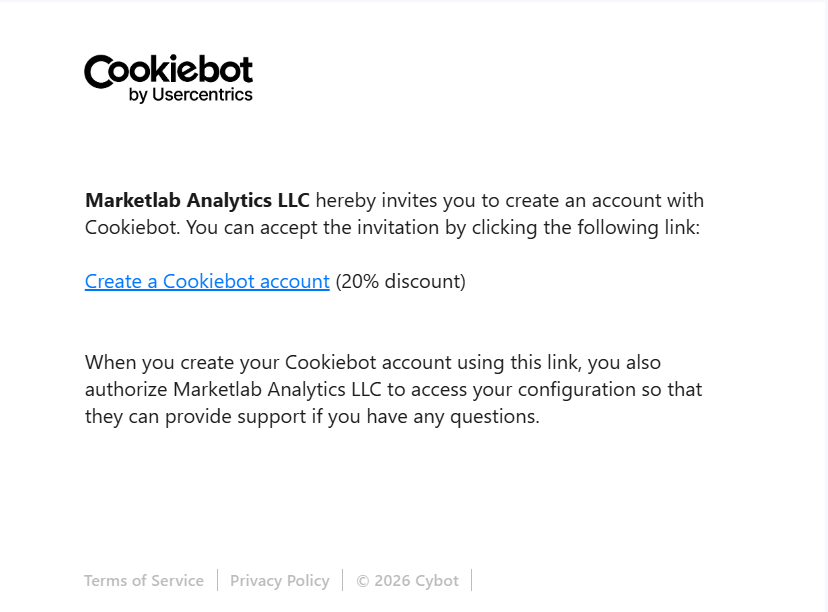
Expected result: your new Cookiebot Manager account is created through the invitation workflow, linked to the metricfixer reseller setup, and ready for CMP configuration.
Scenario 2: You already have a Cookiebot account in Manager
Use this workflow if you already have a Cookiebot Manager account. It also applies when that Manager account already has an active subscription. The goal is to connect the existing account, not to create a second one.
- Create a Cookiebot CMP setup ticket in metricfixer. Tell us that you already have a Cookiebot Manager account and provide the owner email used for that account.
- Wait for the invitation email from Cookiebot. The invitation is sent through the reseller workflow so your existing Manager account can be linked.
- Open the invitation link. The page may look like a signup page, but existing Manager users should use the login path.
- Log in with your existing Manager credentials. Use the account that already owns your Cookiebot setup or active subscription.
- Do not create a new account. Creating a duplicate account can leave the real subscription outside the discount workflow and delay the service delivery process.
- Confirm that the connection is complete in the metricfixer ticket. Once the existing Manager account is linked, metricfixer can continue with setup and support.
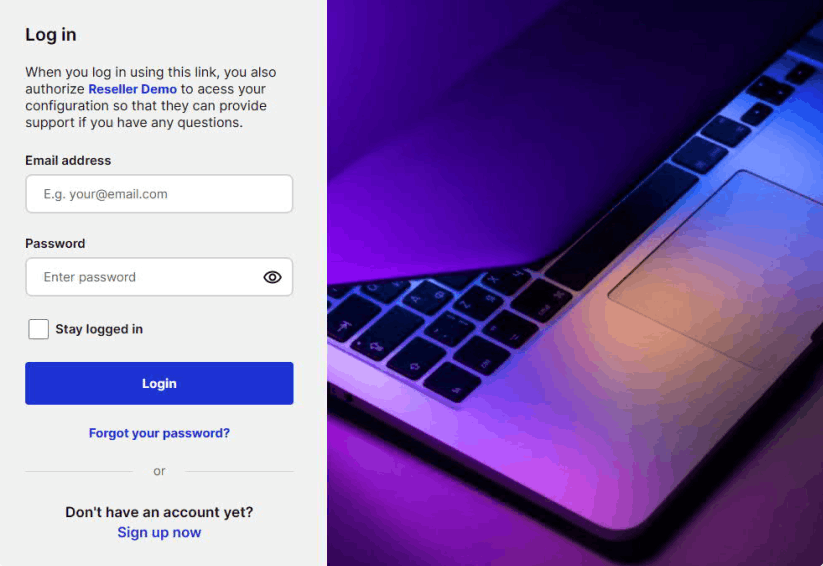
Expected result: your existing Manager account is linked to Marketlab Analytics LLC as a retail customer in the reseller workflow. If the account was already managed through Manager, you continue working in Manager.
Scenario 3: You already have Cookiebot in the Admin Interface
Use this workflow if your current Cookiebot account is managed through the Admin Interface. This scenario has one extra stage because the account first needs access to Cookiebot Manager. Your Manager password may be different from your Admin Interface password, so do not assume the same credentials will always work.
- Create a Cookiebot CMP setup ticket in metricfixer. Tell us that you currently use the Cookiebot Admin Interface, provide the owner email, and mention whether the account already has an active subscription.
- Wait for the reseller invitation email. Keep this email available, but do not create a new Cookiebot account from it.
- Log in to your Cookiebot Admin Interface. Use the account that currently controls your subscription, domains, or domain group.
- Open the user menu in the top-right corner. Choose the Cookiebot Manager option from that menu.
- Follow the Cookiebot Manager activation steps. Cookiebot may ask you to request a link, receive a temporary password, and create or activate a Manager user.
- After Manager access is ready, return to the reseller invitation email. Open the invitation link sent for your metricfixer ticket.
- Log in with the Manager-specific credentials. If Cookiebot created a separate Manager password, use that password rather than the Admin Interface password.
- Do not sign up for a new account. The purpose is to link the existing Cookiebot account to the reseller workflow.
- Confirm completion in your metricfixer ticket. After the account is linked, metricfixer can continue with CMP configuration and testing.
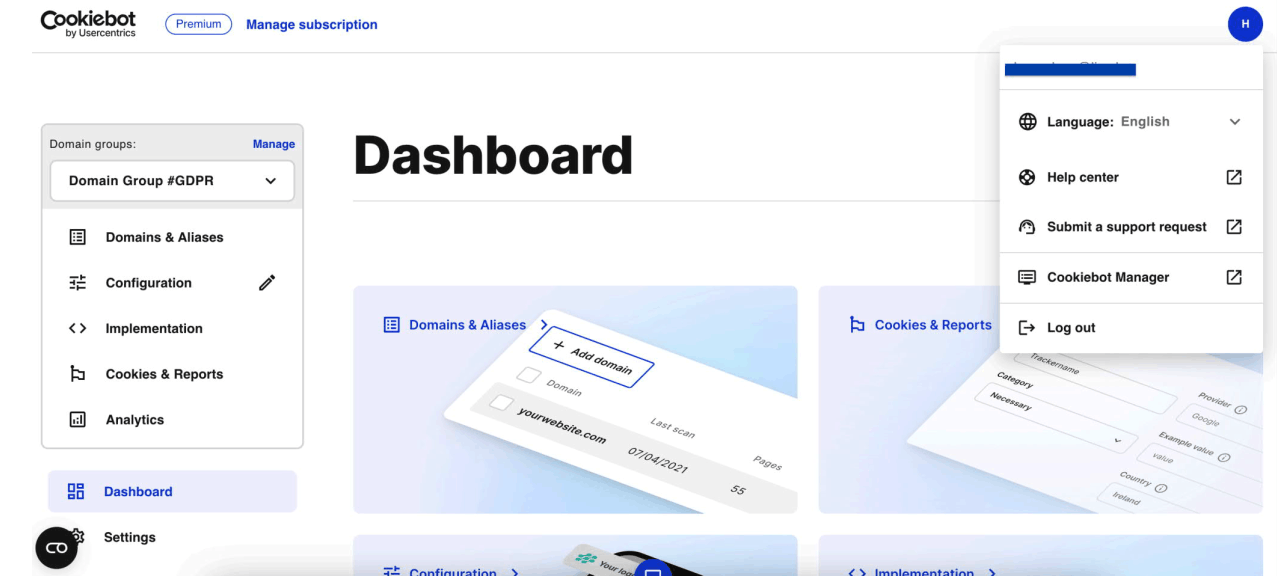
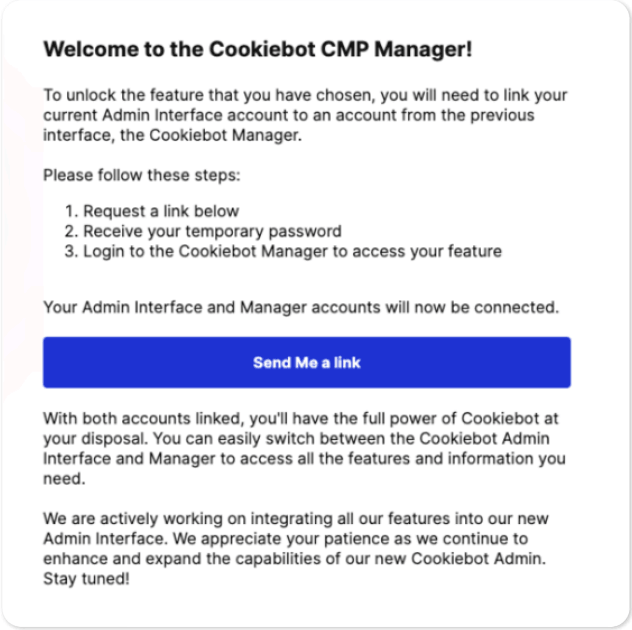
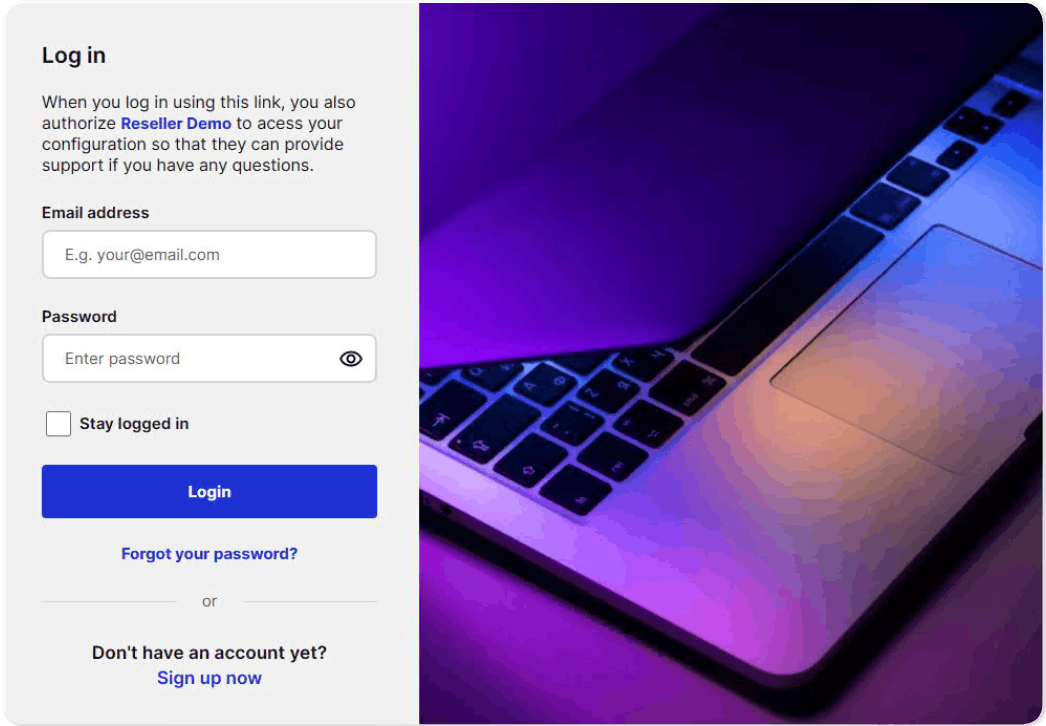 Expected result: the existing Cookiebot account is linked to the reseller workflow, and you can have access to both the Admin Interface and Cookiebot Manager. This is the key path for customers who already pay for Cookiebot but want to connect the active account to the 20% discount workflow.
What happens after the account is linked
Account linking solves only the subscription-access part of the service workflow. After that, metricfixer can proceed with the CMP setup scope agreed in the ticket. Depending on the order, this may include:
- Cookiebot domain group and scanner review;
- cookie category review and banner configuration;
- banner text, layout, language, and regional behavior checks;
- implementation through the website template, CMS, or Google Tag Manager;
- Google Consent Mode setup and testing;
- analytics and advertising tag behavior checks before and after consent;
- basic QA of consent states, cookie behavior, and tag firing logic;
- handoff notes for ongoing account management.
The exact scope depends on the service ordered in the ticket. Connecting the Cookiebot account does not by itself complete the CMP implementation; the banner, consent signals, tag behavior, and QA still need to be configured and verified.
Common mistakes that delay the discount workflow
- Creating a new account when an existing account should be linked. Existing customers should log in through the invitation page instead of signing up again.
- Using Admin Interface credentials before Manager access is activated. Admin Interface users may need to create or activate Manager-specific credentials first.
- Opening the invitation with the wrong email address. Use the email that owns or manages the Cookiebot account that should receive the discount.
- Changing the subscription manually before the account is connected. If you already have an active subscription, wait for ticket-specific instructions before making plan or billing changes.
- Forwarding the invitation without checking account ownership. The person accepting the invitation should control the Cookiebot account that needs to be linked.
- Assuming CMP setup is complete after account linking. The link enables the reseller association and support access; the actual CMP configuration still requires implementation and QA.
Customer checklist
- [ ] I created a Cookiebot CMP setup ticket in metricfixer.
- [ ] I provided the domain or domain group that should be configured.
- [ ] I stated whether I am a new Cookiebot user, an existing Manager user, or an Admin Interface user.
- [ ] I provided the correct Cookiebot owner email.
- [ ] I waited for the invitation email connected to my metricfixer ticket.
- [ ] If I already had a Cookiebot account, I logged in instead of creating a new account.
- [ ] If I used the Admin Interface, I activated or connected Cookiebot Manager before accepting the reseller invitation.
- [ ] I confirmed in the metricfixer ticket that the account was connected.
Methodology and sources
This guide is based on Cookiebot reseller-connection instructions for customers who previously signed up through Cookiebot Manager, Cookiebot reseller-connection instructions for customers who previously signed up through the Cookiebot Admin Interface, the Cookiebot invitation email workflow received by Marketlab Analytics LLC, and metricfixer service delivery rules for Cookiebot CMP setup. The purpose of the article is to translate those operational instructions into a customer-facing workflow that reduces duplicate accounts, missed discounts, and setup delays.
- Cookiebot Manager Panel signup and account connection entry point
- Cookiebot reseller instruction: connecting a customer who previously signed up using Cookiebot Manager.
- Cookiebot reseller instruction: connecting a customer who previously signed up using the Cookiebot Admin Interface.
- metricfixer service workflow for Cookiebot CMP setup, support access, implementation, QA, and handoff.
This guide is provided for operational and service-delivery purposes only. metricfixer.com is operated by Marketlab Analytics LLC. Cookiebot is a product of Usercentrics, and Cookiebot subscription terms, pricing, discount availability, billing cycles, account-linking behavior, and effective dates are controlled by Cookiebot/Usercentrics and may change. The 20% discount workflow depends on correct account linking through Cookiebot Manager and does not guarantee retroactive credits, refunds, or a specific billing effective date. CMP configuration can support privacy and consent workflows, but it is not legal advice and does not replace review by qualified counsel for your jurisdiction and business model.