
Published Jul 31, 2026
Why GA4 Measurement Protocol Events Lose Session and Traffic-Source Attribution
A reproducible GA4 Measurement Protocol lab showing why server-side purchases become Direct, Unassigned, or (not set), with tests for IDs, timestamps, consent, sGTM, and BigQuery.
Category: Analytics & Conversion Tracking · By Mikalai Sasau
This laboratory-style study explains why a server-side purchase can arrive in Google Analytics 4 while losing the browser session’s source, medium, campaign, or even the session itself. It isolates the roles of client_id, user_id, session_id, ga_session_id, engagement_time_msec, event timestamps, consent signals, server-side Google Tag Manager, and proxy-generated identifiers, then provides a reproducible request matrix and BigQuery verification queries.
Practical default: store the browser-generated client_id and current session_id with the order before the user leaves for payment. Send the confirmed purchase with those same values, use the real event time, keep the request inside Google’s session-attribution limits, and verify the result in BigQuery. Treat server-side GTM as a routing and governance layer—not as an attribution engine that can reconstruct identifiers the browser never supplied.
Executive summary
A successful Measurement Protocol request and a correctly attributed GA4 event are two different outcomes. Google can return an HTTP 2xx response even when the payload is malformed, contains an invalid field, or is not processed as expected. Receipt confirms transport only; it does not confirm user matching, session stitching, traffic-source inheritance, appearance in Realtime, or inclusion in downstream advertising workflows.
The central finding is that GA4 uses several separate joins:
client_ididentifies the pseudonymous web user or browser instance and should match the value generated by the Google tag.user_ididentifies a signed-in business user across devices and sessions, but it does not replace the device identifier or the session identifier.session_idis the Measurement Protocol input used to connect an event to a specific online session.ga_session_idis the name normally seen in BigQuery after export. It is not the correct Measurement Protocol input name, and parameters beginning withga_are reserved.timestamp_microsdetermines when GA4 treats the event as having occurred. For session attribution, the timestamp must fall inside the online session and the request must arrive no later than 24 hours after that session started.engagement_time_msecimproves Realtime visibility and engagement metrics, but it is not the key that assigns source or medium.
Matching only client_id can let GA4 associate the Measurement Protocol event with the same pseudonymous user and reuse some recent device, geography, privacy, and advertising context. It does not satisfy Google’s documented requirements for inheriting the source, medium, campaign, and other attributes of a particular session. That narrower operation requires the correct session_id and valid timing.
The second major finding is that user_id can make the GA4 interface look more unified without repairing the raw session link. GA4 reports may use User-ID and modeling according to the property’s reporting identity, while the BigQuery event export is based on device identity and exposes the underlying user_pseudo_id, user_id, and event parameters. For diagnostics, BigQuery is therefore the more reliable place to determine whether the browser event and server event really share the same pseudonymous user and session key.
The third finding is that direct Measurement Protocol and sGTM are not inherently different attribution models. A browser GA4 request routed through a server container can preserve its identifiers, and the server GA4 tag inherits relevant fields by default. A backend event sent through sGTM, however, gains no automatic right to the browser session. If the server container changes client_id, drops session_id, rewrites the timestamp, substitutes a server-managed identifier only for the purchase, or applies a conflicting consent state, the event can split from the original session just as it would in a direct Measurement Protocol implementation.
Receipt, user matching, session matching, and attribution are different tests
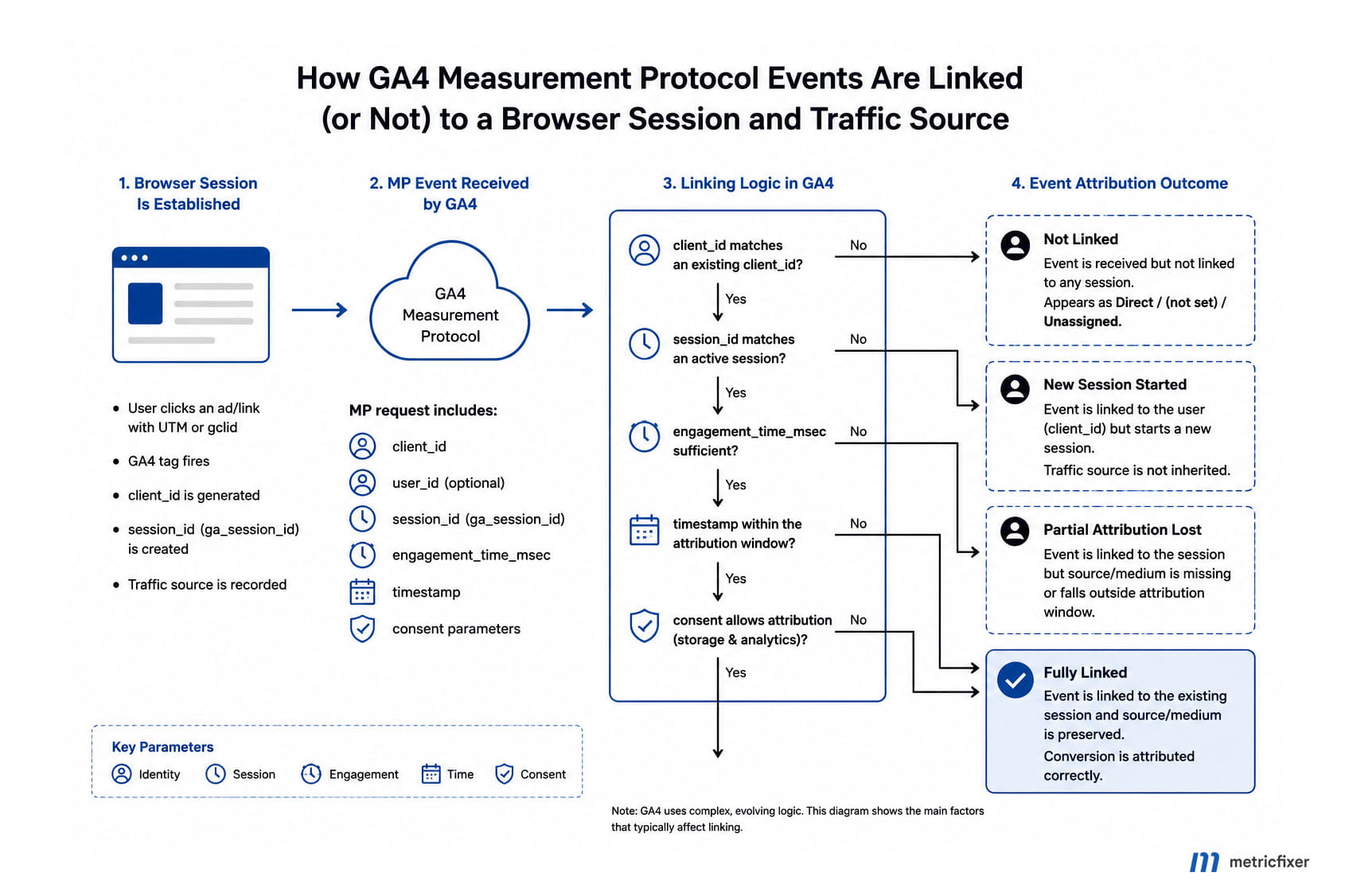
Many implementation reviews stop after confirming that purchase appears in the Events report. That proves only that an event with that name was processed somewhere in the property. A proper investigation separates four layers.
| Layer | Question | Primary evidence | Typical false conclusion |
|---|---|---|---|
| Transport | Did Google receive an HTTP request? | HTTP status and application logs | “A 204 or other 2xx means the event is correct.” |
| Event processing | Did the event enter the GA4 property? | Realtime, DebugView, event count, BigQuery export | “The event exists, so it must have the original campaign.” |
| User and session stitching | Does it share the browser’s pseudonymous user and session? | user_pseudo_id plus exported ga_session_id |
“The same user_id means the same session.” |
| Traffic-source attribution | Did GA4 assign the online session’s source, medium, and campaign? | Session-scoped reports and session_traffic_source_last_click |
“Any missing source is just a reporting delay.” |
Google explicitly describes Measurement Protocol as a supplement to data collected by the Google tag, Google Tag Manager, or Firebase—not a full replacement for online tagging. This distinction matters because the browser interaction establishes the session and collects the landing-page campaign parameters, referrer, click identifiers, device context, and consent state that a later server event may inherit.
Reliable stitching workflow: campaign-tagged landing page → Google tag creates the browser identity and session → checkout stores client_id, session_id, session start time, consent context, and order ID → payment webhook confirms the canonical transaction → backend sends purchase with the same browser identifiers and a truthful timestamp → GA4 processes the event → BigQuery confirms the composite session key and session traffic-source record.
Why Direct, (not set), and Unassigned are not the same
A detached Measurement Protocol purchase can look different depending on the report, dimension scope, reporting identity, and processing stage:
(not set)means GA4 did not receive or derive a value for the selected dimension. Google’s Measurement Protocol help specifically recommends sending a valid browser-sidesession_idwhen session-based MP events show(not set) / (not set).- Unassigned is a channel-group result. It appears when the available source and medium do not match a channel rule or when the underlying session identity or source information is missing.
- Direct is a traffic-source classification used when GA4 has no identifiable referring campaign or source for that session after its attribution logic is applied.
These values should not be treated as interchangeable error codes. The same implementation defect can produce (not set) in a session source/medium table, Unassigned in a channel-group report, and a seemingly unified user journey elsewhere in the interface. The lab therefore checks the raw identifiers first and interprets report labels second.
The identity model behind a stitched Measurement Protocol event
1. client_id: the browser or device identity
For a web stream, client_id is a top-level Measurement Protocol field. Google says it should match the identifier generated by the Google Analytics tag on the website. In BigQuery, the corresponding pseudonymous identity is normally exposed as user_pseudo_id.
The value should not be replaced with an order number, CRM contact ID, hashed email, server hostname, load-balancer token, IP address, or a newly generated UUID created when the webhook arrives. Those values may be stable in another system, but they do not identify the same browser instance that created the GA4 session.
Google updated the protocol in February 2026 so it can accept a client ID cookie value for client_id and a session ID cookie value for session_id. Google still recommends sending the extracted, non-cookie values. The same principle applies to the built-in Google Tag Manager variables introduced in late 2025: use the officially supported Analytics Client ID and Analytics Session ID variables rather than maintaining a custom parser for cookie formats.
2. user_id: the signed-in business identity
user_id is valuable for joining a known customer across devices and sessions. It is not a substitute for client_id and session_id. A purchase sent with the correct CRM user ID but a new server-generated client_id can still appear as a separate pseudonymous device and fail to inherit the browser session’s source.
Google’s current use-case documentation makes the separation explicit. To associate a Measurement Protocol event with a User-ID from an online session, the event still needs the session_id and valid timing. If the online session already carried the User-ID and the MP event is correctly tied to that session, the server request does not necessarily need to repeat user_id. Conversely, repeating user_id does not repair a missing or mismatched session key.
3. session_id versus ga_session_id
The correct Measurement Protocol input is session_id. In the BigQuery event export, the same concept is normally found as the event parameter ga_session_id. This naming difference causes a large share of broken implementations.
Do not send ga_session_id in the Measurement Protocol payload. Google reserves parameter names beginning with ga_, and the protocol reference defines session_id as the supported common event parameter. A production endpoint may still return 2xx under relaxed validation, while the invalid parameter is ignored.
A session ID is also not globally unique by itself. Google recommends combining user_id or user_pseudo_id with session_id when analyzing sessions outside GA4. For web diagnostics, the practical raw session key is therefore:
user_pseudo_id + "." + ga_session_idIf the server purchase has the expected ga_session_id but a different user_pseudo_id, it is not the same raw session. If it has the expected user_pseudo_id but no ga_session_id, it is the same pseudonymous user without a reliable session join.
4. engagement_time_msec: reporting quality, not attribution identity
engagement_time_msec represents user engagement elapsed since the preceding event. Google recommends including it with session_id for accurate Realtime reporting and engagement metrics such as Average engagement time and Engaged sessions.
Removing it is a useful lab case because it separates two effects. A request with the correct client_id, session_id, and timing can still satisfy the documented session-attribution conditions without engagement_time_msec. However, the event may be incomplete in Realtime and may not contribute correctly to engagement metrics. Adding an arbitrary large value does not improve source attribution and can distort engagement reporting.
5. timestamp_micros: three different time limits
Measurement Protocol timing is often reduced to the familiar 72-hour backdating limit, but session attribution has a stricter rule. There are three clocks to distinguish:
- Session interval: for session attribution, an overridden
timestamp_microsmust be at or after the online session start and at or before the online session end. - Attribution request deadline: the request must arrive no later than 24 hours after the online session started.
- General processing and backdating limits: events intended to be joined with client events should arrive within 48 hours of the original client-side event timestamp, and events can normally be backdated by no more than 72 hours. Under relaxed validation, an older timestamp may be moved forward to 72 hours ago; under strict validation it is rejected.
The 24-hour rule is the relevant ceiling when the goal is to inherit session source, medium, campaign, geography, and other session attributes. The 48-hour and 72-hour rules do not extend that session-attribution window.
Do not falsify the purchase time just to force an event into a previous session. If a customer completes payment after the original session has genuinely ended, the transaction can still be measured as an offline or server event and may remain useful for advertising exports, User-ID analysis, and first-party attribution. It should not be backdated into a session in which the purchase did not occur.
6. Consent fields: ads use and analytics identity are separate
The Measurement Protocol consent object currently documents two fields: ad_user_data and ad_personalization. If the object is omitted, GA4 uses consent settings from corresponding online interactions for that client or app instance.
There is no documented Measurement Protocol body field named analytics_storage. That consent type is set in the online tagging environment. When analytics_storage is denied, the Google tag sends cookieless pings and does not read or write the normal analytics cookie; Google also states that Analytics does not store the client ID in that state. Deterministic cookie-based session stitching is therefore unavailable by design, and a backend should not create or persist a substitute analytics identifier to bypass the user’s choice.
Denying ad_user_data or ad_personalization does not automatically mean that an otherwise consented analytics session must lose its source. It changes how data can be used for advertising, personalization, exports, and related features. The lab should therefore test analytics identity and advertising consent separately rather than treating one consent flag as a universal on/off switch for all attribution.
Laboratory design
GA4 does not return a synchronous “session successfully attributed” response. The only defensible experiment is a reproducible property-side test: hold every variable constant, change one field at a time, send each event with a unique transaction and case ID, then compare the GA4 interface with the raw BigQuery export.
The matrix below distinguishes two kinds of findings:
- Documented outcome: Google explicitly states the requirement or validation behavior.
- Diagnostic expectation: the result follows from the documented identity model, but the exact interface label can vary by reporting identity, consent modeling, processing status, and dimension scope.
This distinction prevents a common research error: presenting a property-specific screenshot as if it were a universal GA4 contract. The identifiers and BigQuery conditions are more stable than the exact UI wording.
Recommended lab environment
- Create a dedicated GA4 test property and web stream.
- Link BigQuery and enable streaming export if available. Use the final daily table for the conclusive result because intraday data can be incomplete.
- For UI-to-BigQuery comparison, use a test property with device-based reporting identity or explicitly account for User-ID and modeled reporting differences.
- Land on a test page with a known manual campaign:
https://lab.example/checkout?utm_source=mf_lab&utm_medium=email&utm_campaign=mp_session_test- Use the official GTM built-in variables Analytics Client ID, Analytics Session ID, and Analytics Session Number, or another officially supported extraction method. Store the non-cookie values with the test order.
- Record session start time, the last browser event time, the transaction time, consent state, and route used: direct MP or sGTM.
- Send one
purchaseper case with a uniquetransaction_idand anexperiment_caseparameter. - Validate payload structure with the debug endpoint, then send the real test to the production collection endpoint. Events sent only to the debug endpoint do not enter reports.
- Inspect Realtime and DebugView for arrival, then use BigQuery for the final identity and attribution verdict.
Canonical request
The canonical case keeps the browser identity, session, truthful transaction time, consent context, and ecommerce values together. Replace every placeholder with values from the dedicated test session.
{
  "client_id": "1234567890.1785492000",
  "user_id": "lab-user-84291",
  "timestamp_micros": 1785493800000000,
  "consent": {
    "ad_user_data": "GRANTED",
    "ad_personalization": "GRANTED"
  },
  "events": [
    {
      "name": "purchase",
      "params": {
        "session_id": 1785492000,
        "engagement_time_msec": 1,
        "transaction_id": "MF-MP-LAB-01",
        "currency": "EUR",
        "value": 129.90,
        "experiment_case": "L1_canonical"
      }
    }
  ]
}
For an anonymous test, omit user_id from both the browser control and the server request. For an authenticated test, set the same non-personally identifiable User-ID on both sides. Do not add user_id only to the canonical server case, because that would change two variables at once.
The endpoint for a web stream is:
https://www.google-analytics.com/mp/collect?measurement_id=G-XXXXXXXXXX&api_secret=YOUR_API_SECRETUse the EU endpoint where appropriate:
https://region1.google-analytics.com/mp/collect?measurement_id=G-XXXXXXXXXX&api_secret=YOUR_API_SECRETFor structural validation, use the debug path:
https://www.google-analytics.com/debug/mp/collect?measurement_id=G-XXXXXXXXXX&api_secret=YOUR_API_SECRETThe validation response can identify payload problems, but it does not prove that the event was authenticated for the intended property, joined to a browser session, or attributed to a traffic source. Debug-endpoint events do not enter normal reports.
Keep the API secret in a trusted server environment. It must never be exposed in browser JavaScript, a public data layer, client-side GTM, or a downloadable application bundle.
Request matrix and expected GA4/BigQuery results
| Case | Changed condition | Expected GA4 result | Expected BigQuery signature | Verdict |
|---|---|---|---|---|
| L0 Browser control |
Browser-side purchase in the known UTM session. |
Known session source, medium, and campaign. | Baseline user_pseudo_id, ga_session_id, and populated session traffic-source fields. |
Control row. |
| L1 Canonical MP |
Matching client_id and session_id; request within 24 hours; timestamp inside the session; engagement included. |
Should inherit the same session attributes as the browser events. | Same composite session key as L0 and the same session_traffic_source_last_click values. |
Documented pass. |
| L2 Client only |
Correct client_id; no session_id. |
Event may enter GA4 and associate with the same pseudonymous user, but session source/medium can be (not set) or otherwise detached. |
Expected user_pseudo_id; missing or nonmatching ga_session_id; session traffic-source record not reliably inherited. |
Fails the documented session-attribution requirement. |
| L3 Session only |
Correct session_id but a new or server-generated client_id. |
Should not be treated as the original raw session merely because the numeric session ID matches. | Different user_pseudo_id with the same numeric ga_session_id; different composite session key. |
Diagnostic fail. Session ID alone is not globally unique. |
| L4 User-ID repair attempt |
Correct user_id, but new client_id and missing or wrong session_id. |
UI user reporting may look unified under a blended identity, but the original session source is not reliably restored. | Same user_id, different user_pseudo_id, and no matching composite session key. |
Diagnostic fail. User-ID is not a session key. |
| L5 Wrong parameter name |
Send ga_session_id instead of session_id. |
Production may still return 2xx, but the reserved parameter is not the supported MP session field. |
No reliable exported session join from that field; the invalid parameter can be ignored. | Documented implementation error. |
| L6 No engagement |
Correct identifiers and timing; omit engagement_time_msec. |
Session source can still match, but Realtime and engagement metrics can be incomplete. | Matching composite session key; null engagement parameter; session source may remain populated. | Attribution can pass; engagement quality fails. |
| L7 Arrival time used after session |
Correct identifiers, but omit timestamp_micros and send after the online session has ended. |
The request time becomes the event time. It no longer meets the documented timestamp condition for the old session. | The supplied ga_session_id may still be visible, but session traffic-source inheritance is not guaranteed; upload offset shows delay. |
Fails the timestamp requirement. |
| L8 Late request |
Correct identifiers and an in-session timestamp, but request arrives more than 24 hours after session start. | Event may be processed, yet the prior session’s source, medium, campaign, geography, and device attributes are not guaranteed. | Identifiers may match while the session traffic-source record is missing or differs. | Fails the documented 24-hour deadline. |
| L9 Older than 72 hours |
Backdated timestamp older than 72 hours. | With strict validation, rejected; with relaxed validation, timestamp can be moved to 72 hours before receipt. | No original historical event time under the relaxed path; no valid original session inheritance. | Documented validation behavior. |
| L10 Ad consent denied |
Correct analytics identity; ad_user_data and/or ad_personalization set to DENIED. |
Core session stitching can still work when analytics storage was allowed, while advertising use and personalization are restricted. | Same composite session key can remain; advertising-related fields and downstream use may differ. | Separate analytics identity from advertising consent. |
| L11 Analytics storage denied online |
The browser session is cookieless because analytics_storage is denied. |
Do not expect deterministic cookie-based stitching to a stored browser client and session. | privacy_info.analytics_storage can be No; stable pseudonymous and session identifiers may be absent. |
Identity is unavailable by design. |
| L12 sGTM pass-through |
Browser and backend data pass through sGTM without changing identifiers, timestamp, or consent. | Expected to behave like the canonical case for the preserved fields. | Same composite session key and session traffic-source record as L1. | Expected pass; verify the outbound event. |
| L13 sGTM overwrite |
sGTM replaces client_id only on the server purchase. |
Purchase splits from the browser session even though transport and event processing succeed. | Different user_pseudo_id; original ga_session_id may be present but composite key differs. |
Diagnostic fail. |
| L14 Consistent server-managed ID |
A server-managed identifier is used consistently for the browser session and the purchase in a first-party sGTM setup. | Can stitch when the same identity and session values reach GA4 from the beginning of the session. | Matching pseudonymous identity and session key across browser and server events. | Implementation-dependent pass. |
| L15 Proxy/IP identity |
Backend IP, proxy IP, user agent hash, or load-balancer token used as client_id. |
Users can be merged or split unpredictably; traffic-source attribution becomes unreliable. | Abnormal reuse or churn of user_pseudo_id across unrelated orders and sessions. |
Architecture fail. |
Detailed findings by parameter
Finding 1: client_id is necessary but not sufficient
Google uses client_id to join a Measurement Protocol event with online interactions from the same web user instance. This can carry useful context: current documentation says advertising identifiers such as GBRAID and WBRAID, privacy settings, and recent geography and device information can be joined through client_id.
That broader user-level context explains why a server purchase with only client_id can look partially correct. It may have the expected browser or device, and it may contribute to user-level analysis. The missing piece is the particular session. Google documents session_id as a separate requirement when the event must inherit source, medium, campaign, and other attributes from a specific online session.
Finding 2: user_id does not repair session attribution
A stable User-ID is the correct way to represent a signed-in customer, but GA4’s reporting identity can hide implementation defects. Reports may deduplicate or unify users by User-ID, while BigQuery still shows the server event under a different user_pseudo_id or without the browser’s ga_session_id.
For a fair lab comparison, inspect both views:
- GA4 UI: whether the purchase appears in the intended user journey and session-scoped acquisition reports.
- BigQuery: whether
user_pseudo_idandga_session_idmatch the browser control.
If the UI appears connected but the raw composite session key differs, User-ID or modeling has unified reporting without recreating the original session link.
Finding 3: session_id is the attribution join
Google’s current Measurement Protocol use-case guide is unusually explicit: events that meet the requirements appear with the same session attributes as online events from that session. The required elements are session_id, delivery within 24 hours of session start, and—when the timestamp is overridden—an event time between session start and session end.
This is the strongest answer to the common question “Should we send source and medium from the backend?” The first repair should not be a custom copy of UTM values. It should be preserving and sending the correct browser session key. Manually duplicating campaign labels can create custom event parameters, but it does not recreate the session established by the online session_start and its attribution data.
Finding 4: ga_session_id is an export name, not the MP request field
Many data teams learn the name ga_session_id from BigQuery and then put the same name into a server payload. That is incorrect. The protocol reference reserves the ga_ prefix and defines session_id as the supported request parameter.
The correct mapping is:
| System layer | Field | Use |
|---|---|---|
| Browser/GTM variable | Analytics Session ID | Read the current GA4 session value. |
| Measurement Protocol request | session_id | Send the session value inside events[].params. |
| BigQuery event export | ga_session_id | Inspect the exported session parameter. |
Finding 5: engagement_time_msec affects visibility and metrics, not source identity
It is reasonable to include engagement_time_msec in a server purchase because Google recommends it for Realtime and engagement reporting. It should represent a defensible amount of engagement since the previous event. A small value is less distorting than an invented long duration when the backend cannot observe active browser time.
However, adding this parameter will not repair a wrong client_id, a missing session_id, a late request, or a timestamp outside the session. If source attribution changes when only engagement is added, the implementation should be retested because another variable likely changed at the same time.
Finding 6: event time is part of the session-attribution test
If timestamp_micros is absent, Measurement Protocol uses the request receipt time. This is often harmless for an immediate server confirmation, but it becomes a problem when a payment webhook arrives after the browser session has ended. The event may carry an old session_id while its effective event time belongs to a later period.
The backend should store at least three timestamps:
- when the online session started;
- when the transaction actually became confirmed;
- when the Measurement Protocol request was sent.
Those values make it possible to distinguish a genuine stitching defect from a transaction that simply occurred outside the original online session. BigQuery’s event_server_timestamp_offset can provide additional evidence about collection-to-upload delay.
Finding 7: consent cannot be reconstructed safely on the server
When the user allowed analytics storage, a matching client_id lets MP inherit relevant online privacy context if the request does not explicitly provide the documented advertising consent fields. When analytics storage was denied, there is no normal persistent client cookie to recover. A server should not silently convert a cookieless visit into an identified session by assigning its own analytics ID.
Store a consent snapshot with the order only when the collection and retention are lawful and technically aligned with the consent platform. Keep the concepts separate:
analytics_storage: whether analytics identifiers may be read or written by the online tag;ad_user_data: whether user data may be sent to Google for advertising purposes;ad_personalization: whether personalized advertising is permitted.
Finding 8: sGTM preserves or changes identity; it does not invent attribution
In the standard browser-to-sGTM pattern, the Google tag sends a GA4 request to the server container. The GA4 client parses the request into an event data object, and the GA4 server tag inherits relevant parameters by default before dispatching them to Google Analytics. With no transformations, the key identifiers can remain intact.
A backend-to-sGTM implementation is a different route. The server container must claim and parse the incoming request, and its client, transformations, and destination tag decide what is forwarded. Google notes that sending nonwebsite data through the server container does not use the Measurement Protocol endpoint itself and does not support every MP feature, including some automatic geography and device derivation behavior.
For attribution troubleshooting, compare these values in sGTM Preview at three points:
- incoming request;
- event data produced by the active client;
- outbound GA4 request produced by the destination tag.
If client_id, session_id, timestamp_micros, or consent changes between those stages, the difference—not “server-side tracking” as a category—is the likely cause of the attribution split.
Finding 9: proxy and server identifiers are not GA4 client identifiers
A server container can read request headers and make a best-effort determination of the originating IP address, but Google does not define that value as a user or session identifier. The protocol provides ip_override for geographic derivation, not for client_id.
Using a proxy IP, server IP, user-agent hash, or connection token as client_id creates predictable failure modes:
- many users behind one network are merged;
- one user moving between networks is split;
- load-balancer or proxy changes create artificial new users;
- backend-originated requests inherit server geography rather than user geography unless handled explicitly;
- privacy and consent obligations become harder to control.
A server-managed first-party identifier can be valid only when it is intentionally used as the same analytics identity across the browser session and the later server event. Substituting it only at the purchase step breaks the composite session key.
How to verify the result in BigQuery
BigQuery is the decisive layer because it exposes the event-level identity and session parameters before the full set of value additions used in GA4 reports. Google also notes that GA4 reports and BigQuery can differ because the interface may use other reporting-identity spaces and modeled data, while the event export is device-identity based.
For session attribution, inspect:
user_pseudo_id— the raw pseudonymous browser/device identity;user_id— the optional signed-in identity;ga_session_idextracted fromevent_params;engagement_time_msec;event_timestampandevent_server_timestamp_offset;privacy_info.analytics_storageandprivacy_info.ads_storage;session_traffic_source_last_clickfor the processed session source, medium, and campaign;collected_traffic_sourcewhen diagnosing raw campaign fields that arrived with an event.
Query 1: inspect all purchase cases
WITH purchase_events AS (
  SELECT
    event_date,
    TIMESTAMP_MICROS(event_timestamp) AS event_time_utc,
    event_server_timestamp_offset,
    event_name,
    stream_id,
    platform,
    user_pseudo_id,
    user_id,
    (SELECT value.int_value
     FROM UNNEST(event_params)
     WHERE key = 'ga_session_id') AS ga_session_id,
    (SELECT value.int_value
     FROM UNNEST(event_params)
     WHERE key = 'engagement_time_msec') AS engagement_time_msec,
    (SELECT value.string_value
     FROM UNNEST(event_params)
     WHERE key = 'transaction_id') AS transaction_id,
    (SELECT value.string_value
     FROM UNNEST(event_params)
     WHERE key = 'experiment_case') AS experiment_case,
    privacy_info.analytics_storage,
    privacy_info.ads_storage,
    collected_traffic_source.manual_source AS collected_source,
    collected_traffic_source.manual_medium AS collected_medium,
    collected_traffic_source.manual_campaign_name AS collected_campaign,
    session_traffic_source_last_click.manual_campaign.source AS session_source,
    session_traffic_source_last_click.manual_campaign.medium AS session_medium,
    session_traffic_source_last_click.manual_campaign.campaign_name AS session_campaign,
    session_traffic_source_last_click.google_ads_campaign.campaign_name AS google_ads_campaign
  FROM `YOUR_PROJECT.analytics_PROPERTY_ID.events_*`
  WHERE _TABLE_SUFFIX BETWEEN '20260701' AND '20260731'
    AND event_name = 'purchase'
)
SELECT
  *,
  CONCAT(
    COALESCE(user_pseudo_id, 'NULL'),
    '.',
    COALESCE(CAST(ga_session_id AS STRING), 'NULL')
  ) AS raw_session_key
FROM purchase_events
WHERE STARTS_WITH(transaction_id, 'MF-MP-LAB-')
ORDER BY event_time_utc, experiment_case;
The canonical MP row should have the same raw_session_key and session traffic-source fields as the browser control. A matching user_id with a different raw session key is not a successful session stitch.
Query 2: reconstruct the browser and server event timeline
DECLARE expected_client_id STRING DEFAULT '1234567890.1785492000';
DECLARE expected_session_id INT64 DEFAULT 1785492000;

WITH session_events AS (
  SELECT
    TIMESTAMP_MICROS(event_timestamp) AS event_time_utc,
    event_name,
    user_pseudo_id,
    user_id,
    (SELECT value.int_value
     FROM UNNEST(event_params)
     WHERE key = 'ga_session_id') AS ga_session_id,
    (SELECT value.string_value
     FROM UNNEST(event_params)
     WHERE key = 'experiment_case') AS experiment_case,
    (SELECT value.string_value
     FROM UNNEST(event_params)
     WHERE key = 'transaction_id') AS transaction_id,
    session_traffic_source_last_click.manual_campaign.source AS session_source,
    session_traffic_source_last_click.manual_campaign.medium AS session_medium,
    session_traffic_source_last_click.manual_campaign.campaign_name AS session_campaign,
    privacy_info.analytics_storage,
    event_server_timestamp_offset
  FROM `YOUR_PROJECT.analytics_PROPERTY_ID.events_*`
  WHERE _TABLE_SUFFIX BETWEEN '20260701' AND '20260731'
)
SELECT *
FROM session_events
WHERE user_pseudo_id = expected_client_id
   OR ga_session_id = expected_session_id
ORDER BY event_time_utc;
This query intentionally uses an OR condition. It reveals two important defects that an exact composite-key filter would hide: an event with the correct user but missing session, and an event with the correct numeric session ID but the wrong pseudonymous user.
How to read the output
| BigQuery pattern | Meaning | Likely repair |
|---|---|---|
Same user_pseudo_id, same ga_session_id, same session source |
Successful raw session stitch. | None; compare UI processing and reporting scope if labels still differ. |
Same user_pseudo_id, null ga_session_id |
User matched; session did not. | Send valid session_id in events[].params. |
Different user_pseudo_id, same numeric ga_session_id |
Session number reused under another pseudonymous user. | Restore the browser-generated client_id. |
Same user_id, different user_pseudo_id and session |
User-ID reporting may unify the customer, but raw session attribution is split. | Preserve both browser client_id and session_id. |
| Correct identifiers, large upload offset, missing session source | Likely late request or timestamp outside the online session. | Store and send the real event timestamp; enforce the 24-hour session-attribution deadline. |
analytics_storage = No with missing stable IDs |
Cookieless measurement; deterministic cookie stitching is not expected. | Respect consent and use aggregate/modeling or lawful first-party attribution instead. |
| Identifiers match but UI differs from BigQuery | Reporting identity, processing, modeling, scope, or data freshness difference. | Compare device-based reporting identity, final daily export, and compatible session dimensions. |
Direct Measurement Protocol versus sGTM
| Dimension | Direct Measurement Protocol | Through server-side GTM |
|---|---|---|
| Session identity | Backend must send the browser’s client_id and session_id. |
Same requirement. sGTM may preserve, map, replace, or remove them. |
| Attribution logic | Google’s documented MP session-attribution requirements apply. | No extra attribution is created merely because the request passed through a server container. |
| Validation | Use the MP debug endpoint for payload structure, then production endpoint for real processing. | Use sGTM Preview to inspect client claiming, event data, transformations, and outbound tag request. |
| Cookie strategy | Typically uses the browser’s Google Analytics identifiers captured before checkout. | Can use JavaScript-managed or server-managed client identification in first-party contexts. |
| Main risk | Missing, stale, or fabricated identifiers; late timestamp; exposed API secret. | Silent transformations, mixed client/server paths, inconsistent server-managed IDs, duplicate dispatch. |
| Geo/device context | Current MP can join recent context through the matching client and accepts explicit location/device fields. | Nonwebsite data sent to sGTM does not support every MP endpoint feature; verify enrichment separately. |
The correct comparison is therefore not “sGTM attributes better than direct MP.” It is “which route preserves and governs the same validated identity, session, time, and consent data more reliably?” A well-governed sGTM setup can improve control, first-party transport, security, and observability. A poorly mapped setup can make the split harder to see.
Reference architecture for reliable server-side purchases
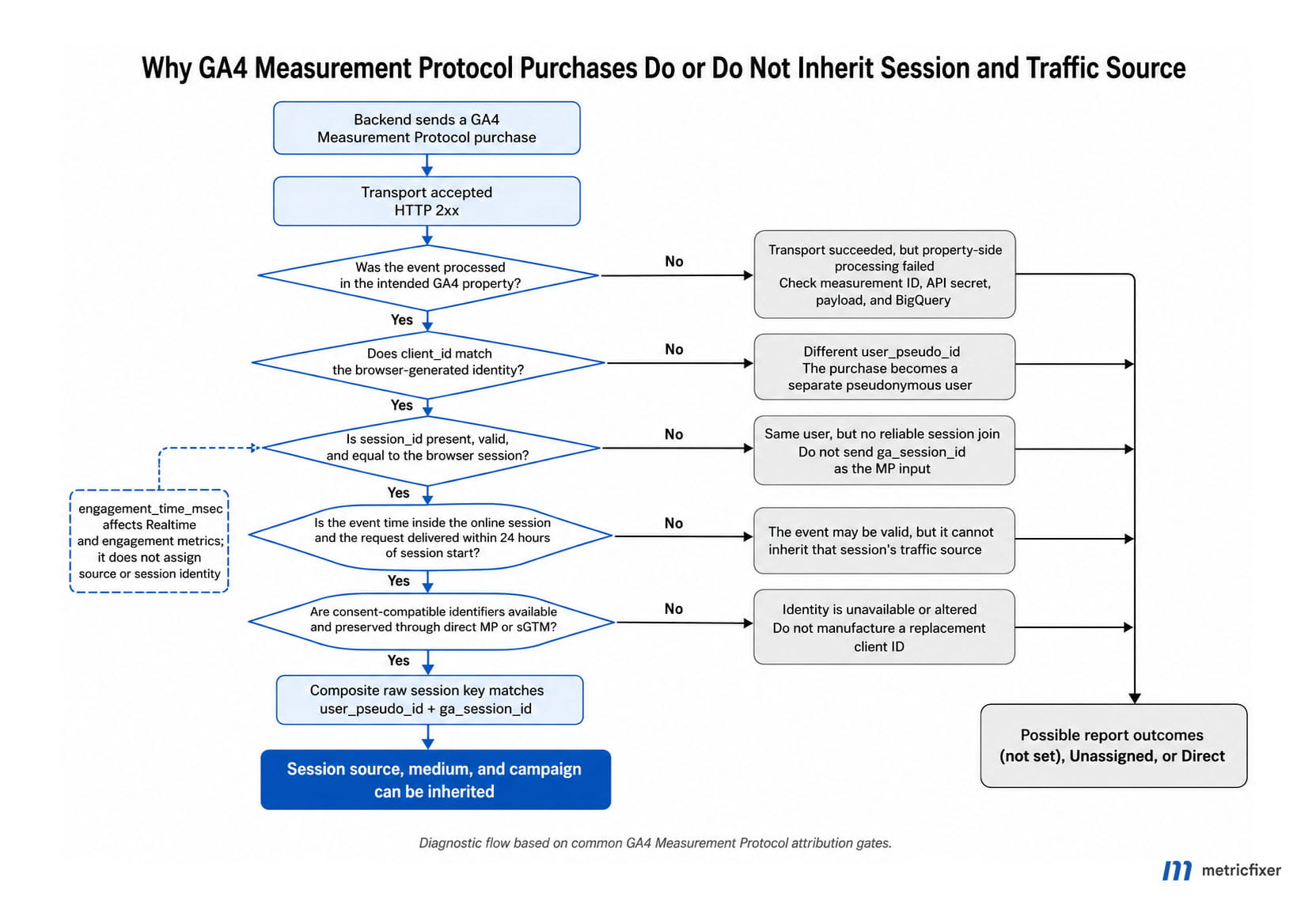
1. Capture context before the external redirect
Before sending the user to a payment gateway, persist the following against the checkout or order:
- browser-generated
client_id; - current
session_idand optionally session number; - session start time and the latest browser event time;
user_idwhen the user is signed in;- consent snapshot relevant to analytics and advertising;
- transaction or order ID;
- click identifiers and first-party campaign context where collection is permitted;
- the route used for analytics dispatch: direct MP or sGTM.
Store the identifiers in backend order state, not only in a thank-you page URL or a short-lived browser variable. The entire purpose is to survive a payment flow in which the customer never returns to the website.
2. Use the payment webhook as business truth
The payment provider’s signed webhook should determine whether the transaction is confirmed, pending, failed, refunded, or cancelled. The analytics request should be a downstream effect of that canonical state change. Use the ecommerce transaction_id as the stable link between analytics, order data, and webhook retries.
3. Select the measurement path based on timing
- Purchase confirmed during the online session: send matching
client_idandsession_id, a truthful timestamp inside the session, and deliver within 24 hours of session start. - Purchase confirmed after the online session ended: send a truthful server event, preserve User-ID and first-party attribution context where lawful, but do not force it into the old session. Use the appropriate offline-conversion or advertising-import workflow when campaign optimization is the main goal.
- No analytics identifier because consent was denied: do not manufacture one. Use consent-compatible aggregate, modeled, or first-party reporting.
Google’s current use-case guide separates session attribution from export to advertising platforms. An MP event can be eligible for advertising export under its own timing and attribution-window conditions without inheriting a historical GA4 session’s source. That distinction is important for delayed bookings and offline confirmations.
4. Validate, dispatch, and log idempotently
For every server event, log:
- order and transaction ID;
- measurement ID and route, but never expose the secret;
- hashed or access-controlled diagnostic representation of
client_idandsession_id; - event time and dispatch time;
- consent fields sent or inherited;
- HTTP response;
- retry count and final delivery state;
- sGTM container version when applicable.
A 2xx response should be stored as “request received,” not “purchase attributed.” The latter status can be confirmed only after property-side observation.
5. Monitor with BigQuery
Create a scheduled data-quality query that measures:
- percentage of server purchases with non-null
user_pseudo_id; - percentage with non-null
ga_session_id; - percentage with populated session source and medium;
- share of server purchases classified as Direct, Unassigned, or
(not set); - share with large upload offsets;
- share where one
transaction_idappears under multiple raw session keys; - differences between direct MP and sGTM routes.
Trend these rates by consent state, browser, payment method, gateway, and implementation version. A single aggregate percentage can hide a defect limited to one payment provider or one sGTM transformation.
Troubleshooting sequence
- Confirm the event entered the correct property. Check the measurement ID, API secret, event name, and BigQuery row—not only the HTTP response.
- Confirm the request used
session_id, notga_session_id. Validate withENFORCE_RECOMMENDATIONSduring development. - Compare
client_idwith BigQueryuser_pseudo_id. Do not compare only User-ID. - Compare the composite raw session key. The pair must match the browser control.
- Check event time. Determine whether GA4 used the explicit timestamp or the later request time.
- Check the 24-hour deadline. A 72-hour-valid event can still be too late for session attribution.
- Check engagement separately. Missing Realtime visibility is not proof that the source join failed.
- Check consent and identifier availability. Do not expect cookie stitching for an analytics-storage-denied visit.
- Inspect every sGTM stage. Compare incoming request, client event data, transformation output, and outbound GA4 request.
- Compare compatible reporting surfaces. Use session-scoped dimensions, device-based identity for the lab, and final BigQuery tables.
Implementation checklist
- [ ] The Google tag initializes before checkout events and captures the landing-page campaign correctly.
- [ ] The order record stores the browser-generated
client_idand currentsession_idbefore redirect. - [ ]
client_idis sent at the top level of the MP body. - [ ]
session_idis sent insideevents[].params. - [ ] The payload does not send
ga_session_idor another reservedga_parameter. - [ ]
user_idsupplements rather than replaces browser identity. - [ ] The event timestamp is in microseconds, reflects the real event time, and is inside the session only when that is factually correct.
- [ ] Requests intended to inherit session source arrive within 24 hours of session start.
- [ ]
engagement_time_msecis present where Realtime and engagement reporting matter, and its value is defensible. - [ ] Consent fields are derived from the actual consent workflow; no backend identifier is created to bypass denied analytics storage.
- [ ] Direct MP secrets stay server-side.
- [ ] sGTM transformations do not unexpectedly replace or delete identity, session, timestamp, or consent fields.
- [ ] Browser and server events use one consistent identity strategy.
- [ ] Each test and production purchase uses a stable
transaction_idand an idempotent dispatch workflow. - [ ] BigQuery monitoring checks the composite session key and
session_traffic_source_last_click, not only event counts.
Conclusion
A GA4 Measurement Protocol purchase becomes Direct, Unassigned, or (not set) not because server events are inherently unattributable, but because event receipt, user identity, session identity, and traffic-source inheritance are separate stages.
The minimum reliable session-attribution chain is:
matching client_id
+ valid session_id
+ request within 24 hours of session start
+ truthful timestamp inside the online session
+ consent-compatible identity
+ unchanged outbound payload
user_id can unify a customer, engagement_time_msec can improve Realtime and engagement reporting, and sGTM can improve governance. None of them replaces the browser’s session key. The decisive test is whether the browser event and server event share the same user_pseudo_id plus ga_session_id in BigQuery and carry the same session traffic-source record.
Methodology and sources
This article was prepared as a reproducible laboratory protocol using Google’s current official GA4 Measurement Protocol, session, consent, server-side tagging, reporting-identity, and BigQuery documentation available on 31 July 2026. The matrix changes one variable at a time and defines falsifiable GA4 and BigQuery result criteria. Exact UI labels are identified as diagnostic expectations where Google documents the underlying requirement but not a universal report rendering.
No reader-specific GA4 property credentials, API secret, server container, or BigQuery dataset were available for this publication. The article therefore does not fabricate account-level observations. Teams should run the matrix in a dedicated test property, retain the raw requests and timestamps, and use the final BigQuery daily export to confirm their own processing results.
- Google Analytics Measurement Protocol overview
- Google Analytics Measurement Protocol use cases and session-attribution requirements
- Google Analytics Measurement Protocol reference
- Google Analytics: Send Measurement Protocol events
- Google Analytics: Validate Measurement Protocol events
- Google Analytics: Verify Measurement Protocol implementation
- Google Analytics Measurement Protocol changelog
- Google Analytics Help: Measurement Protocol
- Google Analytics Help: About Analytics sessions
- Google Analytics tagging practices for avoiding Unassigned, (not set), and Direct issues
- Google Analytics Help: What (not set) means
- Google Analytics Help: Reporting identity
- Google Analytics Help: Compare GA4 reports with BigQuery export
- Google Analytics BigQuery traffic-attribution data
- Google Analytics BigQuery Export schema
- Google Analytics data collection and client identifiers
- Google Analytics Consent Mode reference
- Google Tag Manager built-in variables for web containers
- Google server-side tagging fundamentals for GA4
- Google Tag Manager: Send data to server-side Tag Manager
- Google Tag Manager server-side tagging overview
- Google Tag Manager server-side APIs
This article is for technical and operational information only. metricfixer is not affiliated with Google, Google Analytics, Google Tag Manager, Google Cloud, or any payment provider. GA4 processing rules, consent behavior, reporting identity, Measurement Protocol fields, server-side tagging features, and BigQuery schemas may change after publication. Validate the architecture in a dedicated property before using it for financial reconciliation, advertising optimization, or compliance decisions, and never use server-side identifiers to bypass a user’s consent choice.