
Published Jul 9, 2026
Google Ads Target-Based Bid Strategy Changes: What Advertisers Should Do Before August 2026
Google is changing how budget-limited campaigns with target-based bidding behave from 17 August 2026. This practical guide explains what advertisers should review, when to adjust targets, and how to prepare Search, Shopping, Performance Max, Demand Gen, and Travel campaigns.
Category: Online advertising · By Mikalai Sasau
Google is changing how some target-based bid strategies behave when campaigns are limited by budget. Starting on 17 August 2026, affected campaigns are expected to optimize more consistently toward the target entered in Google Ads, even when advertisers adjust budgets. This article explains what is changing, why it matters, and how advertisers and agencies should prepare campaigns before the rollout.
Practical default: do not treat this as a reason to make broad emergency changes. First identify campaigns with Limited by budget status and target-based bidding. Then compare the current target with recent actual performance. If the campaign has been achieving a much better CPA or ROAS than the target you entered, decide whether that better level is the real business target and update the setting before 17 August 2026.
Executive summary
Google’s update affects a specific situation: a campaign is constrained by budget and uses a target-based bid strategy, such as Target CPA or Target ROAS. Under the previous behavior, some budget-limited campaigns could outperform their stated target. For example, a campaign could have a Target CPA of $10 but actually deliver conversions around $5. After the update, Google says the system will optimize more consistently toward the target that is actually entered in the account.
The important consequence is simple: if your target is looser than your recent real performance, the campaign may move closer to that looser target after the change. That does not necessarily mean Google will spend more by itself. Google says daily and monthly budget limits remain in place. The risk is that efficiency, volume, and channel mix may shift if the target no longer reflects what you really expect from the campaign.
The update is not meant to change the Google Ads auction itself. It is a bidding behavior change. It is also not a universal change for every campaign. Google says campaigns that are not budget-constrained should not change their behavior because of this update, and some campaign types continue using previous behavior or already use the newer behavior.
The best preparation is a structured review, not a panic rebuild. Export affected campaigns, compare target versus actual performance, check whether the target still reflects business economics, and decide one of four actions: keep the target, align it with recent performance, set a custom target, or change the bidding strategy where a fixed budget and maximum volume matter more than a stable target.
What is changing in Google Ads bidding behavior?
Google’s official explanation is that, from 17 August 2026, budget-limited campaigns using target-based bid strategies will more consistently optimize toward the target entered in the account. The purpose is to make performance more predictable when advertisers change budgets.
In plain language, Google is reducing a gap that could exist between the target you typed into the campaign and the actual performance the campaign was achieving while budget-limited. Before the change, some campaigns with limited budgets could perform better than the target. After the change, Google expects affected campaigns to behave more closely to the stated target.
Workflow before the rollout: find campaigns with Limited by budget status → filter for target-based bidding → compare the entered target with recent actual CPA, ROAS, or CPC → decide whether the current target is still correct → update the target, budget, or bid strategy only where the business case supports it → wait 1–2 conversion cycles before judging the result.
The practical question is not “will the campaign become worse?” but “does the target in the account still represent the result we want?” If the answer is no, the campaign settings should be updated before the new behavior takes effect.
Which campaigns are affected?
The change mainly matters for campaigns that meet both conditions:
- the campaign has been in
Limited by budgetstatus; and - the campaign uses a target-based bid strategy affected by the update.
Google lists the main affected strategies as Target CPA and Target ROAS across most eligible campaign types, plus Target CPC for Demand Gen. The affected campaign types include Search, Shopping, Performance Max, Demand Gen, and Travel campaigns in the supported platforms. Google also notes that App campaigns, Video reach campaigns, and Video view campaigns continue using previous bidding behavior, while Hotel and Display campaigns already have the newer behavior.
| Campaign or bidding setup | Practical interpretation | Recommended review |
|---|---|---|
Search with Target CPA or Target ROAS | Likely affected if the campaign is or was budget-limited. | Compare actual performance with the stated target and review budget constraints. |
Shopping with Target ROAS | Efficiency targets may become more literal after the change. | Check whether the entered ROAS target still matches margin and inventory goals. |
Performance Max | Overall target behavior may become more predictable, but channel allocation may shift. | Review asset groups, conversion goals, budget pressure, and target-to-actual gaps. |
Demand Gen | Affected for relevant target-based strategies, including Target CPC where applicable. | Check whether the campaign is optimized for traffic, leads, or deeper conversion quality. |
| Portfolio bidding or shared budgets | Actions may need to happen at portfolio or shared-budget level. | Do not review only individual campaigns; review the shared structure. |
| Not budget-limited | Google says target-based campaigns that are not budget-constrained should not change behavior because of this update. | Monitor normally, but prioritize budget-limited campaigns first. |
Why this matters for advertisers
The change matters because many accounts contain targets that were set for control, caution, or historical reasons, not because they represent the current business target. A campaign may have been left with a relaxed Target CPA because the budget was small, or a Target ROAS may no longer reflect current margins, lead quality, product mix, or sales capacity.
Under the new behavior, those old targets become more important. If the entered target is weaker than recent performance, the campaign may begin to deliver closer to that weaker target. For example, if the target is $10 and recent actual CPA is around $5, keeping the target unchanged signals that $10 is acceptable. If that is not true, the target should be adjusted.
For Performance Max and Demand Gen, there is an additional layer: Google says multi-channel campaigns may see shifts in traffic distribution across channels. That means the account-level result may remain aligned with the target, while the internal mix of placements, inventory, or touchpoints changes.
What not to do in response to the update
This update should not trigger random account surgery. Google’s FAQ specifically says advertisers should not apply actions such as data exclusions or new bid limits solely because of this change, because those actions can create performance fluctuations.
It is also usually a mistake to lower every target aggressively just because the tool identifies a gap. A stricter target can reduce spend and volume. A looser target can increase volume but may weaken efficiency. The correct target should come from business economics: margin, lead quality, close rate, average order value, customer lifetime value, and the capacity to handle additional demand.
How to prepare campaigns before 17 August 2026
The preparation process should be handled as a bidding and measurement audit. The goal is to make sure each target-based campaign has a target that the business actually wants Google Ads to pursue.
- Find affected campaigns. Start with campaigns that have had
Limited by budgetstatus during the last 12 months and use an affected target-based bid strategy. - Compare target versus actual performance. For
Target CPA, compare the entered target with recent actualCPA. ForTarget ROAS, compare the entered target with recent actualROAS. ForDemand GenusingTarget CPC, compare the target with actual traffic cost and downstream quality. - Check whether conversion tracking is reliable. Do not optimize targets around noisy or incomplete conversion data. Review primary conversion actions, offline conversion imports, enhanced conversions, consent mode behavior, duplicate conversion actions, and delayed conversions.
- Decide the business target. A good target is not simply the best recent number. It is the point where volume and profitability still make sense.
- Use the
Bid Target Adjustment Toolwhere relevant. Google says the tool is available from 6 July 2026 and can help advertisers review historical performance and quickly apply updates. - Evaluate after enough time has passed. Google recommends waiting 1–2 conversion cycles before judging performance after target or budget changes, especially where conversion delay is long.
Your practical options
Google describes several ways to respond. The right option depends on whether the current target reflects business goals and whether the advertiser wants to protect efficiency, increase volume, or use the budget as the main control.
| Option | When it makes sense | Main risk |
|---|---|---|
| Keep the current target | The entered target already reflects the acceptable business result. | If the campaign has been outperforming the target, performance may move closer to the looser stated target. |
| Adjust the target to recent performance | You want to preserve the current efficiency level, such as a recent $5 CPA instead of the old $10 Target CPA. | A stricter target may reduce eligible volume if the budget is later expanded. |
| Set a custom target | You want a middle ground between recent performance and growth ambition. | The number may look reasonable but still fail if it is not tied to margin, lead quality, or sales capacity. |
Switch to Maximize conversions or Maximize conversion value | You have a fixed budget and want the system to capture as much conversion volume or value as possible within that budget. | Without a target, actual CPA or ROAS can fluctuate as budgets change. |
| Increase budget with the target preserved | The target is correct and there is room to scale profitably. | Forecasts and short-term results should be interpreted carefully during the transition period. |
Budget planning after the change
One of the intended benefits of the update is more predictable scaling. Google says that, after the change, advertisers can increase budget with more confidence that campaigns will optimize toward the stated target. This does not mean every higher budget will be fully spent. It means the target becomes the stronger control point when demand and inventory allow scale.
For practical account management, this means budgets and targets should be reviewed together. A campaign with a correct target but a tight budget may miss profitable demand. A campaign with an incorrect target and a larger budget may scale in the wrong direction. The safer setup is a target that reflects real economics and a budget that gives the system room to capture profitable demand without forcing unnecessary spend.
During the transition, be cautious with forecasts. Google says planning tools such as Performance Planner will be updated for the new behavior, but there may be a short period where forecasts are less accurate from 17 August to 31 August 2026.
Special cases to review carefully
Portfolio bidding and shared budgets
For portfolio bidding and shared budgets, the review should happen at the structure level, not only at the individual campaign level. If several campaigns share one budget or one portfolio strategy, the effect of budget limitation can be distributed across the group. Target changes may also need to be applied to the portfolio strategy rather than to a single campaign.
Long conversion delay
Accounts with long conversion windows should avoid judging results too quickly. If leads convert offline after two weeks, or ecommerce revenue is imported later, a one-day or three-day view can be misleading. Use the same conversion-cycle logic that you already use for Smart Bidding evaluation and wait at least 1–2 conversion cycles after important changes.
Non-purchase goals
Lead-generation and content-driven campaigns often optimize toward forms, calls, downloads, or engaged sessions rather than purchases. For these campaigns, the review should include quality, not only cost. A lower CPA is not always better if the leads are weaker, and a higher ROAS target is not meaningful if value tracking is incomplete.
Performance Max and Demand Gen
For multi-channel campaign types, the total campaign target may be met while internal distribution changes. Review campaign-level results, but also check whether channel mix, creative performance, audience signals, product groups, or lead quality changed after target or budget adjustments.
Preparation checklist for advertisers and agencies
- [ ] Export all campaigns that have had
Limited by budgetstatus in the last 12 months. - [ ] Mark campaigns using
Target CPA,Target ROAS, and relevantDemand GenTarget CPCsetups. - [ ] Compare entered targets with recent actual performance over a meaningful window.
- [ ] Separate campaigns that are genuinely profitable from campaigns that only look efficient because conversion tracking is incomplete.
- [ ] Review primary conversion actions, conversion values, offline imports, consent settings, and delayed conversion behavior.
- [ ] Decide whether each target should be kept, aligned to recent performance, customized, or replaced with a different bid strategy.
- [ ] Review portfolio strategies and shared budgets at the group level.
- [ ] Avoid using
data exclusionsor new bid limits only because of this update. - [ ] Document every target change with the reason, old target, new target, date, and expected evaluation window.
- [ ] After major changes, wait 1–2 conversion cycles before making another strategic adjustment.
Recommended agency workflow
For agencies, the update creates a communication task as much as a technical task. Clients may see changes in efficiency, volume, or channel mix and assume something “broke.” The better approach is to explain the change before the rollout and agree on target logic in advance.
- Create an affected-campaign register. Include campaign name, campaign type, bid strategy, budget status, entered target, recent actual performance, conversion lag, and recommended action.
- Classify the business goal. Use categories such as protect efficiency, grow volume, clear inventory, stabilize lead flow, or test new demand.
- Get approval for material target changes. Do not silently convert a
$10 Target CPAto$5if the client’s growth plan actually allows a higher cost per qualified lead. - Plan the reporting window. Mark the rollout date and avoid overreacting to short-term noise immediately after 17 August 2026.
- Explain what Google will not do automatically. Google says it will not automatically change daily budgets or bid targets. The account owner remains responsible for deciding whether targets should be updated.
Practical examples: how different actions may affect campaign behavior after 17 August 2026
The examples below show the same starting point: a campaign currently has a $10 CPA target, but its last 28-day performance is closer to $5 CPA. The campaign is also budget-constrained, which means the target may be limiting how Google Ads spends the available budget. After Google’s update, keeping or changing the target can lead to different behavior.
How to read these examples: the right action depends on your business goal. If the main goal is to get as many conversions as possible within a fixed budget, removing the target may be reasonable. If you still need efficiency control, adjusting the target to a realistic level is usually safer than keeping an outdated number.
Example 1: remove the CPA target and maximize conversions within the budget
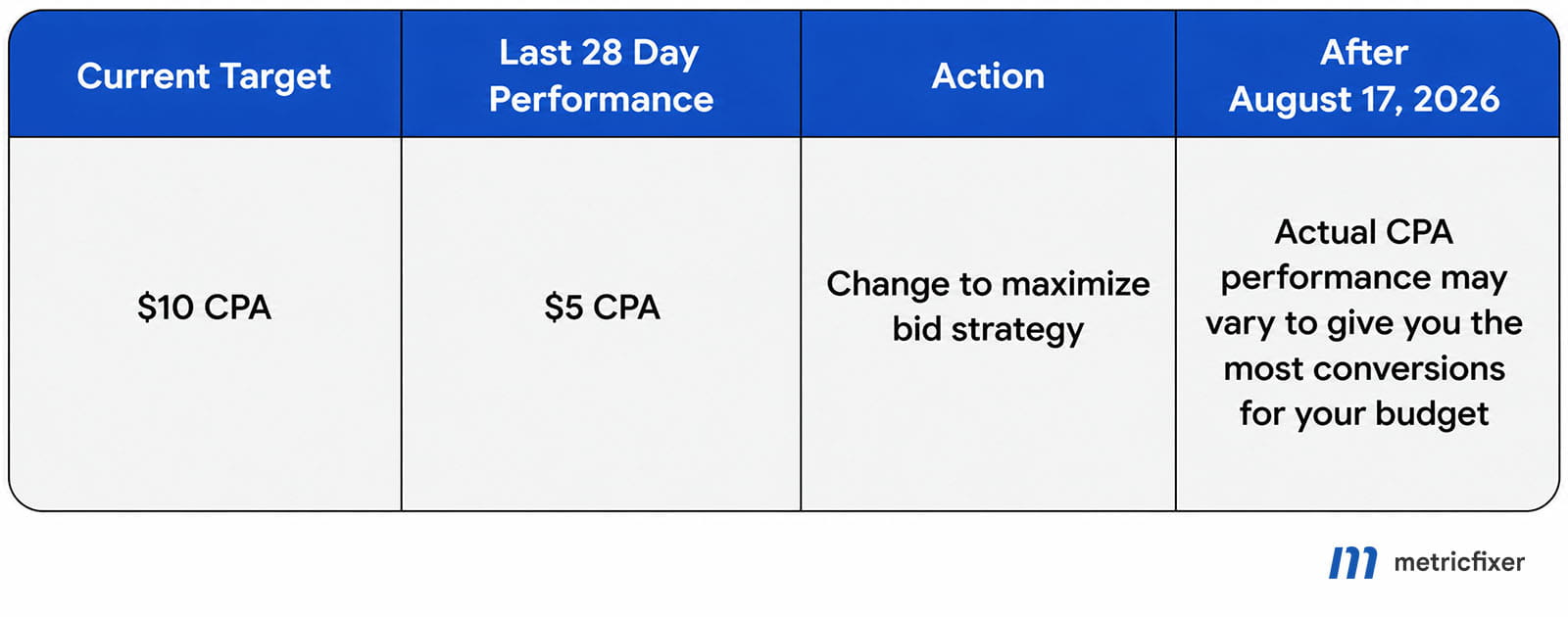
CPA may move up or down depending on auction conditions, conversion volume, and budget pressure.This option is closest to saying: “Use the budget as efficiently as possible, but do not force the campaign to stay near a fixed CPA target.” It can make sense when conversion volume is the priority and the advertiser accepts that actual CPA may vary.
Example 2: change the target to a more realistic intermediate CPA
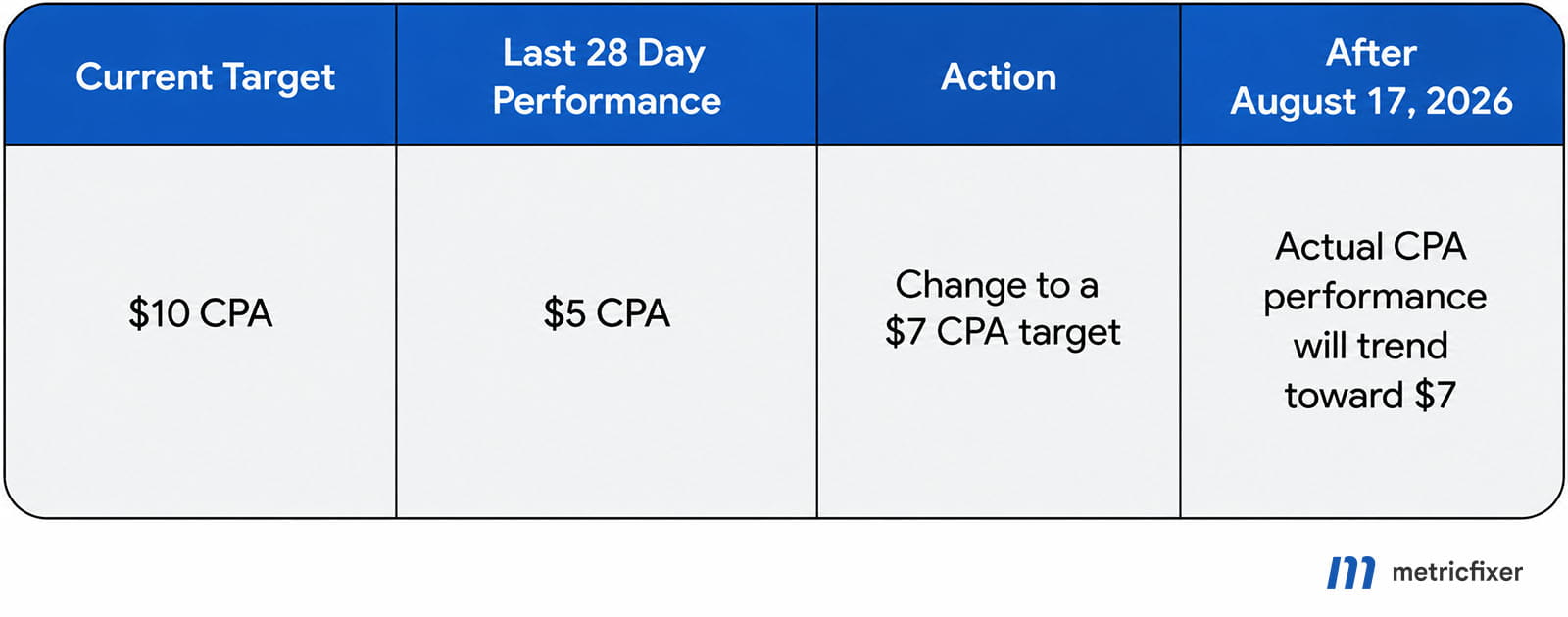
$10 CPA to $7 CPA gives the bidding system a new efficiency goal that is closer to recent performance but not as restrictive as $5 CPA.This is often the practical middle ground. The new target still gives Smart Bidding a clear efficiency signal, but it avoids keeping a target that is far above recent actual performance. For many accounts, this kind of gradual adjustment is easier to monitor than a sharp target change.
Example 3: keep the current CPA target unchanged
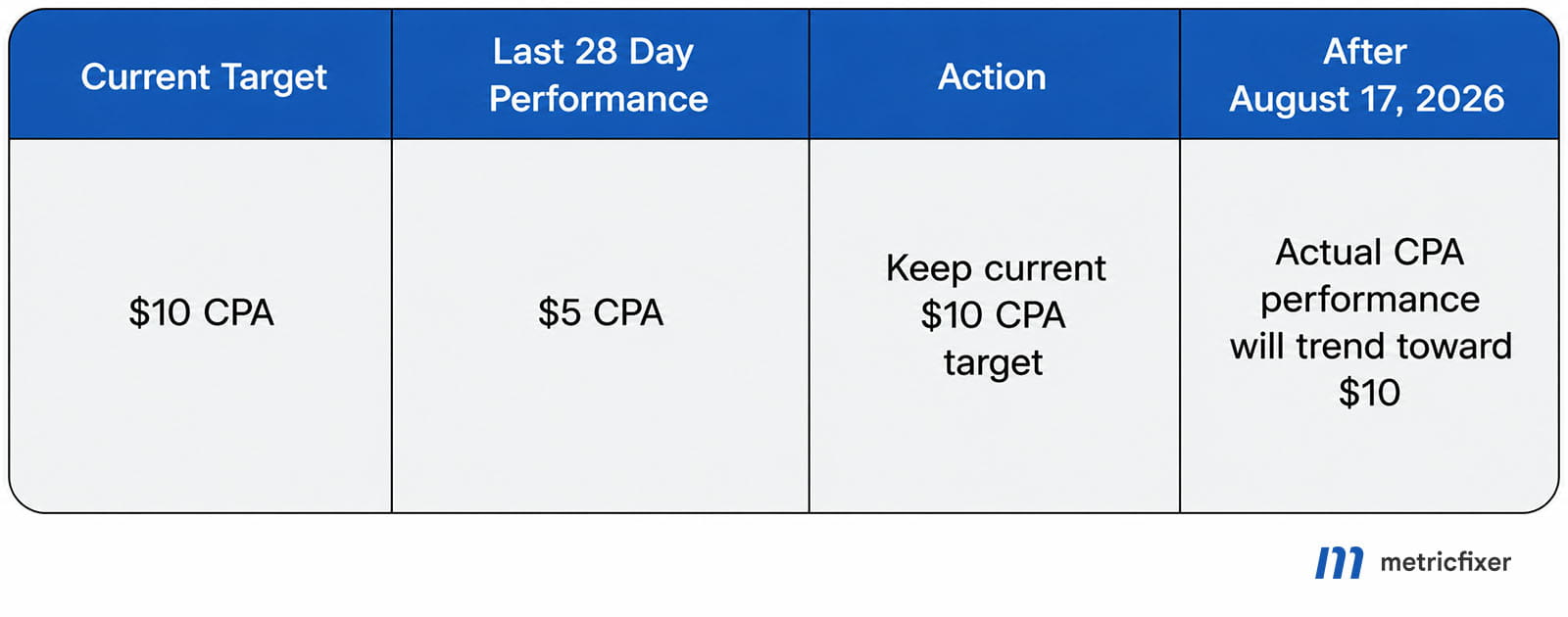
$10 CPA target is kept, actual performance may trend toward that target after the change. This can reduce efficiency if the campaign was previously achieving conversions around $5 CPA.This is the highest-risk option when the current target is clearly looser than recent performance. A campaign that used to deliver around $5 CPA may begin behaving more like a campaign optimized toward $10 CPA. That does not automatically mean performance will double in cost, but it does mean the old target should not be treated as harmless.
Example 4: align the target with recent actual performance
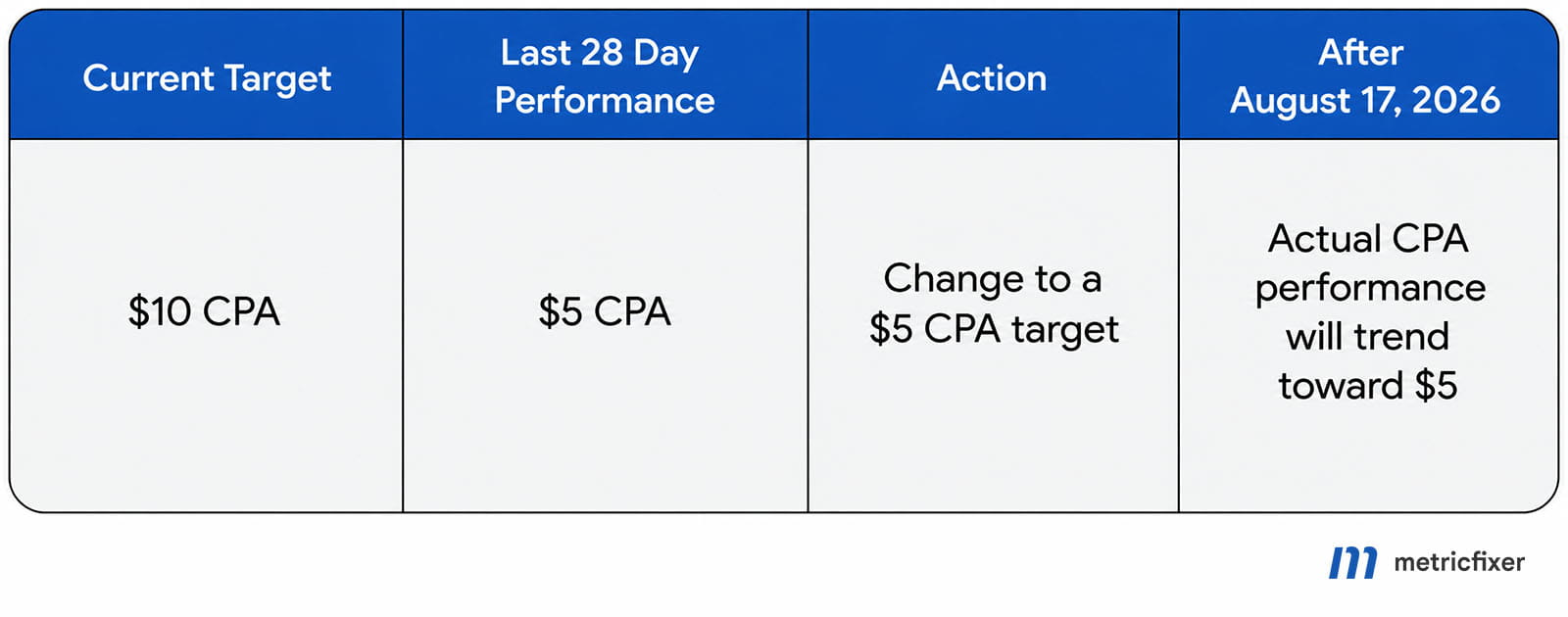
$5 CPA tells the bidding system to stay close to the campaign’s recent actual efficiency level.This option can be appropriate when recent CPA is stable, conversion tracking is reliable, and the advertiser wants to protect efficiency more than increase volume. The trade-off is that a tighter target can limit delivery if the campaign needs more auction flexibility to spend the budget.
How to choose between these options
| Situation | Recommended action | Why it helps |
|---|---|---|
| The campaign is budget-limited and the main goal is more conversions. | Consider removing the target and using a maximize strategy. | It gives Smart Bidding more flexibility to use the budget for volume. |
| The current target is much higher than recent actual performance. | Lower the target before the update. | It reduces the risk that the campaign starts drifting toward an inefficient old target. |
| Recent performance is strong but not fully stable. | Use an intermediate target, such as moving from $10 CPA to $7 CPA. |
It avoids an abrupt change while still making the target more realistic. |
| The business has a strict acquisition-cost ceiling. | Set the target close to the acceptable business limit, then monitor volume. | It protects efficiency, but may reduce spend if the target is too tight. |
| The campaign has unreliable conversion tracking or recent tracking changes. | Fix measurement first, then adjust targets. | Smart Bidding decisions depend on conversion data quality. |
Practical recommendation: do not wait until the update date to review targets. Export campaigns that use Target CPA, Target ROAS, Maximize conversions with a target, or Maximize conversion value with a target, compare the target with the last 28 days of actual performance, and prioritize campaigns marked Limited by budget. These are the campaigns where outdated targets are most likely to create unwanted behavior after the change.
Bottom line
This Google Ads update makes target settings more consequential for budget-limited campaigns. It should make scaling more predictable when the target is correct, but it can expose old or loose targets that no longer match business expectations.
The safest preparation is to review affected campaigns before 17 August 2026, update targets where recent performance and business economics support it, give budgets enough room where profitable scale exists, and avoid unnecessary disruptive changes. In short: make sure the target in Google Ads is the target you actually want the system to pursue.
Methodology and sources
This article is based on Google’s official documentation about the 2026 changes to target-based bid strategies, Google’s FAQ on the update, and related Google Ads help materials about Smart Bidding, bid strategies, budgets, and conversion goals. The analysis focuses on practical account-management consequences for advertisers and agencies rather than reproducing Google’s documentation verbatim.
- Google Ads Help: Changes to target based bid strategies
- Google Ads Help: Frequently asked questions about changes to Target-based bid strategies
- Google Ads Help: About Smart Bidding
- Google Ads Help: Bid strategies to help you meet your goals
- Google Ads Help: Budgets overview
- Google Ads Help: About conversion goals
This article is for technical and operational information only. metricfixer is not affiliated with Google. Google Ads features, bidding behavior, campaign eligibility, tool availability, forecasts, and help documentation may change after publication. Before making material campaign changes, review your own account data, conversion tracking quality, budget constraints, and commercial goals.