
Published Oct 18, 2026
Google Business Profile Ads: Can Performance Max Replace Smart Campaigns?
Google Business Profile can replace a website as a Performance Max destination. Learn which Smart campaign benefits can be recreated, how to set up local goals and call reporting, and how to measure qualified leads instead of button clicks.
Category: Online advertising · By metricfixer Expert Team
For a local business, the best landing page is not always a website. Sometimes a customer needs to see the reviews, check the opening hours, and call. The Google Business Profile landing-page option for Performance Max brings that journey into a current campaign workflow. Business Profile is the product many advertisers still know as Google My Business. But can it recreate what advertisers valued in Smart campaigns: advertising without a website, affordable local enquiries, and useful information about the people who called? The answer depends as much on measurement as on the destination.
Practical starting point: check whether your Performance Max setup offers a Business Profile destination. Then establish what your campaign will count: a button click, a measured phone call, a qualified enquiry, or a booking. These are different outcomes, and they should not share an unexplained "cost per lead" label.
Research checked: October 16, 2026. This guide separates documented functionality from recommendations that must be tested in an advertiser's account.
What can replace the old Smart campaign workflow?
Performance Max with a Business Profile destination can recreate the no-website advertising journey. It does not automatically recreate every old report or guarantee the same acquisition cost. Google explicitly documents a Business Profile optimized for ads as an alternative landing page for eligible Performance Max campaigns linked to a verified profile.
The practical replacement has three parts: a profile-based destination, suitable conversion goals, and a way to verify the quality of incoming enquiries. Treating the destination selector as the entire solution leaves the most important work unfinished.
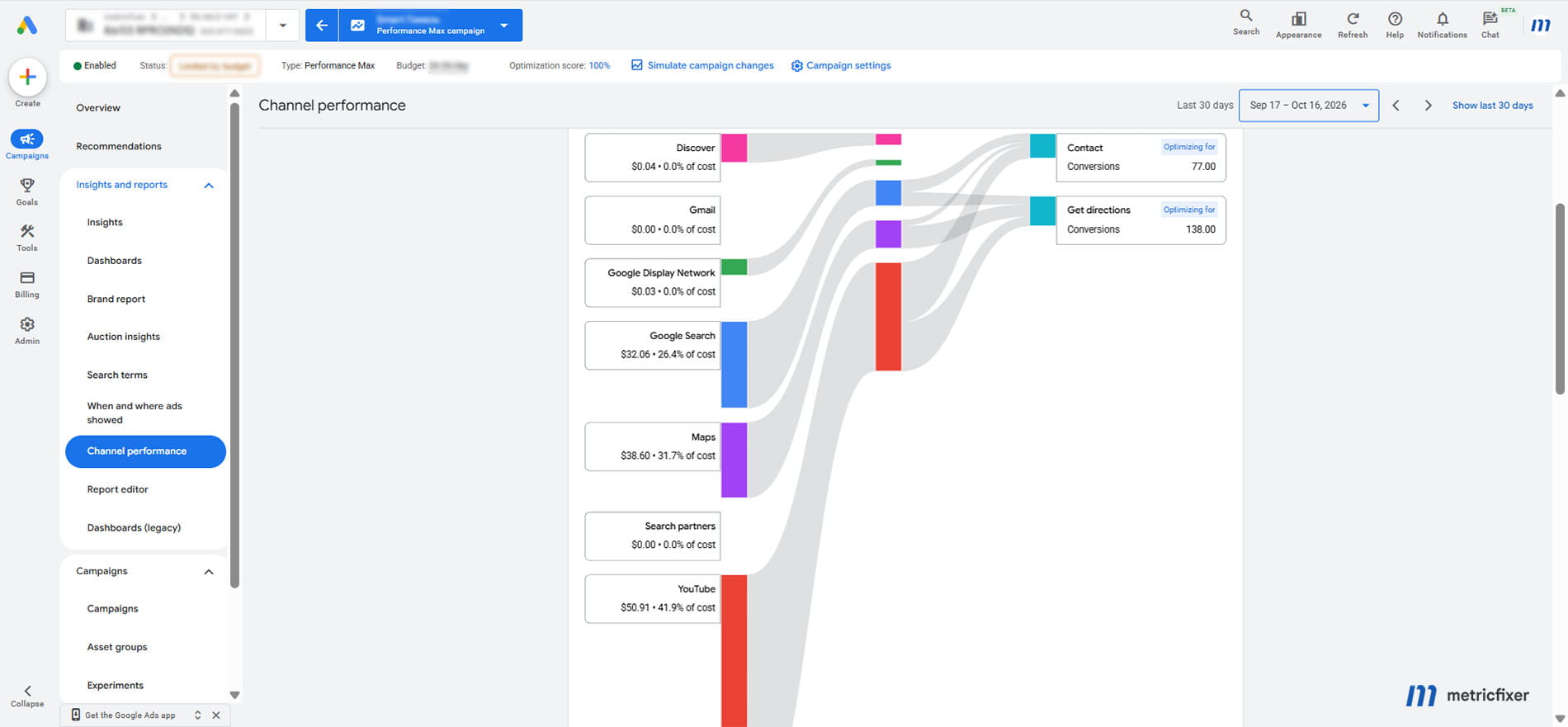
Also separate the destination from the campaign's reach. Performance Max can serve across Search, Maps, YouTube, Display, Discover, and Gmail. Choosing a local profile does not turn it into a Search-only or Maps-only campaign. Nor is this a general instruction to paste a Maps sharing link into any campaign's final URL field.

What Google changed, and what it did not
Several different product changes are easily remembered as one shutdown. That makes the history confusing and can lead to the wrong setup instructions.
| Change | What is established | Practical consequence |
|---|---|---|
| Business Profile chat and call history | Google discontinued these features on July 31, 2024. | The old profile call-history switch is not a current tracking solution. |
| Creating Smart campaigns through the Google Ads API | Creation stopped on September 23, 2026. Google's notice says existing campaigns can continue serving and being updated. | This is not evidence that every Smart campaign everywhere stopped on one earlier date. |
| Business Profile as a Performance Max destination | Current Google documentation supports the feature, with actions varying by business, location, and account configuration. | Check availability in the actual setup rather than promising identical functionality to every client. |
The dates above come from Google's Business Profile retirement notice and its updated Smart campaign API announcement. The reviewed official material does not establish a single worldwide Smart campaign shutdown date or a universal launch date for the profile destination. An option newly appearing in one account is not necessarily a global product launch.
There was also an important limitation in the old experience. Google's Smart campaign reported-calls documentation distinguishes calls tracked through forwarding numbers from call clicks in unsupported countries, and says those reported calls did not cover ads on Google Maps. Even the former workflow was not a complete record of every profile interaction.
Which Smart campaign capabilities can be recreated?
The new destination uses profile information such as location, phone number, hours, photos, and reviews. Google's current landing-page documentation lists possible actions including calls, directions, lead forms, and bookings through integrated partners. The available buttons depend on the business and account; this is not a promise that every advertiser receives every action.
| What advertisers want back | Current route | Important limit |
|---|---|---|
| Advertising without building a website | Choose the supported Business Profile destination. | The option must be available for the linked profile and campaign. |
| A short journey from reviews to contact | Use the profile-based landing experience. | Custom sales copy, qualification tools, and page design remain reasons to use a website. |
| Visibility for a local business on Search and Maps | Use eligible local ad formats with linked location assets. | This does not reserve a position or restrict all PMax delivery to Maps. |
| Optimization toward calls or directions | Select suitable local-action or phone-call conversion goals. | A call-button click is not a completed conversation. |
| Call duration, missed calls, and caller numbers | Enable eligible Google Ads call reporting and inspect Call details. | Coverage depends on forwarding numbers, country, call source, and disclosure rules. |
| Enquiries outside staffed hours | Use a form or booking option when offered and operationally supported. | Do not assume the old automatic call/form switching or email routing has carried over. |
| Simple automated campaign management | Use PMax bidding and asset automation. | Automation still needs business rules, suitable creative, and quality checks. |
| The previous low cost per customer | Run a controlled business-outcome test. | No documented feature guarantees restoration of historical pricing or profitability. |
These distinctions follow Google's separate documentation for advertising without a website, local ads, local actions, and call reporting. They should also appear in an agency's proposal: a supported destination, a tracked action, and a verified customer are separate deliverables.
Who should test the profile destination?
Our recommendation: prioritize businesses where a customer can make a useful decision from location, reputation, availability, and a short conversation. Examples include a repair workshop, tool-rental counter, beauty salon, or a local service with a straightforward booking process. These are test candidates, not categories with proven universal performance advantages.
A strong profile and a weak mobile website make a sensible test hypothesis: fewer steps may help people contact the business. But an unanswered phone, unclear service area, or irrelevant enquiry does not become valuable because the landing page is easier to use.
Keep the website route when customers need a detailed quotation, product selection, financing information, case studies, eligibility checks, or a custom booking flow. A site can also be important when the business needs to own the page content and measurement implementation.
For mobile and service-area businesses: do not publish a private address or invent a storefront to imitate a shop campaign. Google's address guidance supports hiding an address where customers are not served. Verify which destination and local formats are available for that genuine profile. Use contact goals rather than directions to a place customers should never visit.
For businesses with several branches, begin with locations that share the same offer, lead-handling process, and economics. Split the test when budgets, operating hours, service territories, or margins genuinely differ, not simply to create more campaigns.
Step-by-step: set up the campaign without confusing the destination and the goal
The following workflow combines Google's documented setup routes with our implementation recommendations. Labels can differ between new-account onboarding and established accounts. It has not been validated inside your advertising account.
1. Prepare the Business Profile and the response process
Confirm that the profile is verified, that the business can access it, and that the public information is correct. Review the category, services, phone number, regular and holiday hours, location or service area, photos, and relevant booking links.
Then test the business process independently of advertising. Does the phone reach the right team? What happens when nobody answers? Who receives a form? Can that person confirm availability and prices? Decide who records whether each enquiry became a qualified lead or a booking.
For an agency, keep the client in control of its profile and advertising account, with appropriate delegated access. Record the exact branch and receiving phone number before linking anything.
2. Link the correct profile through location assets
Google's profile-linking instructions provide this route: Campaigns → Assets → + → Location → Our locations. Choose the Business Profile you manage, or send a linking request to its owner. Apply business-name or label filters where needed and save.
Check that the request was approved and that the intended locations are available. Existing links can be inspected under Tools → Data Manager → Connected products → Google Business Profile.
Linking alone does not select the landing destination. Location assets supply location information to ads; the destination setting decides where an eligible landing-page click goes. For multiple branches, inspect the campaign's actual location selection rather than relying on a successful account-level link.
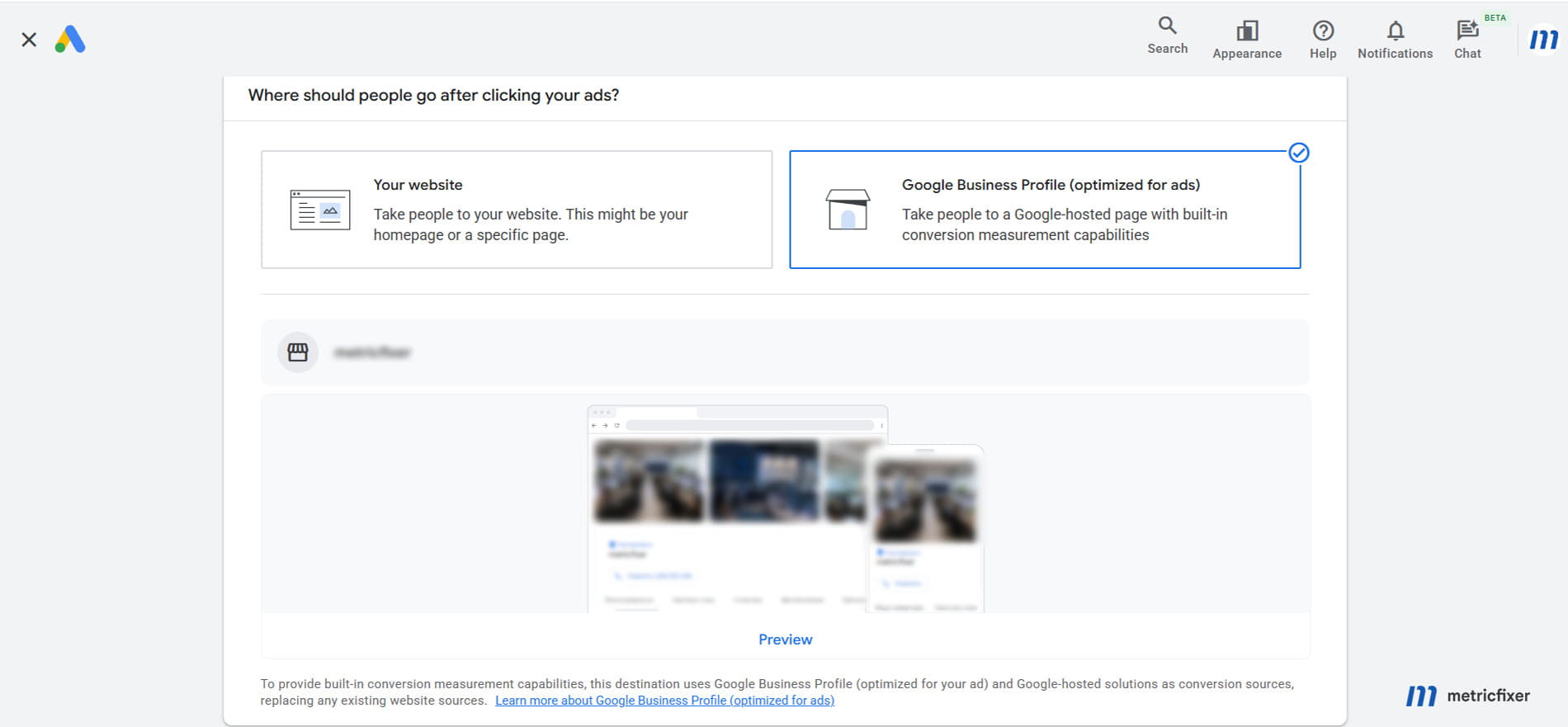
3. Choose the supported profile destination
For a new account, Google's no-website setup guide explicitly describes selecting Business Profile (optimized for your ad) during the initial sign-up flow.
In an existing account, start an eligible Performance Max setup and inspect the available destination options. Choose the profile option when offered, rather than supplying a Maps URL as a substitute. Google's PMax onboarding guide explains the account-linking and campaign-creation process, but does not guarantee that every account exposes the same screens.
If the selector is absent, verify the profile link, verification status, campaign type, and business eligibility. Ask support about that specific configuration. Do not dismantle a working campaign or create duplicate advertising accounts merely to pursue a different onboarding screen.
4. Choose conversion goals that reflect the business
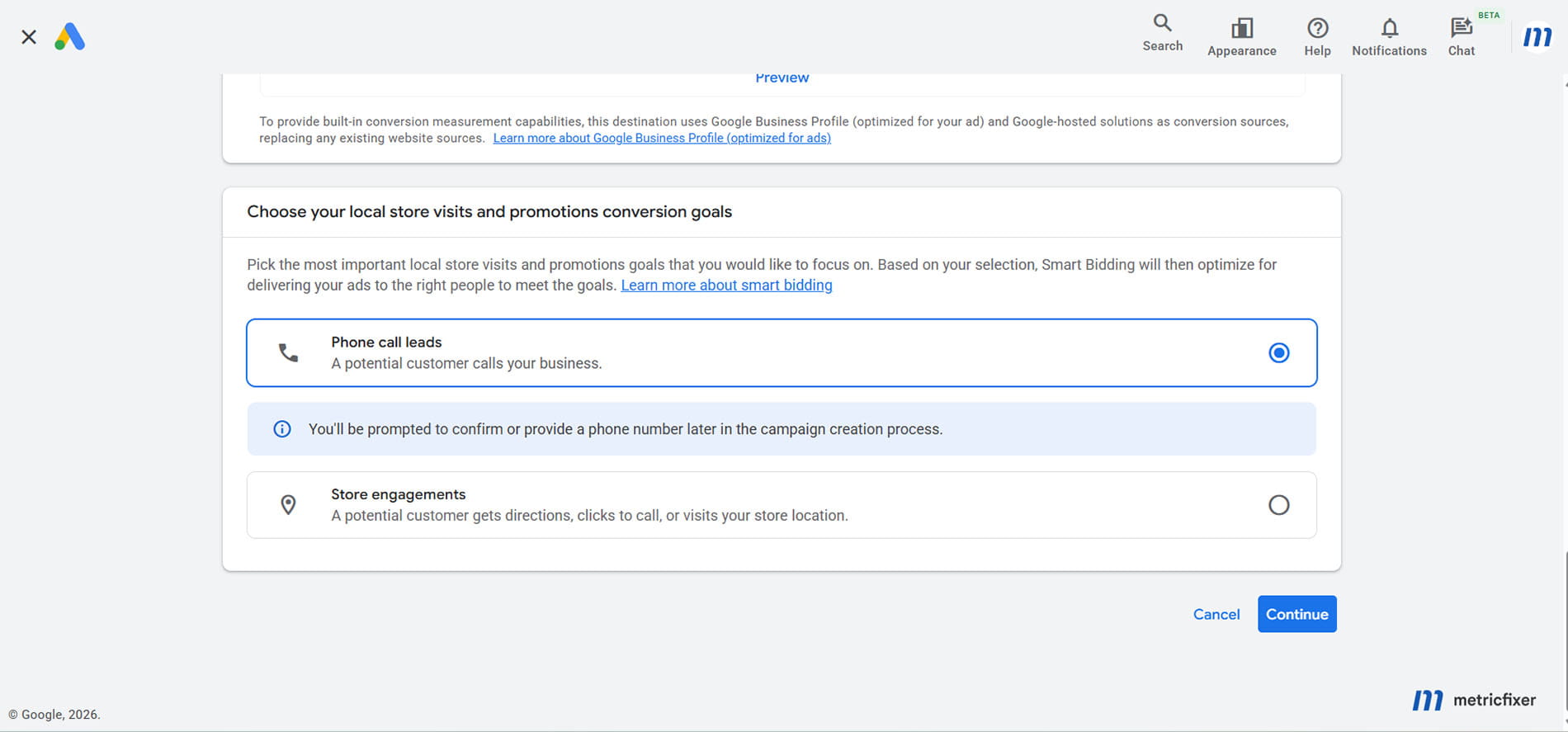
Open Goals → Conversions → Summary and inspect the individual actions. Record each action's source, definition, optimization status, and value. Then verify which goals the campaign uses.
Google distinguishes primary and secondary actions: primary actions can guide bidding when their standard goal is selected; secondary actions are normally observational. A custom goal is an exception: its included actions can be used for bidding even when marked secondary. Therefore, checking one status label is not enough.
| Business model | Preferred outcome | How to treat easier interactions |
|---|---|---|
| Service sold over the phone | A qualified call or confirmed job; initially, a meaningful measured call if that is the available signal. | Keep call clicks separate. Use them as a declared proxy only when better signals are unavailable. |
| Walk-in store or rental counter | A sale or credible visit outcome where measurable. | Directions can be useful, but they are not proof of arrival or purchase. |
| Appointment-based business | A confirmed appointment or qualified enquiry. | A form submission needs follow-up; an opened booking page is not a booking. |
With active location assets, Google can create local-action conversions after relevant activity occurs. PMax can bid toward call clicks and directions; some other interactions are reporting-only. These goals may therefore be absent before the first relevant action. Do not manufacture conversions to populate them.
Use campaign-specific goals for the test when needed, instead of unintentionally changing optimization across the client's account. Avoid counting a call click, the resulting conversation, and a later booking as three equivalent new customers.
5. Set a serviceable geography and realistic hours
Review the campaign's locations, exclusions, languages, and schedule. Google's PMax settings guide describes geographic targeting; the profile's address is not, by itself, a complete advertising territory.
For a strictly local service, consider Presence rather than Presence or interest where the setup exposes that choice. This is a business-fit recommendation, not a universal rule: someone arranging a service for a relative may be outside the area. Google also warns that location targeting is not perfectly accurate.
Store-goal campaigns can use their own location-based radius behavior, described in Google's store-goal documentation. Inspect the actual mode instead of assuming every PMax workflow has identical controls. Align call-led advertising with answerable hours, unless a tested form, booking, or callback process covers the rest.
6. Supply useful creative and search signals
Write clear service descriptions, identify the area served, and use authentic business photos. Review every generated asset for incorrect claims. Do not advertise emergency availability, a discount, or a service that the business cannot deliver.
Search themes help describe relevant demand; they are optional, additive signals, not a restrictive keyword list. Start with the important service intents rather than filling every available slot with near-duplicates.
Use applicable negative keywords and brand controls to reduce unsuitable demand. Google documents campaign-level negative-keyword lists and search-term reporting for PMax. Review visible searches for wrong services, employment queries, irrelevant locations, and existing-customer support. Exclusions should follow evidence, not an indiscriminate blocklist.
Do not remove creative merely to try to force a Maps-only campaign. Also inspect URL-related settings rather than applying a generic website checklist: Google says Final URL expansion is not supported when a campaign uses only store goals.
7. Set a budget and bidding approach that match the signal
For a narrowly defined lead outcome, conversion-volume bidding can be a practical starting point where available. When optimizing several outcomes with meaningfully different values, consider value-based bidding only after those values are defensible. Do not assign invented sales revenue to a direction request.
Choose a test budget the business can afford to spend without a positive result, then define the acceptable cost per qualified lead from its economics. An old Smart campaign's reported cost per conversion is not automatically an appropriate target for a differently measured PMax campaign.
With an average daily budget, spending is not a fixed daily allowance. Google's budget documentation describes limits of up to twice that amount per day and 30.4 times it per month for most campaigns, subject to the applicable budget rules. Monitor billing and test spend rather than assuming that a calendar reminder is a hard cap.
8. Verify the journey before and after launch
Use available previews to check the correct branch, destination, phone, hours, and calls to action. Test any form-delivery or booking integration through its supported test process. Record screenshots of the final settings and leave the campaign paused until the business is ready to receive enquiries.
After launch, inspect real incoming activity and reporting. A preview can establish that a button or form exists; it cannot establish that live advertising attribution works. Do not repeatedly click your own ads to create test conversions. Investigate operational failures promptly, but avoid rewriting budgets, goals, and creative simultaneously in response to a few early clicks.
How to recover useful call reporting
The most important distinction is between a click to call, a measured phone call, and a qualified lead. A person can tap a button and abandon the dialer. A connected call can be a supplier, a wrong number, or an existing customer's question. Neither event automatically means a new sales opportunity.
Enable account-level reporting, then check the conversion action
Google Ads call reporting uses Google forwarding numbers to route eligible calls to the business and measure them. Availability is country-dependent; the published list includes, for example, the United States, Canada, the United Kingdom, Australia, France, Germany, and Poland. Check the current list for the advertised business rather than assuming worldwide coverage.
Follow Google's account-level instructions: Admin → Account settings → Call reporting → On → Save. Confirm that the relevant phone or location asset is approved and that the number reaches the intended business.
Next, inspect the existing Calls from ads action and the campaign's selected goals. Google's phone-call conversion guide describes creating an action through Goals → Summary → Create conversion action → Conversions from phone calls. Review an existing action before adding another one for the same outcome.
Read its actual qualification method. Current options can depend on recording eligibility or call-duration measurement; some fallback measurement uses ad interactions instead. Do not describe every action named "Calls" as a measured conversation.
Where duration-based qualification is available, choose a threshold that reflects the business. For example, 60 seconds might be a starting hypothesis for a repair service, not a Google recommendation or proof of quality. A genuine booking can be shorter; a long call can consist mostly of hold music. Revisit the threshold against actual outcomes.
Open Call details, and remove the column that hides PMax
Use Campaigns → Insights and reports → Report editor → Ads and assets → Call details. Google's per-call reporting guide lists fields including call time, duration, missed or received status, source, and campaign.
Important for Performance Max: remove the Ad group column. Google explicitly warns that selecting this column prevents PMax call details from appearing.
The same guide says caller numbers are available for most calls longer than 15 seconds, except in India and Japan. This disclosure threshold is separate from your lead-qualification threshold. Missing caller numbers do not, by themselves, prove that a call was missed or that tracking failed.
A profile destination does not establish that every call from every surface passes through a reportable forwarding number. Validate the actual source and available rows after delivery. Do not promise full caller-number visibility in a proposal before checking this.

When reconciling reports, also check the date basis. Google's call-reporting analysis guide explains that phone-call reporting and conversion reporting can use different dates: the call itself versus the attributed ad interaction. A midnight boundary or delayed callback can therefore create a legitimate daily mismatch.
Do not confuse reporting with audio recording
Seeing a duration does not mean audio is available. Google's current recording documentation covers eligible calls in the United States and Canada with forwarding numbers and reporting enabled. It excludes calls through location assets. Therefore, do not sell a profile-based campaign as an automatic recording solution.
Check recording settings and notification obligations before using audio for quality review. Restrict access to caller data and recordings, and avoid placing identifiable customer information in routine client reports. These operational safeguards do not replace advice on applicable privacy and recording law.
Google forwarding numbers are not permanent business contact numbers: the reporting guide warns against using them outside the supported advertising setup. Also ignore legacy instructions to enable Business Profile call history; that retired feature is not the switch described above.
How to measure leads and sales, not just profile activity
Check where forms and bookings actually go
For every offered form or booking action, identify the receiving inbox, system, or partner. Submit a supported test, check notifications, and confirm who follows up. Do not assume that every profile administrator receives an email or that a submission reaches the CRM automatically.
A separate Google Ads lead form asset has its own requirements and delivery options, including a privacy-policy link. Do not assume those settings describe every profile-native form. Selecting a destination without a website does not remove privacy obligations or guarantee a suitable hosted privacy notice.
Use the right report for the right question
Business Profile performance combines organic and advertising activity. Its call metric describes call-button clicks, not a complete log of conversations. Do not attribute the entire profile total to PMax or add it to Ads conversions as extra leads.
Google's local-action documentation also allows attribution after an earlier ad interaction, including a later organic profile action within the applicable window. Attribution is not proof that advertising created demand that would otherwise not exist.
A Google-hosted profile is not your tagged website. If the user never visits your site, there is no reason to expect that journey to produce a session in your website's GA4 property. A low GA4 session count is therefore not evidence that this campaign has no activity. The same reporting-boundary principle appears in metricfixer's guide to Google Ads, Search Console, and GA4 reporting differences.
When a journey later reaches your website and an external booking provider, that is a separate implementation. See our guide to cross-domain tracking for booking and payment journeys; it does not give you control over Google's profile page.
Connect enquiries with real business outcomes
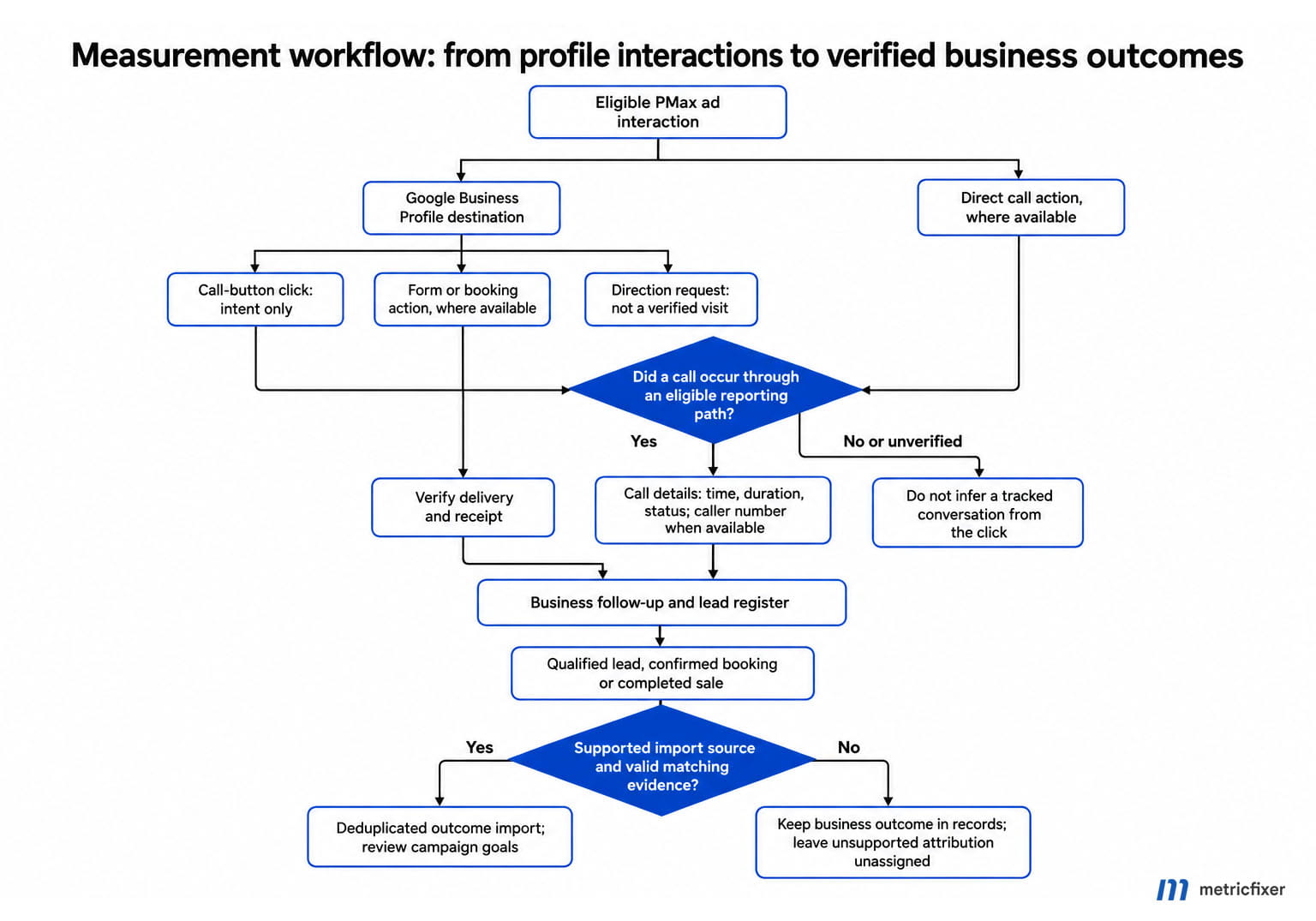
Keep a simple lead register: time, branch, supported source evidence, new or existing customer, requested service, qualified or not, appointment, completed job, and revenue where appropriate. Deduplicate repeat enquiries. Keep uncertain sources explicitly unassigned rather than inventing attribution.
Google supports importing outcomes for eligible tracked calls. This requires the supported call source and matching information, including the caller number and call start time. It is not a way to upload any organic profile call and make it attributable to PMax. Check eligibility, time zones, matching results, and duplicate handling before using imports for bidding.
Keep personal data in appropriate business systems and approved integrations. Google's Analytics privacy guidance prohibits sending personally identifiable information such as raw phone numbers or email addresses to Analytics. Do not place them in GA4 events, custom dimensions, or URL parameters.
Measurement workflow: ad interaction → observed contact action → received enquiry → qualified lead → booking or sale → eligible outcome import.
Record the evidence available at each step. A missing measurement link must not be replaced with an assumption.
How to test whether the new setup actually performs better
The appeal of the former Smart workflow was commercial, not merely technical: local businesses wanted affordable customers. The right test therefore compares business outcomes, not whatever each campaign happens to label a conversion.
The following example is hypothetical. The profile and website campaigns use different platform-action definitions; the qualified-lead and completed-job definitions are held constant.
| Metric | Profile destination | Website destination |
|---|---|---|
| Advertising spend | $600 | $600 |
| Platform-reported actions | 120 | 30 |
| Cost per platform action | $5 | $20 |
| Verified qualified leads | 12 | 20 |
| Cost per qualified lead | $50 | $30 |
| Completed jobs | 4 | 8 |
| Advertising cost per completed job | $150 | $75 |
The website route wins this invented example despite a higher platform cost per action. The reverse could happen in a real test. The point is to use the same commercial denominator, and to include agency or handling costs separately when calculating fully loaded acquisition cost.
Cost per qualified lead = advertising spend / unique qualified leads
Advertising cost per completed job = advertising spend / completed jobs
Lead-to-job rate = completed jobs / unique qualified leads
Before launch, write down the offer, territory, response hours, qualification rule, attribution method, spending limit, and stopping conditions. Keep lead handling consistent between comparison groups. Otherwise, a faster receptionist or a seasonal demand change may be mistaken for a better landing destination.
Use an eligible experiment where the account supports the required comparison. Otherwise, a carefully matched location or time-based pilot can provide directional evidence, but it is not a randomized test. Two overlapping PMax campaigns launched side by side do not automatically create a clean A/B experiment.
Allow for the business's normal sales cycle and reporting delay before judging completed jobs. There is no defensible universal rule that every local advertiser needs the same daily budget or exactly the same number of test days.
For agencies, review spend, qualified leads, answer rate, missed calls, new versus existing customers, completed jobs, and revenue by branch. Google's PMax channel-performance report can help show where spend and attributed results occur. It does not make every channel conversion equivalent in commercial value.
Finally, review total new-business volume, not only attributed conversions. Branded searches and returning customers may look efficient without demonstrating additional demand. Treat incrementality as a separate question and avoid promising that a new destination necessarily produces new customers.
Troubleshooting: what to check before declaring the feature broken
| Symptom | What to check |
|---|---|
| No Business Profile destination option | Confirm PMax, the correct verified profile, approved linking, and account-specific availability. Do not substitute an arbitrary Maps URL. |
| Call clicks appear, but no call durations | Check the conversion definition, country, forwarding-number eligibility, account reporting setting, and actual call source. A click metric does not imply measured calls. |
| No PMax rows in Call details | Remove the Ad group column, then review campaign filters and the date range. |
| Some callers have no visible number | Review country and disclosure limitations; do not assume every short or withheld-number call is invalid. |
| Many conversions, few useful enquiries | Segment by conversion action; inspect duplicate funnel stages, low-intent goals, missed calls, and the qualification process. |
| No local-action goals yet | Check active location assets, relevant real activity, and category restrictions described in Google's local-action guidance. |
| Ads activity does not appear as GA4 sessions | Determine whether people actually visited the tagged website. Profile-hosted interactions belong to a different measurement environment. |
| Forms or bookings do not reach the team | Test the exact receiving integration and notification owner. Do not infer delivery from an available button. |
| Enquiries come from outside the service area | Review location settings, presence versus interest where available, store-goal behavior, exclusions, and the actual location of the requested job. |
For implementation checks, use the current Call details instructions, local-action definitions, and campaign-settings guide rather than an old Smart campaign tutorial.
Do not confuse this with the separate pay-per-lead option
Selecting a profile destination does not, by itself, change billing to payment only for a qualified enquiry. Google's local-ad documentation describes click-based charges and, for certain store-goal Maps formats, impression-based charges.
Google separately documents Performance Max onboarding with pay-per-lead goals, integrating Local Services into Google Ads. At the time of review, this new-account onboarding is for certain advertisers creating their first account; the guide says existing advertisers cannot set it up through their existing account.
The related targeting documentation limits the initial offering to eligible United States businesses and categories. Phone leads are required in that onboarding flow, with some message or booking options depending on the setup. Screening and verification can also apply.
This may deserve a separate evaluation for an eligible business, but its pricing, eligibility, and lead-management assumptions must not be copied into an ordinary PMax proposal simply because both use Business Profile information.
The bottom line: rebuild the business process, not just the landing page
The profile destination can restore a valuable no-website route for eligible local advertisers. Useful call reporting can also be part of the setup, but only within its supported coverage. Neither feature restores a historical cost per customer by itself.
The strongest implementation connects four things: an accurate profile, suitable campaign goals, a reliable response process, and evidence that enquiries became business. That is the practical replacement for what advertisers valued in Smart campaigns.
Methodology and sources
This article reviews official Google Ads Help, Business Profile Help, Analytics Help, and the Google Ads Developer Blog, checked on October 16, 2026. Sources are linked beside the claims they support. Product documentation establishes available mechanisms, not performance in a particular account.
We distinguish verified product statements from implementation recommendations and hypothetical examples. No live advertiser account, client call log, or controlled performance dataset was supplied for this review. Reports of inexpensive historical Smart campaign leads are a reason to test, not evidence that PMax will reproduce those results.
Some documentation still contains legacy Business Profile call-history instructions. We treat the explicit July 2024 retirement notice as controlling for that feature and do not recommend enabling it. For caller-number visibility and recording, we use the dedicated current pages rather than assume all call documentation has identical coverage.
We did not establish a universal launch date for the profile destination, a single worldwide shutdown date for Smart campaigns, or universal account access. Recheck the actual interface, country coverage, and conversion definitions before publishing implementation screenshots or launching a campaign.
Disclaimer: This publication is independent educational analysis, not a Google product guarantee or legal advice. Interfaces, eligibility, reporting, and billing can change. Advertisers remain responsible for account settings, budget decisions, customer-data handling, and applicable privacy and call-recording requirements. No acquisition cost or commercial result is guaranteed.