
Published Oct 14, 2026
Why GA4 Shows So Few Search Queries: Google Ads vs Search Console
Why do Google Ads, Search Console, and GA4 tell different stories about search traffic? This report explains hidden queries, mismatched clicks and sessions, canonical URLs, Discover, and the limits of combining search data with website outcomes.
Category: Analytics & Conversion Tracking · By metricfixer Expert Team
Why can Google Ads show thousands of clicks while a GA4 query report explains only 3-4% of the associated sessions? And why do Search Console clicks disagree with GA4 organic traffic? This report compares the three systems for one illustrative website, separates missing query text from missing traffic, and explains how to build a useful report without claiming more precision than the data supports.
Practical starting point: use Google Ads to investigate paid search terms, Search Console to investigate organic search queries, and GA4 to investigate visits and outcomes. Before comparing totals, write down the exact report, dimension, metric, traffic scope, date range, and time zone. A small visible query share is not, by itself, evidence that GA4 lost the remaining visits.
Contents
Executive summary
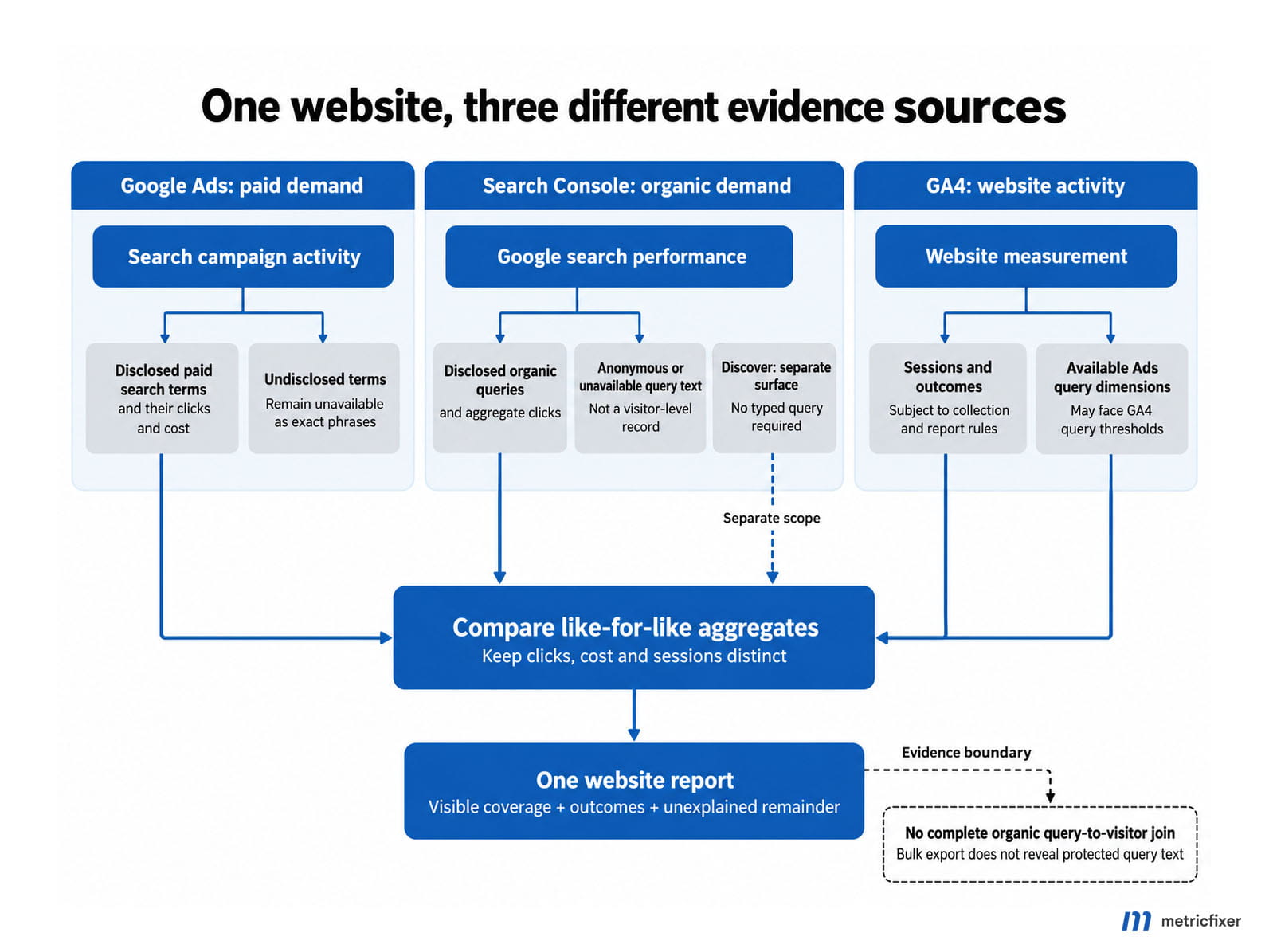
There is no single Google search-query database that appears identically in Google Ads, Search Console, and GA4. Each product observes a different part of the journey and applies its own reporting rules. Google's guide to using Search Console and Analytics together explicitly recommends comparing patterns rather than expecting identical click and session counts.
For paid search, GA4 does have Google Ads query dimensions. However, Google Ads restricts the search terms it discloses, and GA4 can additionally withhold query rows when there are too few users. For organic search, the ordinary referral information sent to a website does not provide the original Google query; linking Search Console supplies a separate, aggregated dataset rather than a query attached to every visitor. These distinctions follow Google's documentation on traffic-source dimensions, data thresholds, and the Search Console integration.
The useful outcome is therefore not a promise to recover every hidden phrase. It is a report that answers three separate questions: what searches are visible, how much activity those visible searches represent, and what happened on the website. Any part that cannot be reconciled should remain explicitly unexplained rather than being assigned to privacy, consent, or tracking failure by assumption.

One website, three reporting systems
Worked example, not a client case study. All numbers below are invented to demonstrate the audit. The site is an online retailer at www.example.com, with product pages, editorial content, and PDF buying guides. The reporting window is September 1-28, 2026. Its Google Ads and GA4 reporting time zones are both Europe/Warsaw; historical Search Console daily data uses Pacific Time. That last difference is recorded, not silently treated as resolved.
The paid comparison is limited to selected Search campaigns, Google Search network traffic, and website-directed clicks. The organic comparison uses a Search Console property covering the same website and GA4 sessions with Session source = google and Session medium = organic. Discover is reported separately. These are starting scopes, not a claim that all remaining populations match.
| System and report | Illustrative result | What it tells us |
|---|---|---|
| Google Ads campaign totals | 10,000 clicks; $20,000 cost | Paid activity within the selected campaign and network scope. |
| Google Ads named search-term rows | 7,400 clicks; $14,400 cost | Visible terms cover 74% of clicks and 72% of cost. |
| GA4 sessions attributed to those campaigns | 8,200 sessions | A different metric from advertising clicks. |
| GA4 named Session Google Ads query rows | 287 sessions | The displayed query rows explain 3.5% of the 8,200-session baseline. |
| Search Console Web, unfiltered query baseline | 16,000 clicks | Organic Web search activity, not paid clicks or GA4 sessions. |
| Search Console exported named-query rows | 9,600 clicks | 60% visible-query click coverage in this particular extraction. |
| GA4 Google organic traffic | 11,200 sessions | A starting session-to-Web-click ratio of 70%, before reconciliation. |
| Search Console Discover | 3,000 clicks | A separate Google discovery surface; not another 3,000 keyword searches. |
The first finding is already useful: 74% click coverage in Google Ads and 3.5% session coverage in GA4 are different measurements. Neither is the percentage of all distinct searches known to Google. In particular, the example does not establish that privacy alone explains all 7,913 sessions absent from the named GA4 query rows.
Likewise, 16,000 Search Console clicks minus 11,200 GA4 sessions is not a count of 4,800 lost people. The difference combines unlike units and potentially different traffic populations. Keep it as a reconciliation question.
Search term, keyword, and site search are not interchangeable
A search term is what someone searched for. A Google Ads keyword is a targeting input supplied by the advertiser. A search for waterproof running shoes for winter might match the keyword running shoes. Google's search terms documentation explicitly separates these concepts. The matching keyword is not a transcript of the search.
| Field or report | What it means | What it does not establish |
|---|---|---|
| Google Ads search term | A disclosed search that triggered advertising. | The complete set of all searches behind campaign totals. |
| GA4 Session Google Ads query | The available advertising query associated with a session. | An organic query or universal coverage of paid sessions. |
| GA4 Session Google Ads keyword text | The matched advertising keyword. | The user's exact wording. |
| Search Console organic query | Aggregated organic search performance for a disclosed query. | The identity, session, or purchase of the searcher. |
| GA4 Search term | The value of search_term, commonly collected from the website's own search. | The Google query that brought the visitor to the site. |
The GA4 Data API schema makes the distinction concrete: searchTerm, sessionGoogleAdsQuery, and sessionGoogleAdsKeyword are separate dimensions. In a session analysis, use the session-scoped advertising dimension, not a first-user dimension or a key-event attribution dimension merely because its name looks similar.
Another common mistake is to treat utm_term or ValueTrack's {keyword} as a way to recover the original query. utm_term carries the value assigned by your tagging setup; ValueTrack documents {keyword} as the matched keyword. Neither turns an advertiser-supplied label into the user's actual search. Keywordless targeting can also legitimately lack a manually selected keyword.
This naming trap appears in practical guidance too. Analytics Mania's tutorial on finding GA4 search terms explicitly distinguishes searches performed on the website from searches performed in Google. Enabling site-search measurement is useful, but it solves a different problem.
Why GA4 may show only 3-4% of Google Ads queries
Two reporting restrictions can coexist
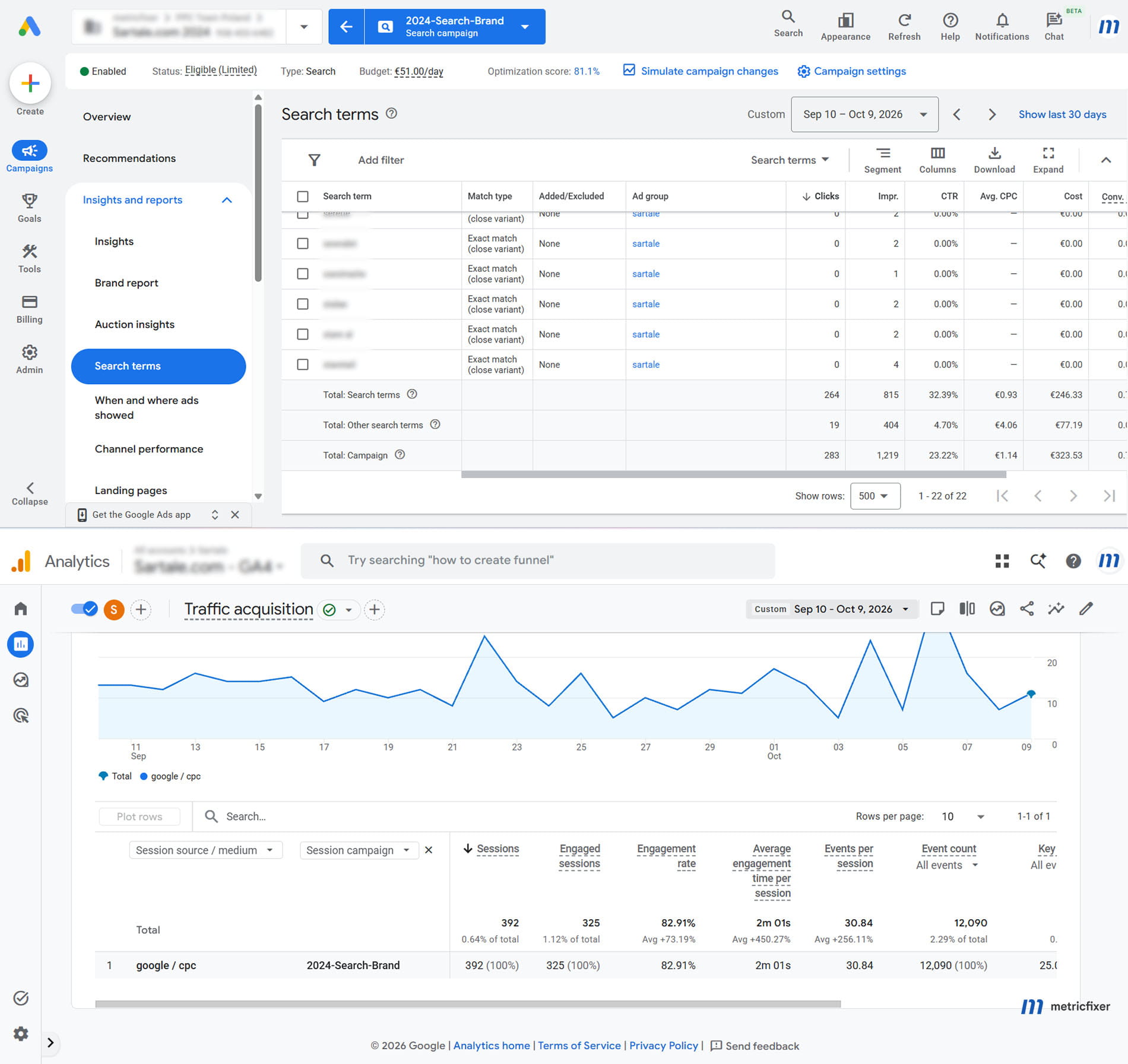
Google Ads does not promise a complete search-term list. It discloses terms that meet its activity requirements and omits some low-volume queries for privacy. Its documentation does not give advertisers a universal visible percentage or a configurable threshold. Therefore, a 3-4% figure must be investigated in its actual report, not accepted as a platform-wide rule.
GA4 applies its own protection: when a report contains search-query information, rows can be withheld if there are not enough users. Google's threshold guidance says to inspect the data-quality indicator; the thresholds are system-defined. A longer date range can sometimes make more rows eligible, but does not guarantee full disclosure. Adding more breakdowns can also make the report harder to interpret.
Start with the denominator, then inspect the integration
For the example website, calculate the following independently. Sum all eligible exported rows, not just the rows visible on the first screen, and keep campaign, network, and date filters consistent.
Google Ads visible-term click coverage = 7,400 / 10,000 = 74%
Google Ads visible-term cost coverage  = 14,400 / 20,000 = 72%
GA4 displayed query-session coverage   = 287 / 8,200 = 3.5%
The GA4 denominator should come from a matching campaign/session report without the query breakdown. Do not assume a query report's total is an unaffected baseline when its data-quality indicator warns that data has been restricted. A distinct-query coverage percentage usually cannot be calculated, because the full number of undisclosed distinct queries is unknown.
Next compare query availability with campaign and keyword availability. If campaign IDs and keyword text are populated but query rows are sparse, investigate query-specific restrictions first. If almost every advertising dimension is missing, investigate the connection and collection path. Google's guide to (not set) identifies unlinked accounts, disabled auto-tagging, and incomplete manual tagging among the causes of missing Ads dimensions.
Verify that the correct Ads account is linked, auto-tagging is enabled, redirects preserve relevant click information such as gclid, and the intended GA4 tag runs on the landing pages under the site's consent rules. The presence of google / cpc alone does not prove that every Ads dimension is successfully available. Google's tagging documentation explains the different data supplied by manual and automatic tagging.
| What you see | What to investigate |
|---|---|
| A threshold warning | User-count restrictions affecting the requested report. |
(not set) | Missing information for that dimension; inspect linking, tagging, scope, and applicability. |
(other) | Less-common values grouped because a reporting table exceeded its row capacity. |
| A sampling indicator | A report calculated from a subset of events, not a list of deliberately hidden query strings. |
Google documents the (other) row and sampling separately. Record the actual indicator instead of using these explanations interchangeably.
What remains useful in Google Ads
Use the native search terms report for disclosed phrases and negative-keyword decisions. Use search terms insights to examine intent categories that can incorporate terms omitted from the individual-query report. A category is an aggregate, not disclosure of its hidden member queries. Also, the appearance of a word in a category label does not prove that the exact word served after you excluded it.
For Performance Max, do not divide search-term clicks by all campaign interactions across every channel and call the result query coverage. Isolate the relevant search inventory where the reporting allows it. Current Google documentation also discusses search-term reporting for Performance Max; the old blanket statement that it never exposes search terms is not a sound audit rule. See the Google Ads search terms documentation.
When detail remains unavailable, report the visible and unassigned portions honestly. You can still evaluate campaigns, landing pages, products, and permitted aggregate insights. You cannot label every undisclosed term as irrelevant, profitable, or fraudulent without evidence.
Why organic queries are missing from the referrer
For an ordinary Google organic visit, a website may receive referral information identifying Google without receiving the original search phrase. Google described this separation in its 2011 explanation of secure search and its 2012 explanation of origin-only referrers. These are historical explanations of the mechanism, not current instructions for the old Analytics interface.
A simplified example illustrates the boundary:
Search performed in Google:
waterproof running shoes for winter

Possible referrer received by the website:
https://www.google.com/

Destination page:
https://www.example.com/products/trail-shoes
The destination knows where the visitor came from and which page they opened. The missing phrase is not concealed somewhere inside that origin-only URL. Browser referrer policies also govern which parts of a referring URL are transmitted; the exact referral signal can vary by browser and navigation path.
Changing GA4 to GTM, reading document.referrer, examining the server's Referer header, or deploying server-side tagging cannot reconstruct text that was not sent. Nor is HTTPS itself a promise that query text becomes available at your own TLS endpoint. The relevant issue is what the referring service and browser transmit.
Search Console is the appropriate separate source for disclosed organic queries. A ranking tool or an inferred keyword model may suggest plausible phrases, but a plausible phrase is not a recovered record of what a particular visitor typed. Never write inferred terms into a report as observed acquisition data.
Why Search Console also shows an incomplete query list
Search Console has two different limitations. Some query text is anonymized for privacy; other rows are missing because of the amount of detail retained or returned by a particular report. Google's query-dimension documentation explicitly describes both. A short query table therefore does not identify a single cause.
Anonymized queries can contribute to the overall chart total while being absent from the named-query table. Applying a query filter removes that anonymous contribution from the filtered result. Consequently, adding a "contains brand" export to a "does not contain brand" export does not necessarily reproduce the unfiltered total. Label the remainder unclassified or unavailable; do not automatically call it non-branded traffic.
In our example, named rows contain 9,600 of 16,000 Web clicks: 60% coverage. The missing 6,400 clicks are not proof that exactly 40% of searches were anonymized. We must also inspect the extraction method, row limits, filters, and grouping. Google's discrepancy guide explains why chart totals and table totals can differ, including the interface's 1,000-row limit.
Keep three baselines: the unfiltered total for the chosen search surface, the total represented by the available named-query rows, and the output of any subsequent filter or transformation. That makes it possible to distinguish a platform disclosure limit from a spreadsheet or dashboard that accidentally dropped data.
Why Search Console clicks and GA4 sessions do not match
A click is an interaction with a Google result. A session is a period of activity measured on the destination site. Google's session documentation says a session normally starts when there is no active session and times out after 30 minutes of inactivity by default. These are not interchangeable counters.
Repeated clicks do not produce a simple conversion formula
Be precise about Search Console's rules. Google says that clicking a result, returning to the results, and clicking the same link again counts as one click. Clicking a different link can count separately. Several distinct search-result clicks can therefore coexist with one ongoing GA4 session, but "every return click adds another Search Console click" is incorrect. See Google's click definitions.
The reverse direction is possible too. GA4 uses non-direct last-click attribution for sessions; Google's own session example shows a later direct visit retaining an earlier google / organic attribution within the applicable lookback window. A session attributed to organic search therefore does not always require a new Google click in the same reporting period. Changing the reporting attribution model for event-scoped results does not change the model used by session-scoped traffic dimensions.
Collection gaps, population differences, and modeled data
| Possible difference | Practical check |
|---|---|
| The destination was not measured | Test landing-page tags, failed loads, consent states, blockers, and redirects. Compare affected templates rather than guessing a site-wide percentage. |
| A direct PDF or other non-HTML result | A Google click can open a resource without running the website's GA4 tag. Do not confuse this with a download event triggered by clicking a link on a tagged page. |
| Different website coverage | Compare the Search Console property boundary with GA4 hostnames and streams. A Domain property can cover more than one hostname. |
| Different acquisition scope | Use session source and medium, not First user source, all Organic Search channels, all users, or all page views. |
| Different data treatment | Record GA4 report identity, modeling, filters, data-quality warnings, and whether the comparison uses the interface or exported events. |
| Different reporting readiness | Compare settled dates. Avoid diagnosing an implementation from a partial current day or differently processed recent data. |
Google's cross-product comparison guide identifies implementation, consent, non-HTML resources, scope, and time zones as relevant differences. Its Ads click/session troubleshooting guide adds useful paid-traffic checks, including repeated clicks, invalid-click handling, and landing-page collection problems. Do not import an Ads-specific explanation into an organic report without checking that it applies.
Consent Mode is not a guarantee that all unobserved visits will be restored. Behavioral modeling depends on eligibility and report support, and modeled behavioral data is not included in the GA4 BigQuery export. A report containing eligible modeled estimates and a warehouse count built from observed events are different datasets; neither should be silently substituted for the other.
The useful diagnostic is the pattern: a sudden deterioration after a deployment, a missing template, or a disproportionate gap on one device deserves investigation. A stable difference does not prove the setup is correct, but neither does an arbitrary 20% or 30% difference prove that a tag is broken. Establish the site's own baseline and test the hypotheses.
Time zones and canonical URLs can move the same activity
Match the calendar before comparing daily totals
| Dataset | Time basis | Consequence |
|---|---|---|
| Historical Search Console daily reports and bulk export | Pacific Time; use America/Los_Angeles for time-zone conversion. | A European morning can belong to the previous Search Console date. |
| Search Console 24-hour view | Browser-local time. | Do not extrapolate its date boundaries to historical daily exports. |
| GA4 reporting | The property's reporting time zone; Europe/Warsaw in this example. | Property-date totals cannot simply be relabeled as Pacific dates. |
| Google Ads reporting | The account time zone; also Europe/Warsaw in this example. | Check it independently rather than assuming it matches GA4. |
These distinctions are documented in Google's Search Console discrepancy guidance, 24-hour view announcement, and Ads time-zone guidance. For example, September 10, 2026 at 08:30 in Warsaw is September 9 at 23:30 in Los Angeles. The same arrival can therefore be assigned to different calendar dates.
Use named time zones rather than assuming a permanent nine-hour difference: daylight-saving transitions do not occur on identical schedules. For precise daily reconciliation, derive a Pacific reporting date from the relevant GA4 session-start timestamps and document the session-attribution method. Converting every event's date independently is not the same as assigning each session to its start date. A multiweek comparison reduces boundary noise, but does not make different time windows identical.
Search Console may credit a different URL from the one GA4 records
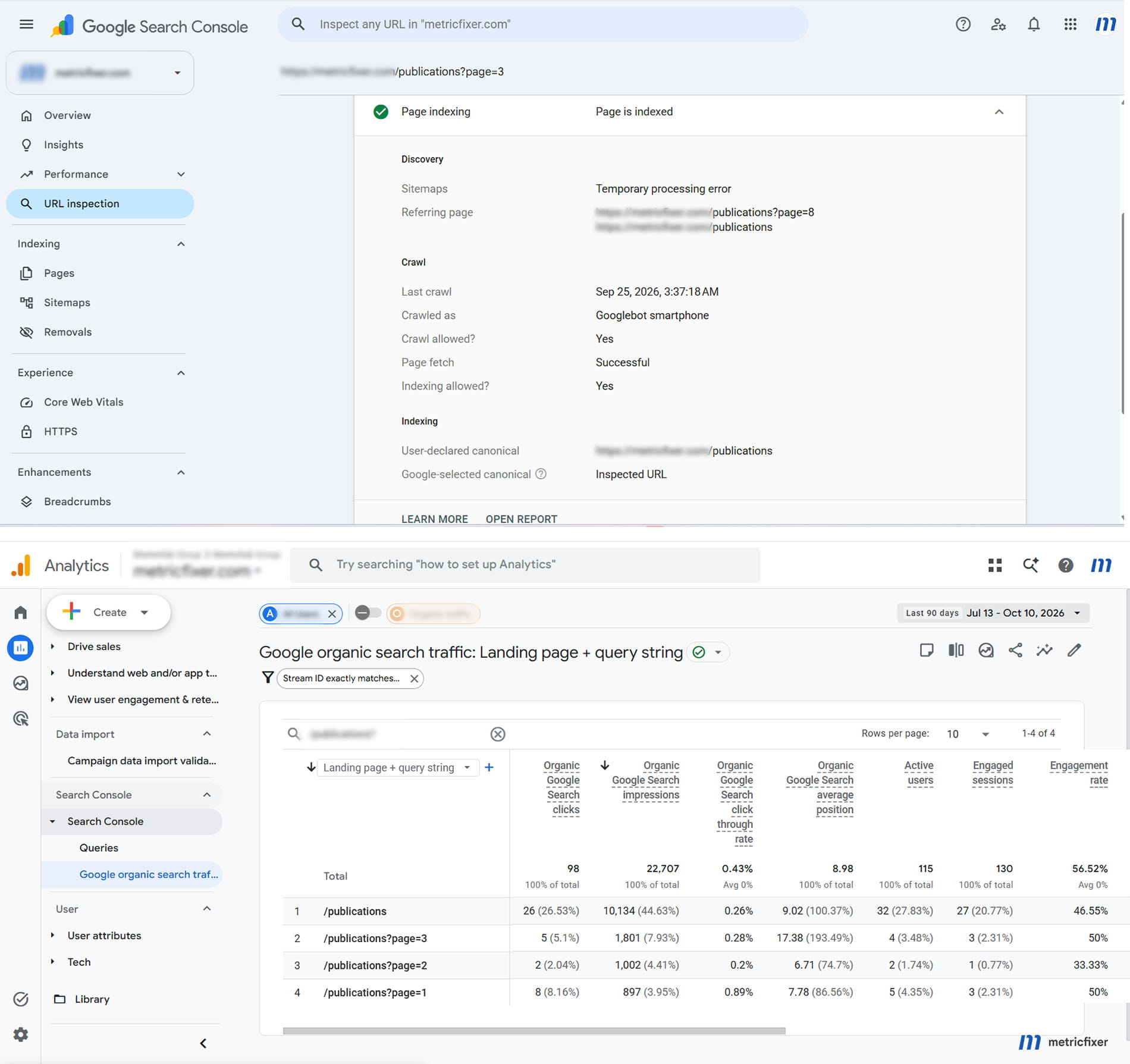
Google assigns most Search Console performance to its selected canonical URL, even when the visitor opens another version. GA4 instead records the URLs supplied by website measurement. This can split one search landing page across several analytics rows. Google's URL attribution rules explain why canonical-level search data should not be compared blindly with a literal landing-page string.
| Reported URL or group | Search Console Web clicks | GA4 Google organic sessions |
|---|---|---|
/products/trail-shoes | 3,000 | 1,400 |
/products/trail-shoes?variant=blue | Credited to the canonical in this example | 400 |
/collections/running/trail-shoes | Credited to the canonical in this example | 200 |
| Verified canonical page group | 3,000 | 2,000 |
The original comparison of 3,000 clicks with 1,400 sessions omitted 600 measured sessions from the page group. Correcting the mapping narrows the apparent gap without creating a single new visit. The remaining 3,000-versus-2,000 difference still needs the other checks in this report; canonical mapping does not prove equality.
Build the mapping from verified page relationships. Use the indexed result in URL Inspection to examine Google's selected canonical, not only the site's declared canonical. A live test does not establish Google's canonical choice. Keep hostname and meaningful URL parameters until there is a defensible rule for grouping them; lowercasing every path or deleting every parameter can merge genuinely different pages.
For the GA4 side, start with landing pages, not every page viewed during the visit. The metricfixer GA4 Page Dictionary explains the difference between Landing Page, Page Path, Page Location, and the first observed page. For migrations or international sites, retain dated mappings and verify which hostnames the Search Console property includes.
Discover is not another keyword report
Discover recommends content without requiring someone to type a search. Its Search Console performance report is separate from Search results and appears when the property has enough relevant activity. A publisher can therefore receive meaningful Google traffic for which there is no original text query to display.
For our retailer, the 3,000 Discover clicks belong in a separate panel. They must not be added to the 16,000 Web clicks and described as 19,000 keyword-driven visits. Nor should 3,000 be subtracted mechanically from GA4 organic sessions: the reports do not provide a one-to-one click/session mapping, and the analytics classification must be checked for the actual traffic.
Keep the Search results Web, Image, Video, and News scopes separate from the standalone Google News and Discover datasets. Google's export schema distinguishes these search types. The practical rule is to record the surface before attempting to explain its missing query text.
There are newer boundaries too. Google documents AI Overviews and AI Mode traffic within Web performance, rather than treating them as Discover. Current query documentation also says that text-query detail is unavailable for the multimodal search type. Not every unavailable phrase is a conventional text query withheld under the same privacy rule.
How to combine Search Console and GA4 without inventing attribution
What the built-in link actually provides
The Search Console link connects a GA4 web stream and a Search Console property. Creating it requires the appropriate GA4 Editor permission and verified Search Console ownership. The collection may need to be published from the GA4 Library before it appears in navigation.
It provides two different views. Google Organic Search Queries contains query-level Search Console metrics. Google Organic Search Traffic places Search Console and Analytics metrics beside landing pages, with supported country and device breakdowns. The first does not become a visitor-level organic query report simply because it is displayed inside GA4.
That is why the link does not provide a reliable table saying that a particular organic query produced a particular GA4 purchase. The query dataset has no shared visitor or session identifier with which to make that match. Changing the visualization tool does not create the missing relationship.
Use a common reporting level, not a many-to-many join
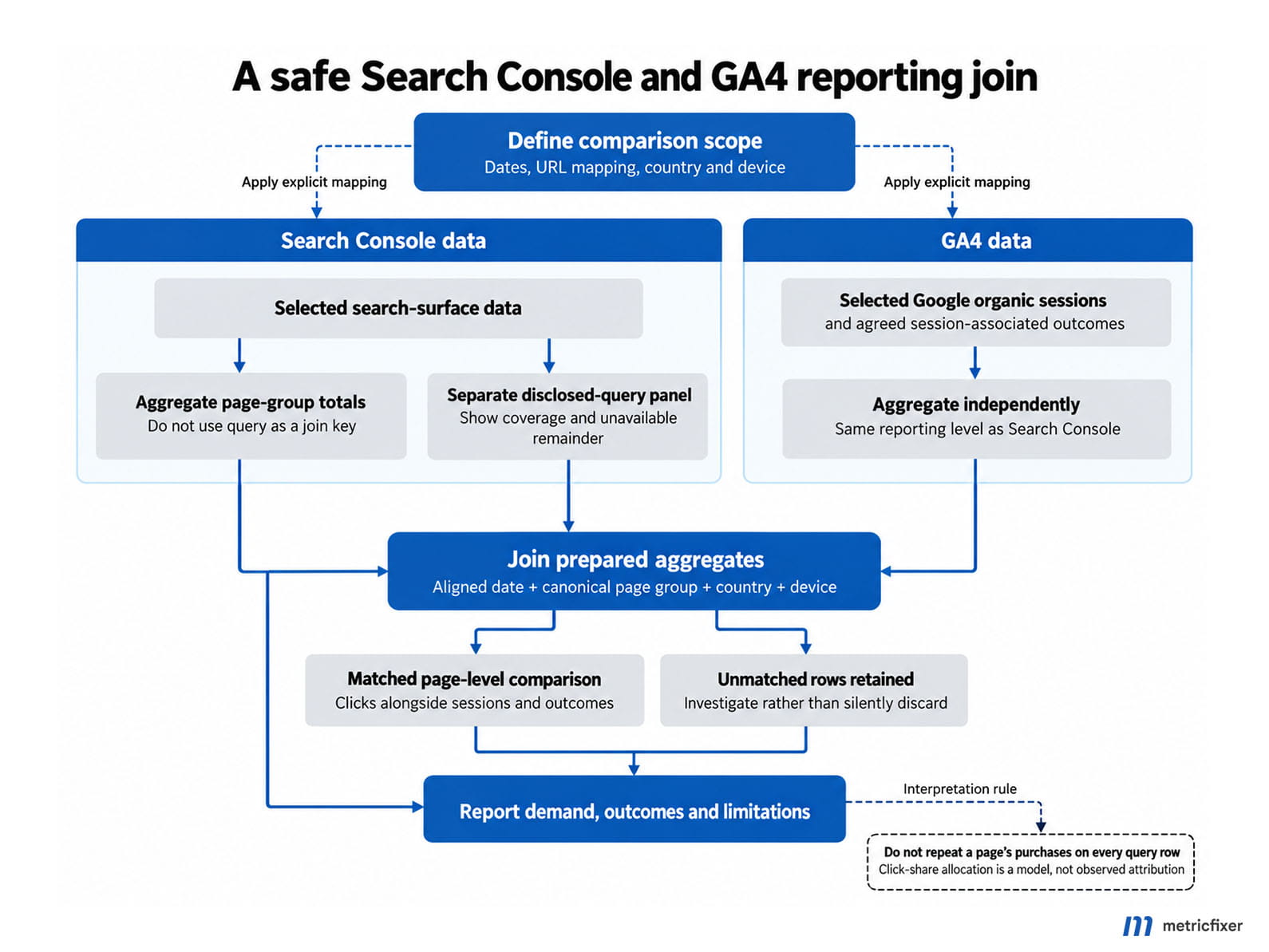
For a custom report, build an organic page-level comparison first. A useful target is aligned reporting date + verified canonical page group + country + device, provided each dataset supports that detail. Aggregate Search Console to that level without query in the join key. Independently aggregate GA4 organic sessions and the agreed session-associated outcomes to the same level.
Then join those two prepared tables. Normalize country representations, device labels, full URL versus path, and time-zone treatment explicitly. Preserve unmatched rows in a separate reconciliation bucket; an inner join that drops them can make a broken comparison look reassuringly clean. Maintain a separate query table for the same selected page group, with its visible-query coverage shown.
Example of a dangerous join: the verified trail-shoes group has 2,000 sessions and 60 purchases in our illustrative GA4 dataset. Search Console supplies three named query rows for the selected group. Joining the complete page total onto every query row and summing the result produces 6,000 sessions and 180 purchases. The extra 4,000 sessions and 120 purchases were created by the join, not by customers.
Dividing those 60 purchases among queries in proportion to clicks is an optional allocation model, not observed keyword conversion attribution. It also requires handling the anonymous or unavailable remainder rather than redistributing everything to named queries. Label such an estimate clearly and do not present its calculated query-level revenue or conversion rates as measured facts.
Practical workflow: define scope and dates → verify URL mappings → aggregate each source independently → join page-level totals → retain unmatched records → show disclosed queries in a separate panel → investigate changes in the reconciliation gap.
When Search Console bulk export to BigQuery is worth it
Bulk export is useful when the obstacle is the amount of accessible reporting data, the need for a durable archive, or repeatable analysis. It is not a mechanism for reversing query anonymization. Google's bulk-export announcement distinguishes the export from the daily row limits affecting other access methods.
| Method | Useful for | Important boundary |
|---|---|---|
| Search Console interface and table export | Manual checks and reviewing prominent queries or pages. | The interface table is limited to 1,000 rows; do not assume its exported rows explain every chart click. |
| Search Analytics API | Scheduled reports, historical extraction, and manageable datasets. | Up to 25,000 rows per request, with up to 50,000 rows per day per search type. Pagination does not guarantee all underlying detail. |
| Native bulk export to BigQuery | Large query/page datasets, repeated multidimensional analysis, and an owned archive. | Removes those row caps, but does not disclose anonymized query text or create GA4 visitor identifiers. |
The API's data-extraction guide warns that it returns top data, with detailed page/query groupings subject to loss. Bulk export is therefore especially valuable when top-row extracts are inadequate. It can also be worthwhile for a smaller site that needs an archive beyond the 16-month reporting window or reproducible page-level joins. Size alone is not the decision criterion.
Keep anonymous counts even though their text is unavailable
The native export contains searchdata_site_impression for property-level data, searchdata_url_impression for URL-level data, and ExportLog for successful exports. The schema reference includes is_anonymized_query. Anonymous query strings are unavailable, but their metric rows can remain in the export. Handle both empty and null query values rather than relying on one representation.
The following example calculates daily named-query click coverage for one URL-prefix property and the Web search type. It preserves anonymous clicks in the total, and keeps any other unnamed rows separate. Replace the project, dataset, property value, and dates. A Domain property's site_url instead uses a value such as sc-domain:example.com.
-- GoogleSQL. Requires an existing Search Console bulk export.
WITH classified AS (
  SELECT
    data_date,
    clicks,
    CASE
      WHEN COALESCE(is_anonymized_query, FALSE) THEN 'anonymous'
      WHEN COALESCE(query, '') != '' THEN 'named'
      ELSE 'other_unnamed'
    END AS query_status
  FROM `your-project.searchconsole.searchdata_site_impression`
  WHERE data_date BETWEEN DATE '2026-09-01' AND DATE '2026-09-28'
    AND site_url = 'https://www.example.com/'
    AND UPPER(search_type) = 'WEB'
), daily AS (
  SELECT
    data_date,
    SUM(clicks) AS total_clicks,
    SUM(IF(query_status = 'named', clicks, 0)) AS named_query_clicks,
    SUM(IF(query_status = 'anonymous', clicks, 0)) AS anonymous_clicks,
    SUM(IF(query_status = 'other_unnamed', clicks, 0)) AS other_unnamed_clicks
  FROM classified
  GROUP BY data_date
)
SELECT
  *,
  SAFE_DIVIDE(named_query_clicks, total_clicks) AS named_query_click_coverage
FROM daily
ORDER BY data_date;
This returns a fraction, such as 0.60 for 60%, not a percentage of distinct queries. It intentionally uses SUM: Google's query guidance explains that repeated dimension keys can occur and metrics must be aggregated. Do not apply SELECT DISTINCT to metric rows as an improvised deduplication rule. For page-level reporting, prepare the URL table separately; do not stack property totals and URL totals into one summed dataset.
Export operations matter as much as SQL
Setup requires a billed Google Cloud project, the required BigQuery permissions, and configuration in Search Console. The first export can take up to 48 hours after successful configuration. It does not backfill the property's earlier history; use the API or reports for older available data and label that historical dataset's limitations.
Leave the managed export table schemas unchanged. Put transformations in separate views or tables. Apply date filters to control query scans, monitor storage and query spending, and check retention settings: Google specifies at least 14 days when setting partition expiration. An archive is not durable if an organization-level expiration policy silently deletes it.
Monitor both data tables by expected date, not merely the latest successful job. Google's monitoring guidance explains that failed exports are retried for roughly a week; unresolved failures can leave permanent gaps. ExportLog records successes, not a complete failure history. Check missing dates alongside Search Console's export status and notifications.
For the example retailer, bulk export becomes a sensible next step when repeated reports need more than the available named rows or a historical archive is required. It would not, by itself, repair the 3.5% GA4 advertising-query coverage: that is a different product, dataset, and diagnostic problem.
What practitioner evidence shows, and what it cannot prove
Published account-data studies confirm that unavailable query detail can be substantial. They do not establish a universal percentage for this website, or make Search Console anonymity equivalent to a GA4 reporting threshold.
| Research | Reported finding | How to use it |
|---|---|---|
| Ahrefs, June 24, 2022 | One month of data across 146,741 websites and nearly 9 billion clicks. The study reported 46.08% of clicks without disclosed query text. | Evidence that incomplete query reporting was already material; individual websites varied widely. |
| Ahrefs, February 11, 2026 | Its April 2025 dataset covered 887,534 Search Console properties and 22 billion clicks. The reported anonymous share was 46.77%. | A larger observational dataset, not a measurement of October 2026 traffic or a forecast for every site. |
| Taikun Digital, June 30, 2025 | Across 933 campaigns and approximately $19.6 million of spend, hidden terms represented 26.7% of Search spend and 33.5% of Shopping spend. | Evidence that unavailable paid-query detail can affect meaningful budget, not merely a few impressions. |
Ahrefs describes its missing-query category as anonymous. When reproducing such a calculation, distinguish that published label from a direct measurement of the bulk export's anonymity flag. Subtracting named-query clicks from a total can also reflect the extraction limitations discussed above. The 2022 article used API data; it should not be read as evidence that the API has no reporting limits.
The two Ahrefs percentages also do not prove that privacy restrictions worsened by exactly 0.69 percentage points for a typical website. The samples and observation periods differ. Likewise, Taikun's analysis of 779 Search and 154 Shopping campaigns is not a representative census of all advertisers and is not a study of GA4 query coverage. Its economic criticism should not be converted into a proven claim about Google's motive.
The operational lesson is narrower and stronger: measure your own visible share, preserve the unassigned portion, and avoid making every optimization depend on a complete phrase list. Practitioner observations are useful for identifying hypotheses; Google's product documentation and tests in the actual property determine which explanation is supported.
Practical audit checklist for one website
Use this checklist to produce a report that another analyst can repeat. Save the settings and original exports alongside the conclusions.
| Check | Evidence to retain | Decision it supports |
|---|---|---|
| 1. Name the exact query field | Product, report, dimension, and scope: internal Search term, Session Google Ads query, keyword text, or Search Console query. | Are we investigating the right data? |
| 2. Define comparable populations | Property, hostname, stream, campaigns, network, search surface, countries, devices, and exclusions. | Do these totals cover the same part of the business? |
| 3. Save independent baselines | Unfiltered query baselines and complete eligible exports; separate click, cost, and session coverage calculations. | What proportion of activity is actually explained? |
| 4. Check paid integration and report quality | Linked account, auto-tagging, surviving click identifiers, campaign fields, and actual threshold/sampling messages. | Is this disclosure, collection, scope, or missing metadata? |
| 5. Test the landing experience | Representative templates, successful and failed page loads, consent states, measurement requests, and non-HTML destinations. | Which collection gaps can we demonstrate? |
| 6. Align dates and URL groups | Time zones, mature reporting dates, indexed canonical checks, and versioned landing-page mappings. | Has activity merely moved between dates or URL rows? |
| 7. Separate surfaces and metrics | Web versus Discover and other search types; sessions versus users, clicks, and event-attributed outcomes. | Are we comparing like with like? |
| 8. Validate joins and extraction | Totals before and after joins, unmatched rows, API pagination, anonymity handling, and export completeness. | Did the reporting pipeline lose or multiply records? |
| 9. Assign action and uncertainty | Confirmed findings, untested hypotheses, responsible owner, next test, and review date. | What can be fixed, and what remains a reporting boundary? |
The final report for our example website should retain three panels. The paid panel shows 74% visible click coverage and 72% visible cost coverage in Ads, with the separate 3.5% GA4 query-session result requiring investigation. The organic-demand panel shows 60% named-query coverage in the initial extraction and keeps Discover separate. The website-outcome panel shows GA4 sessions and purchases by verified landing-page group, with collection, scope, and date qualifications attached.
The conclusion is not "96.5% of traffic disappeared." It is that one GA4 query breakdown explains only a small part of its relevant session baseline. The next step is to diagnose that breakdown while separately reconciling clicks, sessions, URLs, and outcomes. A useful report shows the boundary of the evidence instead of filling it with invented keywords.

Methodology and sources
This report was researched on October 10, 2026. It prioritizes official Google Ads, Google Analytics, Search Console, Search Central, and BigQuery-export documentation for product behavior. Original research from Ahrefs and Taikun Digital supplies observational context; Analytics Mania supplies a practical explanation of the site-search naming problem. Historical Google posts explain the referrer mechanism, not today's interface.
Sources are linked at the relevant claims. The core reference groups are Google's paid search-term rules and GA4 thresholds; Search Console discrepancy guidance and Analytics integration documentation; and native BigQuery bulk-export guidance. These answer different questions and should not be treated as interchangeable specifications.
No advertiser account, GA4 property, Search Console property, or original discussion-thread export was supplied for this article. The one-website ledger, URL-group figures, and join example are deliberately synthetic. They demonstrate calculations and diagnostic decisions, not measured client performance. The SQL is a schema-based example, not a query executed against a production property. Published studies were reviewed rather than independently reproduced, and their sample-specific findings are not presented as universal benchmarks.
This article is for technical and operational information, not legal or privacy advice. metricfixer is not affiliated with Google, Ahrefs, Taikun Digital, Analytics Mania, or other third-party platforms and publishers mentioned here. Product interfaces, reporting rules, data availability, and export requirements can change. No workflow described here guarantees disclosure of protected queries, complete visitor-level attribution, or identical totals across platforms.