
Published Oct 5, 2026
GA4 Page Dictionary: Landing Page, Page Path, Page Location and First Page
A practical GA4 page dictionary with ready-to-use report setups. Rebuild All Pages, distinguish session entry from conversion location, and understand why campaign reports include pages your ads never linked to.
Category: Analytics & Conversion Tracking · By metricfixer Expert Team
GA4 can answer the familiar questions behind Universal Analytics page reports, but not with one universal "page" dimension. Landing page describes where a session began. Page path identifies content visited. Page location carries the URL associated with an event. A user's first observed page and the page where a conversion happened are separate questions. This guide explains the differences and provides report configurations you can use without confusing traffic acquisition with on-site navigation.
Practical default: use Page path and screen class + Views for content popularity, Landing page + Sessions for entry-page performance, and Page location + an event-name filter for conversion location. To analyze one campaign's sessions, use Session campaign, not an unspecified campaign field or a search for UTM text in every page URL.
Contents
Rebuild the question, not the UA menu
It can feel as though Universal Analytics disappeared five years ago. The dates are more recent: standard UA properties began losing new-data processing on July 1, 2023; the UA 360 processing extension ended on July 1, 2024. Historical access to standard UA was also scheduled to end on July 1, 2024. In October 2026, that is a little over three years since the standard-property cutoff, not four or five. Google's sunset announcement and migration reminder distinguish those milestones.
The nostalgia is understandable. "All Pages" was an inviting label: open a table, find a URL, judge its performance. But a familiar menu did not make every number a measurement of the same thing. Content consumption, session entry and completed actions are different analytical questions.
The useful goal is therefore not to rebuild an identical-looking UA table and assume identical mathematics. It is to recover the business question behind it: Which content gets viewed? Which entry pages begin productive sessions? Where do people submit a lead? Which content appears in successful journeys?
In GA4, the answer depends on three choices: the page dimension, the metric, and the scope of any filter or segment. "Scope" simply means whether a value describes an event, a session or a user. A page report becomes much easier to interpret once those choices are explicit.

The GA4 page dictionary
First, distinguish a collected parameter from a reporting dimension. Your implementation sends parameters such as page_location and page_title. GA4 uses collected data to populate dimensions such as Page location, Page path and Landing page. Their labels sound related because they describe different views of the same browsing activity, not because they are interchangeable.
| Name | What it describes | Use it for |
|---|---|---|
| Landing page | The path associated with the first recorded pageview in a session. | Which entry pages begin sessions. |
| Landing page + query string | The session's first pageview path, with reportable query parameters. | Separating meaningful entry-page variants. |
| Page path and screen class | The website path associated with activity; the combined dimension also supports app screen classes. | Content reporting without the hostname or query string. |
| Page path + query string | The page path plus reportable query parameters. | Distinguishing content variants that depend on parameters. |
| Page location | The event's page URL, including protocol, hostname, path and query string, as collected. | Full-URL diagnostics and event location. |
| Page title and screen name | A page's reported title, or an app screen name. | Readable labels and title-quality checks, not unique URL identification. |
| First page | An ambiguous phrase: first in a session, first observed for a user, or first in a selected path. | A question that must be defined before choosing a report. |
The technical names in Google's Data API reference include landingPage, landingPagePlusQueryString, unifiedPagePathScreen, pagePathPlusQueryString and pageLocation. These are reporting field names, not instructions to send similarly named custom event parameters. In particular, do not assume that adding a custom page_path parameter will populate GA4's built-in path dimensions.
Landing page does not mean a user's first-ever page. In GA4 it remains a session-entry question. A returning visitor can have a different landing page in every session, while the first observed page for that visitor stays a separate historical fact.
"Query string" does not mean an untouched copy of the URL
Google's campaign URL documentation explicitly says that UTM parameters are omitted from Landing page + query string and Page path + query string. It identifies Page location as the dimension containing that UTM information. Do not diagnose missing campaign tagging merely because a UTM is absent from one of the two path-based dimensions.
Consider this illustrative entry URL, with a business parameter and campaign tags:
https://www.example.com/offer?plan=team&utm_source=partner&utm_medium=cpc&utm_campaign=autumn-demoIts path is /offer. A path-plus-query report can distinguish /offer?plan=team without displaying the UTMs. Page location is the appropriate place to inspect the collected full URL; Session campaign is the appropriate field for selecting the campaign's sessions. A cleaned-up content row and usable campaign attribution can coexist.
A title is a label, not a page identifier
By default, page_title comes from the document title, while page_location comes from the page URL. Google's pageview implementation guide also notes that the default URL excludes the fragment after #. Overridden page locations must be full URLs, including the protocol.
Two different URLs can share a title such as "Contact us". One URL can acquire several titles after an editorial update or an incorrectly timed SPA event. A title-based table can therefore merge different pages or split one page across rows. The reported title is also not automatically the visible H1 heading. Use paths or locations to identify pages and titles to describe them.
One visitor, two sessions, several correct page answers
Imagine one recognized browser with two separate sessions. Measurement works correctly, the sessions fall inside the reporting period, and the second session begins with the tagged offer URL above. This is an illustrative journey, not customer data.
Session 1, organic search: /blog/measurement-guide → /pricing → leave.
Session 2, campaign autumn-demo: /offer → /pricing → /contact → generate_lead on /contact.
| Question | Answer in this example |
|---|---|
| What was the user's first observed page? | /blog/measurement-guide. |
| What was the second session's landing page? | /offer. |
| Which pages were viewed in the campaign session? | /offer, /pricing and /contact. |
| Where was the lead event recorded? | /contact, assuming that location was sent with generate_lead. |
| Which landing page is associated with that session's lead? | /offer, even though the form was submitted elsewhere. |
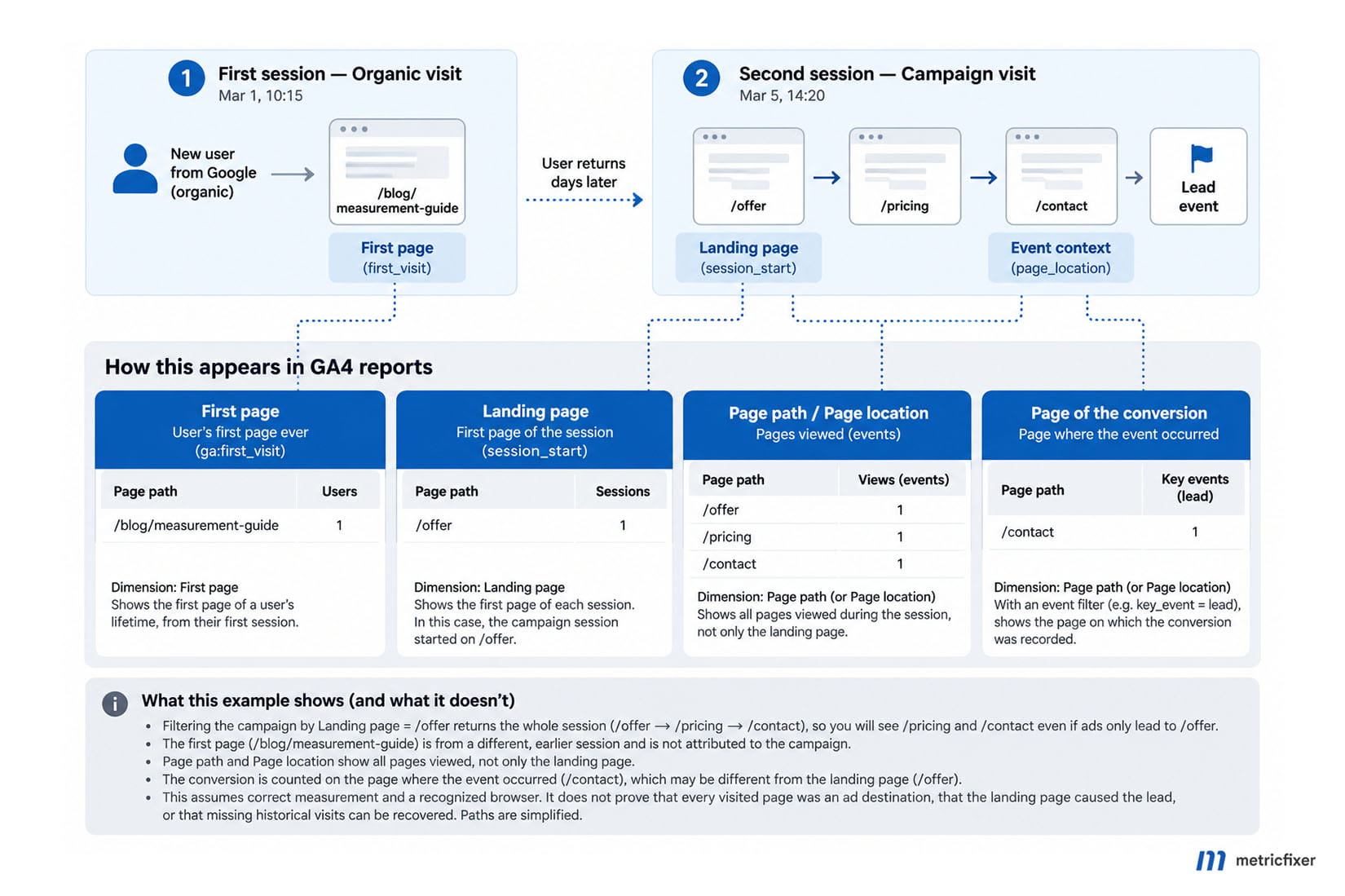
Nothing is contradictory here. The campaign helped bring the visitor into a session; navigation happened afterward. The conversion-location report and the landing-page report should show different pages because they answer different questions.
Why campaign filters show pages your ads never linked to
A campaign filter does not turn a content report into a destination-URL report. With Session campaign = autumn-demo and Page path as the row dimension, the example above legitimately includes the pricing and contact pages. The filter selects campaign-associated sessions; the page dimension still describes activity within them.
Read the complete traffic-source field name. Google's scope documentation separates user acquisition, session acquisition and event-level attribution:
| Campaign field | Question it helps answer | What it does not prove |
|---|---|---|
| Session campaign | What happened in sessions associated with this campaign? | That every page viewed was an ad destination, or every selected session represents a fresh click. |
| First user campaign | What did users originally acquired through this campaign do? | That all their later sessions came from that campaign. |
| Campaign, without a scope prefix | Which campaign received event-level attribution credit for key events? | Where a session started or which URLs appeared in ads. |
For manually tagged traffic, Session manual campaign name can be the more explicit choice. For a linked Google Ads analysis, use Session Google Ads campaign, ideally with the campaign ID when names are reused. Google's tagging reference explains the cross-channel and platform-specific variants.
Do not replace these dimensions with a filter such as "Page location contains utm_campaign=autumn-demo" when the question concerns the whole session. Internal navigation usually changes the URL. Such a filter selects events whose collected URL contains that text, not all activity belonging to the campaign session.
What about an unexpected page in an actual landing-page report?
That deserves a different investigation. Compare the configured ad destination, the URL after redirects, and the first recorded page_view. If measurement starts only after navigation, the first observed page can be later than the real entry. A landing report describes collected browsing data, not the advertiser's destination settings.
Campaign association is not a fresh-click log, either. Google's campaign-processing documentation describes source precedence: direct traffic does not override an existing referrer. A visitor returning directly to a bookmarked pricing page may therefore retain earlier non-direct acquisition information. A campaign-associated landing page is not necessarily proof of an ad click to that URL on that visit.
GA4 also does not automatically start a new session when it encounters a new campaign mid-session. The documentation distinguishes the new event-level campaign information from the existing session. The page reached by a later ad click is therefore not necessarily a new session landing page.
If acquisition labels are also missing or surprising, use the separate metricfixer guide to Direct, (not set) and Unassigned. Do not begin by declaring ordinary post-click navigation a tracking failure.
Report recipe 1: rebuild All Pages
Business question: which pages did people view, and how often? The closest starting point to UA's Behavior → Site Content → All Pages is GA4's Pages and screens report, not Landing page.
Open Reports → Engagement → Pages and screens where that collection is published. Change the main dimension from a title-based option to Page path and screen class. Google's report guide confirms that this report covers pages visited throughout the journey. If the report is absent from navigation, an Editor or Administrator can add it back.
| Setting | Recommended configuration |
|---|---|
| Report name | All pages - content performance. |
| Rows | Page path and screen class. Use Page path + query string when business parameters distinguish content. |
| Metrics | Views, Active users, Views per active user and Average engagement time. |
| Scope | Website traffic; select the intended web stream or Platform = web when the property also contains apps. |
| Optional breakdown | Hostname for a multi-domain content inventory; Session campaign for campaign-associated browsing. |
| Sort | Views, descending. |
For a flexible version, open Explore → Free form, import the dimensions and metrics through the plus buttons in Variables, then place the page dimension in Rows and the metrics in Values. Google's Explore playbook demonstrates rebuilding a UA-style pages table using a path dimension and Views.
Do not add an event filter for page_view to a mixed engagement-and-outcomes report. Views already counts page and screen views. Restricting every row to pageview events can remove the other events needed for engagement and key-event analysis.
A useful alternative to "Unique Pageviews"
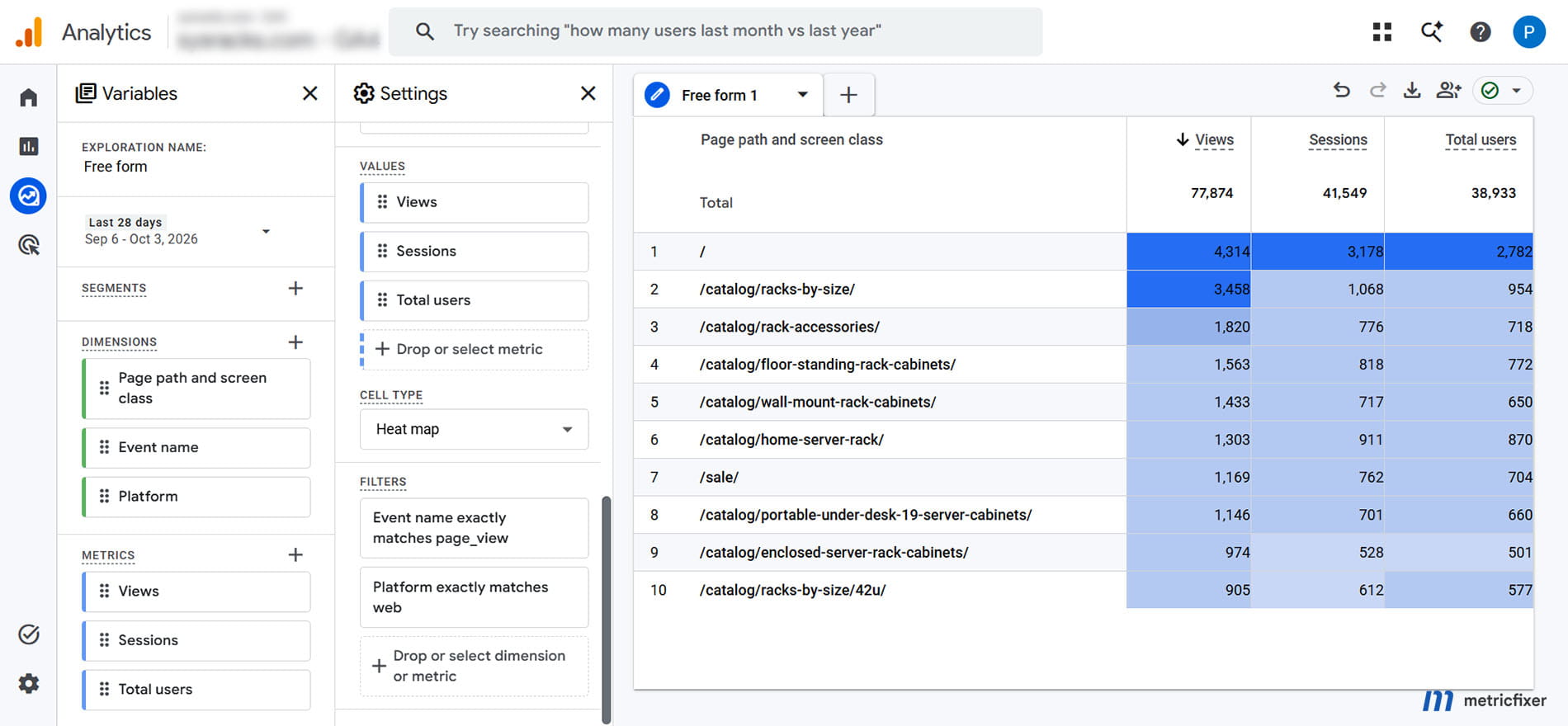
For the narrower question "In how many sessions was this page viewed?", create a separate exploration:
Technique: Free form
Rows: Page path and screen class
Values: Views, Sessions, Total users
Filters: Event name exactly matches page_view
         Platform exactly matches web
Sort: Views descending
Optional filter: Session campaign exactly matches autumn-demo
Google's current session-measurement guide explicitly distinguishes Sessions with Page path, which counts sessions visiting a path, from Sessions with Landing page, which counts sessions beginning there. One session can count against several visited pages. Consequently, adding the session counts down the page rows can exceed the report's deduplicated total.
Label this metric sessions containing this page, not "UA Unique Pageviews restored." It answers a similar practical question, but changing the label does not recreate UA's session definitions or guarantee identical historical totals. Users are also non-additive across page rows: one person can view many pages.
Do not rename GA4 metrics into old UA meanings
GA4's Average engagement time in Pages and screens uses active users as its denominator and focuses on foreground engagement. It is not a drop-in replacement for UA's Average Time on Page. Likewise, GA4 bounce rate measures sessions that were not engaged, rather than simply preserving UA's old bounce definition. Keep the GA4 metric names visible in client dashboards.
To recover another familiar view, create a separate free-form table with Page path and screen class, Entrances and Exits. Google defines these through the locations of the first and last session events. That is not the same definition as the first pageview used for Landing page. Do not expect every entrance, exit and session total to match across date boundaries and collection edge cases.
Report recipe 2: measure landing-page performance
Business question: which entry pages begin sessions that produce useful outcomes? Use the built-in Landing page report. Google's landing-page guide explicitly describes it as session-scoped and recommends session acquisition dimensions when adding traffic-source context.
| Setting | Recommended configuration |
|---|---|
| Report name | Landing pages - session outcomes. |
| Rows | Landing page; use Landing page + query string for meaningful entry variants. |
| Metrics | Sessions, Engaged sessions, Engagement rate, Key events and Session key event rate. Add Total revenue for a revenue question. |
| Campaign selection | Session campaign = the chosen campaign, or the appropriate session-scoped platform-specific field. |
| Optional breakdown | Session source / medium or Device category. |
| Event restriction | No global Event name filter. Keep non-converting sessions in the denominator. |
| Sort | Sessions first; compare outcome rates only with adequate sample sizes. |
Editors can customize a detail report to include supported metrics. An alternative is the Traffic acquisition report with a session campaign dimension and Landing page as the secondary dimension. For an exploration, use the same dimension choices, add the available metrics and apply the campaign filter in Tab settings.
For lead generation, select generate_lead in the report's Key events selector. Check whether Session key event rate is using the same selected event or all key events; label it accordingly. Do not solve an unavailable event-specific rate by filtering the entire report to generate_lead: that removes the non-converting sessions you need for comparison.
The session key event rate is the share of sessions containing a key event. It is not the number of event occurrences divided by sessions. For an illustrative 100 sessions containing 10 lead-generating sessions and 14 recorded lead events, the session lead rate is 10%, not 14%.
In our journey, the lead belongs under /offer in this report because that is where the session began. The report does not claim the form existed on that page or that the entry page alone caused the result.
A multi-domain caution: Hostname describes event context, while Landing page describes the session's entry path. Appending the current event's hostname to that path can invent a full URL that was never the landing URL. To establish the original landing hostname, inspect the full page_location of the session's first pageview. A warehouse reconstruction must use a reliable user-and-session key, event ordering and enough history to include the session start.
Report recipe 3: find the page where a conversion happened
Business question: where was the lead, signup or purchase event recorded? This is the closest practical replacement for asking about a goal-completion location. Use an event's page context, not the session landing dimension.
| Setting | Recommended configuration |
|---|---|
| Technique | Explore → Free form. |
| Rows | Page location; switch to Page path and screen class for a simpler content view. |
| Values | Event count and Total users. Add Key events when the selected event is marked as a key event. |
| Filter | Event name exactly matches generate_lead, or the specific event being investigated. |
| Optional breakdown | Session campaign for the session-acquisition question. |
| Do not add | An additional page_view event filter or a pageview metric as the measure of completed leads. |
With correct browser-side measurement, this produces /contact in our example. GA4's automatically collected event documentation describes page context parameters, including page_location and page_title, for web events.
Nevertheless, a backend event is not proof that a browser was displaying a particular page. A delayed payment, CRM update or server-side lead event may have no reliable current page URL. Preserve that limitation instead of supplying an invented thank-you URL. Where useful, capture a separately named origin context and document whether it means form location, order creation page or another business fact.
Finally, a thank-you page view is not automatically a unique successful submission. Reloads, direct visits and duplicate event sending require their own checks. First establish what the event proves; then analyze its location.
Report recipe 4: find pages visited in converting sessions
Business question: which pages appeared in sessions that contained a lead? This is different from asking where the lead event fired.
Create a Session segment, not an Event segment, that includes sessions containing Event name = generate_lead. Apply it to a free-form exploration. Google's segment documentation distinguishes selecting whole sessions from selecting only matching events.
Segment type: Session segment
Include sessions when: Event name exactly matches generate_lead

Exploration rows: Page path and screen class
Values: Views, Sessions, Total users
Tab filter: Event name exactly matches page_view
Comparison: All sessions, using the same date range and website scope
The session segment identifies qualifying sessions. The separate tab filter then displays their pageviews. In the example, that includes /offer, /pricing and /contact. An event-only filter for generate_lead would instead retain the lead event and its contact-page context.
Name the result pages viewed in converting sessions. Do not call it "pages that caused conversions" or even "pages viewed before conversion." A qualifying session can also contain pageviews after the lead. For ordered behavior, use an explicitly configured funnel, path investigation or event-level reconstruction with a defined conversion cutoff and session boundary.
The comparison is descriptive, not causal. A pricing page may be common in successful sessions because serious prospects visit it, because the page helps them decide, or both. That table alone cannot distinguish the explanations.
Report recipe 5: find a user's first observed page
Business question: where did newly observed visitors first appear? Do not substitute First user campaign: that describes acquisition, not a page. Likewise, the first node displayed in a path exploration is the start of that configured analysis, not automatically the person's first-ever visit.
For a practical first-visit observation report, use the web event first_visit. Google documents it as the first website visit detected by Analytics and lists its page-context parameters. Build the following exploration:
| Setting | Recommended configuration |
|---|---|
| Report name | First observed website pages - first_visit events. |
| Rows | Page location, or Page path and screen class when hostname and query detail are unnecessary. |
| Values | Total users and Event count. |
| Filters | Event name exactly matches first_visit; Platform = web. |
| Optional breakdown | First user source / medium. |
| Interpretation | Page context on first-visit events observed within the selected period. |
In the illustrative journey, the answer is /blog/measurement-guide, provided the selected period includes that first visit. This is not a built-in lifetime "first page" dimension that automatically attaches the same URL to every subsequent event.
That distinction matters when the real question is "How much revenue did users first acquired through this article generate months later?" Filtering to first_visit will not retain their later purchase events. You need a deliberately defined first-page cohort and a separate measurement of its subsequent outcomes.
A warehouse analysis can derive the earliest observed pageview for a chosen user identifier, preserve that cohort assignment, and join later activity. A carefully governed custom user property can support some forward-looking reporting, particularly with a stable content identifier rather than a long URL. Neither method recovers visits that were never observed.
Specify the identity rule, historical coverage and reset behavior. Google's reporting identity documentation explains the distinction between device-based and combined identity options. Selecting the earliest event in this month's extract does not establish a lifetime first page. Taking the alphabetically smallest URL is not an ordering method. And a new cookie, browser, device or restricted measurement context can change what "new" means. Write first observed, not first-ever human visit.

Why page reports still look wrong
Missing pageviews and (not set)
Google identifies sessions without a page_view as a reason for Landing page = (not set). Check whether entry pages actually send pageviews and whether events are associated with the expected session.
A missing early pageview can create a different problem: a later page becomes the first observed pageview, so the landing value looks plausible but is wrong for the real entry. An event arriving before a pageview does not, by itself, establish that the entire session has no landing page. Inspect the sequence instead of hiding (not set) rows immediately.
SPA navigation and stale page context
A single-page application can change content without loading a new HTML document. Google's SPA measurement guide recommends checking virtual pageviews and their page context in DebugView. Verify that URL and title updates happen at the correct point in the route lifecycle.
Watch for duplicate pageviews when automatic history measurement and a manual route trigger both track the same transition. Also check whether later interaction events carry the current page rather than the initial route. The metricfixer SPA analytics architecture guide covers the broader lifecycle and state-cleanup problem.
Hostname, query parameters and accidental grouping
A path-only report can combine /pricing on different hosts. Add Hostname when the question concerns visited content across multiple domains, or inspect Page location. Remember the separate landing-host caveat: a current hostname is not necessarily the original entry hostname.
Conversely, meaningful query parameters can split one template into useful content variants. Decide whether plan=team represents a different offer or merely a presentation choice. Set explicit normalization rules for case, trailing slashes and business parameters rather than merging everything indiscriminately.
Do not rewrite page_location into a bare path or strip acquisition parameters before they can be collected simply to make a table prettier. Choose a cleaner reporting dimension first. A well-grouped report should not come at the cost of losing source evidence.
Different reporting conditions
Before comparing two exports, align the dates, property, stream, campaign scope and event selection. Check the reporting identity, available exploration history and any data-quality indicators. A standard report and an exploration can differ for reasons other than the chosen page label; Google's comparison guidance for reports and explorations is useful here.
Most importantly, do not treat an unexplained difference as evidence that UA was inherently accurate and GA4 inherently inaccurate. First establish that the two tables are asking the same question of comparable collected data.
A practical validation checklist
Before trusting a dashboard, run a controlled website journey in an authorized test environment or a clearly identifiable test segment. Capture the expected URLs and events before opening the aggregate reports.
- Choose the unit: are you counting pageviews, sessions containing a page, session entries, users, or outcome events?
- Verify the sequence: record the first pageview, navigate through two more pages, and trigger the intended outcome. Check
page_location,page_titleand session continuity. - Compare the three page answers: the session landing page should stay at the first pageview; content rows should include later pages; the outcome-location row should reflect the event's actual context.
- Verify campaign scope: use a session campaign field for session analysis. Do not require every later page URL to retain the entry UTMs.
- Protect denominators: keep non-converting sessions in a landing-page conversion-rate report. Use a session segment, not only a conversion-event filter, for converting-session content.
- Check collection limits: repeat relevant scenarios with consent timing, redirects, SPA transitions and cross-domain navigation. Treat unobserved activity as missing evidence, not as a recoverable certainty.
The final naming rule is simple: a report title should state what the rows mean. "All pages viewed in campaign sessions," "Session landing pages," "Lead-event locations" and "First-visit page observations" are longer than "Pages," but they prevent expensive misunderstandings.
metricfixer can help audit pageview collection, campaign scope and report definitions, then build the specific views your team needs. The aim is not to disguise GA4 as UA. It is to make the new reports as understandable as the business questions behind them.
Methodology and sources
This article is a documentation-based technical review checked on October 4, 2026. It draws on Google's Analytics Help materials, tagging documentation, Data API field definitions and predefined-report examples. Sources are linked alongside the relevant explanations rather than repeated as a technical URL list.
The report configurations are metricfixer's suggested applications of those documented definitions. The two-session journey and the numerical rate example are synthetic teaching examples, not measured client results. No private GA4 property was queried, and these configurations were not executed against the reader's implementation.
Where documentation differs in age or purpose, current dedicated report and collection guidance takes priority over older migration walkthroughs. For example, an older Explore playbook passage says a landing-page report is unavailable, while the dedicated Landing page documentation describes the existing report. Similarly, a generic "path plus query" definition should be read together with Google's specific note about omitted UTM parameters.
Available navigation, dimension-metric combinations, event selectors and results can depend on property configuration, permissions and collection quality. The first-page cohort and multi-domain cautions are analytical consequences of the stated scope and identity assumptions, not promises that GA4 can reconstruct missing browsing history.
This article is for technical and operational information only. metricfixer is not affiliated with Google or Google Analytics. Product interfaces, reporting definitions and processing behavior may change after publication. The examples do not guarantee attribution accuracy, recovery of missing data or improved marketing performance. Configure and validate measurement in accordance with your organization's privacy, consent and data-governance requirements.