
Published Oct 24, 2026
Google Ads MCC Security Changes: A Guide for Agencies and In-House Teams
A practical guide to Google Ads MCC security for agencies: diagnose blocked client links, prepare business identities and passkeys, manage admin approvals, and protect access during migrations.
Category: Online advertising · By metricfixer Expert Team
Connecting a client to Google Ads Manager Accounts, commonly called an MCC, is no longer just a question of sending and accepting an invitation. Agencies need the right user permissions and may also face business-email requirements, additional identity checks and approval by another administrator. This guide explains how to identify the obstacle, prepare your team and keep legitimate account changes moving without weakening security.
Start here: identify the exact account, signed-in user, requested action and message before changing anything. A login challenge, a business-email restriction and a pending approval need different solutions. If a client connection is already blocked, go to the linking diagnostic. If nobody else can approve a change, go to the single-administrator section.
Contents
What has changed—and what applies to your MCC?
Documentation checked on 24 October 2026. Google describes several overlapping controls, not one security switch with a single worldwide deadline. Some protect sign-in, some verify an individual operation, and others require a second administrator to review a proposed change. The practical consequence is that successful access to campaigns does not necessarily mean the same user can change the account structure.
| Control | Documented status | What your agency should establish |
|---|---|---|
| Confirm it's you | An existing action-level check, rolled out to all accounts in 2022, independently of ordinary two-step verification. | Which operation triggered it, not just whether the user can sign in. See Google's explanation. |
| Passkeys for sensitive actions | Account-specific requirements are communicated through email and in-product notices. | Whether the affected user can complete the required challenge. See the passkey overview. |
| Business-email restriction | A pilot affecting a subset of advertisers, not a universal ban on Gmail access. | Whether the account is enrolled and which working identity is authorized. See the domain requirement. |
| Multi-party approval, or MPA | Documented for sensitive changes, including linking an existing independent account to an MCC. Eligibility wording is inconsistent across help pages. | Whether a review exists and who is eligible to decide it. See the approval workflow and caveat. |
| MPA in the API | Google announced a rollout starting 27 July 2026 for specified user-access operations. | Whether your integration handles pending reviews rather than treating every successful response as completion. See the dated announcement. |
| Permanent passkey enforcement | An administrator-selected control, introduced gradually. | Who approved activation and whether the team is ready. See the pre-activation checks. |
There is also a monitoring layer. Google's 21 April 2026 announcement introduced security monitoring, a security-insights dashboard and passkeys as part of its Ads Advisor updates. An announcement establishes what Google said and when; it does not prove that every feature is available in every MCC.
No universal future deadline for all advertisers to adopt corporate email and passkeys was identified in the reviewed documentation. Treat a notice addressed to your account, a published rollout date and an enforcement date chosen by your own administrator as three different things. The July API announcement is already in the past at this review date; it should not be presented as an upcoming July change.

For an agency, preparation is still worthwhile before any notice arrives. Assign a person to maintain an access register, test administrative workflows ahead of onboarding deadlines, and record which requirements have actually appeared in each relevant account. That is a continuity plan, not a prediction of Google's next rollout.
Understand your MCC hierarchy before changing access
Before troubleshooting a verification loop, establish where the user has access. A manager account is not the same object as the client account it manages. Someone may be an administrator of one MCC, a campaign operator elsewhere, and a direct administrator of only a few clients.
Google's manager-account permissions guide distinguishes the user's access level from the manager's administrative ownership. Standard access does not include hierarchy management. Administrators of a non-owner MCC can perform some limited user-management tasks, but important actions such as adding client administrators or removing other managers require ownership or direct client-administrator access. Do not simplify this into either “every MCC admin controls every client” or “a non-owner manager can do nothing.”
Linking is not ownership. Google says an MCC that creates a client account becomes its administrative owner, while linking an existing account does not grant ownership by default. Ownership extends up the owning manager's hierarchy. It does not transfer the client's ownership of its data. Google's ownership documentation recommends granting these privileges only when needed.
Our recommendation is to keep a small account map that answers four practical questions:
- Which account will change? Record the client or manager account, not just the agency's trading name.
- Who will initiate the action? Record the person's own Google Account and the level at which their permission is granted.
- Who can authorize the relationship? Identify the client's direct administrator or appropriately authorized owner-manager administrator.
- Who will handle a separate approval? Identify an eligible reviewer and a legitimate substitute before an urgent request arises.
For example, a buyer who manages campaigns successfully through an MCC may still need the agency's hierarchy administrator to request a new connection and a client-side administrator to accept it. Giving the buyer additional privileges merely to avoid coordination should not be the default response.
In Admin > Access and security, check the user's actual role and the relevant manager relationship. Google's user-management instructions also describe the hierarchy-wide user view. Make these checks while signed in as yourself; “log in directly to the client account” does not mean borrowing the client's credentials.
Why a client-linking request is blocked
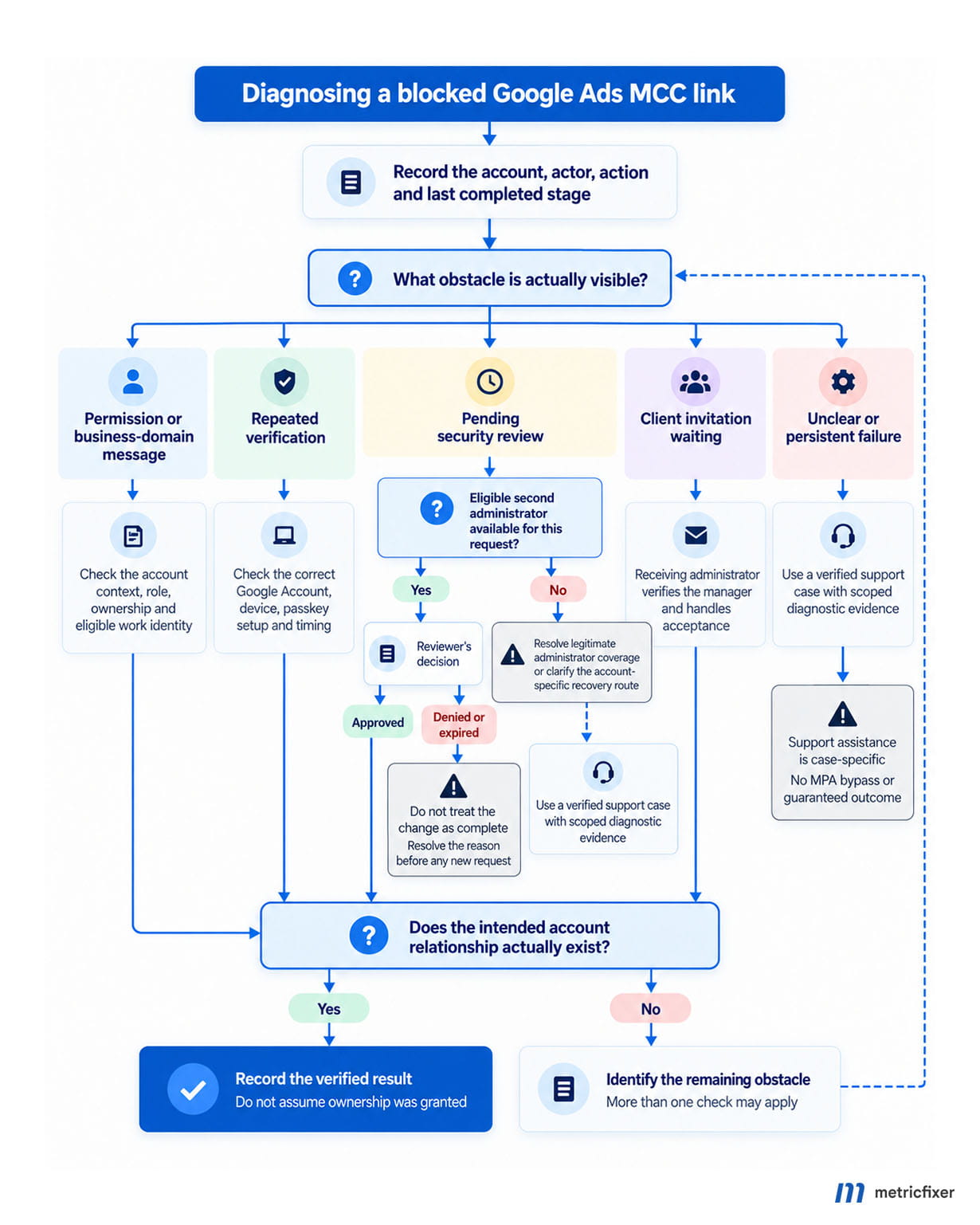
The first useful question is not “Why is Google Ads broken?” It is “What was the last stage that actually completed?” Record whether the request was created, whether an identity challenge appeared, whether a security review is pending, and whether the receiving account can see an invitation.
The normal linking route
Google's standard linking instructions start in the MCC at Accounts > Sub-account settings > Link existing account. After entering the customer ID and reviewing the request, the receiving account handles the invitation under Admin > Access and security > Managers. A direct administrator, or an administrator acting through a manager with the necessary ownership, can handle that acceptance.
Additional security checks should not be confused with that client acceptance. A request can be legitimate but not yet ready for the receiving administrator, or it can have passed an internal check while the relationship remains unaccepted. Confirm the final connection in the account hierarchy rather than relying on the last button clicked.
| What you observe | First investigation | What not to assume |
|---|---|---|
| The action is unavailable or permission is denied | Check the signed-in user, selected account and applicable hierarchy permissions. | That creating another passkey will grant administrative rights. |
| A business-domain message appears | Check the identity restriction and the authorized corporate user. | That an invitation allowlist overrides the account's separate domain requirement. |
| Verification repeats or the page refreshes | Check the chosen Google Account, verification method, device and timing; retain the exact error. | That the loop proves an attack or a platform-wide outage. |
| A security request is awaiting review | Locate the request and coordinate with an eligible administrator. | That repeating the original action will complete the review. |
| The receiving client sees a manager invitation | Verify the manager identity and finish the authorized acceptance workflow. | That acceptance automatically grants administrative ownership. |
| No clear state explains the failure | Prepare a reproducible case with timestamps, account context and the stages already checked. | That an error label alone identifies the underlying cause. |
This is an editorial diagnostic based on the permission, linking and verification documentation cited in this guide. It is not a description of Google's internal processing order: several checks may apply to the same request.
What the metricfixer support case shows
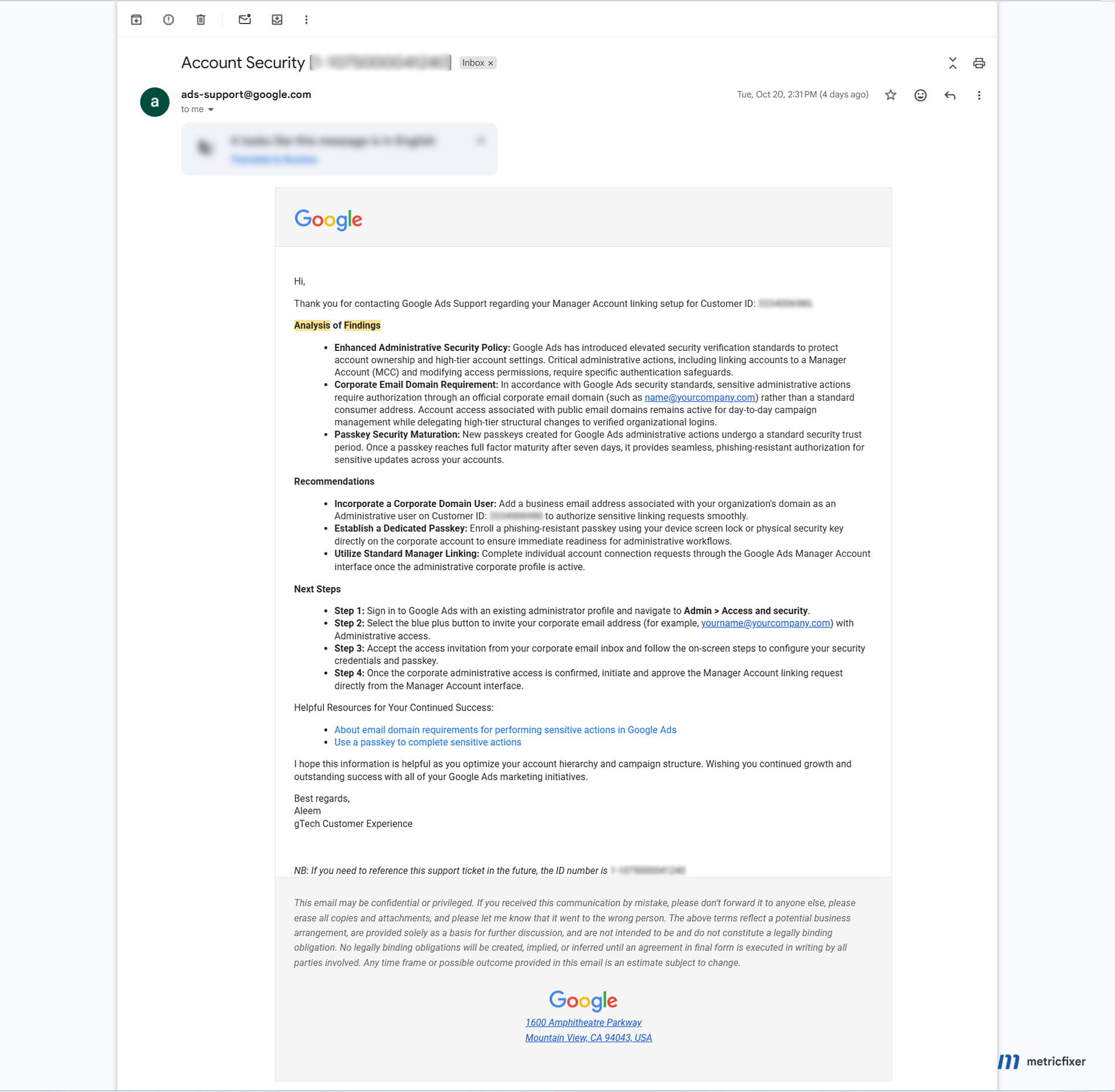
metricfixer reports that its MCC was compromised in March 2026. Later correspondence supplied for this article documents a separate operational problem: difficulty connecting an account to a manager. These records explain why the topic matters to the team; they do not establish the scale of a wider attack or prove that a particular incident caused Google's subsequent changes.
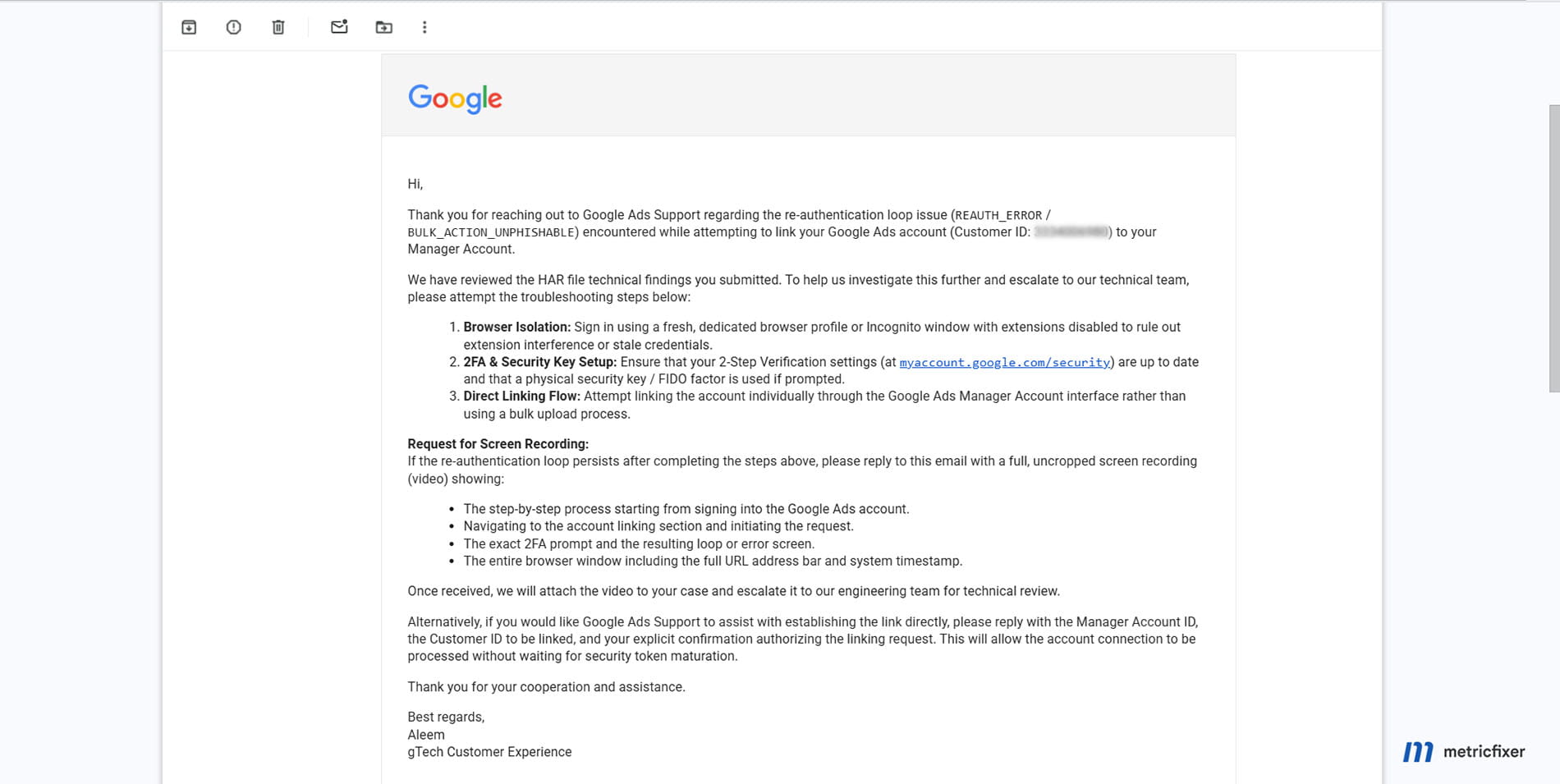
In one message, support describes a repeated verification problem using REAUTH_ERROR and BULK_ACTION_UNPHISHABLE. The message says support reviewed submitted HAR findings and proposes browser isolation, checking the verification setup, using a physical security factor if prompted, and attempting individual linking rather than a bulk process. It also requests a recording to support escalation. We reviewed the correspondence screenshots, not the underlying HAR file, so those statements are evidence of support's advice—not an independently reproduced diagnosis.
A separate message dated 20 October 2026 recommends an administrative user on the organization's domain and a passkey, describing a seven-day trust period. The message describing the verification loop also offers support-assisted linking after the customer supplies the relevant account IDs and explicit authorization, saying this could avoid waiting for security-token maturation.
That offer must not become a general “support can bypass security” instruction. The screenshots do not show successful completion or establish which checks the proposed intervention would address. Google's public MPA guidance separately says support cannot approve, deny or bypass an MPA request. The appropriate escalation is to ask support to identify the specific obstacle and the authorized remedy for that case—not to demand an override of a second administrator's decision.
Build a useful support case
Our recommendation is to send a short factual record rather than a sequence of unstructured screenshots. Include the affected account and MCC IDs privately, the initiating Google Account, the intended change, the exact message, the attempt time and time zone, and whether a security review or client invitation exists. Also record when the current credential was created and what happened in a clean browser profile.
Action attempted:
Initiating Google Account and access level:
Manager account and affected account IDs: [share privately]
Attempt time and time zone:
Exact message or error:
Last successfully completed stage:
Pending security review or client invitation:
Credential setup date and device used:
Tests already completed and their results:
Requested clarification: which requirement is blocking this action?
Browser isolation and credential enrollment are different tests. The case correspondence suggests a clean profile or an incognito window to isolate interference. Google's passkey setup instructions warn that private browsing can prevent creating a key. Prefer a clean, normal browser profile when testing enrollment; do not interpret a failed private-window setup as proof that passkeys are unsupported.
A HAR file records browser network activity and should be treated as sensitive. Chrome's sanitized HAR export excludes headers such as Cookie, Set-Cookie and Authorization. That is not a promise that every URL, request body or account detail is anonymous. Review the file and use a verified support channel. For recordings, agree a safe capture method: do not expose passwords, one-time codes, recovery codes or live authentication QR codes. Evidence sent privately to support and screenshots prepared for publication need different handling.
Move to individual business identities without breaking operations
The corporate-domain pilot restricts sensitive operations by users on public email domains. Routine campaign work may continue according to their role. A different passkey on the same public-domain identity does not resolve a requirement to use a corporate identity.
The requirement concerns the account identity, not the appearance of the inbox. You can create a Google Account using an existing non-Gmail address. Google also explicitly describes inviting an existing corporate address in its domain guidance. This does not establish an obligation for every affected advertiser to purchase Google Workspace.
Choose the right migration route
There are two routes to distinguish. One is adding the person's corporate Google Account with appropriate Ads access. The other is Google's managed business-email migration workflow, which uses verified Cloud Identity or Google Workspace domains. That workflow describes a 30-day overlap period followed by removal of personal-email access. It is not a universal 30-day grace period for every domain restriction.
For an agency with an IT team, agree the identity route with that team before individuals independently create accounts on the corporate domain. Decide who manages recovery, devices and employee departure. An address that looks corporate and an identity that the organization centrally manages are not automatically the same operational arrangement.
Use one accountable identity per person. Google's security best practices advise individual access rather than shared credentials and the minimum permission needed for each role. A shared agency mailbox should not become the team's shared administrator login.
A safe order for the transition
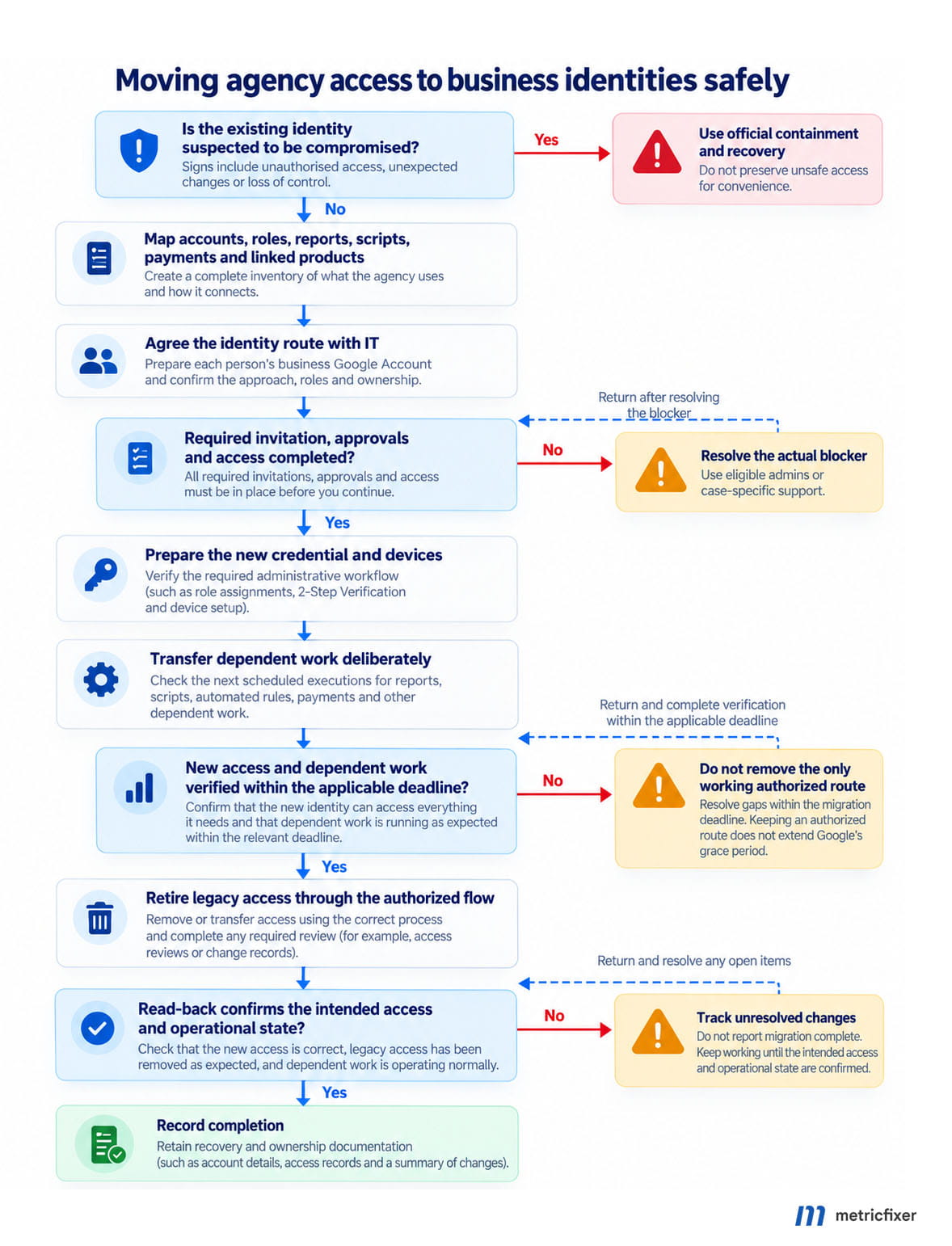
For a planned migration, our recommended sequence is: map the old identity's responsibilities; prepare the new identity; obtain the necessary invitations and approvals; confirm access; test the required administrative workflow; move dependent jobs and notifications; then retire the old access. If the old identity is compromised, use the incident-response route instead of preserving unsafe access for convenience.
A corporate identity created as a separate Google Account needs its own passkey; the previous account's key does not become its credential. The domain guidance also warns that inviting the new user may itself require MPA. This is why replacing every administrator simultaneously is a poor migration plan.
Google's migration documentation identifies dependencies including scheduled reports, scripts, linked products, payment-profile access and Skillshop. For scripts, it describes stopping the old user's schedules and scheduling under the new user. Treat the handover as a controlled change: check the next execution, not just the presence of a new email address in a user list.
Do not recreate the client's advertising account simply to change who signs in. Keep the migration focused on authorized access to the existing account. When reviewing integrations, also distinguish an MCC relationship from measurement-product connections; metricfixer's guide to Google tag destinations and GA4–Google Ads links explains that separate measurement layer.
Prepare passkeys before critical administrative work
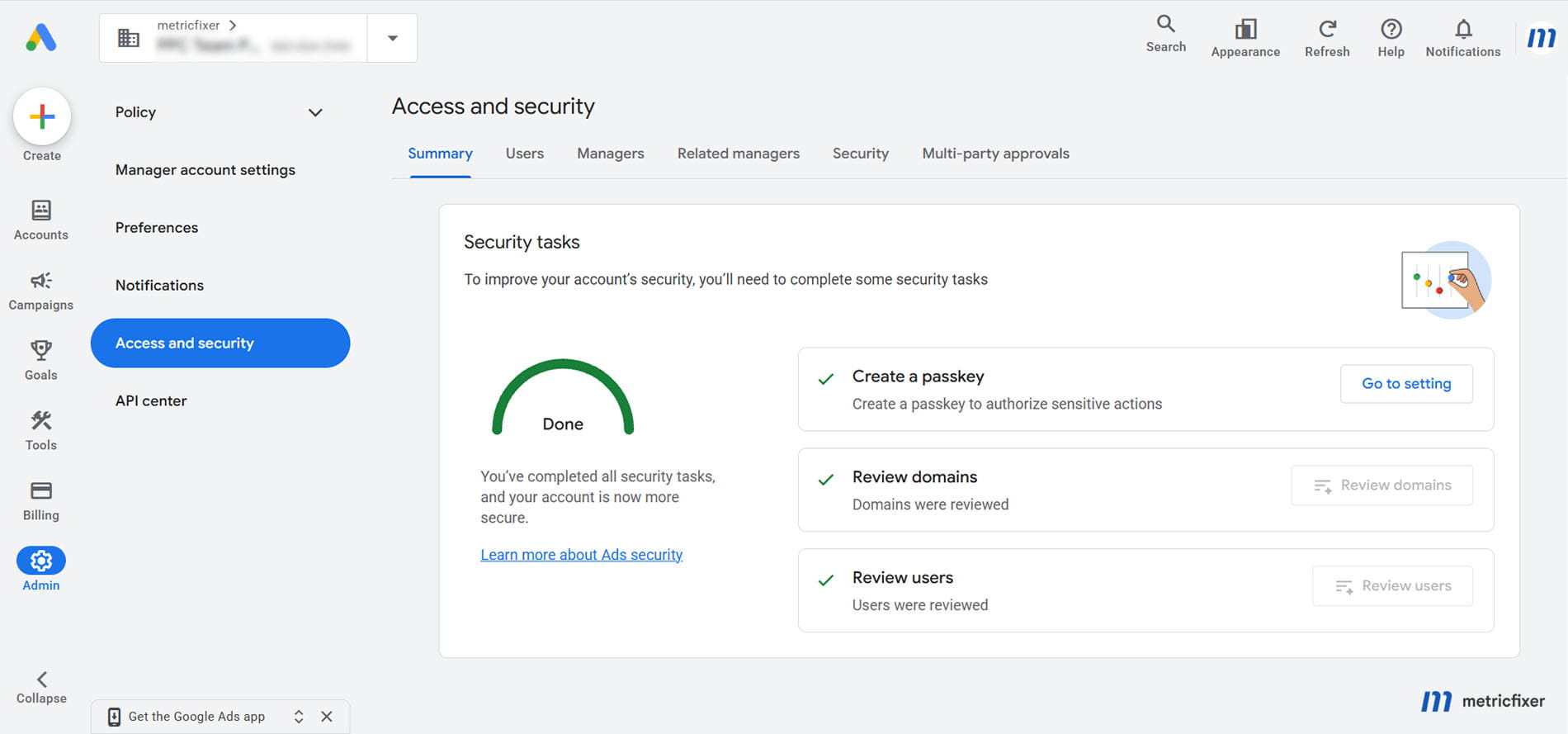
A passkey should be part of readiness, not something first created during an urgent client handover. Successful sign-in is not a sufficient test of readiness for an administrative operation.
The sensitive-action guide distinguishes sign-in from action verification, describes 24–48 hours for pairing and seven days for full readiness, and says SSO users still need a Google passkey for these checks. It currently excludes automatically generated Android passkeys and sensitive challenges performed directly in an Android browser, while documenting desktop verification using a phone. Do not promise that every loop ends after 48 hours or that SMS will remain available.
Test the actual working setup
Google's setup guide covers screen locks, supported browsers and operating systems, and FIDO2 hardware keys. It also provides an alternate-device flow when the credential is held on a phone. An older security device or a phone that can receive a login prompt should not be assumed to satisfy every required challenge.
Our recommended readiness record is deliberately simple: the person's work identity, the device normally used, the credential setup date, the last successful relevant verification and the approved recovery arrangement. Do not store credentials or recovery codes in that register.
Ask the person to test the device they actually use for administrative work. Record the result of a legitimate operation that the business already needs; do not create unnecessary users, payment changes or account relationships merely to test security. A colleague saying “my login works” is useful but incomplete evidence.
Where exposed, inspect Passkey status and Show users in full hierarchy in Access and security. Treat the displayed status as one readiness indicator, not proof that domain eligibility, account permissions and approvals are also satisfied.
Avoid making the problem harder to diagnose
Do not disable two-step verification to clear an action-level challenge. Google explicitly says that disabling it does not remove Confirm it's you checks.
As an operational precaution, avoid repeatedly deleting and recreating working credentials while changing browsers, devices and email addresses at the same time. Keep a record of each deliberate change so the next test has an interpretable result. Remove a lost or exposed credential through the proper security process; this precaution is not a reason to keep unsafe credentials active.
Also separate credential readiness from changes to recovery information. Google's two-step verification guidance describes a possible seven-day propagation period for recovery-information updates. That is another documented delay, not evidence that all security delays share one timer.
For onboarding, build in verification time before the client promises a handover date. When a deadline is urgent, an already authorized and prepared administrator may be the appropriate operator. They should act under their own identity and permissions, not lend their device or approval to someone else.
Manage multi-party approvals without delaying client work
Multi-party approval asks another administrator to review a sensitive change. It is not the same as the initiating user proving their identity, and it is not the same as an invited person accepting access.
Google's MPA help page identifies a Security requests tab under Admin > Access and security; some instructions also refer to Pending invitations. Locate the actual requested change and account before approving. A familiar agency name is not enough to establish that a particular access change is intended.
The administrator count is not consistently documented
The main MPA page says more than three administrators, while the domain-requirements FAQ says three or more active administrators. The MPA page separately describes enforcement for linking an existing independent account. These statements do not support one unqualified numerical rule for every workflow.
Do not remove legitimate administrators to experiment with that threshold. Instead, record the relevant account's user structure and whether Google actually generated a review. If the count appears inconsistent with the prompt, ask support to clarify the applicable workflow. Keep “who is visible in the hierarchy” separate from an unverified assumption about whom Google counts for eligibility.
Make approval a small managed workflow
The MPA workflow documentation describes pending, approved, rejected, revoked and expired states, with requests expiring after 20 days. An unanswered request needs a responsible reviewer, not another round of troubleshooting the initiating user's password.
We recommend a lightweight internal record with the requested action, business reason, affected account, initiator, reviewer and last checked status. The reviewer should compare the destination account or invited identity with the approved work request through the team's normal communication channel. Approving a request and confirming that the intended outcome exists should be separate completion checks.
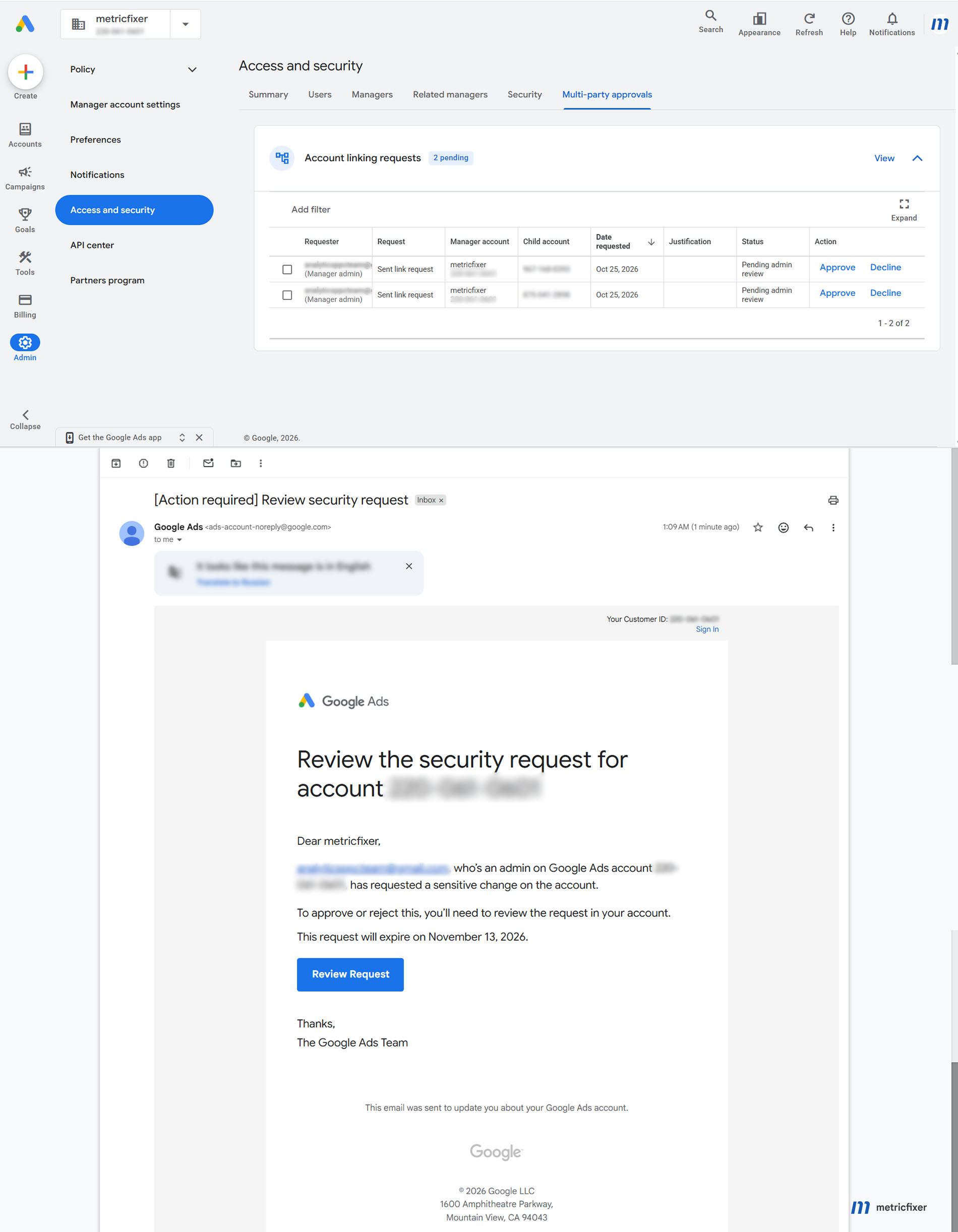
If a request is denied, resolve the reason before resubmitting. If the business no longer needs a pending request, the initiator should use the available cancellation route. If it expires, confirm that the operation is still wanted before starting again. These are workflow decisions, not reasons to weaken the account's protections.
Do not make email your only approval queue. Google's MPA page contains conflicting statements about whether approval emails are sent and how reminders work. Checking the in-product request state avoids making an onboarding promise depend on that unresolved documentation detail.
Support cannot replace the approver. The public MPA guidance explicitly excludes support approval or bypass. A case-specific offer to assist with linking, like the one in the supplied correspondence, does not erase that boundary.
What if only one administrator is available?
“There is only one admin” can describe very different problems. Start by establishing whether only one administrator is assigned, only one is reachable, or only one is visible from the account currently selected.
Only one administrator is assigned
The MPA page says that when an account transitions to a single administrator, MPA is paused and pending requests are cancelled. It does not provide a complete rule for every single-admin linking scenario. Nor does that statement remove a separate domain or credential requirement.
If a second-person approval still appears, capture the exact account and operation. Ask support whether the request concerns the MCC, the receiving account or a different administrative context. Do not present the generic single-admin statement as a guarantee that your particular transaction must succeed.
Other administrators exist but are unavailable
This is a coverage problem, not necessarily an eligibility exception. Identify an authorized colleague or an eligible administrator elsewhere in the relevant hierarchy and confirm that they can actually see the request. Do not assume that someone with access to a campaign dashboard is an eligible reviewer.
For future continuity, arrange legitimate administrative cover before leave, employee departure or a major client migration. Google's access-level guidance also warns about continuity problems when an account has only one administrator. The right response is deliberate access planning, not giving every campaign operator Admin access.
The only administrator cannot add a business user
This is the difficult case that a generic “invite your corporate email” answer does not resolve. If the invitation itself is blocked, the migration instructions assume a working authorization path that you may not have.
The reviewed public documentation does not establish a universal self-service solution for that combination. Ask support to distinguish the domain restriction, the verification failure, any pending approval and the scope of the existing administrator's rights. Describe which step is impossible and request the supported migration or recovery procedure for that account.
For a genuinely one-person business, creating another personal identity to approve your own changes is not our recommended operating model. Neither is adding an unfamiliar person merely to clear a prompt. Any backup administrator should have a legitimate responsibility and a documented relationship with the business.
Administrative access has been lost
An unavailable former employee and an account takeover require different handling. If there is evidence of unauthorized access, use the compromise-response route. Otherwise, ask an existing authorized administrator or pursue Google's account-access process. Do not create a replacement advertising account or disconnect legitimate managers as an experiment.
Apply security settings at the right account level
Google's manager security mandates can apply minimum requirements to current and future accounts the MCC administratively owns. Sub-accounts may be stricter. This is not the same as applying a rule to every account that happens to appear beneath a manager.
The documented controls include authentication strength and allowed email domains, with a choice between the manager itself and the accounts it owns. The two-step verification enforcement date uses the manager account's time zone. Before saving a change, record the selected scope and affected client organizations; a screenshot of a setting without its scope is incomplete change documentation.
Allowed Domains is not the corporate-domain pilot
Allowed Domains controls which email domains can be invited. The corporate-domain pilot controls eligibility to perform sensitive actions. These answer different questions. Adding a public email provider to an invitation allowlist is not a documented exemption from the pilot, and narrowing an allowlist is not a substitute for auditing existing access.
Our recommendation is to document the agency, client and approved partner domains before tightening invitations. Give each exception a business owner and a review date. Avoid treating an unfamiliar but legitimate client domain as malicious simply because it does not match the agency's domain.
Permanent passkey enforcement needs a readiness check
Google's permanent-enforcement instructions place the setting under Admin > Account > Security. Where available, an administrator can choose a date up to 30 days ahead. Once confirmed, passkeys or hardware security keys become the required secondary factors for sensitive actions; Google says users cannot turn the setting off.
Do not treat this as a harmless trial toggle. Before activation, our recommended checks are: a prepared operator and legitimate administrative cover; tested devices; a recovery process; understood account scope; and no unresolved migration dependency that will require an unprepared user to intervene. Keep the approval to activate the policy in the same internal change record as the chosen date.
The advertised 30-day scheduling window belongs to this setting. It is not a promise that all other restrictions will wait for the same date. Equally, the documentation for manager mandates should not be used to infer undocumented hierarchy-wide behavior for the newer passkey control.
Check API integrations and scheduled workflows
API means the software interface used by integrations rather than the Google Ads website. A security change can therefore affect an agency's onboarding tool even when employees rarely perform the same operation manually.
Google's 25 June 2026 announcement identified user invitations, permission changes and access removal as affected operations, with rollout scheduled from 27 July. The blanket API exemption still visible in the general MPA help page conflicts with these API-specific instructions and should not be used to design current automation.
A successful response may mean pending, not completed
The invitation API guide explains that a response can contain multi_party_auth_review instead of an invitation resource_name. The invitation email is not yet the completed outcome, and a second invitation for the same address cannot be created while that review remains unresolved. The invitation itself still needs the recipient's acceptance after approval.
Likewise, the user-access API guide documents pending reviews for permission changes and removals. Do not mark an employee as removed merely because the integration received a successful response. Read back the effective access state after the review is resolved.
The business questions for your developer are straightforward:
- Can we distinguish completion from review? The interface should tell the operator what remains outstanding.
- Who follows up? Pending reviews need an owner, not an unattended retry loop.
- What proves the result? Invitations, confirmed user access and pending reviews are different records.
- What happens after rejection or expiry? The tool should report the state and require a justified next step.
Google documents resolving an API review through a second administrator, which may be a human or an appropriately privileged service account. That capability is not a recommendation to auto-approve every request using credentials controlled by the same unattended process. Our recommendation is to preserve meaningful authorization and auditability in the integration's design.
Keep the scope precise: these sources document particular user-access methods. They do not establish that every reporting query, conversion upload, campaign edit or MCC-linking API call has identical approval behavior.
Check jobs that still depend on the old user
Separate the MPA change from identity migration. A scheduled report can need a new recipient; a script can need a deliberate scheduling handover; an integration can need its access arrangement reviewed. These are different work items and should not all be described as “the API is blocked.”
Our recommended acceptance test is a business result: the intended report arrives, the scheduled job executes once under the intended operator, and the relevant client data remains available. Keep the previous and next execution times in the handover record so duplicate or missed work can be identified.
Audit access across the hierarchy
An access review should cover people, manager relationships and outstanding changes. Start with a current account map, then compare the visible access with your client contracts, employee roster and approved integrations.
Use Google's Related managers view to identify other MCCs connected to your clients. Its visibility is limited: it does not reveal those external managers' users or higher-level hierarchies. Therefore, “our Related managers list looks familiar” is useful evidence, but not a complete audit of every person who could have access through another organization.
For each unfamiliar relationship, seek confirmation from the client through an established contact. Record its purpose before changing it. An external manager may be legitimate; an unrecognized name alone is not sufficient justification for disconnecting a client workflow.
Use Security insights as review input
Where available, Google's Security Agent surfaces suggestions under Admin > Access and security > Security. It can flag unusual users, domains and excessive access. Google asks users to review recommendations and adjust them when the context warrants it.
A recommendation is an investigation input, not proof of an intrusion. Conversely, a dashboard without visible warnings is not an assurance that every connected organization has completed its own access review. Assign someone to reconcile alerts with actual staff and supplier changes.
For temporary consultants, consider expiring access. Google documents automatic removal at the selected expiry, using the account's time zone. Review the handover before that date, especially when the consultant owns scheduled work. Expiration is a useful control, not a replacement for deciding the correct permissions in the first place.
Our suggested rhythm is a short review after every employee departure, client onboarding or manager change, plus a scheduled broader review. Include unanswered security requests and migration dependencies, not just active users. The appropriate frequency depends on how often the agency changes staff and clients; it is an operating recommendation rather than a new Google deadline.
Recognize a real compromise and follow the recovery process
A repetitive verification prompt is not, on its own, evidence of compromise. Unexpected administrators, unrecognized manager connections or unauthorized account changes deserve a different response: preserve evidence, involve the responsible security contact and use Google's recovery process.
Google's compromised-account guidance asks for a timeline and evidence of unauthorized activity. It also distinguishes who may approve remediation according to where the compromise occurred. If access was gained at an MCC level, the relevant manager-level administrators—not simply any person who can see a client—may need to act. Google limits cleanup decisions to eligible administrators from before the compromise; newly added access does not establish eligibility.
Nominate an incident coordinator. Keep a private record of affected accounts, unexpected changes, the support case and the people authorized to approve restoration. Do not publish customer IDs, security evidence or the identities of suspected users as part of an attempt to obtain faster public assistance.
Review cleanup rather than assuming a full rollback
The account activity change-log documentation includes outcomes requiring advertiser review or manual follow-up when restoration fails. Regaining sign-in access is therefore not proof that all permissions, manager links, payments and campaigns are back to their intended state.
After recovery, compare the account with your last approved operational record. Review legitimate users, manager relationships, payment arrangements, budgets, destinations and scheduled jobs before resuming normal change activity. Use the readiness checklist to assign ownership of that review rather than leaving it to whichever employee first regains access.
Read the cleanup choice carefully. Google's recovery guidance says submitted cleanup decisions are irreversible. It also states that selecting Restore this account as is confirms no hijacking and makes that event ineligible for reimbursement; the other documented paths include cleanup or further investigation. Do not select a faster-looking option without understanding what it records.
Reimbursement is a separate, conditional process after recovery, reactivation and enabling two-step verification—not a guaranteed consequence of reporting an incident. Keep incident response, restoration approval and the financial claim as separate work items.
Where client data or contractual obligations may be affected, involve the appropriate privacy or legal contact. Account ownership in the Google Ads interface does not settle those responsibilities. The separate metricfixer review of Google Ads Data Processing Terms addresses that wider agency–advertiser context.
Agency readiness checklist
Use this as an internal operating checklist. The suggested responsibilities and review stages below are metricfixer's recommendations, not Google-mandated job titles or a certification of security.
| When | Suggested owner | Evidence to retain |
|---|---|---|
| Now | MCC administrator and IT contact | Account map, named users, business-identity plan, tested verification and recovery arrangements. |
| Before linking a client | Agency onboarding lead and client administrator | Correct account IDs, approved relationship, initiating operator, acceptance contact and any required reviewer. |
| Before stricter enforcement | Account administrator and security owner | Approved scope, readiness checks, enforcement date and time zone where applicable. |
| During identity migration | IT contact and automation owner | Verified new access, completed approvals, reports and scripts handed over, next execution checked. |
| At employee or supplier departure | Access owner and team manager | Confirmed effective access removal, reassigned work and resolved pending reviews. |
| After an incident | Incident coordinator and authorized administrators | Reviewed cleanup decisions, unresolved restoration items and separate reimbursement follow-up. |
- [ ] We know which MCCs own which accounts and which are only linked.
- [ ] Each operator uses an individual identity with a justified access level.
- [ ] We can distinguish a permission failure, domain restriction, credential challenge, MPA review and client invitation.
- [ ] Business-email migration has a responsible owner and a tested replacement access route.
- [ ] Critical administrators have tested their actual working devices before urgent changes.
- [ ] Approval requests have a legitimate reviewer and coverage for absence.
- [ ] Nobody enables an irreversible setting without an agreed readiness check.
- [ ] Integrations distinguish a pending review from an effective account change.
- [ ] External managers, temporary access and departed staff are included in the access review.
- [ ] Support evidence is prepared privately, with credentials and unrelated client information protected.
- [ ] Incident recovery includes a review of what was restored and what still needs action.
- [ ] Each upcoming date in our plan has a source: an account notice, an administrator's decision or an official announcement.
The objective is not to give more people more power so that work can move faster. It is to ensure that the right person is ready, the right reviewer is available and the team can identify the precise reason when a legitimate operation stops.
Methodology and sources
This article reviews publicly accessible Google Ads Help, Google Account Help, Google Ads API documentation, Chrome DevTools documentation and dated Google announcements as checked on 24 October 2026. Source links appear next to the relevant explanations rather than in a duplicated technical bibliography. Help pages are treated as changing operational documentation; their retrieval date is not presented as a launch date.
The metricfixer case is based on the team's report of a March 2026 compromise and supplied screenshots of support correspondence, including a message dated 20 October 2026. Those materials support the description of advice received. They do not provide an independently reviewed HAR capture, original message-authentication headers, direct account inspection or evidence that the proposed assistance succeeded. Private identifiers and staff details are excluded.
Unresolved points are retained explicitly: the differing administrator-count thresholds for MPA; inconsistent email-notification wording; the general API-exemption statement versus the API-specific documentation; and the absence of a complete public migration procedure for every already-blocked single-administrator scenario. The referenced community thread could not be retrieved reliably and was not used to establish an official incident timeline.
The diagnostics, account registers, migration sequence and readiness checklist are editorial recommendations built around the cited evidence. They are not Google's internal decision rules. We did not change security settings, submit account requests or test recovery on a live account while preparing this article.
This article provides technical and operational information, not a guarantee of account access, security, recovery or reimbursement, and not legal advice. metricfixer is not affiliated with Google, Google Ads, Google Workspace, Cloud Identity or other third-party services mentioned here. Requirements, interface labels, availability and support procedures may change. Confirm the current requirements for your account before changing access, ownership or irreversible security settings, and use official support channels for account-specific problems.