
Published Jul 17, 2026
Google Tag Destinations vs GA4–Google Ads Links: What the Connection Really Does
Google’s tag-destination connection and the GA4–Google Ads product link are separate systems. This review explains what each one controls, why an Ads destination can belong to only one Google tag, and how to structure one Ads account across multiple websites.
Category: Analytics & Conversion Tracking · By Mikalai Sasau
The connection between a Google tag and its Google Ads destination, and the account-level link between Google Analytics 4 and Google Ads, are separate mechanisms. This review explains what each connection controls, what changes when a Google Ads destination is moved from one Google tag to another, and how to structure measurement when one Google Ads account advertises more than one website.
Key correction: Google does not prevent one Google Ads account from being linked to two or more GA4 properties. The one-to-one rule shown in the Google-tag interface applies to the Google tag that owns a destination, not to the GA4–Google Ads product link. For a multi-site advertiser, the normal architecture is separate GA4 properties, both product-linked to the same Ads account, with the shared Ads tag deployed and verified on every advertised site.
Executive summary
The two interfaces in the screenshots look related because both display Google Ads and Google Analytics objects. Technically, however, they operate at different layers. The first interface manages a Google-tag destination: a Google product account or stream that shares configuration with a Google tag and receives data from that tag. The second interface creates a product link between a GA4 property and a Google Ads account so the two products can exchange reporting, audience, and conversion data.
Moving a Google Ads destination such as AW-... from one Google tag to another changes the destination’s canonical tag configuration, website-coverage relationship, and inherited user access. It can determine which deployed Google-tag footprint sends page and event data to the Ads destination. It does not create a GA4–Google Ads product link, import GA4 key events into Google Ads, share GA4 audiences, or make Google Ads cost and campaign dimensions available in GA4.
The apparent restriction is also narrower than it first appears. Google requires a destination to have one associated Google tag at a time, and adding that destination to another tag removes it from the previous one. But Google explicitly supports linking a Google Ads account to all relevant Analytics properties. Its own multi-site example says that when one Ads account sends traffic to four websites, the account should be linked to an Analytics property for each site.
Google does not publicly explain the engineering rationale for single-owner destination assignment. The most plausible explanation is architectural rather than commercial: one destination needs one authoritative parent for shared settings, permissions, coverage, diagnostics, and routing. Allowing the same destination to be independently owned by two tags would create ambiguous consent defaults, cross-domain rules, automatic-event settings, user-provided-data controls, and access inheritance. This is an inference from Google’s documented behavior, not an official statement of motive.
The mechanism is closely connected to the 2026 unification described in Metricfixer’s review of Google Tag Manager and the new prefix logic. Google now says Google tags will be upgraded into fully capable Google Tag Manager containers, each Google destination will have its own tag, optimized containers will send data directly to destinations, and account links will be established automatically for access and management. The likely destination is a unified, destination-aware measurement control plane. Google has not, however, announced that GA4 and Google Ads product links will disappear or that all interfaces will collapse into one permanent UI.
What the two screens actually show
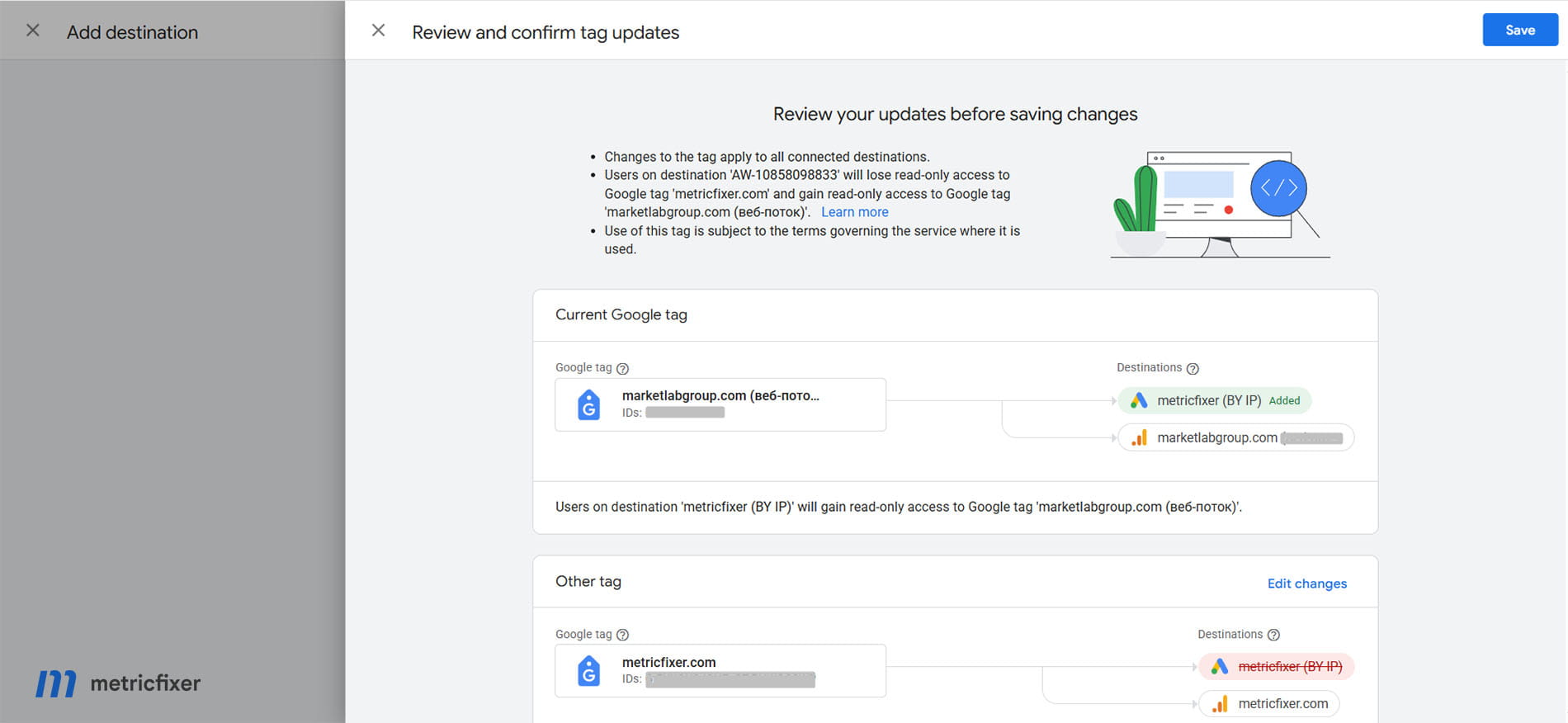
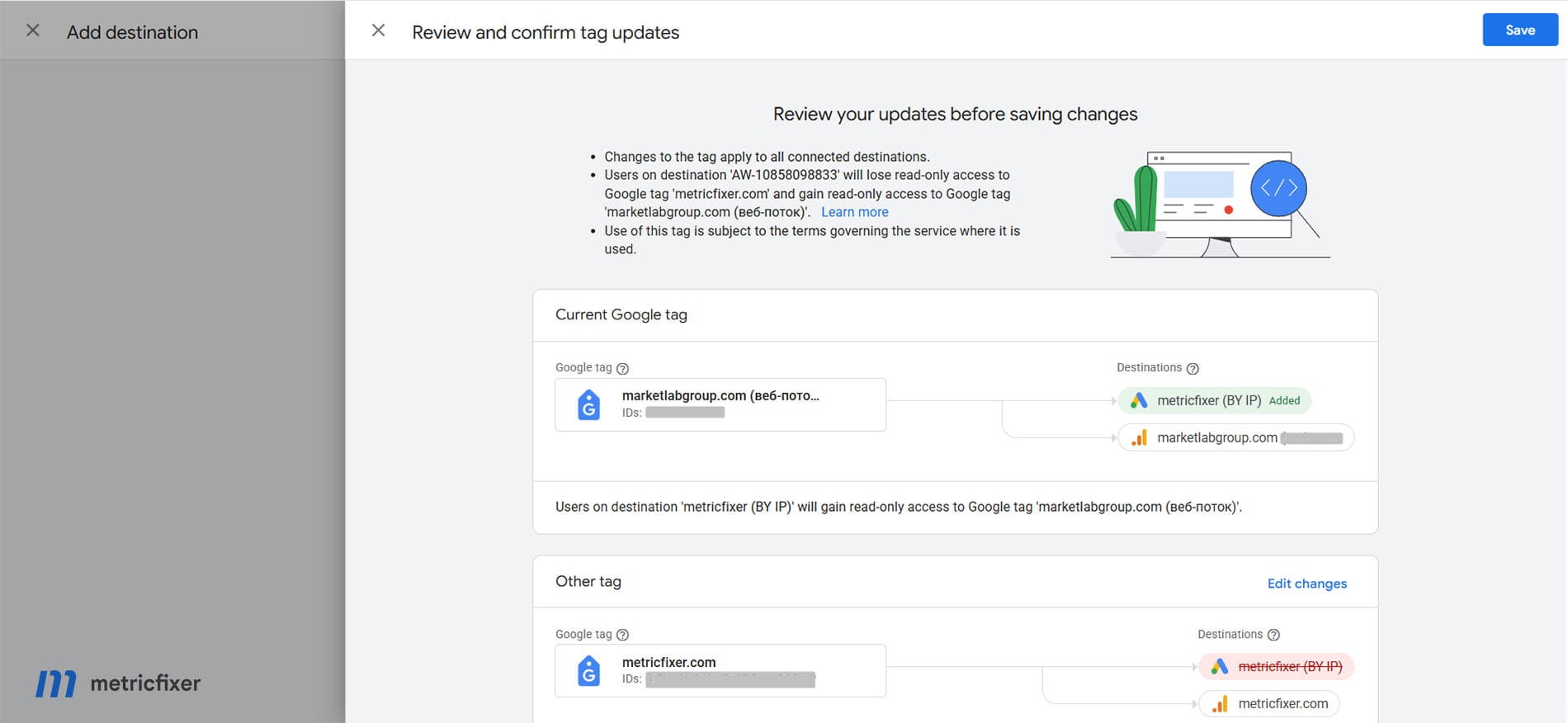
The first screen is a destination reassignment
In the first configuration, one Google tag is shown with its own GA4 destination and a Google Ads destination that is about to be added. A second Google tag retains its GA4 destination but loses the same Ads destination. This is consistent with Google’s rule that a destination must always have an associated tag and can be assigned to only one Google tag at a time.
The access warning is not incidental. Users of a destination inherit access to the Google tag associated with it. In the interface shown, users of the Ads destination are warned that they will lose read access to the previous tag and receive read access to the new one. The operation therefore changes both data-routing governance and user-governance inheritance.
After the move, the new tag can use its existing website footprint and shared configuration to send data to both its GA4 stream and the Ads destination. The previous tag no longer has that Ads destination in its destination list. Whether Ads measurement continues on the previous website depends on the code and GTM configuration actually deployed there. A backend reassignment does not automatically prove that either website is correctly tagged.
The second screen is account-level product linking
The second screenshot is GA4 Admin under Product links → Google Ads links. It shows no completed links for the selected property. This means the GA4 property and the Google Ads account are not connected through the product-link layer, even though the Ads account may already be configured as a destination of a Google tag.
That combination is technically possible:
- The Ads destination may receive browser-side page and event data through the Google tag.
- Native Google Ads conversion tags may still record conversions.
- Google Ads website-visitor data segments may still populate.
- But GA4 audiences and GA4-derived conversions cannot be imported into that Ads account through the missing product link.
- GA4 will not receive the full linked-account set of Google Ads clicks, cost, impressions, and campaign dimensions.
Google-tag destinations and product links compared
| Question | Google-tag destination association | GA4–Google Ads product link |
|---|---|---|
| Where is it managed? | Google tag / Tag Manager / Google Ads Data Manager / GA4 data-stream tag settings. | GA4 Admin under Product links or Google Ads Data Manager under connected products. |
| Main purpose | Connect a deployed Google tag to a product destination that shares tag configuration and receives browser-side data. | Exchange product-level data and capabilities between a GA4 property and a Google Ads account. |
| Typical identifiers | GT-..., G-..., AW-..., and DC-.... |
GA4 property and Google Ads customer-account relationship; not an on-page tag ID. |
| Controls tag coverage? | Yes. It determines which tag footprint and configuration are associated with the destination. | No. A product link does not install or repair website tags. |
| Controls tag settings? | Yes. Shared settings can include automatic events, domains, user-provided-data capability, consent defaults, and product-relevant cookie behavior. | No. It controls product data exchange rather than browser-tag execution. |
| Shares GA4 audiences with Ads? | Not by itself. | Yes, subject to personalization, data-collection, consent, and eligibility settings. |
| Creates Ads conversions from GA4 events? | Not by itself. | It makes that workflow available; a conversion still needs to be created or imported. |
| Sends Google Ads reporting data to GA4? | Not the full linked-product dataset. | Yes. Linked Google Ads reporting data becomes available in GA4, normally after processing time. |
| User-access effect | Destination users can inherit Google-tag roles and permissions. | Google Ads linked-user groups receive mapped access to Analytics features associated with the link. |
| Cardinality | One destination has one associated Google tag at a time; one tag can have multiple destinations. | One Ads account can be linked to multiple GA4 properties, and one GA4 property can have many Ads links within Google’s published limits. |
What a Google Ads destination adds to a Google tag
Adding a Google Ads account as a destination is more than a visual relationship in an admin screen. Google defines a destination as a product account that shares configuration with and receives data from a Google tag. The destination ID is used to load product-specific settings and route events. For Ads, that destination ID uses the AW-... format.
In practical terms, destination association can add the following capabilities to the existing tag footprint:
- Sitewide Ads measurement foundation. The Google tag can capture page URLs and titles, read ad-click information, and support first-party click-cookie storage when correctly deployed across landing pages.
- Website-visitor data segments. Page visits can populate Google Ads data segments, including default groups such as all visitors and rule-based segments built from URL conditions.
- Native conversion measurement. Google Ads conversion events or codeless URL-based events can use the Ads destination, although the destination connection alone does not define every conversion action.
- Shared automatic-event settings. Page views, history changes, scrolls, outbound clicks, form interactions, video engagement, and file downloads can be controlled at Google-tag level where relevant to the connected products.
- Shared user-provided-data capability. When enabled and legally permitted, the tag can pass hashed first-party data to destination products that accept it, including enhanced-conversion workflows.
- Consent behavior. Tag-level consent defaults or overrides can affect data sent to the destination.
- Central diagnostics and coverage. Google can evaluate where the tag has been detected and surface missing-tag or configuration warnings.
- Inherited access. Google Ads administrators, standard users, and read-only users can inherit corresponding Google-tag permissions.
This is why a destination move can have a material effect even when no GTM version is published. The change is made in Google’s control plane. The IDs already deployed on a site can begin resolving to a different destination-and-settings relationship after the reassignment.
What it does not do
A destination association does not automatically:
- link the GA4 property to the Google Ads account at product level;
- enable full Google Ads campaign and cost reporting inside GA4;
- import GA4 audiences into Google Ads;
- turn every GA4 key event into a biddable Google Ads conversion;
- decide which conversion goals a campaign uses for Smart Bidding;
- repair missing tags, consent-order problems, broken redirects, or stripped
gclidparameters; - guarantee that both websites in a multi-site account continue sending Ads data after a destination move.
The final point is important. Google changes the backend owner of the destination, but the real collection outcome depends on which IDs and event tags load on each page. A website that explicitly loads the shared AW-... tag may continue to send Ads data. A website that depended only on its old G-... tag automatically forwarding to the Ads destination may stop doing so after the destination is moved. Tag Assistant and browser-network validation are therefore mandatory after reassignment.
What the GA4–Google Ads product link adds
The product link sits after or alongside data collection. Its purpose is to let the two accounts exchange information and activate features that the website tag cannot provide on its own.
When the link is configured correctly, it can make the following available:
- Google Ads reporting in GA4. Clicks, cost, impressions, campaign metadata, and related dimensions can be used in Analytics reporting and paid-channel attribution.
- GA4-based conversions in Google Ads. Events or key events from the linked property can be turned into Google Ads conversions for reporting and, when primary and selected by the campaign, bidding.
- GA4 audiences in Google Ads. Behavioral audiences built in the property can be shared for remarketing and audience use, subject to the applicable personalization and consent settings.
- Analytics engagement metrics in Ads. Relevant app and web metrics can be imported and displayed in Google Ads reporting.
- Linked-user access mapping. Google Ads access levels are represented through linked-user groups for Analytics features exposed in Ads.
Google’s own unlinking documentation illustrates the boundary. When the product link is removed, new Google Ads dimensions are no longer fully available in Analytics, new linked audience membership stops accumulating in Ads, and the account stops importing Analytics key events. None of those effects is described as removing the physical Google tag from the website.
Can one Google Ads account link to two GA4 properties?
Yes. The interface shown in the first screenshot should not be read as a ban on connecting one Ads account to two Analytics properties.
Google’s current GA4 documentation says an Analytics property can create up to 400 Google Ads links. More directly relevant to a multi-site advertiser, Google Ads documentation states that all relevant Analytics properties should be linked. Its example is explicit: when one Google Ads account contains ads targeting landing pages on four different websites, the Ads account should be linked to an Analytics property for each of the four sites.
Therefore, a two-site configuration can legitimately contain:
- Google Ads account A;
- GA4 property for site 1 linked to Ads account A;
- GA4 property for site 2 linked to Ads account A;
- the same Ads destination ID deployed across both sites;
- separate conversion actions, audiences, values, and campaign-goal controls for each site.
The restriction that remains is different: the Ads destination has one canonical Google-tag association at a time. The same Google Ads tag can still have website coverage across multiple domains. “One associated tag object” does not mean “one website” and does not mean “one GA4 property link.”
Why Google uses single destination ownership
Google documents the rule but does not publish a direct explanation of why it is required. The public help pages say:
- adding a destination to one Google tag removes it from another;
- a destination must always have an associated tag;
- a tag can have multiple destinations;
- tags with materially different configurations should not be combined;
- duplicate on-page configuration can produce duplicate data or mixed settings.
From those rules, the most likely engineering rationale is that the destination needs a single authoritative configuration owner. Consider the ambiguity that would arise if the same Ads destination were independently attached to two Google tags:
| Configuration area | Potential conflict with two independent owners |
|---|---|
| Automatic events | One tag could enable form and scroll detection while another disables it. |
| Cross-domain settings | Each tag could define a different domain set and linker behavior. |
| User-provided data | One tag could allow collection while another blocks it. |
| Consent defaults | The same destination could inherit contradictory regional defaults or override logic. |
| Cookie behavior | Tags could apply different first-party cookie lifetime or update settings. |
| Website coverage | Google would need to decide which coverage map is canonical for diagnostics and recommendations. |
| User permissions | Destination users could inherit two incompatible administration models. |
| Event routing | The platform would need duplicate prevention and precedence rules for the same destination. |
A single-owner model removes most of those conflicts. It is also consistent with Google’s 2026 statement that each Google destination will have its own tag. The tag becomes the destination’s canonical configuration and governance object, while that tag can still be loaded from more than one website or implementation surface.
Recommended architecture for one Ads account and two websites
The safest design depends on whether the websites are separate businesses, separate brands, or parts of one connected user journey. For two operationally separate websites that happen to advertise from one Ads account, the following pattern keeps measurement separated without fighting Google’s destination model.
Recommended multi-site flow: site 1 uses its own GA4 property and website tag implementation → site 2 uses its own GA4 property and website tag implementation → the shared Google Ads AW-... tag is present and validated on both sites → both GA4 properties are product-linked to the same Ads account → each site has clearly named conversion actions and audiences → campaigns use the conversion goals that match the site they advertise.
Keep GA4 properties separate when the sites are separate
Separate properties preserve clean acquisition, session, audience, consent, and reporting boundaries. Do not combine two Google tags merely to make the destination screen look symmetrical. Google itself warns against combining tags with significantly different configurations. If both GA4 destinations are placed behind one shared tag without deliberate routing, both properties may begin receiving coverage or events that do not belong in them.
A shared Ads account does not require a shared GA4 dataset. The product-link layer is designed to connect the Ads account to each relevant property.
Deploy the shared Ads tag on every advertised site
Google Ads says the Google tag should be installed sitewide. Sitewide coverage is what allows ad-click information such as gclid to be stored in first-party cookies and later associated with conversion events. If an advertised landing page does not load the Ads measurement foundation, clicks to that page may not be measured reliably.
For a two-site account, verify the shared Ads destination on both domains rather than assuming destination reassignment extends coverage automatically. Check landing pages, checkout or lead-confirmation pages, consent states, single-page-app route changes, and any separate booking or payment domain.
Product-link both GA4 properties
Create the GA4–Google Ads product link from each property. This preserves per-site audience creation and makes each property’s conversion and reporting data available to the account. The link is not redundant with the Ads tag; it completes a different part of the measurement architecture.
Separate conversion actions, values, and naming
Use names that make the website and business outcome obvious, for example Site 1 — qualified lead and Site 2 — purchase. Avoid two indistinguishable actions called Submit form. Pass realistic values where the economics differ, and keep diagnostic or micro-conversions secondary unless a campaign is intentionally meant to optimize for them.
If the same business outcome is measured natively in Google Ads and again from GA4, do not leave both versions as primary without a deliberate reason. Run one as the bidding source and keep the other secondary for comparison until discrepancies are understood.
Control which goals each campaign uses
Google Ads account-default goals are used across campaigns and feed automated bidding. This is convenient when all campaigns share the same commercial objective. It becomes risky when one account contains two sites with different lead quality, values, funnels, or conversion definitions.
Google supports campaign-specific goals that override account defaults. They are appropriate when campaigns for site 1 should not bid toward site 2’s primary conversions, or vice versa. The trade-off is that excessive fragmentation reduces shared learning. A practical rule is:
- use account-default goals when the sites share the same outcome and comparable value model;
- use campaign-specific or custom goals when the objectives are genuinely different;
- use conversion values and value-based bidding when actions differ mainly in economic value rather than in business meaning;
- keep irrelevant actions out of the campaign’s biddable
Conversionsset while retaining them inAll conversionsfor analysis.
Separate audiences deliberately
A shared Ads tag can populate broad account-level segments across its coverage. Default “all visitors” logic may therefore combine users from both domains. That may be useful for one brand ecosystem, but it can be undesirable when the sites serve different markets or offers.
Google Ads supports rule-based segments using URL conditions, so the domains can be separated without adding a different tag for every list. Product-linked GA4 properties provide another clean option: build site-specific audiences in each property and share them to the same Ads account. Remember that very granular lists may fail to meet minimum active-user thresholds.
Do not enable cross-domain measurement only because the Ads account is shared
Cross-domain measurement is for a connected journey in which a user moves between related domains and should remain one measured user/session—for example, a marketing site and a separate checkout. It is not required merely because both sites use the same Ads account or the same AW-... destination.
For unrelated sites, adding both to cross-domain settings can decorate links with the _gl parameter and create user-stitching behavior that does not match the business or privacy model. Keep the domains separate unless the journey genuinely crosses between them.
Align consent and user-provided-data controls
A shared Google tag can carry settings that affect all connected destinations and all pages on which that tag is loaded. If the two sites use different consent platforms, legal entities, regional policies, or form-data practices, validate that the shared Ads destination receives correct consent signals on both sites.
This is especially important for enhanced conversions and other user-provided-data features. A destination move can change which tag-level permission and consent configuration is authoritative, but it does not correct a consent banner that fires tags in the wrong order or labels data incorrectly.
Consequences for advertising effectiveness
The destination rule itself does not inherently make advertising less effective. Performance falls when the implementation around that rule produces incomplete or contaminated signals.
| Failure mode | Likely effect | Control |
|---|---|---|
| Ads destination moved, but the previous site no longer loads the shared Ads tag | Loss of sitewide Ads page data, thinner remarketing populations, and weaker conversion attribution. | Validate AW-... coverage on every advertised domain and landing-page template. |
| GA4 properties are not product-linked | No GA4 audience import, no GA4-derived conversion workflow, and incomplete Ads reporting inside GA4. | Link every relevant property to the Ads account. |
| Conversions from both sites are account-default and primary | Smart Bidding may optimize a campaign toward the wrong site’s easier or cheaper outcome. | Use campaign-specific goals, value-based bidding, or separate accounts when objectives materially differ. |
| Duplicate native Ads and GA4 conversions are both primary | Inflated conversion totals and distorted bidding signals. | Choose one primary source per business outcome; keep the comparison source secondary. |
| Shared broad audience segment | Visitors from unrelated sites are mixed, weakening message relevance or creating governance concerns. | Use URL-based rules or separate GA4 audiences. |
| Consent behavior differs between sites | Inconsistent observable data, modeling eligibility, enhanced-conversion quality, and compliance posture. | Audit consent states and tag order on both domains. |
| Unrelated domains added to cross-domain measurement | Unwanted link decoration and identity/session stitching. | Enable cross-domain only for a real connected journey. |
| Two distinct businesses remain in one Ads account | Shared budgets, goals, audiences, policy history, access, and automation can become difficult to govern. | Consider separate Ads accounts under a manager account when ownership or economics diverge. |
The important distinction is between measurement loss and measurement separation. Separate GA4 properties do not deprive Smart Bidding of data when the relevant conversions reach the Ads account correctly. What harms optimization is missing tag coverage, wrong goal selection, duplicate primary actions, inconsistent values, or consent-related data loss.
How this fits Google’s 2026 tag unification
The destination ownership model makes more sense when read alongside Google’s May 2026 Google tag and GTM announcement.
Google said:
- Google tags will be upgraded to fully capable Google Tag Manager containers;
- websites that only use Google tag will gain GTM’s interface, debugging, and version control;
- each Google destination will have its own tag;
- new deployment snippets will be standardized and will no longer rely on the old page-level
gtag('config', ...)pattern; - optimized GTM containers will send data directly to Google destinations instead of loading an additional
gtag.jslayer; - a centralized Settings area and data-flow map will show which destinations receive the container-wide settings;
- links to Google destination accounts will be established automatically, with read access by default;
- visual tagging will let users create events and conversions with less manual code.
Google’s July 2026 release notes add another piece: the identifier prefix, rather than an unsupported script path, now determines whether the container runs in restricted Google-only mode or full GTM-... mode. The tag object, destination relationship, runtime capability, settings, permissions, and delivery path are becoming parts of one architecture.
The likely end state
Google has not published a final architecture diagram or promised that every product will use one interface. Still, the public roadmap supports several strong conclusions:
- One runtime family. Google tag and GTM are becoming modes of a shared container runtime rather than separate tagging stacks.
- Destination-centric configuration. Each product destination has a canonical tag object that owns shared settings and access.
- Graph-based data flow. Sources, tag/container objects, consent, events, and destinations are increasingly represented as a visible data-flow map.
- Less page-level configuration. Initialization and routing logic are moving from hard-coded snippets into server-delivered container configuration.
- Direct and first-party delivery. Optimized containers and Google tag gateway reduce extra client-side layers and move more delivery through controlled first-party paths.
- More no-code activation. Visual event and conversion setup brings measurement configuration into the shared control plane.
In that model, a rule that one destination has one canonical tag owner is not an arbitrary limitation. It is a way to keep a single source of truth for destination-level settings while allowing the same tag to have broad website coverage and multiple user interfaces.
What remains separate is the product-account relationship. GA4–Google Ads product linking still decides which Analytics property can exchange reporting, audiences, and conversions with which Ads account. The unification of tag runtime does not make that business-data permission layer unnecessary.
Practical audit workflow after moving an Ads destination
Audit workflow: document the old and new Google-tag destination map → inventory every G-..., GT-..., AW-..., and GTM-... identifier deployed on both sites → verify the shared Ads tag on all landing pages and conversion paths → test consent-granted and consent-denied states → trigger one test conversion per site → inspect Tag Assistant and browser network requests → confirm conversion diagnostics in Google Ads → create the GA4–Google Ads product link for each property → verify Ads reporting in GA4 and audience/conversion availability in Ads → review campaign goal selection before automated bidding uses the new data.
- Export or record the current topology. Save the destination list, tag IDs, tag names, user-access inheritance, and the date of the change.
- Inventory production code. Check templates, GTM containers, plugins, CMS integrations, landing-page builders, checkout pages, and subdomains. Do not rely only on the admin UI.
- Confirm page-level Ads coverage. The shared
AW-...destination should be detectable on every page that needs Ads measurement. - Check duplicate configuration. Google warns that loading the same tag more than once can produce duplicate data or mixed settings.
- Test click persistence. Use a controlled tagged visit and verify that redirects preserve
gclidand that first-party conversion-linking storage is created where consent permits it. - Test conversions separately. Trigger the important site 1 and site 2 actions and confirm that each reaches the intended conversion action with the right value, currency, and transaction identifier where applicable.
- Validate product links. Create or verify the Google Ads link in each GA4 property and review personalized-advertising and auto-tagging settings.
- Review audiences. Confirm whether broad Ads segments combine both sites and whether GA4 audiences are populating in the intended account.
- Review bidding inputs. Inspect account-default goals, campaign-specific goals, primary/secondary status, values, and the
ConversionsversusAll conversionscolumns. - Monitor after the change. Watch Tag Diagnostics, conversion status, audience size, GA4 paid-channel attribution, and conversion volume for at least one normal reporting cycle.
Decision checklist
- [ ] Each website has the intended GA4 property and a verified sitewide implementation.
- [ ] The shared Google Ads
AW-...tag is present on every advertised landing page and conversion path. - [ ] Both GA4 properties are product-linked to the shared Google Ads account.
- [ ] The destination move did not unintentionally remove Ads data flow from the previous website.
- [ ] Duplicate Google tags and duplicate conversion actions have been checked.
- [ ] Conversion names clearly identify the website and business outcome.
- [ ] Only the intended conversions are primary and eligible for bidding.
- [ ] Campaigns use account-default goals only where the same objectives genuinely apply.
- [ ] Site-specific audiences are separated with URL rules or GA4 audiences where needed.
- [ ] Cross-domain measurement is enabled only for a connected user journey.
- [ ] Consent mode and user-provided-data behavior have been tested independently on both sites.
- [ ] Access inherited from the Ads destination is acceptable after the reassignment.
- [ ] Tag Assistant, Tag Diagnostics, GA4 Realtime/DebugView, and Google Ads conversion diagnostics all show the intended result.
Open questions and limitations
Google clearly documents the single-owner destination rule but does not document its internal precedence or conflict-resolution design. The explanation in this article about canonical configuration ownership is an architectural inference based on Google’s published settings, permissions, duplicate-configuration warnings, and 2026 destination-per-tag model.
The exact effect of moving a destination depends on the implementation. A site using only a GA4-originated Google tag can behave differently from a site that explicitly loads the Ads AW-... ID, a site managed through a classic GTM web container, or a site that has adopted Google’s 2026 container optimization. Production testing is therefore more reliable than inferring behavior from account screens alone.
Google’s tag and GTM unification is still rolling out. Google has described the direction and several concrete runtime changes, but it has not published a final date on which every account, interface, and legacy implementation will use the same optimized model.
Finally, one Ads account can technically advertise multiple sites, but technical possibility does not always make it the best governance model. Separate Ads accounts under a manager account may be preferable when the sites have different owners, currencies, billing, legal entities, consent policies, policy-risk profiles, or fundamentally different conversion economics.
Methodology and sources
This article is based on a review of the two supplied account screenshots and Google’s official documentation available on 16 July 2026. The research separated browser-side collection and destination routing from account-level product linking, then compared the documented consequences for tag settings, permissions, website coverage, audiences, conversions, reporting, Smart Bidding, and multi-site account structure. Where Google documents a rule without explaining its rationale, the article labels the resulting architectural interpretation as an inference.
- Google Tag Manager Help: Destination definition
- Google Tag Manager Help: Destination ID definition
- Google Tag Manager Help: Google tag management, combining tags, and adding destinations
- Google Tag Manager Help: Configure Google tag settings
- Google Tag Manager Help: Manage Google tag users and inherited access
- Google Tag Manager API: destination linking behavior
- Google Analytics Help: Connect Google Ads to Google Analytics
- Google Ads Help: Link all relevant Analytics properties for multi-site advertising
- Google Ads Help: Link GA4 properties and Google Ads
- Google Analytics Help: Troubleshoot GA4 audience and key-event imports to Google Ads
- Google Ads Help: Tag a website using Google Ads
- Google Ads Help: Use the Google tag for conversion tracking
- Google Ads Help: Troubleshoot sitewide tagging and click-ID storage
- Google Ads Help: Website-visitor data segments and URL rules
- Google Ads Help: Account-default conversion goals
- Google Ads Help: Campaign-specific conversion goals
- Google Analytics Help: Cross-domain measurement
- Google Tag Manager Help: 2026 Google tag and Google Tag Manager unification
- Google Tag Manager Help: Container-ID prefixes and runtime capability
- Google Tag Manager release notes
- Google tag API reference
- Google Developers: Configure products and event routing with the Google tag
- Google Tag Manager Help: Tag Diagnostics
- Google Developers: Google tag gateway and first-party delivery
This article is for technical and operational information only. metricfixer is not affiliated with Google, Google Ads, Google Analytics, Google Tag Manager, or other third-party platforms mentioned in the article. Google’s interfaces, tag behavior, destination rules, conversion settings, consent controls, and product-link capabilities may change after publication. Account-level changes should be tested in Tag Assistant, browser developer tools, Google Ads diagnostics, and the relevant GA4 property before they are treated as production-safe.