
Published Jul 9, 2026
TikTok Ads Dynamic URL Parameters: UTM Templates, ttclid, and Attribution Workflow
A practical guide to TikTok Ads dynamic URL parameters, UTM templates, ttclid handling, campaign compatibility, and attribution data hygiene for analytics, CRM, and paid social reporting.
Category: Online advertising · By Mikalai Sasau
This article explains how to use TikTok Ads dynamic URL parameters for UTM tracking without turning campaign URLs into a fragile reporting system. It covers the official TikTok macro set, ttclid, Smart+ campaign structure, Search Ads limitations, Instant Form caveats, recommended templates, validation steps, governance rules, and analytics-side normalization for GA4, BI, CRM, Pixel, and Events API workflows.
Practical default: keep standard UTM fields readable, store TikTok IDs in separate custom parameters, preserve ttclid as a click identifier, and normalize values after collection. Use dynamic macros for campaign structure and QA, not as a replacement for TikTok Ads Manager reporting, search-term reporting, app attribution, Instant Form tracking, or consent-aware event matching.
Executive summary
TikTok Ads URL tracking works best as a layered system. UTMs answer human reporting questions such as source, medium, campaign, ad group theme, and creative. TikTok IDs answer technical questions such as which campaign, ad group, Smart+ ad bundle, creative, or broad placement generated the click. ttclid answers a separate matching question: which ad click should TikTok use when associating website events with ad interactions.
TikTok’s public macro set for URL tracking is small, but it covers the main campaign levels. The official UTM documentation lists dynamic URL macros for campaign name and ID, ad group name and ID, Smart+ ad name and ID, creative name and ID, and placement. The two ADID_V2 macros matter especially for upgraded Smart+ campaigns, where TikTok describes an additional ad level between ad group and creative.
The safest web-campaign template keeps utm_source=tiktok and utm_medium=paid_social static, uses utm_campaign=__CAMPAIGN_NAME__ and utm_id=__CAMPAIGN_ID__ together, places ad group or targeting context in utm_term, and places creative or Smart+ ad-bundle context in utm_content. Immutable TikTok IDs should also be duplicated into custom fields such as tt_campaign_id, tt_adgroup_id, tt_ad_id, tt_creative_id, and tt_placement.
Dynamic URL parameters are most useful when the click lands on an external website URL that can receive query parameters. They are less useful, or not the primary attribution layer, when the conversion happens inside TikTok, inside an app-store or MMP flow, or inside a native Instant Form. Instant Form lead capture should use form-level Tracking Parameters, lead exports, CRM fields, and API payloads. App campaigns should primarily use Mobile Measurement Partner tracking unless an intentional web fallback exists.
The biggest limitations are granularity and destination fit. __PLACEMENT__ is a broad placement macro and should not be treated as a detailed surface-level field for feed, search, Lite, Lemon8, PineDrama, or web inventory. TikTok Search Ads reporting supports keyword and search-term analysis inside TikTok Ads Manager, but the public URL macro list does not expose a live search-keyword or search-query macro.
The production rule is simple: build one approved template, keep names consistent, store raw IDs separately, preserve ttclid, avoid person-level data in URLs, encode static delimiters and free-text labels, test every template through Preview and real click paths, and normalize values after collection.
Why URL parameters matter in TikTok Ads
TikTok campaigns often involve fast creative testing, frequent ad iterations, Spark Ads, creator-style assets, Smart+ automation, search inventory, Pangle placements, and short optimization cycles. Without a controlled URL parameter strategy, analytics reporting quickly fragments. One campaign can appear as tiktok, another as TikTok, another as paid-social, and another with no usable campaign or creative value at all.
Dynamic URL parameters reduce manual tagging work because TikTok substitutes campaign, ad group, ad, creative, and placement values at click time. That does not automatically create good attribution. A weak template simply automates weak data. The goal is to pass values that remain useful later in GA4, CRM, BI, server logs, Pixel diagnostics, and Events API workflows.
A strong tracking design separates three layers:
- UTM reporting layer: stable source, medium, campaign, term, content, and optional source-platform fields.
- TikTok object layer: raw campaign, ad group, Smart+ ad, creative, and placement identifiers.
- Click-matching layer:
ttclidand other event-matching values handled through Pixel or Events API according to consent and platform requirements.
Official TikTok parameter inventory
TikTok documents one core family of URL macros for passing campaign and placement-related values into final URLs. The list is not large, but it is enough for a clean first-party reporting setup when it is mapped carefully.
| TikTok macro | Meaning in TikTok | Scope | Availability notes | Example value |
|---|---|---|---|---|
__CAMPAIGN_NAME__ |
Campaign name | Campaign | General | spring_sale_emea |
__CAMPAIGN_ID__ |
Campaign ID | Campaign | General | 1802210238121985 |
__AID_NAME__ |
Ad group name | Ad group | General | retargeting_7d_cart |
__AID__ |
Ad group ID | Ad group | General | 1802210238450121 |
__ADID_V2_NAME__ |
Ad name, described by TikTok as the bundle of creative assets | Ad | Upgraded Smart+ campaigns | smart_bundle_video_us_01 |
__ADID_V2__ |
Ad ID | Ad | Upgraded Smart+ campaigns | 1802210238997755 |
__CID_NAME__ |
Creative name | Creative | General; in Smart+ this is the individual asset level | ugc_hook_03_blue_bg |
__CID__ |
Creative ID | Creative | General | 1802210239554400 |
__PLACEMENT__ |
Placement type | Placement | General, but coarse | TikTok or TikTok Pangle |
The Smart+ distinction is important because upgraded Smart+ reporting can include campaign, ad group, ad, and creative levels. In a standard campaign, many teams use utm_content for the creative name. In Smart+ campaigns, that may be too narrow because the ad bundle and the individual creative asset can be different reporting objects.
TikTok also has URL-adjacent tracking features that are not UTM macros but still matter for implementation.
| Adjacent parameter or feature | What it does | Where it belongs in practice |
|---|---|---|
ttclid |
TikTok click identifier appended to landing-page URLs after ad clicks. | Preserve it through redirects and pass it to Pixel or Events API matching where relevant. |
| URL Auto-attach | Automatically fills baseline source, medium, ID, and name values. | Good safety net, but review final mapping and avoid duplicate ownership of the same UTM keys. |
utm_id |
GA4 campaign ID parameter. | Best standard UTM field for __CAMPAIGN_ID__. |
utm_source_platform |
GA4 source-platform field. | Useful optional field for tiktok_ads platform governance. |
| Instant Form Tracking Parameters | Key-value tags stored with TikTok Instant Form leads. | Use them for in-app lead capture where no initial website click exists. |
How the click URL workflow works
At setup time, you enter a destination URL and attach static UTM values, TikTok macro placeholders, and optional custom parameters. At click time, TikTok replaces supported macro placeholders with concrete campaign values. The website receives the resolved URL, not the template. Analytics tools, server logs, tag managers, and backend collectors can then capture the final query string.
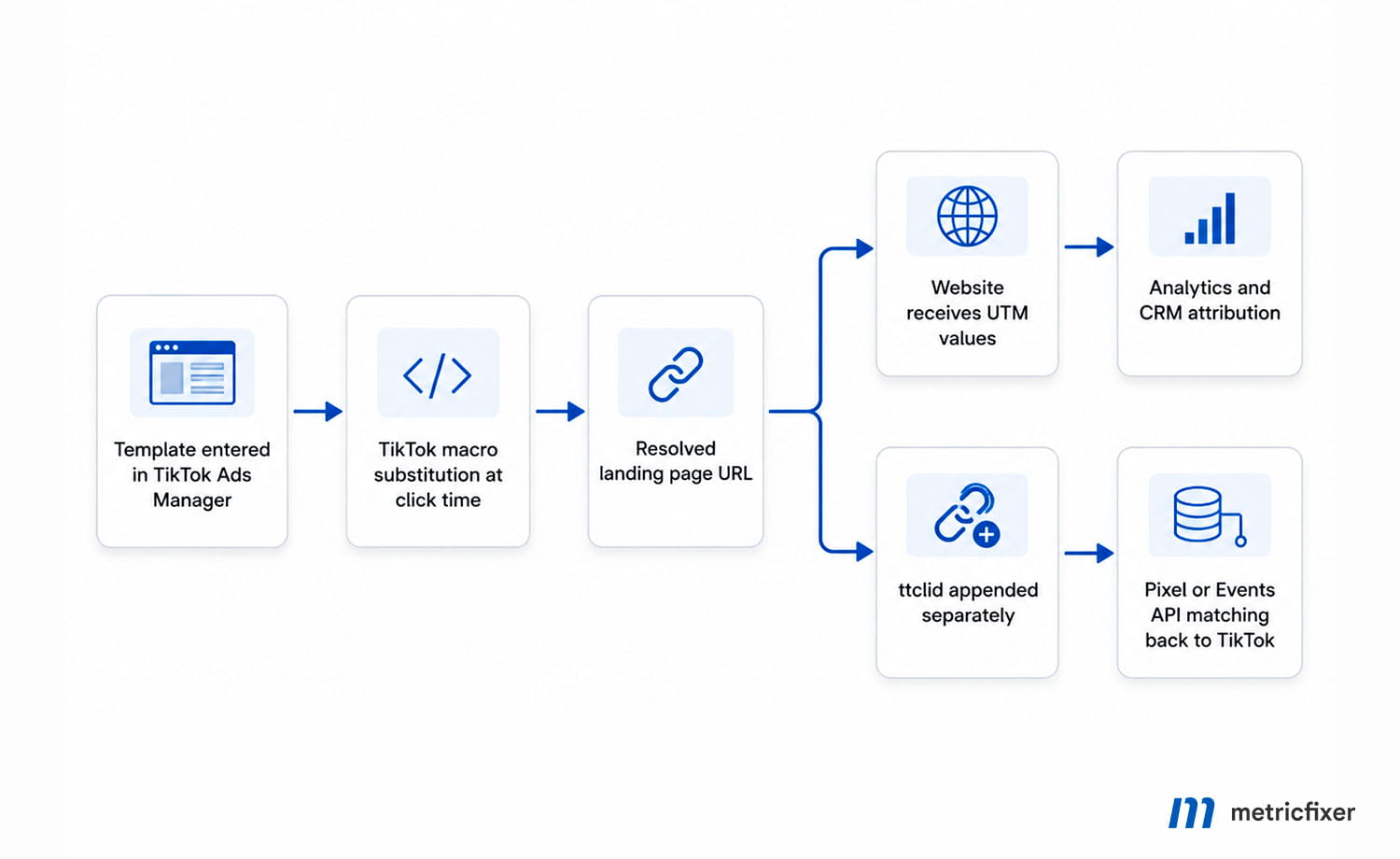
This flow creates two parallel attribution streams. The UTM stream is for analytics, BI, CRM, and channel reporting. The ttclid stream is for TikTok-side click matching and optimization. They should work together, but they should not be collapsed into the same field.
Practical workflow: URL template entered in TikTok Ads Manager → TikTok substitutes supported macros at click time → the website receives readable UTM values and custom TikTok ID parameters → ttclid is preserved separately → analytics and CRM systems report on campaign structure → Pixel or Events API uses click identifiers for TikTok attribution and optimization.
UTM values vs ttclid: keep them separate
UTM parameters and ttclid serve different purposes. UTMs are campaign classification fields. They help analytics tools group traffic into readable sources, channels, campaigns, content variants, and optional terms. ttclid is a click identifier. It is primarily useful for matching website events back to TikTok ad clicks, especially when TikTok Pixel or Events API is part of the measurement setup.
A common mistake is to treat ttclid as another UTM value. That creates noise because a click identifier is high-cardinality and not suitable for campaign-level reporting. It should be stored as a raw identifier, not used as utm_campaign, utm_content, or utm_term.
| Parameter | Primary role | Recommended handling |
|---|---|---|
utm_source |
Identifies the traffic source. | Use a stable lowercase value such as tiktok. |
utm_medium |
Identifies the marketing channel. | Use a controlled value such as paid_social, cpc, or your approved paid-media taxonomy. |
utm_campaign |
Groups traffic by campaign. | Use campaign name when naming governance is strong; pair it with utm_id=__CAMPAIGN_ID__ for stability. |
utm_content |
Differentiates ads, creatives, Smart+ ad bundles, or variants. | Use __CID_NAME__ for standard creative reporting or __ADID_V2_NAME__ for Smart+ ad-bundle reporting. |
utm_term |
Optional segmentation field. | Use for ad group, targeting theme, or managed Search Ads theme. Do not promise exact search query data. |
ttclid |
TikTok click matching and attribution support. | Capture and preserve it as a raw click identifier outside the UTM namespace. |
Compatibility across campaign types and placements
The simplest compatibility rule is destination-based: if the user click starts with a website destination URL, UTM macros usually make sense. If the main conversion happens inside TikTok, inside an app store flow, or inside an app attribution stack, normal website UTMs are partial or not the primary measurement layer.
| Campaign type or placement | Final website URL at initial click? | TikTok macros in final URL? | Recommended status |
|---|---|---|---|
| Traffic to website | Yes | Yes | Full support. |
| Website sales / website conversions | Yes | Yes | Full support; best with Pixel or Events API. |
| Lead generation with website form | Yes | Yes | Full support; capture values before the form submission. |
| Lead generation with Instant Form | No, not for the primary lead action | No for the main form submission | Use Instant Form Tracking Parameters; use website UTMs only for post-submit CTAs if needed. |
| Manual Search Ads Campaign | Yes | Yes | Full support with limitation: no public live keyword URL macro. |
| Automatic Search Placement | Yes, when the original campaign uses a website URL | Yes | Full support with limitation: __PLACEMENT__ is too coarse for search-vs-feed separation. |
| Spark Ads with destination URL | Usually yes | Yes | Full support when a destination URL is used; validate at ad level. |
| Website Catalog Ads | Yes | Yes | Full support; keep tagging consistent at product-link and ad level. |
| Smart+ website campaigns | Yes | Yes | Full support; preserve __ADID_V2__ and __ADID_V2_NAME__. |
| App promotion direct to store or app | Usually no | Not materially useful for primary attribution | Use MMP tracking links; use web UTMs only for intentional web fallback flows. |
| Pangle web-driving campaigns | Yes | Yes | Full support; __PLACEMENT__ helps split TikTok from TikTok Pangle at a broad level. |
| Pangle app, playable, or rewarded formats | Often no | Often not applicable | Use the app measurement stack rather than forcing website UTM logic. |
| Shopping or in-platform commerce surfaces | Context-dependent | Context-dependent | Do not assume website-style UTM capture unless the click reaches a landing page you control. |
Instant Forms deserve special attention. The lead is captured inside TikTok, so the primary lead record may never begin as a website session. TikTok’s form-level Tracking Parameters are the correct attribution layer for the lead itself. A tagged website URL can still be useful on the final page CTA, but that only tracks the optional follow-up website visit, not the original form submission.
Search Ads also need careful wording. TikTok Search Ads reporting can show keyword and search-term data inside TikTok Ads Manager, but the public URL macro set does not expose a live search-query macro. Use utm_term for managed search themes or ad group taxonomy, then enrich query-level analysis from TikTok reporting exports.
Recommended TikTok UTM architecture
A good TikTok URL template should answer two different reporting questions at the same time. The first question is human-readable: which source, medium, campaign, ad group theme, and creative label should appear in GA4 and business dashboards? The second question is technical: which immutable TikTok objects should be available for joins, exports, CRM enrichment, and troubleshooting?
The answer is to avoid overloading a single UTM field. Keep UTM fields clean and readable. Put TikTok IDs in custom parameters. Preserve raw values before normalization so analysts can troubleshoot renames, macro failures, and Smart+ structure differences.
| Field | Recommended value | Alternative | Why this is a good default |
|---|---|---|---|
utm_source |
tiktok |
tt if your global taxonomy uses short codes |
One stable source value keeps channel reporting clean. |
utm_medium |
paid_social |
cpc or paid if that is your house taxonomy |
The medium should describe how the traffic arrived, not repeat the platform name. |
utm_campaign |
__CAMPAIGN_NAME__ |
Controlled static campaign slug if names are unstable | Campaign name is the main readable business grouping. |
utm_id |
__CAMPAIGN_ID__ |
Leave blank only if your analytics stack does not use campaign IDs | Protects reporting against campaign renaming. |
utm_term |
__AID_NAME__ |
Static keyword or audience theme for Search Ads and special campaigns | TikTok notes that utm_term can contain an ad group name or targeting string. |
utm_content |
__CID_NAME__ for standard campaigns |
__ADID_V2_NAME__ for Smart+ ad-bundle reporting |
Separates creative or ad-bundle performance in analytics. |
utm_source_platform |
tiktok_ads |
tiktok |
Optional GA4 enrichment for platform governance. |
tt_campaign_id |
__CAMPAIGN_ID__ |
— | Immutable campaign join key. |
tt_adgroup_id |
__AID__ |
— | Immutable ad group join key. |
tt_ad_id |
__ADID_V2__ in Smart+ |
Use only when Smart+ ad level is relevant | Preserves the Smart+ ad bundle identity. |
tt_creative_id |
__CID__ |
— | Immutable creative join key. |
tt_placement |
__PLACEMENT__ |
— | Useful broad split between TikTok and TikTok Pangle. |
ttclid |
Auto-appended by TikTok | Manual attachment only when implementing a supported manual flow | Click identifier for TikTok attribution and event matching. |
This mapping deliberately avoids long composite strings such as campaign + audience + creative + placement + country inside one UTM value. Composite values can work technically, but they often become hard to read, hard to normalize, and easy to break when names contain spaces, delimiters, or inconsistent capitalization.
Naming taxonomy for clean reporting
Before adding dynamic parameters, define a naming taxonomy. Otherwise, the template may faithfully pass values that are not useful. The taxonomy should answer four questions:
- What exact value should represent TikTok in
utm_source? - What medium should TikTok paid traffic use:
paid_social,cpc, or another internal standard? - Should campaign reporting be based on campaign name, campaign ID, or both?
- Where should creative, ad group, placement, audience, Search Ads theme, and experiment labels be stored?
For most metricfixer-style analytics implementations, the recommended answer is: keep utm_source and utm_medium governed, use campaign name plus campaign ID together, keep creative or ad-bundle detail in utm_content, use utm_term only when it has a defined meaning, and store TikTok object IDs in custom tt_* parameters.
Template library
The following templates are designed for web campaigns where TikTok Ads Manager sends the click to a website destination URL. Replace the domain and path with the real landing page. Keep the macro tokens unchanged; TikTok performs substitution at click time.
Standard web campaign template
This template fits most traffic, website conversion, website sales, and website lead-generation campaigns.
https://www.example.com/landing-page?
utm_source=tiktok&
utm_medium=paid_social&
utm_campaign=__CAMPAIGN_NAME__&
utm_id=__CAMPAIGN_ID__&
utm_term=__AID_NAME__&
utm_content=__CID_NAME__&
utm_source_platform=tiktok_ads&
tt_campaign_id=__CAMPAIGN_ID__&
tt_adgroup_id=__AID__&
tt_creative_id=__CID__&
tt_placement=__PLACEMENT__
The UTM layer remains readable in GA4 and CRM reports, while the custom tt_* layer keeps stable TikTok object IDs for joins and audits.
Smart+ template
Use this version when Smart+ reporting at the ad-bundle level matters. It places __ADID_V2_NAME__ in utm_content and stores both the Smart+ ad ID and creative ID separately.
https://www.example.com/offer?
utm_source=tiktok&
utm_medium=paid_social&
utm_campaign=__CAMPAIGN_NAME__&
utm_id=__CAMPAIGN_ID__&
utm_term=__AID_NAME__&
utm_content=__ADID_V2_NAME__&
utm_source_platform=tiktok_ads&
tt_campaign_id=__CAMPAIGN_ID__&
tt_adgroup_id=__AID__&
tt_ad_id=__ADID_V2__&
tt_creative_id=__CID__&
tt_placement=__PLACEMENT__
If asset-level creative performance is the main analysis question, keep utm_content=__CID_NAME__ and store __ADID_V2_NAME__ in a custom parameter instead. The important point is to preserve both levels somewhere in the click data.
Search Ads template
TikTok Search Ads reporting exists inside TikTok Ads Manager, but the public URL macro list does not include a live search keyword or query macro. For that reason, utm_term should carry a managed keyword theme, ad group theme, or static taxonomy value, not a promise of exact query text.
https://www.example.com/category/running-shoes?
utm_source=tiktok&
utm_medium=paid_social&
utm_campaign=__CAMPAIGN_NAME__&
utm_id=__CAMPAIGN_ID__&
utm_term=running_shoes_theme&
utm_content=__CID_NAME__&
utm_source_platform=tiktok_ads&
tt_campaign_id=__CAMPAIGN_ID__&
tt_adgroup_id=__AID__&
tt_creative_id=__CID__&
tt_placement=__PLACEMENT__
Use TikTok Search Terms and keyword reports for real query-level diagnostics. Do not try to reconstruct search queries from URL parameters that TikTok does not expose publicly.
Instant Form post-submit website CTA template
For Instant Forms, the form submission itself should be attributed through TikTok form Tracking Parameters, exports, API payloads, and CRM fields. If the thank-you screen or post-submit CTA sends users to your website, tag that optional website visit separately.
https://www.example.com/thank-you-resource?
utm_source=tiktok&
utm_medium=paid_social&
utm_campaign=__CAMPAIGN_NAME__&
utm_id=__CAMPAIGN_ID__&
utm_content=instant_form_followup&
tt_campaign_id=__CAMPAIGN_ID__&
tt_adgroup_id=__AID__&
tt_creative_id=__CID__
This URL measures the follow-up website session. It should not be confused with the original native lead submission.
Encoded value example
Encode static delimiters and free text, not the TikTok macro tokens themselves. This matters when you intentionally combine labels such as creative: and placement: inside one parameter value.
https://www.example.com/landing-page?
utm_source=tiktok&
utm_medium=paid_social&
utm_campaign=__CAMPAIGN_NAME__&
utm_id=__CAMPAIGN_ID__&
utm_term=__AID_NAME__&
utm_content=creative%3A__CID_NAME__%7Cplacement%3A__PLACEMENT__&
tt_campaign_id=__CAMPAIGN_ID__&
tt_adgroup_id=__AID__&
tt_creative_id=__CID__
A cleaner option is to avoid composite values and keep creative and placement in separate fields. Use composite values only when a downstream system cannot accept additional custom parameters.
Programmatic URL building
When templates are generated by code, build the URL from key-value pairs instead of manually concatenating query strings. Component-level encoding is safer than whole-URL encoding when static text and macro placeholders are mixed.
function buildTikTokUrl(baseUrl, params) {
  const url = new URL(baseUrl);

  for (const [key, value] of Object.entries(params)) {
    url.searchParams.set(key, value);
  }

  return url.toString();
}

const finalUrl = buildTikTokUrl("https://www.example.com/landing-page", {
  utm_source: "tiktok",
  utm_medium: "paid_social",
  utm_campaign: "__CAMPAIGN_NAME__",
  utm_id: "__CAMPAIGN_ID__",
  utm_term: "__AID_NAME__",
  utm_content: "creative:__CID_NAME__|placement:__PLACEMENT__",
  tt_campaign_id: "__CAMPAIGN_ID__",
  tt_adgroup_id: "__AID__",
  tt_creative_id: "__CID__"
});

console.log(finalUrl);
Server-side and client-side capture
The website should not only read UTMs at pageview time. It should also preserve the original query string, store first-touch values where needed, update session-level values according to the attribution policy, and send the right identifiers to analytics, CRM, and event APIs.
Client-side capture is easy to deploy with a tag manager, but it is not always enough. Browser restrictions, consent behavior, redirects, single-page application routing, and embedded forms can interfere with attribution persistence. Server-side capture is more robust when the landing page receives the original query string before redirects or front-end routing changes the URL.
At minimum, capture these values on the first landing-page hit:
- full landing page URL;
- referrer;
utm_source,utm_medium,utm_campaign,utm_id,utm_content, andutm_term;ttclid, if present;- custom TikTok IDs such as campaign ID, ad group ID, ad ID, creative ID, and placement, if passed;
- timestamp, session ID, consent state, and user or lead identifier when available and lawful.
For forms, pass these values into hidden fields or server-side lead metadata. For ecommerce, attach them to the session or order attribution model. For SaaS, preserve them through signup, trial, and sales-qualified lead stages.
Analytics-side normalization and server-side handling
Templates reduce tracking errors, but they do not eliminate them. Campaign names change, teams switch between paid, cpc, and paid_social, and Smart+ campaigns may coexist with manual campaigns. A mature analytics setup should store raw query parameters as received and also create normalized reporting fields.
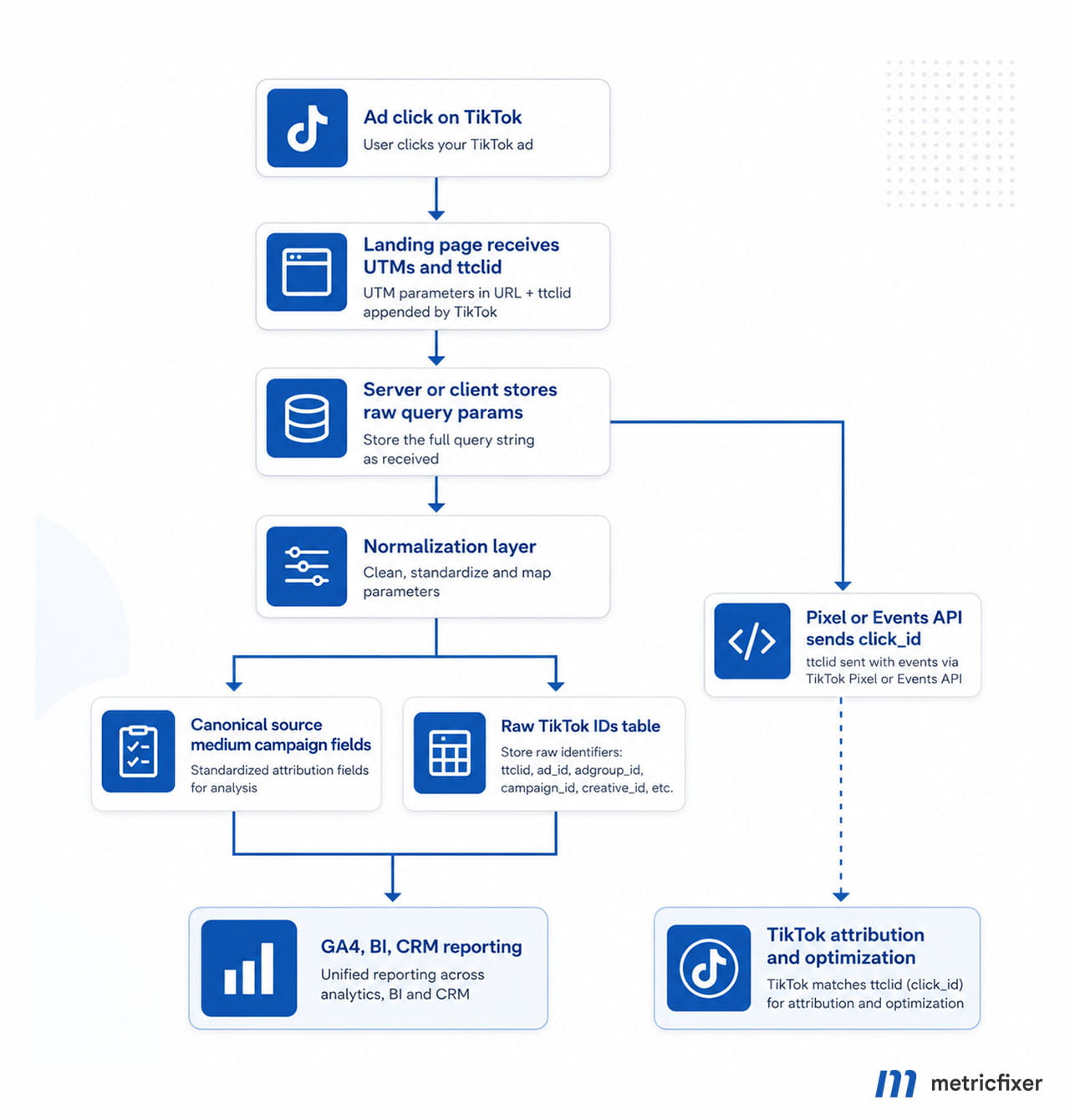
The minimum normalization layer should lowercase governed taxonomy fields, preserve raw originals, detect unresolved macro patterns, map medium synonyms to one canonical value, separate Smart+ ad bundle identity from creative identity, and store ttclid outside the UTM namespace.
select
  lower(coalesce(utm_source, '')) as utm_source_norm,
  lower(coalesce(utm_medium, '')) as utm_medium_norm,
  lower(coalesce(utm_campaign, '')) as utm_campaign_norm,
  utm_id,
  utm_term,
  utm_content,
  ttclid,
  tt_campaign_id,
  tt_adgroup_id,
  tt_ad_id,
  tt_creative_id,
  tt_placement,
  case
    when lower(coalesce(utm_medium, '')) in ('paid', 'paid_social', 'cpc') then 'paid_social'
    else lower(coalesce(utm_medium, ''))
  end as reporting_medium,
  case
    when utm_campaign like '%__%' or utm_content like '%__%' then true
    else false
  end as unresolved_macro_flag
from landing_page_events;
For server-side measurement, the critical TikTok-specific task is to capture and preserve click identifiers. If the landing request contains ttclid, store it in a first-party context where lawful and appropriate, keep it through multi-step journeys, and include it in TikTok event payloads when the Pixel or Events API flow expects click IDs.
Do not expect the click URL to replace every reporting source. Search-versus-feed analysis should often be enriched from TikTok Ads Manager exports. Instant Form source should be ingested from TikTok form Tracking Parameters into the CRM. App campaigns should be joined with MMP or self-attributing network data. Smart+ reporting may require both tt_ad_id and tt_creative_id to preserve the extra campaign level.
Best practices and common pitfalls
Auto-attach vs manual control
TikTok URL Auto-attach can help advertisers avoid missing basic tracking parameters. It is useful for teams without strict UTM governance. More mature teams may prefer manual templates because they can control utm_medium, utm_id, Smart+ mapping, custom ID fields, and downstream naming exactly.
The practical rule is to avoid duplicate ownership of the same keys. Do not let Auto-attach and a manual template both compete for utm_source, utm_medium, or utm_campaign unless you have previewed the final resolved URL and confirmed which value is actually captured by the landing page.
Naming discipline
UTM values are case-sensitive in many analytics workflows. TikTok, tiktok, Paid, and paid_social can become separate rows if they are not normalized. Keep platform names, media, campaign names, and ad group names consistent. If campaign names are used as UTM values, campaign naming in TikTok Ads Manager becomes part of the analytics system.
A strong naming convention is lowercase, descriptive, and delimiter-safe. For example, spring_sale_emea is easier to query than Spring Sale EMEA. If the team needs human-friendly names inside TikTok Ads Manager, keep utm_id=__CAMPAIGN_ID__ and custom ID parameters so reporting remains stable after renames.
ttclid is not a UTM
ttclid should be preserved, not rewritten into UTM fields. It is a click identifier used by TikTok to associate website events with TikTok ad clicks. If your website uses redirects, server-side tagging, a checkout subdomain, a form platform, or a CRM handoff, make sure ttclid is not stripped before the conversion event can be matched.
Placement is coarse
__PLACEMENT__ is useful, but only at a broad level. It can help distinguish TikTok from TikTok Pangle. It should not be used as a detailed map of feed, search, Lite, Lemon8, PineDrama, or web surfaces. For search-versus-feed analysis, use TikTok Ads Manager reporting and exports rather than expecting the click URL to carry that level of detail.
Search keyword data does not arrive by magic
Do not assume that utm_term will contain the actual TikTok search query. TikTok provides search reporting in TikTok Ads Manager, including keyword and search-term views, but it does not publish a URL macro for the live query. Use utm_term for your managed theme or ad-group taxonomy, and reconcile actual search behavior from TikTok reporting.
Privacy and URL hygiene
Do not put emails, phone numbers, internal customer IDs, lead IDs, loyalty IDs, or other person-level identifiers into UTM values or custom URL parameters. URL query strings can be captured by browsers, analytics tools, CDNs, server logs, CRM systems, and referral flows. Keep click URLs limited to campaign metadata and platform identifiers, not user-level data.
Common implementation mistakes
| Mistake | Why it causes problems | Better approach |
|---|---|---|
Using different values such as TikTok, tiktok_ads, and tik-tok for utm_source. |
Traffic is split across multiple source values. | Use one controlled lowercase value, usually tiktok. |
Putting click IDs into utm_campaign. |
Reports become too granular and campaign analysis breaks. | Store ttclid and platform IDs as raw identifiers outside standard UTM fields. |
| Depending only on campaign names. | Names can be edited, duplicated, translated, or truncated. | Store campaign IDs alongside readable names. |
| Copying macro syntax from an old article or another ad platform. | Unsupported tokens may resolve incorrectly or remain as literal text. | Use the current TikTok Ads Manager parameter selector and test live resolution. |
| Adding parameters after redirects without testing. | Intermediate redirects can drop query strings. | Test the complete click path from ad click to final landing page. |
| Using URL parameters before considering consent requirements. | Click identifiers and marketing storage may be regulated depending on jurisdiction and implementation. | Coordinate with the consent management platform and legal requirements for your market. |
Using utm_term as if TikTok had a live search-query macro. |
Search query analysis becomes misleading. | Use a managed theme in utm_term and use TikTok Search reporting for query data. |
Using __PLACEMENT__ as detailed inventory mapping. |
GA4 reporting overpromises inventory detail that the macro does not provide. | Use __PLACEMENT__ only as broad placement context and enrich from TikTok exports where needed. |
Troubleshooting and validation
The best validation routine starts in TikTok Ads Manager. Use the URL Preview flow, perform real test clicks where possible, and verify the final URL after all redirects. Then confirm that analytics, server logs, CRM, and TikTok event matching receive the expected values.
| Symptom | Likely cause | How to validate | Fix |
|---|---|---|---|
| UTMs are missing in analytics. | The URL was not tagged, the ad did not use the final template, or redirects stripped the query string. | Use TikTok Preview and inspect the final landing URL in browser dev tools or server logs. | Rebuild URL parameters and preserve the query string across redirects. |
A macro such as __CID_NAME__ appears literally on the page. |
Unsupported macro in that campaign flow or a typo in the token. | Preview the final URL before publishing. | Replace the macro with a supported token or a static value. |
| Search traffic cannot be separated from feed traffic in GA4. | __PLACEMENT__ is too coarse. |
Compare TikTok Ads Manager ad type or Search reports with site sessions. | Enrich analytics from TikTok exports instead of relying only on URL macros. |
Search keywords are missing from utm_term. |
No public search-keyword macro is available in the TikTok URL macro list. | Check Search Terms and keyword reporting in TikTok Ads Manager. | Use a theme-based utm_term and analyze real queries in TikTok reporting. |
| Instant Form leads do not show website UTMs. | The lead submission happened inside TikTok, not on the website. | Check Instant Form Tracking Parameters in CSV export, API, or CRM integration. | Use form Tracking Parameters as the primary lead attribution layer. |
| App installs do not match website UTM reporting. | The campaign should be measured through MMP or app attribution flows. | Check MMP dashboards and TikTok app integration settings. | Use MMP tracking links and app attribution, not webpage UTMs, as the primary system. |
| Reports fragment after campaign renaming. | Name-based UTMs changed over time. | Compare utm_campaign values with utm_id and TikTok campaign ID. |
Normalize names and keep utm_id=__CAMPAIGN_ID__. |
ttclid disappears before conversion. |
Redirects, checkout flows, CRM forms, URL cleaners, or consent tools remove query parameters. | Inspect the first landing request, later conversion URL, cookies or first-party storage, and event payloads. | Preserve ttclid through the user journey where lawful and appropriate. |
A practical test sequence:
- Create or edit the URL template in TikTok Ads Manager.
- Use Preview to confirm that macros resolve and the URL is not broken.
- Click through and verify that the landing page receives every expected parameter.
- Check whether redirects preserve
utm_*,tt_*, andttclidvalues. - Trigger a controlled pageview, lead, add-to-cart, checkout, or purchase event.
- Confirm the data in GA4, server logs, CRM, Pixel, or Events API pipelines.
- For Search Ads, allow for TikTok reporting latency before treating missing search data as a tracking failure.
During QA, a temporary internal debug flag can make log analysis easier. For example, use mf_debug=1 during testing and remove it before final launch. This is not a TikTok feature; it is a practical workflow habit for faster troubleshooting.
Pre-launch QA checklist
- [ ] Confirm that the selected campaign objective and destination actually support external URL parameters.
- [ ] Use the current TikTok Ads Manager token selector or official documentation for macro syntax.
- [ ] Check that the landing page URL already uses
?or&correctly before adding new parameters. - [ ] Verify that query parameters survive redirects, localization routing, app banners, cookie banners, and SPA navigation.
- [ ] Open a test click and inspect the final resolved URL in the browser.
- [ ] Confirm that
utm_source,utm_medium,utm_campaign,utm_id,utm_content, andutm_termare captured in analytics. - [ ] Confirm that
ttclidis captured separately and is not forced into a UTM field. - [ ] Submit a test lead or transaction and check whether values reach CRM, order database, or BI tables.
- [ ] Check whether Pixel or Events API events include expected matching identifiers when consent allows it.
- [ ] Document the final template and assign an owner for future changes.
Governance rules for marketing teams
The template should not be reinvented by every media buyer. Create one approved TikTok URL parameter pattern and make it part of the campaign launch checklist. When a different template is needed, document the reason and test it separately.
A simple governance policy can prevent most attribution issues:
- Only approved values can be used for
utm_sourceandutm_medium. - Campaign names must follow one naming convention if they are used in
utm_campaign. utm_id=__CAMPAIGN_ID__should be used when long-term joins matter.- Platform IDs should be stored in custom parameters or a raw IDs table.
ttclidshould be preserved as received and handled through the attribution or event-matching layer.- Any new destination type should be tested before budget is moved to it.
- Every final resolved URL should be archived in a shared tracking sheet or QA record.
This is especially important when TikTok campaigns are managed by multiple agencies, regional teams, creators, or internal performance teams. The more people who can launch ads, the more important a strict template becomes.
Implementation checklist
- [ ] Use
utm_source,utm_medium,utm_campaign, and preferablyutm_idon every TikTok web campaign. - [ ] Keep
utm_source=tiktokstable and use one consistent medium taxonomy across paid social. - [ ] Use
utm_campaign=__CAMPAIGN_NAME__andutm_id=__CAMPAIGN_ID__together so reports remain readable and stable after renames. - [ ] Use
utm_term=__AID_NAME__for ad group or targeting theme, especially when no real keyword macro exists. - [ ] Use
utm_content=__CID_NAME__for standard campaigns, orutm_content=__ADID_V2_NAME__when Smart+ ad-bundle reporting is more important. - [ ] Store immutable IDs in custom fields such as
tt_campaign_id,tt_adgroup_id,tt_ad_id, andtt_creative_id. - [ ] Preserve
ttclidand pass click IDs into Pixel or Events API flows where relevant and permitted. - [ ] Do not expect
__PLACEMENT__to separate search, feed, Lite, Lemon8, PineDrama, or web surfaces. - [ ] Use TikTok Instant Form Tracking Parameters as the primary attribution layer for in-app lead capture.
- [ ] Use MMP tracking links as the primary system for app-install and app-retargeting campaigns.
- [ ] Encode static delimiters and free text; avoid raw
#, duplicate keys, and delimiter-heavy values. - [ ] Never place person-level identifiers such as email, phone, customer ID, or lead ID into URL parameters.
- [ ] Preview every ad URL, run real test clicks, and verify values in analytics, logs, CRM, and event-matching systems before launch.
Methodology and sources
This article is based on a reworked research brief and a practical implementation article prepared for metricfixer, then consolidated into a single CMS-ready guide. The review focused on TikTok Ads dynamic URL macros, UTM taxonomy, ttclid handling, Smart+ campaign reporting, Search Ads limitations, Instant Form tracking, app-attribution boundaries, query-string hygiene, client-side and server-side capture, normalization, and campaign QA.
- TikTok Ads Manager: About UTM parameters
- TikTok Ads Manager: How to add URL parameters to your website URL
- TikTok Ads Manager: Best practices when adding UTM parameters
- TikTok Ads Manager: About TikTok Click ID
- TikTok Ads Manager: Reporting for the upgraded Smart+ experience
- TikTok for Business: Search Ads Campaign objectives
- TikTok for Business: How to set up a Search Ads Campaign
- TikTok for Business: Reporting on Search Ads Campaigns
- TikTok Ads Manager: How to create an Instant Form
- TikTok Ads Manager: Lead Generation campaign with your own website
- TikTok for Business: Mobile Measurement Partner tracking
- Google Analytics Help: URL builders and custom campaign URLs
- Google Analytics Help: Traffic-source dimensions, manual tagging, and auto-tagging
- MDN Web Docs: URLSearchParams
- EUR-Lex: General Data Protection Regulation
This article is for technical and operational information only. It is not legal advice and does not replace platform documentation, privacy review, or account-specific testing. TikTok Ads Manager, Smart+, Search Ads, Instant Forms, Pixel, Events API, GA4, MMP integrations, and campaign availability may change by region, account, product rollout, and documentation update. metricfixer is not affiliated with TikTok, ByteDance, Google, MDN, EUR-Lex, or the third-party platforms mentioned in this article.