
Published Sep 28, 2026
TikTok App Campaign Measurement Checklist: What to Verify Before Spending the First Dollar
A practical pre-launch checklist for TikTok app campaigns, covering production app IDs, Android and iOS collection, MMP and SAN setup, event mapping, permissions, deep links, attribution, and cost integration. Learn which evidence establishes readiness and which checks must wait for real delivery.
Category: Online advertising · By metricfixer Expert Team
Before a TikTok app campaign spends its first dollar, the production app, measurement partner, event definitions, and advertising account need to agree on what is being measured. This checklist explains what to verify across Android and iOS, which evidence to keep, and which questions can only be answered after real delivery begins.
Practical starting point: complete one sign-off for each app and operating system. Treat event collection, attribution, partner event receipt, optimization eligibility, and cost reporting as separate checks. A working iOS integration does not sign off Android, and a received event does not prove an attributed conversion.
Contents
Executive summary
The most useful pre-launch question is not “Is TikTok connected?” It is “Can we explain and verify each part of the measurement path for this production app?”
TikTok documents SAN as the integration route for new apps. SAN means self-attributing network; AppsFlyer uses the related term self-reporting network, or SRN. In practice, selecting a partner is only part of the setup: the app, integration, event-sharing configuration, and campaign must refer to the intended measurement path. Start with TikTok’s new-app SAN instructions, not an old tracking-link recipe.
This article is the preventive companion to our guide on missing Android installs in TikTok and AppsFlyer when iOS works. AppsFlyer examples make the checks concrete; they are not instructions to copy AppsFlyer field names into another MMP.
Use four statuses: ready, blocked, pending live evidence, and not applicable, with a reason. Configuration and existing release-QA evidence can establish readiness. They cannot prove that a future paid impression will receive attribution, that a campaign will deliver, or that imported spend will reconcile. Do not turn those unknowns into green checkmarks.
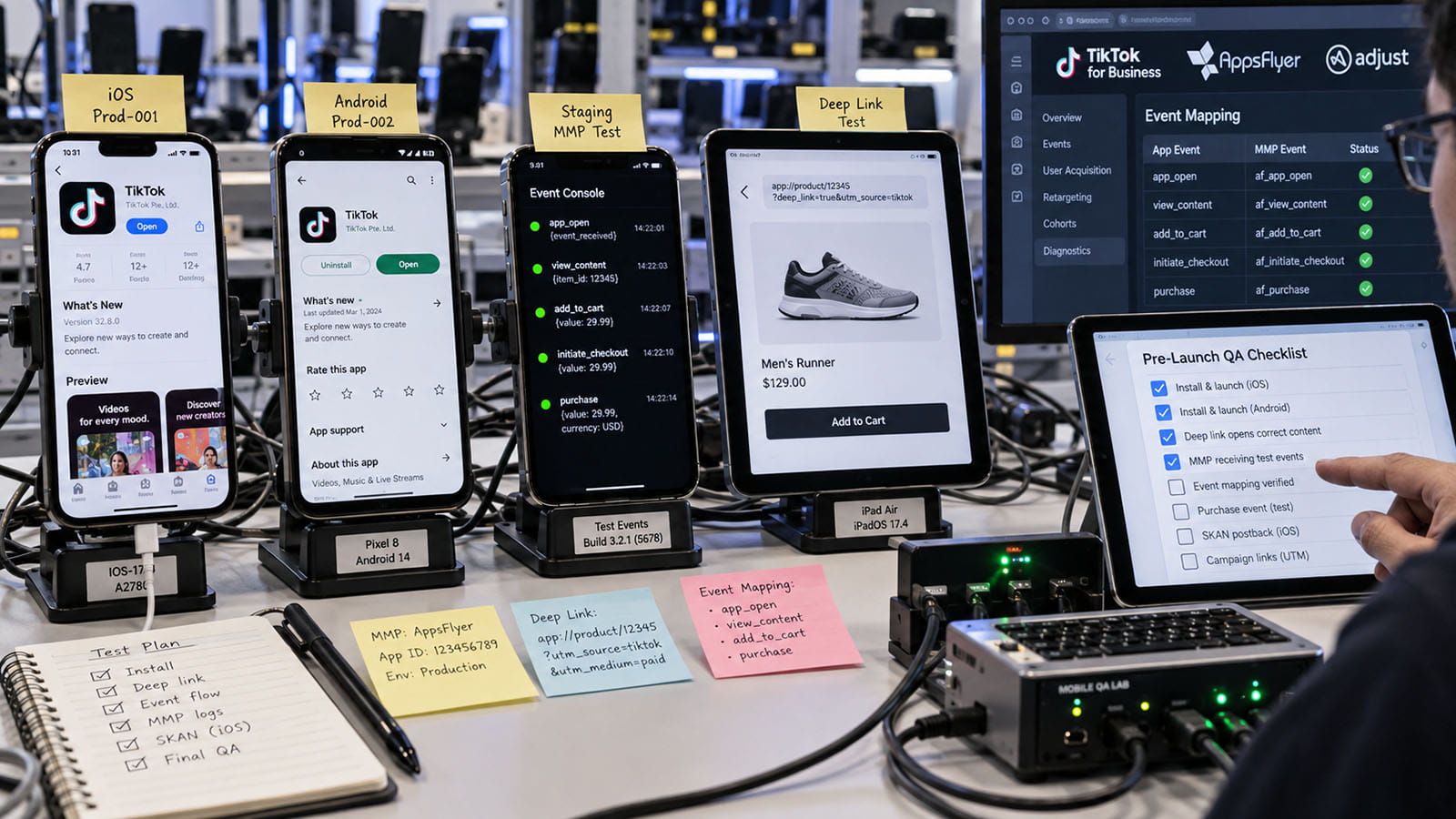
Pre-launch checklist at a glance
The following is an editorial acceptance checklist, not a list of universal TikTok platform requirements. Record an owner, evidence location, date, and status for every row. “The developer said it works” is not an evidence location.
| Check | Evidence to retain before launch | Suggested owner |
|---|---|---|
| Production identity | Store listing, released app identifier, MMP app record, TikTok app and advertiser IDs agree. | App developer + media buyer |
| Production collection | Release version and existing QA records establish SDK startup, first-launch collection, and the required business events. | App developer + analyst |
| MMP and SAN integration | The correct app has the intended integration activated and saved; TikTok shows the expected connection. | MMP administrator |
| Access and ownership | Named people can maintain the app asset, mappings, reporting, and cost connection without relying on one departing contractor. | Advertiser administrator |
| Sharing and privacy | Approved data categories, source scope, consent behavior, and platform privacy settings are documented. | Privacy owner + developer |
| Event definitions and mapping | Actual emitted names, destination events, revenue rules, and source ownership are written down. | Analyst + backend developer |
| Test evidence | Each record identifies the app, OS, build, event, timestamp, and whether it belongs to a test or production pipeline. | QA owner |
| Optimization readiness | The intended event is available for the selected app, OS, and campaign setup; any unmet eligibility condition is explicit. | Media buyer |
| iOS reporting mode | The chosen measurement mode, sharing settings, and any required conversion schema are documented. | iOS developer + analyst |
| Destinations and deep links | The production store destination and required installed/not-installed journeys have release-QA coverage. | App developer + QA owner |
| Attribution and reports | Saved windows, event definitions, time zones, and comparison reports are recorded. | Analyst + media buyer |
| Cost and first-data review | Authorization and app/account scope are checked, or a manual reporting fallback is approved. Actual spend reconciliation remains pending. | Reporting owner |
Do not combine the two operating systems into one “app setup complete” task. Shared code and a shared brand name are reasons to coordinate the review, not reasons to skip half of it.
Confirm production app identity
Start with an identity register. Write down what customers can actually install, then compare that with the app selected in the MMP and TikTok. Do not begin with the advertising account’s display name.
| Layer | Android | iOS |
|---|---|---|
| Released application | The production applicationId, including the correct build flavor. | The production Bundle ID and released application version. |
| Store listing | The Google Play listing for that package, in the intended markets. | The App Store listing and its numeric Apple app ID. |
| MMP record | The Android app record receiving the released build’s data. | The iOS app record receiving that build’s data, not a similarly named test app. |
| TikTok asset | The TikTok app configuration and TikTok App ID for Android. | The separate TikTok app configuration and TikTok App ID for iOS. |
| Advertising scope | The exact advertiser account and app asset selected for the campaign, plus the agency relationship where applicable. | |
AppsFlyer’s Android integration guide requires the configured application ID to match the registered app. Its iOS guide uses the numeric Apple app ID, without the id prefix, for appleAppID. That field is not the Bundle ID.
TikTok’s own app identifier is another layer. Its App ID instructions distinguish IDs by app and OS. Separately, AppsFlyer describes its TikTok App ID field as recommended rather than mandatory and says it does not affect data inside AppsFlyer. That does not make TikTok-side verification optional; it means the two systems use the field for different purposes. See the AppsFlyer integration reference.
Acceptance evidence: one register ties the released build to its store listing, MMP record, TikTok app, and advertiser account. A development suffix, a staging app record, or an ID copied from the other OS is a blocker until reconciled.
Verify production event collection
“The SDK is installed” should mean more than a dependency appearing in the source code. Review the SDK and wrapper versions in the released binary, configuration keys, startup lifecycle, and existing evidence that events reach the intended MMP app.
For AppsFlyer, a measured install refers to a first launch, not simply a store download. Its SDK validation guide separates organic install, non-organic install, and in-app event checks. Do not create a custom “install” event to disguise missing first-launch collection.
Android: verify the released startup path
Check that SDK startup is reachable before the business event you need, subject to the app’s approved privacy behavior. Review initialization failures, environment-specific keys, stopped collection, and a startup flow that waits indefinitely for login. Use instructions for the actual SDK version: AppsFlyer’s Android SDK v7 customer-user-ID guide describes a different flow from older implementations using waitForCustomerUserId.
Also distinguish identifier availability from event collection. Google documents the com.google.android.gms.permission.AD_ID requirement for apps targeting Android API 33 or higher that access the advertising ID. Review the merged release manifest and the user’s applicable privacy choices; this is not an iOS-style runtime permission prompt. A missing advertising ID alone is not sufficient evidence that the SDK never ran. Consult Google’s advertising-ID reference.
Where Google Play acquisition is relevant, review the supported Install Referrer integration. Google’s Install Referrer documentation describes store referral information and timestamps. A sideloaded build does not reproduce the Play installation path; equally, one missing referrer value does not establish the cause of every SAN attribution failure.
iOS: verify lifecycle and privacy behavior
Confirm that SDK startup works with the app’s actual lifecycle and that any ATT wait is deliberately bounded. Record how the app behaves when tracking authorization is allowed, denied, restricted, or not yet determined. Follow the SDK’s iOS lifecycle guidance, rather than assuming an Android implementation covers the same cases.
Apple’s privacy and tracking requirements govern tracking across other companies’ apps and websites. ATT is not interchangeable with every consent decision, and vendor settings do not authorize fingerprinting or override a person’s choices. Have the privacy owner approve which collection and sharing remain permitted in each state.
Acceptance evidence: a release record and appropriately scoped QA evidence show the intended app receiving its first-launch and business-event records. Where that evidence is missing, mark collection as unverified rather than inferring success from a different build.
Connect the correct MMP and SAN integration
In AppsFlyer, the current TikTok Advanced SRN integration is tiktokglobal_int. The legacy bytedanceglobal_int is not a template for a new setup. AppsFlyer also states that ordinary attribution links are not relevant to this integration. Do not manufacture a click-tracking URL just because an older checklist asks for one. These distinctions are documented in the Advanced SRN setup guide.
Verify the main integration for the selected app, not merely the presence of TikTok in an integrations list. AppsFlyer explains that a partner can appear in Active Integrations because another connection, such as cost, is active while the main Activate partner setting is off. The advertiser must establish SRN activation before an agency can work through its permitted setup. See partner activation and deactivation.
On TikTok’s side, confirm the expected SAN connection using the SAN status guidance. Keep a dated configuration record rather than relying on the recollection that somebody connected it months ago.
Other MMPs: follow their connection contract
Adjust’s TikTok SAN guide, for example, calls for its link token in TikTok Events Manager, even though a conventional tracking-link setup is not required. Adjust also describes its own attribution decision across eligible network claims. An Adjust link token is not an AppsFlyer developer key, a TikTok App ID, or a reason to copy an AppsFlyer URL.
Acceptance evidence: the correct production app has a saved, active integration, the required MMP-specific connection values are present, and the advertiser and agency agree on who controls the configuration. Investigate inherited legacy settings without disabling working historical integrations blindly.
Verify access, app verification, and sharing
Separate three questions: can the right person administer the asset, has the relevant connection been verified, and is the proposed data sharing approved?
TikTok documents separate verification for MMP, SDK, and Events API connections. For an MMP connection, an attributed or unattributed event can establish verification. For SDK and Events API connections, verification requires non-test events. Therefore, a verified MMP connection is evidence of that connection, not proof of paid attribution or of another connection type. See TikTok’s verification rules.
Build a small access register covering the advertiser’s TikTok app asset, ad account, MMP app, event mapping, reporting, and cost authorization. Name both the operating owner and a backup. Ask each owner to confirm the required capabilities; do not solve every access problem by distributing administrator credentials.
Then review event sharing. AppsFlyer’s postback configuration guide separates the source event, partner destination, user-source scope, included values, conditions, and forwarding window. A postback is the notification sent onward to the partner; it is not the original business action.
“This partner only” and “all sources, including organic” are different disclosures. An organic validation event may exist in the MMP but not qualify for forwarding under the chosen rules. Do not broaden sharing, remove privacy controls, or add customer identifiers merely to make a status indicator change. Resolve the verification path with the responsible privacy owner and vendor when the approved configuration cannot supply the required evidence.
Acceptance evidence: an access register, a dated record of the relevant connection status, and an approved sharing specification. Record what is withheld as well as what is sent.
Define events and map them deliberately
Write the business definition before selecting the optimization event. A button tap, successful registration, trial activation, and settled payment are different outcomes. A campaign should not learn from “purchase” events that actually mean somebody opened checkout.
The table illustrates an AppsFlyer mapping plan. The AppsFlyer names are examples to match against your implementation; they are not a claim that every app emits them automatically. TikTok’s supported AppsFlyer event list supplies the SAN destination names.
| Business outcome | Illustrative AppsFlyer event | TikTok SAN destination | Acceptance question |
|---|---|---|---|
| Account successfully created | af_complete_registration | Registration | Does it exclude failed submissions and ordinary logins? |
| Trial actually activated | af_start_trial | StartTrial | Is the trial active, rather than merely selected? |
| Payment confirmed | af_purchase | Purchase | Are amount, currency, and transaction uniqueness correct? |
| Subscription established | af_subscribe | Subscribe | Are initial subscriptions and renewals deliberately distinguished? |
AppsFlyer’s partner setup documentation notes that event names are case-sensitive. Match the string actually received, including any custom naming convention. Creating a mapping does not instrument an event that the app never sends.
For each selected event, retain its trigger, source, expected frequency, required parameters, destination mapping, sharing scope, and forwarding window. Install forwarding and in-app event forwarding deserve separate review. Confirm that the selected revenue-sharing option actually includes the values needed for the intended use; event receipt without revenue is not sufficient evidence for revenue-based optimization.
Check server-side and validated purchase routes
For backend events, verify the MMP's app-install association as well as the business transaction. AppsFlyer's S2S reference requires appsflyer_id; a CRM customer ID is not a substitute. Its event endpoint also requires the id prefix in an iOS app_id, unlike the SDK's appleAppID field. Confirm the receiving record, not just an HTTP 200 response, and preserve the actual event time.
A current release check: AppsFlyer's legacy Receipt validation bulletin sets September 7, 2026 as the service's sunset date. It states that purchases validated and logged through the legacy validateAndLogInAppPurchase signature stop being recorded, regardless of SDK version. This does not mean all af_purchase events stop working. Check the actual method signature and supported replacement, including store onboarding and the released code. A dashboard setting does not replace legacy calls in an already distributed binary.
Protect the meaning of revenue
Define whether amounts represent gross or net revenue, whether tax is included, and which currency is supplied. Check major versus minor currency units, failed payments, restored purchases, refunds, and repeated transaction notifications. These are proposed business-data checks, not a claim that every vendor handles those cases identically.
Assign one authoritative producer per business event, or document the supported deduplication arrangement. TikTok permits a hybrid MMP and TikTok SDK setup; coexistence does not by itself prove that every duplicate SDK, MMP, and server notification will be removed. Do not assume that a shared identifier automatically deduplicates unrelated ingestion paths.
Finally, verify optimization eligibility separately. AppsFlyer says custom events forwarded “as is” in this integration are for reporting, not optimization. A correctly mapped standard event still needs to be available for the actual campaign configuration. Check the integration’s event-mapping guidance and the selected app in Ads Manager.
Acceptance evidence: an event contract, a saved mapping, an approved revenue definition, and a recorded optimization choice. A reporting-only event is not a substitute for an eligible optimization event.
Interpret test events correctly
Ask what each piece of evidence proves. A development log, an MMP event record, a TikTok test event, and an attributed campaign conversion are not interchangeable.
| Evidence | What it can establish | What remains unproved |
|---|---|---|
| Application or backend log | The relevant code path attempted to produce the event. | Acceptance by the MMP or TikTok. |
| MMP production event record | The MMP received the action for the specified app. | TikTok forwarding, campaign credit, and optimization eligibility. |
| TikTok SDK test-pipeline event | The test submission reached the diagnostic pipeline. | Production connection verification and campaign reporting. |
| Eligible event received through the MMP connection | That forwarding and receipt path worked for this record. | A paid TikTok touchpoint caused or received credit for it. |
| Real paid conversion after launch | The observed journey produced the recorded attribution outcome. | Coverage of every OS, privacy state, user journey, or future conversion. |
TikTok’s SDK integration guide distinguishes its test pipeline from production reporting. Remove test or debug configuration from the release path according to the SDK’s instructions; do not present diagnostic events as real campaign results.
For MMP validation, use the vendor’s supported tools and eligibility rules. AppsFlyer’s validation guide explains its test-device and event-viewing procedures. A generic non-organic test link is not a substitute for evidence about the specific TikTok SAN integration.
Keep a compact evidence record: app and OS, build, event name, timestamp and time zone, permitted device/reference identifier, privacy state, environment, receiving system, and result. Use existing release-QA records where suitable; where evidence is absent, request the appropriate validation from the owner. Do not label a reinstall on a familiar device a clean acquisition without checking the MMP’s classification rules.
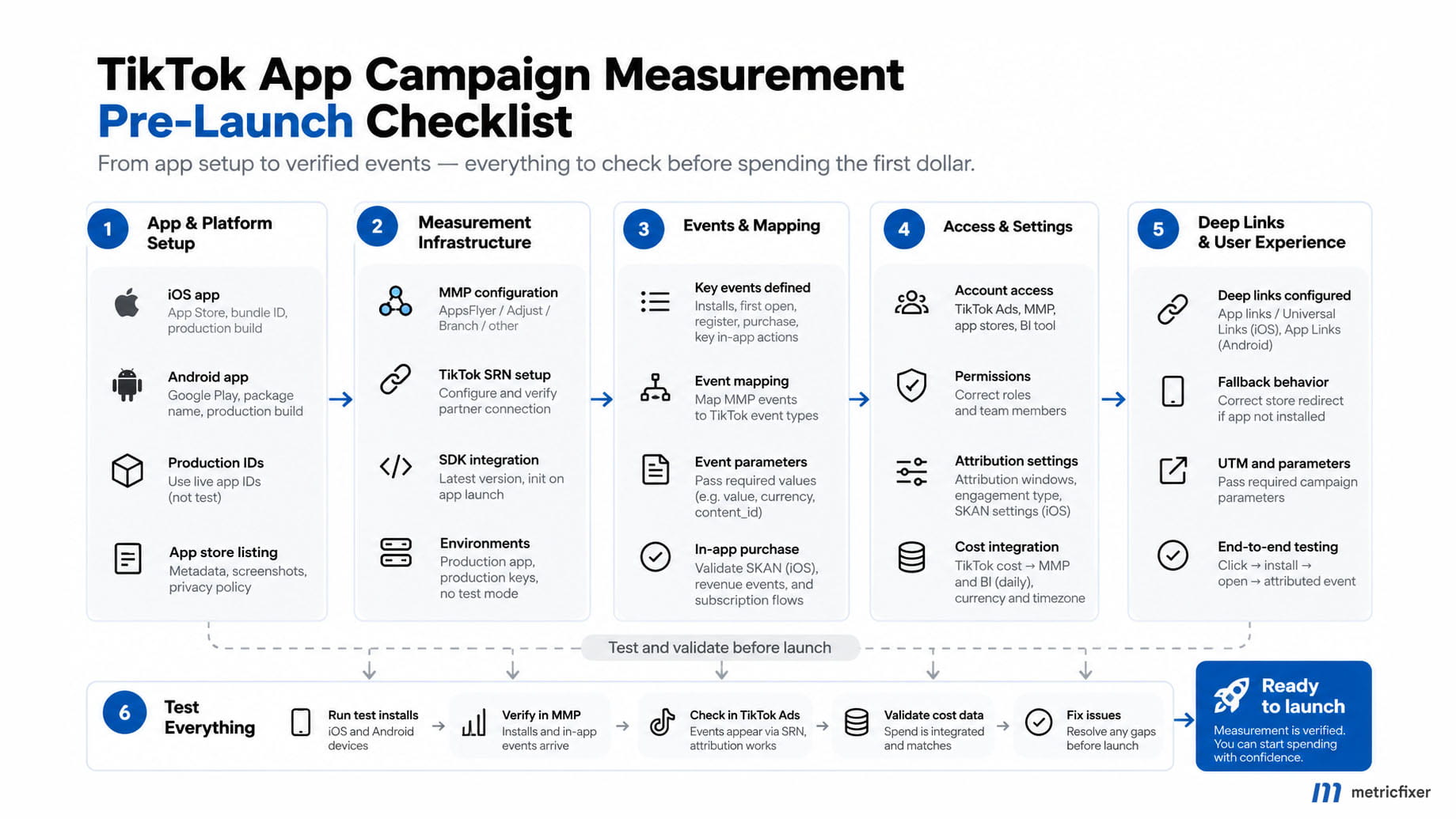
Choose the iOS measurement mode
Do not approve iOS from a checklist written for a different reporting architecture. Record which mode the app and campaign will use, what permissions it requires, and which reports should consequently exist.
AppsFlyer’s June 2026 bulletin replaced the TikTok iOS Advanced Privacy control with Advanced Data Sharing, effective June 23, 2026. The documented migration maps old AP off to ADS on, and old AP on to ADS off. An old instruction to “turn off Advanced Privacy” should not be applied mechanically to a differently named current switch.
TikTok’s iOS real-time reporting guide lists AppsFlyer support with ADS enabled, but also describes app-level eligibility. Do not promise eligibility solely because the MMP appears on the supported-partner list. Where the eligible campaign setup allows SKAN attribution to be disabled, that choice removes SKAN data from the corresponding TikTok and MMP reporting; missing SKAN rows then are not automatically an integration fault.
When SKAN is part of the chosen setup, review conversion measurement and event mapping together. AppsFlyer’s TikTok SKAN interoperation guide describes the conversion configuration and partner mapping. A normal in-app event mapping alone is not evidence that the intended SKAN conversion schema is correctly configured. Check the measurement window and whether the desired business action can occur within it.
Acceptance evidence: a written mode decision, current sharing settings, app/campaign eligibility where required, and the relevant schema. Privacy approval remains a separate requirement. Do not treat the same conversion represented in different reporting systems as additional revenue.
Check store destinations and deep links
A working measurement SDK cannot rescue an ad that opens the wrong store listing. Confirm the final destination for the target OS and market, including any redirect or fallback. For a store-only acquisition campaign, record deep linking as not applicable rather than inventing a requirement.
When deep links matter, cover four journeys in the release-QA record: an installed app opened from a cold start; an already running app; a device without the app; and a user who must log in before reaching the advertised content. Include unavailable content and unsupported-market fallbacks.
Review platform association against the production application, not only a development build. Android provides App Links verification guidance; Apple documents Universal Links support. A link opening the app is useful navigation evidence, but it does not prove advertising attribution.
Distinguish ordinary deep linking from deferred deep linking, which aims to preserve the destination through installation. TikTok’s deferred-link feature guide, last updated July 2025, describes approval and campaign restrictions and says this feature is not supported for iOS 14.5+ dedicated campaigns. Verify eligibility for the exact current campaign type; an MMP’s general deep-link capability does not establish TikTok feature availability.
Acceptance evidence: a valid production store route and evidence for every navigation behavior the ad promises. An optional unavailable deep-link feature can be removed from the plan; a broken required destination is a launch blocker.
Align attribution and reporting definitions
Choose the measurement question before choosing a window. “How many conversions did TikTok claim?” and “Which channel received credit in our MMP?” are different reports. Equal settings reduce avoidable differences; they do not turn the two systems into the same attribution engine.
TikTok explicitly says that its Ads Manager attribution-window settings do not change MMP reporting. Record the saved click-through, view-through, and engaged-view settings where available, then review the corresponding MMP settings independently. Do not assume that one vendor’s recommendation is a mandatory window for every business.
Engaged-view attribution deserves its own entry. TikTok’s EVTA documentation describes a qualifying six-second view, or completion of a shorter video, and notes that these conversions are reported as click-through conversions in MMPs. Matching column labels literally can therefore mislead a reconciliation.
Record these reporting decisions together: install versus reinstall or re-engagement; total event occurrences versus unique converters; event date versus ad-interaction date; account and app time zones; revenue currency; and the exact reporting view. TikTok’s MMP discrepancy guide explains timing, attribution, and time-zone differences.
For iOS, keep two concepts separate: eligibility for iOS real-time conversion reporting and columns grouped by conversion time. TikTok’s current reporting guide lists conversion-time metrics within that reporting capability; the names do not describe an identical setting.
Acceptance evidence: a dated measurement specification naming both reports and their definitions. Assign expected processing delays and escalation rules using the applicable vendor guidance, not a universal “wait 24 hours” rule. For the later comparison, use our TikTok and AppsFlyer discrepancy troubleshooting guide.
Connect cost data before judging performance
Cost reporting is a separate integration. A working event feed does not prove access to the advertising account’s spend, and an authenticated cost connection does not prove that app attribution works.
AppsFlyer’s TikTok reference distinguishes included click/impression data from cost data requiring ROI360. Confirm the actual subscription entitlement rather than treating visible engagement statistics as proof that spend will arrive.
For AppsFlyer, review both the relevant app’s Cost tab and account-level Cost settings where used. Its cost API guide documents the Cost Connections permission, explicit app selection, and TikTok advertiser IDs belonging to the connected TikTok user. New apps do not automatically inherit account-level cost coverage.
Assign one owner for authorization and renewal. Check whether the advertiser, agency, or an inherited integration is already importing the same spend. AppsFlyer warns that overlapping advertiser/agency connections using the same credentials can duplicate cost; its TikTok migration bulletin also addresses overlap between legacy and current cost integrations. Do not add competing connections as a troubleshooting shortcut.
Before spend, an empty cost response can be expected. The documented status checks distinguish connection problems from missing matching activity. Approve authentication and scope now; leave the first populated import, currency comparison, campaign-ID matching, and reconciliation pending real spend.
Acceptance evidence: authorized account scope, included apps, entitlement, connection owner, and a scheduled first-data review. When automation is unavailable, approve a manual export procedure with an owner and deadline. Do not silently calculate CPI or ROAS with absent spend, mismatched dates, or an undefined revenue basis.
Sign off the launch and first-data review
A measurement sign-off should authorize a controlled next step, not certify that every future conversion will be visible. Critical gaps in identity, collection, the selected optimization path, permitted sharing, or the required destination should be resolved before that campaign launches.
Do not spend merely to test whether an unidentified configuration problem disappears. Conversely, do not demand a paid conversion or a populated cost report from an account that has never delivered. Those are first-data acceptance checks with named owners.
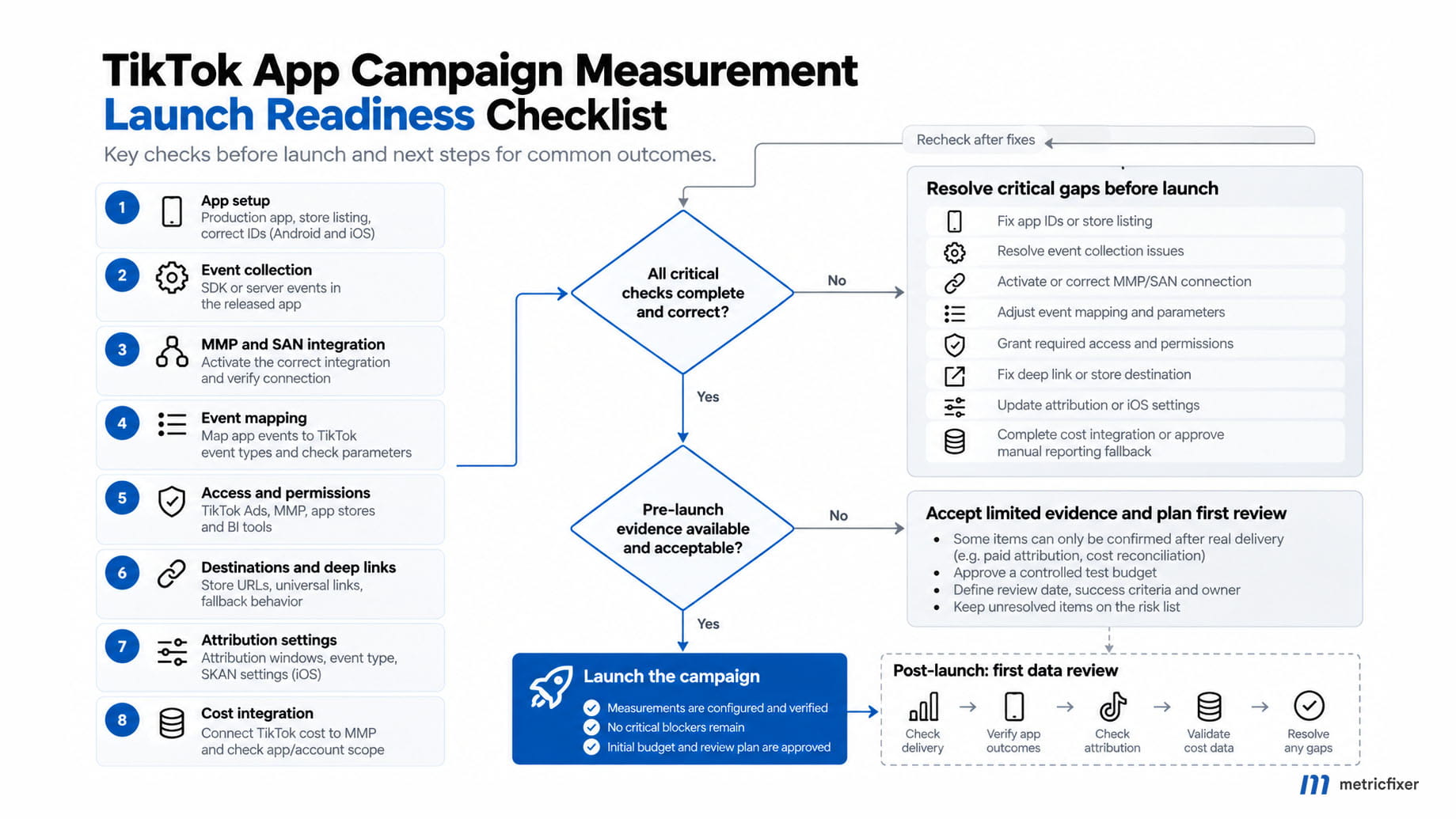
The following is a proposed sign-off record, not an API payload or a vendor-required template:
App / OS / release version: [record separately for each OS]
Production app, store, MMP and TikTok IDs: [evidence reference]
Collection and connection evidence: [reference and date]
Business event / mapped event / optimization goal: [approved choice]
Privacy and sharing specification: [approval reference]
iOS reporting mode, where applicable: [mode and evidence]
Destination and required deep-link journeys: [QA reference]
Attribution windows / report definitions / time zones: [specification]
Cost authorization or approved manual fallback: [owner and reference]
Unresolved blockers: [none, or hold this campaign]
Pending live evidence: [delivery, attribution, cost reconciliation]
Initial spend limit / review trigger / pause owner: [agreed values]
Sign-off owners / date: [names and timestamp]
After launch, check delivery first, then the app’s observed outcomes, then attribution and partner reporting, and finally the matching spend import. Escalate at the first missing layer rather than changing several settings at once. Preserve the original configuration record so the team can explain what changed.
The objective is not a dashboard with identical numbers everywhere. It is a measurement setup in which the team knows what each number means, which evidence supports it, and who acts when the expected signal is missing.
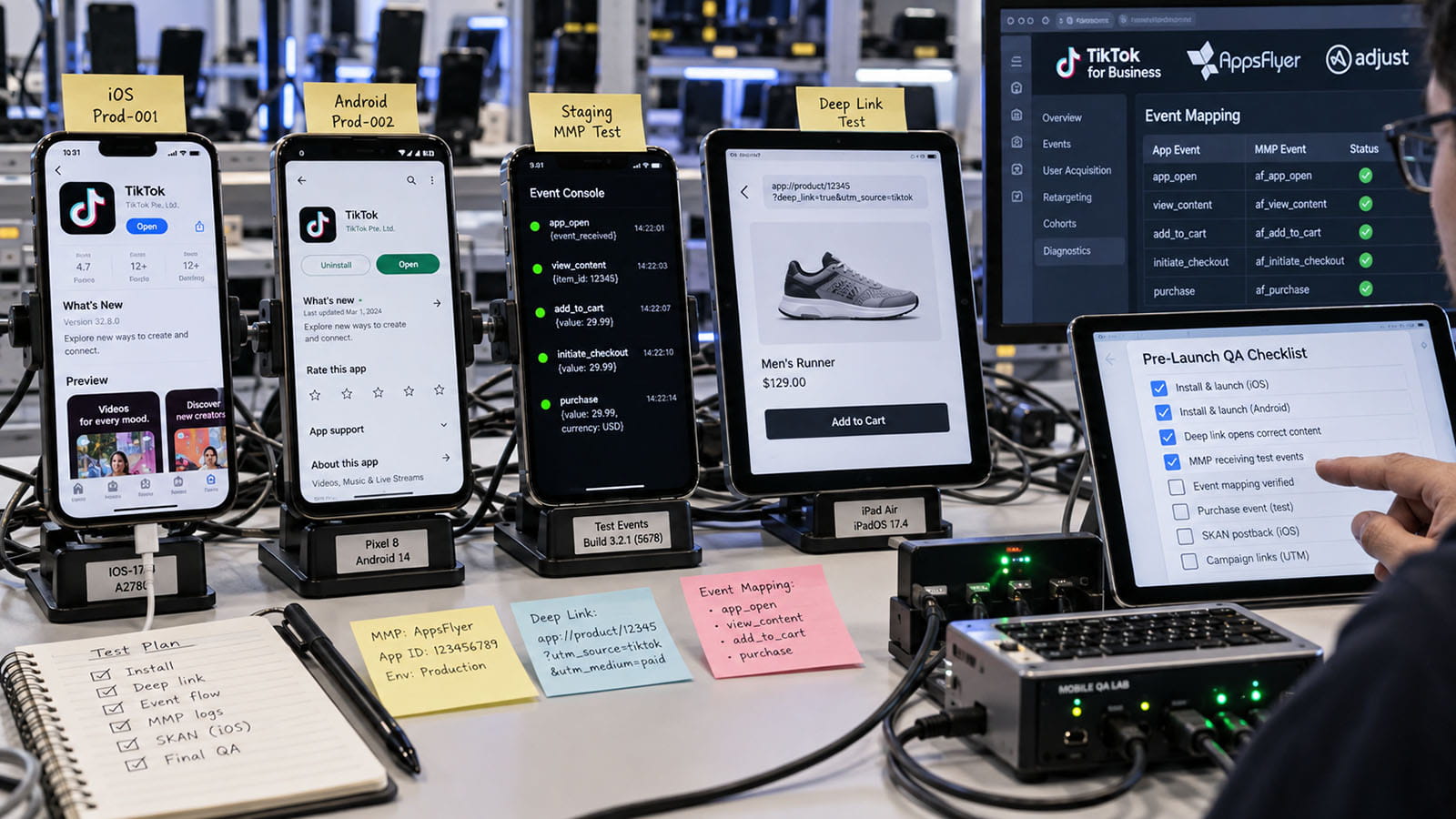
Methodology and sources
This article is a documentation-based review completed on September 27, 2026. It uses official TikTok for Business, AppsFlyer, Adjust, Android/Google, and Apple documentation, linked beside the relevant claims. The metricfixer troubleshooting articles provide related editorial context, not independent experimental proof.
No advertising account was audited, no campaign was launched, and no SDK, device, purchase, or attribution experiment was performed for this article. The checklists, ownership assignments, acceptance records, and diagrams are proposed operational controls derived from the documented integration boundaries. They are not reported test results or universal platform requirements.
Current integration instructions and dated change notices take precedence over legacy setup recipes. Where guidance is feature-specific or older, such as TikTok’s deferred-link eligibility page, that limitation is stated rather than generalized. Account eligibility, release-specific SDK behavior, plan entitlements, and live delivery still require verification in the implementation concerned.
This article is for technical and operational information only. It is not legal advice, a platform endorsement, or a guarantee of attribution, campaign delivery, or advertising performance. Privacy obligations, app-store rules, available features, and vendor interfaces can change. Review data collection and sharing with the responsible privacy and technical owners, and confirm the current requirements for your app, market, MMP, and advertising account before implementation.