
Published Jul 27, 2026
Why GA4 Shows (direct), (not set), and Unassigned: A Diagnostic Decision Tree
A practical GA4 decision tree for tracing why purchases and key events become (direct), (not set), or Unassigned across browser and server-side measurement.
Category: Analytics & Conversion Tracking · By Mikalai Sasau
This guide explains how to diagnose why a purchase or another key event appears as (direct), (not set), or Unassigned in Google Analytics 4. Instead of listing unrelated causes, it follows one conversion backwards through the actual measurement chain: report scope, session identity, the first event, campaign parameters, redirects, domains, payment gateways, consent, cookies, event timing, and Measurement Protocol.
Practical rule: do not start by editing a channel group. Select one affected transaction_id and prove the chain landing URL → first measured event → session_start → client_id + session_id → domain and consent transitions → purchase request → report dimension. The first broken link is normally the real cause.
Executive summary
(direct), (not set), and Unassigned are not three names for the same problem. They belong to different layers of GA4 reporting:
| Value | What it means | First diagnostic question |
|---|---|---|
(direct) / (none) |
GA4 has no identifiable campaign or referring source for that traffic touchpoint, so it uses Direct. This may be a genuine typed or bookmarked visit, but it may also be the result of a stripped click ID, missing UTM parameters, a lost referrer, a new cookie, or a broken cross-domain journey. | Did the first measured event receive a usable gclid, UTM set, or referrer? |
(not set) |
The requested dimension has no value at that scope. For Session source / medium, a frequent cause is a missing or disconnected session_start. It can also be expected when a dimension is queried outside the context in which GA4 populates it. |
Does the affected event belong to a properly constructed online session, and are you using the correct scoped dimension? |
Unassigned |
The selected default or custom channel group could not map the available source, medium, campaign, or source-platform values to one of its rules. If those underlying values are themselves missing, Unassigned is only the visible final symptom. | What are the underlying source and medium before channel grouping is applied? |
The most reliable diagnostic order is:
- Confirm which attribution scope and dimension you are looking at.
- Trace one conversion by
transaction_id,client_id, andsession_id. - Inspect the first event of the session and confirm that
session_startexists. - Verify that click IDs and UTMs survived every redirect until the first GA4 request.
- Check whether a domain, subdomain, hosted checkout, or payment gateway changed user or session identity.
- Check Consent Mode and whether Analytics was allowed to use a persistent identifier.
- Check how late the event was sent and whether it was sent from the browser or through Measurement Protocol.
- Only after the source and medium are known, inspect default or custom channel-group rules.
A particularly important result concerns server-side purchases. Sending the correct-looking client_id and session_id does not automatically restore attribution. For Measurement Protocol session attribution, the event must join a real online session, the request must be sent no later than 24 hours after that session started, and an overridden timestamp_micros must fall between the session start and session end. If the backend invents a new session_id, reuses an old client_id, sends to another stream, or joins a browser session that never had a source, GA4 has nothing reliable to inherit.
Decision tree: why did the conversion lose its source?
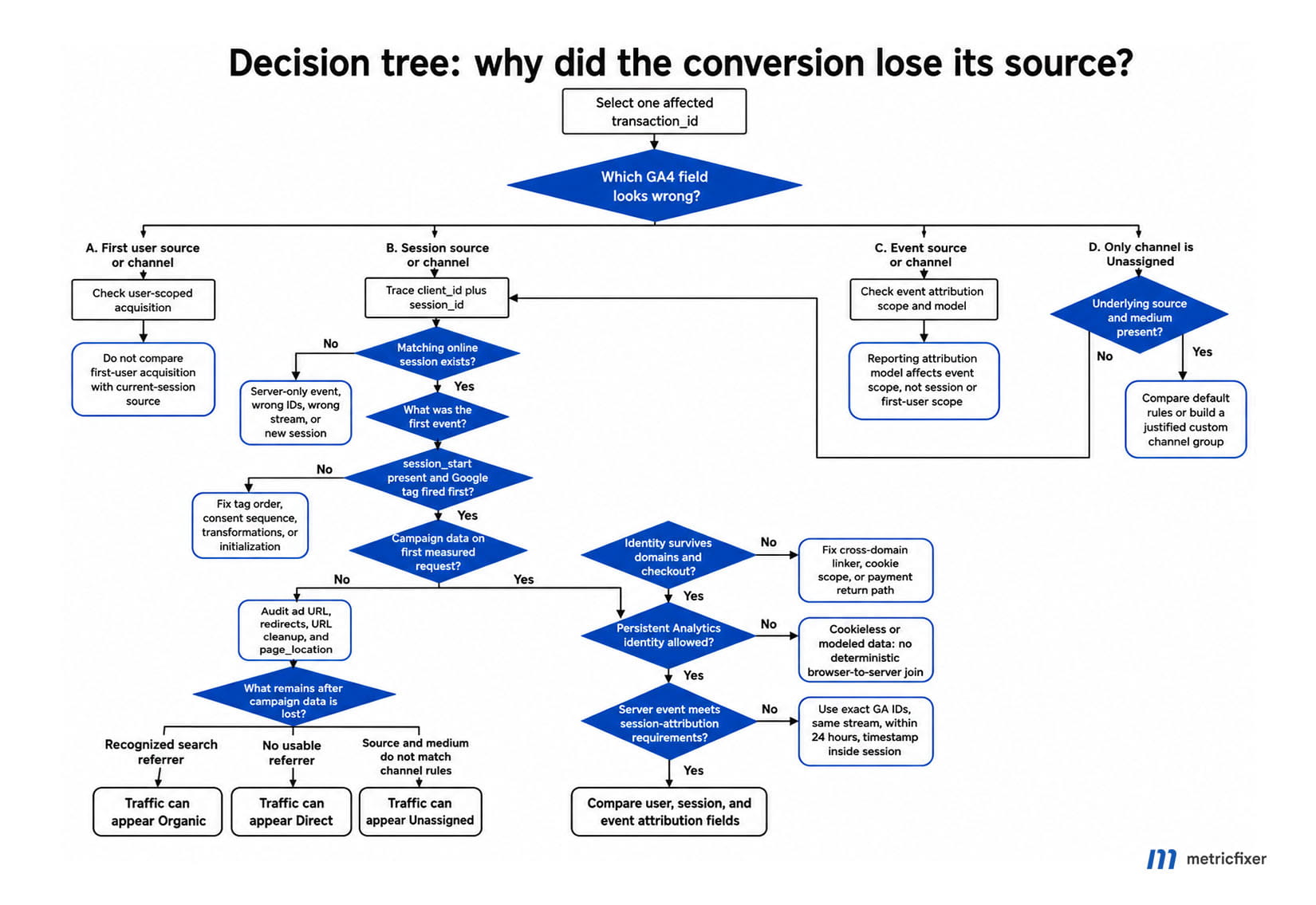
Diagnostic workflow: choose one failed purchase → identify the exact report dimension → find its client_id and session_id → locate the matching online session → inspect the first event and session_start → verify gclid, UTMs, and referrer on the first request → check domains, gateways, consent, and cookie continuity → verify server-event timing → inspect source and medium → evaluate the channel-group rule.
- Which field is wrong? If you are looking at
First user source / medium, you are asking how the user was originally acquired. If you are looking atSession source / medium, you are asking what started this session. If you are using unprefixedSource / mediumin an attribution report, you are asking which touchpoint receives event-level credit. Do not compare these as if they were the same field. - Is the data old enough to be processed? Use Tag Assistant, browser network requests, DebugView, and BigQuery for immediate technical evidence. Standard GA4 reports can take time to settle, so do not classify a fresh event as permanently broken only because a processed report has not updated yet.
- Can you identify one affected purchase? Record its
transaction_id, event timestamp,client_idor BigQueryuser_pseudo_id, andga_session_id. Aggregate percentages are useful for sizing the problem, but they are poor evidence for finding the broken step. - Does a matching online session exist? If no browser or app session exists with the same identifiers, the purchase is effectively server-only. It cannot inherit a source from a session that GA4 never received. If a session exists, continue with its earliest event.
- What was the first event? Confirm that the Google tag configuration ran before custom GA4 event tags. A custom event that fires before the Google tag can start or contaminate the session without the configuration and identity context later events expect.
- Is
session_startpresent? If it is absent from a normal browser journey, fix tag order, consent sequencing, transformations, or duplicate initialization before looking at channel rules. Aga_session_idby itself is not proof that GA4 received a fully attributed browser session. - Were campaign details present on the first measured request? Compare the clicked URL, each redirect response, the final address in the browser, and the first GA4 request. If
gclid,wbraid,gbraid, or the UTM parameters disappear before that request, attribution is already lost. - Did identity survive a hostname change? For different root domains, verify cross-domain measurement, the same web stream, and preservation of the
_gllinker. For subdomains, first verify shared cookie scope, the same tag configuration, and consistent cookie settings. - Did the user leave for a payment provider? If the gateway replaced the source, configure it as an unwanted referral where appropriate. If the return journey generated a new
client_idor a new session, an unwanted-referral rule alone cannot reconnect the purchase. - Was Analytics storage granted? With
analytics_storage='denied', GA4 does not read or write Analytics cookies and sends cookieless pings. Modeled reporting may fill aggregate gaps, but there is no persistent browser identifier to deterministically join to a later backend event. - Was the event delayed or server-generated? For a Measurement Protocol event, verify the exact GA-generated identifiers, destination stream, request time, and
timestamp_micros. Do not confuse the 24-hour session-attribution limit with the broader 48-hour processing warning, 72-hour backdating limit, or 63-day advertising-export use case. - Does source and medium exist? If they are
(not set), return to the session and identity branches. If they are present but the channel is Unassigned, compare the values with the default channel rules or create a justified custom channel group.
Start with scope: three attribution questions that can produce three answers
Many investigations fail before they begin because the analyst says “the purchase source is wrong” without recording which source dimension was used. GA4 separates acquisition and attribution into user, session, and event scopes. The same customer can therefore be Organic at user scope, Paid Search at session scope, and receive event-level conversion credit through another eligible touchpoint under the property’s reporting attribution model.
| Business question | Use this dimension | Typical report | Attribution behavior |
|---|---|---|---|
| How was this user originally acquired? | First user source / medium and First user default channel group |
User acquisition | User-scoped; paid and organic last click for the first-user touchpoint. |
| What source started this particular session? | Session source / medium and Session default channel group |
Traffic acquisition | Session-scoped; paid and organic last click. Changing the reporting attribution model does not rewrite this scope. |
| Which touchpoint receives credit for a key event? | Unprefixed Source, Medium, and Default channel group in an attribution-compatible report |
Advertising and attribution reporting | Event-scoped; follows the property’s selected reporting attribution model, which is data-driven by default. |
This distinction explains apparently contradictory observations:
- A purchase can occur in a session whose
Session source / mediumis(direct) / (none), while event-level attribution credits a previous eligible non-direct touchpoint. - A returning user can remain
google / organicat first-user scope even when the current purchase session came from paid search. - Changing the reporting attribution model can change event-scoped conversion credit without changing user- or session-scoped acquisition dimensions.
- A channel label can be Unassigned at one scope and valid at another because each channel-group dimension evaluates the fields available at its own scope.
Before troubleshooting, write down the exact GA4 column name. “Source” is not precise enough.
Branch 1: inspect the first event and session_start
When an online session starts, GA4 automatically collects session_start and generates ga_session_id and ga_session_number. The session-start context is where campaign identifiers, manual campaign parameters, and the referrer become connected to the session. If the first event reaches GA4 before the Google tag has been configured, later events can have a valid-looking user or session identifier but still fail to associate with the expected attribution context.
What the event order should look like
Expected order: Consent Mode defaults are set → Google tag configuration loads → the initial page_view and automatic session_start are collected → custom interaction and ecommerce events fire → any server-side purchase supplements the same session.
In Google Tag Manager, consent defaults belong on the Consent Initialization stage. The Google tag should then run before GA4 event tags, normally on Initialization or another reliably earlier trigger. A consent-management tag, custom HTML tag, ecommerce event, or server-side forwarding rule should not become the first piece of GA4 measurement logic by accident.
How to test the first event
- Open a fresh browser profile or clear the relevant site data.
- Start Tag Assistant preview before opening the tagged campaign URL.
- Record the first Google tag and GA4 event in the timeline.
- Open the browser Network panel and filter requests for
g/collect. - Confirm that the first request contains the expected page URL, referrer, consent state, client identifier where permitted, and session information.
- Compare the same event sequence in DebugView or BigQuery. DebugView is useful, but network evidence is more fundamental when consent or privacy controls suppress debugging visibility.
If a custom event appears before the Google tag, repair the firing sequence and retest in a clean browser. Do not try to compensate by creating a custom channel rule.
What a missing session_start tells you
For a normal browser implementation, a missing session_start is a collection problem, not an attribution-model preference. Google explicitly identifies missing session_start as a reason that Session source / medium can become (not set). Common implementation paths include:
- the Google tag runs after a custom event;
- the first request is dropped or transformed in a web or server GTM container;
- multiple Google tag initializations use conflicting settings;
- a consent implementation blocks or resets the initial measurement sequence;
- a server implementation creates a new session identifier without a corresponding online landing event;
- the first page does not contain the tag, while a later page does.
Do not send a synthetic session_start later simply to make a report look complete. Repair the sequence that should have created and attributed the session in the first place.
Branch 2: prove that campaign data survived until the first GA4 request
A tracking parameter only helps if the Google tag sees it. It is not enough that the ad platform displays the correct destination URL or that the parameter briefly appears in the address bar. URL shorteners, tracking domains, consent redirects, localization logic, login redirects, trailing-slash normalization, JavaScript routers, and server-side URL cleanup can all remove parameters before the first GA4 request.
For Google Ads, preserve the relevant click identifier, including gclid and, where used, wbraid or gbraid. For manually tagged campaigns, use a coherent set of utm_source, utm_medium, and utm_campaign. UTM values are case-sensitive, and incomplete or malformed parameter sets can produce missing dimensions or channel values that do not match the default rules.
Use a four-snapshot redirect test
| Snapshot | What to record | Failure signal |
|---|---|---|
| 1. Clicked destination | The exact URL generated by the ad, email, social post, QR code, or partner link. | The campaign parameter is absent before the browser even opens. |
| 2. Redirect chain | Every HTTP 3xx response and its Location header. |
A redirect reconstructs the destination without the query string or selectively drops click IDs. |
| 3. Final browser URL | The URL after server and client-side redirects finish. | The parameter was removed by application routing, a canonicalization script, or a consent flow. |
| 4. First GA4 request | The page_location, referrer, and campaign fields sent in the first collection request. |
The address bar still has the parameter, but the tag overwrote page_location, loaded too late, or sent another URL. |
A simple controlled test should preserve the identifier from the first URL to the final landing page:
Initial ad click:
https://example.com/offer?gclid=TEST_CLICK_ID

Final page after all redirects:
https://example.com/offer?gclid=TEST_CLICK_ID
A manually tagged campaign should likewise retain the complete query string:
https://example.com/offer?utm_source=newsletter&utm_medium=email&utm_campaign=spring_launchWhy paid traffic can become Organic or Direct
GA4 can only classify what reaches the first measured event:
- If the paid click identifier or UTM parameters are missing but a recognized search-engine referrer remains, the visit can look Organic.
- If both campaign information and a usable referrer are missing, the visit can become Direct.
- If source and medium arrive but use values outside the default channel definitions, the visit can become Unassigned.
- If the session itself is not constructed correctly, the source dimension can become
(not set)before channel classification is even attempted.
This is why “Google Ads traffic became Organic” is not primarily a channel-group problem. First verify auto-tagging, the Google Ads–GA4 link where relevant, the redirect chain, the first landing-page tag, and the click identifier received by GA4.
Branch 3: domains, subdomains, hosted checkout, and payment gateways
A domain transition can split one customer journey into two GA4 users or sessions. The correct fix depends on whether the destination is another measured domain, a subdomain of the same site, or an external intermediary that should not become a traffic source.
| Journey | Expected setup | What to inspect |
|---|---|---|
www.example.com → shop.example.com |
GA4 normally shares first-party cookies across subdomains when default cookie behavior is retained. Cross-domain configuration is usually not required solely because the hostname changed. | Same web stream and tag settings; identical _ga user identity; consistent cookie_domain and cookie_prefix; no self-referral. |
example.com → checkout.example-payments.com, both measured as one journey |
Cross-domain measurement with the same GA4 stream and a preserved _gl linker. |
The linker is appended before navigation, survives redirects and forms, and is read by the destination tag before being removed. |
| Merchant site → external payment gateway → merchant return page | Usually configure the gateway as an unwanted referral if it is only an intermediary and should not replace the original source. | Whether the original merchant cookie still exists, whether the session timed out, and whether the return page creates a new identity. |
| Browser checkout → backend webhook purchase | Store the original GA-generated identifiers with the order or checkout record, then send the server event back to the same property under Measurement Protocol requirements. | The exact captured client_id, session_id, timestamp, consent state, and property destination—not the webhook provider’s session. |
Cross-domain diagnosis
GA4 cross-domain measurement passes identifiers between different domains through the _gl URL parameter. Both domains must use the same web data stream, and the linker must survive every navigation mechanism. Test ordinary links, forms, JavaScript redirects, locale redirects, and checkout buttons separately; a configuration that works for one navigation path may fail for another.
On the destination domain, compare the client and session identifiers with the values from the source domain. If they change, the source cannot be inherited reliably. Adding the destination to the cross-domain list does not repair a linker that is stripped by an intermediate redirect or a destination tag that fires after the URL has been cleaned.
Subdomain diagnosis
Subdomains are often misdiagnosed as a cross-domain problem. With default GA4 cookie behavior, the first-party cookie is normally available across subdomains of the same registrable domain. When a subdomain creates a new user or self-referral, check for custom cookie settings, different measurement IDs, a second GTM container with conflicting Google tag settings, consent differences, and application-specific storage isolation.
Payment-gateway diagnosis
Google’s unwanted-referral feature is designed for domains such as third-party payment processors that should not replace the original acquisition source. It solves one specific issue: treating the gateway as a new referral. It does not recreate a deleted cookie, restore a stripped gclid, recover a missing session_start, or join a webhook purchase to a browser session whose IDs were never stored.
For one failed order, compare:
- the
client_idandsession_idbefore the user leaves for payment; - the same values on the return page;
- the referrer on the return page;
- the time spent outside the site relative to the session timeout;
- the identifiers attached to the browser or server-side
purchase.
If the gateway is the only incorrect field but identity is continuous, an unwanted-referral rule may be sufficient for future sessions. If identity changes, solve the identity break first.
Branch 4: Consent Mode and the loss of deterministic identity
Consent Mode changes what Google tags are allowed to store and send. It should not be treated as a simple switch that either preserves all attribution or removes all data. The diagnostic question is whether the affected browser interaction had a persistent Analytics identifier that a later event could use.
| Consent situation | Measurement behavior | Attribution consequence |
|---|---|---|
| Basic consent mode before consent | Google tags are blocked until the user grants consent. | The initial landing interaction is not collected. If the URL, referrer, or campaign parameters change before the tag is released, the later first event may no longer contain the original source. |
Advanced consent mode with analytics_storage='denied' |
The tag can send cookieless pings, but GA4 does not read or write Analytics cookies. | GA4 can use the anonymous signals for modeling, but there is no persistent Analytics cookie for a deterministic transaction-level join. |
analytics_storage='granted' |
Analytics cookies can be read and written, subject to browser and site restrictions. | A stable client_id can support session continuity, provided the rest of the implementation is correct. |
| Consent state differs across domains | One domain can store identifiers while another sends cookieless or blocked events. | The cross-domain linker may be present, but the destination may be unable or unauthorized to use the same identifier. |
Consent diagnostic sequence
- Confirm that the consent
defaultcommand runs before any Google tag. - Confirm that the user’s choice triggers a consent
update, not another conflictingdefault. - Inspect the consent state on the first GA4 request and on the purchase request.
- Verify that a CMP redirect, page reload, or single-page application route change does not remove the campaign query before consent is granted.
- Verify that web and server containers apply compatible consent logic and do not silently drop the first request.
- Repeat the test for accept, reject, and partial-consent choices. A setup that works only when every category is accepted is not fully diagnosed.
When analytics_storage is denied, a server purchase carrying an old client_id from the CRM should not be assumed to represent the current cookieless browser interaction. It may refer to a previous consenting visit, another device, or an identifier captured before the user’s current consent state. Modeled results are valuable for aggregate reporting, but they are not a substitute for a one-to-one identifier chain when debugging a specific order.
Branch 5: cookie loss or a new client_id
A campaign can be collected correctly and still fail to reach the purchase if the user identity changes later. GA4 uses first-party cookies such as _ga to distinguish users and a measurement-specific cookie to maintain session state. A new cookie usually means a new client_id, which separates later events from the attributed session.
Typical causes include:
- the user clears cookies or uses a browser mode that limits storage;
- an ad blocker or privacy extension interferes with Google requests or storage;
- Consent Mode changes from an identified to a cookieless state;
- the journey moves to another root domain without a working linker;
- a subdomain uses a different
cookie_domainorcookie_prefix; - multiple implementations create separate cookie namespaces;
- a server-managed client-ID setup is mixed with events sent directly to Google using browser-managed IDs;
- the backend stores an incomplete or reconstructed value instead of the exact GA-generated identifier.
How to confirm a client-ID change
- Record the value returned by the Google tag or the GA4 client-ID variable on the landing page.
- Record it again immediately before checkout, on the return page, and when the purchase payload is created.
- In BigQuery, compare
user_pseudo_idacross those events. - Check whether the same business
user_idis attached to more than oneuser_pseudo_id. A shareduser_idcan help analysis, but it does not retroactively turn separate browser sessions into one correctly attributed session. - Verify that the backend did not store the whole cookie string, a stale identifier, an identifier from another stream, or an order timestamp presented as
session_id.
Capture the IDs while the attributed online session is active, ideally when the user begins checkout or submits the lead. Do not wait until a webhook arrives and then try to derive the original session from whatever cookies happen to be available at that later time.
Branch 6: delayed event dispatch and reporting latency
“The purchase appeared late” can describe four different situations:
- the browser generated the event on time, but the standard report had not processed it yet;
- the browser queued the request and transmitted it later;
- the backend learned about the purchase later and sent a Measurement Protocol event;
- the backend sent the event promptly but assigned an older or invalid
timestamp_micros.
Separate these cases before changing the implementation. Tag Assistant and the Network panel show when the browser attempted to send the request. Server logs show when the backend made the Measurement Protocol call. BigQuery shows the event timestamp and can help reveal the event’s position relative to the session. Standard GA4 reports are the last layer to consult, not the first technical evidence.
For ordinary browser events, verify that navigation does not cancel the purchase request. Use a reliable ecommerce trigger and avoid firing purchase only on a fragile thank-you-page condition that can be skipped, reloaded, blocked, or opened in another context. For server events, use the Measurement Protocol rules below.
Branch 7: Measurement Protocol and server-side purchases
Google positions Measurement Protocol as a way to supplement an existing web or app measurement stream, not as a full replacement for browser or SDK collection. The browser establishes the online session and its acquisition context; the backend can then add an offline or server-confirmed event to that session if the required identifiers and timing are correct.
A practical web-stream payload
For a web stream, client_id belongs at the top level of the JSON body, while session_id belongs in the event parameters. The request also needs the correct measurement_id and a server-only api_secret. The following is a simplified diagnostic example, not a complete ecommerce implementation:
{
  "client_id": "1234567890.1710000000",
  "timestamp_micros": 1710000123456789,
  "events": [
    {
      "name": "purchase",
      "params": {
        "session_id": 1710000000,
        "engagement_time_msec": 1,
        "transaction_id": "ORDER-100045",
        "currency": "USD",
        "value": 149.00
      }
    }
  ]
}
The collection endpoint has this form:
https://www.google-analytics.com/mp/collect?measurement_id=G-XXXXXXXXXX&api_secret=SERVER_ONLY_SECRETKeep the api_secret on the server. Never expose it in browser JavaScript, a data layer, a public repository, or a page source.
Four timing limits that are often confused
| Limit | What it applies to | What it does not mean |
|---|---|---|
| 24 hours after session start | For a Measurement Protocol event to appear with the same session attributes—such as source, medium, campaign, and geography—as the online session. If timestamp_micros is supplied, it must be between that session’s start and end. |
It is not 24 hours after the purchase and not 24 hours after the last browser event. |
| 48 hours from the original client event | Google’s broader warning for Measurement Protocol events intended to be joined or processed with browser or SDK events. | It does not override the stricter 24-hour rule for session attribution. |
| 72 hours of backdating | The general maximum age for an overridden event timestamp. With relaxed validation, older timestamps can be moved forward to 72 hours ago; strict validation can reject them. | It does not guarantee inheritance of the original session source. |
| 63 days after the latest online event | A separate use case for exporting eligible events to linked advertising platforms, subject to the key-event attribution window. | It does not make the event part of the old GA4 session or give it that session’s source in GA4 reports. |
Why correct-looking client_id and session_id can still produce (not set) or Unassigned
| Failure | What happens | How to test it |
|---|---|---|
The client_id is not the exact GA-generated value |
The server event belongs to another or new user instance. | Compare the top-level MP value with the browser value and BigQuery user_pseudo_id. Retrieve it through the tag implementation rather than guessing from a cookie format. |
The session_id was generated by the CRM |
GA4 creates or uses a session that has no original landing context. | Compare it with the browser’s actual ga_session_id. Do not use the order time, webhook time, or an internal session token. |
| The request targets another stream or property | The identifiers may be valid, but the destination has no matching online session. | Verify the measurement_id, API secret, environment, and property in server logs. |
| The matching online session never reached GA4 | There is no source, medium, campaign, or first-event context to inherit. | Search BigQuery and DebugView for the same user_pseudo_id and ga_session_id. |
The original session itself had (not set) |
The server event correctly inherits an incomplete session. | Inspect the first event and session_start, not only the purchase row. |
| The request arrived more than 24 hours after session start | The event may be accepted, but same-session attribution is not guaranteed under the documented session-attribution use case. | Compare backend send time with the original session start in the property time zone. |
timestamp_micros is outside the session interval |
The event timestamp does not satisfy the documented requirement for inheriting that session’s attributes. | Compare the supplied timestamp with the earliest and latest online events in the session. |
The backend creates a new session_id |
GA4 can count a new session without a separately sent session_start, but the new server-created session has no browser landing source. |
Check whether the ID exists on any online event before the server purchase. |
| Consent denied persistent Analytics storage | The browser interaction used cookieless pings, while the server payload supplies a persistent ID that was not part of that interaction. | Inspect the consent state and identifier fields on the browser request. |
| The event was sent with manual campaign fields to “fix” it | The purchase can look like a new campaign interaction instead of inheriting the genuine acquisition context. | Remove fabricated source fields and solve the original session join. Only send campaign information when a real new campaign interaction occurred. |
The correct validation question is not “Did we send two IDs?” It is “Did we send the exact online identifiers to the same property, within the session-attribution window, with a timestamp inside a real source-bearing session?”
Measurement Protocol validation workflow
- At the online landing or checkout step, store the exact
client_id,ga_session_id, and capture time with the order record. - Confirm that the same pair exists in GA4 browser events before the purchase.
- Confirm that the first event in that pair has a valid source and
session_start. - Send the server purchase to the same
measurement_id. - Send it within 24 hours of session start if same-session source inheritance is required.
- If using
timestamp_micros, use the real event time and confirm it falls within the online session interval for the session-attribution use case. - Include a stable, unique
transaction_idto control duplicate purchases. - Validate the JSON with the Measurement Protocol validation endpoint, but remember that syntactic validation does not prove attribution.
- Check BigQuery after processing and compare the purchase row with the online session rows.
Why Yandex can appear as Referral—and why advertising can appear as Organic
Google’s default search-engine list recognizes Yandex search patterns, including common Yandex domains and the text query parameter. Therefore, a row such as yandex / referral should trigger inspection of the exact referrer, not an assumption that GA4 never recognizes Yandex.
Possible explanations include:
- the referrer came from a Yandex service, app, redirector, or hostname that did not match the recognized organic-search pattern;
- the search query information was not present in the referrer GA4 received;
- a redirect changed the referrer;
- paid Yandex traffic was not manually tagged, so GA4 had to infer the channel from the remaining referrer;
- a custom implementation overwrote
page_referrerorpage_location.
Diagnostic sequence for Yandex
- Inspect the raw
page_referreron the first event, preferably in BigQuery or the collection request. - Confirm whether the referrer is actually a search results page rather than another Yandex product.
- For Yandex Ads, verify that the final landing URL contains a deliberate UTM set. Do not rely on the referrer to distinguish paid from organic.
- Use a controlled test click and follow every redirect.
- For future paid campaigns, standardize the medium to a value that maps predictably, such as
cpc.
A typical paid Yandex landing URL could be:
https://example.com/landing?utm_source=yandex&utm_medium=cpc&utm_campaign=brand_searchIf historical yandex / referral traffic has been manually verified as organic search, a custom channel group can relabel that source/medium combination in reports. However, the rule cannot inspect the original referrer path in the same way as a forensic BigQuery query, and it does not change the stored source or medium. A broad “all Yandex referrals are Organic Search” rule can therefore misclassify traffic from other Yandex services.
Branch 8: default and custom channel groups
Channel groups are rule-based labels applied after GA4 has source, medium, campaign, source-platform, or related information. The default channel group cannot be edited. Custom channel groups can use supported dimensions such as source, medium, campaign, source platform, and the default channel group, and they can be applied retroactively in reports.
That makes custom groups useful for a narrow class of problems: the traffic source was collected correctly, but the organization wants a different reporting taxonomy or the chosen UTM vocabulary does not match Google’s default rules.
| Observed data | Use a custom channel group? | Reason |
|---|---|---|
Session source / medium = (not set) |
No | There is no underlying session source to classify. Fix session construction or scope. |
source = partner, medium = sponsored_listing, channel = Unassigned |
Possibly | The values exist but may not match default channel rules. Define a custom channel and standardize future UTMs. |
Paid click became google / organic |
No, not as the primary fix | The paid identifier was lost. Relabeling all Google organic traffic would corrupt genuine SEO data. |
| Payment gateway is the source | No | Use unwanted referrals and repair identity continuity; a channel label does not preserve the original source. |
Verified historical yandex / referral is genuinely organic |
Possibly | A custom group can provide a reporting view, but future paid and organic Yandex traffic should be tagged and validated separately. |
| A company wants to split brand and non-brand paid search | Yes | This is a reporting taxonomy decision when campaign naming supplies reliable conditions. |
Because custom channel groups apply retroactively, they are often mistaken for a data repair feature. They are not. They recalculate labels from fields that already exist; they cannot reconstruct a missing gclid, a deleted cookie, a missing session_start, or a source that was never collected.
Field checklist for one failed purchase
| Field or observation | Where to inspect it | What it proves |
|---|---|---|
transaction_id |
Backend order, GA4 event payload, BigQuery ecommerce.transaction_id |
Connects the business transaction to one analytics event and exposes duplicates. |
| Event creation and send time | Browser network log, server log, BigQuery event timestamp | Distinguishes report latency, queued delivery, and late Measurement Protocol dispatch. |
client_id / user_pseudo_id |
Google tag, GTM variable, MP body, BigQuery | Shows whether the browser and server event use the same user instance. |
ga_session_id / MP session_id |
Browser event parameters, MP body, BigQuery | Shows whether the purchase targets the actual attributed online session. |
| First event name and time | Tag Assistant, DebugView, BigQuery | Shows whether a custom event arrived before the Google tag and landing context. |
session_start |
DebugView, Events report, BigQuery | Confirms that GA4 constructed the expected browser session. |
First page_location |
Network request, BigQuery event parameters | Shows whether campaign parameters were visible to GA4. |
First page_referrer |
Network request, BigQuery event parameters | Shows the referrer GA4 actually received, including unexpected gateway or search-service domains. |
gclid, UTMs, and _gl |
Clicked URL, redirect headers, final URL, collection request, BigQuery collected traffic source | Locates the precise redirect or application step where acquisition data disappeared. |
| Hostname and stream | Page URL, tag configuration, MP endpoint | Confirms that all journey steps send to the same intended property and web stream. |
| Cookie continuity | Browser storage before and after each transition | Shows whether the journey retained or replaced the user and session identity. |
| Consent state | Tag Assistant consent view and collection requests | Shows whether Analytics cookies were available and whether server and browser behavior are compatible. |
| Session, user, and event source dimensions | GA4 reports, explorations, BigQuery attribution fields | Prevents a scope mismatch from being mistaken for data loss. |
| Default and custom channel rules | GA4 Admin and report dimensions | Explains Unassigned only after the underlying source and medium are known. |
BigQuery query: reconstruct the session around one transaction
BigQuery is the most useful place to compare event order, identifiers, landing data, collected campaign parameters, and attribution fields. The query below locates a purchase by transaction_id, then returns the events from the same user_pseudo_id and ga_session_id. Replace the project, property, dates, and order ID. Some attribution records were introduced over time, so adapt the selected fields if older tables use a different export schema.
DECLARE target_transaction_id STRING DEFAULT 'ORDER-100045';

WITH event_rows AS (
  SELECT
    TIMESTAMP_MICROS(event_timestamp) AS event_time,
    event_name,
    user_pseudo_id,
    user_id,
    (
      SELECT value.int_value
      FROM UNNEST(event_params)
      WHERE key = 'ga_session_id'
    ) AS ga_session_id,
    COALESCE(
      ecommerce.transaction_id,
      (
        SELECT value.string_value
        FROM UNNEST(event_params)
        WHERE key = 'transaction_id'
      )
    ) AS transaction_id,
    (
      SELECT value.string_value
      FROM UNNEST(event_params)
      WHERE key = 'page_location'
    ) AS page_location,
    (
      SELECT value.string_value
      FROM UNNEST(event_params)
      WHERE key = 'page_referrer'
    ) AS page_referrer,
    collected_traffic_source.gclid AS collected_gclid,
    collected_traffic_source.manual_source AS collected_manual_source,
    collected_traffic_source.manual_medium AS collected_manual_medium,
    collected_traffic_source.manual_campaign_name AS collected_manual_campaign,
    session_traffic_source_last_click.manual_campaign.source
      AS session_manual_source,
    session_traffic_source_last_click.manual_campaign.medium
      AS session_manual_medium,
    session_traffic_source_last_click.manual_campaign.campaign_name
      AS session_manual_campaign,
    session_traffic_source_last_click.google_ads_campaign.campaign_name
      AS session_google_ads_campaign,
    traffic_source.source AS event_attribution_source,
    traffic_source.medium AS event_attribution_medium,
    traffic_source.name AS event_attribution_campaign
  FROM `PROJECT_ID.analytics_PROPERTY_ID.events_*`
  WHERE _TABLE_SUFFIX BETWEEN '20260701' AND '20260731'
),

target_session AS (
  SELECT
    ANY_VALUE(user_pseudo_id) AS user_pseudo_id,
    ANY_VALUE(ga_session_id) AS ga_session_id
  FROM event_rows
  WHERE transaction_id = target_transaction_id
)

SELECT e.*
FROM event_rows AS e
CROSS JOIN target_session AS t
WHERE e.user_pseudo_id = t.user_pseudo_id
  AND e.ga_session_id = t.ga_session_id
ORDER BY e.event_time;
Read the result from top to bottom. The first row should expose the landing context. Look for session_start, the initial page_location and page_referrer, collected campaign fields, and whether the purchase has the same identity pair. If the query returns only the purchase, that is strong evidence that the backend identifiers do not match a collected online session—or that the online session never reached this property.
Fast interpretation of common patterns
| Observed pattern | Most likely branch | Next action |
|---|---|---|
Session source / medium = (not set) and no session_start |
First-event or tag-order failure | Make the Google tag run before custom events; test consent and server transformations. |
First URL has gclid, final URL does not |
Redirect loss | Preserve the full query string through every redirect and retest the first GA4 request. |
Final URL has gclid, first GA4 request does not |
Late tag or overridden page URL | Inspect page_location, URL-cleanup scripts, and Google tag timing. |
| Source becomes a payment provider | Unwanted referral | Add the actual intermediary domain to unwanted referrals, then verify identity continuity. |
| Source becomes Direct after checkout | New cookie, new session, or missing referrer/campaign | Compare IDs before and after checkout; inspect cross-domain and consent behavior. |
| Paid search becomes Organic Search | Paid identifier lost while search referrer remains | Audit auto-tagging or UTMs, redirects, and the first event. |
yandex / referral |
Unrecognized referrer pattern or another Yandex service | Inspect raw page_referrer; tag Yandex Ads explicitly; use a custom group only after verification. |
| Source and medium look correct, channel is Unassigned | Channel-rule mismatch | Compare medium/source values with default rules or define a justified custom channel group. |
| MP purchase has same IDs but no session source | Wrong stream, no online session, source-less original session, timing, timestamp, or consent failure | Run the full Measurement Protocol validation workflow; do not add fabricated UTMs to the purchase. |
| First-user source is Organic, session source is Paid | No error | The report answers two different scope questions. |
What can—and cannot—be fixed historically?
GA4 can recalculate some reporting views, but it cannot recreate information that was never collected.
| Historical issue | Can GA4 repair it? | Practical option |
|---|---|---|
| Correct source/medium exists but the default channel is Unassigned | Partly | Create a custom channel group for retroactive reporting and standardize future UTM values. |
gclid or UTM parameters were stripped before the first event |
No | Use ad-platform logs, CRM click IDs, redirect logs, or a warehouse model to reconstruct analysis outside native GA4 reports. |
session_start was missing |
No reliable native repair | Fix tag order for future sessions. BigQuery may support a custom analytical reconstruction if enough raw evidence exists. |
| A payment gateway overwrote the source | Not for already processed source dimensions | Configure unwanted referrals for future journeys; rebuild historical attribution in a warehouse if the original source was stored elsewhere. |
Browser and server events used different client_id values |
No | Correct ID capture and persistence. Join historical orders in a first-party warehouse when another reliable key exists. |
| Custom reporting taxonomy is needed | Yes, as a reporting view | Use a custom channel group; remember that it does not alter source/medium. |
For important revenue reporting, store first-party attribution evidence outside GA4 as well: landing-page UTMs and click IDs, the captured GA client_id and session_id, order or lead identifiers, consent state, and timestamps. This does not replace GA4, but it gives you the evidence needed to audit and, where justified, rebuild attribution when browser measurement fails.
Implementation checklist
- [ ] The exact report dimension and scope are recorded before investigation.
- [ ] The Google tag configuration runs before all custom GA4 events.
- [ ] A normal browser session produces
session_start. - [ ]
gclid,wbraid,gbraid, and UTMs survive the complete redirect chain. - [ ] The first GA4 request contains the expected
page_locationandpage_referrer. - [ ] All measured domains use the intended GA4 stream.
- [ ] Cross-domain journeys preserve the
_gllinker and browser identity. - [ ] Subdomains share compatible cookie and Google tag settings.
- [ ] Payment gateways are configured as unwanted referrals only when they are genuine intermediaries.
- [ ] Consent defaults run before Google tags, and user choices send an
update. - [ ] Consent state is consistent across browser and server containers.
- [ ] The order database stores the exact GA-generated
client_idandga_session_idwhile the online session is active. - [ ] Measurement Protocol events use the same property and web stream.
- [ ] Server events that must inherit session attributes are sent within 24 hours of session start.
- [ ] Overridden
timestamp_microsfalls inside the online session for session attribution. - [ ] Manual source and medium are not fabricated on a purchase merely to avoid Direct or Unassigned.
- [ ] Custom channel groups are used only after source and medium are verified.
- [ ] At least one failed and one successful transaction are traced end to end in BigQuery.
Related metricfixer guides
- Manual UTM Tagging in GA4: Recommended Values and Naming Rules
- GA4 Consent Changes and Server-Side GTM: What to Expect
- Google Tag Manager and the New Prefix Logic
Methodology and sources
This article is based primarily on current Google Analytics, Google Ads, Google Tag Platform, and Google for Developers documentation. The diagnostic order was designed around the evidence available for one transaction: tag execution, collection requests, session identifiers, redirect behavior, consent state, BigQuery events, and processed report dimensions. Product documentation was checked against the server-side and attribution scenarios described in the article, with particular attention to Measurement Protocol guidance updated in June 2026.
- Google Analytics: What the value (not set) means in reports
- Google Analytics: Understand (direct) / (none) traffic
- Google Analytics: Tagging best practices to avoid Unassigned, (not set), and Direct issues
- Google Analytics: About Analytics sessions
- Google Analytics: Scopes of traffic-source dimensions
- Google Analytics: Default channel group
- Google Analytics: Custom channel groups
- Google Analytics: Collect campaign data with custom URLs
- Google Ads: Troubleshoot redirects that lose click data
- Google Analytics: Set up cross-domain measurement
- Google Analytics: Identify unwanted referrals
- Google Analytics: Cookie usage on websites
- Google Analytics: About consent mode
- Google Analytics: Consent mode reference
- Google for Developers: GA4 Measurement Protocol overview
- Google for Developers: Measurement Protocol use cases and session-attribution requirements
- Google for Developers: Send Measurement Protocol events
- Google for Developers: Traffic attribution data in BigQuery
- Google for Developers: Basic queries for GA4 BigQuery export
- Google Analytics: Default search-engine list, including Yandex patterns
- Google Analytics: Monitor events in DebugView
- Google Tag Assistant: Troubleshoot tags and event order
This article is for technical and operational information only. It is not legal advice, and it does not recommend collecting or storing identifiers without an appropriate lawful basis and consent workflow. Google Analytics attribution logic, channel definitions, Consent Mode behavior, Measurement Protocol limits, BigQuery schemas, and reporting interfaces may change after publication. Browser privacy controls, ad blockers, consent choices, tag architecture, and data-processing latency can also affect results. metricfixer is not affiliated with Google, Google Analytics, Google Ads, Google Tag Manager, Yandex, payment providers, or other third-party platforms mentioned in this article.