
Published Sep 22, 2026
Offline Conversion Tracking: CRM Integration, IDs and Consent
Connect CRM, payment, call and in-store outcomes to advertising platforms. Understand integration options, matching identifiers, consent and secure data handling.
Category: Analytics & Conversion Tracking · By Mikalai Sasau
Offline conversion tracking connects advertising with what happens after a website visit: a qualified lead, a phone sale, an in-store purchase or a paid invoice. This guide explains how to connect CRM and other business systems to advertising and analytics platforms, which identifiers make the connection possible, and how to handle consent, security and sensitive data without turning a tracking project into an uncontrolled customer-data export.
Practical starting point: choose the business outcome you need to measure, identify the system that can confirm it, and preserve the permitted connection to the original customer journey. Only then choose a connector, API or server-side GTM setup. Installing another sending tool does not, by itself, create that connection.
Executive summary: connect business outcomes, not just systems
A form submission tells you that somebody made an inquiry. It does not tell you whether that person was suitable, signed a contract or paid. Offline conversion tracking sends selected, confirmed outcomes from your business systems back to the platforms that measure and optimize advertising.
Consider a fictional office-furniture supplier. A customer clicks an ad, requests a quote, speaks to a salesperson and pays an invoice twenty days later. The website can record the inquiry. The CRM can confirm qualification. The accounting or payment system can confirm payment. A useful integration connects these records without pretending they are the same event.
There are four separate questions: Did the outcome happen? Was the event delivered? Could the platform match it? Did it qualify for attribution and the intended advertising use? A successful upload answers only part of this chain. Google's offline conversion troubleshooting guidance explicitly distinguishes importing data from seeing attributed conversions.
For most projects, the strongest starting design is a dependable business record, a protected identifier lookup, a destination-specific permission check and a delivery log. The transport can be a native connector, a scheduled import, an API integration or server-side GTM. The recommendations below describe how to choose between them; they are not a requirement to build every component as a separate product.
Where offline and CRM events come from
In advertising, an offline conversion does not necessarily happen without an internet connection. It can be an outcome that your website tag cannot observe directly: a sales representative approves a lead, a bank transfer arrives, or a subscription renews while the customer is away.
The following are candidate business sources, not a list of events that every advertising platform permits you to upload. Each destination needs its own policy and technical review.
| Source | Potential outcome | What needs checking |
|---|---|---|
| CRM and sales pipeline | Qualified lead, accepted opportunity, closed deal | Whether the stage has a consistent definition and records an actual transition rather than a repeated synchronization. |
| Point-of-sale and retail systems | In-store purchase, collection, return | Whether there is a permitted customer or journey identifier. An anonymous cash sale has no automatic link to an online visitor. |
| Call tracking, contact centers and messaging systems | Qualified conversation, telephone order, booked consultation | Whether a call or conversation ID connects to the acquisition record. Call duration alone is not proof of a qualified lead. |
| Booking and appointment systems | Booking confirmed, attended, canceled or paid | Which outcome matters and whether the booking context reveals restricted or sensitive information. |
| Payment processors, billing, accounting and ERP | Captured payment, paid invoice, subscription renewal, refund | The difference between an authorization, an issued invoice, a settlement and actual recognized revenue. |
| Product backends and helpdesks | Account activated, subscription upgraded, commercial renewal | Whether the event represents a useful business result. Support notes and conversation transcripts should not become advertising parameters. |
| Native lead forms and platform messaging | A platform-generated lead later becomes a customer | The original platform lead or referral identifier, the permitted matching route, and the advertiser account that owns the journey. |
| Warehouses, CDPs and controlled file imports | A reconciled outcome assembled from several systems | Which original record proves the outcome, how fresh the data is, and how corrections and permissions reach the export. |
A warehouse is often the assembly point, not the place where the sale originally happened. Keep that distinction in the data model. For delayed online payments, see our separate guide to tracking purchases when customers do not return from an external payment gateway.
Define the conversion before choosing the integration
Start with a sentence that both the business owner and the implementation team can approve: We record a paid sale when the payment system confirms successful collection for this order. That is more useful than starting with a tag called Purchase.
Create an event dictionary with the following decisions. These are metricfixer's recommended design controls, rather than a universal vendor schema.
| Decision | Example or rule |
|---|---|
| Authoritative system | The payment system confirms payment; the CRM confirms sales qualification. Resolve conflicts explicitly. |
| Exact trigger | A transition from unpaid to paid, not every update to an already-paid order. |
| Business object and event | The order identifies the transaction. A separate event identifier identifies this particular outcome or transition. |
| Time | Store when the outcome occurred separately from when a connector noticed it and when it was uploaded. |
| Value | Define whether the number means revenue, collected cash, margin or estimated lead value, and how tax, shipping and currency are handled. |
| Corrections | Define what happens after refunds, cancellations, duplicate payments, partial payments and reopened opportunities. |
| Destination and purpose | Specify whether the event supports internal reporting, advertising measurement, bidding or audience use. These are not interchangeable permissions. |
Do not count the full order value again when a deposit becomes a final payment. Equally, do not treat a lost opportunity as a negative purchase unless the destination explicitly supports that adjustment method. Preserve the business facts internally and translate them into each platform's supported conversion and correction mechanisms.
The same customer may have several inquiries, opportunities and orders. A customer identifier therefore cannot replace an order identifier, and an order identifier is not automatically a suitable identifier for every lifecycle event.
How a dependable integration works
Think of the integration as a controlled reporting process. First it establishes what happened. Then it finds the permitted identifiers. Next it decides which recipient may receive which fields. Finally it sends the event and records the result.
Reference workflow: business outcome → durable event record → identifier and permission lookup → destination-specific field selection → connector or API delivery → delivery diagnostics and reporting checks.
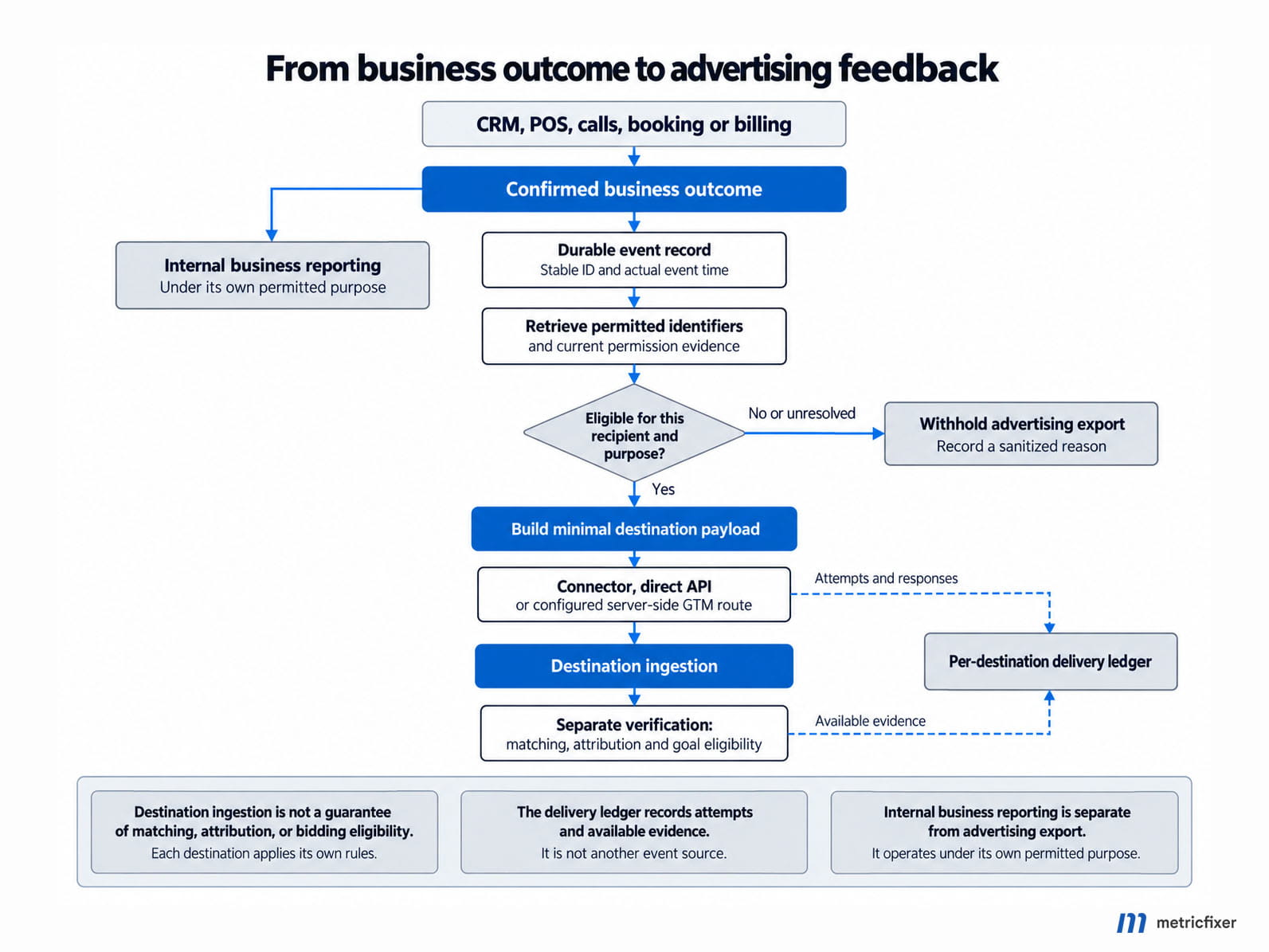
A durable event record is simply a record that survives a temporary integration failure. One implementation is an outbox: a database list of events waiting to be sent. Another is a managed queue backed by a database. A small business may get the same essential guarantees from a well-designed connector. The requirement is recoverability, not a particular technology.
Keep a delivery ledger per destination. Record the internal event ID, destination account, conversion action or event type, attempt time, status, sanitized error and provider request reference when available. A retry should reuse the same business event identity. It should not invent a new sale.
For a multi-client or multi-brand service, bind the destination to trusted server configuration. A website visitor or incoming webhook must not be able to choose an arbitrary advertising account, dataset or analytics property.
The main integration methods and when to use them
These approaches can be combined. A CRM webhook can feed a queue, a warehouse can enrich the event, and a server container can deliver selected destinations. Choose the smallest arrangement that meets the actual reliability and privacy requirements.
| Method | Good fit | Questions before adoption |
|---|---|---|
| Native CRM or platform connector | A supported CRM, standard lifecycle stages and limited custom logic | Does it preserve identifiers, distinguish stages, respect per-record permissions, expose failures and prevent duplicates? |
| Scheduled file or database import | Lower-frequency outcomes, legacy systems and controlled batch workflows | How are time zones, changed rows, repeated imports, secure access and missed schedules handled? |
| Direct API integration | Custom applications, several event sources or strict field-level control | Who maintains authentication, schema changes, rate limits, retries, partial failures and destination diagnostics? |
| Webhooks with an integration platform | A source can announce a new outcome immediately, but a full custom service is unnecessary | Does the platform authenticate senders, retain failed events safely, redact execution logs and support corrections? |
| Warehouse or CDP activation | Customer and revenue information must be joined across systems | Does the model preserve original timestamps and event history? Can consent changes and deletions reach every export? |
| Server-side GTM | A team already manages a server container and needs supported routing or transformation alongside web measurement | Which client accepts the backend request? Which tag implements the required destination API? Where are durable storage and retries? |
Evaluate the route, not the product label. A connector advertised as supporting offline conversions may support purchases but not refunds, one identifier but not another, or daily uploads but not the latency your campaigns need. Compare the actual fields and behavior against the destination's current documentation.
Budget for ownership after launch. Someone must investigate missing events, expired credentials, changed CRM fields and new platform requirements. A cheaper integration with no visible failures can become more expensive than a modestly larger system that makes problems traceable.
Where server-side GTM fits, and where it does not
Server-side Google Tag Manager runs tagging logic on a server. A client interprets an incoming request, and tags decide what to send onward. Google's server-container data guide explains this request-claiming model. An arbitrary CRM webhook does not become a valid measurement event merely because it reaches the container URL.
Three different patterns
Browser relay: the browser sends a website event to the server container, which forwards it. This can be useful, but it does not discover a payment recorded tomorrow in the accounting system. The source is still the browser.
Backend event route: a business system sends a verified outcome to an adapter or supported server-container client. The integration supplies identifiers and permissions from stored records. Destination tags then make the required API calls. Authentication and a recoverable delivery record belong in this design even when a tag template hides the API details.
Hybrid route: website events use the server container, while delayed Google Ads outcomes go directly through Data Manager API and other destinations use their appropriate connectors. There is no requirement for all destinations to share the same transport.
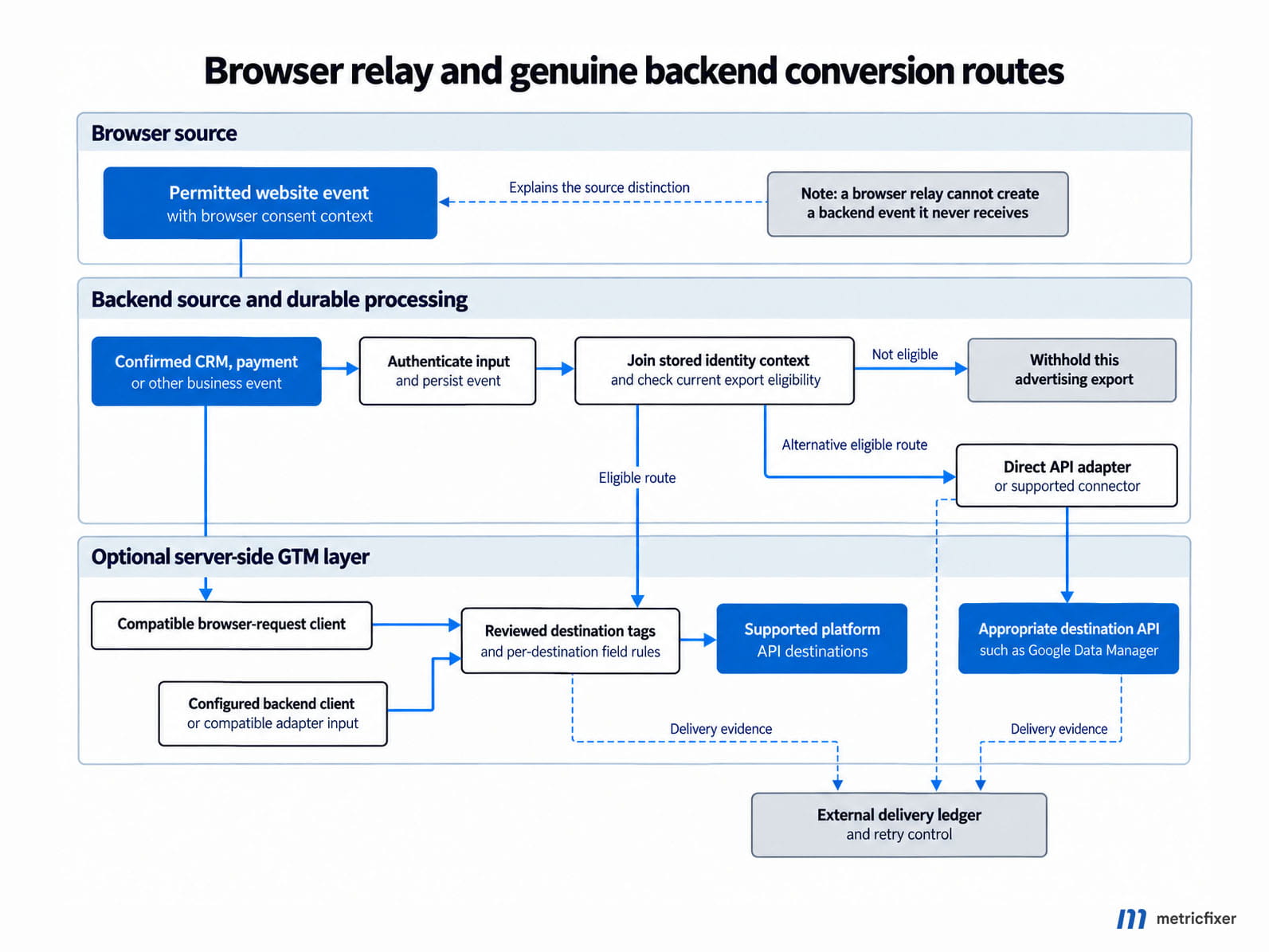
Do not assume a normal Google Ads server-side conversion tag implements the same workflow as an offline import. Check the exact tag, API and conversion-action type. Likewise, using a GA4-shaped request as a container input does not require sending all of its contents to Google Analytics.
A CRM webhook normally carries the CRM server's network context, not the customer's browser context. Do not label the integration server's IP address or user agent as the customer's. Google's server-side API reference describes request-derived addresses; interpreting those addresses correctly remains the implementer's responsibility.
Recommended boundary: keep the authoritative event, permission history and retry state outside transient tag execution. Restrict each tag to the fields it needs, and review community or vendor templates before allowing them to access customer data or secrets.
Which identifiers you need
There is no single universal tracking ID. Different identifiers answer different questions: which advertising interaction, which browser, which customer, which order and which particular event?
| Identifier family | Examples | What it does | Handling rule |
|---|---|---|---|
| Advertising interaction | gclid, gbraid, wbraid, msclkid, ttclid | Provides platform-specific advertising context. | Preserve original values and types. Do not hash, relabel or use them as your customer primary key. |
| Browser and platform tracking | Meta fbc/fbp, LinkedIn li_fat_id, supported TikTok browser identifiers | Helps the destination connect an event to earlier activity. | Capture through the supported integration when permitted. Do not manufacture missing values. |
| Analytics identity | GA4 client_id, app app_instance_id, optional user_id, contextual session_id | Connects measurement to the appropriate browser, app installation, account or session. | Use the actual identifier from the relevant stream. An email address is not a substitute for client_id. |
| First-party matching data | Permitted email address, phone number or another supported customer identifier | Enables matching through a supported customer-data feature. | Normalize and hash only as that destination requires. Collection permission and field eligibility still apply. |
| Business identity | Lead ID, opportunity ID, customer ID, order ID, invoice ID | Connects your own records. | Keep the relationships explicit. Do not assume an advertising platform understands an internal ID without a supported matching route. |
| Event identity | Internal event ID; destination event_id, eventId or transaction reference | Distinguishes a genuine new event from another copy or retry. | Keep it stable for the same event. Apply each destination's deduplication rules. |
| Destination and credentials | Conversion action, dataset/pixel, property, stream, access token | Selects and authenticates the recipient. | These are configuration, not customer matching data. Store secrets on the server. |
Google documents separate click and braid fields in the Data Manager event schema. Meta's official customer-data SDK model distinguishes fbc, fbp, customer identifiers and browser context. The platform comparison below links the corresponding Microsoft, LinkedIn and TikTok specifications.
For implementation detail, read our guides to GCLID, GBRAID and WBRAID in CRM and GA4 workflows and Meta identifiers, CRM and Conversions API. Neither an advertising ID nor a browser cookie should replace your own lead and order records.
How to preserve the connection from first visit to later sale
Capture permitted context while it exists
At the initial interaction, preserve the available, permitted attribution context before redirects and navigation remove it. Depending on the implementation, this may happen in an approved first-party request handler, in the browser, or through a native lead-form integration. Server-side availability is not permission to retain every query parameter.
When a form is submitted, associate its lead ID with the relevant acquisition record. Hidden form fields can help transport context, but they are user-controlled input. Validate their format and do not trust them to authorize exports or select destination accounts.
For calls, keep the call provider's link between the call and the web or advertising interaction. For native lead forms or messaging, retain the supported lead and referral identifiers from that platform. These journeys do not always contain a website visit, so a missing website cookie may be entirely normal.
Store relationships rather than one permanently overwritten field
A customer can return through several campaigns before purchasing. Instead of overwriting one global click-ID field on the customer every time, retain a bounded history of acquisition touches and link the relevant lead, opportunity or order to that history. Document how the integration selects the context allowed by each destination.
Keep capture time, source, identifier type and permission reference alongside the value. A later purchase should retrieve its context through a recorded relationship, not a guess based on a matching name. Shared phone numbers, shared mailboxes, account switching and merged CRM contacts need explicit handling.
Across domains or hosted checkout pages, prefer a controlled business reference or signed linking token over placing customer details in URLs. A signed token still needs limited scope and lifetime; signing does not make its readable contents confidential.
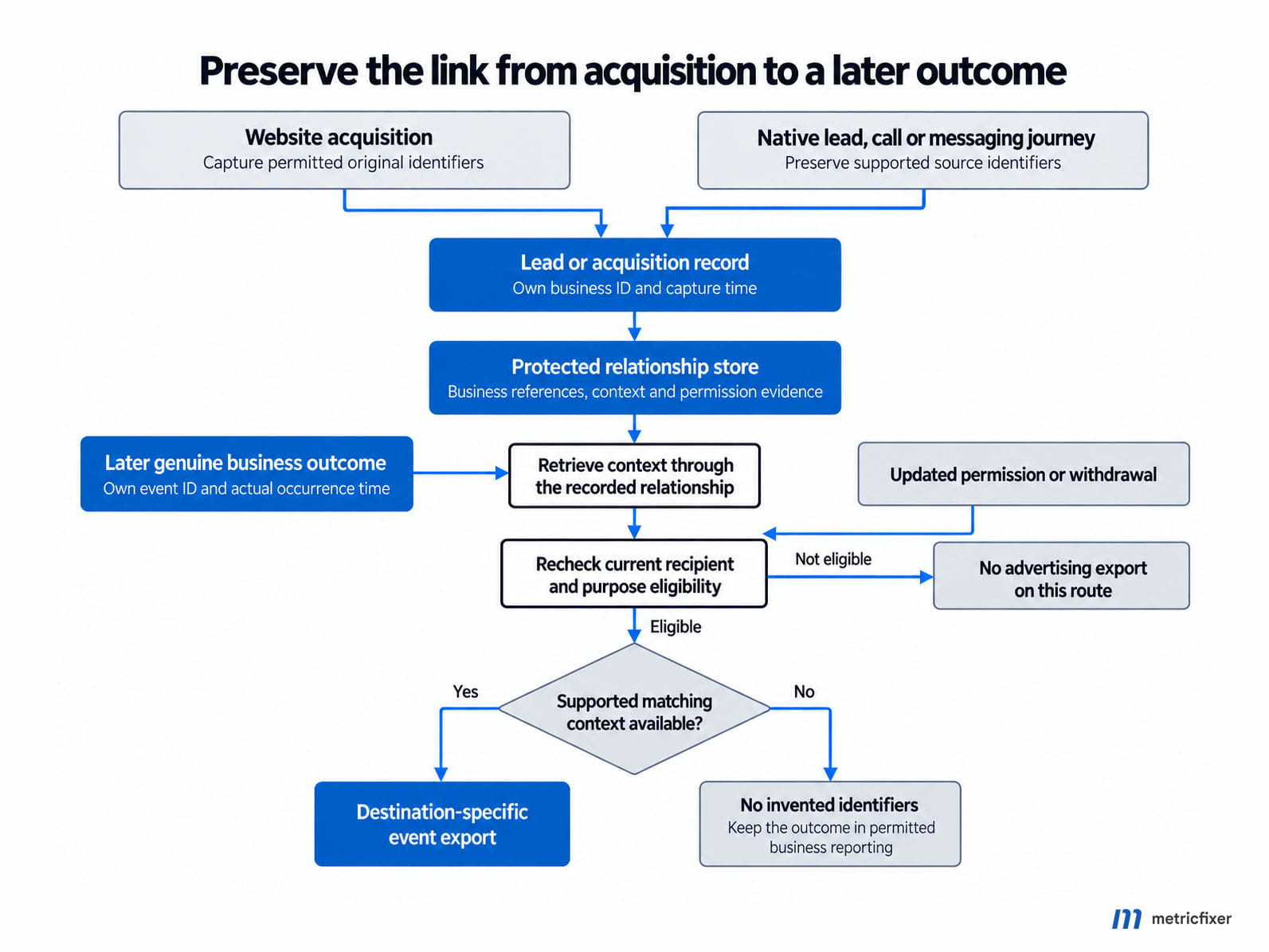
What happens when there is no click ID?
Some destinations support matching through permitted first-party customer data instead. That is a separate supported path, not a reason to invent a click ID. Enhanced conversions for leads, for example, can use customer data alongside the relevant Google measurement setup. Google still recommends providing captured GCLIDs when available.
Some records will remain unattributable. Keep those sales in business reporting. Do not silently remove them from revenue totals merely because an advertising platform cannot claim them, and do not manufacture identifiers to make a dashboard look complete.
A small internal event contract keeps the integration understandable
An internal contract is the agreed structure of a business event before any vendor-specific conversion. The following is an illustrative design, not a payload to paste into Google, Meta or another API. Its references point to protected internal records rather than exposing customer details.
{
  "schema_version": "1.0",
  "event_id": "evt_payment_7842_captured",
  "event_name": "payment_captured",
  "occurred_at": "2026-09-18T14:35:00Z",
  "recorded_at": "2026-09-18T14:35:04Z",
  "source_system": "billing",
  "source_record_id": "payment_7842",
  "order_id": "order_3156",
  "lead_id": "lead_2081",
  "value": 2400.00,
  "currency": "EUR",
  "value_basis": "collected_excluding_tax",
  "identity_ref": "identity_record_902",
  "permission_ref": "permission_record_441",
  "origin_channel": "website"
}
The adapter translates this contract into the destination's event names, timestamp units, identity fields and value rules. It also checks the latest applicable permission and policy state; permission_ref is evidence to inspect, not an unconditional send instruction.
Timestamp formats are a concrete example of why adapters matter: Meta event_time uses Unix seconds; LinkedIn conversionHappenedAt uses milliseconds; GA4 timestamp_micros uses microseconds; Data Manager eventTimestamp uses an RFC 3339 timestamp. Use the platform schemas linked below, not a universal timestamp conversion copied across destinations. In the internal example, origin_channel describes where the action happened, not the advertising channel that originally acquired the customer.
Keep a destination mapping register containing the owning account, event or conversion-action ID, permitted fields, matching requirements, correction route and responsible maintainer. Version the mapping. A source change from dollars to cents must not silently multiply reported revenue by one hundred.
Consent Mode and permission: what a server cannot bypass
Consent Mode communicates choices to supported Google tags; it does not obtain permission or govern every CRM export. Google's Consent Mode documentation separates storage controls from advertising-data and personalization controls. Treat the following signals as different questions, not interchangeable yes/no flags; Google's website implementation guide shows how they are set and updated.
| Google signal | Main concern | Integration consequence |
|---|---|---|
analytics_storage | Analytics-related storage | Do not presume a persistent analytics identifier may be created or read. |
ad_storage | Advertising-related storage | Do not move prohibited cookie storage to your server as a workaround. |
ad_user_data | Sending user data to Google for advertising | A captured email does not automatically qualify for enhanced-conversion sharing. |
ad_personalization | Personalized advertising use | Measurement and personalization must not be treated as the same permission. |
Basic Consent Mode blocks Google tags until the relevant consent is given. Advanced mode can send limited cookieless signals under denied states. Neither behavior is a general license to send a CRM customer's identity to advertising APIs. Modeled measurement also does not give you a recovered person-level link for every unconsented lead.
Google's server-side Consent Mode guide explains how website consent travels with requests in the documented Google-tag flow. A separate CRM webhook sent weeks later does not automatically inherit that browser request. The backend integration needs its own permission lookup and destination mapping.
What to store with the permission record
As an implementation recommendation, preserve the choice, purposes and recipients covered, time, collection source, notice or policy version, and evidence reference. Track changes and withdrawals. Assess both whether the original collection was permitted and whether the proposed processing is permitted now; later consent does not automatically legalize earlier collection.
Do not convert an empty field to granted. Where the project lacks evidence that a personal-data export is allowed, hold that export for resolution or omit it under the documented policy. A permitted operational sale record can remain in the business system even when its advertising export is blocked.
API spellings also differ. Data Manager uses adUserData and adPersonalization with values such as CONSENT_GRANTED in its consent object. GA4 Measurement Protocol uses different field and value conventions. Translate deliberately; do not copy a browser Consent Mode object into every API.
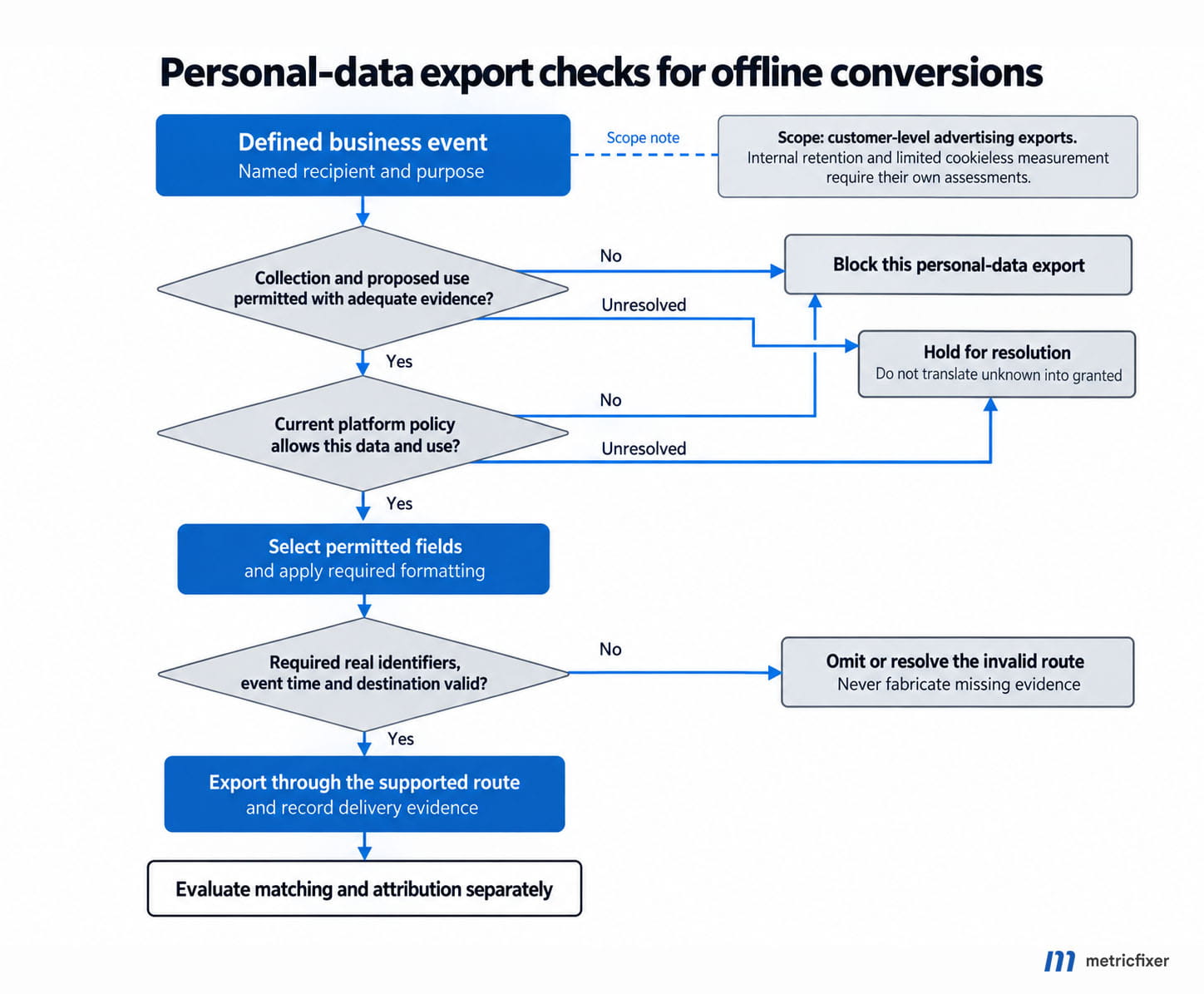
Regional obligations depend on the processing and jurisdiction. Google's EU User Consent Policy has specific requirements for the EEA, UK and Switzerland. Elsewhere, applicable opt-outs, sector rules and contractual restrictions still require review. A data-processing agreement is not a substitute for this assessment; our Google Ads data-processing terms guide explains the role distinction.
Where to store identifiers and how to protect them
The following is a recommended storage model. It separates useful business information from the smaller set needed for advertising matching and avoids distributing the full customer record across every integration.
| Location | Appropriate role | Required design decisions |
|---|---|---|
| Browser storage | Permitted, temporary journey continuity | Consent, cookie scope, lifetime and access. Never store API secrets here. |
| Restricted CRM fields | Lead and opportunity references plus necessary acquisition context | Field-level access and protection against uncontrolled exports, email templates and ordinary sales-user visibility. |
| Protected identity lookup | Links business records to permitted platform identifiers | Encryption, narrow service access, tenant isolation, retention and deletion propagation. |
| Warehouse | Reconciliation and controlled joins | Separate restricted identity tables from reporting views. Avoid copying raw identifiers into every analytics model. |
| Queue and delivery ledger | Recoverable sending and operational evidence | Minimal payload, bounded retention, retry rules, permission rechecks and sanitized provider responses. |
| Logs, support tools and AI workflows | Diagnosis and approved operational assistance | Redact personal data, hashes, credentials and sensitive URLs. Give tools access to the minimum required record, not unrestricted CRM exports. |
Hashing is not encryption, consent or anonymization
Hashing creates a deterministic representation that a platform can compare with its own data. Encryption protects readable data using a key. Neither operation establishes a lawful purpose. The ICO's pseudonymisation guidance explains why replacing identifiers does not automatically make linkable information anonymous.
For advertising matching, follow the destination's exact normalization and hashing specification. Adding your own salt or substituting an internal HMAC can prevent the platform from matching the value. Conversely, a matching-compatible hash should not be treated as harmless public data. Protect it, restrict access and give it a retention rule.
Decide which layer hashes each field. Some SDKs or connectors normalize and hash selected fields; others require pre-hashed input. Double hashing and inconsistent phone formatting can destroy matching while leaving the request technically valid. Never apply an email-hashing rule to a click ID or browser identifier.
Retention, secrets and AI access
There is no universally correct retention period for all identifiers. Set a purpose-based schedule that considers the actual sales cycle, supported matching and upload windows, legal obligations and deletion requirements. Accounting retention is a separate purpose from retaining an advertising lookup. Keeping an invoice does not automatically justify keeping every acquisition identifier for the same period.
Use encrypted transport and storage, a secrets manager, least-privilege service accounts and audited access. Authenticate webhooks, check replay protection where supported, and separate production from development destinations. Consider connector execution histories, exports, backups and support attachments when designing deletion and redaction.
For internal AI assistants: enforce access and field filtering in the surrounding tools, not just in a prompt. An assistant must not infer consent from sales notes, invent an absent identifier, change a historical timestamp to pass an import window, or authorize a restricted export. Use reviewed mappings and deterministic policy checks for those decisions. Prefer redacted examples and sanitized errors in training and support workflows.
Healthcare, finance and other sensitive contexts need a stricter boundary
Being able to send an event is not proof that the recipient permits it. Google's customer-data policies restrict certain sensitive conversion data for enhanced conversions and store-sales uploads, including health-related information and negative financial status. Not every financial-service interaction has the same legal classification, but that is a reason for a precise assessment, not a blanket exemption.
Review the complete disclosure: event name, page URL, product or service category, value, identifier and destination. Replacing a diagnosis-specific event name with Lead does not necessarily remove the health information revealed by the surrounding context. Hashing a patient's email does not solve that problem either.
In the United States, HIPAA obligations depend on the entity, data and use. Google's HIPAA guidance for Google Analytics states that Analytics must not receive protected health information and that Google does not offer a Business Associate Agreement for that service.
The HHS tracking-technology guidance also distinguishes ordinary website consent from HIPAA authorization. Its page notes the June 2024 court decision vacating a specific interpretation involving IP addresses and visits to unauthenticated public health-related pages. Do not generalize that every public-page visit is automatically protected health information, or that the ruling makes patient-level advertising exports permissible.
Recommended approach: classify fields and events before building the connector; obtain the necessary legal and platform-policy review; allow only approved event-purpose-destination combinations; and keep restricted outcomes in an appropriate internal reporting environment. Where an export is prohibited, the correct solution may be not to export it. A first-party domain, server container or generic event label is not an exception.
What the main platforms support
The routes below reflect the official material reviewed on 21 September 2026. A supported ingestion route does not guarantee access to every optimization, audience or store-sales feature. Check account eligibility, permissions, event type and API version before implementation.
| Destination | Relevant route and identifiers | Important boundary |
|---|---|---|
| Google Ads | Data Manager API, supported connectors or imports; captured Google advertising identifiers and permitted first-party data for enhanced conversions for leads. | A delayed CRM stage is not simply an enhancement of the original website conversion. Configure the appropriate conversion action and ownership. |
| GA4 | Measurement Protocol supplements web tags or app SDKs using the relevant client_id or app_instance_id. Data Manager also documents GA4 event routes. | Recording an event, connecting it to an old session and exporting it to an advertising product have different requirements. |
| Meta | Conversions API for supported web, app and offline events, as illustrated in Meta's official Business SDK; appropriate customer data, event identity and genuine source context. | Choose the real action_source. CRM delivery does not make every event system_generated, and browser identifiers must not be fabricated. |
| Microsoft Advertising | Offline conversion imports use the exact goal name, conversion time and supported matching data, such as MicrosoftClickId or enhanced-conversion hashed identifiers. | The current schema permits hashed email or phone matching without MicrosoftClickId; check enhanced-conversion setup rather than assuming every import requires msclkid. |
| Conversions API with a conversion rule, event timestamp and supported user-matching information. | Campaign association, permissions and versioned identifier support matter. A valid event is not automatically associated with every campaign. | |
| TikTok | Events API covers supported web, app, offline and CRM sources; partner and manual routes exist for relevant offline workflows. | Use the matching rules for the chosen source. A website pixel alone cannot observe an in-store sale or later CRM qualification. |
Google Ads: start new API work with the current route
Google's May 2026 announcement made Data Manager API the primary API for offline conversion imports. From 15 June 2026, new adopters and integrations without qualifying prior usage could lose access to the legacy Google Ads API click-upload method. Existing qualifying integrations could continue while migrating. This is not a claim that every old integration stopped working on that date.
For a new build, evaluate Data Manager API first. Its destination configuration distinguishes offline and enhanced-conversions-for-leads actions of type UPLOAD_CLICKS from website and store-sales actions. The receiving Google Ads account must own the conversion action.
Do not confuse Data Manager's event ingestion with a promise that every associated feature is generally available. Its events overview separately identifies use cases such as store sales and multi-source measurement, including access restrictions. Select the route that matches the actual business event.
Social platforms: event identity and source still matter
Meta's event model uses event_name with event_id to identify matching browser and server copies. A later qualified lead or paid order is a different business event, not another copy of the original form submission. Its server-tag implementation also distinguishes sources such as website, phone call and physical store. Choose where the action happened, not merely which system exported it.
LinkedIn's conversion schema includes supported hashed-email and first-party tracking-UUID paths; the latter can come from li_fat_id in the applicable setup. TikTok's Events API matching guide distinguishes click context, customer matching and browser information. Do not apply one platform's cookie format or hashing rule to another.
GA4 is not a general-purpose CRM upload destination
Do not place raw emails, phone numbers, notes or sensitive details in ordinary GA4 event parameters, URLs or user_id. Google's PII guidance identifies several ways these details can leak through normal analytics fields.
That is different from claiming GA4 has no supported user-provided-data feature. Google documents a dedicated Measurement Protocol user-data route with specific normalization and hashing rules. Use that feature only under its applicable configuration, terms and permissions; it is not permission to attach arbitrary customer information to an event.
Time limits: four different clocks, not one retention rule
Always separate the time of the business outcome, the age of the advertising interaction, the deadline for uploading an event and your own storage period. They answer different questions.
| Constraint | Documented example | Practical meaning |
|---|---|---|
| Click-to-upload eligibility | Google's offline import guidance specifies 90 days after the associated last click for standard offline imports and 63 days for enhanced conversions for leads. | A long sales cycle can exceed the supported matching/import opportunity even when your CRM still holds the identifier. |
| Event backdating | GA4 Measurement Protocol documents a 72-hour backdating limit in its reference. | A sale that happened today is a current event, even when the inquiry happened twenty days ago. |
| GA4 session attribution | The use-case requirements require the real session_id, delivery within 24 hours of session start, and an event timestamp within that session. | Do not attach a genuinely later sale to the original session by changing its timestamp. |
| GA4 export to linked advertising products | The same guide documents a separate 63-day limit after the latest online event, the key-event attribution window and a timestamp within the last 72 hours. | Missing the old session's 24-hour condition does not mean that every later event is excluded from advertising export. |
These are not interchangeable platform-wide rules. Connector lookbacks, event-source requirements and other destinations may differ. Document the clock for each route and flag records that are approaching its deadline. Never reset occurred_at to make an old event appear eligible.
Design for the failures that occur after launch
Most avoidable failures are ordinary data-management problems rather than mysterious attribution behavior. The following controls are part of the proposed architecture, not assurances that a platform will accept or attribute every event.
| Failure | Recommended control |
|---|---|
| A webhook is delivered twice or a batch is reprocessed | Stable event identity and a per-destination ledger; do not create a new identifier for each attempt. |
| The API times out after possibly accepting the request | Follow that endpoint's documented retry and duplicate behavior. A timeout alone does not prove the event was rejected. |
| Only part of a batch fails | Track records individually and retry only eligible failures. Separate temporary errors from invalid data. |
| A customer withdraws permission while an event waits in a queue | Recheck permission before export and propagate suppression or deletion instructions to relevant systems. |
| A deal is reopened or a payment refunded | Apply a defined business transition and the destination's supported correction mechanism, not an improvised replacement purchase. |
| The same purchase travels through a plugin, API and GA4 import | Map every route and conversion action. Do not assume deduplication spans unrelated pipelines or separate conversion actions. |
| A CRM field or SDK changes | Version the mapping, validate types and units, and alert on missing identifiers, rejected records or abnormal value totals. |
| Credentials or routing cross a client boundary | Separate accounts, restricted service access and server-controlled destination selection. |
Keep an operational reconciliation: confirmed business events, eligible events, attempted exports, accepted records and available platform reporting. These totals need not be equal, but differences should have understandable categories. A privacy-blocked export is not the same failure as a broken webhook.
What this architecture makes possible: verification and better bidding inputs
Test delivery and attribution as separate questions
A synthetic event can be useful for checking schema validation, authentication and retry logic. A fabricated click ID or arbitrary email cannot demonstrate that a platform connects a real customer outcome to a real advertising interaction. For that question, evidence must come from permitted genuine journeys; a production identity should not be exposed merely to make a test convenient.
In a recent adapter project reported by the metricfixer team, test events could not initially be confirmed through Meta Graph API Explorer, but later appeared in pixel statistics. That observation does not establish the cause or prove attribution. Graph API Explorer is an API-request tool, not a substitute for every event-reporting surface. Meta's official request model directs test_event_code verification to Test Events in Events Manager.
Without the original requests, responses, destination configuration and timestamps, it would be speculation to blame a delay, a filter or a missing test code. The operational lesson is to preserve evidence and distinguish the API response, test-event visibility, processed event totals and advertising attribution.
Send the outcome the business wants advertising to learn from
Qualified-lead and paid-sale signals can make conversion goals more meaningful than counting every inquiry equally. Value-based bidding also needs an agreed value: actual revenue and an estimated lead value should not be mixed without a documented model.
In Google Ads, the standard-goal arrangement generally requires an action to be primary and its goal to be used by the campaign for bidding. There is an important exception: actions in a custom goal can be used for bidding even when marked secondary. See Google's conversion-goal documentation.
Do not make every funnel stage a primary success by default. A campaign optimizing for a form submission, qualification and payment may receive several positive signals from the same customer journey. Choose the intended objective, then assess signal frequency, delay, value quality and feature eligibility. Better input is an opportunity to improve decisions, not a guaranteed reduction in acquisition cost.
Part 2 explains testing, attribution checks and Smart Bidding implementation, including why accepted events, matched events and campaign conversions must be evaluated separately.
What to approve before implementation
- Business definition: the event, authoritative system, timestamp, value and correction rules are documented and owned.
- Identifier path: the team knows where permitted identifiers originate, how they reach the business record and what happens when they are absent.
- Permission and policy: each event-purpose-destination combination has an approved rule, including unknown states, withdrawals and sensitive-data restrictions.
- Delivery design: the route, credentials, durable state, duplicate controls, error handling and destination ownership are explicit.
- Data protection: access, encryption, retention, redaction, deletion and AI-tool boundaries cover every copy of the data.
- Acceptance criteria: business reconciliation, delivery evidence and attribution checks are separate; the advertising team has approved which eligible goals may affect bidding.
A useful implementation specification can therefore be quite concrete: these source events, these identifiers, these permitted fields, these recipients, these time limits and these owners. That is the foundation to agree with an internal team or a provider such as metricfixer before comparing connector prices or deciding whether server-side GTM is necessary.
Methodology and sources
This is an architecture and implementation review based on official documentation checked on 21 September 2026. The linked sources cover Google Ads and Data Manager API, GA4 Measurement Protocol, Google Tag Manager, Microsoft's offline conversion schema, LinkedIn Conversions API, TikTok Events API, and applicable Google policy, ICO and HHS guidance. Meta field behavior is additionally supported by its official Business SDK and server-tag source code; direct access to some Meta developer and legal pages was restricted during the review.
Platform requirements are attributed to their documentation. The event contract, storage layout, failure controls and implementation checklist are metricfixer's design recommendations, not vendor-mandated standards. The furniture-supplier example is illustrative. The adapter observation was supplied by the metricfixer team and was not independently reproduced or diagnosed. No new experiments were performed, and no claim is made about a universal match rate, conversion uplift or bidding improvement.
Account eligibility, regional obligations, API versions and connector capabilities must be checked for the actual implementation. Source links are placed beside the relevant discussion rather than repeated as a technical bibliography.
This article is for technical and operational information and is not legal, medical or financial advice. A working integration does not establish lawful processing, platform-policy eligibility, attribution or improved advertising performance. Obtain appropriate privacy, security and legal review for the data and jurisdictions involved, especially in regulated industries. metricfixer is not affiliated with the third-party platforms or regulators discussed here. Product behavior, APIs, policies and eligibility requirements may change after publication.