
Published Jul 23, 2026
Google Ads Click Identifiers: GCLID, GBRAID, WBRAID, CRM Tracking, and GA4 Measurement Protocol
A practical guide to Google Ads click identifiers: when Google uses GCLID, GBRAID, or WBRAID, how to preserve them in a CRM, upload delayed conversions, and handle GA4 Measurement Protocol correctly.
Category: Analytics & Conversion Tracking · By Mikalai Sasau
Google Ads can append gclid, gbraid, or wbraid to an ad destination. They are related, but they are not interchangeable. This guide explains when Google uses each identifier, how to preserve the signal through a website and CRM, how to return a qualified lead or sale to Google Ads, and why sending the same value to GA4 through Measurement Protocol usually does not restore advertising attribution.
Practical default: capture every Google advertising parameter that is present, without changing its case or value; store it with the lead, the original GA4 client_id, any implemented user_id, consent state, landing-page context, and a stable CRM transaction ID. Send delayed business outcomes directly to a Google Ads offline conversion action—preferably through the Data Manager API and enhanced conversions for leads. Send a separate GA4 server event for analytics, but do not treat a custom gclid, gbraid, or wbraid event parameter as an official GA4 attribution field.
Executive summary
gclid is the standard Google Click Identifier. Google Ads adds it through auto-tagging when click-level measurement is available. It carries enough information for Google to connect the click with the campaign and other click attributes, and it is the traditional identifier used for website conversion tracking, Google Ads–GA4 linking, and offline conversion import.
gbraid and wbraid are privacy-oriented identifiers created for affected iOS 14+ measurement paths. The simplest practical mapping is:
- web to iOS app: usually
gbraid; - iOS app to website: usually
wbraid; - ordinary eligible click-level web measurement: usually
gclid.
This is a routing model, not a rule that advertisers should implement themselves. Google chooses the parameter based on the ad interaction, destination, device environment, consent and measurement eligibility. In some cases, Google explicitly says that a conversion can have both gclid and gbraid; when both are available, both should be sent.
For CRM and offline conversion workflows, store the identifiers as attribution signals, not as customer identities. In particular, Google describes gbraid as non-unique and campaign-like rather than a value that identifies an individual user or event. A CRM must therefore use its own lead ID, opportunity ID, order ID, or transaction ID as the primary key. The Google identifier is an attribute of the acquisition touch.
For Google Ads, the current integration path has changed. As of 15 June 2026, Google directs current and future offline conversion and enhanced-conversion-for-leads uploads to the Data Manager API; new or inactive Google Ads API integrations may be blocked from legacy click-upload access. The destination conversion action should be an import-from-clicks action with type UPLOAD_CLICKS.
For GA4 Measurement Protocol, there is no documented structured request field named gclid, gbraid, or wbraid. The protocol accepts custom event parameters, so those names can be transmitted as ordinary parameters if they fit the collection limits. However, Google does not document those custom parameters as a way to set or repair traffic-source attribution. Google instead says that advertising identifiers collected during the original online interaction are joined to Measurement Protocol events through the original client_id or app_instance_id.
The timing rules make GA4 a poor substitute for long-cycle offline import. Measurement Protocol events can be backdated by no more than 72 hours, and Google warns that an event intended to join with an online client event should arrive within 48 hours of that client event. A deal closed several weeks later can still be recorded in GA4 at the actual close time, but Google does not promise that it will inherit the original paid-click attribution. The Google Ads offline conversion path is designed for that job.
Which identifier does Google Ads use?
| Identifier | Typical path | Measurement character | Recommended CRM treatment | Google Ads upload field |
|---|---|---|---|---|
gclid |
Eligible Google Ads click, especially website-bound traffic where click-level measurement is available. | Click-level identifier used for campaign attribution and conversion matching. | Store exactly as received. It is case-sensitive. Associate it with the lead touch, not with the customer as a permanent identity. | adIdentifiers.gclid |
gbraid |
Clicks associated with iOS 14+ app events; the clearest documented example is an ad click on the web that leads to an iOS app. | Privacy-preserving and explicitly non-unique; it does not link to an individual user or event in the same way as a click-level identifier. | Store exactly as received, but never use it as the CRM primary key or as a deduplication key. | adIdentifiers.gbraid |
wbraid |
Clicks associated with iOS 14+ web events; the clearest documented example is an ad click in an iOS app that leads to a webpage. | Privacy-oriented web attribution signal used when ordinary click-level measurement is affected. | Store as an attribution signal. Do not assume it is a stable, person-level or globally unique identifier. | adIdentifiers.wbraid |
gad_source, gad_campaignid and session attributes |
Additional Google Ads URL and session signals that may be available when individual click IDs or user-provided data are unavailable. | Source- or campaign-level context used for attribution and modeling. | Capture alongside the three primary identifiers and the full landing context. Do not replace a present click ID with these values. | adIdentifiers.sessionAttributes or documented session-attribute fields |
GCLID: the standard click identifier
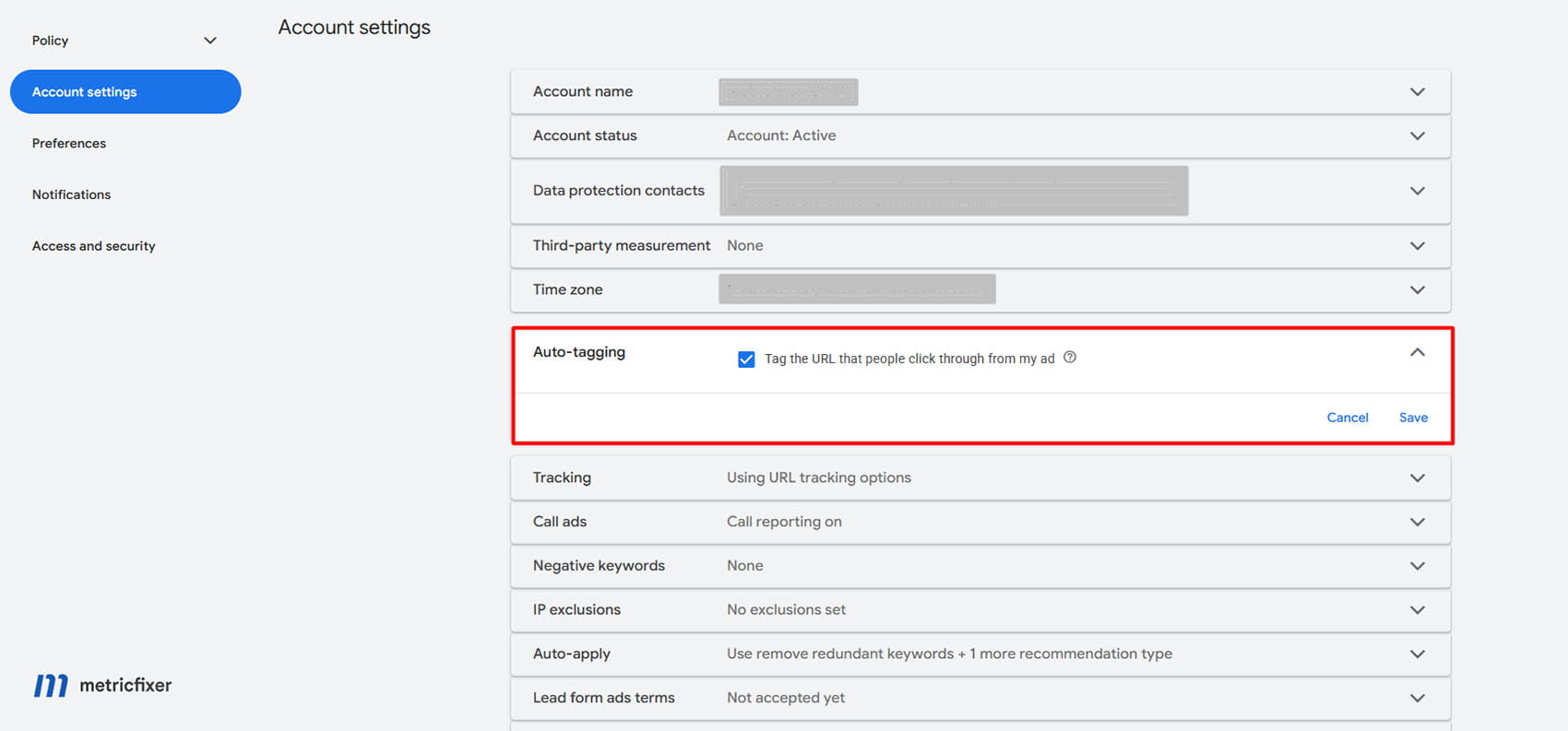
gclid stands for Google Click Identifier. Google describes it as a URL parameter passed with ad clicks that identifies the campaign and other attributes of the click for ad tracking and campaign attribution. It is enabled by Google Ads auto-tagging and is required for standard Google Ads website conversion tracking.
A landing URL may look conceptually like this:
https://www.example.com/landing-page?gclid=CLICK_IDENTIFIER_VALUEThe value is opaque. Do not try to parse campaign, keyword, ad group or user information from the string. Google performs the matching. The advertiser’s responsibility is to preserve the value and send it back in a supported conversion workflow.
Important implementation properties:
gclidis case-sensitive. Lowercasing an entire URL, normalizing query values, or applying a case-changing redirect can break the match. This is one reason the practice discussed in Why Lowercasing URLs Without Redirects Hurts SEO and Breaks Tracking is particularly dangerous for paid traffic.- It can be lost before the lead form if redirects, cross-domain navigation, client-side routing, payment providers, URL-cleaning scripts or a canonicalization rule remove query parameters.
- It should be captured on the first landing request whenever possible, then associated with the lead or account record.
- It should not be hashed before upload. Hashing requirements apply to user-provided data such as email addresses and phone numbers, not to Google click identifiers.
GBRAID: app-oriented iOS attribution
gbraid is used for clicks associated with app events originating from iOS 14+ devices. Google’s Google Ads API documentation gives a clear directional example: the parameter can be present when a user clicks an ad on the web and is directed to an iOS app. Google Analytics documentation summarizes this as a web-to-app measurement path.
Google’s glossary adds an important limitation: gbraid measures conversions in a non-unique way, similar to a campaign ID, without linking them to individual users or events. This changes how it should be handled:
- do not count distinct
gbraidvalues as distinct clicks, users or leads; - do not use
gbraidas a CRM deduplication key; - do not merge customer records because the same value appears more than once;
- use a CRM-generated transaction ID to make each uploaded conversion idempotent.
gbraid is case-sensitive and should not be converted to upper or lower case. In some eligible flows Google can associate both gclid and gbraid with one conversion. Capture both independently and send both when they are both available.
WBRAID: web-oriented iOS attribution
wbraid is used for clicks associated with web events originating from iOS 14+ devices. Google’s documented example is an ad clicked inside an iOS app that sends the user to a webpage. Google Analytics documentation summarizes this as an app-to-web path.
Google introduced wbraid to support website conversion measurement and modeling when affected iOS traffic can no longer use the ordinary gclid path. The Google tag, Google Tag Manager and Google Analytics can preserve relevant information in a first-party context, but an advertiser that wants to connect a later CRM outcome must still capture the URL signal and keep it with the lead. For the wider relationship between Google tag IDs and product destinations, see Google Tag Manager and the New Prefix Logic.
Do not treat wbraid as a replacement customer ID. It is an advertising attribution signal. A notable operational limitation is that Google Ads API conversion-adjustment documentation supports adjustments for gclid and gbraid, but not for wbraid. This matters if the business frequently retracts, refunds or restates imported conversion values.
Can more than one identifier appear?
Yes. Google specifically recommends setting both gclid and gbraid on a conversion message when both are associated with the conversion. Therefore, the capture logic should not use a mutually exclusive chain such as “if GCLID exists, ignore GBRAID.”
A safer rule is:
- capture
gclidif present; - capture
gbraidif present; - capture
wbraidif present; - capture relevant
gad_*and session attributes if present; - send all valid signals supported by the chosen destination.
The advertiser should not try to recreate Google’s decision tree from the operating system or user agent. The URL and supported first-party tag/session data are the source of truth.
How to capture the identifiers and preserve them in a CRM
Recommended workflow: Google ad interaction → landing URL carries one or more Google identifiers → the first-party website captures every present value and the landing context → the lead form or authenticated account passes the data to the backend → the CRM stores one or more acquisition touches → the business records a qualified lead, sale, subscription, call outcome or offline purchase → the backend sends the outcome to a Google Ads import conversion action → GA4 receives a separate server event for analytics where appropriate.
Capture on the earliest first-party page
The best capture point is the first server request that receives the ad landing URL. Server-side capture is more reliable than waiting for a form submission because parameters can disappear during navigation. When server-side capture is not immediately possible, client-side JavaScript can populate hidden form fields, but it should be treated as a fallback rather than the only source.
At minimum, test these paths:
- HTTP-to-HTTPS and host redirects;
- lowercase or trailing-slash redirects;
- international or language redirects;
- single-page application route changes;
- cross-domain forms and booking engines;
- payment-provider and authentication handoffs;
- consent-banner reloads;
- server and CDN cache keys;
- URL-cleaning or “remove tracking parameters” scripts.
Google also advises testing whether the site accepts arbitrary URL parameters. A site that returns an error page, redirects to a parameter-free URL before capture, or routes every unknown query parameter to a generic page can lose both Google click IDs and newer gad_* signals.
Minimal hidden-field example
The following fields make the identifiers available to a normal first-party form submission. The fields should be protected by the same access controls and retention rules as the lead record.
<input type="hidden" name="gclid" id="gclid">
<input type="hidden" name="gbraid" id="gbraid">
<input type="hidden" name="wbraid" id="wbraid">
<input type="hidden" name="gad_source" id="gad_source">
<input type="hidden" name="gad_campaignid" id="gad_campaignid">
The following JavaScript copies every present value. It intentionally does not use an else if chain, so gclid and gbraid can coexist.
(() => {
  const supportedParameters = [
    'gclid',
    'gbraid',
    'wbraid',
    'gad_source',
    'gad_campaignid'
  ];

  const url = new URL(window.location.href);

  for (const parameterName of supportedParameters) {
    const value = url.searchParams.get(parameterName);
    if (!value) continue;

    document
      .querySelectorAll(`[name="${parameterName}"]`)
      .forEach((field) => {
        field.value = value;
      });
  }
})();
This snippet is only the extraction layer. A production implementation still needs consent-aware execution, backend validation, CSRF protection, secure transport, access control, retention rules and a strategy for multi-page journeys. Do not expose an API secret or a Google Ads credential in browser JavaScript.
Recommended CRM and warehouse fields
| Field | Why it matters | Implementation note |
|---|---|---|
lead_id / opportunity_id / order_id |
Primary business identity and deduplication key. | Generate internally. Do not use a braid value as the primary key. |
gclid, gbraid, wbraid |
Google Ads acquisition and conversion-matching signals. | Store in separate nullable text columns or in a child touch table. Preserve exact case and value. |
ga_client_id |
Connects a server event with the original GA4 web client where possible. | Read from the implemented GA4 client context. It is not interchangeable with a Google Ads click ID. |
ga_app_instance_id |
Equivalent join key for a GA4 app instance. | Use for app streams rather than forcing a web client_id model. |
user_id |
Can support authenticated cross-device analytics. | Use only an internal, non-PII identifier under a documented User-ID implementation. |
ga_session_id |
Useful for short-delay Measurement Protocol events that truly belong to the original session. | Do not attach a weeks-later sale to the old session merely to force attribution. |
gad_source, gad_campaignid, encoded session_attributes |
Additional source and campaign context when an individual click ID is missing. | Capture the exact values and the documented session start context. |
landing_page_url, landing_page_referrer, user agent, session start time |
Supports session-attribute matching, QA and redirect-loss diagnosis. | Store only what is necessary and lawful; avoid placeholder or partial URLs in uploads. |
utm_source, utm_medium, utm_campaign and other manual tags |
Human-readable internal reporting and non-Google channel attribution. | Keep separate from automatic Google Ads identifiers. UTMs do not replace click IDs. |
captured_at, landing_at, conversion_at, timezone |
Lets the system validate sequence and upload windows. | Store timestamps in UTC and retain the business/account timezone for reporting reconciliation. |
transaction_id |
Provides idempotency, duplicate protection and a durable reference for later operations. | Reuse the same value when retrying the same event; generate a new value for a genuinely separate conversion. |
conversion_action_id, value, currency, upload status and error code |
Creates an auditable conversion pipeline. | Keep raw API request/response metadata in a restricted technical log, not in ordinary user-facing CRM notes. |
| Consent and policy state | Determines whether user-provided data and advertising signals may be collected or sent. | Store the decision and its timestamp; do not infer consent from the presence of an identifier. |
One lead can have several Google Ads touches
A single-column CRM model loses information when a person returns through another campaign. A more durable model uses a parent lead record and a child table of acquisition touches. Each touch can contain the identifiers, landing context, timestamp and source metadata observed at that moment.
Then define the business rule explicitly:
- first paid touch for acquisition-origin reporting;
- latest eligible paid touch for the Google Ads conversion upload;
- all paid touches for warehouse analysis;
- a separate internal attribution model for revenue allocation.
Do not overwrite the first identifier every time a page contains a new parameter, and do not permanently freeze the first identifier if the business wants the latest eligible click for bidding. Keep the raw touch history, then apply a documented selection rule.
How to return delayed CRM conversions to Google Ads
Do not confuse three different workflows
| Workflow | Use it when | Destination type | Matching signals |
|---|---|---|---|
| Offline conversion import | A lead becomes qualified, a sale closes, a call produces revenue, or another important event happens outside the original browser session. | Google Ads conversion action of type UPLOAD_CLICKS. |
gclid, gbraid, wbraid, session attributes, user-provided data and other supported signals. |
| Enhanced conversions for leads | The business can add consented, normalized and hashed first-party data such as email or phone to make offline matching more durable. | Google Ads import conversion action, using Data Manager or another supported connection. | Click IDs plus hashed user-provided data where available. |
| Additional data source for a tag conversion | A server or CRM is supplementing a website conversion already measured, normally with a shared transaction_id. |
Website conversion action of type WEBPAGE. |
Transaction ID and supported ad/user identifiers. Matched transactions do not behave like a new delayed CRM stage. |
For a typical B2B funnel, the form submission can remain a website conversion, while qualified lead, sales accepted lead, proposal and closed won are separate imported conversion actions. This gives Smart Bidding a signal that reflects business quality rather than only form volume.
The current route: Data Manager API
Google’s current documentation states that, starting 15 June 2026, offline conversion import and enhanced-conversion-for-leads uploads are migrated to the Data Manager API and blocked in the Google Ads API for developer tokens that do not retain legacy access. New implementations should therefore start with Data Manager API rather than building on the legacy click upload guide.
For a Google Ads offline conversion destination:
- the destination account must own the conversion action;
productDestinationIdmust be the numeric ID of a conversion action whose type isUPLOAD_CLICKS;- the event needs the actual conversion timestamp, including timezone;
- set a correct
eventSource, such asWEB,PHONE,IN_STOREorOTHER; - provide at least one supported matching route, and preferably every lawful, accurate signal that is available;
- use a stable transaction ID for safe retries and auditability;
- provide value and currency when the conversion action is value-based;
- send consent state according to the documented collection and upload workflow.
Illustrative Data Manager API event
The following payload is intentionally simplified. Account IDs, access structure, consent fields, encryption, user-data hashing and destination configuration must match the actual account. It shows the important distinction: Google click identifiers belong in the structured adIdentifiers object.
{
  "destinations": [
    {
      "operatingAccount": {
        "accountType": "GOOGLE_ADS",
        "accountId": "1234567890"
      },
      "loginAccount": {
        "accountType": "GOOGLE_ADS",
        "accountId": "0987654321"
      },
      "productDestinationId": "1122334455"
    }
  ],
  "events": [
    {
      "transactionId": "deal-2026-0001842",
      "eventTimestamp": "2026-07-22T14:35:12+02:00",
      "eventSource": "WEB",
      "adIdentifiers": {
        "gclid": "GCLID_VALUE_CAPTURED_ON_THE_LANDING_PAGE",
        "gbraid": "GBRAID_VALUE_IF_IT_WAS_PRESENT"
      },
      "conversionValue": 7800.00,
      "currency": "EUR"
    }
  ]
}
When only one parameter is present, send only that field. When both gclid and gbraid are legitimately associated with the event, Google recommends sending both. Never invent a braid from a GCLID, copy one identifier into another field, or hash a click identifier.
Add enhanced conversions for leads where possible
Google describes enhanced conversions for leads as an upgraded offline conversion import. It supplements the conversion with normalized and SHA-256-hashed first-party data, such as an email address or phone number. This can improve durability, reporting accuracy, engaged-view measurement and cross-device matching.
The practical hierarchy is:
- send the Google click or braid identifiers that were captured;
- add consented, properly normalized and hashed first-party user data;
- add session attributes and landing context where supported;
- retain the CRM transaction ID, timestamp, value and currency;
- monitor import diagnostics and fix systemic errors rather than retrying blindly.
User-provided data and click identifiers have different formatting rules. Email, phone and address components may require normalization and SHA-256 hashing. gclid, gbraid and wbraid must be sent in their original form.
Upload windows and long sales cycles
Google states that standard offline conversions uploaded more than 90 days after the associated last click are not imported. For enhanced conversions for leads, the documented limit is 63 days after the associated last click. A second constraint is the connector lookback: some Data Manager sources read 90 days per run, while database and warehouse connectors may read only the last 14 days per run. A 90-day attribution limit does not help if a scheduled connector never queries the older changed row.
For a sales cycle longer than the supported window:
- upload an earlier high-quality stage, such as sales accepted lead or qualified opportunity, while it is still eligible;
- use that stage for bidding only after it has enough volume and a stable relationship with final revenue;
- keep final revenue and margin in the CRM or warehouse even when it cannot be attributed through the original click import;
- consider a value model that assigns expected value to early qualified stages;
- do not backdate a later sale to an earlier date just to fit the window.
Deduplication and retries
Use the CRM’s transaction_id or order ID as the stable event key. The same conversion retry should use the same transaction ID, conversion action and event meaning. A new upgrade, renewal or later purchase should receive a new transaction ID.
This is especially important for braids. Because gbraid is explicitly non-unique, it cannot protect the pipeline from duplicates. A reliable pipeline keeps:
- an outbox table of pending conversion events;
- a deterministic transaction ID;
- request ID and destination status;
- the last error and retry count;
- a dead-letter queue for records requiring human review.
The Data Manager API can validate requests with validateOnly. Use validation in staging and for schema changes, then retrieve processing diagnostics after real ingestion. Do not treat an HTTP success and returned request ID as proof that every conversion has already been attributed.
Common reasons delayed conversions fail
| Failure | What usually happened | Corrective action |
|---|---|---|
| Identifier rejected or unmatched | Case changed, value truncated, wrong field used, query parameter stripped, or the click belongs to another Google Ads conversion customer. | Compare the raw landing value with the stored and uploaded value byte-for-byte; verify the owning account and conversion action. |
| Identifier or iOS URL parameter too old | The upload happened outside the supported click-to-conversion window. | Upload more frequently and choose an earlier meaningful funnel stage. |
| Conversion precedes click | Timezone, parsing or field mapping is wrong. | Store UTC and explicit timezone offsets; send the actual conversion time. |
| Duplicate conversion | A retry generated a new transaction ID or the same event was uploaded through multiple pipelines without a deduplication plan. | Use a stable transaction ID and maintain one authoritative outbox. |
| Wrong conversion action type | A delayed CRM event was sent to a website conversion action, or an import destination is not UPLOAD_CLICKS. |
Separate website tag conversions from imported CRM stages. |
| Low match rate | Click IDs are missing, user data is absent or improperly normalized, or landing/session context was not captured. | Implement enhanced conversions for leads and capture all supported signals. |
| Connector misses old changes | The source connector reads only a short lookback window. | Schedule frequent imports and use an incremental change timestamp or API outbox. |
Should GCLID, GBRAID or WBRAID be sent to GA4 through Measurement Protocol?
Technically, they can be sent as ordinary custom event parameters. Practically, they should not be expected to set GA4 advertising attribution.
There are no documented native click-ID fields in the GA4 Measurement Protocol schema
The documented Measurement Protocol request model provides identifiers such as client_id, app_instance_id and user_id, plus an event list whose params object can contain custom parameters. The reference does not define structured top-level fields named gclid, gbraid or wbraid.
The names are not in Google’s published reserved-parameter list, so a payload such as events[].params.gclid can be syntactically accepted as a custom parameter. That does not turn it into the same thing as the adIdentifiers.gclid field in Data Manager API, and Google does not document it as an attribution override.
Google’s documented join uses the original GA client identifier
Google says that advertising identifiers such as gbraid and wbraid, collected during online interactions, are automatically joined with Measurement Protocol events using the original client_id for web or app_instance_id for app. This is the official architecture:
GA4 join model: browser or app collects the original online event and advertising context → backend stores the GA4 client_id or app_instance_id with the lead → backend sends the later Measurement Protocol event with the same GA identifier → GA4 attempts to join the event to the online history under its timing and processing rules.
For authenticated journeys, a consistently implemented user_id can help cross-device analysis. It does not eliminate the need for the original client/app identifier, consent controls or correct event timing.
The timing limits are decisive
- Measurement Protocol events can be backdated no more than 72 hours.
- Google says an event intended to join and process with an original client event should arrive within 48 hours of that client event; later events may not process as expected, especially for conversion attribution.
- To associate a server event with a specific session and inherit that session’s location and device context, include
session_idand send within 24 hours of the session start.
Consider a lead created on 1 July and marked closed won on 20 July:
- sending the close event on 20 July with a 20 July timestamp is valid as a current GA4 event;
- backdating it to 1 July is outside the 72-hour limit and is not a valid way to force attribution;
- sending the 20 July event with the old
client_idmay support user-level continuity, but Google does not promise that it will be attributed to the 1 July paid session; - the 20 July sale should be uploaded separately to Google Ads through the offline conversion workflow.
Why raw click IDs are weak GA4 custom parameters
Even as diagnostic fields, raw IDs have practical limitations:
- a standard GA4 event supports up to 25 event parameters;
- parameter names are limited to 40 characters;
- text parameter values are limited to 100 characters in standard properties and 500 in GA4 360;
- a click ID is inherently high-cardinality;
- registering it as a custom dimension can increase the chance that reports collapse rows into
(other); - GA4’s interface is not designed as a click-ID lookup database.
Therefore, a more useful GA4 diagnostic payload usually sends a low-cardinality value such as ads_click_id_type with values gclid, gbraid, wbraid or none, while the raw value remains in the CRM or BigQuery-controlled first-party dataset. If raw IDs are sent for a narrowly defined QA purpose, do not register them as custom dimensions merely to expose them in standard reports.
Recommended Measurement Protocol pattern for a CRM outcome
Keep the API secret server-side. A web-stream endpoint has this structure:
https://www.google-analytics.com/mp/collect?measurement_id=G-XXXXXXXXXX&api_secret=YOUR_SERVER_SIDE_SECRETThe event payload should use the original GA4 client identifier, a non-PII User-ID if implemented, the actual event time, a stable transaction ID and business context. The raw Google Ads click ID is not required to make the event valid:
{
  "client_id": "1871825471.1760000000",
  "user_id": "crm-user-48192",
  "timestamp_micros": 1784723712000000,
  "events": [
    {
      "name": "crm_deal_won",
      "params": {
        "transaction_id": "deal-2026-0001842",
        "value": 7800.00,
        "currency": "EUR",
        "crm_stage": "closed_won",
        "ads_click_id_type": "gclid",
        "engagement_time_msec": 1
      }
    }
  ]
}
Do not include an old session_id simply to attach a weeks-later event to the acquisition session. Include session_id only when the event genuinely belongs to that session and falls within Google’s documented timing window.
When a custom click-ID parameter can still help
There are limited diagnostic uses:
- confirming that a CRM export and GA4 event pipeline saw the same type of acquisition signal;
- detecting pages or forms that disproportionately lose all Google identifiers;
- comparing processing coverage by
gclid,gbraid,wbraidand session-attribute route; - temporarily debugging a new integration in BigQuery.
For most of these cases, a boolean or type field is enough. The raw string is better kept in an access-controlled CRM or warehouse table.
Data Manager API is different from Measurement Protocol
The 2026 Data Manager API adds a structured path that must not be confused with ordinary Measurement Protocol:
- for a Google Ads offline destination, use
adIdentifiers.gclid,adIdentifiers.gbraidoradIdentifiers.wbraid; - for a Google Analytics web stream used as an additional data source, Google documents
clientId,adIdentifiers.gclidoruserIdas eligible identifiers; - for an app stream additional source, Google requires
appInstanceIdand allowsgbraidorgclidas extra signals; - the GA4 additional-data-source feature currently requires an allowlisted property, while recommended and custom GA events can also be sent through Data Manager API under its own rules.
This is the official structured place where adIdentifiers.gclid exists for a GA destination. It does not retroactively create a native gclid field in the Measurement Protocol payload.
Other useful analytics and optimization applications
1. Train bidding on business outcomes, not just form submissions
The highest-value use is importing qualified and revenue-bearing stages back to Google Ads. A campaign that produces 100 cheap leads and two sales should not look better than a campaign that produces 40 leads and ten sales. Imported stages can support:
- qualified-lead optimization;
- sales-accepted-lead optimization;
- target CPA based on a deeper funnel stage;
- value-based bidding using expected or actual revenue;
- new-customer and margin-aware measurement when the required fields are implemented.
Choose the deepest stage that has enough volume, arrives inside the matching window and is defined consistently. A perfect final-revenue signal that arrives too late or only a few times per month may be less useful to bidding than a reliable earlier-stage value model.
2. Measure identifier coverage
Create a daily coverage report with counts and rates for:
- leads with
gclid; - leads with
gbraid; - leads with
wbraid; - leads with only
gad_*or session attributes; - leads with user-provided data eligible for enhanced matching;
- paid-search sessions with no usable CRM attribution signal.
Segment by landing page, device category, browser, consent state, form type, domain and redirect path. A sudden fall in gclid coverage after a release often reveals a routing or URL-normalization defect. Do not interpret the number of distinct gbraid values as the number of clicks.
3. Analyze click-to-lead and lead-to-sale latency
The timestamps stored with each touch and CRM stage make it possible to measure:
- click-to-form latency;
- form-to-qualified latency;
- qualified-to-sale latency;
- percentage of revenue that becomes ineligible for import because the cycle is too long;
- which campaign types produce fast versus slow revenue.
This analysis helps set the connector schedule, select the bidding stage, define expected values and identify sales-process delays that are being misdiagnosed as advertising problems.
4. Enrich GA4 exports with Google Ads data in BigQuery
GA4’s BigQuery export schema contains collected_traffic_source.gclid. Google’s official BigQuery guide says it can be joined to the gclid field in the Google Ads Data Transfer ads_ClickStats_* table to retrieve additional Ads data. The schema does not document equivalent raw gbraid and wbraid fields in collected_traffic_source, so retain braid values in the advertiser’s own first-party table when raw diagnostics are required.
A basic GA4 inspection query can start like this:
SELECT
  event_date,
  event_timestamp,
  user_pseudo_id,
  collected_traffic_source.gclid,
  session_traffic_source_last_click.google_ads_campaign.campaign_id,
  session_traffic_source_last_click.google_ads_campaign.campaign_name,
  event_name
FROM `project.analytics_123456789.events_*`
WHERE _TABLE_SUFFIX BETWEEN '20260701' AND '20260731'
  AND collected_traffic_source.gclid IS NOT NULL;
For reporting, prefer the exported session_traffic_source_last_click.google_ads_campaign fields where they already contain the required campaign dimensions. Use the raw gclid join for audits, detailed click enrichment and cases where the standard campaign record is insufficient.
5. Reconcile Google Ads, GA4 and CRM without forcing them to match
The three systems answer different questions:
- Google Ads reports conversions according to Google Ads attribution, conversion windows, consent and modeling;
- GA4 reports events under Analytics identity, session and attribution logic;
- CRM records the business’s operational truth and may use a different revenue date, status and attribution model.
A good reconciliation report keeps separate columns for event time, upload time, attributed click date, CRM stage date, Google Ads conversion action and GA4 event name. It explains differences instead of trying to make all totals identical.
6. Use identifiers as a quality-control signal
Identifier presence can reveal:
- redirects that strip query parameters;
- forms that fail to send hidden fields;
- cross-domain handoffs that lose the acquisition touch;
- case-normalization bugs;
- CRM mappings that truncate long values;
- imports routed to the wrong Google Ads account;
- consent configurations that behave differently from the documented policy.
They should not be used to fingerprint users, reverse-engineer Google’s internal identifiers or create an undisclosed identity graph.
7. Plan for value changes and cancellations
If the business imports provisional revenue, it needs a correction strategy. Google Ads conversion-adjustment documentation supports retractions and restatements for conversions identified by gclid or gbraid, but not wbraid. A stable order or transaction ID is more durable than a click-ID-and-time pair for identifying the conversion to adjust.
Where wbraid traffic is material, consider whether the imported event should be a stable milestone whose meaning rarely changes, or whether the reporting layer should keep later refunds and margin corrections outside the Google Ads adjustment path.
What not to do
- Do not lowercase a full landing URL. Query values such as
gclidandgbraidare case-sensitive. - Do not choose one identifier with an
else ifchain. Google may provide bothgclidandgbraid. - Do not use
gbraidas a unique click or user key. Google explicitly describes it as non-unique. - Do not hash Google click identifiers. Send them as captured. Hash only the user-provided fields that Google requires to be hashed.
- Do not register raw click IDs as GA4 custom dimensions. They are high-cardinality and do not become native attribution dimensions.
- Do not backdate a month-old sale through Measurement Protocol. The documented backdating limit is 72 hours.
- Do not send an old
session_idto make a later event appear inside the acquisition session. It distorts event meaning and is outside the documented session timing behavior. - Do not assume UTMs can replace auto-tagging. UTMs are useful reporting labels, but they do not provide the same Google Ads click matching.
- Do not rely on a browser-only capture. Capture server-side as early as possible and test redirect chains.
- Do not treat a successful API request as final attribution. Retrieve diagnostics and compare accepted, processed, matched and reported outcomes.
- Do not send every CRM field to Google. Use data minimization, consent and the customer-data policies applicable to the feature.
Implementation decision table
| Question | Recommended answer |
|---|---|
| Which Google identifier should the site capture? | All present values: gclid, gbraid, wbraid, plus relevant gad_* and session attributes. |
| Which field should identify the CRM record? | An internal lead, order, opportunity or transaction ID—not a Google advertising identifier. |
| Where should a delayed qualified lead or sale be sent? | To a Google Ads offline conversion action through Data Manager API or another currently supported Data Manager connection. |
| Should user-provided data be added? | Yes, when lawful and supported, using enhanced conversions for leads and the required normalization and hashing rules. |
Should gclid be sent as a GA4 Measurement Protocol custom parameter? |
Only for a narrow diagnostic purpose. It is not a documented attribution field. |
| What should join a GA4 server event to the online user? | The original client_id or app_instance_id, plus a consistently implemented user_id where appropriate. |
| Can a weeks-later event inherit the original GA4 paid session reliably? | No guarantee. Google warns that intended client/server joins should arrive within 48 hours; use Google Ads offline import for long-cycle attribution. |
| Where should raw click-level analysis happen? | In the CRM or an access-controlled warehouse. GA4 BigQuery can expose collected gclid; retain braid values in the advertiser’s own dataset. |
Implementation checklist
- [ ] Enable and verify Google Ads auto-tagging.
- [ ] Test every landing-page template with arbitrary query parameters.
- [ ] Confirm that redirects preserve parameter names, case and values.
- [ ] Capture
gclid,gbraid,wbraid,gad_source,gad_campaignidand documented session attributes. - [ ] Capture the GA4
client_idor appapp_instance_idseparately. - [ ] Store a consent record and collection timestamp.
- [ ] Use a child attribution-touch table when one lead can have multiple paid interactions.
- [ ] Create separate Google Ads conversion actions for the business stages that matter.
- [ ] Configure the import conversion action as
UPLOAD_CLICKS. - [ ] Prefer Data Manager API for a new 2026 integration.
- [ ] Add enhanced conversions for leads with correctly normalized and hashed first-party data.
- [ ] Generate a stable transaction ID and make retries idempotent.
- [ ] Send the actual conversion timestamp with timezone, value and currency.
- [ ] Schedule uploads often enough to stay inside both the attribution window and connector lookback.
- [ ] Monitor import diagnostics, match rate and identifier coverage.
- [ ] Send GA4 CRM events at their actual time with
client_id/user_id; do not force old-session attribution. - [ ] Keep raw click IDs out of GA4 custom dimensions.
- [ ] Document retention, access and deletion rules for CRM attribution data.
Methodology and sources
This article was prepared from current official Google Ads, Google Analytics, Google Ads API and Data Manager API documentation reviewed on 23 July 2026. The review compared the identifier definitions, iOS routing examples, current offline-conversion upload architecture, Data Manager event schema, Google Ads API compatibility notes, GA4 Measurement Protocol request schema and timing rules, GA4 BigQuery export schema, and current enhanced-conversion guidance. Where Google documents different behavior for legacy Google Ads API and the newer Data Manager API, the article treats Data Manager API as the default architecture for a new implementation.
- Google Click Identifier (GCLID): definition
- GBRAID URL parameter
- Google Ads: updates to iOS 14 campaign measurement
- Google Analytics: updates to iOS 14+ campaign measurement
- Set up offline conversions using Google Click ID
- About offline conversion imports
- About enhanced conversions for leads
- Guidelines for importing offline conversions
- Fix discrepancies and errors in offline conversion imports
- About gad_* URL parameters
- Data Manager API: send events
- Data Manager API: Google Ads offline conversions
- Data Manager API: events.ingest reference
- Google Ads API: manage offline conversions
- Google Ads API: import conversion adjustments
- GA4 Measurement Protocol overview
- GA4 Measurement Protocol reference
- GA4 cardinality
- GA4 BigQuery Export schema
- Google Analytics BigQuery basic queries and Google Ads joining guidance
This article is for technical and operational information only. It is not legal advice and does not replace Google’s product documentation, customer-data policies, consent requirements, account eligibility rules or API terms. Identifier availability, attribution, modeling, upload windows, API access and product behavior may vary by traffic path, consent state, account configuration and future platform changes. metricfixer is not affiliated with Google.