
Published Oct 3, 2026
Google Ads Automated Promotions: A Practical Preparation Guide
Google Ads can turn website offers into promotion assets before advertisers inspect them. Learn how to control sourcing, prevent stale or mismatched offers, and build an expiry and monitoring workflow that scales.
Category: Online advertising · By metricfixer Expert Team
Google Ads can turn website offers into promotion assets without an advertiser creating each one. That saves setup time, but raises a practical question: how do you prevent an old sale, a restricted discount, or an offer for the wrong products from becoming advertising copy? This guide explains the controls available, the limits of Google's published safeguards, and a preparation workflow that does not depend on checking every page every day.
Practical starting point: when every offer needs approval before its first impression, use the Automated promotions opt-out once it is available in your account, and manage approved promotion assets yourself. For businesses comfortable with controlled automation, first fix offer ownership and expiry, then monitor exceptions. Better markup and faster reporting are useful, but neither is a substitute for an approval gate. Documentation reviewed: 3 October 2026.
Contents
Executive summary
The most useful preparation is not a site-wide emergency rewrite. It is a decision about who is allowed to approve an advertising offer, followed by a reliable process for publishing, updating, and retiring that offer.
The advertiser-supplied announcement reviewed for this article names 12 October 2026 and describes Search and Performance Max campaigns with location assets and without promotion assets. It also says new automatic assets become visible in the account after receiving impressions. Treat that date as the date in the supplied notice, not proof of a simultaneous worldwide launch.
Account availability before launch: the metricfixer team reported checking several client accounts before the 12 October date in the notice and finding that the Automated promotions setting was not yet visible. This is a limited account observation, not evidence of availability or unavailability everywhere. The interface instructions below describe the documented workflow once the relevant controls and served assets are available; they are not a claim that every reader can access them today.
Our recommendation is straightforward: businesses that cannot accept an unreviewed offer should opt out of this feature. Businesses that can accept some operational uncertainty can evaluate it, but should start with coherent offers, a documented account-wide scope, and a response owner. An extensive archive, complicated store exclusions, or an inability to stop advertising promptly are reasons to postpone that evaluation.
There is also an important distinction between an offer still being visible and an offer still being commercially valid. A page can remain online after the checkout discount has ended. That is a website governance problem even before advertising automation is involved.

What the announcement covers
The feature is not merely a new name for an existing Merchant Center setting. Three separate systems need to be distinguished:
| System | What it controls | Where to manage it |
|---|---|---|
| Google Ads Automated promotions | Automatically sourced promotion assets for eligible campaigns. | Account-level automated asset settings in Google Ads. |
| Manually created promotion assets | Promotional content, associations, and schedules supplied by the advertiser. | The Assets section in Google Ads. |
| Merchant Center automated promotions | A separate website-sourced promotions feature for eligible Shopping and free-listing use cases. | Promotions and its automated-source controls in Merchant Center. |
These distinctions follow Google's documentation for account-level automated assets, promotion assets, and Merchant Center automated promotions. Disabling one system should not be treated as disabling every promotional appearance across Google.
Before classifying a campaign as unaffected, inspect its actual location-asset associations. Google's general automated-assets documentation describes automatically created location assets too. “We did not add an address manually” is therefore not a sufficient eligibility check.
The feature-specific help page says campaigns with manual promotions currently running are bypassed. Do not extend that statement to every paused, expired, disapproved, future-scheduled, or differently associated asset. A manual asset merely existing somewhere in the account is not a permanent opt-out.
Public visibility also predates the supplied notice: PPC News Feed documented the feature on 2 September 2026 and reported the setting appearing in accounts on 23 September. Those reports do not establish availability in every account and should not override the date in an individual account notice. Check and record what is actually visible in your account rather than assuming a uniform rollout.
Where the safeguards end
Google's published safeguard gives each automatically sourced promotion less than 24 hours of serving eligibility, with possible renewal while the offer remains visibly available. Extracting start and end dates is described as a future change.
That is not a promise that every expired offer disappears within 24 hours. Renewal makes a fixed maximum-lifetime interpretation unsafe. Nor does the description establish a guaranteed recrawl interval, checkout validation, or a correction deadline after you edit a page.
The documentation describes sourcing from landing pages, while Google's broader automated-assets overview also mentions other sources. It does not provide a complete source inventory. Consequently, neither “Google reads the entire domain” nor “only the exact final URL can matter” is a safe operational assumption.
The following are risk scenarios to test, not documented incident rates or claims that Google always makes these mistakes:
| Scenario | Potential misunderstanding | Preventive action |
|---|---|---|
| Old sale announcement remains live | A historical offer looks current when separated from its context. | Use a clear archive state; retire active coupon modules and calls to action. |
| A category discount appears in a shared banner | A narrow offer looks like a site-wide discount. | Name the eligible category beside the discount, and use scoped advertising assets. |
| Only selected branches participate | A genuine offer is presented to customers of an excluded location. | Keep store eligibility explicit in the offer record, page, and advertising setup. |
| Membership or minimum spend is required | The headline discount survives while its qualification is lost. | Place essential restrictions with the headline; reject formats that cannot communicate them adequately. |
| A future sale is announced early | A scheduled offer appears available immediately. | Label it clearly as upcoming; prefer scheduled manual assets for strict launch times. |
A readable date or an “expired” label improves the page, but is not a documented exclusion instruction for this advertising feature. Where the remaining uncertainty is unacceptable, solve it with the advertising control rather than stronger wording alone.
Choose your control model
Approval-first: disable automated sourcing
When Automated promotions is available in your account, the documented opt-out route is:
Campaigns → Assets → three-dot menu → Account level automated assets → three-dot menu → Advanced settings → Automated promotions → Off.
Provide a reason if prompted. Save or confirm the change as the interface requires, reopen the setting, and retain evidence of its saved state. Perform this check in each relevant client account; do not assume an agency-level working preference has changed every account.
If the setting has not appeared: record the account and check date, retain its launch notice, and ask Google Ads support how the opt-out can be applied for that account. Treat that as a request for clarification, not a promise that support can expose the control or apply it immediately. Until a saved setting or account-specific confirmation is available, label the opt-out as unverified rather than disabled. Continue preparing approved offers, schedules, and the expiry workflow; do not create a dummy promotion or remove useful location assets just to make a control appear.
This is the appropriate starting point when promotional copy requires prior brand or compliance approval, exclusions are complex, or the business cannot tolerate any first-impression mistake. It does not require removing useful location assets or publishing a dummy promotion.
Turning off auto-applied recommendations, changing text customization, or excluding landing pages addresses a different control. Do not use those actions as evidence that Automated promotions is disabled.
Controlled automation: accept a defined response window
This model is suitable for a business with simple, consistently maintained offers and someone authorized to respond during campaign operating hours. Define what may be advertised, what constitutes an unacceptable mismatch, and how much uncertainty the business accepts before enabling it.
The switch is account-level. Calling an exercise a “one-campaign pilot” does not isolate it. First account for every other eligible campaign and its offer coverage. If that cannot be done safely, leave the feature off rather than assuming campaign naming or an asset-group structure creates a boundary.
For either model, write down the decision and the owner. “We will watch the account” is not a control specification. “No automatically sourced offers are permitted; the paid-media owner verifies the saved setting before launch” is.
Audit the highest-risk content first
Start with the places where a wrong claim would have the broadest consequences. The sequence below is our recommended triage method, not a claim about Google's crawl priority.
| Priority | What to inspect | What to deliver |
|---|---|---|
| First: current exposure | Active ad destinations, promotion pages, product/category templates, store pages, and shared desktop/mobile banners. | A list of active offers and obvious contradictions; fixes to shared components. |
| Next: likely stale material | Previous sale pages, news archives, translated copies, old coupon codes, reusable CMS blocks, and cached variants. | An exception list grouped by template and content owner. |
| Then: broader assurance | The remaining archive and other maintained promotional sources, using automated searches and representative template checks. | A baseline for periodic review rather than a permanent daily manual reading task. |
Use the CMS export or content database to find discount symbols, coupon identifiers, sale language, and old validity periods in every relevant language. Include image-based banners in the review: a text-only scan is not a complete inventory. Compare matching pages with a list of approved current offers and send only discrepancies to a reviewer.
Fix the common source before individual pages. Removing an obsolete promotion from a shared header may be more valuable than editing hundreds of articles. Conversely, checking only today's landing pages cannot establish that all other possible sources are safe.
Keep useful archives without presenting them as live offers
Historical content does not need to disappear automatically. Give expired promotions an explicit archive state, remove active redemption widgets, stop recycling old sale text into current banners, and link readers to current offers where appropriate. Preserve the original historical meaning instead of silently rewriting a past event as a current one.
Do not use wholesale deletion, indiscriminate redirects, or blanket noindex as the default fix. Google's robots directives govern search indexing and snippets; data-nosnippet is not an Automated promotions exclusion mechanism. Blocking advertising crawlers can create destination-accessibility problems.
Likewise, hiding stale text with CSS or a late Google Tag Manager update is not a reliable content-retirement process. Correct the source and its published variants for visitors as well as automated systems.
How to mark up promotions
No special website schema should be presented as a guaranteed configuration interface for this feature. The reviewed Automated promotions documentation does not specify one. The useful engineering objective is consistent, unambiguous offer data, not a speculative “Google Ads promotion tag.”
Make the visible offer understandable on its own
Keep the discount, eligible products, validity period, redemption channel, and important restrictions in one coherent module. Do not rely on a distant footer to turn “20% off” into “20% off selected jackets for qualifying orders in Germany.”
This fictional HTML example illustrates clear presentation. Its element IDs and class names are ordinary site implementation choices, not Google-supported extraction instructions:
<section class="promotion" aria-labelledby="jacket-offer-title">
  <h2 id="jacket-offer-title">20% off selected waterproof jackets</h2>
  <p>Online orders delivered within Germany only.
     Enter JACKET20 at checkout.</p>
  <p>Minimum qualifying jacket subtotal: EUR 100 before discount.
     Footwear and clearance products are excluded.
     Cannot be combined with other coupon codes.</p>
  <p>Starts <time datetime="2026-10-12T00:00:00+02:00">
     12 October 2026 at 00:00</time>.
     Ends <time datetime="2026-10-18T23:59:59+02:00">
     18 October 2026 at 23:59:59</time>.
     Time zone: Europe/Berlin.</p>
  <a href="/offers/jacket20-terms">Eligible products and full terms</a>
</section>
The checkout must enforce those same conditions. A clearly formatted promise that the business cannot honor is still a bad offer. Test the eligible purchase and the exclusions, not just whether the page renders.
Keep structured data accurate, but respect its actual purpose
Google's merchant-listing structured-data documentation includes offer validity properties such as validFrom, validThrough, and priceValidUntil, with applicability depending on the object used. For example, priceValidUntil does not apply to PriceSpecification. These are not interchangeable fields, and this documentation does not establish how Automated promotions handles coupon expiry.
Keep genuine product prices separate from conditional coupon offers. Do not replace the publicly available product price with a members-only or minimum-spend coupon price simply to encourage extraction. A successful structured-data test confirms aspects of that markup, not the future content or campaign association of an automatically sourced ad asset.
Generate the visible offer and any applicable structured data from the same approved record. When template access is available, that is easier to govern than maintaining a second version in tags. The implementation trade-offs are explained in our guide to server-rendered versus GTM-injected JSON-LD.
Merchant Center attributes belong to another workflow
For Merchant Center, Google documents product selection and promotion mapping using fields such as promotion_id and product_applicability. That is useful when managing Merchant Center promotions. It is not evidence that adding similarly named HTML attributes controls Google Ads automatic asset sourcing.
Match offers to campaigns and locations
A promotion can be valid but inappropriate for a particular ad. Treat offer validity and advertising relevance as separate checks.
For each offer, map the eligible products or services, countries, stores, languages, and online/in-store channel to the intended campaigns. A discount on jackets does not become relevant to footwear because both sit in the same account. A Berlin-only deal does not become nationwide because the brand has branches elsewhere.
Use manual associations when the scope must be explicit
Manual promotion assets support advertiser-supplied offer details and associations at supported account, campaign, or ad-group levels. Choose the narrowest appropriate scope; an account-level category discount can reach more advertising contexts than intended. Check inherited and more-specific assets rather than reviewing only the row you just created.
Displayed promotion dates and serving schedules are different controls. Google's setup instructions put the actual eligibility dates and hours in Advanced options. Configure both the customer-facing validity information and the serving schedule, verify the account time zone, and align them with the website and checkout. A date printed in an asset is not, by itself, the scheduling configuration.
Do not promise that an ad-group name, product label, or structured-data category forces automatic sourcing to follow the same business rules. Where the relationship must be deterministic, use the explicit advertising setup rather than expecting the extractor to infer it.
Use landing-page controls for their documented purpose
Google's Performance Max Final URL expansion documentation describes how ads can use other relevant destinations. A page feed is not a strict allowlist while expansion remains enabled. Review applicable expansion settings and exclusions so that noncommercial archive pages are not deliberately used as landing pages.
However, a destination exclusion is not a documented promotion-sourcing exclusion. Google also documents limitations on URL exclusions, including the campaign's own final URL. Merchant Center product destinations require their own review. Final URL expansion is not supported for campaigns configured only for store goals. Apply these controls where relevant without treating them as a universal extraction firewall.
Build an expiry workflow
The sustainable alternative to daily full-site review is to make promotional content a managed business object. Start with a shared register if necessary; it does not require a major platform rebuild.
| Record | Minimum useful information |
|---|---|
| Identity and ownership | Internal offer ID, approval status, responsible person, and last approved revision. |
| Commercial terms | Discount, qualifying items, coupon, minimum spend, exclusions, and combination rules. |
| Scope | Countries, stores, language versions, redemption channels, and intended campaigns. |
| Timing | Start and end timestamps with time zone; cancellation and early-withdrawal rules. |
| Published copies | Pages, reusable modules, applicable structured data, advertising assets, and separately managed feeds. |
These are proposed internal fields, not a Google API specification. Their purpose is to stop the website team, ecommerce team, and media team from maintaining contradictory versions of the same offer.
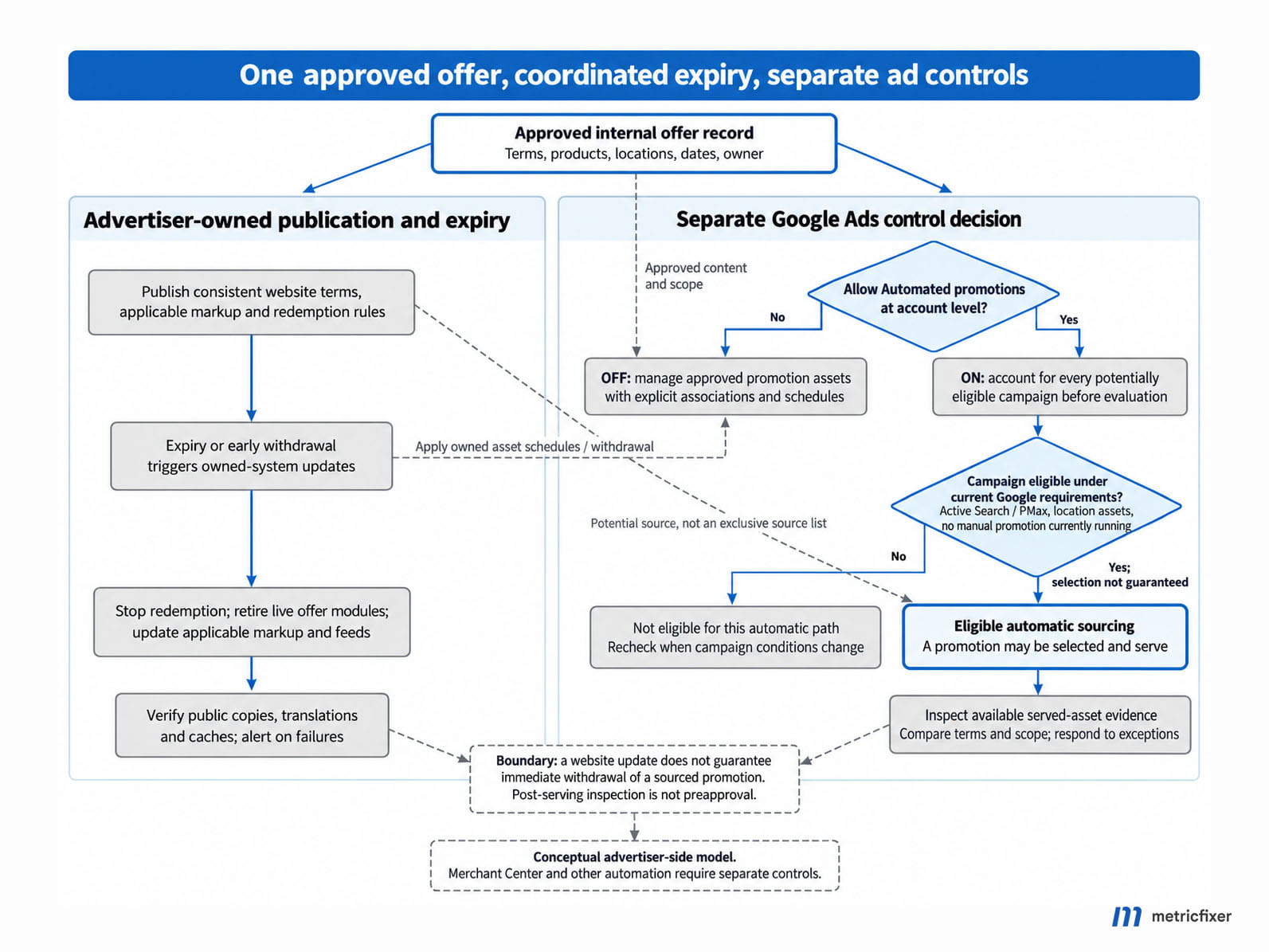
Recommended internal workflow: draft → commercial approval → scheduled release → active offer → expiry or withdrawal → verification that owned copies and manually managed assets are retired.
Trigger checks when something changes
On publication or amendment, validate required fields, compare visible text with the approved record, and check all affected languages and shared modules. At expiry, stop redemption in the business system, change live offer modules to an expired state, update applicable structured data, and expire advertiser-managed advertising assets and feeds.
Then verify the deployed result rather than accepting a successful CMS save as proof. Check the public response, rendered page, relevant mobile variant, and cache behavior. A failed cache purge or missed translated component should create an exception assigned to an owner.
Use a lightweight scheduled reconciliation as a backstop for missed jobs: compare active offers with current time and publication status, then inspect only mismatches. Add a less frequent broader archive scan according to the size and change rate of the site. These checks can be automated without turning every content change into a full crawl.
Define failure handling in advance. For example, a critical expiry job failure can block the next promotion release and notify the person authorized to stop affected advertising. Test the failure path in staging; do not deliberately publish an invalid live offer to see whether Google will find it.
Your own expiry workflow cannot set Google's refresh deadline. A sale that must begin and end at exact times belongs in an approval-first advertising setup unless the business has explicitly accepted the remaining automation risk.
Monitor without mistaking reports for preapproval
The supplied notice explicitly says assets without impressions are not shown. It does not describe a queue of proposed offers awaiting advertiser approval. For the workflow described there, inspection is therefore a detective control: it can identify an issue after serving, not prevent the first impression.
For an account whose notice names 12 October, a pre-launch check cannot be expected to provide an example of an asset served by that rollout. Once the rollout reaches the account, a report example still depends on an automatic promotion actually receiving impressions. A missing setting and an empty report are different observations: neither should be recorded as a successful opt-out or as confirmation that all future offers have been reviewed.
However, “the data will only be available tomorrow” is too broad. Google's current data-freshness guidance gives clicks, impressions, and cost a one-hour service-level objective, while allowing delays and slower processing for other reports. That is not a feature-specific guarantee for when a newly sourced promotion will become inspectable.
| Clock | What the team needs to know |
|---|---|
| First serving | Did an offer start appearing before the team could inspect it? |
| Source renewal | Is the published offer still being treated as available? Do not confuse renewal with business expiry. |
| Report availability | When did the relevant asset and its data become visible, rather than when did the event happen? |
| Operational response | How long until someone saw the issue, decided what to do, and applied the control? |
A shorter polling interval affects only part of this chain. Querying every few minutes cannot retrieve information that has not been exposed yet. An empty report is not proof that every possible promotional appearance has been reviewed.
Review new and changed offers, not every asset repeatedly
Once a served automated promotion is available for inspection, Google's inspection instructions use the Promotion asset filter and Added by: Google AI. The documented workflow exposes sourcing details by hovering over that attribution and additional content details by hovering over the promotion name. Check the controls actually available in the account rather than treating these instructions as proof of an already accessible report.
Retain a baseline and flag new assets, changed terms, unknown sources, unexpected campaign associations, and offers not present in the approved register. Include the offer's scope and expiry in the review, not just whether the discount percentage looks reasonable.
Before commissioning an API or script integration, verify that it exposes these specific assets, associations, and source details in the account and API version being used. This research did not validate a production API implementation; a generic asset export should not be advertised as complete monitoring coverage.
Use checkout coupon failures and customer-service reports as additional warning signals, not primary protection. Our ValueTrack and UTM guide can help preserve campaign-level click context. Such context does not, by itself, prove that a particular promotion asset appeared in the ad.
Set the response window from the business risk
As a planning example, campaigns spending EUR 600 per hour would spend EUR 1,800 during a three-hour detection-and-response window. That is campaign spend during the window, not a measurement of incorrect-promotion spend or loss. Actual exposure depends on serving and traffic patterns.
The example explains why a high-volume advertiser may rationally prefer manual approval even when average reporting is fairly quick. Choose the monitoring cadence from the acceptable response window and staffed hours. Do not let an arbitrary daily reminder define the business's risk tolerance.
Respond to an incorrect promotion
Agree on this runbook before an incident. Evidence collection should not delay containment when the business is actively advertising an unacceptable offer.
- Contain further exposure. Disable Automated promotions where the control is available. If the control is unavailable, or the offer may still be serving and the risk cannot wait for confirmation, the authorized owner should consider pausing the affected campaigns and escalating the issue to Google Ads support. Do not promise an instantaneous stop from a setting change.
- Preserve the evidence. Capture the exact claim, asset and campaign identifiers where available, source details, destination, locale, selected reporting period, and timestamps with time zone. Record what was observed separately from what you infer.
- Remove the relevant associations. Google's asset-removal instructions explain that removal from one campaign does not remove an asset from others. Check every affected association. Removing one asset is not the same control as disabling future automatic sourcing.
- Correct the source of truth. Fix the offer record, visible page, shared components, translations, redemption rules, and caches. Check separately managed Merchant Center promotions and manually written ad text rather than assuming the account switch covers them.
- Verify and decide whether to restart. Confirm saved settings and remaining associations, review subsequently available evidence, and resume only the approved setup. Escalate unexplained source selection or recurrence to Google with the evidence package.
Do not immediately re-enable automation simply because the original asset disappeared from a filtered view. Check the date range, filters, other associations, and whether the underlying content problem was actually resolved.
Pre-launch checklist and evaluation
Use this checklist before the date in your account notice, or before enabling the feature voluntarily. Assign an owner and retain evidence for each item.
| Check | Evidence to retain |
|---|---|
| □ The account's setting availability and potentially affected campaigns are recorded. | A verified saved setting, or an explicit not-yet-available / unverified status with check date and follow-up owner; location-asset associations and current manual-promotion coverage. |
| □ The business has chosen approval-first or controlled automation. | Decision owner, accepted response window, and escalation authority. |
| □ Current destinations and shared promotional components have been checked. | Offer inventory and resolved high-priority exceptions. |
| □ Dates, channels, categories, locations, and restrictions agree. | Approved terms, representative pages, and positive/negative checkout tests. |
| □ Manual assets have correct associations and actual serving schedules. | Asset settings, account time zone, and expiry confirmation. |
| □ Expiry and withdrawal have an owner and a tested failure path. | Staging test, cache verification, and alert destination. |
| □ Monitoring coverage and incident response have been verified. | Inspection procedure, available report fields, and a rehearsed containment decision. |
| □ Merchant Center and other relevant automation have been reviewed separately. | Independent settings and scope, where those systems are used. |
For a controlled evaluation, begin with genuine, low-complexity offers that the business can honor throughout their stated eligibility. Check launch, an amendment, and expiry; include the important language and store variations. Record observed delays without turning a few observations into a universal timing guarantee.
Evaluate safety before performance: accurate claims, correct scope, successful retirement of owned content, and workable response procedures. An offer that generates conversions but creates material customer complaints has not passed the operational test.
Then assess campaign outcomes, discount cost, margin, and redemption quality. Direct clicks on a promotion are not the whole customer journey, while an improvement after activation does not establish causation. Seasonality, the offer itself, spend, and other campaign changes can explain the difference. Use an appropriately designed comparison where available; do not create a knowingly unsafe control group.
The lowest-cost starting package is often modest: verify the switch, inventory current offers, fix shared stale content, set explicit schedules, and assign an incident owner. Build more elaborate monitoring only after deciding that automatic sourcing is worth enabling.
What public discussions add
Early public discussion is useful mainly for identifying failure scenarios, not measuring their frequency. In an original practitioner post, Mark van der Eng raised concerns about evergreen sale banners, members-only discounts, and old promotional pages that remain accessible. These are sensible audit cases, but the post does not provide a controlled test showing how often the new feature mishandles them.
Its interpretation that visibility is the only thing Google checks goes further than the published evidence. Google's documentation describes a visibility-based renewal condition; it does not disclose every validation signal. The right conclusion is that the publicly described safeguard does not resolve all business-rule questions, not that the complete algorithm has been reverse-engineered.
The September discovery and interface reports establish that the feature was being discussed and observed. Among the public materials reviewed, we did not find a reproducible study measuring stale-offer extraction, category-mismatch rates, or the delay between a first impression and asset visibility. Older discussions of Merchant Center automatic promotions were not treated as evidence about this Google Ads rollout.
The unresolved questions worth taking to support are specific: which sources supplied a disputed asset; how restrictive terms were preserved; which associations made it eligible; what happens to automatic eligibility when a manual promotion stops; and what inspection or exclusion controls are actually available in the account. Preserve the answer as account-specific guidance unless Google publishes a broader commitment.

Methodology and sources
This article combines an advertiser-supplied Russian-language announcement, official Google Ads and Merchant Center help pages, Google Search Central documentation, and English- and Russian-language searches for public launch reports and practitioner discussion. Sources were reviewed on 3 October 2026. The supplied notice establishes the wording and date shown to its recipient; its sender metadata and worldwide rollout coverage were not independently authenticated.
The pre-launch availability note reflects a check of several client accounts reported by the metricfixer team. It does not include a representative account sample, a verified rollout schedule, or observed automated-promotion delivery. The documented navigation and report descriptions should therefore be distinguished from a screen-by-screen validation in those accounts.
Official documentation supports the descriptions of product settings, manual scheduling, reporting freshness, landing-page controls, and structured-data scope. Public posts are used as evidence of observations or concerns, not as a substitute for product documentation. Some help pages were available through search-indexed text when direct retrieval was unavailable; interface wording should therefore be rechecked in the live account.
The risk matrix, prioritization method, offer register, expiry workflow, incident runbook, and evaluation criteria are metricfixer's operational recommendations. No live advertising account was changed, no intentionally invalid promotion was published, and no field experiment was conducted for this article. The HTML example and spending calculation are illustrative. We do not claim a measured error rate, a guaranteed withdrawal time, or proven performance uplift.
Source links appear beside the relevant explanations rather than in a duplicated reference list. The main implementation lesson is to separate three jobs: deciding what the business authorizes, keeping published offers accurate, and checking what the advertising system actually served.
This article provides technical and operational information, not legal advice or a guarantee of Google Ads behavior, approval, reporting latency, or commercial performance. Product availability, interfaces, and policies can change. Advertisers remain responsible for checking their offers and applicable requirements. metricfixer is an independent publication and service provider; this article is not an official Google announcement or endorsement.