
Published Sep 7, 2026
Why an iOS App Campaign Gets No Delivery While Android Works
Android is spending, but your Meta iOS app campaign gets few or no impressions. Follow a practical audit of app access, AppsFlyer events, AEM, SKAdNetwork, geography, audiences, budgets, and optimization goals.
Category: Online advertising · By metricfixer Expert Team
An Android app campaign is getting impressions, while the iOS version barely spends. The developer says the SDK is installed, and AppsFlyer shows activity. That still leaves several unanswered questions: can the advertising account use the correct iOS app, does Meta receive the event selected for optimization, and can the campaign reach enough eligible users within its bidding constraints? This guide shows how to investigate each layer without confusing missing attribution with missing delivery.
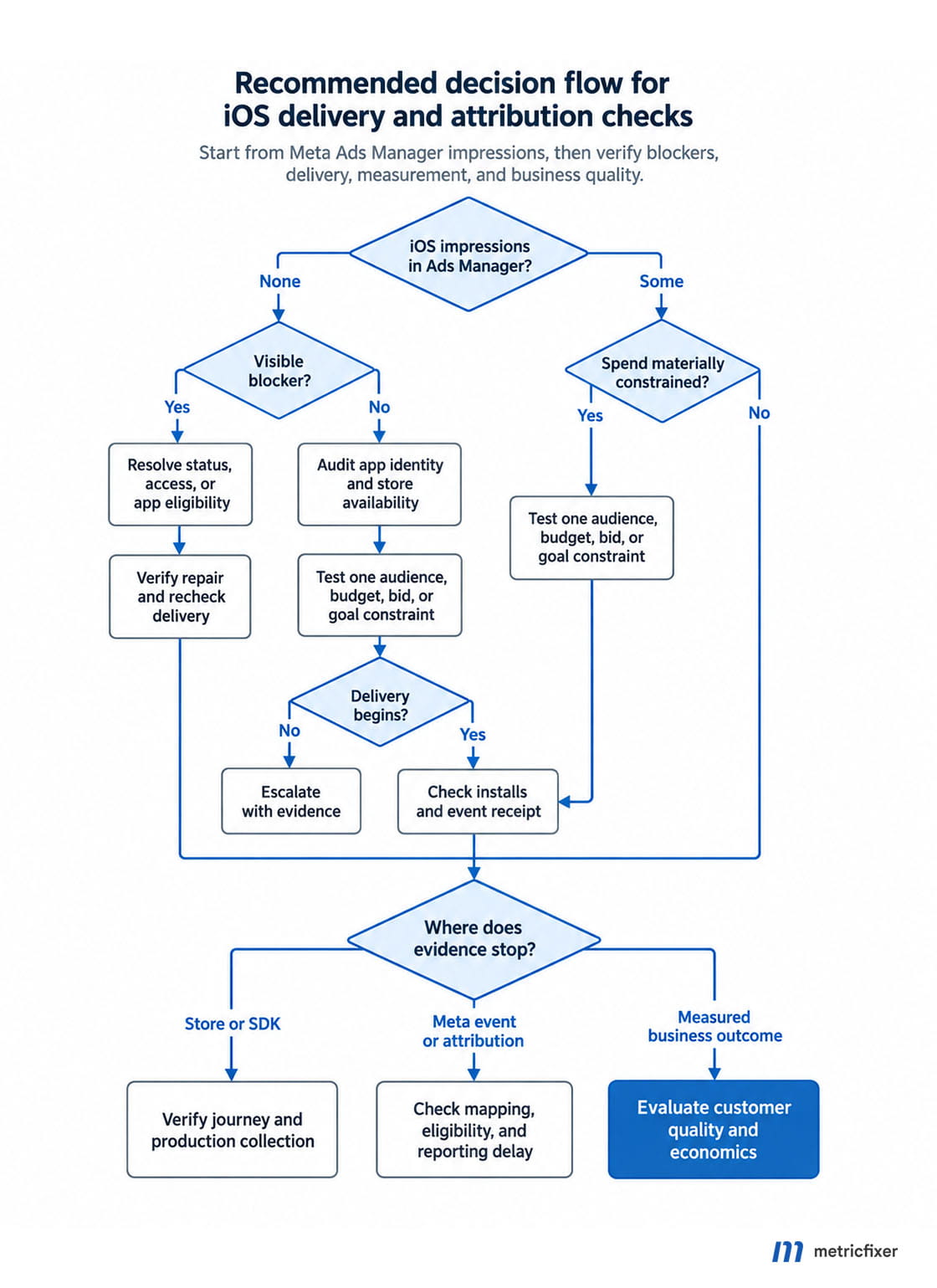
Practical starting point: check iOS impressions and spend in Meta Ads Manager first. If both are zero, investigate delivery status, app access, destination, targeting, and optimization eligibility. If impressions exist but AppsFlyer reports no installs, follow the measurement branch. Confirm the failure before changing the SDK or increasing the budget.
Executive summary
Android working is a useful comparison, but it is not an end-to-end test of iOS. The two versions can use different app records, releases, store availability, event implementations, and attribution paths. Even when they share a Meta App ID, a successful Android campaign does not prove that the iOS platform configuration is complete.
The most productive investigation separates three layers: permission to advertise the app, usable measurement signals, and an achievable delivery setup. A failure in any one can make the campaign appear stalled, but the evidence and corrective action differ.
AppsFlyer explicitly states that its mobile attribution integration does not require Facebook Login or the Facebook SDK. Installing another SDK should therefore be a response to a specific feature requirement, not the default repair. Its Meta integration guide also identifies incorrect App IDs, platform setup, and app status as attribution troubleshooting points.
Apple's SKAdNetwork documentation allows its APIs to be used regardless of tracking authorization. An ATT refusal is therefore not, by itself, an explanation for zero impressions. App Tracking Transparency governs tracking permission; SKAdNetwork provides a separate attribution mechanism.
1. Establish what “no delivery” actually means
Open the affected iOS ad set and its ads in Meta Ads Manager. Use a date range that includes the scheduled start, confirm the account time zone, and inspect impressions, amount spent, results, and the detailed delivery message. Record the exact message at campaign, ad set, and ad level.
| Observed result | What it establishes | Start here |
|---|---|---|
| Zero impressions and zero spend in Meta | No recorded delivery in the selected period. | Approval, scheduling, billing, restrictions, app access, destination, and ad set configuration. |
| Some impressions, but very little spend | The campaign can serve at least some ads. | Budget allocation, audience restrictions, bidding, and the selected optimization goal. |
| Meta shows impressions and spend; installs or events are missing | Ads are delivering. The missing outcome may concern conversion, collection, attribution, or reporting. | Store journey, production SDK, partner event receipt, AEM/SKAN settings, and reporting delays. |
Do not use an empty AppsFlyer dashboard as the only evidence that Meta served no ads. Conversely, do not explain zero Meta impressions by pointing to delayed Apple conversion reports. These measurements describe different stages.
Keep the Android comparison specific: same advertising account, overlapping dates, comparable markets, and clearly identified app destinations. A working campaign in another account does not clear the affected account's billing or access checks.
2. Check delivery restrictions and access to the app
Before involving the developer, inspect the account's visible restrictions, payment status, spending limits, ad review results, start and end dates, and any paused parent objects. These are basic exclusion checks: record a pass or the actual error, rather than assuming every iOS problem is an SDK issue.
Next, have the app owner and media buyer inspect the same Meta app. Meta's current app ads setup instructions connect the business portfolio, advertising accounts, platforms, and App Events setup. For that creation flow, Meta specifies portfolio control, ad account administration, and business verification before advertising. It also instructs advertisers to check app eligibility and integration-method consistency for installs and selected events.
| Boundary | Evidence to request | Who can confirm it |
|---|---|---|
| Business to app | The intended portfolio owns or has the necessary authorized access to the correct app. | App owner or business administrator. |
| Ad account to app | The affected advertising account is connected or authorized for that app in the applicable setup. | Business administrator. |
| Person or agency to assets | The actual operator can select the app and inspect its event source, not merely edit ads. | Business administrator and agency administrator. |
| App setup to campaign | Required setup, verification, publication, or review tasks are complete; the iOS app is selectable. | App administrator and media buyer. |
An agency's access to an ad account is not evidence of access to every connected app. Ask the owner to grant the required asset access through the supported workflow. Do not transfer ownership or create replacement app records just to make a dropdown work.
Follow the requirements shown for the actual app and use case. Legacy dashboards and newer onboarding flows can differ; a generic instruction to switch a mode or request every API permission is not a substitute for resolving the displayed blocker.
3. Match the iOS app across Meta, AppsFlyer, and Apple
Create a short identity record before comparing settings. Similar app names and icons are weak evidence, especially when production, staging, and an earlier agency integration all exist.
| Identifier | What it identifies | Where to compare it |
|---|---|---|
| Meta App ID | The app registered with Meta. | Meta app dashboard, event source, and AppsFlyer's Meta integration. |
| Apple App ID | The numeric App Store record. | App Store Connect, store destination, AppsFlyer app, and SDK configuration. |
| iOS bundle identifier | The application's bundle identity, such as com.example.product. | Released build and registered iOS platform settings. |
| Release version and build | The binary customers actually install. | Published store version and developer release record. |
AppsFlyer's setup guide permits one Meta App ID for both Android and iOS. Separate IDs are not a universal requirement. Verify the iOS platform and activate the Meta integration for the correct AppsFlyer app. The guide also recommends selecting the registered app in Meta's app selector: pasting a store URL instead is a documented AppsFlyer attribution pitfall, even when Meta accepts the destination.
Document mismatches before correcting them. If a campaign points to an old app record, installing a newer SDK in the current app does not repair that relationship.
4. Verify geography and the actual App Store journey
A store page opening in a desktop browser is not a complete availability test. Apple's availability guidance explains that the customer's Apple Account country or region determines their storefront. An app can also have different release or availability states across territories.
Compare the iOS campaign's countries with App Store Connect, then test on a compatible iPhone using the relevant storefront. Check whether the app can actually be downloaded, whether its minimum OS and supported devices match the audience, and whether onboarding and the advertised offer work in that market.
For a campaign using a custom product page or deep link, test that exact destination. Confirm its store fallback and release state. A successful test of the default page does not prove that an alternative destination works.
Treat the findings precisely. An unavailable destination can create an eligibility problem or prevent installs; it does not establish that every such campaign will receive exactly zero impressions. For diagnosis, use a market the business genuinely serves, with verified app availability. Do not switch to unrelated countries solely to obtain cheap delivery.
5. Ask the developer to prove the production SDK path
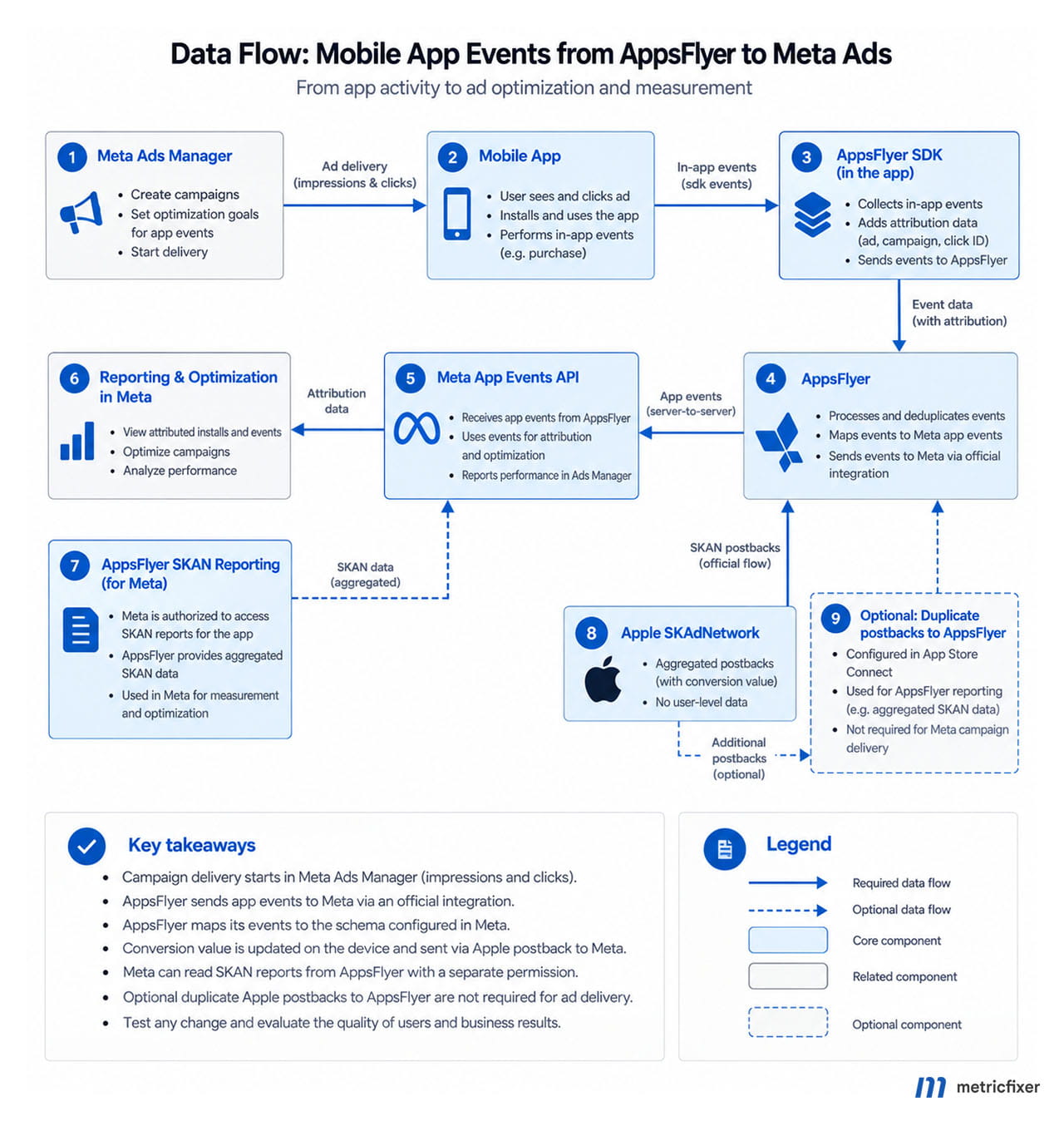
An SDK is the code library embedded in the app. AppsFlyer acts as the mobile measurement partner, or MMP, that processes activity and attribution. “SDK installed” can mean only that a dependency exists in the project. The useful proof is that the released iOS build initializes it, starts it, and sends activity to the correct AppsFlyer app.
The AppsFlyer iOS integration guide separates initialization from start and covers application lifecycle handling, including scene-based applications. It also describes a bounded ATT wait: waitForATTUserAuthorization should be used when the app intends to request authorization, with the timeout matched to the prompt's timing.
- Record the installed AppsFlyer SDK version and any framework wrapper version.
- Identify the production Apple App ID and confirm the developer key privately.
- Trace first launch, return to foreground, and the selected business event.
- Check whether login, onboarding, remote configuration, or consent code prevents the intended permitted collection path from starting.
- Test the actual ATT states the app supports, including denied or restricted authorization.
- Confirm the fix is in the public release; a successful debug or TestFlight build does not update existing production installations.
Use SDK logs and AppsFlyer receipt together. AppsFlyer's integration testing guide associates an install/event response of 404 with an incorrect app ID and identifies missing startup or developer-key problems as separate failures. These are checks on SDK collection, not Meta delivery status codes.
Test events establish connectivity. They do not establish that Meta can attribute the event to an ad, that a purchase is eligible for optimization, or that an ad set has enough genuine customer activity. Keep those acceptance criteria separate.
6. Trace the exact event Meta is supposed to optimize
Write the business action in plain language first: completed registration, started trial, confirmed purchase, or another meaningful milestone. Then trace its event name through the app, AppsFlyer, the Meta partner mapping, and Meta Events Manager.
AppsFlyer's discrepancy guide documents a straightforward failure: AppsFlyer receives SDK events, but unmapped events are not sent to Meta. It separately identifies missing revenue forwarding and warns that parallel reporting through AppsFlyer and Facebook SDKs can duplicate in-app events.
| Business action | Example AppsFlyer event | Check at Meta |
|---|---|---|
| Registration succeeds | af_complete_registration | The intended registration event arrives after confirmed completion. |
| A real trial starts | af_start_trial | The trial event is distinct from opening the paywall. |
| A purchase is confirmed | af_purchase | The intended purchase event includes the appropriate value and currency. |
These are standard AppsFlyer event names, not a ready-made mapping for every account. Use the exact partner identifier supported by the chosen integration. The iOS event reference documents event names and revenue parameters. It also cautions against duplicate revenue when ROI360 purchase-connector reporting is combined with manual af_revenue reporting.
For each selected event, inspect recent iOS receipt, connection method, postback scope, parameters, and any eligibility warning. An event visible somewhere in Events Manager may come from Android or another connection. Match the source and platform, not just its display name.
Define one deliberate reporting route for each business event. Do not enable additional purchase reporting merely to make a counter increase. If the existing implementation uses both SDK and server events, ask the developer to demonstrate how duplicate business outcomes are prevented under that specific integration.
7. Check app AEM eligibility separately from ATT
Aggregated Event Measurement, or AEM, is Meta's measurement solution. SKAdNetwork is Apple's. AppsFlyer's app AEM guide says eligible app-promotion campaigns can use AEM and SKAN together; choosing the SKAN-only option changes that measurement setup.
For an ineligible event, the guide directs teams to inspect Advanced Data Sharing, postback coverage including organic events, IP masking, and the connection selected for MMP traffic. For server-to-server AEM events, it specifies IP address and IDFV requirements. It allows up to two or three days for eligibility changes to appear. Check the actual diagnostic message before changing anything.
These are vendor eligibility conditions, not permission to expand data collection. Apple's tracking guidance requires ATT authorization for tracking and forbids replacing a denied IDFA with another identifier to perform that tracking. Apply vendor instructions only within the app's permitted data practices; do not remove masking or change consent handling simply to clear a warning.
Record an AEM eligibility issue as an eligibility issue. Record a denied ATT state as a consent state. Neither label alone proves the cause of zero delivery. The question is whether the campaign's selected measurement and optimization route is available and correctly configured.
8. Audit SKAdNetwork without mixing up its participants
A SKAN conversion value is a compact representation of post-install activity. Its schema tells the receiving platform what that value means. The SDK, schema, network integration, and reporting connection must be checked as separate components.
Two connections and one conversion-value owner
AppsFlyer's Meta SKAN interoperability guide describes two operations: authorizing Meta to share SKAN reports with AppsFlyer, and importing AppsFlyer's conversion schema into Meta. For the reporting connection, it specifies ads_read and access to the advertised App ID. That reporting authorization is different from authorizing an ad account to advertise an app.
- Confirm SKAN measurement is enabled in AppsFlyer.
- Match the schema's case-sensitive events with the Meta partner postback mappings.
- Verify the MMP connection URL has been imported successfully into Meta.
- Confirm AppsFlyer owns conversion-value updates; the documented interoperability flow stops the Facebook SDK from setting them.
- Inspect the separate SKAN reporting connection and its synchronization status.
The guide allows up to 24 hours for schema changes to take effect. It also documents disabled partner import when Meta has not received MMP events. Establish genuine event receipt before retrying configuration; repeatedly pasting the same URL does not fix a missing event path.
Why adding network IDs may be the wrong repair
Apple distinguishes the source app, which displays an ad, from the advertised app, which the user installs. Its source-app instructions place the network-ID list in that source app's Info.plist, using SKAdNetworkItems. The advertised-app instructions focus on registering attribution through a conversion-value update at first launch.
If your app also displays other advertisers' ads, it has a publisher role too. Check the monetization SDK's requirements for that role. But do not treat a missing Meta network ID in your acquisition app as a universal explanation for its campaign receiving no impressions.
Postback copies are a separate reporting check
AppsFlyer's postback-copy instructions describe an additional reporting path from Apple to AppsFlyer. They also note that the “not set up” message can appear when there is no SKAN traffic, and that production copies are not sent from TestFlight. That warning is not sufficient evidence of a delivery blocker.
Apple's documentation now also covers AdAttributionKit and interoperability with SKAdNetwork. Record the framework and SDK path actually used by the campaign. Do not assume that every Meta campaign has migrated merely because newer Apple APIs exist.
9. Test audience restrictions and budget allocation
Once access and the destination pass, review the effective iOS audience. Look at country, age, language, device and OS restrictions, placements, custom-audience inclusions, and exclusions. Inspect which settings are strict controls and which are audience suggestions in the current campaign type.
Our recommended test is to remove one unnecessary restriction at a time while preserving the business's actual market and policy requirements. For example, compare a narrow language restriction with an otherwise identical eligible setup. Do not change country, event, bid, and creative together and then claim the audience was the cause.
If Android and iOS ad sets share a campaign budget, compare actual allocations. A funded campaign does not prove that its iOS ad set receives a useful test budget. Meta's bidding overview describes campaign-budget distribution across ad sets and ties auction delivery to the optimization goal, predicted results, and bidding constraints.
For diagnosis, give iOS a defined allocation through a supported budget arrangement. That makes its test opportunity observable. It does not promise an equal cost per install or prove that automatic allocation was malfunctioning.
10. Choose a goal the iOS campaign can actually support
Meta's app optimization guide distinguishes installs, app events, and value optimization. Each asks the system to find a different outcome. Purchase-event optimization requires a usable purchase signal; value optimization additionally depends on purchase values. Selecting a business goal does not make the necessary signal appear.
| Goal | What a successful test supports | What it leaves unanswered |
|---|---|---|
| App installs | The eligible setup can acquire installations. | Whether acquired users register, retain, or pay. |
| Registration or trial | Delivery can pursue a verified early business milestone. | Whether that milestone predicts profitable customers. |
| Purchase | The campaign can pursue the measured purchase outcome. | Whether purchase volume and economics will remain sustainable. |
| Value | The eligible campaign can use revenue information. | Whether reported revenue represents margin, retention, or incremental value. |
Inspect any bid cap, cost-per-result goal, or ROAS constraint. A target copied from Android is a hypothesis for iOS, not a validated business result. As an editorial diagnostic test, consider an eligible install goal and an unconstrained highest-volume bidding option, where available, within a predefined spend limit. Change the bidding constraint and the event in separate steps when feasible.
Traffic optimization is a narrower connectivity test. Getting clicks does not validate app-install attribution or purchase optimization. Do not present a spending Traffic campaign as proof that the original app campaign has been repaired.
There is no universal purchase count that must be generated before an app ad can receive its first impression. Event-specific eligibility conditions should be checked in the account. The wider distinction between learning volume and campaign viability is covered in metricfixer's guide to Meta's learning phase for low-volume campaigns.
11. Allow for the right reporting clock
Apple's SKAN 4 postback documentation describes conversion windows ending after days 2, 7, and 35. Without early locking, the first postback follows its window with a random 24–48-hour delay; later postbacks use 24–144-hour delays. Privacy tiers also affect which values and postbacks are available.
This makes a missing same-day SKAN purchase a poor reason to rebuild a campaign. It does not mean every campaign uses SKAN 4 or that every missing result will eventually arrive. Identify the applicable attribution path and allow for its processing before comparing mature cohorts.
AppsFlyer's SKAN solution guide describes aggregated measurement with limited detail. A missing conversion value is not the same as a measured value of zero. Review volume and privacy-related data availability alongside implementation checks.
For reconciliation, record the report type, dates, time zones, attribution windows, and whether results include modeled data. Keep SDK-attributed, AEM, and SKAN views identified; do not add overlapping views together as if they represented separate customers.
12. Run a small, interpretable diagnostic test
The following is metricfixer's recommended investigation protocol, not a Meta-prescribed launch formula. Its purpose is to locate the failing layer with a bounded commercial exposure.
- Capture the baseline. Save the original settings, exact errors, recent changes, and iOS delivery figures.
- Repair a demonstrated blocker. Correct access, identity, store availability, or event receipt, then verify that particular repair.
- Define a viable iOS test. Use the correct app, a verified market, a compatible audience, approved creative, and a measurable budget allocation.
- Test one hypothesis. Relax one unnecessary constraint or select a supported earlier event. Keep other settings stable where possible.
- Apply stopping rules. Agree the spend ceiling, review time, and immediate stop conditions before launch. Use controls available in the account and supervise actual spend.
- Read delivery before delayed conversions. Establish impressions and spend, then inspect installations, event receipt, and mature attributed outcomes.
| Outcome | Next action |
|---|---|
| Still zero impressions after verified prerequisites | Escalate with the exact app, ad set, errors, and test configuration. Ask Meta to identify the remaining serving or eligibility restriction. |
| Delivery begins after a budget or bid change | Evaluate that constraint as a contributor. Do not conclude that the SDK was repaired. |
| Install optimization delivers; the purchase setup does not | Return to purchase-event eligibility, signal volume, values, and bidding economics. |
| Spend appears; the store journey fails | Fix the demonstrated destination or product problem before buying more traffic. |
| Installs occur; partner reporting stays empty | Trace collection, integration, attribution, and reporting with timestamps. |
| Delivery and measurement work; customers are uneconomic | Assess acquisition quality, retention, pricing, and monetization. Technical delivery is only the first acceptance criterion. |
What to send to the developer, AppsFlyer, or Meta
A useful escalation contains one reproducible timeline. The record below is an illustrative evidence template, not an API payload. Replace its placeholders with the actual findings.
Review time and time zone: <timestamp>
Meta App ID / ad account / campaign / ad set: <IDs>
Apple App ID / bundle ID / public build: <identifiers>
Reporting period: <start and end>
iOS impressions / spend: <observed values>
Exact delivery or eligibility message: <verbatim message>
Country / audience / goal / bid / budget: <settings>
SDK version and first-launch receipt: <evidence>
Selected event and Meta receipt: <evidence>
AEM / SKAN configuration and last change: <evidence>
Single change tested and outcome: <result>
Send missing collection or release evidence to the developer; partner mapping and synchronization evidence to AppsFlyer; and verified zero-delivery or Meta eligibility evidence to Meta. Share identifiers through the authorized support channel and remove credentials, tokens, and personal data from screenshots.
The useful question is not simply whether iOS is harder to advertise. It is which observable boundary has failed. Confirm delivery, establish the app and account relationship, prove the event path, and test the remaining constraints. Keep a change only when the evidence supports it and the resulting customers make business sense.
Methodology and sources
This review was checked on 6 September 2026. It draws on Meta's app setup, App Events, optimization, and bidding documentation; AppsFlyer's iOS SDK, Meta integration, AEM, SKAN, testing, and discrepancy guidance; and Apple's tracking, attribution, and App Store availability documentation. Sources are linked beside the claims they support. Some documentation retains older interface labels and API examples; this article describes the relevant mechanisms and directs readers to their current account controls.
No advertising account, app source code, private support correspondence, or production logs were supplied. No campaign experiment was conducted, and this review does not establish a single cause or a success rate for the Android-working/iOS-stalled pattern. Vendor-documented failure modes are distinguished from the editorial audit tables and proposed diagnostic tests. The event examples and evidence template are illustrative. Some Meta Help Center pages were not publicly readable during review; their unavailable contents were not used to substantiate claims.
This article provides technical and operational information and does not guarantee advertising delivery, attribution accuracy, or commercial results. It is not legal or privacy advice. Campaign changes can increase spend or change acquisition quality. Validate recommendations against the app's released implementation, user permissions, platform policies, available account features, and business economics. metricfixer is not affiliated with Meta, AppsFlyer, or Apple. Product interfaces, eligibility requirements, and measurement behavior may change after publication.