
Published Oct 13, 2026
Google Multimodal Search Traffic: What Changes for Visual SEO
Google's new multimodal reporting reveals searches that start with images rather than words. Learn how to plan useful visual content, check technical eligibility, and measure the opportunity without inventing attribution.
Category: SEO & Web Marketing · By Mikalai Sasau
A search can begin with a photograph, a screenshot, or an object circled on a phone, not a keyword. Google Search Console now makes part of that discovery visible through its Web: Multimodal reporting. For SEO teams, the opportunity is not simply to upload more pictures. It is to connect what people can see with a page that helps them identify it, understand it, evaluate it, or take the next step.
Start here: establish a separate multimodal reporting baseline, check that important images and their landing pages are accessible, and choose a small group of visually meaningful pages for improvement. Do not commission a site-wide image replacement project before identifying a useful customer task.
Research reviewed: October 11, 2026. This guide distinguishes documented platform behavior, a published site-owner observation, and our proposed working methods. A new reporting category is not evidence of a new ranking factor.
What Google means by multimodal search traffic
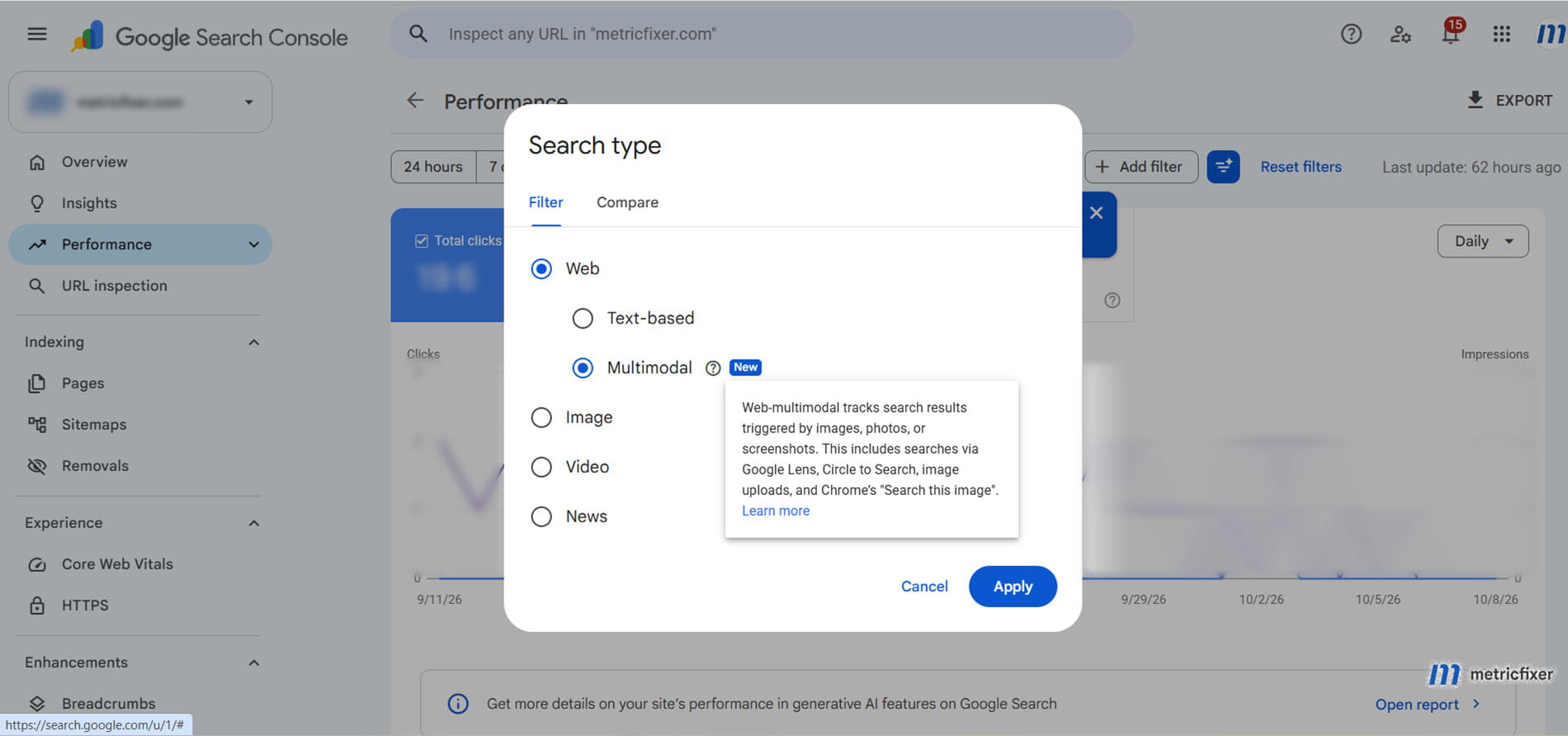
Google announced the global rollout on September 24, 2026. The new reporting covers web searches initiated with Google Lens, Circle to Search on Android, image uploads to Google Search, and Chrome's right-click image-search feature. It is available through the search-type filter in both the Search results performance report and the Search generative AI performance report.
The important distinction is between how someone searches and what kind of result they see. A photograph can lead to an ordinary web page. A text query can lead to an image result. An image and a follow-up question can also lead to a generative answer.
| View | What it describes | What not to assume |
|---|---|---|
| Web: Text-based | Web search originating from text queries. | A page with photographs is not automatically multimodal traffic. |
| Web: Multimodal | Web search in which an image forms part of the input. | The destination need not be an image file or a product page. |
| Image | Performance in Google's Image search results. | This is not an interchangeable name for Lens traffic. |
| Generative AI performance: Search | Link impressions in supported AI search features, with a text-based or multimodal filter. | This is an overlapping reporting view, not another channel to add to Web totals. |
The first three distinctions follow Google's Search performance definitions. The separate generative AI report currently covers AI Overviews and AI Mode, reports impressions rather than separate clicks or conversions, and uses data included in Web Search reporting.
This is not a report of every interaction with a camera, every Gemini conversation, or every AI mention of a brand. Its scope is the Google Search activity that Google documents for this reporting feature.
Read the new data before drawing a growth story
In the Search results report, the familiar measures are clicks, impressions, CTR, and average position. Start with pages, then examine device, country, and date patterns. Keep the selected reporting view visible in every export and dashboard.
There is a major limitation: Google does not provide the Queries dimension for multimodal searches. This is not merely the ordinary omission of some anonymized queries. The dimension itself is unavailable. Do not expect supplementary text from an image-plus-text search to become a usable keyword report.
Nor should page-level performance be treated as an image-level explanation. John Mueller clarified that the input photograph is not shown. The documented dimensions also do not provide a Lens-versus-Circle-to-Search breakdown. A page receiving impressions does not establish which illustration, screenshot, paragraph, or combination of signals made it relevant.
A new series is not necessarily new demand
After checking with the Search Console team, Mueller confirmed that these data had not previously been included in the counts. Therefore, do not present the launch as merely a redistribution of an old Web total. Equally, do not assume every existing dashboard now includes multimodal automatically.
Establish the first usable date in your own property. Annotate reporting changes separately from content releases. An empty earlier period does not prove that people had never found the site visually; and a newly visible series does not, by itself, prove that your optimization created demand.
What one early observation shows, and what it does not
In a published analysis of his own site, Christian Ott reported 407 multimodal impressions and two clicks for September 10-21, 2026. About 89% of those impressions were mobile. The pages included informational content, not only products.
That is useful evidence that the report can matter beyond ecommerce. It is not an industry traffic-share estimate, a mobile benchmark, or evidence that a particular image treatment improved rankings. With two clicks, a conversion or CTR narrative would be especially fragile.
Our recommendation is to treat impressions as discovery evidence, clicks as visits from Search, and average position as a contextual reporting metric, not a fixed ranking for a known visual query. Never rename impressions as traffic or describe visibility alone as revenue.
The opportunity: optimize for a visible problem, not only its name
Traditional keyword research usually starts with language. Visual research can start earlier: a person recognizes an object or problem but does not know what to call it. For an SEO brief, the useful question becomes: what might our customer photograph, capture, or circle before they can formulate the right query?
Google's engineering explanation of AI-assisted visual search describes systems that can identify several objects in one image and issue multiple related visual searches. In AI Mode, the image and the user's question can guide this process. That is a description of search behavior, not a published list of ranking weights.
Our practical inference is that a useful page needs more than visual resemblance. It should help with the task behind the image. A photograph of a connector might imply identification, compatibility, replacement, or installation. Those needs require different information, even when the object is the same.
| Potential visual input | Likely task to investigate | Content worth preparing |
|---|---|---|
| A product or distinctive component | Identify it or find the correct variant. | Clear views, identifiers, dimensions, compatibility, and an accurate product destination. |
| A damaged surface or installation detail | Understand what is wrong and the next safe step. | Documented examples, alternative explanations, limits of visual diagnosis, and when professional inspection is necessary. |
| A software error or unfamiliar interface | Identify the state and resolve a problem. | A current screenshot, the exact message as text, prerequisites, diagnostic checks, and verified steps. |
| A room, outfit, or finished project | Understand the components or recreate the result. | Individual items plus their context, specifications, alternatives, and an honest description of the example. |
| A location, entrance, or physical service result | Recognize the business or assess suitability. | Accurate place and service information supported by relevant, current photographs. |
These are research hypotheses, not verified sources of traffic for every business. Build the list from customer questions, product-return reasons, support themes, and the visual material your team already uses to explain things. Use permissioned, anonymized examples rather than exposing customer information.
For a publication such as metricfixer, a screenshot of an analytics configuration could be a more useful search starting point than a decorative illustration of a dashboard. That is a direction to test, not a claim about the site's existing traffic. For local businesses, connect this work with an accurate business presence; our Google Business Profile and AI search checklist covers that complementary layer.
Prepare visual content that can actually answer the question
Give each important image a job
As an editorial rule, ask what information the image adds. Does it distinguish two variants, show a connection point, document a symptom, or demonstrate a step? When it only decorates a heading, do not count it as coverage of a visual search need.
For a selected topic, consider a small, purposeful set: a clear view of the subject, a contextual view, and a close-up of the distinguishing detail. This is a production suggestion, not a required image count. Do not create near-duplicate files merely to make the gallery larger.
Keep observations separate from illustrations. Label a conceptual diagram as a diagram, an example as an example, and a simulated interface as a simulation. Never present a generated screenshot as proof that a platform behaved in a particular way.
Connect the picture to an explicit explanation
Write the relevant identity, problem, and conclusion in the surrounding article. For a troubleshooting screenshot, record the interface or product version where it matters, reproduce the important error message as HTML text, explain what the screenshot establishes, and state what still needs checking.
This also makes the page usable when the image is unavailable. The W3C image accessibility guidance distinguishes concise alternatives for informative images, empty alt attributes for purely decorative images, and fuller text equivalents for complex diagrams. A long keyword list is not a useful substitute for any of those.
For Google, image context, descriptive alternative text, and filenames can help interpretation; filenames are only a light clue. Prefer a meaningful description over a mechanical formula. Do not assume that adding a location to a filename or repeating a query in every caption establishes relevance.

Spend effort on evidence, not artificial freshness
Google's guide to generative AI search emphasizes useful, distinctive content and relevant visuals, while warning against producing pages for every imagined query variation primarily to manipulate results.
Our editorial recommendation is to improve a page where new visuals genuinely reduce uncertainty. For software, that might mean replacing an obsolete screen. For a product, it might mean showing a difficult-to-see connector. For a case study, it might mean explaining how the evidence was collected. Changing an image's date or filename without improving its informational value is not the same thing.
Original photography may help demonstrate something competitors have not documented. The sources reviewed do not establish a universal ranking bonus for original photos, a blanket prohibition on stock imagery, or a guaranteed advantage from AI-generated pictures.
Technical readiness: separate access, interpretation, and eligibility
The reporting announcement does not introduce a general-purpose "Lens SEO" protocol. Start with the delivery path for the page and the asset, then check any additional rules for the specific search feature you are targeting.
Make the page and the actual image retrievable
Google's minimum Search requirements include crawl access, a successful response, and indexable content. Meeting them creates eligibility, not a guarantee of indexing or selection.
For your audit, test the landing page and its important image URLs separately. An article loading normally does not prove that its image CDN is accessible. Investigate login requirements, expired asset URLs, hotlink restrictions, geographic blocks, and bot challenges before changing titles or captions.
Review robots directives and HTTP headers, including unintended noindex, noimageindex, and image-level X-Robots-Tag restrictions. Interpret their scopes correctly: page indexing, image indexing, and preview permissions are different controls.
Do not solve crawler access by disabling site security. Use Google's crawler-verification methods; a Googlebot user-agent string alone is not proof of identity. For operational examples, see our guides to robots.txt across search and advertising systems and Cloudflare crawlability and bot access.
Use discoverable image markup and test the rendered result
Google's image documentation specifies <img src> for discovery, including a fallback src inside responsive implementations. CSS background images are not indexed as content images. Keep significant evidence in actual image elements rather than only in presentation-layer backgrounds.
Google's lazy-loading guidance says not to rely on user actions such as scrolling or clicking to load indexable content. Native lazy loading can be appropriate, but inspect the result with URL Inspection: is the actual image URL in the rendered HTML, and is the relevant content visible?
The following is an implementation example for a below-the-fold diagnostic image. The paths, dimensions, and interface description are illustrative; replace them with actual assets and accurate wording.
<figure>
  <img
    src="/images/analytics-stream-settings-1280.webp"
    srcset="/images/analytics-stream-settings-640.webp 640w,
            /images/analytics-stream-settings-1280.webp 1280w"
    sizes="(max-width: 720px) 100vw, 720px"
    width="1280"
    height="720"
    loading="lazy"
    decoding="async"
    alt="Web stream settings with the stream URL and measurement ID highlighted">
  <figcaption>
    Check that the selected web stream belongs to the website being tested.
    Account-specific identifiers have been redacted.
  </figcaption>
</figure>
As web.dev explains, dimensions help reserve layout space, while lazy loading is unsuitable for images needed immediately on screen. Do not copy loading="lazy" onto the main above-the-fold image by default. Choose a compression level at which meaningful text and details remain readable.
Check mobile delivery and asset discovery
Google's mobile-first indexing guidance calls for equivalent important content and images on mobile, including appropriate quality and alternative text. A useful desktop gallery does not compensate for missing evidence in the mobile version.
An image sitemap can support discovery, including images hosted on a separate domain. Google advises verifying relevant domains in Search Console. A sitemap is not a ranking certificate, and it cannot repair blocked access. Use the current documented fields rather than deprecated image-caption or geographic tags.
As an operational safeguard, keep an asset inventory with its public URL, landing pages, intended purpose, owner, and last content review. Investigate URLs that expire or change unnecessarily. This makes technical failures easier to distinguish from editorial problems.
Do not turn preview guidance into a universal Lens requirement
Google documents og:image and primaryImageOfPage as ways to express a preferred preview image. They do not prove which asset influenced a multimodal match. Similarly, max-image-preview:large permits a larger preview; it does not guarantee selection.
The frequently repeated 1,200-pixel width recommendation belongs to Google Discover guidance. Do not relabel it as a mandatory minimum for every image participating in Lens. A readable diagnostic screenshot and an attractive article preview may serve different purposes; they need not be the same file.

Check AI participation separately
For AI search features, Google's optimization guide requires an indexed, snippet-eligible page and inclusion in Search generative AI features. It does not require an llms.txt file, special AI markup, or an alternative AI-only version of the site.
Review Settings > Search generative AI in Search Console. Inclusion is the default, but a property can be excluded or inherit a parent's choice. Exclusion affects the documented generative features, not ranking or inclusion in other parts of Search. This is a participation check, not a new manual registration requirement for every site.
Keep that control separate from Google-Extended, which is not the switch for Google Search inclusion or ranking. Audit the intended outcome of each control rather than treating every setting containing "AI" as interchangeable.
Ecommerce has additional rules, not just better photography
Retailers should connect images to reliable product identity. Google's Product structured-data documentation explicitly includes Lens among the surfaces where product information can support richer appearances. This is a concrete feature-specific use of markup, not a requirement to put product markup on every illustrated article.
Audit consistency between the photographed item, visible product information, structured data, and Merchant Center submission. For variants, follow the applicable product-variant guidance. A picture of one color or connector should not silently lead to an incompatible variant. Use an assigned GTIN according to Google's identifier requirements; do not manufacture one to fill a field.
Merchant Center's main-image specification requires an accurate product image and restricts promotional overlays. It also announces a minimum of 500 by 500 pixels for all products beginning January 31, 2027, while recommending 1,500 by 1,500 pixels or more. This is a Merchant Center change, not a new universal website requirement caused by the Search Console filter.
Use additional_image_link for useful alternative views and details. That guidance also requires retaining appropriate AI-generation metadata for AI-generated images. Check the relevant IPTC metadata requirements when a production pipeline generates or transforms product imagery.
Finally, check formats by destination. Google's web-image documentation supports AVIF, but AVIF is not listed in the Merchant Center main-image format specification reviewed for this article. A format working on the website is not sufficient evidence that the same URL is valid in the feed.
Our production recommendation is to keep a sufficiently detailed master and generate appropriate web and feed derivatives. Validate the delivered file, not only the filename. Check feed diagnostics after publishing changes instead of assuming that successful page rendering proves product eligibility.
Measure the opportunity without inventing attribution
Do not assume the API matches the new interface
As reviewed on October 11, 2026, the Search Analytics API reference does not document a separate multimodal value for type. The bulk-export schema likewise does not list a dedicated multimodal search type. An interface option is not automatically an API parameter or BigQuery value.
In Ott's published test, API requests with type=web matched the text-based report for his property, not text-based plus multimodal. That is a specific observation, not a guarantee about every connector or a permanent API contract. Do not silently label web as "all web search" without reconciling your own data.
Google's launch announcement recommends the interface's Export function. Use it as the verified starting point for this analysis. Recheck documentation and actual output before building an automated pipeline around the new category.
Create a reporting baseline that another analyst can reproduce
For each export, record the property, report, selected search type, date range, filters, grouping, extraction date, and whether the newest data were complete. Store text-based, multimodal, and Image exports separately. A Pages export and a Countries export are different tables; they do not form a page-by-country dataset merely because the date ranges match.
The Search performance documentation notes that exports can turn unavailable values shown as ~ or - into zeros. Preserve those qualifications in your reporting notes. Also account for row limits and aggregation differences: a sum of visible page rows need not reproduce a property-level chart.
Use the canonical URL mapping and date convention documented for Search Console dimensions. Daily reporting uses Pacific Time, while the 24-hour view differs. Check the GA4 property's time zone before comparing daily patterns. A visit's recorded landing URL can also differ from the canonical URL credited in Search Console.
GA4 is a business-outcome layer, not a multimodal query decoder
The Search Console label does not automatically become a GA4 source, medium, or session attribute. Google's current default channel definitions include an AI Assistant channel, but explicitly exclude Google AI Overviews and AI Mode from it; their non-ad traffic belongs to Organic Search. "AI traffic" and "multimodal Search traffic" are therefore not interchangeable reporting buckets.
The Search Console integration with GA4 supports a limited set of compatible dimensions, including landing page, device, and country. It does not document a session-level join identifying which visitor used a photograph.
Use two adjacent views: Search Console for a page's multimodal visibility and clicks, and GA4 for that page's relevant organic landing sessions, engagement, and key events. Our GA4 page-dimension guide helps distinguish a landing page from other page-level dimensions.
Do not allocate a percentage of organic revenue to multimodal simply because multimodal represents that percentage of Search Console clicks. That calculation would assume an unobserved match between visitors and outcomes. A useful dashboard can show business context while clearly stating that exact multimodal conversion attribution is unavailable.
A practical Visual SEO research program
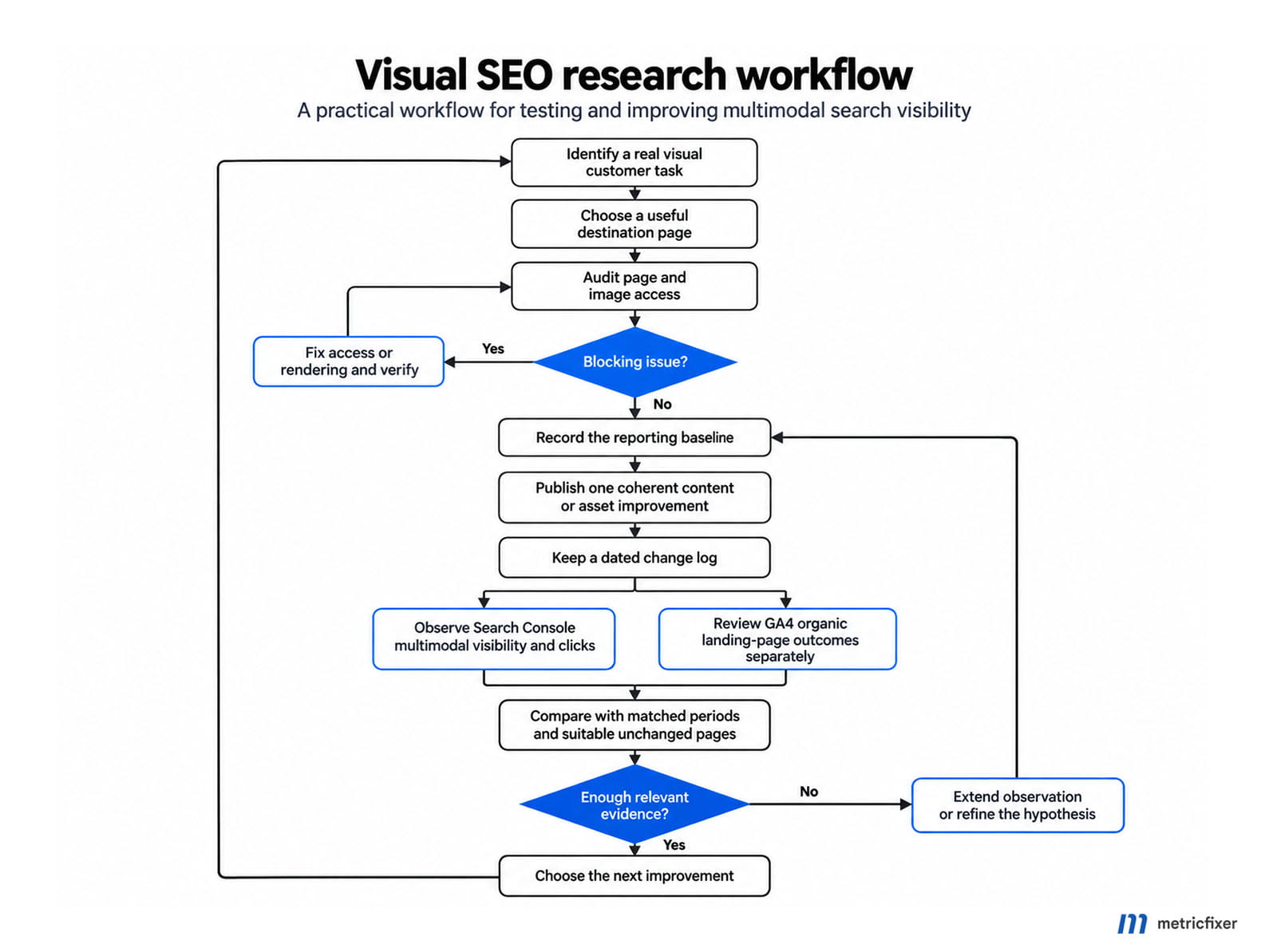
The following is our proposed workflow, not an experiment conducted for this article. Start with a manageable cohort of pages where the visible subject and the business task are both clear. Pages already receiving multimodal impressions are useful candidates, but also examine important pages with obvious technical or content gaps.
First establish what a useful result would look like
Write a visual-intent brief for each candidate: likely input, task, distinguishing detail, intended destination, and information needed after the click. Add the evidence that would contradict the hypothesis. For example, a product page that attracts identification searches but cannot answer compatibility questions may need better information, not simply a larger photo.
Audit access and rendering before editorial experiments. Then select one coherent change: a clearer technical detail, a current screenshot with explanatory text, an accurate variant mapping, or removal of an access problem. Record what changed and when. Avoid changing the template, URL structure, image set, and content simultaneously when the goal is to understand a particular mechanism.
Use repeatable visual tests without pretending they are ranking data
Create a small test set of legitimate, non-sensitive photographs, crops, and screenshots. Include inputs not copied directly from your own page. Searching only your published image can test recognition of that image, but it is a weak test of whether an unfamiliar customer would discover you.
Record the input version, crop, supplementary question, language, location context, device, date, and account state. Note whether your page appeared, whether the result answered the task, and whether the linked destination was correct. Keep results from image-only and image-plus-text tests separate.
Do not add the target brand or URL to every test and call the result unprompted discovery. Do not repeatedly click your own result to manufacture a signal. Treat manual observations as qualitative diagnostics, not a representative estimate of search volume or a stable position tracker.
Evaluate changes against a usable baseline
Compare consistent reporting windows and, where practical, similar unchanged pages. Keep a log of other changes, campaigns, seasonality, and indexing events. A before-and-after increase can justify further investigation, but cannot by itself isolate the effect of an image change.
An initial six-to-eight-week review cycle is a planning suggestion, not a promised response time. For sparse properties, extend the observation window and report absolute counts. When the evidence remains weak, say "insufficient data" rather than converting one extra click into an impressive percentage.
The best next investment is the one supported by several signals: a plausible customer task, reliable technical delivery, evidence of relevant discovery, and a useful landing experience. None alone establishes a universal ranking formula.
A release checklist for SEO, content, and analytics teams
Use Pass, Fail, or Not tested for each item. These are our implementation priorities, not Google's ranking weights.
| Owner | Check | Evidence to retain |
|---|---|---|
| SEO and engineering | The page and important asset URLs are accessible under the intended crawler and indexing rules. | Response checks, rendered-page inspection, relevant access logs, and directive review. |
| Content and design | Images contribute identifiable information, remain readable, and have appropriate text equivalents. | Visual-intent brief, approved assets, captions, and factual review. |
| Commerce, where applicable | Images, identifiers, variants, structured data, and feed requirements agree. | Product validation and current Merchant Center diagnostics. |
| Analytics | Multimodal reporting is separately labeled, reconciled, and not presented as session-level attribution. | Baseline exports, filter notes, canonical mappings, and documented limitations. |
| Project lead | The next review has an owner and a question to answer. | Change log, comparison group where feasible, and an evaluation date. |
What should change in the SEO brief
Add a visual starting point alongside the keyword and audience need. Ask what the customer sees, what they need to understand, what evidence your page supplies, and whether the next step is useful. Then make that evidence accessible, accurate, and measurable.
Do not reduce Visual SEO to image decoration or treat the new filter as proof of an entirely new technical discipline. The practical opportunity is to close the gap between a visible question and a trustworthy answer. Search Console now offers another way to observe that opportunity, with important limits.

Methodology and sources
This research review was checked on October 11, 2026. It prioritizes Google's launch announcement and current Search Console, Search Central, Merchant Center, and GA4 documentation, supplemented by Google's engineering explanation of visual search, W3C accessibility guidance, and web.dev implementation guidance.
John Mueller's original public clarifications are identified separately from formal documentation. Christian Ott's article is used as a first-person observation of one property, not a controlled study or representative benchmark. The supplied Search Console screenshot establishes interface wording, not the causes or business value of metricfixer's traffic.
No private Search Console, GA4, or Merchant Center account was accessed for this article, and no controlled ranking experiment or technical audit of metricfixer.com was performed. The visual-intent framework, implementation example, research workflow, and acceptance checklist are editorial recommendations. The reviewed evidence does not establish a universal multimodal ranking formula, guaranteed uplift, or a reliable session-level attribution method.
Documentation, account interfaces, feature availability, and connector behavior can diverge during product changes. Recheck API coverage, AI participation settings, and dated Merchant Center requirements before implementation.
Disclaimer: This publication provides general technical and editorial guidance, not a guarantee of indexing, search visibility, traffic, or commercial results. Test changes against your site's architecture, security requirements, accessibility needs, and actual account configuration. Use only visual material you are entitled to publish, and remove confidential or personal information from examples. References to Google and other platforms do not imply their endorsement of this publication.