
Published Jul 6, 2026
Microsoft Advertising Dynamic Parameters: Practical Guide to Tracking Templates and UTMs
A practical guide to Microsoft Advertising dynamic parameters in tracking templates and final URL suffixes, with UTM mapping recommendations, campaign-level compatibility notes, auto-tagging considerations, parallel tracking workflow, and troubleshooting tips for advertisers.
Category: Online advertising · By Mikalai Sasau
This practical handbook explains how to use Microsoft Advertising dynamic URL parameters in tracking templates, final URL suffixes, custom parameters, and UTM tagging. It is written for advertisers, agencies, and analysts who need maintainable click tracking across Search, Shopping, Audience, Performance Max, Dynamic Search Ads, extensions, GA4 reporting, and business-intelligence workflows.
Practical default: use Microsoft Advertising Upgraded URLs, keep the final URL as the clean landing page, put ordinary analytics parameters in the final URL suffix, and reserve tracking templates for click trackers or redirects that need {lpurl}. Preserve msclkid, keep utm_source and utm_medium stable, and use stable ID parameters for joins instead of relying only on readable campaign names.
Executive summary
Microsoft Advertising dynamic URL parameters work like a macro layer for click tracking. You place a placeholder such as {CampaignId}, {Campaign}, {AdGroupId}, {AdGroup}, {AdId}, {keyword:na}, {TargetId}, {MatchType}, {BidMatchType}, {Device}, or {Network} in a supported URL field, and Microsoft Advertising substitutes the click-specific value when the ad is served and clicked.
The Upgraded URLs model separates the landing page from the tracking layer. The final URL is the landing page. The tracking template can wrap the landing page or send it to a tracker through {lpurl}, {escapedlpurl}, {unescapedlpurl}, or an advanced escaped variant. The final URL suffix appends tracking parameters directly to the landing page. This separation reduces maintenance and can allow tracking changes without sending ads back through editorial review, depending on which field is changed.
For most accounts, the cleanest architecture is simple: keep landing pages in final URLs, put GA4 and analytics parameters in the final URL suffix, and use tracking templates only when a third-party click tracker or redirect needs to wrap the landing page. Do not place {lpurl} in a final URL suffix.
Microsoft exposes both readable names and stable IDs for campaigns and ad groups. Names are useful for marketers, but IDs are safer for joins, automation, offline conversions, cost imports, and long-term reporting. A resilient setup can use utm_campaign={Campaign} when naming governance is strong, while also storing utm_id={CampaignId}, msads_campaign_id={CampaignId}, and msads_adgroup_id={AdGroupId} in separate fields.
For GA4 and cross-platform reporting, do not overload classical UTM fields with every available Microsoft parameter. Keep utm_source=bing and utm_medium=cpc stable for standard paid-search-style reporting, use utm_id={CampaignId} as the stable campaign join key, use utm_term={keyword:na} only where keyword traffic is meaningful, use utm_content=ad_{AdId} for ad-level reporting, and place match type, bid match type, network, device, query, product, location, target, and asset-group IDs in auxiliary fields.
The most common Microsoft-specific mistakes are using {lpurl} inside the final URL suffix, exceeding the 2,048-character URL or template limit, relying on keyword parameters in non-keyword inventory, forgetting that undefined custom parameters may remain unresolved, missing lower-level URL overrides, and confusing {MatchType} with {BidMatchType}.
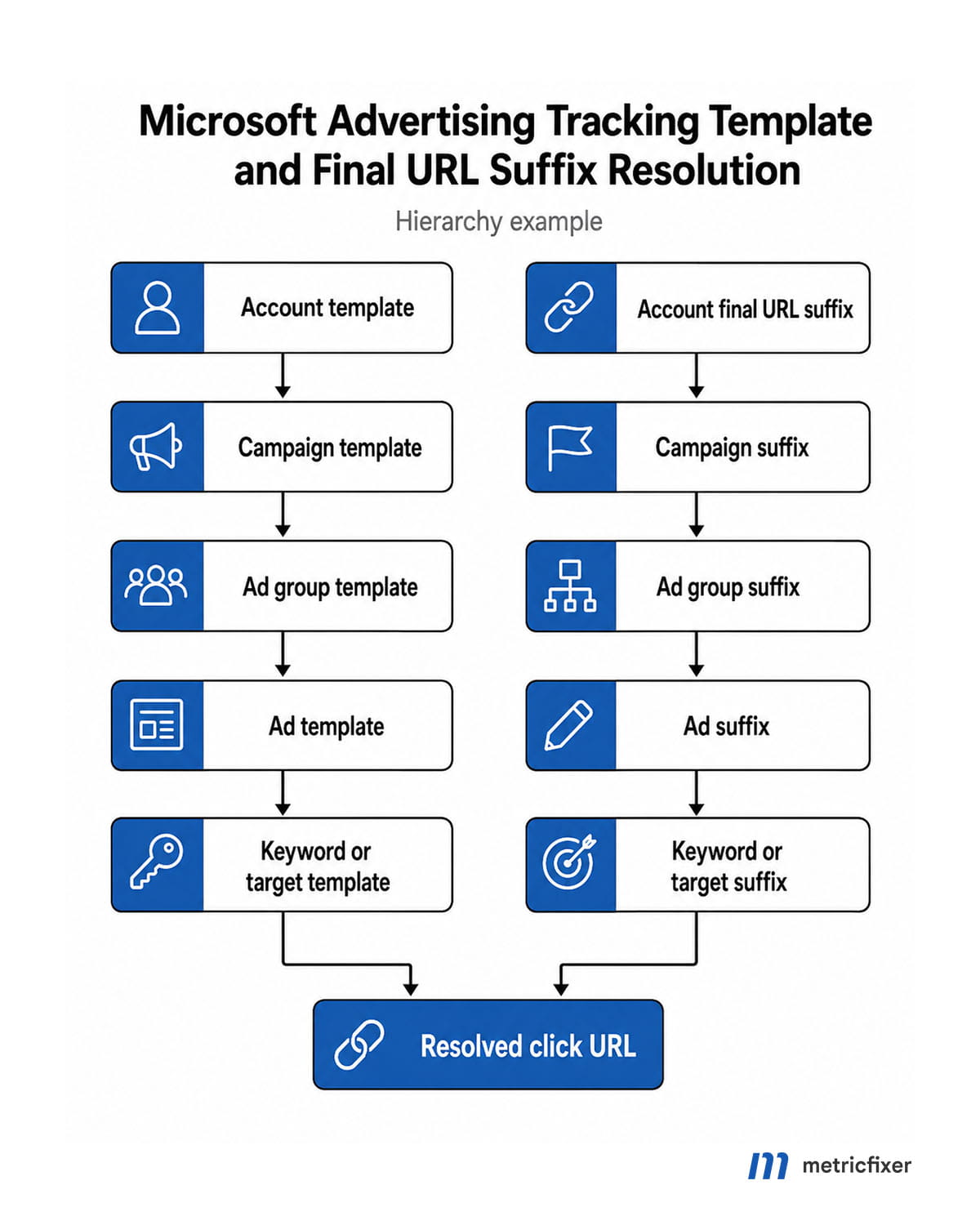
How Microsoft Advertising URL options work
Microsoft Advertising tracking is easiest to manage when each URL field has a narrow role. Upgraded URLs are designed for that separation: landing-page URLs stay in final URL fields, while tracking parameters, click trackers, redirects, and custom taxonomy live in URL options.
| URL field | Primary role | Recommended use | Common risk |
|---|---|---|---|
| Final URL | The landing page URL. | Use a clean landing page URL that starts with http:// or https://. | Embedding long manual tracking strings in every ad and creating editorial-review or maintenance overhead. |
| Tracking template | A URL pattern that can wrap or append tracking to the final URL. | Use for click trackers, redirects, account-level routing, or campaign-level templates that need {lpurl} or an escaped landing-page placeholder. | Creating a high-level template without a supported landing-page URL tag. |
| Final URL suffix | Tracking parameters appended directly to the landing page. | Use for UTMs and diagnostic parameters that the landing page must receive directly. | Starting with ?, &, or #, or placing {lpurl} in the suffix. |
| Custom parameters | Advertiser-defined placeholders such as {_campaign}, {_region}, {_assetgroup}, or {_market}. | Use for controlled slugs, business taxonomy, regional labels, and values not available as native dynamic parameters. | Referencing a custom parameter that has not been defined at the serving level. |
| Auto-tagging and click identifiers | Automatic click ID and, when configured, automatic tracking values. | Preserve msclkid through redirects, consent tools, payment flows, and cross-domain routing. | Website redirects, CMS plugins, CDNs, or consent tools stripping unknown query parameters. |
Lower-level settings override higher-level settings. Microsoft documents URL options across account, campaign, ad group, ad, keyword, sitelink, product group, and asset-group contexts. This makes broad defaults useful, but it also means teams need a simple register showing where campaign-specific overrides, custom parameters, and tracker exceptions were placed.
Where templates and custom parameters can be applied
Microsoft Advertising supports broad defaults and specific overrides. The practical benefit is that one account-level template or suffix can define the baseline, while campaign, ad group, keyword, ad, sitelink, product-group, or asset-group settings can add campaign-specific information. The practical risk is that forgotten lower-level settings quietly override the account default.
| Level | Typical use | Recommended practice |
|---|---|---|
| Account | Default tracking architecture for most campaigns. | Use for stable account-wide source, medium, tracker, or suffix logic. Keep it generic enough to tolerate different campaign types. |
| Campaign | Campaign-specific naming, market, channel, business unit, or tracker ID. | Use for campaign-level taxonomy and controlled values such as {_campaign} when names need to be normalized. |
| Ad group | Ad-group taxonomy, keyword-set diagnostics, asset-group equivalent values in Performance Max contexts. | Use sparingly. Too many ad-group overrides make audits hard. |
| Keyword / criterion | Keyword-level or target-level tracking for mature Search accounts. | Use only when keyword-level parameters add business value beyond native Microsoft Advertising reports. |
| Ad | Creative-level tracking and experiments. | Prefer native {AdId} in utm_content or an auxiliary field instead of manually editing every ad. |
| Sitelink and other extensions | Tracking extension clicks separately from primary ad clicks. | Use only where extension traffic needs separate landing pages, tracker routing, or diagnostics. |
| Product group | Microsoft Shopping product-group routing and diagnostics. | Keep product and feed diagnostics in auxiliary fields, not in core UTM source or medium values. |
| Asset group | Performance Max asset-group URL fields and custom parameters. | Use asset-group URL options when you manage PMax through the UI, API, or bulk workflow. For native asset-group ID/name placeholders, use {AdGroupId} and {AdGroup}. |
Custom parameters are powerful, but they are not magic. If a template references {_campaign} or {_assetgroup}, the value must exist at the relevant serving level. Otherwise the resolved URL may contain the unresolved placeholder instead of the value you expected.
Limits, placeholders, and encoding rules
Microsoft documents several validation rules that should be treated as production constraints. Final URLs and tracking templates are limited to 2,048 characters, including the protocol. Final URLs must start with http:// or https://. Tracking templates must be well formed and start with http://, https://, {lpurl}, or {unescapedlpurl}.
For account, campaign, and ad group tracking templates, include at least one supported final-URL insertion tag such as {lpurl}, {lpurl+2}, {lpurl+3}, {unescapedlpurl}, or {escapedlpurl}. If the tracker needs the landing page inside another URL parameter, confirm whether it expects a raw, escaped, double-escaped, or triple-escaped landing page URL.
The final URL suffix is different. It can include static parameters and supported Microsoft Advertising URL parameters as values, but it cannot start with ?, &, or #. It also cannot contain {ignore}, {lpurl}, {escapedlpurl}, or other final-URL placeholder variations. A suffix appends parameters; it does not insert the landing page into a tracker URL.
| Pattern | Use case | Example |
|---|---|---|
{lpurl}? | Landing page at the beginning of the tracking template. | {lpurl}?utm_source=bing&utm_medium=cpc |
{lpurl}%3F | Landing page passed inside another URL and then given landing-page parameters. | url={lpurl}%3F%26utm_source=bing |
{lpurl+2}%253F | Double-escaped redirect chains. | Use only when the tracker requires two escaping layers. |
{unescapedlpurl} | Tracker expects a raw final URL. | Use cautiously and only with a compatible tracker. |
| Final URL suffix | Parameters appended directly to the landing page. | utm_source=bing&utm_medium=cpc&utm_id={CampaignId} |
# Tracking template when the landing page receives the UTMs directly
{lpurl}?utm_source=bing&utm_medium=cpc&utm_id={CampaignId}&msads_device={Device}

# Tracking template when a third-party tracker receives the landing page URL
https://tracker.example.com/click?url={lpurl}&cid={CampaignId}&agid={AdGroupId}&adid={AdId}

# Tracking template when the tracker receives the landing page URL and the landing page needs parameters
https://tracker.example.com/click?url={lpurl}%3F%26utm_source=bing%26utm_medium=cpc%26utm_id={CampaignId}

# Final URL suffix example: no leading question mark, ampersand, hash, or lpurl
utm_source=bing&utm_medium=cpc&utm_id={CampaignId}&msads_device={Device}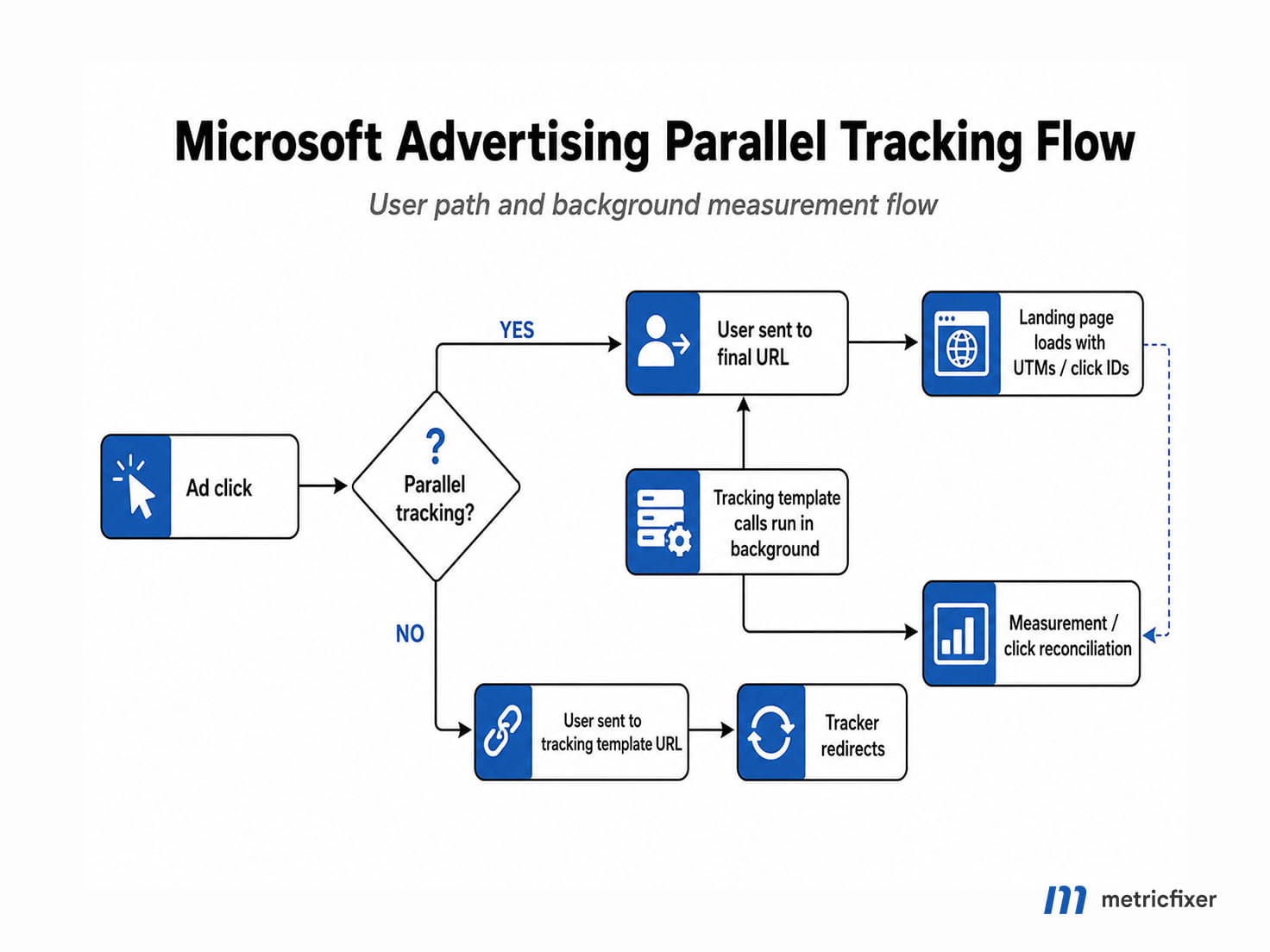
Parallel tracking and msclkid
In a modern Microsoft Advertising setup, advertisers should validate both the final landing page and the tracking URL construction. A template can look correct as a string but still lose parameters during redirects, server routing, consent processing, CDN rewrites, or browser-level measurement calls.
The most important identifier to preserve is msclkid. If Microsoft auto-tagging or click ID measurement is enabled, the website, tracker, CDN, consent tool, redirect service, and checkout or payment flow should preserve this parameter. Manual UTMs are helpful for analytics readability, but they are not a substitute for a platform click ID used for Microsoft-native attribution, conversion matching, troubleshooting, and reconciliation workflows.
Test msclkid preservation with real click URLs, not only with template previews. Pay particular attention to HTTP-to-HTTPS redirects, trailing-slash redirects, language or country redirects, consent banners, single-page app routing, cross-domain checkout, and payment gateways.
Recommended UTM mapping for Microsoft Advertising
The goal of UTM tagging is not to expose every available Microsoft parameter. The goal is to keep analytics reports consistent and useful. Put stable acquisition dimensions in standard UTM fields and detailed Microsoft Advertising context in custom diagnostic fields.
| Analytics field | Recommended value | Why it works | Notes |
|---|---|---|---|
utm_source | bing for standard paid-search-style reporting; microsoft_ads only if your channel taxonomy supports it. | bing / cpc is widely recognized in analytics tools. microsoft_ads can be cleaner for cross-network Microsoft inventory if mapped correctly. | Do not put {Network} directly into utm_source unless you intentionally want source fragmentation. |
utm_medium | cpc for search and shopping; a controlled value such as paid_native only if your channel grouping supports it. | Stable medium values prevent default-channel fragmentation. | Decide whether Audience Network traffic should be classified as paid search, display, native, paid social, or another custom channel before launch. |
utm_campaign | {Campaign} if names are governed; otherwise a custom slug such as {_campaign} or an ID-based fallback. | Readable for business users. | Campaign renames can fragment reporting. Use a custom parameter only if it is defined. |
utm_id | {CampaignId} | Stable campaign ID for GA4, cost-data joins, CRM attribution, and BI models. | This is the safest field for joining Microsoft Ads cost data to analytics sessions. |
utm_term | {keyword:na} for keyword-based Search only. | Maps to paid keyword reporting where keyword matching applies. | Do not make utm_term mandatory across Shopping, Audience, DSA, or Performance Max traffic. |
utm_content | ad_{AdId}, assetgroup_{AdGroupId}, or a controlled creative slug. | Ad or asset-group discriminator for creative reporting. | Use native IDs for stability and custom slugs only when they are maintained. |
| Custom diagnostics | msads_campaign_id, msads_adgroup_id, msads_ad_id, msads_target_id, msads_matchtype, msads_bidmatchtype, msads_network, msads_device, msads_product_id, msads_query | Preserves click context without overloading GA4 standard UTM fields. | Keep names lowercase and consistent. Avoid passing sensitive or unnecessary user-level data. |
A practical Search-focused final URL suffix can look like this:
utm_source=bing&utm_medium=cpc&utm_campaign={Campaign}&utm_id={CampaignId}&utm_term={keyword:na}&utm_content=ad_{AdId}&msads_campaign_id={CampaignId}&msads_adgroup_id={AdGroupId}&msads_ad_id={AdId}&msads_target_id={TargetId}&msads_matchtype={MatchType}&msads_bidmatchtype={BidMatchType}&msads_network={Network}&msads_device={Device}If you use Microsoft automatic UTM tagging or another tracking automation layer, check how it interacts with your manual template. Do not let two systems write conflicting values for the same UTM fields. For enterprise reporting, a deliberate manual taxonomy is often safer than a partially automatic and partially manual mix.
Microsoft dynamic parameter reference for practical tracking
Microsoft Advertising exposes a broad set of dynamic parameters, including both IDs and names. The table below focuses on parameters that are useful for tracking templates, final URLs, final URL suffixes, custom parameters, analytics, and click diagnostics.
| Parameter | Meaning | Best use | Important caveat |
|---|---|---|---|
{CampaignId} | Campaign ID. | utm_id, stable campaign joins, cost-data joins, offline conversion imports, CRM attribution. | Prefer over names for automation and BI joins. |
{Campaign} | Campaign name. | Readable utm_campaign when naming governance is strong. | Renames can fragment reporting. |
{AdGroupId} | Ad group ID. | Ad-group joins; also used for asset group ID in Performance Max contexts. | For PMax, use {AdGroupId} and {AdGroup} when asset-group values are needed. |
{AdGroup} | Ad group name. | Readable ad group or asset group label. | Vulnerable to renames. |
{AdId} | Displayed ad ID. | utm_content or auxiliary creative ID field. | It returns an ID, not the creative text. |
{keyword:default} | Matched keyword with a required fallback. | utm_term for keyword-based Search. | Use a URL-safe default such as na. Do not depend on it outside keyword inventory. |
{TargetId} | Triggering keyword, audience, dynamic target, product partition, or targeted location ID. | Fallback key for mixed targeting, DSA, audience, and product contexts. | Can contain multiple IDs in one value. |
{MatchType} | Delivered match type. | Search diagnostics and query-intent analysis. | Can differ from {BidMatchType}. |
{BidMatchType} | Bidded match type. | Broad-match expansion, intent analysis, and bidding diagnostics. | Use together with {MatchType}. |
{Network} | Network served on. | Search, syndicated, and audience placement reporting. | Do not place directly into utm_source unless fragmentation is intentional. |
{Device} | Device code such as mobile, tablet, or computer. | Device QA and conversion analysis. | Map short codes to readable labels downstream if needed. |
{IfMobile:string} / {IfNotMobile:string} | Conditional device text. | Simple device labels or routing flags. | Inserted text must be URL-safe. |
{IfSearch:string} | Conditional search text. | Search placement labeling. | Use only where search placement context exists. |
{IfNative:string} | Conditional native or Audience ad text where supported. | Audience Network classification. | Test in the exact campaign type and inventory. |
{IfPLA:string} | Conditional product ad text. | Shopping classification. | Useful when product context matters. |
{msclkid} | Microsoft click ID. | Explicit click-ID capture or troubleshooting. | Usually preserve auto-tagging instead of manually inserting it everywhere. |
{QueryString} | User search query text where available. | Server logs and advanced analysis where policy and privacy rules allow it. | High-cardinality and privacy-sensitive. Do not place raw queries in strategic UTM fields. |
{OrderItemId} | Keyword ID or Shopping product group ID. | Keyword and Shopping joins. | Meaning changes by campaign type. |
{CriterionId} | Criterion or product-group identifier where available. | Target-level or product-group diagnostics. | Support and meaning vary by targeting context. |
{param1:default}, {param2:default}, {param3:default} | Keyword-level dynamic text values. | Legacy or specialized keyword-level customization. | Require defaults; avoid using them as the core tracking taxonomy. |
{copy:queryparameter} | Copies a query parameter in legacy destination URL contexts. | Legacy extension scenarios. | Microsoft states it does not work with final URLs. |
{feeditemid} | Clicked ad extension ID. | Extension click diagnostics. | Auxiliary field only. |
{loc_physical_ms} / {loc_interest_ms} | Physical or interest location code. | Geo QA and regional reporting. | Uses Microsoft location codes. |
{lpurl} | Landing-page URL placeholder. | Default landing-page insertion parameter in tracking templates. | Do not use in final URL suffix. |
{lpurl+2} / {lpurl+3} | Double- or triple-escaped landing-page URL placeholder. | Redirect chains that require repeated escaping. | Use only when the tracker explicitly needs it. |
{unescapedlpurl} | Unescaped landing-page URL placeholder. | Specific trackers that expect a raw landing-page URL. | Can break query strings if used with the wrong tracker. |
{escapedlpurl} | Escaped landing-page URL placeholder. | Passing the landing page as a tracker parameter value. | Do not use in final URL suffix. |
{ignore} | Tracking-only marker for final URL use cases. | Reducing crawl load from final URL tracking elements. | Only for final URLs, not final URL suffixes. |
Shopping, lodging, and specialized parameters
Shopping, lodging, app, Audience, and automated campaign formats often need different tracking logic from keyword Search. Keep these values in auxiliary diagnostic fields unless your analytics taxonomy intentionally promotes them to standard campaign dimensions.
| Parameter group | Examples | Best use | Caveat |
|---|---|---|---|
| Shopping | {CriterionId}, {OrderItemId}, {ProductId}, {product_channel}, {product_country}, {product_language}, {seller_name} | Product, feed, product-group, and Merchant Center diagnostics. | Do not build Shopping reporting around {keyword:default}. |
| Audience / native | {Network}, {IfNative:string}, {Device}, {AdId} | Audience placement classification and creative diagnostics. | Decide GA4 channel grouping before launch. |
| Performance Max | {CampaignId}, {Campaign}, {AdGroupId}, {AdGroup}, {Device}, custom asset-group parameters where defined. | Campaign and asset-group reporting. | Microsoft does not expose separate asset-group-specific parameter names; use ad group macros for asset group ID/name. |
| Lodging | {hotelcenter_id}, {property_id}, {hotel_partition_id}, {hotel_adtype}, {advanced_booking_window}, {price_displayed_total}, {user_currency} | Hotel and travel-specific reporting. | Use only in lodging contexts and test each template. |
| Extensions | {feeditemid}, extension-level final URLs, extension-level templates, custom parameters. | Sitelink, action, price, and other extension diagnostics. | Check extension-level overrides when troubleshooting. |
| App install campaigns | App store URLs, mobile measurement partner parameters, deep-link parameters, Microsoft click IDs. | Install attribution and app campaign diagnostics. | Coordinate with the MMP and deep-linking setup; website-style UTMs may not capture install attribution correctly. |
Compatibility by Microsoft Advertising campaign type
| Campaign or format | Useful parameters | Template level | Practical warning |
|---|---|---|---|
| Search | {CampaignId}, {Campaign}, {AdGroupId}, {AdGroup}, {AdId}, {keyword:na}, {MatchType}, {BidMatchType}, {Device}, {Network}, {TargetId}. | Account, campaign, ad group, ad, keyword, sitelink. | Best-documented and safest baseline use case. |
| Responsive Search Ads | Same practical set as Search, especially campaign, ad group, ad, keyword, match type, network, and device values. | Ad-level and inherited URL options. | Use URL testing to confirm inherited levels. |
| Dynamic Search Ads | {CampaignId}, {AdGroupId}, {AdId}, {TargetId}, {Device}, {Network}, landing-page placeholders. | Search hierarchy and dynamic targets. | Do not assume a normal keyword value exists for every click. Use target IDs as fallback keys. |
| Microsoft Shopping / Product Ads | {OrderItemId}, {CriterionId}, {ProductId}, {product_channel}, {product_country}, {product_language}, {seller_name}. | Account, campaign, ad group, product group. | Keep product diagnostics outside core UTMs. |
| Performance Max | {CampaignId}, {Campaign}, {AdGroupId}, {AdGroup}, {Device}, custom asset-group taxonomy where defined. | Campaign and asset group. | Use {AdGroupId} and {AdGroup} for asset group ID/name. Do not assume classic keyword diagnostics explain automated delivery. |
| Audience ads / native | {CampaignId}, {AdGroupId}, {AdId}, {Network}, {IfNative:string}, {Device}. | Audience-capable entities. | Do not force native traffic into keyword-oriented reports unless it is an intentional channel decision. |
| Multimedia ads | {CampaignId}, {AdGroupId}, {AdId}, {Device}, {Network}. | Ad-level and inherited URL options. | Do not assume keyword values are meaningful. |
| Lodging | Lodging-specific macros such as {property_id}, {hotelcenter_id}, {hotel_adtype}, {price_displayed_total}, and {user_currency}. | Lodging entities. | Specialized travel reporting only. |
| App install campaigns | Microsoft click IDs, app attribution partner parameters, store URLs, and deep-linking parameters. | Campaign and app-specific URL setup. | Do not assume website UTM behavior captures install attribution correctly. |
| Sitelinks and extensions | {feeditemid}, extension-level final URLs, custom parameters, and legacy {copy:queryparameter} where applicable. | Sitelink and extension URL options. | {copy:queryparameter} is a legacy destination URL behavior and does not work with final URLs. |
Ready-to-use Microsoft Advertising templates
The following examples are intentionally conservative. They keep default UTMs stable and put Microsoft-specific click context into custom diagnostic parameters. Use them as starting points and test them in the exact account and campaign type before deploying at scale.
Search-focused final URL suffix
utm_source=bing&utm_medium=cpc&utm_campaign={Campaign}&utm_id={CampaignId}&utm_term={keyword:na}&utm_content=ad_{AdId}&msads_campaign_id={CampaignId}&msads_adgroup_id={AdGroupId}&msads_ad_id={AdId}&msads_target_id={TargetId}&msads_matchtype={MatchType}&msads_bidmatchtype={BidMatchType}&msads_network={Network}&msads_device={Device}Use when: the campaign is keyword-based Search and you want standard bing / cpc reporting. Change when: the same suffix is inherited by Audience, Performance Max, Shopping, or DSA campaigns.
Cross-network Microsoft Ads final URL suffix
utm_source=microsoft_ads&utm_medium=cpc&utm_campaign={Campaign}&utm_id={CampaignId}&utm_content=ad_{AdId}&msads_campaign_id={CampaignId}&msads_adgroup_id={AdGroupId}&msads_ad_id={AdId}&msads_target_id={TargetId}&msads_network={Network}&msads_native={IfNative:native}&msads_device={Device}Use when: your analytics team has a custom channel grouping for Microsoft Advertising across search, native, and automated inventory. Do not use blindly: utm_source=microsoft_ads may require GA4 channel-grouping customization if your reports expect bing / cpc.
Performance Max final URL suffix
utm_source=microsoft_ads&utm_medium=cpc&utm_campaign={Campaign}&utm_id={CampaignId}&utm_content=assetgroup_{AdGroupId}&msads_campaign_id={CampaignId}&msads_assetgroup_id={AdGroupId}&msads_assetgroup_name={AdGroup}&msads_device={Device}Use when: you need stable campaign and asset-group reporting for Microsoft Performance Max. Important: Microsoft uses {AdGroupId} and {AdGroup} for asset group ID/name values in this context.
Shopping final URL suffix
utm_source=bing&utm_medium=cpc&utm_campaign={Campaign}&utm_id={CampaignId}&utm_content=product_{ProductId}&msads_campaign_id={CampaignId}&msads_adgroup_id={AdGroupId}&msads_product_id={ProductId}&msads_product_group_id={CriterionId}&msads_order_item_id={OrderItemId}&msads_product_channel={product_channel}&msads_product_country={product_country}&msads_product_language={product_language}Use when: Shopping product and product-group diagnostics matter. Change when: product IDs are too high-cardinality for your analytics property or you prefer to process product-level attribution in server logs or BI.
Audience classification final URL suffix
utm_source=microsoft_ads&utm_medium=paid_native&utm_campaign={Campaign}&utm_id={CampaignId}&utm_content=ad_{AdId}&msads_campaign_id={CampaignId}&msads_adgroup_id={AdGroupId}&msads_ad_id={AdId}&msads_network={Network}&msads_native={IfNative:native}&msads_device={Device}Use when: your GA4 setup intentionally separates Microsoft Audience or native inventory from paid search. Do not use blindly: this requires channel-grouping alignment.
Third-party click-tracker template
https://tracker.example.com/click?platform=microsoft_ads&cid={CampaignId}&agid={AdGroupId}&adid={AdId}&target={TargetId}&match={MatchType}&device={Device}&network={Network}&url={lpurl}Use when: a tracker must receive the landing page URL as a parameter. Confirm whether the provider expects {lpurl}, {escapedlpurl}, {unescapedlpurl}, {lpurl+2}, or {lpurl+3}. Use HTTPS and test redirects with real final URLs that already contain query strings.
Best practices and implementation tips
- Choose the source strategy before launch. For standard paid-search reporting,
utm_source=bingandutm_medium=cpcare usually easiest. For cross-network Microsoft Advertising reporting,utm_source=microsoft_adscan be cleaner but may require custom GA4 channel grouping. - Use IDs and names together. Microsoft exposes
{Campaign}and{AdGroup}, but IDs such as{CampaignId}and{AdGroupId}are safer for joins. - Use
utm_id={CampaignId}as the stable join key. Campaign names change. IDs are better for joining click sessions, CRM leads, cost data, and offline conversions. - Do not overload
utm_term. Use it for{keyword:na}in keyword Search. For Audience, Shopping, DSA, and Performance Max, use custom diagnostics instead. - Pair
{MatchType}with{BidMatchType}. This is one of Microsoft’s most useful diagnostics for delivered intent versus bidded intent. - Keep final URL suffixes suffix-only. Do not insert
{lpurl}into a final URL suffix. If you need a tracker URL, use a tracking template. - Watch the 2,048-character limit. Long UTM names, too many custom fields, readable campaign names, and escaped landing-page URLs can push templates over the limit.
- Make custom parameters boring and documented. Use lowercase names such as
{_campaign},{_region}, and{_assetgroup}. Keep a spreadsheet or taxonomy file showing where each one is defined. - Preserve
msclkid. Many websites, redirect services, CMS plugins, CDNs, and security tools strip unknown query parameters. Make sure Microsoft click IDs survive the full landing-page path. - Do not pass personal data in URLs. Search queries, user IDs, emails, phone numbers, and lead data can leak into logs and third-party systems if placed in URLs. Use server-side or CRM-side attribution for sensitive data.
- Separate campaign-type templates. One universal account-level suffix can work, but it should not require keyword values for non-keyword campaign types.
- Audit lower-level overrides. If tracking looks inconsistent, check keyword, ad, sitelink, extension, product-group, and asset-group URL options before assuming the account-level template is wrong.
Troubleshooting checklist
| Symptom | Likely cause | How to fix |
|---|---|---|
The landing page URL contains literal {_campaign}, {_assetgroup}, or another custom parameter. | The custom parameter was referenced but not defined at the serving level. | Define it at campaign, ad group, keyword, ad, sitelink, asset-group, or other relevant level, or replace it with a native parameter or static fallback. |
| Final URL suffix is rejected. | The suffix starts with ?, &, or #, or contains {lpurl}, {escapedlpurl}, {ignore}, or another final URL placeholder. | Remove the leading separator and move landing-page placeholders into a tracking template. |
| Template is rejected for length. | Tracking template or final URL exceeds the 2,048-character limit. | Shorten parameter names, remove unnecessary diagnostics, avoid very long readable values, and reduce redirect-chain complexity. |
| Clicks route to the tracker but not to the landing page. | Tracking template does not include a supported landing-page URL tag, or the tracker expects a different escaping format. | Add {lpurl}, {escapedlpurl}, {unescapedlpurl}, or an advanced escaped variant according to the tracker’s requirements. |
| GA4 shows Microsoft traffic under unexpected channels. | Source/medium values do not match the property’s channel grouping. | Use bing / cpc for default paid-search-style reporting, or create custom channel rules for microsoft_ads, Audience, native, and PMax traffic. |
utm_term is blank or unhelpful. | The click came from non-keyword traffic such as Audience, Shopping, DSA, or Performance Max. | Use campaign, ad, product, asset-group, network, device, and target diagnostics instead of requiring a keyword. |
msclkid disappears before conversion. | Redirects, URL cleaners, CMS plugins, consent tools, payment flows, or cross-domain navigation remove unknown query parameters. | Allow Microsoft click identifiers and preserve query strings across redirects and cross-domain flows. |
| Only some ads show old tracking values. | Lower-level URL options override the account or campaign template. | Inspect keyword, ad, sitelink, extension, product-group, and asset-group URL options and remove stale overrides. |
| The resolved URL contains duplicate UTM parameters. | Manual UTMs, automatic UTM tagging, final URL parameters, and final URL suffixes are writing the same keys. | Choose one owner for each standard UTM field and remove duplicates from final URLs or suffixes. |
| Analytics reports are too fragmented. | Dynamic high-cardinality values such as query strings, product IDs, or raw names were placed into strategic UTM fields. | Keep strategic UTM fields stable and move high-cardinality diagnostics to auxiliary fields, server logs, or BI tables. |
Implementation checklist
- [ ] Decide whether analytics should see Microsoft traffic as
bing / cpcormicrosoft_ads / cpc, and configure GA4 channel grouping accordingly. - [ ] Use
utm_id={CampaignId}for the stable campaign join key. - [ ] Use
utm_content=ad_{AdId},assetgroup_{AdGroupId}, or another controlled creative discriminator. - [ ] Use
utm_term={keyword:na}only where keyword matching is expected. - [ ] Put network, device, match type, bid match type, ad group, target, product, and asset-group context in custom fields, not in core source or medium fields.
- [ ] Keep ordinary UTMs in the final URL suffix when no redirect is needed.
- [ ] Use a tracking template only when a tracker or redirect must wrap the landing page through
{lpurl}or an escaped variant. - [ ] Verify that custom parameters are defined at the correct level and do not exceed entity limits.
- [ ] Check for lower-level overrides before launch and whenever tracking looks inconsistent.
- [ ] Test final URLs, mobile URLs, existing query strings, redirects,
msclkidpreservation, cross-domain flows, and analytics ingestion before applying templates across the account. - [ ] Document which template or suffix is used by Search, Shopping, Audience, Performance Max, DSA, lodging, app, and extension traffic.
Migration checklist from manual UTMs to dynamic templates
- Export existing final URLs and identify all manually written UTM values.
- Decide which values should remain readable labels and which should become immutable IDs.
- Choose a source and medium strategy before changing templates.
- Move shared logic to an account-level or campaign-level final URL suffix where possible.
- Use
{Campaign}only if campaign names are governed; otherwise create a custom campaign slug or use an ID-based fallback. - Add
{CampaignId},{AdGroupId},{TargetId}, and{AdId}as separate machine fields. - Build separate overrides for Search, Shopping, Performance Max, Audience, DSA, lodging, app, and extension use cases where needed.
- Run Microsoft’s URL test tools or preview flows and inspect the inherited template source.
- Click through test ads or controlled preview URLs and verify that
msclkidand UTMs survive redirects. - Compare the new and old reporting classification for one full reporting cycle before retiring the old scheme.
SEO and crawl implications of tracking parameters
Microsoft Ads UTMs, msclkid, and custom tracking parameters should be treated as non-canonical tracking data. Landing pages should output canonical tags to clean URLs, not to URLs decorated with paid-click parameters. Internal links and XML sitemaps should use clean URLs. This prevents paid-click URL variants from becoming unnecessary crawl and indexing noise.
If your site creates indexable landing-page variants based on query parameters, configure canonicalization, parameter handling, and internal linking carefully. Tracking parameters should help analytics; they should not create duplicate content, inflate crawl volume, or pollute organic landing-page reports.
Methodology and sources
This article is based on a practical review of Microsoft Advertising documentation for URL tracking with Upgraded URLs, tracking templates, final URLs, final URL suffixes, custom parameters, entity hierarchy and limits, asset-group URL fields, dynamic URL parameters, Microsoft Shopping and lodging parameters, and Google Analytics documentation for UTM parameters and traffic-source dimensions. Because Microsoft Advertising interfaces, campaign types, API fields, and parameter support may change, the live Help Center and Microsoft Learn pages should be treated as the final pre-launch reference for production deployments.
- Microsoft Learn: What tracking or URL parameters can I use?
- Microsoft Learn: URL Tracking with Upgraded URLs
- Microsoft Learn: Entity Limits
- Microsoft Advertising API: AssetGroup data object
- Microsoft Advertising API: Asset Group bulk record
- Microsoft Advertising Help: What tracking or URL parameters can I use?
- Microsoft Advertising Help: How do I create an account tracking template?
- Microsoft Advertising Help: Can I use custom parameters?
- Microsoft Advertising Help: Using a final URL suffix
- Google Analytics Help: URL builders and UTM parameters
- Google Analytics Help: Traffic-source dimensions, manual tagging, and auto-tagging
- Google Search Central: URL structure best practices
- Google Search Central: Specify a canonical URL
This article is for technical and operational information only. metricfixer is not affiliated with Microsoft, Microsoft Advertising, Bing, Google, Google Analytics, or any third-party click-measurement provider mentioned or implied in the examples. Microsoft Advertising interface labels, dynamic parameter support, campaign-type behavior, API fields, analytics dimensions, auto-tagging behavior, and conversion-tracking requirements may change after publication. Always test tracking templates in the relevant account and campaign type before deploying them at scale.