
Published Oct 4, 2026
TikTok Ads Manager Login Recovery: What to Do When 2FA Blocks Password Reset
An accepted email code does not always complete a TikTok Ads Manager password reset. Learn how to check existing login routes, recover a saved verification factor, escalate a blocked support path, and protect advertising operations without confusing team access with personal account recovery.
Category: Online advertising · By metricfixer Expert Team
When TikTok Ads Manager rejects a password and then blocks the reset because 2-step verification is enabled, another reset email may not solve the problem. This guide explains how to identify the missing step, use any legitimate access that remains, contact business support, and keep advertising operations separate from the recovery of one person's login.
Practical starting point: preserve any trusted session you still control. Record exactly where the reset stops. Try an already configured alternative only when TikTok offers it, and escalate a persistent 2FA block as an account-recovery issue, not simply as a forgotten password. Never send a helper your password, verification codes, authenticator setup key, or session cookies.
Contents
Executive summary
A successful email check is not necessarily a successful password change, and a successful login is not necessarily access to the correct advertising account. Treat those as separate checkpoints.
The useful recovery options depend on what remains available: your own signed-in session, an existing sign-in method, a registered verification factor, a recoverable authenticator record, or TikTok's ownership-verification process. A colleague's authorized access can help protect business operations, but it should not be confused with recovering your identity.
There is also a genuine gap in the published instructions. TikTok's login troubleshooting guide suggests temporarily disabling 2-step verification for a reset. Its disabling instructions require signing in and entering a password. That advice is not a complete solution when those prerequisites are unavailable.

Why email verification does not finish the reset
The reported scenario investigated here follows this sequence: a previously working password is rejected; the recovery email arrives; its code is accepted; a new password is entered; and the final step refuses the change because 2FA is enabled. The important detail is the last successful step, not how many times the process has been repeated.
Reported reset sequence: email code accepted → new password entered → change rejected at the 2FA-related step → no confirmed password-reset completion.
Do not treat the password you typed into that unsuccessful attempt as the confirmed new credential. Retain the last known working password securely and label the attempted replacement as unconfirmed. Avoid overwriting your only password-manager record before TikTok confirms the change.
TikTok describes 2-step verification as an additional check protecting a TikTok for Business login. In the scenario above, reaching the new-password field does not establish that every required check has passed. Equally, a recovery email code should not be assumed to satisfy a separate authenticator challenge.
This is an interpretation of the visible sequence, not a claim about TikTok's internal authentication code. The message alone cannot establish why the original password stopped working, whether a security setting changed, or whether the failure is a product defect. Check the selected login identity and any legitimate security notifications before deciding what happened.
Why "turn off 2FA first" can be circular
The documented off-switch is an authenticated account-setting change. If you cannot sign in or provide the requested password, repeating that instruction does not supply the missing access. Even a surviving browser session does not guarantee that a sensitive settings change will be allowed.
The practical next question is therefore: Can any existing, authorized route complete the required checks? If not, move to recovery support. Do not weaken organization-wide security settings or assume that changing a Business Center policy resets an individual user's factor.
What the public evidence establishes
The documentation supports a recovery framework, but it does not justify calling every failed reset the same known bug. The sources reviewed establish the following:
| Evidence | What it supports | What it does not prove |
|---|---|---|
| June 2026 setup documentation | TikTok lists SMS, email, and authenticator methods and recommends configuring more than one. See the setup instructions. | That a new recovery feature launched in June, that all three methods are mandatory, or that the reset loop was fixed. |
| Published support routes | The business support guide distinguishes signed-in assistance from a contact form for login problems. | That every visitor can submit the form successfully, or that recovery has a guaranteed completion time. |
| A dated, firsthand authenticator incident | A 1Password Community discussion from April 2022 includes the affected user's follow-up and a specific resolution. | A current TikTok-wide fault, a success rate for support, or independent confirmation of the exact email-to-password reset sequence. |
That forum case is useful precisely because it has an outcome. The advertiser initially could not find the one-time-password entry after enabling 2FA for TikTok Ads. On April 22, 2022, the author reported finding it in a deleted password-manager item associated with another account. The factor had been saved in the wrong place; TikTok support had not bypassed it.
The lesson is narrow but practical: investigate your own saved authenticator records before concluding that the factor is gone. It is not evidence that every missing code can be recovered, or that the current reset problem has the same cause.
Identify the login and preserve remaining access
Start by writing down the sign-in identity, the Business Center ID, and the advertiser account ID. These identify different things. A TikTok profile name or an agency's display name is not enough to distinguish several similarly named business assets.
TikTok's User Settings documentation covers sign-in information for TikTok for Business, including Ads Manager and Business Center. Separately, TikTok documents using a linked TikTok account to sign in. A consumer-app password reset is not automatically a reset of a separately registered business login.
Use the route that originally accessed the business. If an alternative sign-in opens a new-account setup screen instead of the expected assets, stop and verify the identity. Do not create another advertiser account simply to get past onboarding.
Preserve useful access without preserving a suspected compromise
On a trusted device you control, keep any working business session available while you record account identifiers and support information. Perform browser experiments in a separate profile or another approved device, not by erasing the only useful session. A saved session is a temporary opportunity to inspect or request help, not a substitute for a recoverable login.
Unknown contact details, unexplained administrator changes, or advertising you did not authorize deserve a different response. TikTok's account-security guidance directs suspected compromises to support or the assigned account manager immediately. Secure the associated mailbox and involve your security owner. Do not keep a suspected attacker session active merely to preserve convenience.
Choose your recovery route
The following is an editorial decision guide. It does not promise that every listed route is available to every account.
| Your situation | Next action | Important boundary |
|---|---|---|
| Your own trusted session still works | Record the identity and asset IDs; inspect supported settings or open support. | A settings change may demand fresh verification. |
| An existing sign-in method is available | Try that offered method and complete any additional checks. | It must lead to the same business identity. |
| A registered 2FA alternative is accessible | Select it when the challenge offers a choice. | Receiving a factor does not itself replace the missing password. |
| The authenticator entry appears missing | Check the correct app account, vault, archived items, and recoverable deleted items. | Only a previously saved, still-valid record can help. |
| Email succeeds but the reset still fails at 2FA | Capture the sequence and request business-login recovery. | Do not describe it merely as an email delivery problem. |
| Login works, but the advertiser account is missing | Ask the authorized Business Center administrator to check assignments. | This is an access-permission investigation, not necessarily a password problem. |
| No route works and nobody else has access | Use official recovery channels and document any blocked contact route. | No verified self-service shortcut was established in this review. |
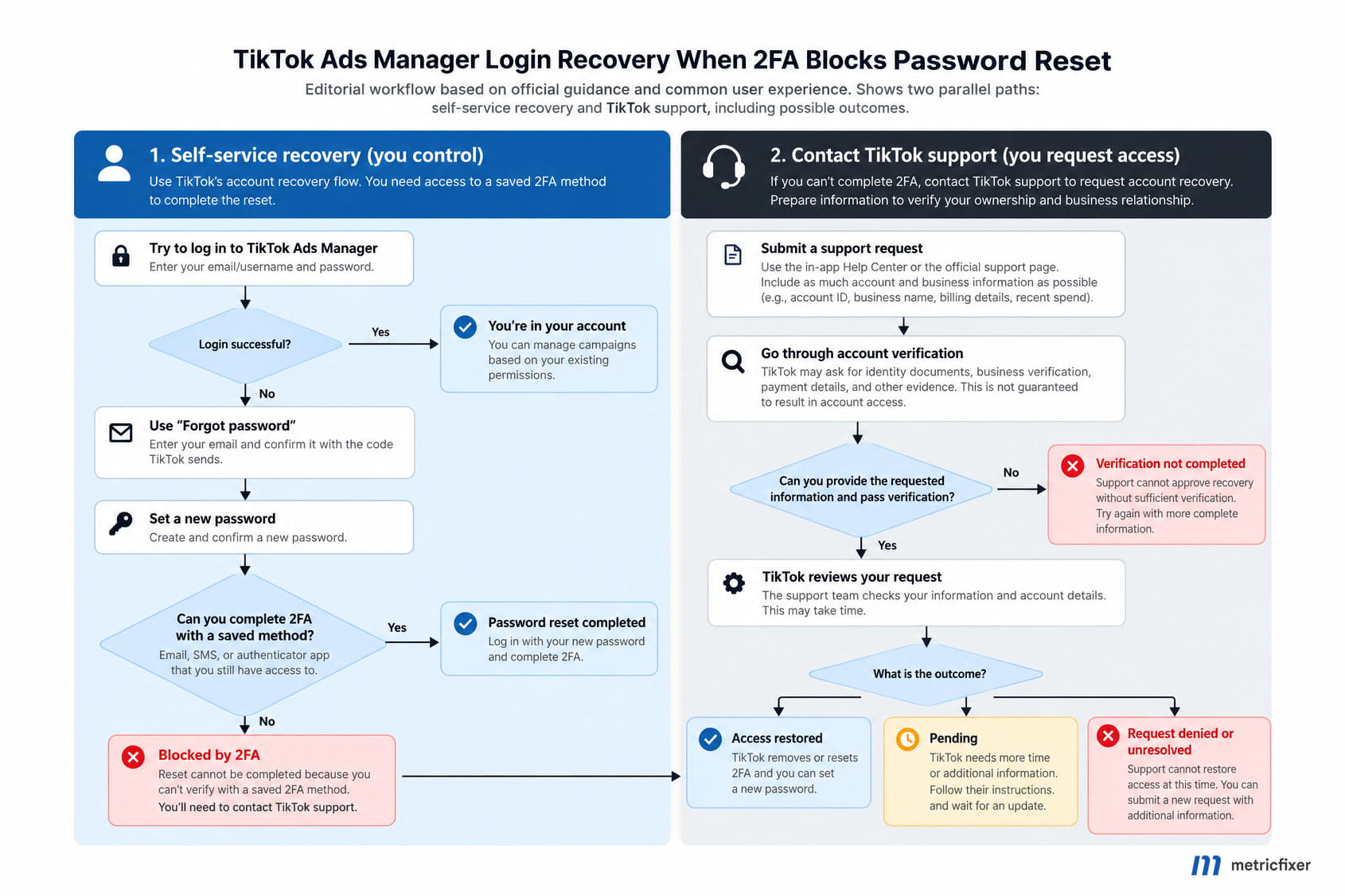
Figure 1. Recover the login; protect advertising separately.
When a registered method still works
Use an existing sign-in route, not a newly invented fallback
TikTok's 2-step login guide describes entering an email address or phone number with a password or SMS code, followed by the configured verification step. Where the interface offers an applicable SMS sign-in route, it is worth checking before repeating a blocked password reset. It does not remove any additional check TikTok requires.
A previously linked TikTok sign-in may also be relevant. Use only the account already associated with the business login. Do not unlink a functioning connection, attach an unrelated profile, or interpret a new empty business account as successful recovery.
A signed-in password change is a separate route
For users who can still reach their own settings, TikTok documents Personal Info → Password → Change, followed by email or phone verification and submission of a new password. This is described in its password-change instructions. It is worth distinguishing from the logged-out reset flow, but the documentation does not guarantee that it resolves this 2FA block.
Stop if an unavailable factor or the same rejection reappears. Also avoid assuming that contact details can always be replaced from an open session: the same settings guide requires verification of the current email or phone when changing those details.
Check the factor itself
For email and SMS delivery, follow TikTok's identity-verification troubleshooting: check the registered destination and filtered folders, including unknown-sender text messages. An inbox that receives ordinary business mail is not proof that it is the destination registered for this particular login.
For Google Authenticator, check the service, account entry, code expiry, and device time. Google's current Authenticator guidance states that version 7.0 uses the operating system's time setting; old instructions to use an in-app time-correction menu are no longer applicable. Also check which Google account holds the saved codes. Existing synchronization or an old device may help; a fresh installation cannot be assumed to contain an unsaved record.
For a password manager, inspect the actual vault rather than relying only on browser autofill. 1Password documents both previous item versions and archived and recently deleted items. Archived items do not appear in ordinary search results; deleted items normally remain recoverable for 30 days unless permanently deleted earlier. That is a 1Password retention rule, not a TikTok recovery deadline.
Check only records you are authorized to access. Never upload an authenticator setup key or QR code to an online "recovery" or code-generation website. Finding a stored secret helps only if it still matches the account's active configuration.
Separate a temporary retry restriction from the reset loop
For the specific Maximum attempts reached error, TikTok says to wait at least one hour before requesting another code and contact support if the restriction persists after 24 hours. This appears in its login troubleshooting guidance. Those timings are not a recovery-service promise or a remedy for every 2FA rejection.
Browser or network tests are appropriate when the page fails to load or reports a network error. Use an approved environment and involve IT before changing corporate security controls. A different browser cannot supply a missing factor, and repeatedly requesting codes is not evidence of progress.
When support is necessary
Escalate when the required checks cannot be completed, or when a correctly identified reset keeps ending at the same 2FA rejection. Ask for the official recovery and ownership-verification procedure for the existing TikTok for Business login, rather than asking an agent to bypass security.
When a legitimate session is available
TikTok documents opening Ad Assistant in Ads Manager, Business Center, or the Business Help Center, then choosing Get support or I need more help. Submit the issue under the relevant category; existing requests can be checked through Manage Tickets. These are the published business-support instructions.
An already authorized colleague may help open a case from their own access. Identify them as the reporter and clearly identify the affected user. Do not pretend that the colleague is the locked-out account holder.
When you cannot sign in
The same official guide points users with login problems to a Feedback and Help contact form. Start from the support guide if the destination changes.
Important limitation: following that link during this review returned a login page in the research browser. No form submission was tested. This observation does not establish that the form fails for every region, device, or ordinary browser session.
If that happens to you, record the redirect as a second problem: both account recovery and the advertised contact route are blocked. Try a separate approved browser once, without destroying an existing trusted session. Then use an already authorized business contact or an established TikTok account manager, where available. Do not register replacement ad accounts solely to unlock a support widget.
TikTok's verification guidance explicitly directs users without their registered contact methods to an account manager or a help form. Its account-linking troubleshooting page also describes verifying ownership before support can bind a contact method for password recovery. That establishes a support-assisted path, not a promise to remove 2FA or approve every request.
If there is no working contact form, no authorized colleague, and no existing account manager, this review cannot supply a verified additional self-service route. Keep the evidence and use TikTok's published contact guidance rather than trusting unofficial recovery agents. No guaranteed response or restoration time was established.
Prepare your recovery request
A useful request distinguishes the working part from the failed part. "The email code arrives and is accepted; saving the new password is rejected because of 2FA" is more actionable than "I cannot log in." Copy the exact error from your own screen rather than borrowing wording from a forum.
Include the affected login, advertiser and Business Center IDs where known, the last successful access, the time and time zone of the failed attempt, and which registered methods remain accessible. State "unknown" when necessary. Do not invent a signup date or another detail to make the request look complete.
For the specific case of losing both email and phone access, TikTok's published evidence list includes the previous email, business/ad account ID, signup date, last login location, and a new email not previously registered. Do not assume that an accessible existing email must be replaced in every 2FA case.
The following is an editorial template, not a TikTok-required form or a guarantee of approval. Remove lines that do not apply.
Subject: TikTok for Business login recovery - password reset blocked by 2FA

Affected login: [registered email or phone]
Advertiser account ID / Business Center ID: [IDs, or unknown]
Reporter and authority: [owner / authorized employee / authorized agency]
Last successful login: [date, time zone, location if known]
Failed attempt: [date, time, time zone, browser]

Observed sequence:
1. The existing password is rejected.
2. The recovery email code arrives and is accepted.
3. I enter a new password.
4. Saving the change fails with this exact message: [paste error].

Methods still accessible: [email / SMS / authenticator / linked login]
Existing trusted session: [yes / no]
Other authorized administrator: [yes / no / unknown]
Security concerns or unauthorized changes: [describe, or none observed]
Support-link failure, if any: [describe redirect or loading error]
Existing case reference: [reference, if available]

Please provide the ownership-verification and recovery procedure for
this existing business login. The standard reset does not complete.
Please specify the required evidence and the official secure channel.

Attachments: [redacted error screenshot and brief chronology]
Keep a single chronology and reference earlier cases when following up. If a reply sends the same generic reset instructions, explain that those steps were completed and identify the exact point of failure. Ask which additional verification procedure applies; do not repeatedly send an unchanged "please help" message.
Account IDs and invoices can help identify a business relationship, but do not assume they independently prove control of a login. Provide business documents only when requested through an authenticated official channel. Exclude passwords, live codes, authenticator secrets, session cookies, full payment-card details, and unrelated customer records. Have a technical owner sanitize diagnostic logs before sharing them.
Keep campaigns under control
Treat advertising continuity as a parallel task. Assign someone to verify actual campaign status, spending, and unexpected changes. Do not infer that advertising stopped because one employee cannot sign in, or that it must still be running because an old screenshot showed active campaigns.
TikTok separates Business Center roles from account and asset permissions. A person who can view a report may not be able to edit advertising. Check the actual assigned permissions before asking a colleague to pause or change anything; finance functions have their own access requirements.
Where the business has a working administrator, TikTok documents adding a named member and granting access to existing assets. Use those authorized mechanisms and the minimum necessary permissions. A new member invitation is not a transfer of ownership and does not recover another user's password or authenticator.
Business Center's 2-step verification policy can cover administrators or all members. That requirement is separate from an individual's configured factors. Do not interpret the administrator's policy control as a documented personal-2FA reset tool.
For external assistance, follow metricfixer's guide to sharing tracking and analytics access: named access, an agreed scope, and no shared passwords. Avoid replacing pixels, disconnecting integrations, or recreating campaigns as a login-recovery experiment. Where nobody can verify the live account, report that uncertainty explicitly.
After-recovery checklist
Consider recovery complete only after confirming the expected identity and assets, not merely seeing a dashboard. Keep a record of any settings changed during the incident.
- Confirm the destination. Check the original advertiser and Business Center IDs, expected campaigns, and your required permissions. Investigate an empty or unfamiliar account before doing new setup.
- Repair the login safely. Save the confirmed password securely. Add or repair approved verification methods, test them without prematurely discarding working access, and remove obsolete or compromised methods through the supported process.
- Keep more than one usable method. TikTok's June 2026 instructions allow one or more methods and recommend more than one. Ensure the fallback does not depend entirely on the same lost phone or inaccessible mailbox.
- Retain a small, accountable administrator group. TikTok's Business Center security guidance recommends at least two administrators while limiting unnecessary admin access. Use separate named logins under the business's control.
- Review what happened during the lockout. Check members, partners, campaign changes, spending, and relevant billing records using appropriately authorized roles. Escalate unexplained activity rather than assuming a password reset resolves it.
- Check affected integrations and close temporary access. Verify any reporting or measurement connection touched during recovery. Remove temporary permissions after the agreed work, record the final outcome, and update the team's recovery instructions.
Do not assume that TikTok Ads Manager offers every recovery mechanism described for the consumer app or another platform. This review did not establish a universal Ads Manager backup-code download, a fixed authenticator-reset waiting period, or a colleague-operated personal-2FA reset. Use the options actually documented and offered for your login.
For app advertisers, a changed integration owner is a reason to revisit the relevant access and cost-authorization checks in our TikTok app campaign measurement checklist, not a reason to rebuild a working measurement setup. Account recovery and measurement readiness remain separate sign-offs.
The goal is not to remove 2FA. It is to restore an authorized login, preserve the existing business assets, and ensure that the next lost device or unavailable employee does not leave the whole advertising operation without a recovery path.
Methodology and sources
This documentation-based review was completed on October 3, 2026. It prioritizes official TikTok for Business materials on authentication, user settings, support, account security, and Business Center permissions. Google and 1Password documentation is used only for the behavior of their own authenticator or password-manager products. Relevant sources are linked beside the claims they support.
The April 2022 forum case is a firsthand historical report with a specific author-reported outcome and identifiable vendor-employee participation. It is used as a limited troubleshooting example, not as a measure of current prevalence or independent proof of TikTok's backend behavior. The precise forum thread behind the initial email-code/password/2FA report could not be independently retrieved; that sequence is treated as the scenario under investigation, not as a verified widespread incident.
No advertiser account was accessed, no password or factor was changed, and no support request was submitted for this article. The support-link redirect was observed through the research browsing tool, not through a controlled test across ordinary user sessions. No recovery success rate, support service-level commitment, or universal workaround was established.
The decision table, request template, workflow, and operational checklist are editorial recommendations drawn from the documented boundaries. Documentation dates are not treated as feature-launch dates. Actual recovery eligibility, required evidence, security challenges, and interface behavior must be confirmed with TikTok for the affected account.
This article is for technical and operational information only. It is not a service for bypassing authentication, an account-ownership determination, or a guarantee of recovery, uninterrupted advertising, or reimbursement. metricfixer is not affiliated with TikTok, ByteDance, Google, or 1Password. Use only accounts and records you are authorized to access, protect authentication secrets, and follow the platform's current verification process. Documentation, interfaces, and support routes may change after publication.