
Published Aug 27, 2026
YouTube Watch While Ads: How the New Image Format Works During Mobile Playback
YouTube’s Watch While ads place a static, dismissible card beside a mobile video while playback continues. This review explains the official campaign routes, best-fit advertiser use cases, creative requirements, reporting limits, and what remains unclear in the 2026 rollout.
Category: Online advertising · By metricfixer Expert Team
YouTube is adding a static advertising card beside mobile videos while playback continues. Early industry reports described the placement as a beta-style test, but Google’s current help documentation now identifies it as Watch While ads or Watch-While Ads and lists Demand Gen, Performance Max, and App Campaigns for Install as supported campaign routes. This review separates what Google has confirmed from what remains rollout-dependent and explains where the format can make commercial sense for advertisers.
Practical default: treat Watch While as automatic incremental image inventory, not as a standalone campaign type. Use App Campaigns for Install when the objective is app acquisition, Demand Gen when you need the clearest YouTube channel controls and image-ad reporting, and Performance Max only when broad cross-channel conversion optimization is already justified. Do not reallocate meaningful budget until the account can show that YouTube image traffic produces qualified business outcomes.
Executive summary
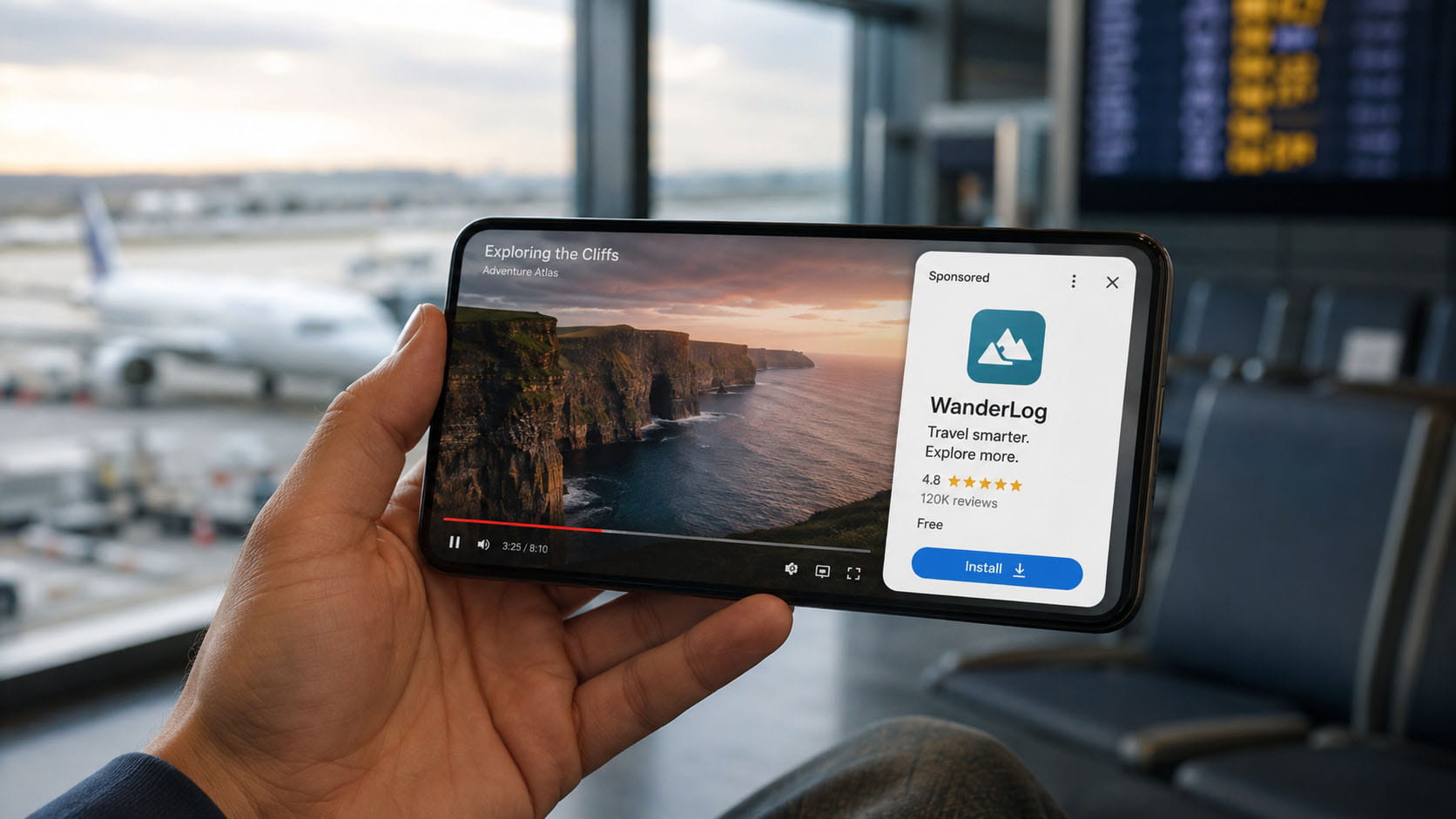
The new experience is easy to recognize: a mobile video continues playing in landscape orientation while a sponsored image-led card occupies a separate panel beside it. The viewer can dismiss the card, and Google says it can disappear automatically after 30 seconds. Unlike a pre-roll or mid-roll video ad, the organic video does not stop. Unlike the retired desktop overlay format, the ad is presented alongside the content rather than as a small banner laid over the picture.
The most important update is the product status. On 6–7 August 2026, PPC News Feed and Search Engine Land reported the experience as an unconfirmed test. Google’s current YouTube advertising-formats documentation now describes Watch While ads as image ads displayed beside a video on mobile without pausing it. Google’s Demand Gen image-format documentation goes further and says the format has launched on the YouTube Watch Page for Demand Gen, Performance Max, and App Campaigns for Install.
This does not mean every advertiser, country, operating-system version, or YouTube app build will receive the same volume immediately. Google has not published a country-by-country rollout list, a dedicated Watch While campaign-creation flow, a separate auction description, a format-specific price model, or a distinct reporting row named Watch While. The safest interpretation is that the format is officially documented inventory that may still be rolling out unevenly and is selected automatically inside supported campaigns.
From an advertiser perspective, the strongest initial use cases are visually clear, action-oriented offers: app installs, travel and activity booking, ecommerce promotions, marketplaces, subscriptions, local booking, food delivery, mobility, fitness, and other services that can be understood from one image, one short value proposition, and one call to action. It is less naturally suited to complex B2B propositions, high-consideration products that need explanation, or pure brand storytelling that depends on sound and motion.
Measurement requires restraint. In Demand Gen, advertisers can segment by network and identify YouTube traffic, then segment by ad format and review Image ads. Google does not currently document a separate Watch While dimension, so those rows can still include other YouTube image inventory. Image ads also do not generate video-view metrics. The primary evaluation should therefore use clicks, conversions, qualified leads, purchases, installs, in-app actions, cost, and conversion value—not view rate or watch time.
What is confirmed, reported, and still unknown
| Question | Best-supported answer as of 27 August 2026 | Status |
|---|---|---|
| Is the format real? | Yes. Google documents image ads that appear alongside a mobile video without pausing playback. | Confirmed |
| What is it called? | YouTube Help uses “Watch While ads”; Google Ads Help also uses “Watch-While Ads.” | Confirmed |
| Is it only a beta? | Early coverage described an unconfirmed test. Current Google Ads Help says the format has launched. Account and market availability may still be staged. | Officially documented; rollout may vary |
| Where does it appear? | On the YouTube Watch Page, beside a video on mobile devices while the video continues playing. | Confirmed |
| Which publisher videos are eligible? | Monetized videos that are not eligible for mid-roll ads: videos between 2 and 8 minutes, plus videos longer than 8 minutes when mid-rolls are turned off. | Confirmed |
| How long can it remain visible? | The viewer can close it at any time; Google says it auto-dismisses after 30 seconds. | Confirmed |
| Which campaign types can supply ads? | Demand Gen, Performance Max, and App Campaigns for Install. | Confirmed |
| Can an advertiser select “Watch While” as a standalone format? | No dedicated campaign type, format switch, or reservation workflow is documented. | Not currently documented |
| Can it be isolated in reporting? | Demand Gen can report YouTube and Image ads, but Google does not document a separate Watch While reporting dimension. | Partially visible, not cleanly isolated |
| Does it appear every three minutes? | That cadence came from early observations. Google has not published a fixed advertiser-facing frequency rule. | Anecdotal, not confirmed |
| Which countries are included? | No public country list was found. The supplied screenshot is localized in Czech, but one observed impression does not establish market-wide availability. | Unknown |
| How is it priced? | No Watch While-specific CPM, CPC, CPV, or auction rule is published. Billing follows the originating campaign’s bidding and charging logic. | No format-specific rule published |
What the supplied screenshot shows
The supplied example shows a workout video continuing on the left while a GetYourGuide card appears on the right. The card includes a localized “Sponsored” label, an image, an app icon, the app name, a 4.8 rating, descriptive copy, a localized download button, a menu, and a close control. The video remains visible and appears to keep its place in the timeline.
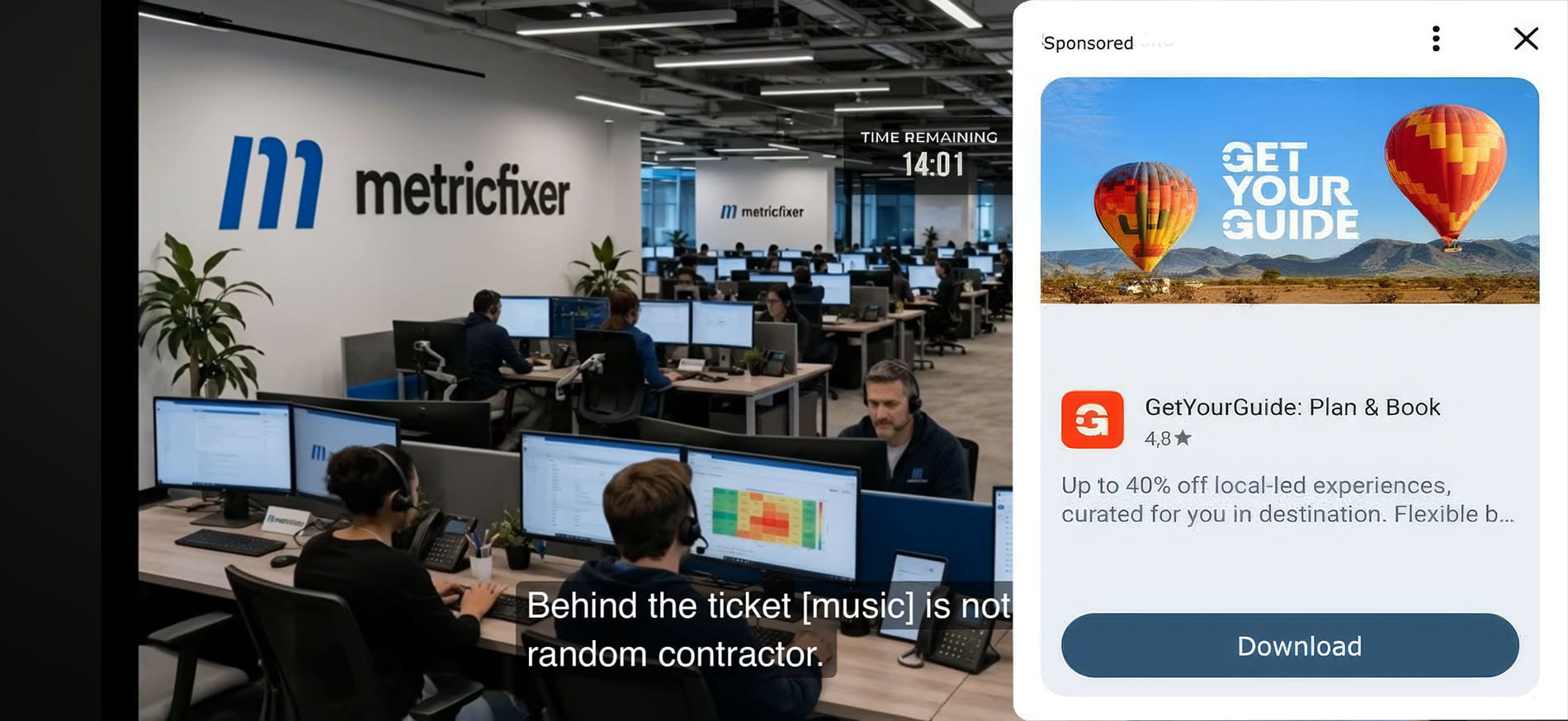
The app icon, rating, app name, and download call to action make App Campaigns for Install the most likely source of this particular impression. That is an informed inference, not something the screenshot can prove by itself. Google’s mobile app install ad documentation says YouTube app-install ads can include app text, an icon, store information, a rating, and a link to the app store—the same basic components visible here.
The example also illustrates an important localization issue. The YouTube interface and the call-to-action button are in Czech, while the advertiser’s promotional copy remains in English. Google’s App campaign specifications warn that advertiser text is not automatically translated. Advertisers should therefore build language-specific asset groups and store listings rather than assuming the complete card will localize itself.
Finally, the ad is for travel while the organic content is a fitness video. This single impression cannot reveal the targeting model, but it is a useful reminder that delivery may be driven by audience, app-install propensity, conversion probability, or other auction signals rather than by a literal match to the video topic. Contextual relevance and audience relevance should be audited separately.
Why YouTube created this inventory
Watch While fills a specific monetization gap. YouTube normally reserves mid-roll ads for videos longer than 8 minutes. Videos between 2 and 8 minutes cannot use mid-rolls, and some creators turn mid-rolls off on longer videos. Google says Watch While ads automatically serve on these mid-roll-ineligible monetized videos. The platform can therefore create an advertising opportunity during active viewing without stopping the content.
The format also expands the usefulness of image assets on YouTube. Historically, the highest-attention part of YouTube pushed many advertisers toward video production. Watch While gives Google a way to use image-led assets from conversion-oriented campaign types inside the Watch Page itself. For smaller advertisers, that lowers the creative barrier. For Google, it adds supply without inserting another conventional commercial break. For viewers, the trade-off is different rather than nonexistent: playback continues, but the video becomes smaller and attention is split.
Delivery workflow: advertiser supplies eligible image, text, logo, product, or app-store assets in Demand Gen, Performance Max, or an App Campaign for Install → Google selects an eligible YouTube Watch Page impression → a monetized video without eligible mid-roll inventory continues playing → the Watch While card appears beside the video → the viewer dismisses it, lets it auto-dismiss, or clicks through → the click and conversion are reported inside the originating campaign rather than in a separate Watch While campaign.
How Watch While differs from other YouTube ad formats
| Format | What happens to the organic video? | Creative | Main device or surface | Buying path | Best use |
|---|---|---|---|---|---|
| Watch While | Playback continues; the ad shares the screen beside the video. | Static image-led card with text, logo, CTA, product or app information. | Mobile YouTube Watch Page. | Automatic inventory in Demand Gen, Performance Max, and App Campaigns for Install. | App installs, direct response, ecommerce, remarketing, simple visual offers. |
| Watch feed / Watch Next ads | The ad appears in the recommendation feed below the player on mobile or next to it on desktop rather than occupying the active landscape playback layout. | Image or video depending on campaign and placement. | Mobile and desktop feeds around the Watch Page. | Supported Google Ads campaign types. | Discovery, consideration, feed-style prospecting. |
| Skippable in-stream | The organic video is replaced before, during, or after playback; the viewer can skip after 5 seconds. | Video, with optional CTA and other interactive assets. | Computer, mobile, TV, and partner inventory. | Video and other eligible campaign types. | Storytelling, demonstrations, brand and performance video. |
| Pause ads | The viewer has already paused the video; the static ad appears after 10 seconds and remains until playback resumes or the ad is dismissed. | Static image plus headline and URL. | Connected TV in selected countries. | Reservation, Premier Reach, YouTube Select. | Broad reach and high-visibility CTV branding. |
| Side-by-side live mid-roll | The live stream remains visible while a video ad plays beside it on eligible streams. | Video ad. | Eligible YouTube live streams. | Automatic live mid-roll delivery. | Lower-disruption reach around live content. |
| Legacy overlay ads | A small banner appeared over the lower part of desktop video playback. | Legacy display overlay. | Desktop only. | Retired. | Not available; YouTube stopped running the format in April 2023. |
One reporting distinction matters: Watch While may appear during playback, but Google does not classify image-only Demand Gen creative as YouTube in-stream. The Demand Gen eligibility table still marks image-only ads as ineligible for the in-stream format and separately describes Watch While as a Watch Page image placement. Advertisers should therefore look for Image ads, not expect video-view or in-stream rows to explain the traffic.
Which campaign route should an advertiser use?
Demand Gen: the most controllable route for web advertisers
Demand Gen is the clearest option when an advertiser wants to test image-led YouTube demand generation for website sales, leads, or remarketing. Google’s Demand Gen channel controls allow an ad group to use all Google channels or manually select YouTube. Reporting can then be segmented by network and by ad format, including Image ads.
That is still not the same as selecting Watch While only. A YouTube-only, image-only Demand Gen ad group can also reach other eligible YouTube image surfaces, including feeds and Shorts. The practical value is that Demand Gen offers a cleaner test environment than Performance Max, not perfect placement isolation.
Demand Gen is a strong fit for advertisers that already understand audience-led visual prospecting. It can use first-party audiences, lookalikes, remarketing, custom segments, product feeds, and conversion-oriented bidding. It is not a substitute for Search when the objective is to capture existing high-intent demand. The broader format choice is covered in metricfixer’s internal comparison of Google Ads Search, Display, Performance Max, and Demand Gen.
Performance Max: incremental inventory inside a broad conversion system
Performance Max can use Watch While inventory, but it is not the best route for a clean format test. PMax optimizes across Search, Shopping, YouTube, Discover, Gmail, Maps, and the Google Display Network according to conversion goals. It does not give advertisers a simple control that reserves budget for Watch While or limits delivery to that one YouTube experience.
The Performance Max channel performance report can show the contribution of YouTube and selected format groups. A separate placement report can show where some impressions appeared, but Google says that report is incomplete and should be used mainly for brand-safety review rather than as a complete performance ledger. For that reason, Watch While should be treated as one possible PMax expression, not as a controllable mini-campaign.
PMax is most defensible when the account already has reliable purchase or qualified-lead tracking, enough conversion volume, useful value signals, and strong image assets. Retailers may benefit because a visually clear product, promotion, and CTA can fit the card well. Small advertisers should not launch PMax solely to chase this placement.
App Campaigns for Install: the strongest native fit
App Campaigns for Install are the most natural match for the format’s compact, action-led interface. Google can assemble ads from text, images, videos, app-store assets, icons, ratings, and listing information, then distribute them across Search, Google Play, YouTube, Discover, and the Google Display Network. A Watch While card can place the app name, rating, short benefit, and install CTA in one panel while the organic video continues.
This route is especially suitable for travel, ticketing, delivery, finance, mobility, gaming, fitness, health and wellness, utilities, education, shopping, and subscription apps—provided the advertiser optimizes beyond the install itself. Campaign success should be based on activation, registration, trial start, purchase, subscription, or another valuable in-app event, not just a cheap install.
What is not listed
Google’s current Watch While documentation does not list standard Video campaigns, YouTube reservation campaigns, or Display & Video 360 as supported buying routes. That may change, but advertisers should not assume a normal skippable in-stream campaign can simply switch into the image format. There is also no documented Watch While-specific campaign objective, bid strategy, placement reservation, or creative upload screen.
| Advertiser objective | Best starting route | Why | Main limitation |
|---|---|---|---|
| Mobile app installs or pre-defined in-app value | App Campaign for Install | Native store destination, app icon/rating, automated install CTA, direct optimization for app outcomes. | High automation and limited placement isolation. |
| Website sales, leads, remarketing, or visual prospecting with YouTube control | Demand Gen | Manual YouTube channel selection, image assets, audience controls, image-ad segmentation. | Cannot isolate Watch While from all other YouTube image inventory. |
| Cross-channel ecommerce or mature lead-generation scale | Performance Max | Can use Watch While as part of goal-based optimization across Google inventory. | No dedicated budget, placement, or reporting control for Watch While. |
| Guaranteed CTV display presence | Pause ads via reservation | Dedicated format and buying workflow on connected TV. | Different device, trigger, inventory, and campaign model. |
| Video storytelling, demonstrations, or view acquisition | Skippable or non-skippable video formats | Motion, sound, sequential story, and mature video metrics. | Interrupts or replaces the organic video during the ad. |
Industries and offers that can benefit
No public performance benchmark exists for Watch While as a separate format. The recommendations below are therefore based on its documented mechanics: a static, dismissible, mobile card; divided viewer attention; a short exposure window; and support through performance-oriented campaign types.
| Industry or offer | Fit | Useful message pattern | Recommended route | Main caution |
|---|---|---|---|---|
| Mobile apps: delivery, mobility, utilities, finance, fitness, gaming, shopping | Very strong | Recognizable icon + one benefit + rating/social proof + install CTA. | App Campaign for Install. | Optimize for valuable in-app actions and retention, not install volume alone. |
| Travel, attractions, events, and booking | Very strong | Destination or experience image + discount, availability, or booking benefit. | ACI for apps; Demand Gen or PMax for web booking. | Localize language, currency, availability, and landing page. |
| Ecommerce and DTC retail | Strong | One product or category + clear value proposition + promotion or shipping benefit. | Demand Gen for controlled prospecting; PMax for broad conversion scale. | Avoid dense catalog collages and tiny price text; protect margin and new-customer quality. |
| Marketplaces and subscription services | Strong | Choice, convenience, introductory offer, free trial, or membership value. | Demand Gen, PMax, or ACI. | Make the post-click experience continue the exact promise shown in the card. |
| Local services and appointments | Moderate to strong | Specific service + city/area + booking or quote action. | Demand Gen for remarketing or visual prospecting; PMax only with strong lead-quality imports. | Raw form fills can look efficient while producing poor or out-of-area leads. |
| Education, fitness, and digital courses | Moderate to strong | Visible outcome + trial, lesson, challenge, or membership CTA. | Demand Gen or app campaigns. | Do not promise outcomes the landing page or product cannot substantiate. |
| B2B SaaS and professional services | Conditional | One recognizable pain point + one concrete result + demo or trial CTA. | Demand Gen remarketing first; selective PMax for mature accounts. | Cold audiences may not understand a complex proposition from a small card. |
| Regulated or high-risk categories | Conditional to weak | Simple, compliant, factual offer with visible brand trust. | Only where Google policy and local law permit. | Limited screen space, truncation, mandatory disclosures, and adjacency risk can make the format unsuitable. |
| Luxury, automotive, enterprise technology, or complex high-ticket products | Weak for cold direct response; useful for remarketing | Brand/product reminder, event, consultation, or return visit. | Demand Gen remarketing or PMax as an incremental surface. | Static side-card attention is usually insufficient for a full product explanation. |
Creative strategy for a split-attention placement
The viewer’s main task is still watching the organic video. The ad competes for peripheral attention while occupying a narrower panel. Creative that works in a full-screen social feed can fail here if the subject is too small, the copy is baked into the image, or the value proposition takes several seconds to decode.
Six practical creative principles
- Communicate one idea. Use one product, one destination, one outcome, or one offer. Multiple products and long benefit lists become visual noise.
- Keep the focal point central. Google may crop assets across formats. Performance Max specifically recommends keeping important content within the center 80% of the image.
- Let the interface carry the detail. The card can add a headline, description, logo, rating, business name, and CTA. Avoid repeating every element inside the image itself.
- Design for fast recognition. Brand, product category, and benefit should remain understandable at a glance while motion continues beside the ad.
- Prepare multiple ratios. The same campaign can use assets across Watch While, YouTube feeds, Shorts, Discover, Gmail, Maps, and Display. One horizontal image is not enough for resilient delivery.
- Localize advertiser-controlled assets. Google may localize interface labels, but advertiser text may remain in the uploaded language. Build market-specific headlines, descriptions, images, store listings, and landing pages.
Asset preparation by campaign type
| Campaign route | Recommended image set | Text limits most relevant to the card | Operational note |
|---|---|---|---|
| Demand Gen | Horizontal 1.91:1 at 1200 × 628; square 1:1 at 1200 × 1200; vertical 4:5 at 960 × 1200; optional 9:16 at 1080 × 1920; images up to 5 MB. | Up to 5 headlines of 40 characters, up to 5 descriptions of 90 characters, business name up to 25 characters. | Google recommends multiple assets per orientation for broad placement coverage. |
| App Campaigns | Horizontal 1200 × 628; square 1200 × 1200; vertical 4:5 at 1200 × 1500; JPG or PNG up to 5 MB. | Headlines up to 30 characters; descriptions up to 90 characters. | Google may retrieve store assets and may crop, drop, or modify supplied content to fit the placement. |
| Performance Max | Horizontal 1.91:1, square 1:1, and portrait 4:5; JPG or PNG up to 5 MB. | Uses PMax asset-group text and business information. | Keep critical visual content in the center 80%; delivery is cross-channel and automatically assembled. |
Google has not published a Watch While-only pixel template or safe-zone overlay. The asset dimensions above are campaign-level specifications, not proof that one exact ratio will always be chosen for the panel. Use the in-platform preview where available, test on real devices, and keep important visual information away from edges.
- [ ] The main subject remains recognizable at a small size.
- [ ] The image communicates value without relying on tiny embedded text.
- [ ] The headline and description do not merely repeat the image.
- [ ] Horizontal, square, and vertical assets are available.
- [ ] The logo remains clear on light and dark interface backgrounds.
- [ ] The destination matches the product, promotion, language, and country shown.
- [ ] App-store screenshots, rating, icon, listing text, and deep links are current.
- [ ] Legal claims, prices, discount terms, and required disclosures remain compliant after truncation.
How to measure Watch While without overstating certainty
The reporting problem is not that Watch While is invisible. The problem is that current documentation does not show a dedicated format name that cleanly separates it from all other YouTube image ads. The correct approach is to narrow the data as far as Google allows and state what remains aggregated.
Demand Gen reporting workflow
- Open the Demand Gen campaign or ad-group report.
- Segment by Network and isolate YouTube.
- Segment by Ad format and review Image ads.
- Add a Device segment and review mobile delivery separately.
- Use the asset report to compare image, headline, description, logo, and CTA performance.
- Use Where ads showed to audit video and channel adjacency where reporting is available.
- Evaluate conversions, conversion value, cost, clicks, and qualified downstream outcomes.
This is the closest practical approximation to Watch While performance, but it is not a perfect filter. The YouTube + Image ads combination can include other image-led YouTube inventory. Google’s reporting documentation also says that views are not applicable to single-image and carousel ads. A Watch While impression should not be evaluated as if it were a skippable video view.
Performance Max reporting workflow
Use the channel performance report to review YouTube impressions, interactions, conversions, conversion value, cost, CPA, and ROAS. Use the time series to see whether YouTube delivery changed after new image assets were added. The placement report can support brand-safety review, but Google warns that it does not include all inventory and should not be treated as a complete performance report.
Because PMax combines formats and channels, it is difficult to attribute a performance change specifically to Watch While. An advertiser that needs a cleaner test should use a separate Demand Gen campaign or ad group rather than trying to reverse-engineer one placement from PMax totals.
App campaign reporting workflow
For app campaigns, report at least the full chain from impression and click to install, first open, registration, trial start, purchase, subscription, and retained user value. Use Firebase, Google Play, App Store measurement, or a supported mobile measurement partner as appropriate. A low cost per install can be misleading if Watch While users do not activate or retain.
For web destinations, preserve Google Ads auto-tagging and the identifiers needed for analytics and CRM reconciliation. The relevant measurement architecture is explained in metricfixer’s guide to gclid, gbraid, wbraid, CRM joins, GA4, and the Measurement Protocol.
| Objective | Primary business metrics | Useful diagnostic metrics | Avoid using as the only success signal |
|---|---|---|---|
| App acquisition | Activated users, in-app purchases, subscriptions, retained value, cost per valuable user. | Installs, store visits, conversion lag, asset performance. | Cost per install alone. |
| Ecommerce | Gross-margin ROAS, CPA, new-customer rate, revenue, repeat purchase. | Clicks, CTR, conversion rate, device and asset mix. | High CTR without profitable orders. |
| Lead generation | Qualified lead cost, sales-accepted lead rate, pipeline value, closed revenue. | Form completion, call quality, geo accuracy, CRM source joins. | Raw form-fill volume. |
| Awareness or consideration | Incremental reach, brand/search lift where available, assisted demand, controlled experiment results. | Frequency, image-ad interactions, direct and branded-search trends. | Video-view rate, because the ad is not a video view. |
A defensible test design
The best available test is an incremental Demand Gen setup, not a claim of perfect format isolation:
- Create a YouTube-only Demand Gen ad group with image assets and a clear conversion objective.
- Keep audience, geography, language, bidding, conversion windows, and landing experience consistent with the comparison group.
- Use separate creative themes rather than changing audience, bid, and message at the same time.
- Segment YouTube Image ads and mobile traffic, then inspect the date when delivery begins.
- Compare qualified outcomes over a meaningful conversion-lag window.
- Use an audience, geographic, or time-based holdout when spend is large enough to support incrementality testing.
Do not compare Watch While image clicks directly with CPV, view rate, or watch time from skippable video campaigns. The user experience, billing logic, and conversion path are different.

Risks, limitations, and unanswered questions
- Rollout visibility: Google documents the format but does not publish a full country, account, app-version, or operating-system availability matrix.
- No standalone control: advertisers cannot currently create a campaign that guarantees only Watch While delivery.
- Reporting aggregation: YouTube Image ads provide useful direction, but not a Watch While-only performance row.
- Frequency uncertainty: the widely repeated “every three minutes” observation is not an official frequency rule and should not be used for forecasting.
- Split attention: the ad does not stop the video, but the viewer may prioritize the moving content and ignore the static card.
- Reduced content area: the video becomes smaller, which may generate irritation even though playback continues.
- Context and brand safety: the ad appears beside real creator content. Review standard content suitability, exclusions, and placement reports, while recognizing that those reports are not always exhaustive.
- Creative truncation and localization: long descriptions may be cut, and advertiser text may remain untranslated even when interface labels localize.
- No public format benchmark: there is no reliable Watch While CTR, CPM, CPC, CPA, ROAS, install-rate, or incremental-lift benchmark.
- Unknown verification detail: the reviewed documentation does not publish Watch While-specific third-party viewability, brand-suitability, or measurement support.
- Creator-side opacity: YouTube says creators cannot control Watch While ads from YouTube Studio, and no separate creator revenue treatment is publicly explained.
What advertisers should do now
- Identify the correct route. Use ACI for app acquisition, Demand Gen for the cleanest image-led YouTube test, and PMax only as part of an established cross-channel strategy.
- Audit image coverage. Prepare strong horizontal, square, and vertical assets rather than relying on one legacy display banner.
- Fix localization. Match asset language, app-store listing, landing page, price, currency, and geography.
- Protect measurement. Verify Google Ads conversion tracking, GA4, app events, CRM joins, deep links, and value signals before testing.
- Separate business outcomes from interface novelty. A new placement is not automatically incremental or efficient.
- Use a small incremental budget. Do not remove budget from proven Search, Shopping, or video activity merely to access Watch While.
- Segment aggressively. Review Network = YouTube, Ad format = Image ads, mobile devices, assets, and placement adjacency.
- Measure quality after the click. Use purchase margin, qualified pipeline, activation, subscription, or retention—not only CTR, installs, or form fills.
- Document what cannot be isolated. Label the analysis as “YouTube image traffic” unless Google introduces a dedicated Watch While report.
- Monitor Google documentation. Availability, controls, reporting, campaign support, and asset requirements may change quickly during rollout.
Frequently asked questions
Is YouTube Watch While still only a beta test?
Early August 2026 reports treated the screenshot as an unconfirmed experiment. Google’s current help pages now name the format, explain publisher eligibility, and list supported campaign types. Google does not publicly label the feature as a beta on those pages, although delivery may still be rolling out unevenly across accounts and markets.
Can advertisers buy Watch While directly?
Not through a dedicated Watch While campaign or format selector. Google says the inventory is supported across Demand Gen, Performance Max, and App Campaigns for Install. The system appears to choose the placement automatically when campaign assets and inventory are eligible.
Does the YouTube video pause?
No. The defining characteristic is that the organic video continues playing while the image ad appears alongside it.
How long does the ad stay visible?
The viewer can close it at any time. Google says it can auto-dismiss after 30 seconds.
Which videos can show Watch While ads?
YouTube says they automatically serve on monetized videos that are not eligible for mid-rolls: videos between 2 and 8 minutes, and videos longer than 8 minutes when mid-rolls are disabled.
Is Watch While the same as YouTube’s old overlay ads?
No. The old overlay format was a desktop banner placed over the video and was discontinued in April 2023. Watch While is a mobile image card displayed beside the video while playback continues.
Is a video asset required?
The Watch While unit itself is image-led. Google lists campaign routes that can use image assets, so a separate video creative is not required for this impression. The broader campaign may still benefit from video assets for coverage on other YouTube formats.
Which businesses should test it first?
App advertisers, travel and booking platforms, visual ecommerce brands, marketplaces, subscriptions, local booking services, and advertisers with a clear one-image offer are the most natural candidates. Complex or regulated propositions should begin with remarketing or a tightly controlled small test.
Can Watch While performance be reported separately?
Not cleanly based on the current public documentation. Demand Gen can isolate YouTube and Image ads, but Google does not describe a dedicated Watch While reporting dimension. Advertisers should be explicit about this limitation.
Methodology and sources
This article was prepared from the supplied screenshot and a review completed on 27 August 2026. Official Google and YouTube documentation was used for the format name, publisher-video eligibility, viewer controls, supported campaign types, creative specifications, channel controls, campaign reporting, app-install behavior, and comparison formats. Early PPC coverage was used to document how the experience was first observed and why it was initially described as a test. Where the screenshot supports a likely App Campaign for Install interpretation, the article labels that conclusion as an inference rather than a confirmed campaign diagnosis.
- YouTube Help: YouTube advertising formats, including Watch While ads
- Google Ads Help: Demand Gen image specifications and Watch-While campaign support
- Google Ads Help: Channel controls in Demand Gen campaigns
- Google Ads Help: Demand Gen campaign metrics and reporting
- Google Ads Help: Demand Gen campaign specifications and format requirements
- Google Ads Help: Performance Max channel performance report
- Google Ads Help: Performance Max placement reports
- Google Ads Help: Image assets for Performance Max campaigns
- Google Ads Help: About App campaigns
- Google Ads Help: About mobile app install ads
- Google Ads Help: App campaign specifications and format requirements
- Google Ads Help: Skippable in-stream ads
- Google Ads Help: YouTube Pause ads in reservation campaigns
- YouTube Help: Side-by-side mid-roll ads on live streams
- Google Ads Help: Where ads showed report
- PPC News Feed: first reported sighting of image ads during horizontal mobile playback
- Search Engine Land: early coverage of the YouTube image-ad test
This article is for advertising, analytics, and operational information only. metricfixer is not affiliated with Google, YouTube, GetYourGuide, Search Engine Land, PPC News Feed, or any other third-party platform, advertiser, or publisher mentioned. Watch While availability, campaign eligibility, auction behavior, creative requirements, reporting, measurement support, and advertising policies may change after publication. The supplied screenshot shows one observed impression and does not prove universal availability or the exact campaign configuration that generated it. No performance result or commercial outcome is guaranteed.