
Published Nov 6, 2026
Website Video: YouTube, Managed Hosting or Self-Hosting?
YouTube, managed hosting and self-hosted files solve different website video problems. Compare their trade-offs for SEO, performance, privacy, costs and conversions, and learn when running your own infrastructure is worth the work.
Category: SEO & Web Marketing · By metricfixer Expert Team
A video can explain a product, answer a difficult question or help a visitor decide what to do next. But putting that video on a website creates a second decision: should it come from YouTube, a paid video platform, a streaming service or your own infrastructure? The best answer depends on the job of the page, not on a universal preference for self-hosting.
Practical starting point: use YouTube when public distribution and a familiar player matter most. Consider managed hosting when the website experience needs more control. For a few short clips, an optimized video file may be enough. Build a complete video pipeline only when there is a specific requirement and someone will maintain it.
Contents
Executive summary
There is no single best place to host every video on a website. A public tutorial, a homepage introduction, a product demonstration and a private training library solve different problems. They do not need to use the same delivery system.
For a public educational library, our default would be to publish on the company's YouTube channel and embed those videos where they help readers. For a conversion-focused landing page, we would first compare a clean managed player with a lightweight native video implementation. For one short clip, we would not begin by building an automated transcoding service.
The important distinction is between owning the experience and operating the infrastructure. You can control the page, surrounding copy, player design and measurement while a specialist service prepares and delivers the media. Conversely, putting a large file on your web server does not automatically produce a fast, accessible or search-friendly experience.
Our recommendation is to choose the simplest setup that meets the actual requirement, then test it. Treat claims of better rankings, higher conversion rates or lower costs as hypotheses until your implementation provides evidence.

The hosting options: more than YouTube versus your server
Separate three decisions: where people discover the video, who prepares and delivers it, and which player visitors use. YouTube can be a distribution channel without being the website's player. A branded player can use a third-party delivery service. A native <video> element can play a file from your server or a content delivery network, usually shortened to CDN.
The following is an editorial comparison of the main approaches, rather than a performance ranking. Product-specific capabilities and limitations are discussed below.
| Approach | Good fit | Main advantage | Main trade-off |
|---|---|---|---|
| YouTube embed | Public tutorials, interviews and channel-led publishing. | One public publishing workflow and a familiar viewing environment. | The platform controls important parts of playback, branding and availability. |
| Hosted business-video player | Marketing teams that need player settings without building a media system. | A managed publishing interface and website-oriented presentation options. | Subscription limits, third-party processing and provider dependence. |
| Managed streaming with your chosen player | Custom website experiences, applications and growing video libraries. | Outsourced encoding and delivery with more frontend flexibility. | Integration work, usage charges and responsibility for player quality. |
| Optimized files on your hosting or CDN | A few short, infrequently changed clips. | A small implementation with direct control over the assets. | You prepare the files and test delivery; a single file does not adapt its bitrate. |
| Self-managed video pipeline | Special processing, controlled environments or an established media operation. | Control over the processing and delivery architecture. | Ongoing engineering, security, capacity and support work. |
| Poster and external viewing link | Optional supplementary material where an embed adds little value. | No embedded player to initialize on the page. | Visitors leave the website to watch. |
Social-post embeds are another option when the post itself matters: for example, a public announcement or a testimonial with useful context. LinkedIn now documents an Embed video only option, so a video embed need not include the full post. That still makes it a LinkedIn-controlled experience. We would choose a social embed for its editorial value, not merely because the file already exists there.
When embedding your YouTube channel is the better choice
A public library that supports both the website and the channel
YouTube is a sensible default when the video should also have a life outside the website. Consider a consultancy publishing practical tutorials: the article supplies explanation, examples and the next step, while the channel provides another place to find and follow the work. Using the same public upload keeps that publishing process manageable.
This is particularly attractive when the team wants to publish regularly but does not want to maintain a separate video application. The official embedding workflow provides a ready-made player. The relevant question is whether its behavior suits the page, not whether a custom player would look more distinctive.
Embedding a video is not a channel-growth strategy by itself. Give the video a clear purpose, make the surrounding article useful and offer a relevant next step. A website visitor may need an answer or a product demonstration rather than an invitation to subscribe.
Accept the platform's limits before designing around it
YouTube is not a white-label video backend. Its player documentation says modestbranding is deprecated and has no effect. Setting rel=0 does not remove related videos; it limits them to the same channel. Do not base a design on older tutorials promising a completely unbranded player.
Nor should a business assume that an unmonetized upload is necessarily ad-free: YouTube says ads may appear even when the uploader has not monetized the video. Its player requirements also prohibit obscuring the embedded player with overlays. Covering unwanted controls is not a sound customization strategy.
For a low-pressure educational article, these compromises may be entirely acceptable. For a tightly controlled product presentation, a sensitive customer journey or a small portrait video beside a lead form, they may outweigh the convenience. Test playback in the countries, browsers and network environments that matter to your audience rather than assuming universal availability.
Finally, unlisted is not private: anyone with the link can view and reshare it. Do not use an unlisted upload as the access-control system for confidential or paid material.
When managed hosting makes more sense
A finished player for a marketing team
A hosted business-video platform is often the middle ground for teams that want presentation controls without operating infrastructure. Vimeo, for example, documents plan-dependent embedding features, including controls over branding, end screens and permitted embedding domains. Check the actual plan rather than assuming every paid account includes every feature.
Platforms can also handle parts of the publishing workflow. Wistia's inline embeds can add video metadata to the page. That is useful automation, not a guarantee of indexing. Check for conflicting markup when the CMS or an SEO plugin describes the same video separately.
Our selection criteria would include editing permissions, captions, replacement of outdated videos, analytics export, privacy controls and an exit path. A convenient dashboard is valuable when it reduces recurring work, not merely when its player looks cleaner in a demonstration.
Managed delivery with a player you control
A streaming service takes a different approach. Cloudflare Stream handles uploading, encoding, storage and delivery. Its own-player documentation supports HLS and DASH playback, while Bunny Stream also allows a chosen player to use its HLS files.
HLS and DASH are streaming formats that can offer several quality levels. A compatible player selects a suitable version as conditions change. This is different from giving every visitor the same large MP4. It is also different from assuming that a streaming URL works natively in every browser: follow the provider's web-player integration guidance.
This arrangement is worth considering when the player belongs inside a custom interface or video is becoming a recurring part of the product. However, control does not require writing every button yourself. W3C recommends considering existing accessible players rather than building one from scratch. Use the provider's player first when it already meets the requirements.
When self-hosting is worth the work
A short clip does not need a video platform
For one short introduction or a handful of product clips, preparing optimized files before upload can be a perfectly reasonable solution. There is no automatic need for an upload API, encoding queue or streaming platform. Start by testing a small MP4 at the displayed size and on a slower mobile connection.
MDN's video performance guidance explains why format and compression choices matter. A practical starting format is MP4 with H.264 video and AAC audio, where audio is needed. Choose resolution and compression from the content: a talking head and a detailed software demonstration do not tolerate the same loss of detail.
For progressive MP4 delivery, FFmpeg's fast-start option moves playback metadata toward the beginning of the file. Check the actual hosting path too: correct media types, caching and HTTP range requests matter for efficient access and seeking. A partial-range response is normally 206 Partial Content, not a full-file response.
This is self-managed media, but it need not mean serving video from the same machine that runs your CMS. Separate media storage and a CDN may be useful. Equally, adding a CDN is not a substitute for compressing an oversized file.
A complete pipeline needs a stronger reason
Running your own processing and delivery system becomes more defensible when you need unusual processing, a controlled internal environment, specific retention arrangements or deep integration with an existing media operation. It can also make sense when a capable team has compared total costs and identified a sustained advantage.
Traffic volume alone is not a sufficient reason. Before choosing this route, assign responsibility for upload validation, isolated encoding workers, retries, multiple renditions, captions, thumbnails, storage, backups, access control, monitoring and browser testing. Plan for someone replacing a source file incorrectly or publishing an unplayable output, not just for the successful upload.
Suggested publishing workflow: upload the master file → validate and queue it → encode the required versions → generate the poster and attach captions → verify playback → publish the asset record → monitor delivery and retain a recoverable source.
This is an editorial operating model, not a requirement to build every component for a single clip. For an automated library, keep expensive encoding work outside the upload request and publish only after processing succeeds.
For private video, make authorization part of the architecture. Services such as Cloudflare provide signed playback URLs and embedding restrictions, but restricting which site embeds a video is not the same as deciding which person may watch it. No ordinary player setting can promise that authorized viewers will never capture what they see.
What changes for SEO, and what does not
The hosting provider is not the same as the search destination
Google explicitly says that a video embedded from a third-party platform can be indexed on both the website's page and the platform's equivalent page. Its video SEO guidance therefore does not require self-hosting. The practical conclusion is narrower than either sales pitch: neither an owned server nor a YouTube iframe is, by itself, a ranking strategy.
Decide which destination serves the query. A concise public demonstration may work well on YouTube. A detailed explanation with code, a transcript and supporting material may justify a watch page on the website. Using both is a publishing choice; do not assume that their visibility, links or conversion data are automatically combined.
A supporting clip does not turn every page into a watch page
Google's main-content guidance distinguishes pages intended for watching a video from pages where video is supplementary. A clip beside a homepage FAQ or beneath a product description can help visitors without making that page a strong candidate for video-focused search results.
Create a dedicated watch page when watching that particular video is a genuine reason to visit. Give it a descriptive title, a prominent player and useful supporting information. Do not manufacture a thin page for every decorative animation merely to add video markup.
Google also distinguishes page indexing from video indexing. The Search Console Video indexing report covers indexed pages and explains why detected videos could not be indexed. A normal page can remain useful in Search even when its supporting video is not indexed as a video.
Describe the actual video, not an imaginary SEO asset
Google's VideoObject documentation requires name, thumbnailUrl and uploadDate, and recommends additional properties. Use the video's real first-publication date. contentUrl means the actual media file, not the page containing it; embedUrl identifies the player.
This illustrative JSON-LD describes a self-hosted demonstration. Replace every example value and deploy it only on a page where that video is actually watchable. It is shown as code here, not installed as this article's structured data.
{
  "@context": "https://schema.org",
  "@type": "VideoObject",
  "name": "How to check a website conversion event",
  "description": "A practical demonstration of checking a test conversion.",
  "thumbnailUrl": "https://example.com/media/conversion-demo-poster.webp",
  "uploadDate": "2026-11-01T10:00:00+00:00",
  "duration": "PT2M30S",
  "contentUrl": "https://example.com/media/conversion-demo.mp4"
}
For a YouTube embed where you do not have a legitimate direct media URL, use the actual player URL as embedUrl instead of inventing a contentUrl. For longer videos, chapters and supported key-moment markup can help describe sections, but timestamps must actually work.
Keep the CMS and player metadata aligned. Our comparison of server-rendered and GTM-injected JSON-LD explains why important markup is usually easier to govern in the publishing layer. For a larger library, consider a video sitemap as an additional discovery aid, not a replacement for accessible pages.
The click-to-load trade-off needs an explicit decision
A poster that creates the player only after a click can reduce unnecessary loading. However, Google advises against relying on user actions to load discoverable video. Stable thumbnails and accessible media also matter. Metadata alone does not make an absent player watchable.
Use stable public thumbnail and media URLs where video discovery is a goal; frequently expiring links can interrupt fetching. Keep private playback protected rather than weakening authorization to satisfy a crawler.
For an optional homepage clip, accepting that trade-off may be sensible. For a watch page intended for video search, verify that the video appears in Google's rendered page without requiring a click. Where consent or authentication prevents this, change the delivery design or accept the indexing limitation. Do not bypass privacy choices for SEO; a separate public preview may be the better answer.

Performance: control what loads, and when
The useful comparison is not simply YouTube versus MP4. It is what each implementation downloads before the visitor needs it. A huge autoplaying file can be worse than a deferred embed, while several eagerly initialized third-party players can add unnecessary work to an otherwise lightweight page.
web.dev's loading guidance explains the costs of iframe documents and their resources. For supplementary videos, consider a poster-first presentation or lazy loading below the fold. Reserve the correct space with dimensions or an aspect ratio so the player does not push the page around when it appears.
For native video, video-specific loading guidance recommends controlling preloading. preload="none" is a useful starting hint for user-initiated playback, not a consent mechanism or an unconditional network guarantee. Autoplay changes the situation because playback requires media to load. Native loading="lazy" support is emerging; unsupported browsers ignore it, so test the fallback.
A simple user-initiated implementation can start like this. These are example local assets and a transcript route, not files supplied with this article:
<figure class="site-video">
  <video controls playsinline preload="none"
         width="1280" height="720"
         poster="/media/service-demo-poster.webp"
         aria-label="How the service works">
    <source src="/media/service-demo.mp4" type="video/mp4">
    <track kind="captions" src="/media/service-demo.en.vtt"
           srclang="en" label="English" default>
    <p>Your browser cannot play this video.</p>
  </video>
  <figcaption>
    How the service works.
    <a href="/guides/service-demo-transcript">Read the transcript</a>.
  </figcaption>
</figure>
Keep the responsive rule in the site's stylesheet:
.site-video video {
  display: block;
  width: 100%;
  height: auto;
}
The native video element provides playback controls, a poster and caption tracks. Leave a transcript link outside the player so the alternative remains available. Do not apply aggressive lazy loading to an above-the-fold poster that users need immediately.
Test more than the initial page score: compare mobile loading, the delay after pressing Play, seeking, buffering and layout stability. Check both first and repeat visits, and consent accepted and refused. A very fast poster followed by a frustrating wait for playback is not a complete performance success.
Privacy and consent: assess the implementation, not the label
Neither “embedded” nor “self-hosted” is a legal classification. Review the actual requests, device storage, purposes, vendors and countries involved. A clean-looking paid player may still process visitor data; an owned video file can still be surrounded by analytics and advertising scripts.
YouTube's privacy-enhanced mode changes how viewing is used for personalization, and any ads shown in that mode are non-personalized. It is not a promise that no data is transmitted, no device storage is used or no consent assessment is needed. The youtube-nocookie.com hostname is not a compliance certificate.
In France, the CNIL's guidance on external embedded content requires prior consent before consent-dependent trackers are used. The UK's ICO guidance on feature-led interaction distinguishes processing strictly necessary to provide requested content from additional purposes. An informed request to play a video does not automatically authorize unrelated tracking. Apply the relevant local rules rather than generalizing one country's exception worldwide.
Our practical approach is to map four states: page load, consent decision, playback and withdrawal. Where a consent gate is required, prevent the relevant player and tracking requests before permission. Do not quietly load a third-party thumbnail or API while describing the placeholder as a no-contact solution. Use an appropriately licensed local poster when avoiding those requests matters.
Keep playback permission separate from analytics permission where the implementation allows it. Audit the provider's contractual role rather than assuming every host is simply your processor: Vimeo, for example, describes different arrangements for use of its embeddable player. A CDN or custom domain does not remove the need to understand who receives data.
For implementation planning, our global Cookiebot and Consent Mode guide explains regional routing and downstream checks. Treat video as another integration to test, not as something a banner automatically controls.

Playback and accessibility: make the video useful without making it intrusive
For an informational video, user-initiated playback is a good default. Show an informative poster, the duration and a clear Play control. For a short ambient demonstration, muted autoplay may be reasonable, but it should be a deliberate design choice rather than a way to inflate the view count.
Browser autoplay policies vary, and playback can be rejected. Always leave a usable manual-start fallback. For a custom implementation, we recommend respecting reduced-motion preferences, pausing off-screen or hidden-tab playback and remembering when someone explicitly pauses. Do not repeatedly restart against that choice.
W3C's Pause, Stop, Hide criterion addresses automatically starting movement that lasts more than five seconds alongside other content, unless essential. A short loop does not escape the issue merely because each individual cycle is brief. Supply an accessible pause, stop or hide mechanism when the criterion applies.
Accessibility also means more than subtitles. Follow W3C's media guidance: provide accurate captions for meaningful audio, useful transcripts, and descriptions of important visual information where needed. Review automated captions, especially names, technical terms and numbers. Controls must be understandable and usable by keyboard, with visible focus.
Match the frame to the content. A portrait introduction may fit a narrow homepage column; a software walkthrough needs enough width to read the interface. Avoid cropping away labels or controls just to make the video fill a fashionable shape. Keep the next step available outside the player so visitors who do not watch can still act.
Costs: compare delivered video and maintenance, not just storage
Start with expected playback, not page views. Estimate how often playback starts, how much media is delivered, the quality selected and the stored library. Then add setup, maintenance, captioning, monitoring and the cost of changing providers.
Public pricing checked on November 4, 2026: Cloudflare Stream lists storage in $5 monthly increments per 1,000 stored minutes and delivery at $1 per 1,000 delivered minutes, with encoding included. Bunny Stream advertises storage from $0.01/GB, delivery from $0.005/GB and a $1 monthly minimum. These are different billing models, not directly comparable unit prices. Bunny also offers separately priced Premium Encoding; “free encoding” should not be read as every encoding option being free.
For an illustrative minute-based budget, 10,000 starts averaging 30 seconds of billable delivered media produce 5,000 delivered minutes. At Cloudflare's listed rate, delivery would be $5; adding one storage increment gives $10 before taxes or other separately purchased services. This is arithmetic, not a usage forecast.
Cloudflare bills requested media segments or portions of files: buffering and preloading can count, while playback from browser cache is not billed again. Watched seconds and delivered seconds are therefore not interchangeable. Replays also do not always mean a full second network transfer.
For a bandwidth model, 10,000 plays delivering 30 seconds at an average combined bitrate of 2 Mbps represent approximately 75 GB in decimal units before protocol overhead and other assets. Different quality levels, buffering and cache behavior change the result. Do not apply a provider's lowest regional rate to every viewer without checking the actual configuration.
The self-hosting comparison should include engineering time and operational risk. Saving a small monthly delivery bill rarely justifies creating an encoding service solely for that purpose. Conversely, an already-supported static-file setup may cost less work than integrating a new platform for one clip. There is no universal traffic threshold at which self-hosting wins.
Measurement: separate playback from business value
A player loading, a video starting and a person choosing to watch are different events. Google's GA4 enhanced measurement collects video_start, video_progress and video_complete for supported YouTube embeds with JavaScript API support enabled. Its progress thresholds are 10%, 25%, 50% and 75%. This is not automatic coverage for every native or third-party player.
For other players, connect the appropriate player events to your measurement setup. The following is a proposed measurement plan, not a claim that GA4 supplies all of these distinctions out of the box.
| Signal | Question it answers | Important boundary |
|---|---|---|
| Player visible | Did the video area enter view? | Visibility is not attention or playback. |
| Manual start versus autoplay | Did the visitor choose to watch? | A start event alone does not establish intent. |
| Progress and completion | How far did playback advance? | Seeking, loops and background playback can distort interpretation. |
| Playback failure and waiting | Could visitors watch comfortably? | Separate a player error from a consent refusal. |
| Relevant next step | Did the visitor continue to a form, product or booking? | Sequence and correlation do not prove causation. |
Use a stable video identifier and document the counting rules. Avoid sending duplicate events from enhanced measurement, GTM and a custom integration. Do not send personal data or private playback tokens in event parameters. When measuring actual watching time, do not count a jump to 90% as evidence that the first 90% was watched.
To estimate conversion impact, compare randomized page variants where feasible, including a no-video or poster-only alternative. Evaluate the assigned groups, not only visitors who chose to watch: those people may already be more interested. Keep the main offer comparable and assess lead quality or purchases, not only play rate.
A website-side playback event is also not the same metric as a YouTube view. YouTube validates its engagement counts using its own processes. Keep channel performance, search visibility and website outcomes separate before drawing connections between them.
Choose and check your setup
Our decision model starts with the user task, then checks access, control and maintenance. It deliberately includes “do not embed” and “do not build yet” outcomes. They are legitimate choices, not failures to adopt video.
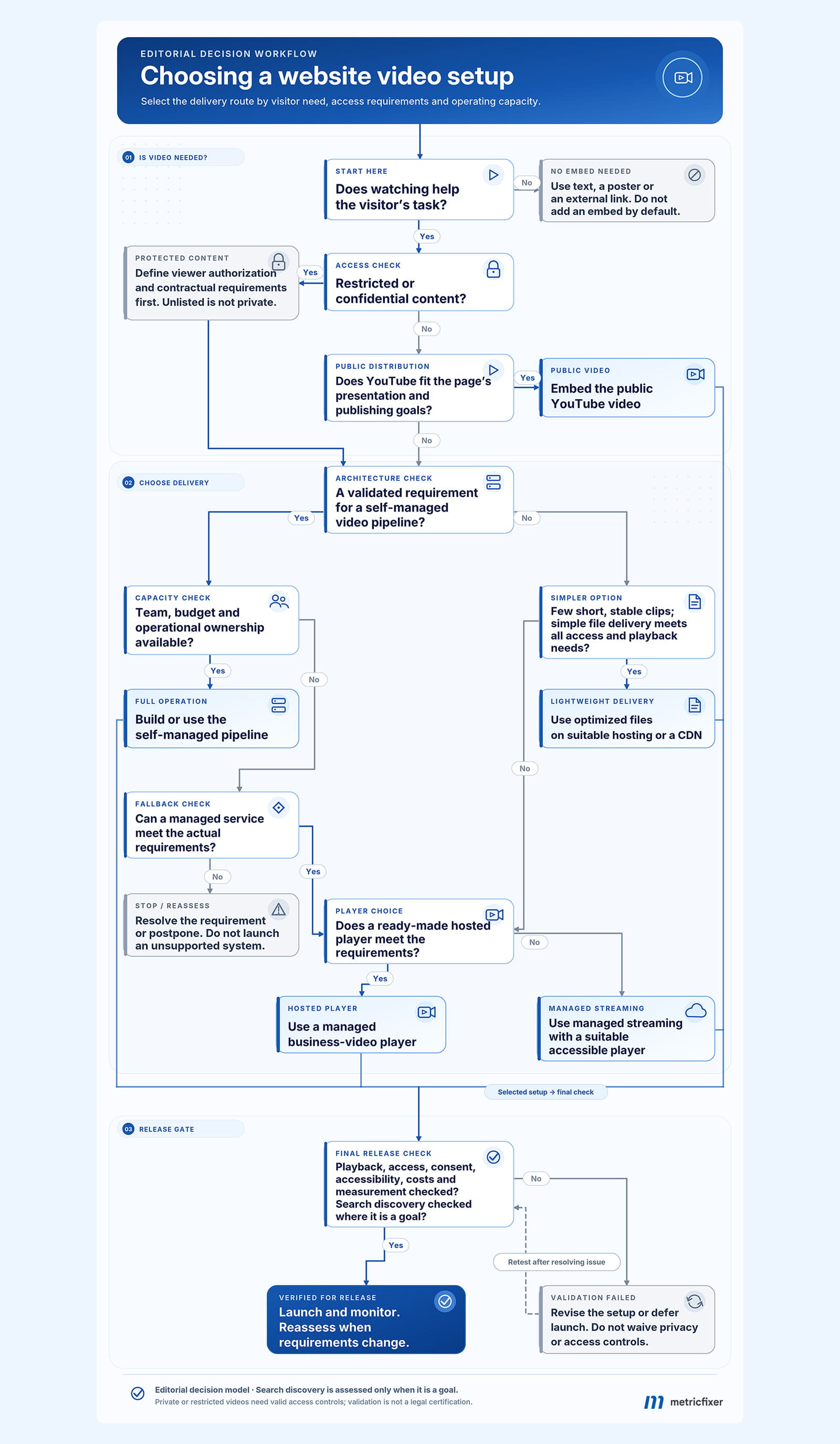
Start with a useful viewing task, identify access requirements, assess whether YouTube fits, and choose between simple files, managed hosting and a justified self-managed pipeline. Validate the selected setup before launch.
For a homepage or service-page introduction: compare an optimized file with a managed player. Keep the core message readable without playback. A portrait clip beside an FAQ should support the page, not interrupt it or force a full streaming project.
For an educational article or public tutorial library: a YouTube embed is often a reasonable first option. Add a dedicated website watch page only when it provides a useful viewing destination, and test its discovery separately from the article.
For a paid course, customer portal or confidential library: choose access control and suitable contractual arrangements first. Use a public trailer separately when discovery matters. An unlisted link is not a membership system.
For a company that needs both channel reach and an owned presentation: publish on YouTube and use a different delivery route on the website. Maintain a shared content record so titles, captions, versions and claims do not drift between the two.
Before launch, complete this checklist:
- Purpose and rights: the video answers a real visitor need; the business has the required rights to the footage, music and website distribution.
- Playback: test relevant phones and browsers, slower connections, manual start, seeking, captions and the fallback.
- Privacy and accessibility: verify pre-consent requests, refusal and withdrawal, keyboard controls, visible focus and motion behavior.
- Search: check the intended watch page, rendered player, thumbnail, metadata and Search Console findings; do not mistake successful markup validation for guaranteed indexing.
- Operations and measurement: retain source files and captions, assign an owner, monitor costs and failures, and check for duplicate events.
The durable choice is not necessarily the most independent one. It is the setup that serves the page's purpose reliably, at a cost the team can support, without creating avoidable friction for the visitor.
Methodology and sources
Research reviewed: November 4, 2026. This article began with an editorial brief about a short homepage explainer and expanded the question to public publishing, conversion pages and restricted-access libraries. The brief's provider preference was treated as a starting hypothesis, not as evidence of superior performance.
The review prioritizes official Google Search Central, Search Console, YouTube and GA4 documentation; web.dev, MDN and W3C technical and accessibility guidance; provider documentation from Cloudflare, bunny.net, Vimeo, Wistia and LinkedIn; and privacy guidance from the CNIL and ICO. Source links appear beside the claims they support rather than in a repeated reference list.
Recommendations, the decision diagram, the measurement plan and the cost calculations are metricfixer's editorial synthesis. No comparative hosting benchmark, account-specific contract review, production privacy audit or conversion experiment was performed for this article. The numerical examples are illustrative, not metricfixer traffic or billing data. Provider documentation establishes advertised features and prices, not independent evidence of faster playback or better commercial results.
This article provides general technical and marketing information, not legal advice or a guarantee of search visibility, accessibility conformance, cost savings or conversion improvement. Privacy requirements depend on jurisdiction and implementation. Product features, prices, browser support and search requirements may change. metricfixer is not affiliated with the third-party platforms mentioned; verify the relevant documentation, contracts and live behavior before deployment.