
Published Nov 21, 2026
How to Manage Google Ads Performance Campaigns
A practical Google Ads management routine: protect tracking, monitor account health, review mature results and make changes within clear spending limits.
Category: Advertising Management Guides · Author: metricfixer Expert Team
Managing Google Ads performance campaigns means protecting the budget, measuring useful sales or leads, and making changes for a clear reason. This guide gives business owners and in-house managers a practical routine for day-to-day supervision, planned reviews and coordination with a specialist. It covers conversion-focused advertising, not only the campaign type called Performance Max.
Practical rule: monitor frequently, fix genuine problems promptly, and change strategy when the evidence or a business constraint justifies it. A review can end with no changes. Waiting is acceptable only while tracking works, the uncertainty is understood and spending remains authorized.
Contents
Set the outcome, budget and responsibilities
Before launch, or before taking over an existing account, write down five agreements:
- Useful outcome: a completed purchase, a qualified enquiry or another clearly defined business result. Decide who checks lead quality and reports sales outcomes.
- Commercial requirement: an acceptable cost per acquisition (CPA) or return on ad spend (ROAS), with margins, refunds and fulfilment costs considered. Revenue ROAS is not profit.
- Test allowance: the maximum authorized spend and end condition for an uncertain approach. A temporary target below the business requirement needs explicit approval.
- Review conditions: the first checkpoint, expected customer delay, reporting or import schedule, and evidence needed before the next decision.
- Ownership: who monitors, who can change settings, who can pause advertising, and who handles an incident when the usual owner is unavailable.

An average daily budget is not a hard daily cap. For most campaigns, Google's spending-limit rules allow billing up to twice that amount on a particular day. Set project-level limits separately, monitor cumulative spend and allow for reporting delays; an alert does not itself stop delivery.
Protect the conversion setup
Smart Bidding automatically sets bids toward selected conversion outcomes. Before relying on it, verify that the intended sale or lead is recorded correctly, values and currencies are accurate, and the same outcome is not unintentionally counted through duplicate sources. Check the actual customer journey and any CRM import, not just whether a tag fires.
Inspect the campaign's selected goals. Google's primary and secondary conversion guidance distinguishes actions used for bidding from observation-only actions. Custom goals are an exception: secondary actions included in a custom goal can also be used for bidding.
Do not promote page views or every funnel step to a bidding outcome just to increase the conversion count. An earlier-stage signal needs a defensible relationship to useful demand. Keep checking whether reported leads become qualified enquiries or sales.
Choose a bidding strategy that fits the campaign type, usable history and measurement. Target ROAS has conversion-value and eligibility requirements; it is not an automatic starting choice for every new account. Equally, do not assume every campaign must start with manual bids.
Check campaign health every day
Use a short daily check as a starting routine, with more frequent alerts where spending or business risk requires them. Its purpose is to catch exceptions, not to produce a daily optimization quota.
| Check | Act promptly when |
|---|---|
| Delivery and spending | Billing or policy problems interrupt delivery, unexpected settings appear, or the approved spending limit is at risk. |
| Website and offer | Checkout, forms or essential pages fail; advertised products are unavailable; prices or promotional claims are wrong. |
| Measurement | Conversions, values or imports change unexpectedly. Compare with actual sales or enquiries before assuming demand has disappeared. |
| Commercial relevance | Traffic clearly concerns an unprovided service, an unsuitable market, or demand the business cannot fulfil. |
Verify the problem, contain avoidable spending in the affected scope, and record the correction. Do not wait for the next review to repair a confirmed fault. Conversely, one quiet day or yesterday's low ROAS is not enough to identify a fault.
For corrupted conversion data, ask the measurement owner whether data exclusions are appropriate. They are an advanced bidding safeguard, not a way to hide poor results; they do not remove conversions from reports.
Review when the evidence is ready
For a new project, metricfixer often schedules a first checkpoint after 10-15 days. This is a working rhythm, not a universal learning period or a deadline for changing settings. A low-volume campaign or a long sales process may need substantially longer to support a decision.
A conversion cycle is the typical time from an ad click to the selected outcome. Establish the observed delay using conversion-delay reporting, and account for qualification and upload delays. Recent clicks have had less opportunity to produce results.
Google's dedicated learning guidance distinguishes adaptation after a change, typically one to two conversion cycles, from subsequent evaluation over two cycles or two weeks, whichever is longer, allowing for conversion delay. A disappearing Learning status does not mean the newest results are complete.
At the checkpoint, check tracking, useful outcome volume, delayed results and changes in the offer or measurement. Compare periods with a similar weekday mix. With no conversions, investigate exposure, tracking and expected delay; do not declare either failure or safety from the number of days alone.
More observation is a valid decision only within the remaining test allowance. Formal bidding experiments follow their own test timeline; a review meeting is not automatically the end of an experiment.
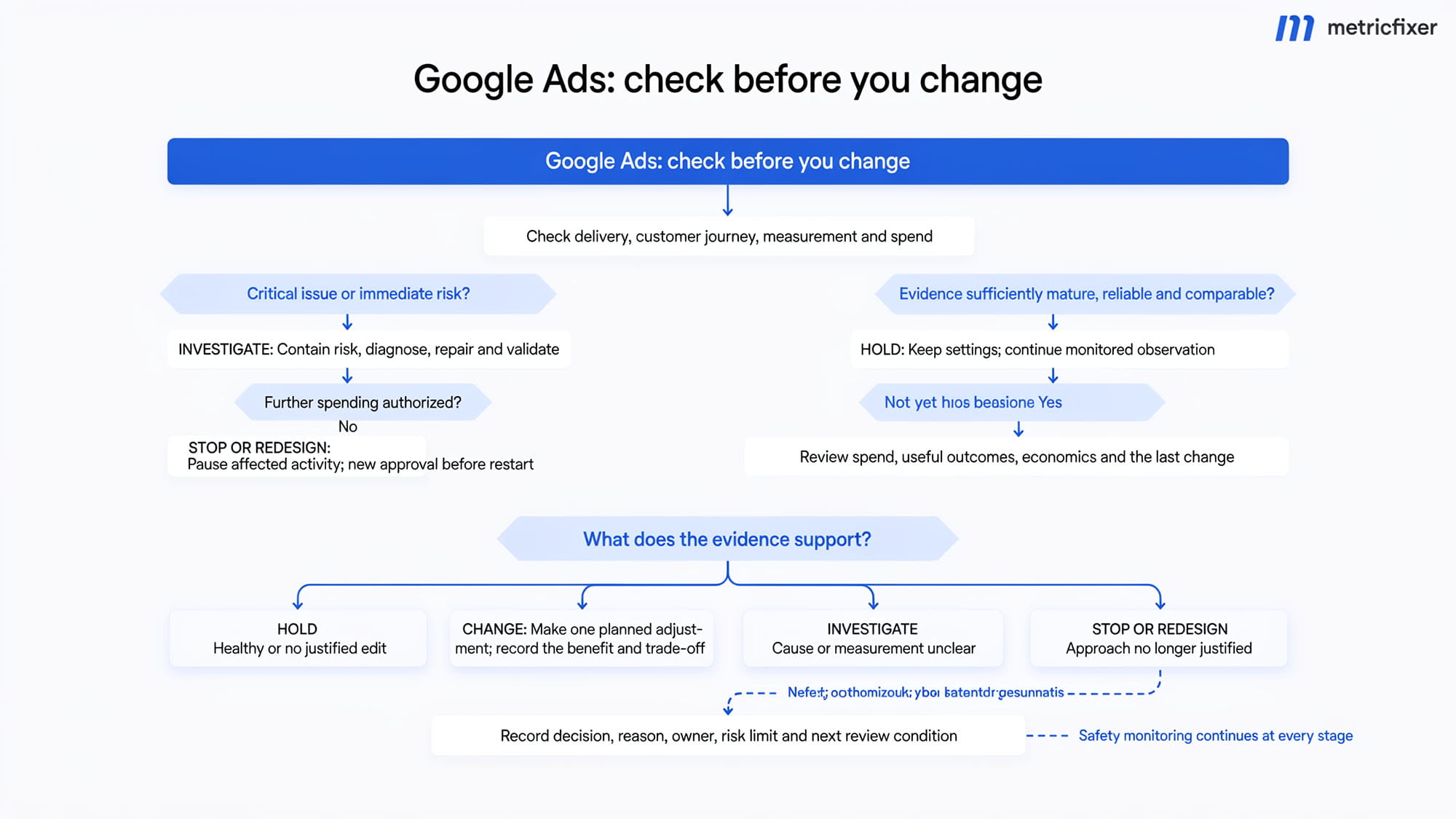
Decision workflow: check safety and measurement → confirm the remaining allowance → assess whether results are mature enough → hold, change, investigate or stop → record the next checkpoint. Safety checks continue throughout.
Choose hold, change, investigate or stop
A review should produce a reasoned decision, not a compulsory edit.
| Decision | Use it when |
|---|---|
| Hold | The setup is healthy and results are acceptable, or evidence is still incomplete within the authorized test allowance. |
| Change | You have a specific hypothesis, relevant evidence, an acceptable trade-off and an agreed way to assess the result. |
| Investigate | Measurement, lead quality or an external business change makes the result unclear. Apply protective controls where needed. |
| Stop or redesign | The allowance is exhausted, the approach is unsuitable, or mature results cannot justify continued spending. |
For a planned change, record the old setting, new setting, reason, expected benefit and downside. Avoid changing the bidding target, budget and landing page together merely to test one idea. Necessary incident repairs take priority, but must still be logged.
A higher Target ROAS or lower Target CPA asks for greater efficiency and can restrict volume; the reverse can allow more volume at lower efficiency. Google's Search target-adjustment guidance advises against repeated ROAS target changes within one conversion cycle without a genuine business need. Judge useful sales or leads alongside the ratio.
Keep three numbers separate: a 330% business requirement, 150% observed ROAS and a proposed 180% bidding target are not interchangeable. Google recommends basing an initial ROAS target on historical performance, at or below that historical ROAS. Setting 180% after observing 150% is a tighter test, not an automatic next step. There is no universal safe 20% adjustment rule.
For affected budget-constrained campaigns, Google's target-based bidding update also means a low budget should not be relied on to preserve returns well above a deliberately loose target. Check that the target itself expresses the intended operating goal.
Review search terms and structure with a purpose
Use the search terms report to identify genuine irrelevance, useful demand and content opportunities. Exclude an unprovided service promptly. Do not exclude a commercially relevant search solely because a few recent clicks have not converted. Check the exclusion's match type and scope before saving.
The report omits some low-volume queries for privacy, so it is not a complete search log. Avoid negative-keyword quotas and the assumption that a longer list proves better management.
Keep campaigns separate where budgets, margins, geography, service obligations or business goals require it. Avoid fragmentation that exists only to create more manual controls. Compatible campaigns may share a supported portfolio strategy, but Performance Max does not support a Target ROAS portfolio. Do not merge incompatible economics just to collect more data; retain reporting that exposes important differences.
Use the right reporting dates
Save a campaign view containing cost, conversions, conversion value and the relevant efficiency measure. For target bidding, compare actual performance with the average target for the same period, not only the latest setting, as described in Google's performance-review guidance.
Google's conversion reporting documentation distinguishes two reporting dates. For click-attributed results, ordinary conversion columns credit the ad-click period; Conversions (by conv. time) and Conv. value (by conv. time) show when outcomes occurred. Add these counterparts to a separate reconciliation view or beside the ordinary columns.
For example, a click on Monday followed by a purchase on Friday belongs to Monday in click-date reporting and Friday in conversion-time reporting, assuming one credited click. Do not divide Friday's conversion-time revenue by Friday's spend and call it the return on Friday's clicks.
Screenshot placeholder: Screenshot 1 in publication-brief.md, section Screenshot 1: two reporting dates: insert a real Google Ads table showing ordinary conversion columns beside their conversion-time counterparts.
Every export needs both the selected date range and an as-of date. Reopen earlier periods to see how delayed outcomes changed them. Label recent results provisional: Google Ads freshness varies by metric, while GA4 processing can take 24-48 hours. Processing completion does not end the customer's buying cycle.
A daily dashboard can provide spending visibility. The main optimization report should follow the decision cycle and state results, data limitations, changes and the next decision. Reconcile with sales, lead quality and refunds; matching dates alone does not make Google Ads, GA4 and CRM totals identical.
Coordinate changes after a handover
When metricfixer or another specialist completes setup, confirm who owns ongoing monitoring and optimization. A completed technical task should not be treated as an unspoken agreement for indefinite campaign management.
Keep one change owner and a shared record. Coordinate changes to bidding, goals, values, attribution, tags, consent handling, feeds and CRM imports. Tell the owner about website releases, pricing changes, promotions and sales-capacity problems: these can alter results without an advertising-setting change.
Review enabled rules, scripts and auto-apply recommendations. Understand what can change automatically and check change history. Enable only actions that fit the agreed plan; do not apply a bundle merely to increase an account score.
Minimum decision record: review date and owner; data period and as-of date; maturity and tracking checks; spend and useful outcomes; decision and reason; old and new settings where applicable; risk limit; next review or stop condition.
For an unresolved measurement or delivery problem, send metricfixer a support request with the affected scope, time range, recent changes and redacted evidence. Do not include passwords or unnecessary customer records.
Avoid these management mistakes
- Do not turn observation into compulsory editing. A healthy account can deserve attention without a new setting.
- Do not wait blindly. Learning does not authorize broken measurement, irrelevant traffic or spending beyond the agreed limit.
- Do not treat 10-15 days or 20% as platform rules. Review timing and change size depend on evidence and risk.
- Do not optimize easy numbers instead of useful outcomes. More clicks, higher engagement or cheaper unqualified leads do not establish business success.
- Do not explain every fluctuation as a learning reset. Google's learning documentation says ordinary budget, target, creative and targeting edits do not erase history or trigger that status.
- Do not hide an uncertain result behind a busy change log. Record what is known, what remains unresolved and what would justify the next action.
For the reasoning and research behind this routine, read Google Ads Management: Daily Monitoring, Deliberate Changes.

Methodology and sources
Prepared on 21 November 2026 as the practical companion to metricfixer's management review. The workflow and 10-15-day checkpoint come from metricfixer's stated operational practice, not a controlled comparison of management schedules. The decision record is an editorial tool, not a Google requirement.
Platform statements were checked against the Google documentation linked in the relevant sections. Where Help pages use conflicting learning-period wording, this guide follows the dedicated learning and target-adjustment pages rather than a blanket reset claim. No advertiser account was inspected or changed for this guide. Screenshots illustrate reporting controls, not promised results.
This guide provides operational information, not a guarantee of sales, profitability or a particular advertising return. Suitable settings and review periods depend on the business, campaign type and measurement quality. Platform features and guidance can change. Use the agreed scope of work to determine responsibilities between the advertiser and metricfixer.
Expert help with this topic
 Supported Google Ads Self-Service
Keep control of your Google Ads account with help for account setup, promotion eligibility, and separately scoped expert support when you need it.
 Google Ads Management
Ongoing Google Ads strategy and optimization around one agreed primary KPI, with scope and priorities confirmed before paid work begins.
 Expert-Led Google Ads Account Audit
Get a PPC-specialist-led review of your Google Ads account, with clear evidence, priorities, limitations, and practical next actions.
 Google Ads and Google Analytics Conversion Tracking Setup
Configure and test Google Ads and Google Analytics conversions around meaningful completed actions, with material measurement limits documented.