
Published Jul 28, 2026
Why Google Ads Clicks Do Not Match GA4 Users, Sessions, or Page Views
A practical, stage-by-stage guide to why 3,000 Google Ads clicks rarely become 3,000 GA4 page views, sessions, users, engaged sessions, or key events—and how to measure each gap.
Category: Analytics & Conversion Tracking · By Mikalai Sasau
A Google Ads click, a landing-page request, a GA4 page_view, a session, and a user are different observations made by different systems at different moments. This guide explains why 3,000 reported ad clicks rarely become 3,000 GA4 views, sessions, users, engaged sessions, or key events—and shows how to identify the exact stage where each difference appears.
Practical rule: do not reconcile Google Ads clicks directly against a single GA4 number. First isolate website-opening clicks, then compare the chain in order: ad click → landing request → successful response → JavaScript execution → GA4 collection → session creation or reuse → user identity → engagement → key event.
Executive summary
The common expectation that “one ad click should equal one GA4 visit” is built on a false equivalence. Google Ads records an interaction with an ad. It can count the click even when the visitor never reaches the website, and the general Clicks column can include interactions such as clicks on a phone number. A website request is recorded later by the destination infrastructure. GA4 records data later still, only after browser-side measurement can run and the applicable consent path allows data collection.
Even after GA4 receives data, its metrics do not form a one-to-one sequence. A second ad click can open another page inside an existing GA4 session. One user can create several sessions. One session can contain many page views and key events. One person can appear as several GA4 users after changing devices, browsers, or cookies, while several sessions can be merged under one user identity when User-ID or blended reporting identity is available.
Some differences are technical loss: a failed redirect, slow response, page closed before the tag starts, JavaScript error, blocker, missing tag, or basic Consent Mode path with no consent. Other differences are normal metric behavior: repeated clicks inside one session, multiple pages in one session, returning users, session reuse, user deduplication, engagement rules, and key-event counting settings. Treating both groups as the same “tracking loss” leads to the wrong diagnosis.
The direction of the discrepancy is not fixed. Google Ads can show more clicks than GA4 sessions when users click repeatedly or leave before measurement starts. GA4 can show more sessions than Ads clicks when people return later, reopen a bookmark, create additional sessions during the campaign window, or when Analytics records visits generated by clicks that Google Ads later filters as invalid. GA4 views can exceed both clicks and sessions because views count pages or history changes, not visits.
There is no universal acceptable discrepancy percentage. The useful question is not “Should these two totals match?” but “Which stage changed, for which traffic segment, and for what reason?” A stable difference caused by session reuse is expected. A sudden fall between successful landing responses and JavaScript execution is an implementation or performance incident.
Scope first: compare only website-opening clicks
Before analyzing GA4, make sure the Google Ads denominator actually represents clicks expected to open a web page. Google Ads defines a click broadly: it can be a click on an ad headline, phone number, or another clickable asset, and it may be counted even when the person does not reach the site. In campaigns with call assets, local actions, app destinations, or other interaction types, the total Clicks column is therefore not a clean landing-page denominator.
In Google Ads, segment the campaign report by Click type and separate website visits from phone calls and other non-page interactions. Also exclude clicks whose final destination is an app store, map action, hosted lead form, or another Google surface if the comparison is specifically about your website’s GA4 property. A large apparent “loss” can disappear before any technical investigation once the denominator is corrected.
This article focuses on clicks intended to open a website. It also assumes that the comparison uses mature reporting data rather than the most recent hours: GA4 standard reports can require processing time, while Google Ads can later adjust invalid traffic and conversion data.
The path from one ad click to a GA4 key event
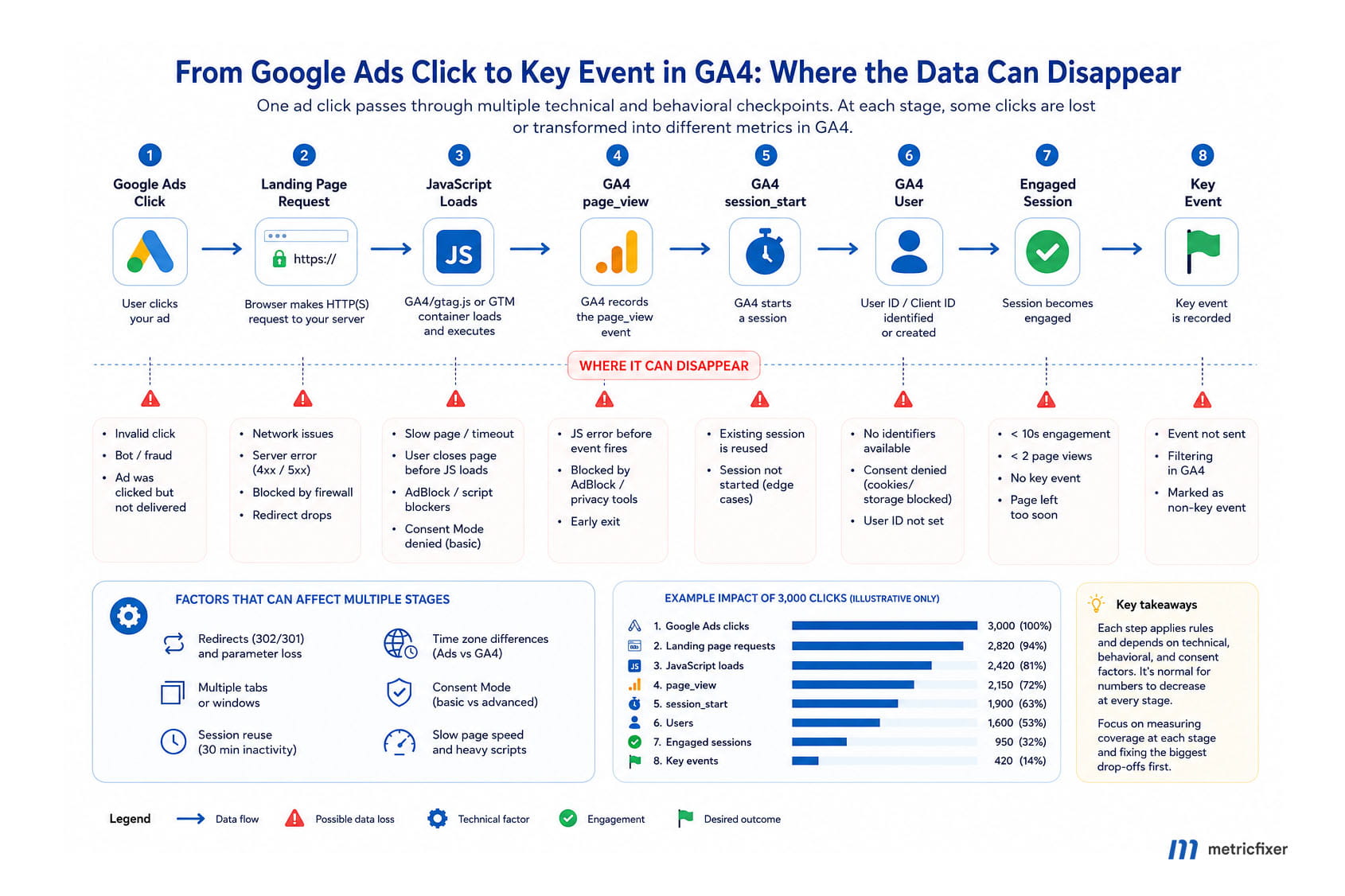
Measurement workflow: Google Ads records a click → the browser attempts to open the destination → the CDN or server receives a landing-page request → redirects and the final HTML response complete → browser-side JavaScript loads and executes → the consent state determines what the Google tag may send → GA4 receives a page_view or another landing event → GA4 either creates a new session or attaches the event to an active session → reporting identity determines the user count → the session may or may not become engaged → an important action may trigger a key event.
Every arrow is a separate measurement boundary. A click can disappear before the request because the destination never opens. A request can exist without a GA4 event because JavaScript never executes. A page_view can exist without a new session_start because the user already has an active session. A session can exist without becoming engaged, and an engaged session can end without a key event.
What each metric actually measures
| Stage or metric | Where it is counted | What it answers | Why it does not equal Google Ads clicks |
|---|---|---|---|
| Google Ads click | Google Ads | Was a chargeable or reportable ad interaction recorded? | The click can be counted before the website opens. Some click types do not lead to a web page, repeated clicks are separate, and invalid clicks can later be filtered. |
| Landing-page request | CDN, edge, load balancer, or web server logs | Did a browser or client request the destination URL? | This is not a GA4 metric. The request may fail, redirect, return 4xx/5xx, be served from an edge rather than the origin, or arrive without the original click identifier. |
| JavaScript load and execution | Browser or first-party real-user monitoring | Did the page reach the point where browser-side analytics could run? | A script request, successful script execution, tag trigger, and analytics network request are four different states. Slow loads, errors, blockers, page closure, and consent logic can interrupt the sequence. |
page_view |
GA4 event collection | Was a page-view event sent for a page load or configured browser-history change? | One click can generate no view, one view, or several views. Automatic and manual implementations can also create duplicates. |
| Views | GA4 reporting | How many page views and screen views were reported? | Views are event-like totals, not visits or people. A user can view many pages after one click, and a single-page application can send views on history changes. |
session_start |
GA4 event collection | Did GA4 begin a new session and generate session identifiers? | It is generated only when no session is active. A later ad click inside the current session can add a page view without creating another session_start. |
| Sessions | GA4 reporting | How many unique session IDs does GA4 estimate for the selected scope? | Repeated clicks can be compressed into one session; later returns can create extra sessions. The reported Sessions metric is related to, but should not be treated as a guaranteed one-for-one copy of, the raw session_start event count. |
| Total users | GA4 reporting identity | How many unique identities triggered any event in the period? | A “user” is an estimated identity, not a verified human. Cookies, device IDs, User-ID, and modeling can split or merge activity. |
| Active users | GA4 reporting | How many unique users engaged with the site or app in the selected period? | GA4’s standard reports often label this primary metric simply as Users. A brief first-page visit may be collected but not qualify in the same way as an active user. |
| Engaged sessions | GA4 reporting | How many sessions lasted longer than 10 seconds, had at least one key event, or had at least two page or screen views? | This is a quality rule applied after the session exists. A technically measured landing can still be a non-engaged session. |
| Key events | GA4 event configuration and reporting | How many important business actions were counted? | A key event can be counted once per event or once per session. One session can therefore produce zero, one, or several key-event counts. |
One visitor can produce very different counts
The following examples show why there is no universal one-click-to-one-session rule. The values are directional illustrations rather than guaranteed platform output; exact reporting depends on consent, identity, implementation, session settings, filters, and attribution configuration.
| Scenario | Ads clicks | Requests | page_view |
New sessions | Users | Main explanation |
|---|---|---|---|---|---|---|
| Clean first visit | 1 | 1 | 1 | 1 | 1 | The full chain completes and no prior GA4 session is active. |
| Second ad click within an active session | +1 | +1 | +1 | +0 | +0 | The second click and page load are real, but GA4 reuses the existing session and identity. |
| Page closed before the tag runs | 1 | 0 or 1 | 0 | 0 | 0 | Google Ads records the interaction before GA4 can collect anything. |
| Analytics blocker | 1 | 1 | 0 | 0 | 0 | The website opens, but the Google script or collection endpoint is blocked. |
| Basic Consent Mode, no consent | 1 | 1 | 0 before consent | 0 before consent | 0 before consent | Google tags do not load before banner interaction, so denied or non-interacting traffic is absent from GA4 collection. |
| Advanced Consent Mode, analytics storage denied | 1 | 1 | Not a conventional cookie-backed one-to-one record | May be limited or modeled | May be limited or modeled | Consent-denied signals can support modeled reporting, but there is no persistent observed identity to match directly to the click. |
| One ad click followed by three page loads | 1 | 3 | 3 | 1 | 1 | Views exceed clicks because the visitor browsed multiple pages in one session. |
| Ad URL copied into two extra tabs | 1 | 3 | Up to 3 | Often 1, but implementation-dependent | Often 1 | Opening or copying a URL creates page loads without creating additional ad clicks. |
| Redirect strips the click ID | 1 | 1 or more | 1 | 1 | 1 | The traffic can exist in GA4 but lose its Google Ads attribution and appear under another source. |
| Return visit from a bookmark | 0 new clicks | 1 | 1+ | 1 | 0 or 1 additional, depending on identity | GA4 gains another session even though no new ad click occurred. |
How each factor changes the numbers
Repeated clicks
Google Ads counts separate clicks. GA4 groups interactions into sessions, and a new session starts only when no session is active. Google’s own discrepancy guidance uses the common example of a person clicking an ad twice within 30 minutes: Ads can report two clicks while Analytics reports one session.
The second click may still create another landing request and another page_view. It normally does not create another user, and it does not guarantee a new session_start. This is metric compression, not missing tracking.
How to measure the impact: compare website-opening clicks, ad-linked landing requests, landing page_view events, and new sessions by hour, campaign, device, and landing page. A high request-to-session ratio with normal request-to-page-view coverage is consistent with repeated clicks or session reuse rather than tag failure.
Invalid clicks
Google Ads filters traffic it classifies as invalid, including certain accidental, duplicate, automated, or fraudulent interactions. Some filtering happens quickly, and later adjustments can still change the Ads total. Your server and GA4 can record activity that originated from a click later removed from the billable Ads report.
This is one reason GA4 sessions can exceed Google Ads clicks. It is not evidence that GA4 invented traffic. The systems are applying different filtering rules at different times.
How to measure the impact: add the Invalid clicks column in Google Ads and compare finalized rather than same-day data. For supported investigations, Google Ads API click_view can expose click-level records for a single day within its lookback limit. Keep the Ads UI’s filtered click total and the click-level technical ledger as separate denominators; do not force GA4 to match the billable total by deleting legitimate site activity.
Slow loading
A click is recorded before the landing page has fully loaded. A slow DNS lookup, TLS handshake, redirect chain, server response, large HTML document, overloaded main thread, or late tag placement increases the window in which a user can abandon the page before analytics starts.
Slow loading produces a characteristic pattern: Google Ads clicks remain stable, edge requests may remain stable, but JavaScript boot and GA4 landing events fall. The gap is usually larger on mobile devices, weak networks, and heavy landing pages.
How to measure the impact: combine edge response status and response time with browser real-user monitoring. Bucket sessions by landing-page response time or Core Web Vitals segment, then compare the share that reaches the analytics boot probe and the first GA4 event. If the request exists but boot coverage drops sharply in the slowest bucket, performance is directly contributing to measurement loss. Place the Google tag as high as practical in <head>, while keeping consent defaults ahead of tags where required.
Closing or leaving before GA4 starts
A visitor can tap an ad accidentally, open the destination, and immediately press Back, close the tab, switch apps, or navigate elsewhere. Google Ads has already recorded the click. Depending on timing, the server may record a request, but GA4 may receive no event.
This factor is not identical to slow loading. Even a fast page can lose an extremely short visit; slow loading simply widens the risk window.
How to measure the impact: distinguish three cases: no landing request, successful request without a browser boot signal, and boot signal without a GA4 collection request. The first points to network or destination-opening failure; the second to immediate abandonment, JavaScript failure, or blocking; the third to consent, tag configuration, trigger, endpoint blocking, or collection error.
Ad blockers and privacy extensions
Browser extensions, DNS filters, privacy browsers, corporate network rules, and content blockers can block gtag.js, Google Tag Manager, or GA4 collection requests. The website can load normally and the server can log a successful request while GA4 sees nothing.
A first-party endpoint or server-side tag architecture can reduce some third-party blocking, but it is not a universal cure. The browser still has to execute code and send a request, consent rules still apply, and sophisticated blockers can recognize first-party collection patterns.
How to measure the impact: compare successful landing responses with a minimal first-party boot signal that does not depend on Google endpoints, then compare that signal with GA4 events. Segment by browser, operating system, device, country, and corporate versus consumer traffic. Google’s troubleshooting guidance also recommends checking browser network requests to google-analytics.com/g/collect or analytics.google.com/g/collect and testing with extensions disabled.
Consent Mode
Consent Mode can create one of the largest differences between paid clicks and GA4 reporting, but the effect depends on the implementation:
- Basic Consent Mode: Google tags are blocked until the visitor interacts with the consent interface. No data is transmitted to Google before that interaction. Visitors who deny consent or leave without interacting can produce an Ads click and a landing request but no GA4 event.
- Advanced Consent Mode: Google tags load with denied defaults and can send consent-denied, cookieless signals. When eligibility and data thresholds are met, behavioral and conversion modeling can estimate otherwise unobservable users, sessions, and key events.
Modeled reporting is valuable, but it makes direct row-by-row reconciliation inappropriate. A modeled user or session is an estimate, not a persistent browser identity that can be joined to a specific click. Conversely, a consent-denied landing may contribute a signal without producing the same observable sequence as a fully consented visit.
How to measure the impact: monitor consent-banner interaction rate, grant rate, denial rate, no-action rate, and time to consent. In GA4 BigQuery export, use the available privacy and consent fields to separate observable consent states where appropriate. Compare basic and advanced implementations only after allowing enough time and volume for modeling eligibility. For broader architecture considerations, see GA4 Consent Changes and Server-Side GTM.
Redirects and click-ID loss
Redirects can affect both collection and attribution. A long chain delays the final page. A broken chain can prevent the destination from loading. A server, CMS, URL normalizer, security layer, or third-party tracker can remove or modify gclid, gbraid, wbraid, gad_*, or manual UTM parameters.
If the final page still loads, GA4 can record the page view and session while losing the Google Ads source. The result is not always fewer GA4 sessions; it can be fewer google / cpc sessions and more Direct, Unassigned, referral, or another source. If an intermediate page is tagged and the final page is also tagged, a redirect can instead create extra page views.
How to measure the impact: log the initial URL, each redirect status, the final URL, and whether every required parameter survives byte-for-byte. Test desktop and mobile destinations, tracking templates, regional redirects, HTTP-to-HTTPS, trailing-slash rules, language routing, and authentication redirects.
curl -sS -L -o /dev/null \
  -w 'final_url=%{url_effective}\nstatus=%{http_code}\nredirects=%{num_redirects}\n' \
  'https://example.com/landing?gclid=TEST_VALUE'
Do not lowercase, decode, truncate, or rebuild click identifiers. The related metricfixer guide Lowercasing URLs Without Redirects: SEO and Tracking Risk explains why apparently harmless URL transformations can damage advertising parameters. For manual campaign tagging, use a consistent taxonomy such as the one in Manual UTM Tagging in GA4: Recommended Values.
Multiple tabs
Tabs break the assumption that a browser navigation equals an ad click. A person can click once and then duplicate the tab, use “open in new tab,” copy the tagged URL, restore a previous browser session, or reopen the page from history. These actions can create additional requests and page_view events without additional Google Ads clicks.
When the tabs share the same browser identity and active session state, GA4 may still report one user and one session. Race conditions, consent changes, storage restrictions, cross-domain navigation, and session timeout can produce different outcomes, so multiple tabs should be treated as a source of multiplicity rather than a fixed formula.
How to measure the impact: compare request count and landing page_view count against distinct click identifiers. A large number of repeated requests for the same landing URL and browser session, especially within seconds, is consistent with tab duplication or reloads. Avoid adding invasive fingerprinting merely to make the counts match.
Reusing an existing session
GA4 starts a session when a user views a page or screen and no session is active. By default, a session times out after 30 minutes of inactivity, although the timeout can be changed. A new ad click does not itself force a new session.
This matters for both totals and attribution. The session_start event carries the information used to determine session attribution, including parameters such as gclid, UTM values, and referrer. A second campaign click inside an existing session can therefore create new events without creating a second session whose source is independently initialized in the same way.
How to measure the impact: calculate the share of ad-linked landing page views that occur in a session whose session_start happened earlier. Segment by time since session start. A high share in the first 30 minutes is expected for users who compare offers, return to search results, and click the ad again.
Google Ads and GA4 time zones
Google Ads reports activity according to the Google Ads account time zone. GA4 reports according to the property time zone. If the settings differ, the same click and landing event can fall on adjacent calendar dates.
Time-zone mismatch creates the strongest distortion near midnight and in daily reports. A one-day comparison can look seriously wrong while a seven-day or 28-day total is much closer. Changing a GA4 property time zone can also create a temporary spike or flat spot as the reporting boundary moves.
How to measure the impact: record both account settings, export hourly data, and re-bucket both platforms into one common time zone such as UTC. Include one extra day before and after the comparison window when rebuilding daily totals. Do not attempt to diagnose collection loss from daily totals until the time zones are aligned.
The first funnel step is another metric choice
“First funnel step” is not a universal GA4 metric. It can mean:
- raw count of a landing
page_viewevent; - users who triggered that event;
- sessions containing that event;
- entrances on a landing page;
- users who entered a GA4 Funnel exploration step;
- a custom event fired after the page becomes interactive, consent is granted, or a component is visible.
These versions can produce very different totals from the same traffic. A custom “landing viewed” event fired on DOMContentLoaded will lose more early exits than the automatic page_view. A user-based funnel will deduplicate repeated events. A session-based calculation will compress multiple page views. Always document the scope, trigger, and counting unit of the first step before comparing it with Ads.
How to measure the gap stage by stage
A reliable audit uses four ledgers rather than one dashboard:
- Google Ads ledger: website-opening click types, reported clicks, invalid clicks, campaign, ad group, date, hour, device, network, and final URL.
- Delivery ledger: edge or CDN landing requests, redirect chain, final status, final URL, response time, and preservation of click parameters.
- Browser execution ledger: a privacy-reviewed first-party boot signal, JavaScript errors, consent state, and whether the GA4 collection request was sent successfully.
- GA4 ledger: landing
page_view,session_start, sessions, total users, active users, engaged sessions, sessions with a key event, and raw key-event count.
Use edge logs rather than origin-only logs when a CDN or reverse proxy serves the site. An origin log can undercount successful requests that were answered from cache. Store only the fields needed for the audit, restrict access, define retention, and avoid turning click identifiers or full URLs into an unnecessary long-term user-level dataset.
Recommended stage ratios
Website-click share
= website-opening click types / all reported Google Ads clicks

Click-to-request coverage
= ad-linked landing requests / website-opening clicks

Successful landing rate
= final 2xx HTML responses / ad-linked landing requests

JavaScript execution rate
= privacy-reviewed first-party boot signals / successful HTML responses

GA4 landing collection rate
= landing page_view events / browser boot signals

New-session rate
= new sessions beginning on the landing page / ad-linked landing page_view events

User-to-session ratio
= total users / sessions

Active-user share
= active users / total users

Engagement rate
= engaged sessions / sessions

Key-event session rate
= sessions with at least one key event / sessions
These are diagnostic ratios, not contractual platform definitions. They are only meaningful when the numerator and denominator use the same web-click scope, campaign set, landing pages, time basis, and data maturity. Some rates can exceed 100% when URLs are reopened, events are duplicated, return visits are included, click filtering changes, or identifiers cannot be matched one-to-one.
An illustrative 3,000-click reconciliation
The example below is not a benchmark and should not be used as an “expected loss” model. It demonstrates how the same campaign can move through technical delivery, metric compression, engagement, and business outcomes.
| Stage | Illustrative count | Share of previous stage | Interpretation |
|---|---|---|---|
| All Google Ads clicks | 3,000 | — | Includes all click types in the initial report. |
| Website-opening click types | 2,910 | 97.0% | Calls and other non-page interactions were removed from the denominator. |
| Ad-linked landing requests | 2,820 | 96.9% | Some destinations never produced an observable request, or the identifier did not survive to the log. |
| Successful final HTML responses | 2,760 | 97.9% | Redirect failures and non-2xx responses were separated. |
| Browser boot signals | 2,610 | 94.6% | Some pages were closed early, blocked, or failed before the measurement bootstrap executed. |
Landing page_view events |
2,540 | 97.3% | Consent, tag configuration, triggers, and endpoint blocking explain the remaining pre-GA4 gap. |
| New GA4 sessions | 2,180 | 85.8% | Repeated clicks and page loads inside active sessions do not create new sessions. |
| Total users | 1,960 | 89.9% | Returning people and user deduplication reduce the count relative to sessions. |
| Active users | 1,780 | 90.8% | Not every collected user qualifies as active in the selected reporting context. |
| Engaged sessions | 1,240 | 56.9% of sessions | Sessions met the duration, view, or key-event rule. |
| Sessions with at least one key event | 102 | 4.7% of sessions | This is a session-based conversion-rate denominator. |
| Raw key-event count | 109 | — | Repeated key events make the raw count higher than the number of converting sessions. |
The first four gaps can contain true delivery or measurement loss. The later decline from page views to sessions, users, engaged sessions, and key-event sessions is mainly a change of unit and user behavior. Reporting one blended “click-to-user loss rate” would hide that distinction.
Diagnostic table: what each pattern usually means
| Observed pattern | Most likely area | First checks |
|---|---|---|
| All Ads clicks are much higher than website requests | Wrong denominator, non-web click types, destination-opening failure | Segment by click type; review final URLs, app/call/local interactions, DNS, TLS, and edge logs. |
| Website clicks are close to requests, but successful responses are low | Redirects, 4xx/5xx, server or CDN reliability |
Inspect redirect chains, status codes, regional routing, and response latency. |
| Successful responses are normal, but JavaScript boot is low | Slow page, immediate exits, JavaScript errors, blockers | Compare response-time buckets, browser errors, device segments, and blocker-sensitive traffic. |
| Boot is normal, but GA4 landing events are low | Consent, tag trigger, missing tag, wrong measurement ID, endpoint blocking | Use Tag Assistant, DebugView, consent diagnostics, and browser network inspection. |
Landing page views are normal, but session_start or Sessions are lower |
Repeated clicks, reloads, multiple tabs, active-session reuse | Measure time since session start and page views per session. |
| Sessions are normal, but users are lower | Returning users, identity merging, multiple sessions per user | Review Total users, reporting identity, User-ID, device mix, and returning-user share. |
| Total users look reasonable, but “Users” in a standard report are lower | Active users versus total users | Confirm the exact metric label and report definition rather than assuming every Users column means Total users. |
| Sessions are normal, but engaged sessions are low | Short visits or landing-page relevance | Review engagement time, second-page rate, key-event rate, page speed, and campaign intent. |
| GA4 sessions exist, but google / cpc sessions are low | Click-ID or UTM loss, attribution scope, active-session reuse | Inspect redirects, final URLs, gclid/gbraid/wbraid, session source, and cross-domain handling. |
| GA4 sessions exceed Ads clicks | Return visits, bookmarks, invalid-click filtering, extra sessions, scope mismatch | Add Invalid clicks, isolate landing sessions, check return traffic and date windows. |
| Daily data differs, but weekly data is close | Time zones, processing, midnight boundary | Align time zones, compare hourly exports, and exclude the newest processing window. |
| Views exceed clicks and sessions | Normal browsing, SPA history events, reloads, duplicates | Review pages per session, automatic versus manual page views, and single-page-app history tracking. |
A practical audit workflow
- Define the comparison question. Decide whether you are comparing Ads clicks with landing requests, landing page views, new sessions, all sessions, total users, active users, engaged sessions, or sessions with a key event. Do not mix these units in one ratio.
- Correct the Ads scope. Segment by click type and retain only interactions expected to open the audited website. Use the same campaigns, networks, devices, countries, and landing pages in both systems.
- Let data mature. Avoid diagnosing the newest hours. GA4 standard reports can require 24–48 hours for full processing, and Ads can apply invalid-traffic adjustments.
- Align time. Record the Ads account time zone and GA4 property time zone. For a forensic comparison, export hourly data and normalize to UTC or another common zone.
- Measure the request boundary. Use CDN or edge logs to count tagged landing requests, final response status, redirect count, response time, and parameter survival.
- Measure browser execution. Use a small, privacy-reviewed first-party boot probe or existing real-user monitoring to separate successful HTML delivery from browser-side execution. Do not rely on GA4 itself to prove that GA4 was able to start.
- Verify GA4 transport. Check Tag Assistant, DebugView, JavaScript console errors, and network requests to the GA4 collection endpoint. Confirm the correct measurement ID and tag presence on every landing template.
- Separate consent states. Document basic versus advanced Consent Mode, consent defaults, update timing, grant/deny/no-action rates, and whether modeling is eligible.
- Inspect session reuse. Compare ad-linked landing page views with sessions beginning on those pages. Quantify how many paid landings occur inside a session that started earlier.
- Compare both user metrics. Put Total users and Active users side by side. Record the reporting identity and whether
User-IDor behavioral modeling is involved. - Use session-based outcomes. For a funnel, prefer “sessions with at least one key event” or “users who triggered the key event” over raw key-event count unless repeated actions are intentionally valuable.
- Segment before changing tags. Break every stage rate down by browser, device, network, geography, consent region, campaign type, landing template, and response-time bucket. A global average can hide a single broken mobile template or regional redirect.
Advanced click-level reconciliation
Aggregate reports are enough for most audits. Click-level matching can help when the gap is large and a supported click identifier reaches the website. Google Ads API click_view is the relevant technical resource: queries must be limited to one day, its documented lookback is 90 days, and click identifiers are not available for every campaign context.
A defensible click-level workflow is:
- Export the supported Ads click records for one day.
- Match the click identifier against edge requests before redirects modify the URL.
- Match the same identifier against the final landing URL after the redirect chain.
- Join to a privacy-approved browser boot record only when necessary.
- Analyze GA4 at session or aggregate level rather than treating the click identifier as a permanent person identifier.
Keep two separate Ads totals in the analysis: the reportable/billable Clicks metric after invalid filtering and the technical click ledger used to test delivery. For privacy-preserving click identifiers such as gbraid or wbraid, exact row-level reconciliation may be unavailable or inappropriate; use aggregate comparisons by hour, campaign, device, and landing page instead.
What a good monitoring dashboard should show
A useful dashboard should not display only Ads clicks next to GA4 users. It should show:
- website-opening clicks and non-website click types;
- invalid clicks;
- tagged landing requests and successful final responses;
- redirect and parameter-preservation failures;
- browser boot rate and GA4 collection rate;
- landing page views, new sessions, and all sessions;
- Total users and Active users;
- engaged sessions and engagement rate;
- sessions with a key event, raw key events, and the configured counting method;
- all stage ratios segmented by device, browser, geography, consent state, landing page, and response-time bucket.
Monitor each ratio against its own historical baseline. A stable click-to-session difference caused by repeat behavior is normal. A sharp change in request coverage after a URL release, or in GA4 collection after a consent-banner change, is actionable.
Common mistakes to avoid
- Comparing all Ads clicks with web-only GA4 data. Remove call and other non-page click types first.
- Calling every difference “bounce.” A missing GA4 event, a non-engaged session, and a user who bounced are not the same state.
- Using Views as a visitor count. Views can multiply inside one session and one user.
- Using the word “users” without naming the metric. Specify Total users or Active users and record the reporting identity.
- Assuming
session_startequals clicks. It is generated for a new session, not for every campaign click. - Ignoring consent no-action traffic. Under basic Consent Mode, a visitor who never interacts with the banner can be absent from GA4 even if the page loaded.
- Looking only at attributed google / cpc sessions. Redirects can preserve the visit but lose the source.
- Comparing different time zones or fresh data. First normalize time and allow processing.
- Fixing a metric-definition difference with extra tags. Duplicating
page_viewor forcing a new session makes data less accurate rather than making systems agree.
Decision checklist
- [ ] The Google Ads denominator includes only click types expected to open the audited website.
- [ ] The Ads account and GA4 property time zones are documented and normalized for comparison.
- [ ] The newest 24–48 hours are excluded from final reconciliation.
- [ ] Edge or CDN logs, not only origin logs, are used for landing requests.
- [ ] Redirect chains preserve
gclid,gbraid,wbraid,gad_*, and required UTM parameters. - [ ] Successful HTML delivery is separated from browser JavaScript execution.
- [ ] Google tag execution and GA4 collection requests are verified independently.
- [ ] Basic or advanced Consent Mode behavior is explicitly documented.
- [ ] Landing
page_view,session_start, Sessions, Total users, and Active users are reported as separate metrics. - [ ] Engaged sessions use the current GA4 rule and are not treated as a transport metric.
- [ ] Key-event counting method—once per event or once per session—is recorded.
- [ ] The first funnel step has a documented trigger and counting unit.
- [ ] Results are segmented by device, browser, geography, landing template, consent state, and page-speed bucket.
- [ ] Technical loss and normal metric compression are reported separately.
Conclusion
Google Ads clicks do not equal GA4 users, sessions, or views because the systems answer different questions. Ads measures an ad interaction. Infrastructure measures whether the destination was requested and delivered. Browser telemetry measures whether JavaScript could run. GA4 events measure collected interactions. Sessions group interactions over time. Users apply identity and deduplication. Active users and engaged sessions add quality conditions. Key events measure configured business actions under their own counting method.
The right reconciliation is therefore not a single percentage. It is a staged audit. First prove that website-opening clicks reach the edge. Then prove that the final page loads, JavaScript executes, consent behavior is understood, and GA4 receives the event. Only after that should you explain the expected differences created by session reuse, user identity, engagement rules, and key-event counting.
When the stages are visible, “3,000 clicks but fewer GA4 users” stops being a vague analytics problem. It becomes a set of measurable questions with a clear owner: Ads scope, web delivery, frontend performance, consent, tagging, attribution, or user behavior.
Methodology and sources
This article is based primarily on official Google Ads, Google Analytics, Google Tag, and Google Ads API documentation reviewed in July 2026. The analysis separates platform-defined metrics from operational measurements that advertisers can add through CDN logs, first-party real-user monitoring, Tag Assistant, DebugView, browser network inspection, and GA4 BigQuery export. The numerical example is illustrative and is not presented as a Google benchmark or an acceptable-loss threshold.
- Google Ads: Click definition
- Google Ads: Clicks and Sessions discrepancy for Google Ads and Google Analytics
- Google Ads: About invalid traffic
- Google Ads: Measure results and segment by click type
- Google Ads: Website redirects are losing click data
- Google Ads: Account time zone setting
- Google Analytics developer documentation: Measure pageviews
- Google Analytics developer documentation: Verify and troubleshoot collection
- Google Analytics: About Analytics sessions
- Google Analytics: Understand user metrics
- Google Analytics: Reporting identity
- Google Analytics: Engagement rate and engaged-session criteria
- Google Analytics: Key-event counting methods
- Google Ads: About Consent Mode
- Google Ads: Basic versus advanced Consent Mode setup
- Google Analytics: Behavioral modeling for Consent Mode
- Google Ads API: click_view resource
- Google Analytics: Property time zone and reporting settings
This article is for technical and operational information only. It does not establish a universal acceptable discrepancy and is not legal advice. Google Ads and GA4 definitions, invalid-traffic filtering, reporting identity, consent behavior, modeling eligibility, interfaces, and processing rules may change after publication. Validate the implementation against current platform documentation and the privacy requirements that apply to your organization and users.