
Published Oct 25, 2026
How Global Advertisers Should Configure GA4 Audiences, Google Ads, and Regional Consent
A step-by-step global setup for GA4, Google Ads audiences, Consent Mode, regional personalization, U.S. Restricted Data Processing, Data Manager defaults, Customer Match, and uploaded data.
Category: Online advertising · By metricfixer AI Studio
Linking GA4 to Google Ads is easy. Making the linked data usable across Europe, the United States, Brazil, Canada, Asia, Oceania, and other markets is not. A global advertiser must align the website CMP, Google Consent Mode, GA4 regional personalization controls, the GA4-Google Ads link, Google Ads Data Manager defaults, U.S. Restricted Data Processing, Customer Match, enhanced conversions, offline imports, and audience definitions. This guide provides a step-by-step setup for that complete pipeline.
Practical default: keep one authoritative regional consent matrix; let the CMP establish the user-level decision; keep the GA4-Google Ads link and audience import enabled for markets where consented or otherwise eligible users should be activated; use GA4 regional ads-personalization switches only for deliberate blanket exclusions; keep Google Ads Data Manager defaults conservative unless every incoming record is already permission-gated; treat GPC and U.S. Restricted Data Processing as a separate control path; and test website, server-side, CRM, and uploaded data for each major regional profile.
Executive summary
A global GA4-to-Google Ads audience pipeline has more than one consent switch. The website sends visitor-level signals. GA4 determines whether events and users are eligible for advertising use. The product link makes data available to Google Ads. Google Ads Data Manager controls account-level defaults for website and uploaded data. U.S. privacy controls can restrict data use. Customer Match, enhanced conversions, and offline imports may carry their own record-level consent information.

The most reliable architecture separates these layers:
- Regional policy layer: determines whether the visitor is in a strict opt-in, U.S. opt-out, hybrid, notice, or special-market profile.
- CMP layer: displays the correct interface, reads browser signals, records the decision, and provides a persistent change or withdrawal route.
- Consent Mode layer: communicates
ad_storage,analytics_storage,ad_user_data, andad_personalizationto Google tags. - GA4 layer: collects analytics data, applies event and region-level ads-personalization controls, creates audiences, and exports eligible users.
- Google Ads link and Data Manager layer: imports GA4 audiences, applies website and uploaded-data defaults, and exposes lists to campaigns.
- U.S. privacy layer: honors GPC and other applicable opt-outs, maps data use to Restricted Data Processing or Analytics controls, and governs sale, sharing, targeted advertising, and profiling beyond Consent Mode.
- Offline and CRM layer: controls Customer Match, enhanced conversions for leads, offline conversion imports, store data, and other uploaded personal data.
This article assumes the global CMP design described in the companion global Cookiebot and Google Consent Mode architecture guide. For the legal and regional baseline, use metricfixer's global website consent-signals review. The goal here is not to repeat the law by country. It is to configure the Google stack so that one region's choices do not silently govern every other market.
Three principles prevent most failures:
- Do not use a product-level off switch when you need visitor-level consent. Disabling GA4 ads personalization for an entire country excludes consenting users too.
- Do not use an account default as proof of consent. Google Ads Data Manager defaults are fallbacks. More specific website, connection, import, or record-level signals override them.
- Do not assume a browser setting controls offline activation. GPC, a Cookiebot choice, or Consent Mode will not automatically remove a customer from CRM sync unless the backend receives and enforces the same state.
The target global advertising pipeline
Global GA4-to-Google Ads audience lifecycle: visitor location and browser privacy state are resolved → Cookiebot selects the regional profile → Google consent defaults are established → the visitor chooses or an applicable opt-out is honored → GA4 collects data under the resulting state → GA4 evaluates audience conditions and advertising eligibility → the linked Google Ads account imports the eligible audience → Google Ads applies account, U.S. privacy, and campaign rules → the list becomes usable only after policy, recency, and minimum-size requirements are met.
There are separate pipelines for four common data types:
| Data type | Main path | Consent and privacy checkpoints |
|---|---|---|
| GA4 audiences | Website or app → GA4 → linked Google Ads account | CMP, Consent Mode, GA4 event and regional personalization controls, product link, audience import, Google Ads eligibility |
| GA4 key events used as Google Ads conversions | Website or app → GA4 key event → Google Ads conversion | Collection state, attribution identifiers, product link, conversion creation, bidding eligibility |
| Enhanced conversions and offline conversions | Website or CRM → Google tag, Data Manager, API, or upload → Google Ads | Collection notice, consent or other approved basis, ad_user_data, account default, record or connection-level signal, customer-data policy |
| Customer Match | CRM or warehouse → Data Manager or API → Google Ads list | First-party provenance, regional consent or opt-out, uploaded-data default, record-level consent, account eligibility, list size and recency |
Before starting: choose the account and property architecture
Consent settings cannot repair an account structure that mixes unrelated brands, controllers, markets, or data-access rules. Decide whether the organization needs one global GA4 property and one or more Google Ads accounts, or separate regional properties.
| Architecture | Best fit | Consent and audience consequence |
|---|---|---|
| One GA4 property linked to one global Google Ads account | Single brand, shared domain, common data controller, centralized campaigns, and one governance team | Simplest linking, but regional controls and audience names must be disciplined. One wrong blanket setting can affect every market. |
| One GA4 property linked to several regional Google Ads accounts | Shared website and measurement, but separate campaign budgets, agencies, currencies, or market teams | Use link-level personalized-advertising controls and define which audiences are published to which account. Manager-account linking can reduce link count but expands availability. |
| Regional GA4 properties and regional Google Ads accounts | Separate brands, legal entities, domains, data controllers, local teams, or strict data-access boundaries | Cleaner regional isolation, but cross-market analysis, audience deduplication, and governance become more complex. |
| Global roll-up plus regional source properties | Analytics 360 environments that need regional operational control and global reporting | Use source properties for activation and confirm which property is linked to each Ads account; do not assume roll-up reporting equals audience-export eligibility. |
Google currently permits up to 400 Google Ads links per Analytics property. A link to a Google Ads manager account counts as one link, and Google states that Analytics data imported through a manager-account link can become available to its client accounts. This can be efficient, but it is a broad access decision. Confirm that every client account under the manager should receive the imported audiences or conversions before using that pattern.
Step 1: approve one regional activation matrix
Do not let the web team, analytics team, CRM team, and agencies maintain different country lists. Create one matrix with at least these fields:
- country or U.S. state;
- commercial market status;
- CMP profile ID;
- Cookiebot domain-group ID;
- banner language and version;
- GPC or universal-signal treatment;
- Google Consent Mode defaults;
- Basic or Advanced Consent Mode;
- GA4 regional ads-personalization status;
- Google Ads RDP or other U.S. control;
- Customer Match and enhanced-conversion eligibility;
- server-side and CRM activation status;
- owner and last review date.
Use behavior-based profiles such as:
EU_STRICTfor EEA, UK, Switzerland, and any approved common strict markets;BR_STRICTfor Brazil;US_OPTOUT_GPCfor covered U.S. traffic;HYBRID_NOTICEfor Canada and selected notice/choice markets;SPECIAL_MARKETfor countries requiring a dedicated transfer, identifier, localization, or personalization review;ROW_FALLBACKfor the documented remainder.
The profile ID should travel with QA logs and, where appropriate, backend consent records. It should not be sent to GA4 as a high-cardinality personal identifier. A low-cardinality configuration label is useful for diagnostics, but the actual legal enforcement must remain in the CMP and activation systems.
Step 2: deploy Cookiebot and regional Google defaults
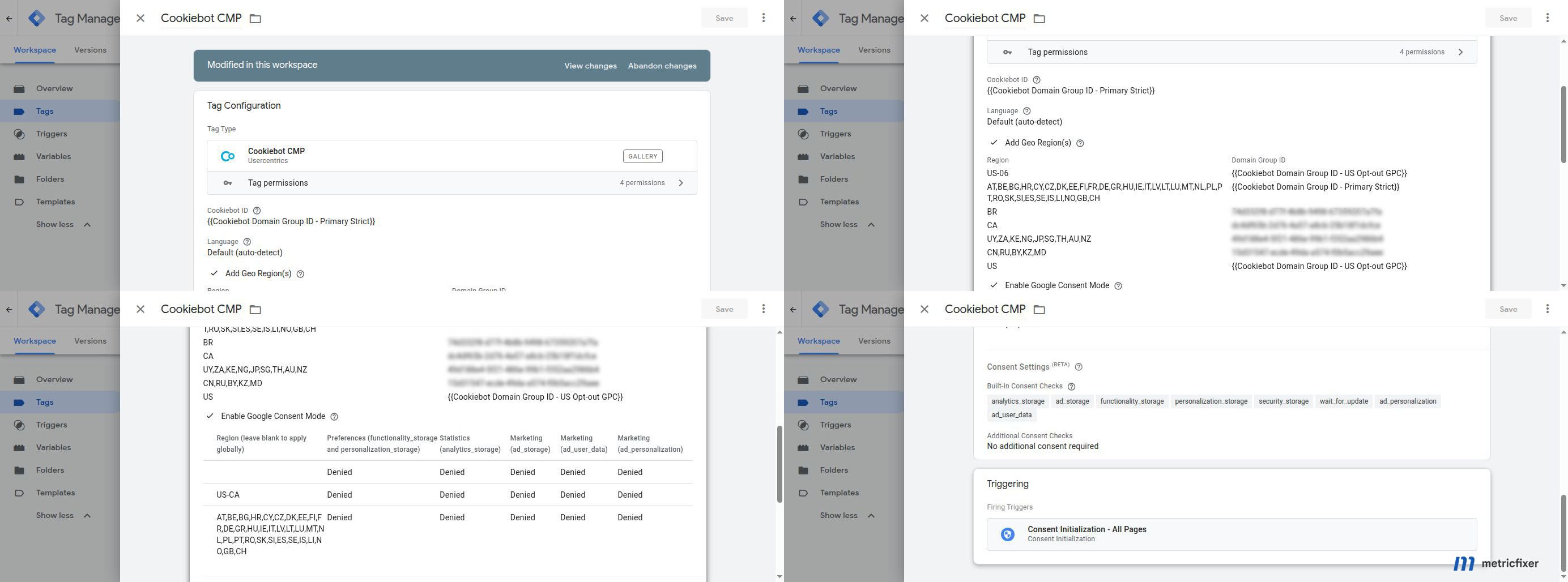
Cookiebot through Google Tag Manager
When Cookiebot is deployed through GTM, use the current Cookiebot CMP template and trigger it on Consent Initialization - All Pages. Cookiebot recommends maintaining at least one global default and adding regional defaults where needed. For Google Consent Mode region fields, use ISO country codes such as DE and ISO subdivisions such as US-CA.
Cookiebot maps its categories to Google consent types as follows:
| Cookiebot category | Google consent types | Global implementation note |
|---|---|---|
| Necessary | security_storage |
Do not place general analytics or advertising technologies in Necessary merely to avoid a choice. |
| Preferences | functionality_storage, personalization_storage |
Review whether personalization is functional or advertising-related in the actual use case. |
| Statistics | analytics_storage |
In strict profiles, start denied and grant only after the statistics choice. |
| Marketing | ad_storage, ad_user_data, ad_personalization |
In U.S. profiles, these values still do not encode the complete sale/share/GPC decision. |
Inline Cookiebot
When Cookiebot is installed directly in the page template, load it before Google tags and use data-georegions for alternative banner groups. Keep the same regional mapping on the Cookie Declaration. Do not mix Cookiebot's numeric U.S. state codes with Google's ISO subdivision codes.
Custom CMP or another platform
A custom solution is acceptable if it can establish defaults before measurement, update all relevant consent types, honor browser-level signals, persist and prove the choice, provide withdrawal, and propagate the decision to browser and backend systems. The test standard should be the same as for Cookiebot. A visually polished custom banner that sends no machine-readable update is not a complete implementation.
Step 3: create and verify the GA4-Google Ads link
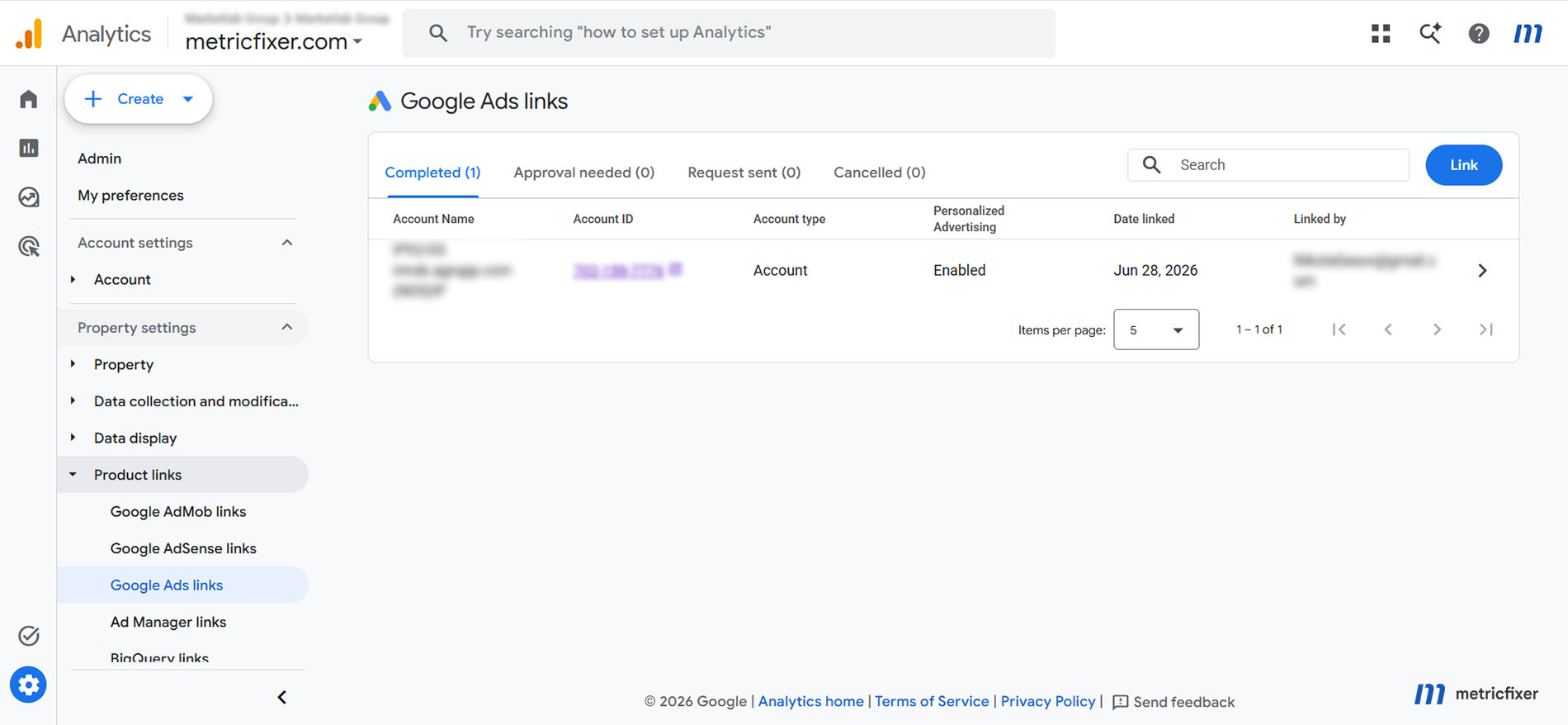
In GA4, go to Admin → Product links → Google Ads links. The user creating the link needs Editor or Administrator access in GA4 and administrative access in Google Ads. Select the intended account or manager account, review Enable Personalized Advertising, review auto-tagging, and submit the link.
For a global property, the usual configuration is:
- keep Enable Personalized Advertising on for Ads accounts that should receive eligible audiences;
- use visitor-level consent and regional GA4 controls to determine who is eligible;
- turn the link-level setting off only when that entire Ads account should not receive personalized-advertising data from the property;
- keep auto-tagging on unless the organization has a documented alternative.
The link is between the GA4 property and the Google Ads account. Removing Analytics access from the individual who originally created it does not itself stop remarketing or conversions. Google documents that changing the Analytics roles assigned to Google Ads linked users affects their ability to use Analytics features inside Google Ads, but does not affect Analytics-based conversions or remarketing. Data flow stops when the link is deleted or when a relevant data-use control is changed.
Step 4: enable the correct connected-product controls in Google Ads
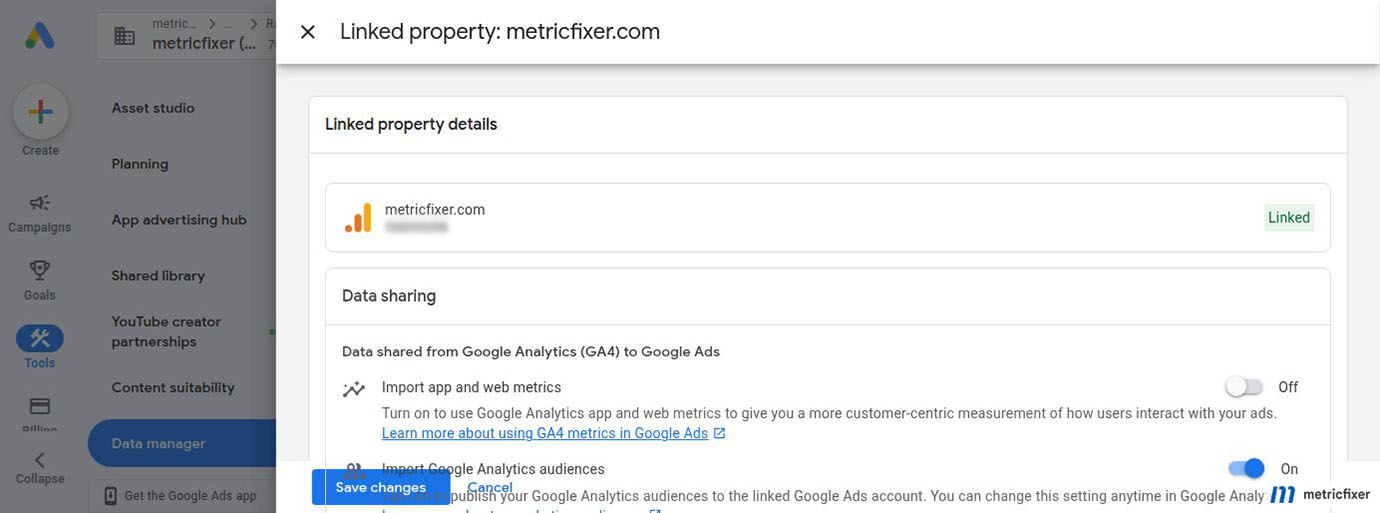
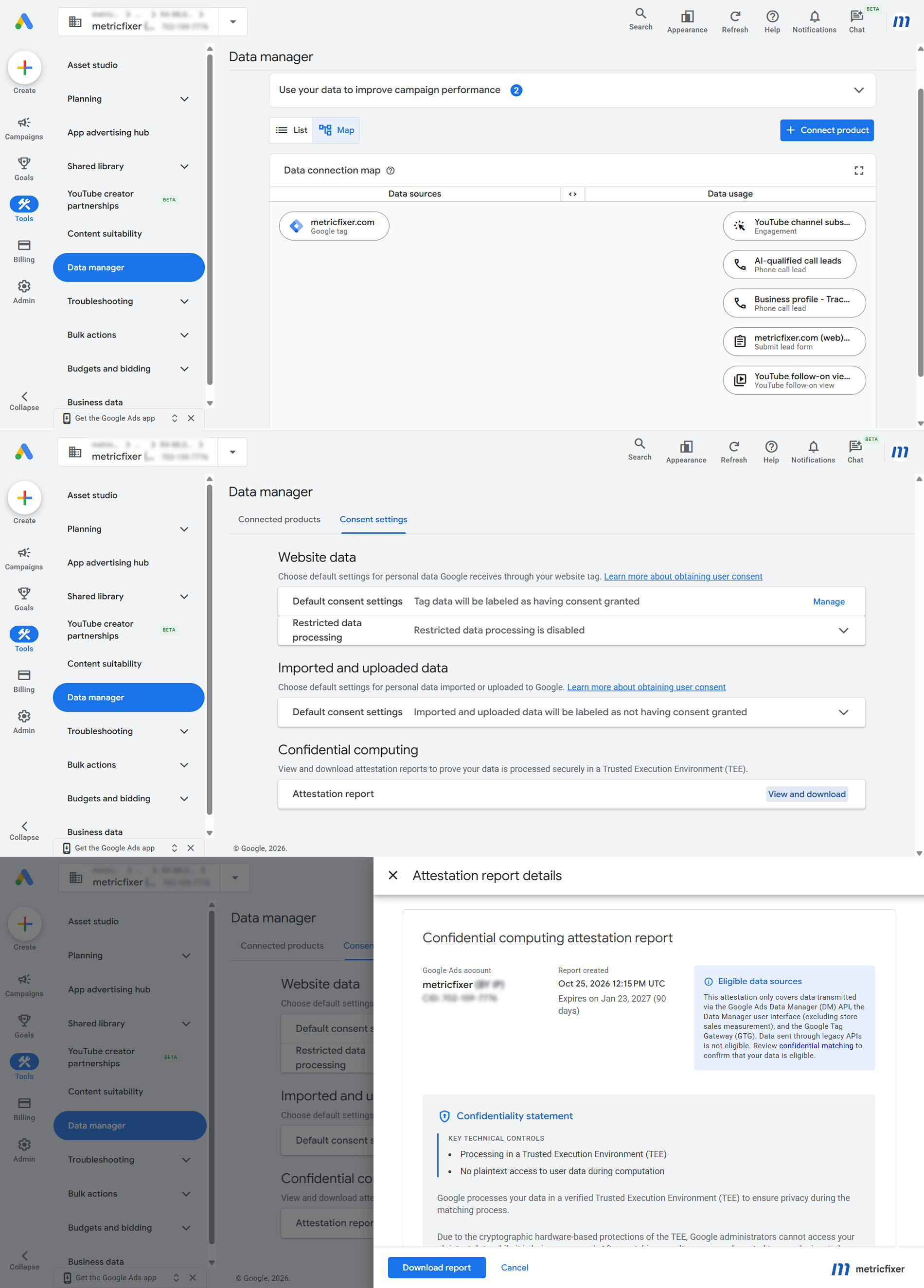
In Google Ads, open Tools → Data manager → Connected products, select the linked GA4 property, and review the data-sharing controls.
| Control | Purpose | Recommended global treatment |
|---|---|---|
| Import Google Analytics audiences | Publishes GA4 audiences to the linked Ads account | Turn on when the account should receive eligible GA4 audiences. |
| Import app and web metrics | Adds GA4 engagement metrics to Google Ads reporting | Optional. It does not replace audience import and is not required merely to publish audiences. |
Save the change and confirm that the property shows Linked. In multi-account structures, repeat the check for each intended Ads account or manager account. Do not assume that a link created in GA4 automatically means the Google Ads audience-import toggle is active in every destination.
Step 5: review GA4 advertising data prerequisites
Google's current linking documentation says that at least one of the following must be active for remarketing:
- Google Signals; or
- user-provided data collection.
Review GA4 Admin → Data collection and document:
- the user-data collection acknowledgment;
- Google Signals status;
- user-provided data collection status;
- regional ads-personalization settings;
- event or user-property exclusions from ads personalization;
- data retention and user-data policies;
- the consent diagnostic for each web stream.
As of 15 June 2026, Google Analytics uses Consent Mode's advertising controls as the single control for Google Ads cookies and identifiers collected through the Analytics tag or SDK for use in Google Ads. This reduces the previous overlap with the Google Signals setting, but it does not make the rest of the GA4 advertising setup irrelevant. The property still needs the correct link, data collection configuration, audience rules, regional personalization controls, and visitor-level consent.
Step 6: use GA4 regional ads-personalization controls deliberately
GA4 can disable ads personalization for selected countries and supported U.S. states. When a region is disabled, Google says that all events from that location are marked not eligible for ads personalization and users from that location are not added to lists exported to linked Ads accounts.
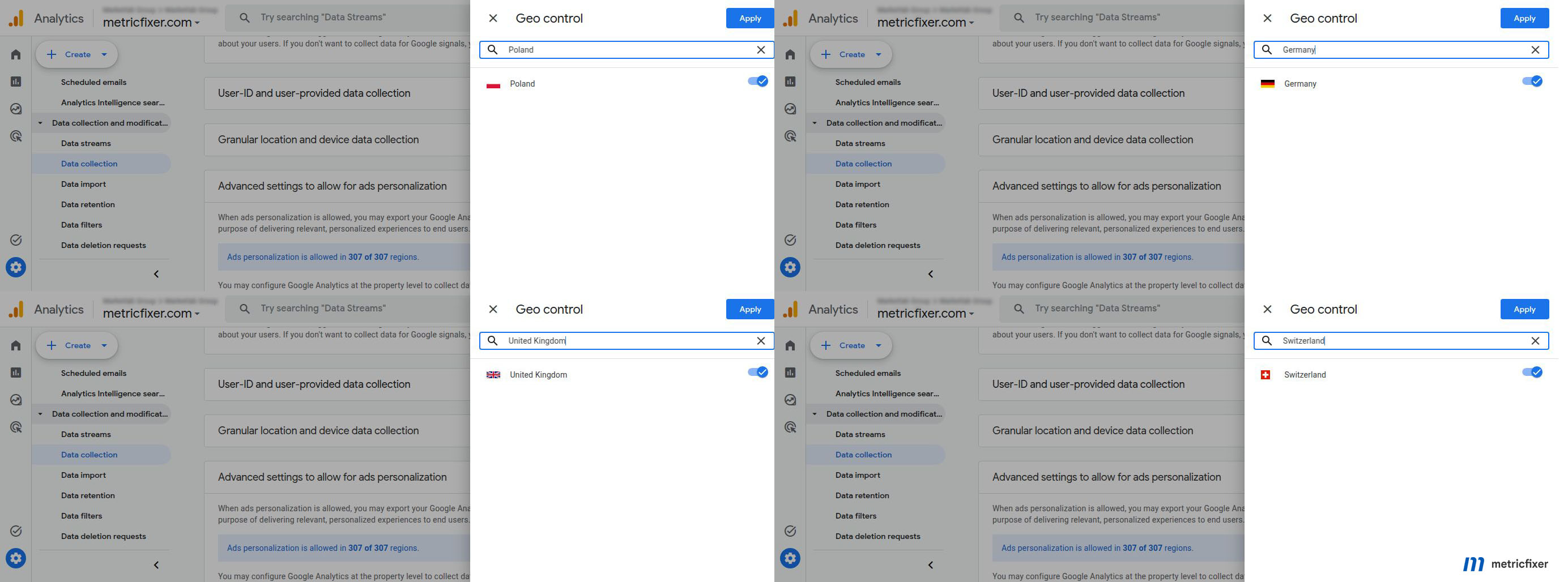
This is a blanket geographic exclusion. It is not a substitute for consent.
| Goal | Correct control |
|---|---|
| Allow consenting EEA users into Google Ads audiences | Keep the region available in GA4 and let ad_personalization, ad_user_data, and the approved consent path determine user-level eligibility. |
| Exclude every user from a country from Google Ads personalization | Turn the region off in GA4 advanced ads-personalization settings. |
| Honor a California or other U.S. opt-out while retaining eligible users | Use the U.S. opt-out, GPC, RDP, and Analytics controls; do not necessarily disable the entire state unless that is the business policy. |
| Stop one Ads account from receiving personalized data | Turn off Enable Personalized Advertising for that specific GA4-Google Ads link. |
| Exclude one event or user property | Use the event or user-property ads-personalization control rather than a country-wide switch. |
A frequent global mistake is disabling the entire EEA in GA4 because a consent banner exists. That excludes users who explicitly accepted marketing as well as users who rejected it. Keep the regional switch on when the business intends to activate properly consented users.
Step 7: configure Google Ads Data Manager consent defaults
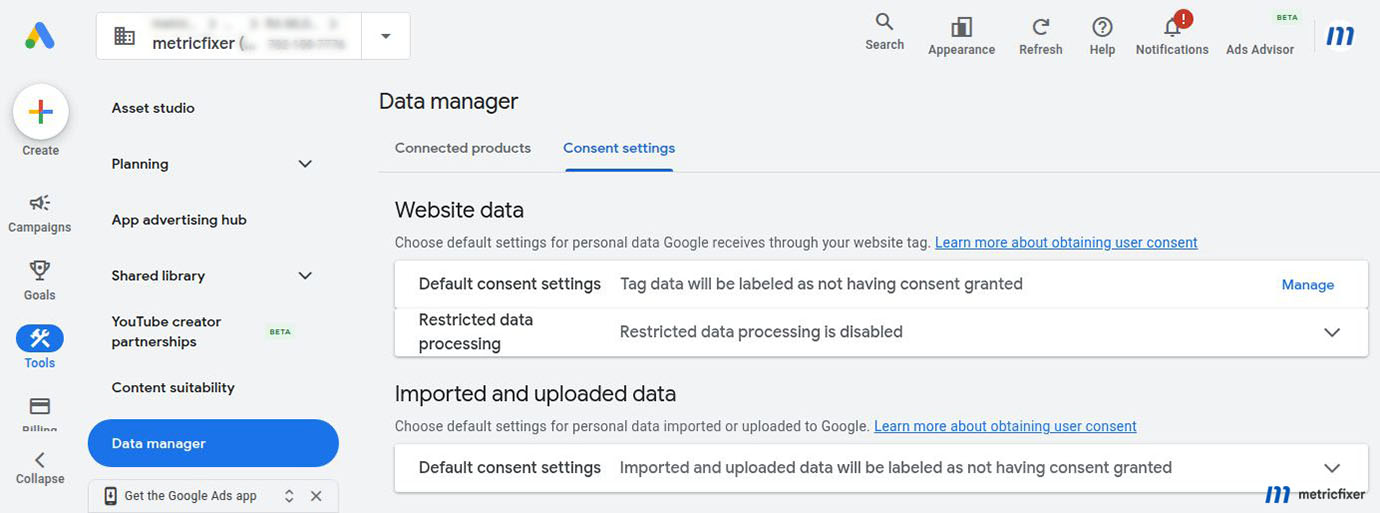
Google Ads Data Manager contains two separate account-level defaults under Consent settings:
Website data
This setting determines whether personal data received through the Google tag is automatically labeled as consented when no more specific website signal is available.
- No: Google does not automatically mark the data as consented and will not use personal data when end-user consent has not been granted.
- Yes: Google automatically treats received data as consented. Google says to use this when the business blocks the Google tag until after the visitor grants consent.
Website-level consent values override the account default. For a global account with mixed regional behavior, No is the safer fallback unless the implementation can prove that every personal-data-bearing Google tag request is permission-gated before it reaches Google.
Imported and uploaded data
This setting applies to personal data imported through connected sources, the Google Ads UI, or APIs. Google lists offline conversion import, enhanced conversions for leads, store calls, store sales, call conversion import, Customer Match, and selected conversion APIs among the affected features.
- No: missing consent is not automatically converted to granted.
- Yes: Google treats imported personal data as consented unless a more specific connection, import, upload, or record-level value overrides it.
For a global advertiser, the recommended default is normally No, followed by explicit consent or permission values at the closest available level. A universal Yes can silently label EEA, Brazilian, U.S. opt-out, or other restricted records as consented merely because the CRM export omitted a field.
Data Manager also lets the advertiser choose which Google services may receive consented data. The consent interface and privacy notice should identify the relevant recipients and purposes rather than promising a narrower flow than the account actually allows.
Step 8: configure the U.S. path separately
The United States should not be modeled as the EEA with different button text. Several state regimes focus on sale, sharing, targeted advertising, profiling, and universal opt-out mechanisms. Google Consent Mode's four main values do not fully encode those concepts.
Global Privacy Control
The CMP should read GPC where applicable, apply the approved opt-out state before covered data use, record that the signal was honored, and propagate the result to browser, server, CRM, and vendor systems. Cookiebot documents support for navigator.globalPrivacyControl, with behavior depending on the banner template.
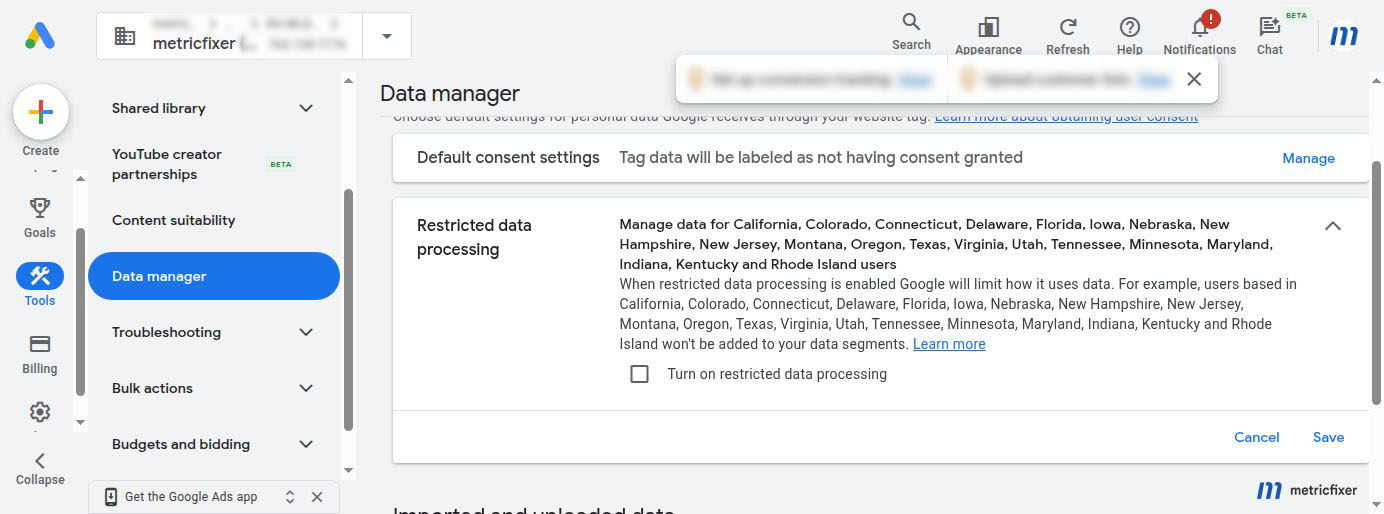
Restricted Data Processing
Google's U.S. state privacy documentation distinguishes where RDP is enabled:
- RDP configured in Google Ads applies to audience lists created with the Google Ads tag;
- for lists shared from Google Analytics, Display & Video 360, or Search Ads 360, the restriction must be configured in the originating product;
- RDP limits data use but does not itself constitute a website notice, GPC handler, or complete state-law program.
This distinction is critical for the subject of this article. Turning on RDP for the Google Ads tag does not automatically restrict a GA4-exported audience. Review GA4 regional ads-personalization controls and the actual consent or opt-out signals that accompany Analytics collection.
Do not turn on RDP globally without a reason
Global RDP can exclude users from data segments or reduce personalization outside the intended U.S. scope. Apply it according to the approved state and data-use matrix, then test both Ads-tag audiences and GA4-exported audiences.
Step 9: govern Customer Match, enhanced conversions, and offline imports
Website Consent Mode is only one source of truth for customer data. A global advertiser may collect a lead in one region, qualify it in another system, and upload it weeks later. The upload needs its own provenance and permission record.
Customer Match
Google requires Customer Match data to come from customers who shared it directly with the advertiser, subject to limited documented exceptions and policy conditions. Build the list from first-party sources, retain the collection purpose and region, and suppress records that should not be used for personalized advertising.
For EEA-related Customer Match workflows, pass the required consent information through the supported upload method. For global workflows, also enforce U.S. opt-outs, GPC-derived suppression, regional restrictions, and any local transfer or personalization rule. A Customer Match file should not be built from "all CRM contacts" without a permission filter.
Google currently states that Customer Match memberships can remain eligible for up to 540 days, subject to refresh and minimum-member rules. A long technical membership period does not override a withdrawal, objection, deletion request, or shorter business retention policy. Suppression and removal should run when the user changes the underlying permission.
Enhanced conversions
Enhanced conversions and enhanced conversions for leads use first-party customer data to improve matching and measurement. Review:
- the original collection notice and purpose;
ad_user_dataand the applicable regional permission;- whether the website, tag, Data Manager, CRM, or API supplies the data;
- normalization and hashing requirements;
- data-source duplication and deduplication;
- the 2026 unified Google Ads controls for website and lead data sources;
- withdrawal and deletion handling.
Offline conversions
Offline conversion import can be used for bidding and measurement even when the final event occurs in a CRM. The original click identifier or user-provided data should be stored with the appropriate regional and consent context. Do not assume that an imported conversion is automatically eligible merely because the initial web visit was measurable.
A practical CRM record contains separate fields for:
- measurement permission;
- advertising user-data permission;
- personalized-advertising permission;
- sale/share or targeted-advertising opt-out;
- source region and state;
- GPC state when captured;
- consent version and timestamp;
- withdrawal or suppression timestamp.
Step 10: design global and regional audiences
One global "All users" audience is useful for diagnostics but weak for activation governance. Build a naming and ownership model that exposes market and purpose.
Example naming pattern:
[Source] [Market] [Behavior] [Window] [Purpose]
GA4 | EEA | Product viewers | 30d | Remarketing
GA4 | US | Cart abandoners | 14d | Remarketing
CRM | Canada | Active customers | 180d | Customer Match
GA4 | Global eligible | Purchasers | 365d | Exclusion
Recommended audience layers:
- Global reporting audience: used inside GA4 to understand behavior, not assumed eligible for advertising.
- Advertising-eligible audience: the subset Google can export after consent, regional, and product controls.
- Market audience: defined by the commercial region, language, product availability, or campaign destination.
- Suppression audience: purchasers, existing customers, withdrawn users, or other users who should not receive acquisition or remarketing ads.
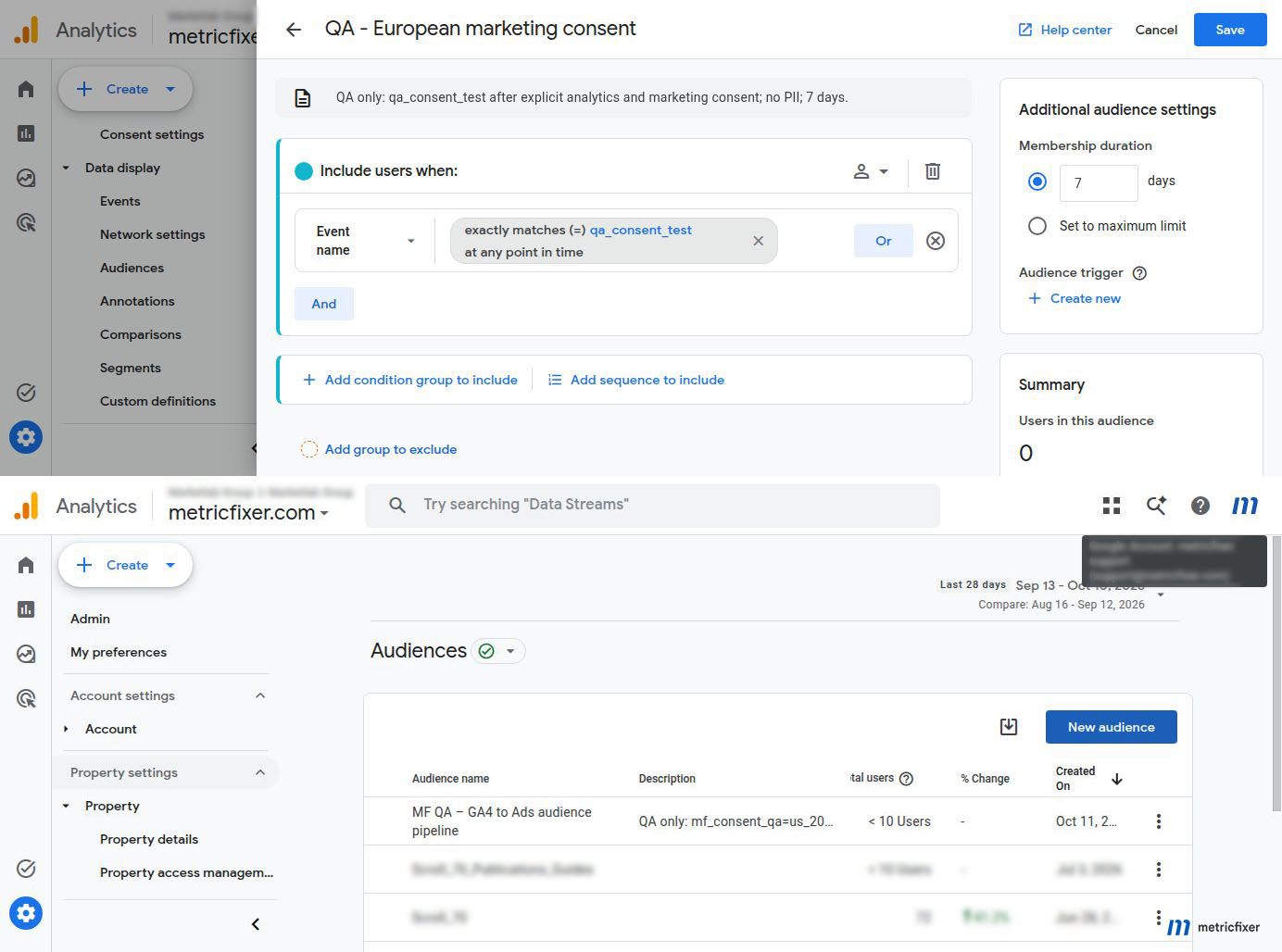
- QA audience: a temporary, narrow rule used to confirm that a controlled test user arrives in the correct destination.
Do not treat a custom GA4 parameter such as consent_status=granted as the enforcement mechanism. It can be useful for QA when implemented carefully, but a client-side parameter can be missing, delayed, or manipulated. Google eligibility should be controlled by Consent Mode and platform settings; CRM activation should use the authoritative backend record.
Step 11: configure conversions separately from audiences
Audience import and conversion import are different workflows. A linked GA4 property does not automatically create every key event as a Google Ads conversion, and a visible conversion does not prove that remarketing audiences are eligible.
For each conversion:
- identify whether it comes from the Google Ads tag, GA4 key event, enhanced conversions, enhanced conversions for leads, offline import, or another source;
- define the regional collection and advertising-use rule;
- confirm attribution identifiers and auto-tagging;
- choose primary or secondary action status deliberately;
- verify deduplication when more than one source reports the same business event;
- confirm whether the event is available for bidding, reporting, or both;
- test rejected, accepted, GPC, and withdrawn users separately.
Advanced Consent Mode can support modeled conversions when denied-state pings are allowed by the approved design. Basic Consent Mode blocks Google tags until consent. The choice affects measurement coverage, but it should not be changed only to make the conversion column larger.
Step 12: review Google tag consent and transmission controls
The Google tag interface can contain consent-mode setup, regional overrides, and data-transmission controls. These screens are useful fail-safes, but they can also contradict the CMP.
Review:
- whether a consent-mode override is global or region-specific;
- whether it resets an update sent by Cookiebot;
- whether the override uses the same country list as the CMP;
- whether data-transmission controls allow limited advertising data or block it more strictly in denied states;
- whether Google Tag Gateway, CDN injection, or server-side delivery changes script order;
- whether multiple Google tags or GTM containers establish conflicting defaults.
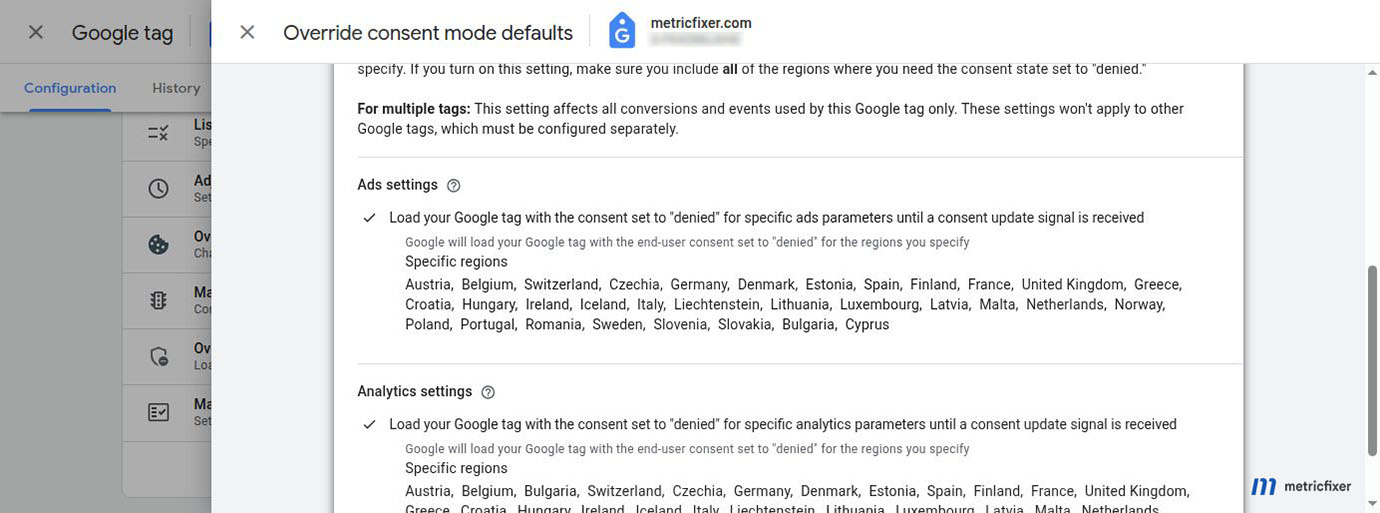
An account screen that shows granted by default does not prove that the website obtained consent. Conversely, a global denied override can suppress data in markets where the approved profile allows collection. Keep the CMP authoritative and use account controls as documented fallbacks.
Step 13: review GA4 consent diagnostics
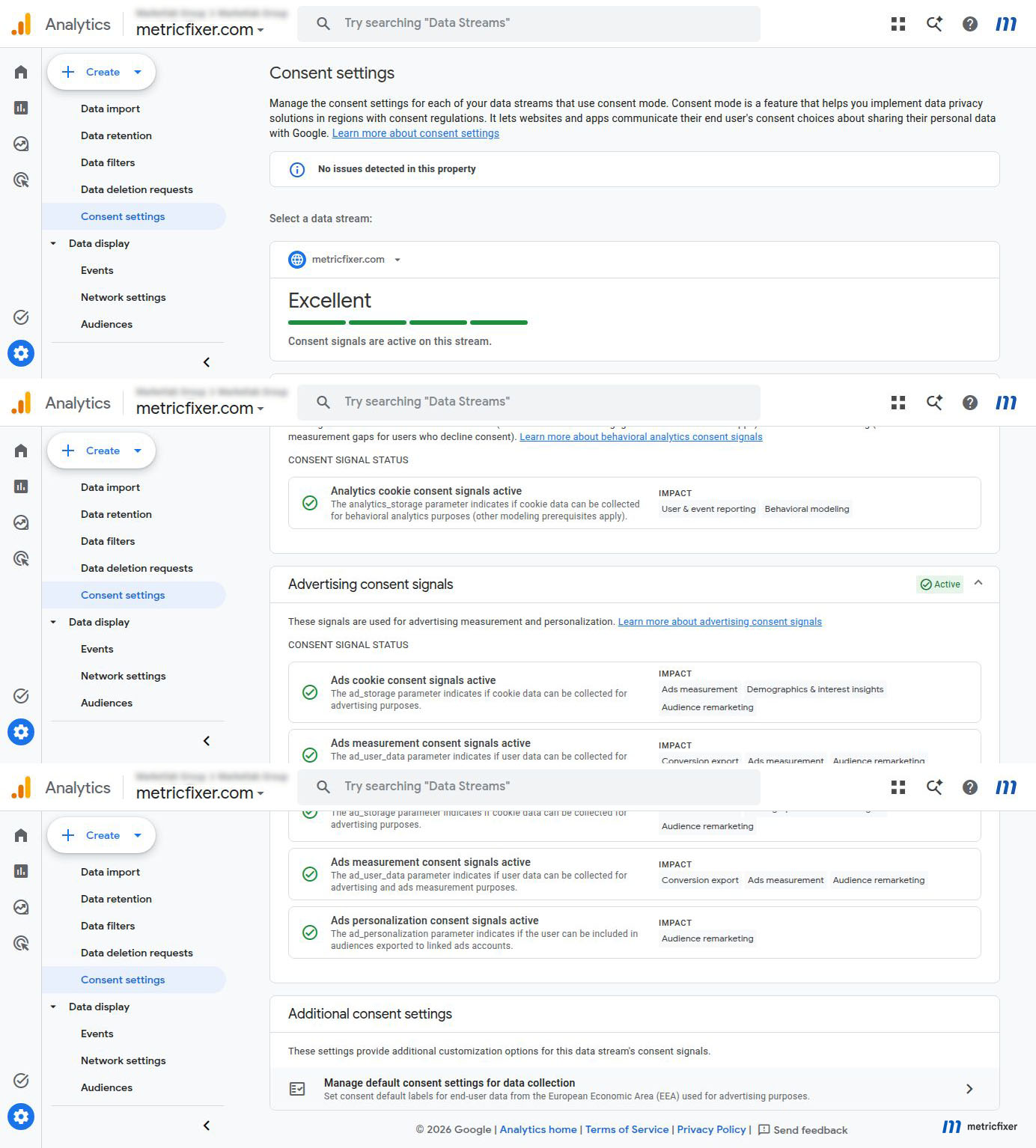
In GA4, open Admin → Data collection and modification → Consent settings and inspect each web stream. Review the behavioral analytics and advertising consent signals separately.
A "Good" or "No issues detected" state means that Google detected a technically plausible setup. It does not prove:
- the correct banner appeared in every country;
- reject was as easy as accept;
- the user received the required disclosures;
- GPC was honored;
- server-side and CRM systems followed the choice;
- the account defaults were appropriate;
- the business selected the correct legal basis.
Use the diagnostic as one layer of evidence, then verify actual tag and data behavior.
Step 14: run a global audience test matrix
| Scenario | GA4 expectation | Google Ads expectation | CRM / backend expectation |
|---|---|---|---|
| EEA, no interaction | Data follows the approved Basic or Advanced denied-state design; no advertising eligibility without the required choice. | User does not enter a personalized audience before consent. | No Customer Match or advertising upload. |
| EEA, statistics only | Analytics measurement can proceed according to the approved statistics choice; advertising states remain denied. | No remarketing membership. | No marketing activation. |
| EEA, marketing accepted | User meets audience rules and advertising eligibility if all other prerequisites are met. | Audience begins populating after processing; campaign use still depends on list size. | Advertising uploads permitted only under the recorded scope. |
| Brazil, reject all | Optional collection remains denied. | No personalized audience membership. | Marketing suppression persists. |
| California, GPC on | Analytics and advertising use follow the approved GPC and RDP mapping. | Ads-tag and GA4-exported lists are checked separately. | Sale/share and targeted-advertising activation suppressed where applicable. |
| California, manual opt-out | Subsequent events reflect the updated state. | Future list eligibility changes as designed. | Existing CRM audience membership is removed or suppressed. |
| Canada, approved marketing choice | Data follows the Canadian or hybrid profile. | Eligible users can populate the market audience. | Purpose and transfer conditions are preserved. |
| Japan or China special-market user | Dedicated regional rules, not ROW fallback. | Only approved personalization and audience use. | Transfer, localization, and vendor routing checked. |
| Unknown location | Explicit fallback values. | No accidental grant due to missing region. | Fallback activation policy applied. |
| User withdraws after entering an audience | Future advertising eligibility is denied. | List refresh and suppression behavior are monitored. | Uploads stop and suppression is propagated. |
Use a clean browser profile, controlled VPN or trusted regional testing service, Tag Assistant, browser developer tools, the GA4 Realtime and DebugView interfaces, Google Ads Audience Manager, Cookiebot logs, and backend logs. Do not use a single accepted session as proof for the entire global setup.
Why GA4 and Google Ads audience sizes differ
GA4 and Google Ads do not count the same population.
| Number | What it represents |
|---|---|
| GA4 audience size | Users who meet the GA4 audience conditions within the property and membership rules. |
| GA4 advertising segment | A more comparable view of users eligible for advertising use. |
| Google Ads list size | Users that Google can match and use on the relevant network after consent, personalization, policy, recency, identity, and product controls. |
| Campaign-eligible size | The list after network-specific minimums, campaign settings, geography, policy restrictions, and other eligibility checks. |
Google's current published minimum for Display, Search, YouTube, and customer lists is generally 100 active users within the last 30 days, with legacy exceptions for some older customer lists. Google also notes that new audiences can require 48 to 72 hours to populate. These thresholds and processing windows can change, so verify the live interface before diagnosing a regional consent issue.
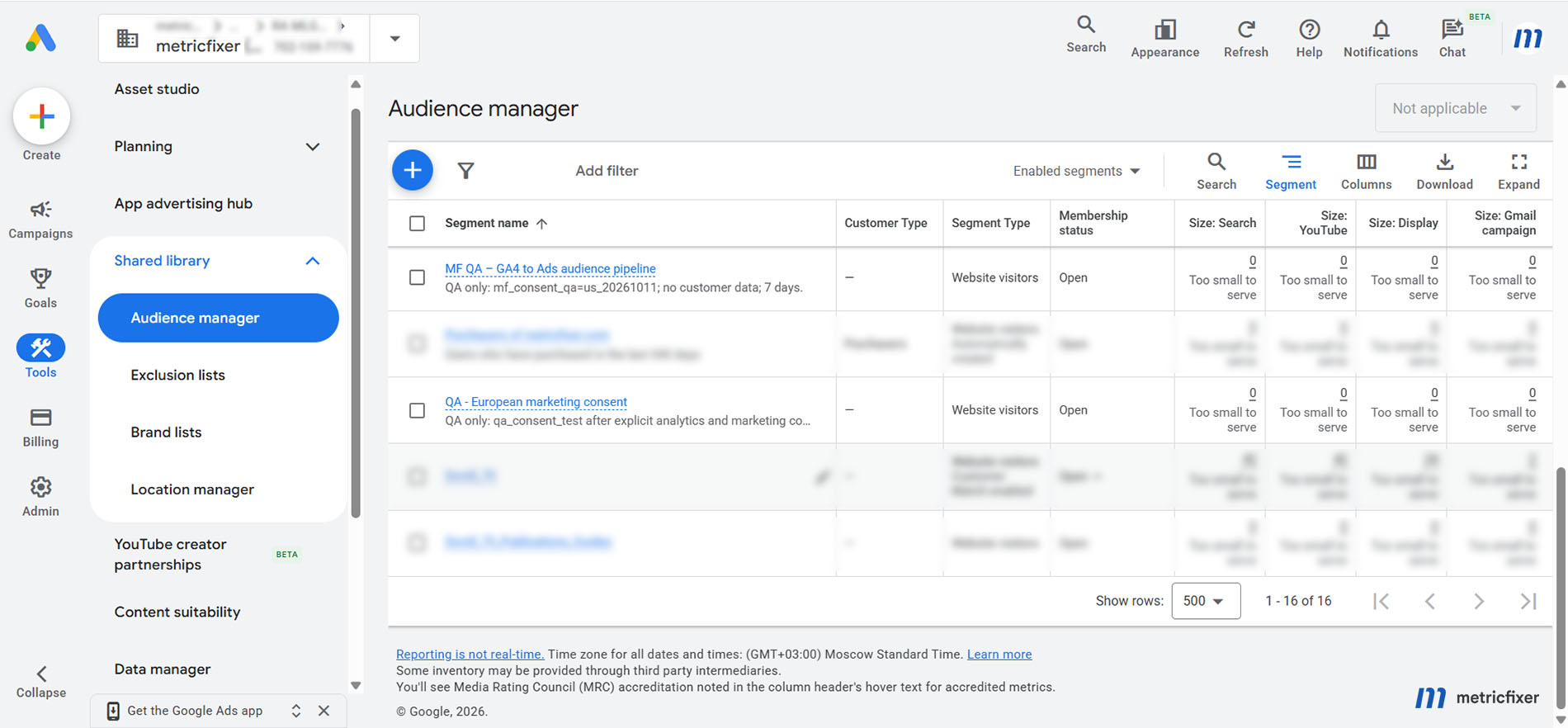
Global lists often shrink for legitimate reasons:
- EEA or Brazilian visitors rejected marketing;
- GPC or a U.S. opt-out suppressed targeted advertising;
- GA4 personalization was disabled for a country or state;
- the Ads link or audience-import toggle is off;
- Google Signals and user-provided data prerequisites are not met;
- the audience has not reached the network minimum;
- users are outside the campaign geography;
- the list contains unmatched or stale Customer Match records;
- the Google account or content is restricted from personalized advertising.
Recommended Google settings matrix
The following is a practical starting point. It assumes that the business wants to use eligible, consented users for advertising rather than exclude whole markets. Final values depend on the approved regional policy.
| Layer | Global default | Regional treatment |
|---|---|---|
| Cookiebot | Primary ROW or conservative fallback group | Alternative strict, U.S. opt-out, Brazil, hybrid, and special-market profiles as needed |
| Google Consent Mode | Explicit policy-approved fallback; never undefined | Denied strict-market defaults; approved U.S., hybrid, and special-market overrides |
| GA4-Google Ads link | Personalized advertising on for intended destination accounts | Turn off only for an entire account that should not receive personalized data |
| Import GA4 audiences | On for intended linked accounts | Control eligibility through consent and regional data controls, not by repeatedly breaking the link |
| GA4 regional ads personalization | On where consented users should be eligible | Off only for deliberate blanket market or state exclusion |
| Data Manager website default | No automatic consent marking for mixed global traffic | A website signal can override it when the implementation provides a more specific state |
| Data Manager imported/uploaded default | No automatic consent marking | Use connection, import, or record-level consent and suppression |
| U.S. RDP | Not a global default | Apply to approved U.S. state and data-use paths; configure GA4-originated lists in GA4 |
| Customer Match | No unfiltered global CRM upload | Filter by provenance, consent, opt-out, region, purpose, recency, and policy eligibility |
| Server-side and offline data | No assumption that browser measurement permission equals advertising activation permission | Use authoritative backend state and suppress withdrawn or opted-out users |
Troubleshooting by symptom
The global Google Ads audience is much smaller than the GA4 audience
Check, in this order:
- the GA4 advertising segment rather than the general audience count;
- regional Consent Mode values and rejection rates;
- GA4 country and U.S. state personalization exclusions;
- the GA4-Google Ads link and Enable Personalized Advertising;
- the Google Ads Import Google Analytics audiences toggle;
- Google Signals or user-provided data collection;
- processing time and the current network minimum;
- policy, identity, age, and content restrictions.
The EEA audience exists in GA4 but is empty in Google Ads
Verify that the region is not globally disabled in GA4. Then verify ad_storage, ad_user_data, and ad_personalization after marketing acceptance. Check whether the account-level website default is contradicting or masking missing signals. Finally, confirm the link and audience import.
A U.S. list stops populating after enabling RDP
Identify the list source. If it is built by the Google Ads tag, the Ads RDP setting can apply directly. If it is exported from GA4, review the Analytics source controls. Also confirm whether GPC or a state-wide GA4 personalization exclusion is suppressing more users than intended.
Customer Match or enhanced-conversion uploads are accepted but not used
Review Data Manager's imported/uploaded default, the connection or record-level consent fields, account eligibility, data normalization, first-party provenance, regional opt-outs, stale memberships, and minimum list size. A successful file upload is not proof that every record is eligible for personalization.
The wrong banner appears and the wrong audience behavior follows
Compare Cookiebot's georegion mapping, CDN or server country, VPN test location, language routing, and cached consent cookie. Confirm that the Cookiebot banner and Cookie Declaration use the same mapping. Remember that Cookiebot and Google use different U.S. state-code formats.
All markets show denied and measurement collapsed
Look for a global Google tag override, multiple consent-default tags, a stale CMP template, a Consent Initialization tag that never updates, or a regional array that accidentally includes the entire world. Fix the source of truth rather than setting Data Manager to automatic consent granted.
All markets show granted before the banner
Check tag order, asynchronous loading, account defaults, hard-coded gtag('consent','default') calls, duplicated Google tags, server-side or gateway injection, and whether the CMP actually runs on Consent Initialization. A late update cannot undo data already transmitted before the correct default.
Audiences stopped after the employee who linked the accounts lost GA4 access
That access change is not, by itself, the cause. Google documents that changing roles assigned to Google Ads linked users does not affect Analytics-based conversions or remarketing. Verify whether the link was deleted, personalized advertising was turned off, the audience-import control changed, consent signals changed, or the source audience stopped qualifying users.
Browser testing looks correct but audiences or conversions still include rejected users
Inspect server-side GTM, Measurement Protocol, CRM uploads, enhanced conversions, conversion APIs, and reverse ETL. Confirm that each destination receives the authoritative regional and consent state and that rejected, opted-out, or withdrawn records are suppressed.
Global GA4-Google Ads checklist
- [ ] Approve one regional activation matrix used by web, analytics, CRM, advertising, and legal teams.
- [ ] Choose the GA4 property, Google Ads account, and manager-account architecture deliberately.
- [ ] Deploy Cookiebot before measurement and configure regional defaults in the correct code format.
- [ ] Verify Basic or Advanced Consent Mode for every major profile.
- [ ] Link the intended GA4 property to the intended Ads account or manager account.
- [ ] Keep Enable Personalized Advertising on where eligible users should be exported.
- [ ] Enable Import Google Analytics audiences in each intended destination.
- [ ] Review Google Signals, user-provided data collection, and GA4 consent diagnostics.
- [ ] Keep GA4 regional ads personalization on for markets where consenting users should qualify.
- [ ] Use GA4 regional off switches only for deliberate blanket exclusion.
- [ ] Set Data Manager website and uploaded-data defaults conservatively for mixed global traffic.
- [ ] Configure GPC, U.S. opt-outs, RDP, and GA4-exported audience controls as separate but connected layers.
- [ ] Filter Customer Match, enhanced conversions, and offline imports by provenance, region, permission, and withdrawal.
- [ ] Name audiences by source, market, behavior, window, and purpose.
- [ ] Test EEA, Brazil, U.S. GPC, U.S. manual opt-out, Canada or hybrid, special-market, unknown-location, and withdrawal scenarios.
- [ ] Compare GA4 audience, GA4 advertising segment, Google Ads list, and campaign-eligible size before diagnosing a failure.
- [ ] Confirm that server-side GTM, CRM, APIs, and warehouse activation honor the same state as the browser.
- [ ] Re-test after CMP, Google tag, Data Manager, account-link, audience, or regional-policy changes.
Methodology and sources
This guide is based on a review of current Google Analytics, Google Ads, Google Ads Data Manager, Google Tag Platform, Cookiebot, Global Privacy Control, and IAB documentation available in August 2026. It uses the regional profiles described in metricfixer's global consent-signals article and the implementation model in the companion global Cookiebot and Consent Mode guide.
The recommendations distinguish documented Google behavior from metricfixer's operational defaults. For example, Google documents that website and upload-level signals override Data Manager account defaults; metricfixer's recommendation to keep those defaults at No for mixed global traffic is a risk-control choice intended to prevent a missing signal from becoming presumed consent.
- Google Analytics: connect Google Ads to Google Analytics
- Google Analytics: enable remarketing with Analytics data
- GA4 advanced settings to allow for ads personalization
- Google Analytics data-control updates effective in 2026
- Google: about consent mode
- Google Consent Mode reference
- Google: verify consent mode implementation
- Google Ads Data Manager consent settings
- Google Ads support for U.S. state privacy laws
- Google Ads: disable collection of personalized advertising data
- Google Ads data-segment sizes and eligibility
- How Google uses Customer Match data
- How to provide consent for Customer Match
- Google Ads customer data policies
- Google Ads enhanced conversions
- Google Ads 2026 enhanced-conversion setup changes
- Google Tag Platform consent-mode implementation
- Cookiebot GTM deployment and Consent Mode mapping
- Cookiebot multi-legislation regional configurations
- Cookiebot and Global Privacy Control
- IAB Tech Lab Global Privacy Protocol
This article is for technical and operational information only and is not legal advice. Google, Cookiebot, IAB, browser, and privacy-law requirements can change, and the correct configuration depends on the advertiser's actual markets, data sources, legal roles, vendors, account structure, and permitted uses. Before enabling personalized advertising or uploading customer data, validate the collection and activation workflow with qualified privacy counsel and test the production data path end to end.