
Published Nov 15, 2026
Google Ads Invalid Traffic: From Reports to Investigation
Understand Google's invalid-traffic reports, separate filtered clicks from later credits, and follow a practical route through GA4 checks, server logs and a Click Quality investigation.
Category: Online advertising · By metricfixer Expert Team
Suspicious Google Ads traffic is not one problem with one report. Some invalid clicks are filtered before billing, some activity produces a later credit, and some poor results come from targeting, measurement or website abuse rather than chargeable invalid clicks. This guide explains how to use Google's new Invalid traffic overview, campaign columns, billing adjustments and credit report, then move from GA4 checks to a well-supported investigation when the evidence warrants it.
Practical starting point: check what Google has already excluded before estimating a loss. Compare the affected campaigns with their own baseline, preserve relevant logs immediately, and escalate only the unresolved question. Start simply, but do not let log retention or Google's investigation window expire while you investigate.
Contents
Executive summary
The first question is not how much money to request back. It is what happened, what Google already removed, and what remains unexplained.
Google's definition of invalid clicks includes automated activity, accidental clicks and deliberately abusive manual clicks. A genuine visitor who does not buy is not automatically an invalid click. Neither is an inconvenient location, a repeated IP address or an unsuccessful sales call sufficient evidence on its own.
Keep three questions separate: whether an advertising interaction should have been charged; whether the visitor was commercially useful; and whether the website measured the visit correctly. They can overlap, but they need different evidence and different remedies.
Google describes real-time filtering, later detection and manual review. Some suspicious patterns take weeks to establish. Treat a next-day or two-day check as a useful reporting checkpoint, not a promise that every invalid click will be identified within 48 hours.
The sensible sequence is to review Google's protection reports, reconcile actual credits, investigate the affected website traffic and then submit a focused case. A larger investigation is justified when the unresolved commercial impact, repeated disruption or uncertainty is substantial enough to make a better diagnosis valuable.
Step 1: Check the Invalid traffic overview
On 12 November 2026, Google announced the Invalid Traffic Overview Card. It brings prevented charges and later credits into one interface. This is a transparency update, not the introduction of Google's invalid-traffic defenses. Google describes the rollout as gradual, so an absent card is not evidence that an account lacks protection.
Open Campaigns → Overview and look for Invalid traffic, headed Your invalid traffic protection and credits in the supplied example. Set the period deliberately and inspect any account or campaign filters before reading the totals. Select View details for the expanded view.
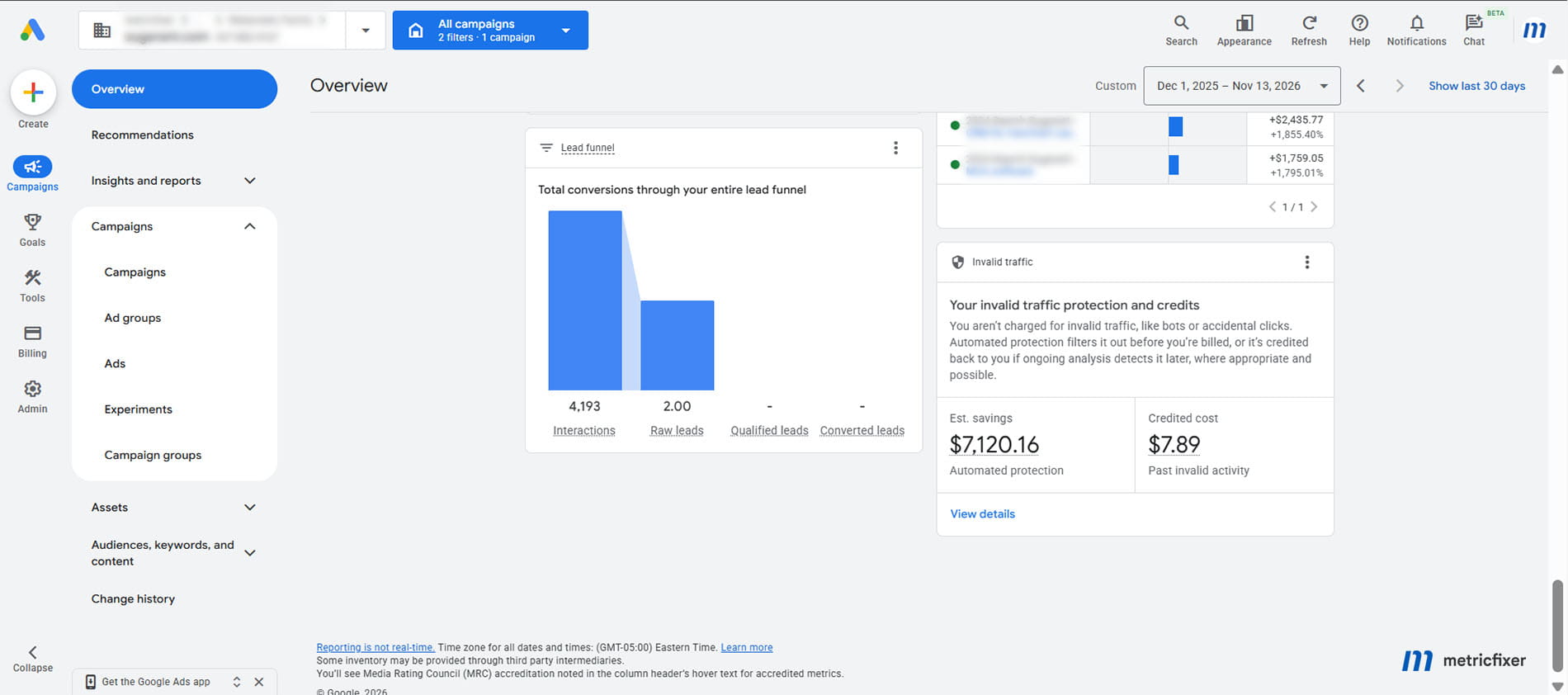
The supplied detailed view contains four headline values:
| Displayed measure | Example value | How to read it |
|---|---|---|
| Est. savings | $7,120.16 | Google's estimate of prevented charges, labelled Automated protection. It is not a cash refund. |
| Filtered clicks | 752 | Clicks included in the automated-protection view, not a list of additional clicks to reclaim. |
| Credited cost | $7.89 | A separate amount associated with past activity credits. |
| Credited clicks | 8 | Clicks associated with those past activity credits, rather than the 752 filtered clicks above. |
It would be misleading to describe this as a $7,120.16 refund, or to conclude that Google compensated only eight of 752 chargeable invalid clicks. The interface separates different stages of protection. Keep the two monetary measures separate in client reporting and do not subtract estimated savings from a cost figure that already excludes filtered activity.
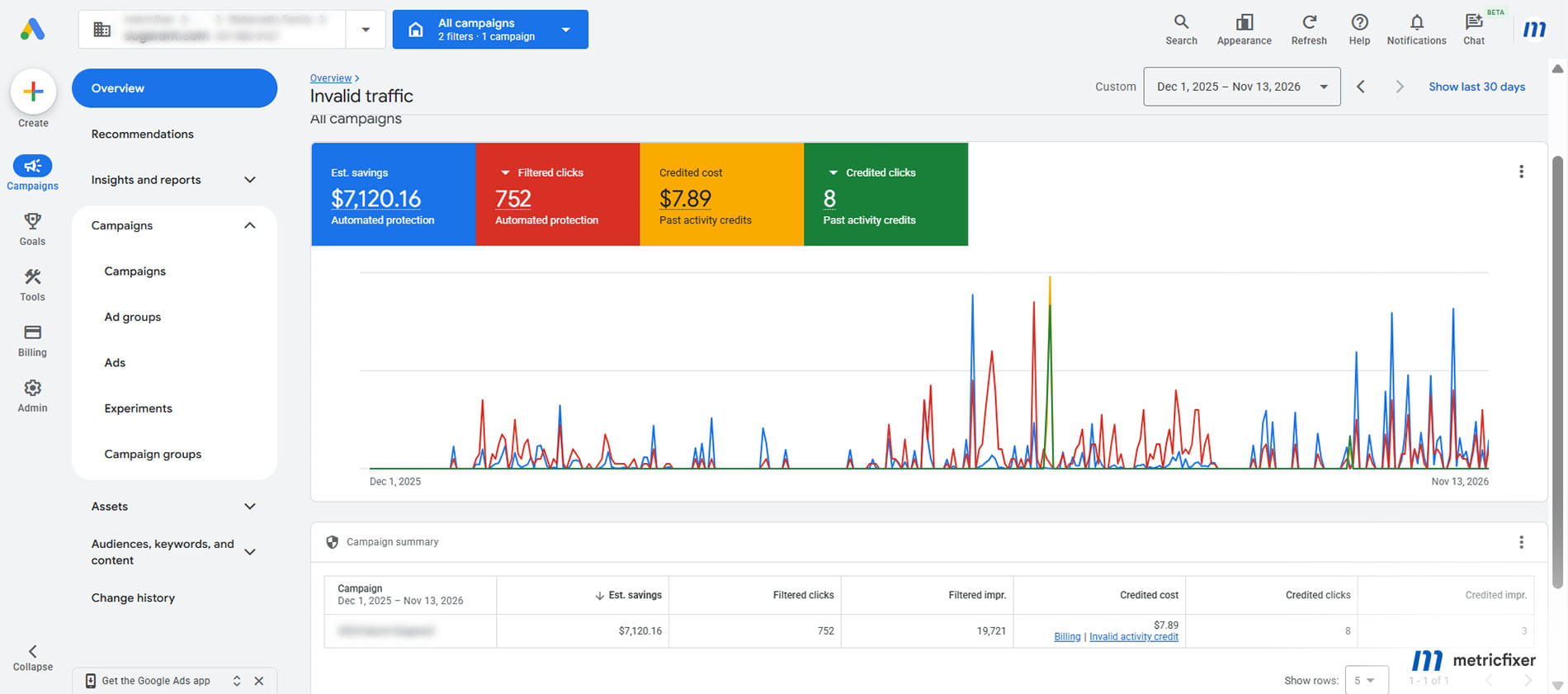
Use the graph to locate dates worth checking. Do not reverse-engineer an exact invalid-click price by dividing estimated savings by filtered clicks: the page also contains impression data, and the supplied evidence does not establish the estimator's complete calculation.
Step 2: Read invalid-click columns correctly
The campaign table remains useful whether or not the new card is available. In Campaigns, open Columns, search for invalid, select the relevant measures and apply the column set. Keep Clicks, Cost and business-result metrics beside them.
Google's column guide documents Invalid clicks and Invalid click rate on the Campaigns page. Do not assume they are available in the ad-group table. Use supported campaign segments and separate ad-group diagnostics rather than promising a column the chosen report does not offer.
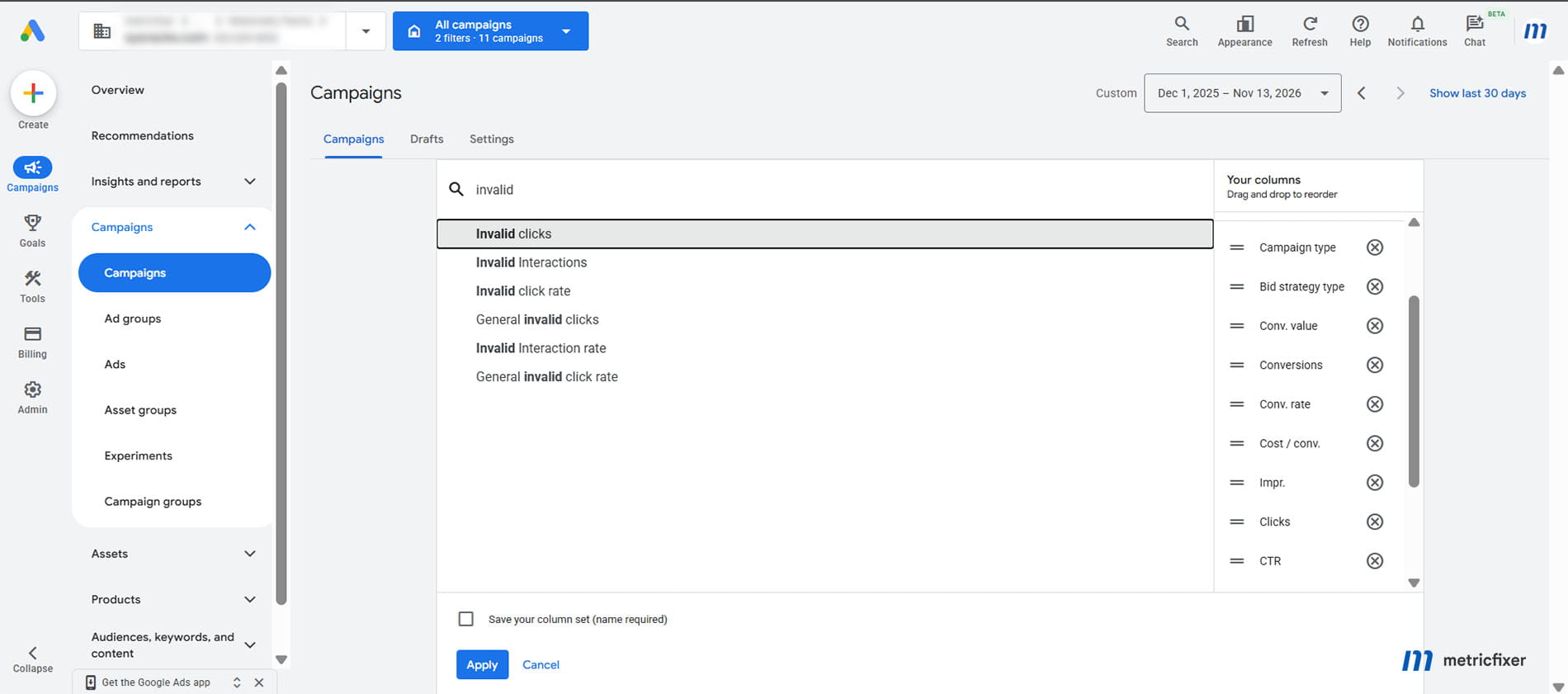
Invalid clicks are clicks Google has already classified and filtered, not outstanding refund claims. General invalid clicks concern routine filtering, such as known bots and standardized checks; Google documents these general-invalid columns for Search and Display. They are not an extra bucket to add to all invalid clicks. Interactions also depend on ad format and can include actions other than clicks, so do not add invalid clicks to invalid interactions as though the populations were separate.
The supplied campaign example shows 45,866 clicks, 4,173 invalid clicks and an 8.34% invalid click rate. The denominator matters. Google's metric definition uses filtered plus non-filtered clicks:
Invalid click rate = invalid clicks / (clicks + invalid clicks)
4,173 / (45,866 + 4,173) = approximately 8.34%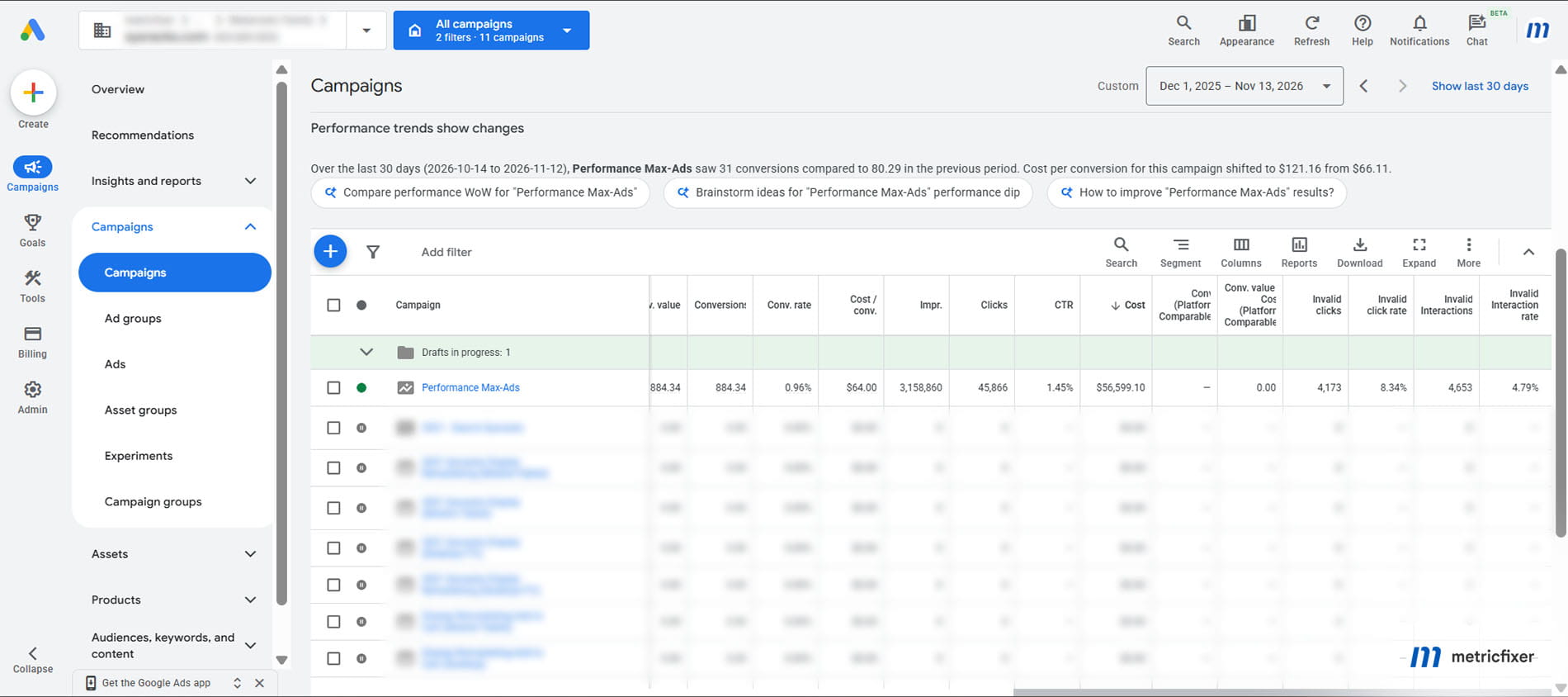
Compare both volume and rate with the same campaign's earlier periods. More filtered clicks may accompany more traffic; a percentage without volume can exaggerate a tiny sample. Neither measure alone shows how much undetected invalid activity remains. Avoid estimating recoverable loss as invalid clicks multiplied by average CPC: that starts with clicks already excluded from charges.
Step 3: Reconcile billing and the credit report
Check the actual adjustment
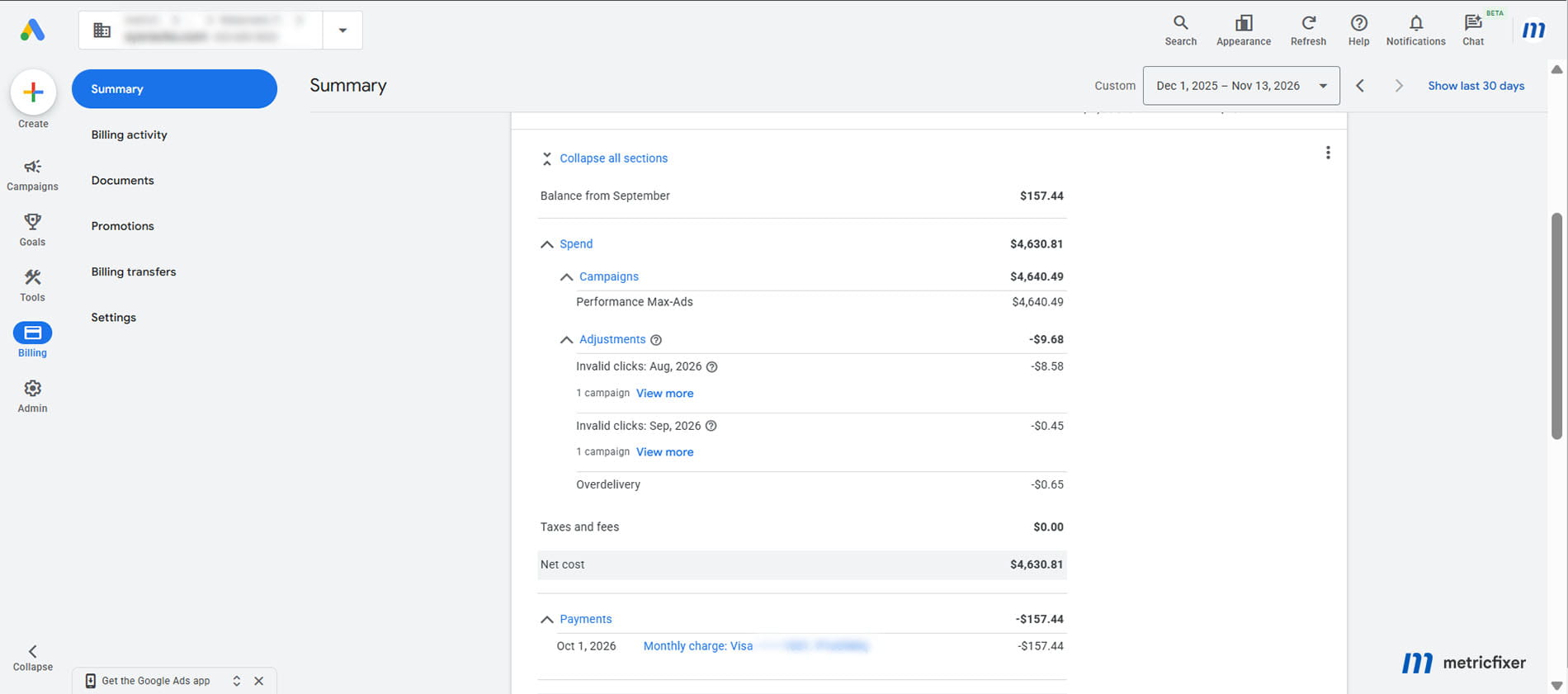
Open Billing → Summary and expand the relevant month's adjustments. Check the label, amount and original service period. The supplied billing screenshot uses Invalid clicks; Google's current guidance also refers to Invalid activity adjustments.
The example contains two invalid-click adjustments of -$8.58 and -$0.45, plus -$0.65 for overdelivery. The invalid-click component is therefore $9.03, not the full $9.68 adjustment total. A negative billing adjustment reduces the account charge; do not describe it as a bank or card refund without separate payment evidence.
Use the Invalid Activity Credit Report
Google's April 2026 announcement introduced this report for Search and Performance Max. Open Campaigns → Insights and reports → Report editor, then find Invalid activity credit: Search & PMax in the template gallery.
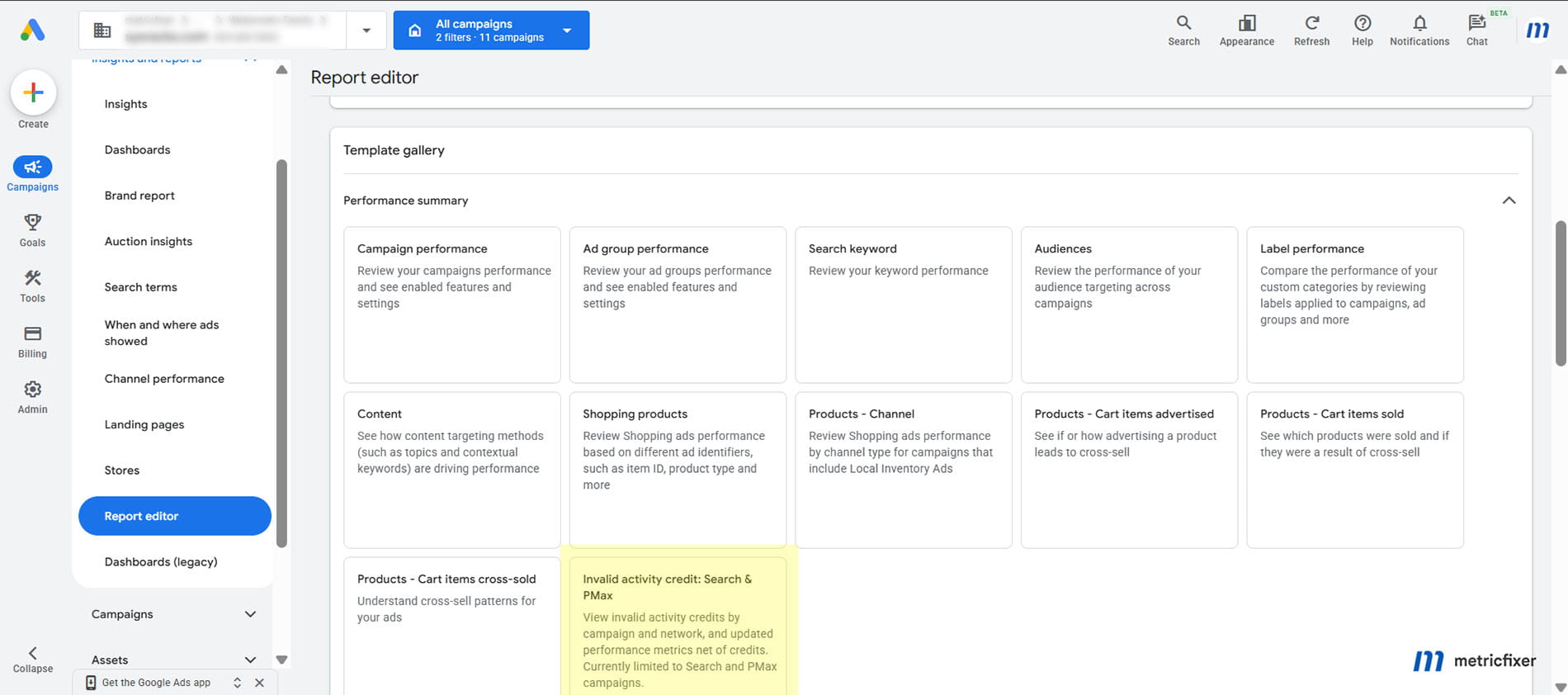
It connects credits with campaigns and networks. Credited clicks, Credited interactions and Credited amount describe later credits; adjusted measures show the corresponding net position. Google explains the fields in its Invalid Activity Credit Report documentation. Invalid activity can also involve inventory that violated publisher policies, not only fraudulent clicks.
In the supplied Performance Max row, the arithmetic is visible:
Adjusted cost = $161,096.47 - $25.89 = $161,070.58
Adjusted clicks = 115,840 - 8 = 115,832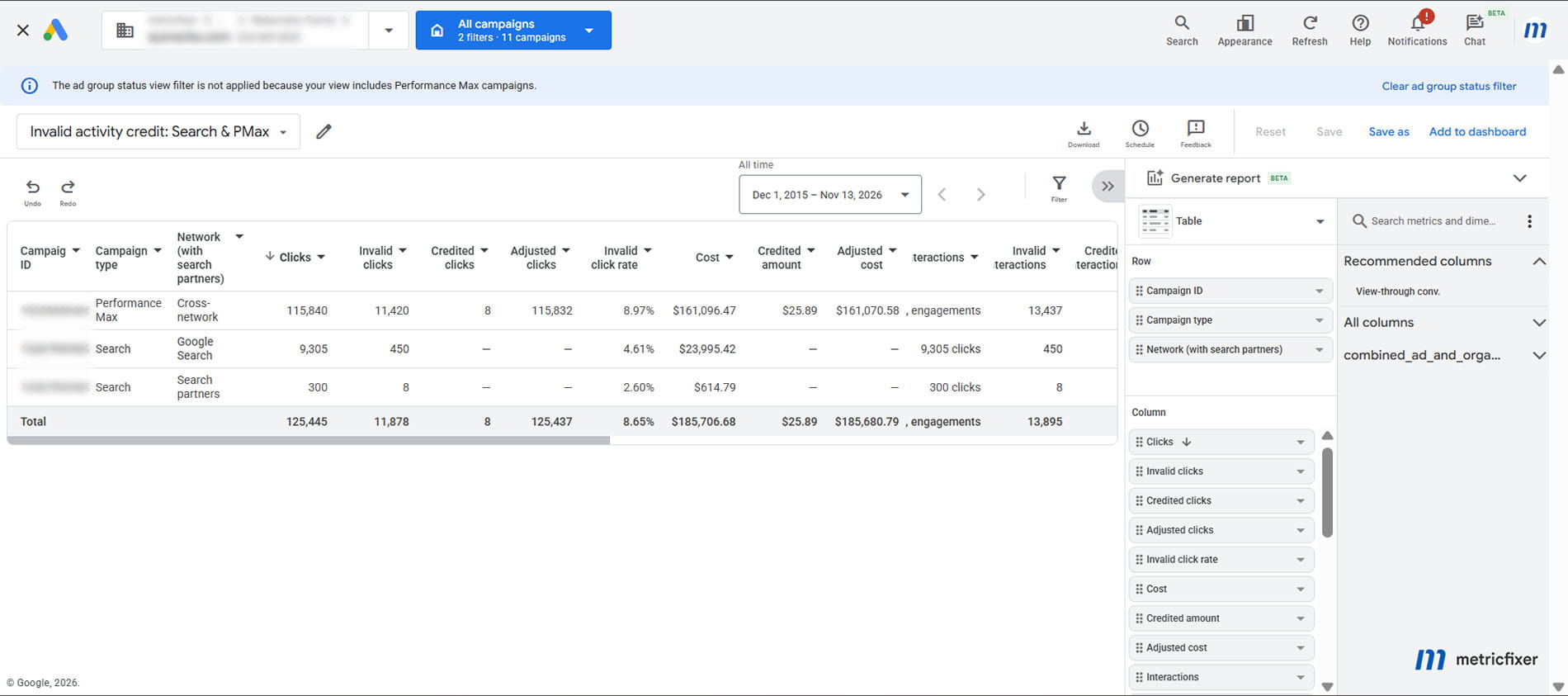
Past-activity credits do not rewrite the ordinary campaign table's closed-month metrics. Use the adjusted report for that comparison. A click near month-end and its later credit can also fall in different months, and monthly rounding can produce small differences.
Before reconciling, align the advertiser account, selected campaigns, filters, currency and date basis. Record both the activity period and the credit posting period. Treat a dash as unavailable or inapplicable until checked, not automatically as zero. Subtract each credit once: subtracting it again from Adjusted cost double-counts the correction. A long historical report does not extend the window for a new investigation request.
Step 4: Compare the affected traffic in GA4
Once you know what Google has reported, ask whether the remaining concern is visible in website behavior. GA4 is useful for locating a pattern. It is not a second billing ledger or a tool for deciding whether Google charged a particular click.
Isolate the right session population
Open Reports → Acquisition → Traffic acquisition, or locate the report through your property's navigation. Choose Session source / medium and begin with google / cpc. Do not filter only on cpc when other advertising platforms use that medium. Google's Traffic acquisition guide describes these session-based dimensions and report filters.
For linked, correctly attributed Google Ads traffic, also check Session source platform and the relevant session campaign dimensions. Use these to verify campaign coverage, rather than assuming one source/medium row contains everything. Do not restrict the review to Paid Search: Google's channel definitions include Performance Max under Cross-network.
Keep the investigation session-scoped. First user source / medium answers how a user was originally acquired, not necessarily how the suspicious visit arrived. Google explains that distinction in its traffic-source scope documentation.
Compare behavior and business results
Select the affected dates and a reasonably comparable baseline: similar weekdays, campaign coverage and business conditions. Record the Ads account timezone, GA4 property timezone and any subsequent log-time conversion. For hourly analysis, align timestamps explicitly; matching calendar dates is not enough.
Compare sessions, engaged sessions, engagement rate, key events and actual sales or qualified leads. Break the anomaly down by campaign, landing page, device, geography and time, using an Exploration where needed. The aim is a specific finding, such as a new concentration of visits to one landing page, not a broad statement that all paid traffic looks bad.
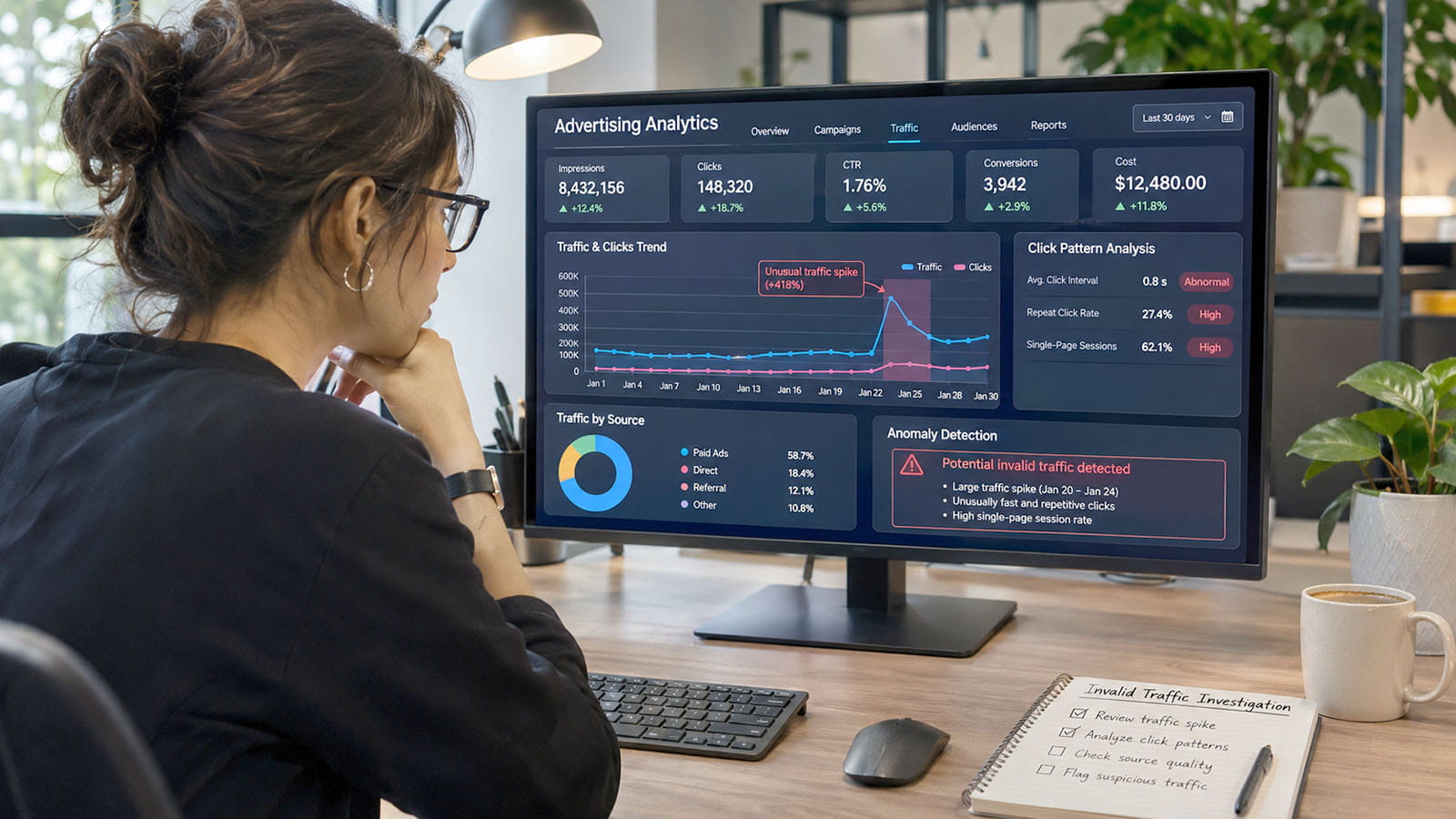
Check recent budget, targeting, landing-page and measurement changes alongside the pattern. Test the form and its tracking. A broken submit button, duplicated event or changed consent setup deserves a different response from repeated automated submissions. For leads, distinguish verified invalid contact details from a single unanswered call, low purchase intent or a sales follow-up problem.
Allow reporting to mature before comparing final totals. Google says Analytics processing can take 24–48 hours, during which reports may change. This is a data-freshness consideration, not an invalid-click-detection deadline.
Understand the limits of the comparison
Ads clicks, GA4 sessions and server requests are different units. Repeat clicks can occur within a session; a visitor can return without another paid click; consent, browser restrictions, failed page loads and redirects can affect collection. Google's clicks-versus-sessions troubleshooting guide covers these differences. An unexplained gap is a question to investigate, not a refund calculation.
Google Ads can filter an interaction while website measurement still records the visit. Conversely, GA4 automatically excludes known bots and spiders, without exposing their excluded volume. Remaining GA4 traffic is not thereby certified as human, and its bot exclusions are not the same reporting population as Ads invalid clicks.
GA4 also does not log or store individual IP addresses. You cannot export a visitor-IP list from its standard reports for this investigation. Use appropriately authorized server or edge evidence instead; do not attempt to fill the gap by sending visitor IP addresses into Analytics custom dimensions.
Step 5: Preserve logs and prepare a Click Quality request
The official route is the Google Ads Click Quality Form. Use an authorized Google account and identify the affected advertiser account, not merely its manager account. The public link requires sign-in; attachment controls and support routing should be checked in the authenticated flow.
As checked on 13 November 2026, Google's investigation guidance limits requests to activity within the last 60 days. It asks for account and campaign details, dates, suspicious keywords where relevant, server evidence including IP/device information and GCLIDs, and an explanation of the pattern. Lead cases should include available click identifiers and documented lead-quality assessments.
Preserve evidence when the concern first appears, not after completing every report check. Ask whoever manages hosting or the CDN what logs exist, how long they are retained and whether they cover the relevant requests. Preserve an authorized original copy before rotation, together with its timezone and collection settings. Enabling logging today cannot reconstruct records that were never kept.
What the evidence package should contain
A compact, navigable package is more useful than an unexplained archive. The following is a recommended structure, not a claim that Google's form has identically named fields:
| Component | What to include |
|---|---|
| Case summary | Advertiser customer ID, campaign IDs and names, affected dates and timezone, what changed, and the precise question Google should investigate. |
| Original request-level evidence | A relevant-period log extract with timestamps, available click identifiers, client-address provenance, requested paths, status codes, user agents and referrers where recorded. Explain missing fields and coverage. |
| Ads reconciliation | Exports of the affected campaign rows, filtered-click measures, relevant credit-report rows and billing adjustments. Label each report's dates and filters. |
| Behavior and lead evidence | Comparable GA4 segments and, where relevant, documented CRM outcomes. Explain the assessment method rather than labelling every non-buyer fraudulent. |
| Analytical note | The baseline, suspicious pattern, reproducible counting rules, representative records, alternative explanations and the unresolved suspected volume. |
Google's advertiser resources on server logs explain why a request is not a unique visitor or ad click: one page can generate requests for several assets, public IPs may be shared, and user-agent strings can be spoofed. Count candidate landing requests separately from images, scripts, health checks and subsequent page requests. Keep the original records available to support the summary.
Preserve gclid where it was recorded, but do not assume every ad visit must contain it. Google's iOS measurement guidance documents cases where GCLID is not sent. Preserve other available identifiers such as wbraid and gbraid with their original labels; do not invent replacements or treat them as interchangeable GCLIDs.
A repeated identifier across requests is not a series of separately paid clicks. Google's third-party-data guidance notes that reloads and return visits can inflate external counts. A copied tagged URL also cannot establish that each later request originated from a fresh ad interaction. Preserve both raw request counts and your deduplication rules.
Submit evidence without overstating it
Keep raw facts separate from the analyst's classification. A useful case identifies a bounded pattern and asks whether its associated advertising interactions escaped filtering. It does not ask Google to accept a proprietary bot score, an IP reputation label or a calculated refund as conclusive.
Attach the analysis alongside the logs through the available supporting-materials route, or ask support for an approved upload method. Do not publish raw logs in a community forum or open cloud folder. Retain required matching evidence through the authorized channel, while removing unrelated passwords, tokens, cookies and customer content from the submission copy. Document redactions and keep the original restricted.
If a deadline is approaching, submit the available evidence promptly and ask how to supplement it. Do not assume that an initial ticket extends the 60-day window. If historical logs are missing, say so and provide the evidence that does exist; describe the resulting uncertainty rather than reconstructing a fictional history.
Google says it sends an email with findings and any additional credits, but does not confirm the valid/invalid status of individual clicks. Expect a case outcome, not a reproducible click-by-click forensic report. Google's assessment determines the credit; an external audit cannot guarantee that assessment or its amount.
When a deeper investigation is worth the cost
Not every unusual chart warrants a forensic project. If the concern is fully explained by a configuration change and the remaining commercial impact is small, a documented correction may be enough. If significant unexplained spend continues, lead handling is being disrupted or several systems tell incompatible stories, a more detailed investigation can be rational.
Compare the cost of investigation with the unresolved exposure and the value of preventing recurrence, not with the largest number in the protection widget. Consider wasted sales time, damaged optimization signals and the risk of blocking genuine customers as well as possible advertising credits. A high estimated-savings figure is not a budget for recoverable losses.
What a cross-source audit adds
A useful audit builds a common timeline from three sources: what Google Ads reported and charged; what GA4 observed on the site; and what the server or edge actually handled. CRM evidence adds business outcomes where available. The objective is to test explanations, not force all three systems to produce the same count.
Start with scope and coverage. Origin logs may omit requests served entirely by a CDN; analytics may omit unconsented or uncollected activity. A server behind a proxy may record the proxy address rather than the visitor. Establish these limitations before interpreting a mismatch or calling a cluster of requests one person.
Where a trustworthy shared identifier exists, use it to connect the available records. Where it does not, compare bounded groups by time, campaign, landing page and other available characteristics, and label that comparison as aggregate evidence. Similar timestamps and device profiles are not a verified session-to-click match. Count requests, identifiers, sessions and reported clicks separately.
Then test competing explanations: measurement failure, duplicated events, real but poorly targeted visitors, automated website access, form abuse, or suspected paid interactions not yet excluded. Assess both corroborating and contradictory evidence. A credible audit states what would change its conclusion and what remains impossible to determine from the available records.
The deliverable should identify supported findings, their strength, the affected period, reproducible counts, known credits, unresolved exposure and the next proportionate action. When estimating financial exposure from aggregate costs, label it an estimate, explain the assumptions and avoid presenting it as Google's eventual credit calculation.
Why analysis can help, but cannot promise a credit
In the practitioner experience supplied for this article, a reasoned analysis submitted with raw logs has sometimes been associated with materially larger credits than logs-only submissions. The practical value is making a complex pattern and its scope easier to assess.
This is a practitioner observation, not a controlled comparison or a Google commitment. No case-level dataset was supplied to isolate the effect of the audit from differences in cases, timing or Google's own detection. There is no defensible uplift percentage or guaranteed refund. Google's guidance also distinguishes first-party evidence from third-party classifications it does not validate.
For a substantial unresolved case, metricfixer's Google Analytics Traffic Anomaly Investigation provides a route to scope the available Analytics and server evidence. Include the relevant Ads reports and billing question in that scope. Begin with a non-sensitive outline; agree secure evidence access and the work required before sharing logs. Investigation, remediation and ongoing monitoring are separate decisions, and none is a promise of compensation.
Choose the remedy that matches the evidence
The best outcome is not necessarily a larger credit. It may be a repaired measurement setup, better targeting, safer forms or a decision not to block valuable traffic.
| Finding | Proportionate next action |
|---|---|
| The difference is explained by reporting scope or broken tracking | Repair the measurement issue, annotate the affected period and compare again. Do not turn the discrepancy into a refund claim. |
| Visitors appear genuine but are a poor commercial fit | Review search terms, campaign reach, landing-page language, the offer and lead qualification. Treat this primarily as a performance problem. |
| Unwanted requests or form abuse continue despite filtered ad clicks | Improve website-side safeguards and verified business-outcome measurement. Ads billing protection does not replace site protection. |
| A specific suspected paid-traffic pattern remains unresolved | Submit the bounded evidence through Click Quality and consider a deeper audit when exposure justifies it. |
| Evidence is insufficient or conflicts | Document the gap, preserve what exists and agree a limited observation plan. Do not invent a culprit, a refund amount or missing historical records. |
Google's invalid-lead guidance recommends form safeguards, server-side validation and meaningful lead goals. A filtered ad interaction can still be followed by a website submission. Conversely, a spam submission does not by itself establish that Google billed an invalid click.
Apply access restrictions cautiously. Prefer a justified, narrow intervention with an owner, review date and rollback plan. Check ordinary customer access and required monitoring rather than treating a quieter chart as proof of success. The distinction is illustrated in metricfixer's server-log investigation of suspicious Singapore traffic: a useful website-protection result did not establish the identity or intent of every visitor.
Do not confuse hiding traffic in an analytics report with preventing requests or correcting an advertising bill. Keep an unfiltered comparison available during analysis. Where lead quality is the issue, preserve the distinction between a submitted form, a qualified lead and a sale.
A practical escalation checklist
- Define: record the advertiser account, campaign, dates, timezone, suspicious change and comparable baseline.
- Preserve: secure the relevant original logs and report exports before retention limits remove them.
- Reconcile: separate filtered activity, estimated savings, issued credits and the unresolved concern; align reporting periods.
- Test: review GA4 session-level behavior, campaign changes, collection problems and actual lead or sales quality.
- Escalate proportionately: submit a focused Click Quality case within the applicable window; commission deeper analysis when its likely decision value justifies the cost.
- Close the loop: record the support outcome and any posted credit, apply the justified remedy, and verify results without counting the same credit twice.
Decision flow: preserve evidence → check Google's reports → compare website behavior → resolve an explained issue, or submit a bounded unresolved case → add cross-source analysis when justified → verify the outcome. Evidence preservation and deadline checks run alongside the investigation, not at its end.
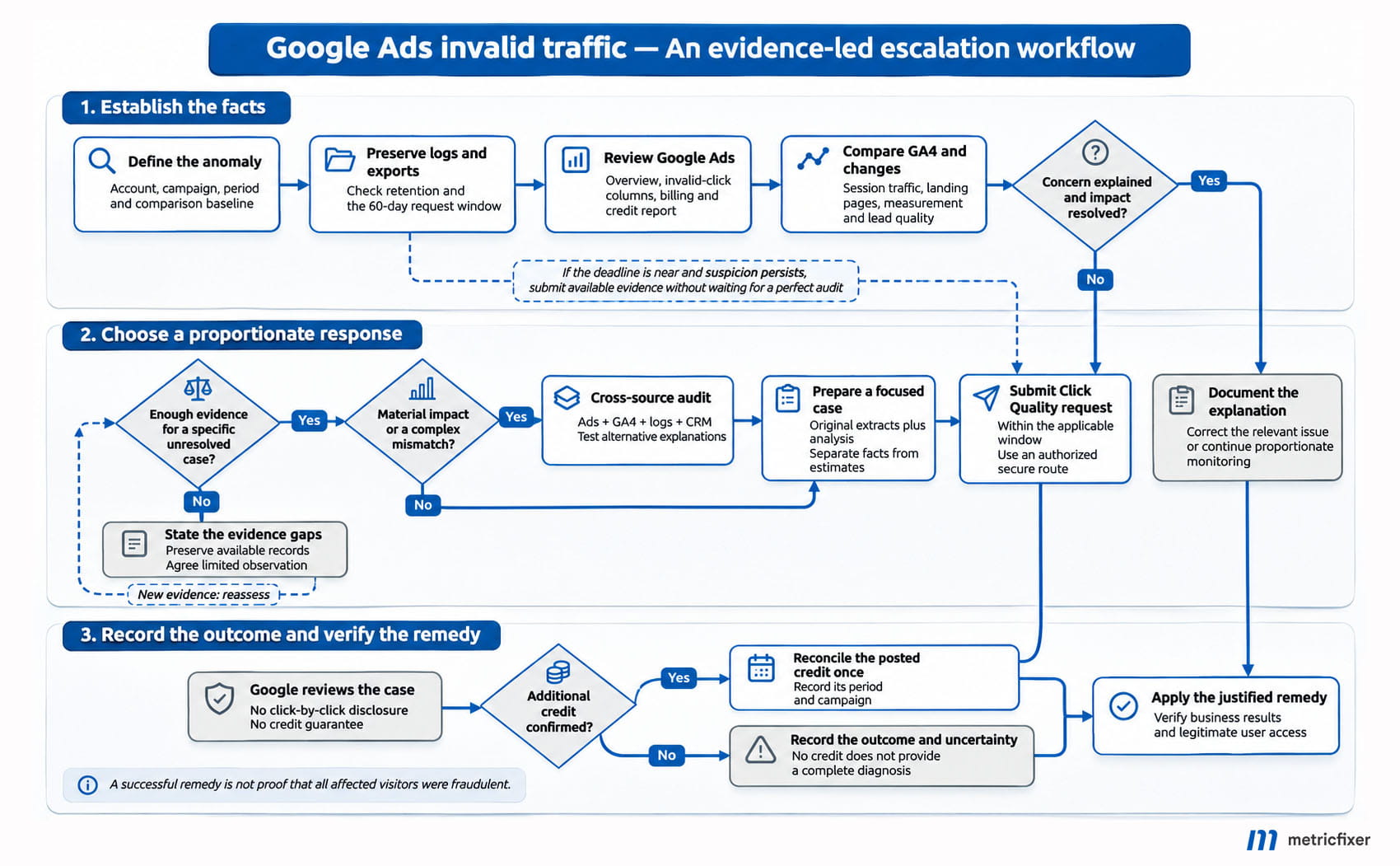
The goal is a defensible decision about the remaining problem. Google's protection reports show what its systems have recognized; your investigation should explain what still needs attention, why it matters and which action is justified.
Methodology and sources
Review date: 13 November 2026. This article combines Google's official product announcement, Ads and Analytics documentation linked at the relevant claims, seven supplied interface screenshots, and the practitioner's account of investigation submissions. The recommended sequence, evidence-package structure and escalation criteria are editorial synthesis, not a mandatory Google procedure.
The screenshots illustrate tools and arithmetic; they do not establish fraud or a recovery result. They cover two advertiser accounts and different date ranges. The Overview and expanded view belong together; the separate campaign, billing and credit-report examples must be read within their own scope. No account access, raw-log dataset, lead dataset or support investigation file was provided for independent re-analysis. Account identities are intentionally excluded from the publication.
The official Click Quality link was verified through Google's Help Center and redirected to sign-in. Its authenticated fields, attachment limits and account-specific routing were not inspected. No submission was made. Interface availability and documentation can change after the review date.
The report examples preserve the supplied figures; the invalid-rate and subtraction examples are arithmetic checks. The practical observation about richer submissions is explicitly not causal evidence that purchasing an audit increases a credit. Internal links provide relevant further reading and a clearly identified commercial investigation option.
This article provides technical and operational information, not legal advice or a guarantee that particular traffic is invalid. metricfixer is not affiliated with or endorsed by Google. Google determines invalid-activity classifications and any credits under its applicable policies and terms. Reporting does not identify an attacker or establish fraudulent intent. Obtain appropriate authority to access and share evidence, minimize personal and confidential data, and assess the impact of protective measures on legitimate users.
Expert help with this topic
 Google Analytics Traffic Anomaly Investigation
Investigate an unexpected traffic change using comparable Analytics and server evidence, with supported findings, uncertainty and practical next checks.
 AI-Assisted Google Ads Account Audit
Get a detailed AI-assisted Google Ads audit with specialist-reviewed findings, evidence-based insights, identified issues, root-cause analysis where supported, prioritized recommendations, and clear next steps in a comprehensive PDF report.
 Expert-Led Google Ads Account Audit
Get a PPC-specialist-led review of your Google Ads account, with clear evidence, priorities, limitations, and practical next actions.
 Google Ads Management
Ongoing Google Ads strategy and optimization around one agreed primary KPI, with scope and priorities confirmed before paid work begins.