
Published Jul 31, 2026
Google Search Console Platform Properties: How to Track Instagram, TikTok, X and YouTube
Google Search Console platform properties show how Instagram, TikTok, X and YouTube content is discovered across Google Search, Discover and Google News. This guide explains the reports, metrics, verification model, limitations and a practical workflow for combining Google-side visibility data with native social analytics, GA4 and CRM reporting.
Category: SEO & Web Marketing · By Mikalai Sasau
Google Search Console can now report how verified Instagram, TikTok, X and YouTube accounts perform across Google Search, Discover and Google News. This review explains what the new platform properties measure, how account verification and data collection work, which networks are still missing, and how social media teams should combine Search Console with native platform analytics, GA4 and CRM data.
Practical default: connect every official account as a separate platform property as early as possible. Use Search Console as the source of truth for Google-side discovery, use each social platform's own analytics for in-platform viewing and engagement, and use GA4 or CRM data for website visits, leads and revenue. Connecting an account does not improve rankings and does not import likes, comments, followers, watch time or native reach into Search Console.
Executive summary
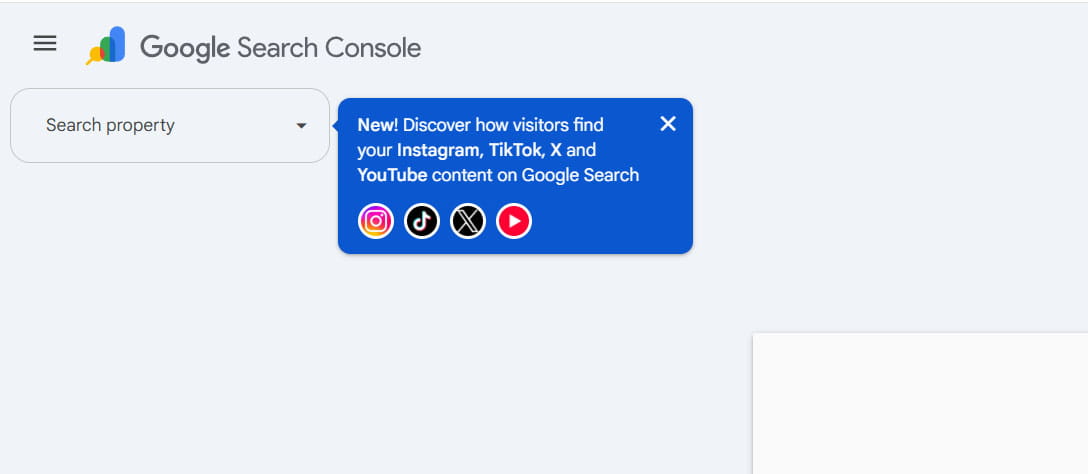
Google's social reporting project moved quickly from experiment to a full Search Console property type. In December 2025, Google tested automatically detected social channels inside Search Console Insights for a limited set of website properties. On 7 July 2026, Google introduced standalone platform properties. On 29 July 2026, Google said the feature was globally available to everyone and published a dedicated analysis guide.
The supported list is currently limited to Instagram, TikTok, X and YouTube. As of 1 August 2026, Google has not announced support dates or a public roadmap for Facebook, LinkedIn, Threads, Pinterest, Snapchat or other networks. Facebook and LinkedIn should therefore be treated as unsupported, not as “coming soon.”
The main Performance report provides clicks, impressions, click-through rate and average position for Google Search, with separate Discover and Google News reporting when the account receives traffic from those surfaces. The reports can be segmented by content URL, query, country, device and date. Search Console Insights adds a simpler 28-day view of traffic trends, top content, query groups and audience countries. Achievements adds click-based milestones.
The feature does not import native social analytics. It reports Google's own visibility and interaction data for social or video content that appears on Google. A video click can be counted even when playback opens inside Google's viewer, so Search Console clicks should not be expected to equal outbound sessions, platform visits or video views in YouTube Studio, TikTok Analytics or Instagram Insights.
For social media managers, the value is not another total-reach dashboard. The real value is access to Google queries, content URLs, countries, devices, formats and search trends for assets hosted outside the brand's website. This creates a practical bridge between SEO and SMM: teams can see which captions, videos, posts and evergreen topics continue to attract search demand after the native feed cycle has ended.
What changed in Google Search Console
Traditional Search Console properties represent a website domain or URL prefix. A platform property represents an account or channel hosted on a supported third-party platform. The owner proves control of that account, and Search Console then exposes performance data for the account's eligible content on Google.
| Date | Product stage | What was available | Why it matters |
|---|---|---|---|
| 8 December 2025 | Limited Insights experiment | Search Console automatically identified some social channels associated with verified websites and offered a combined Insights view. | The experiment tested social reporting, but access depended on a website association and automatic detection. |
| 7 July 2026 | Platform properties announced | Creators could add Instagram, TikTok, X and YouTube as independent properties, including creators without a website. | Social content became a first-class Search Console asset rather than an optional card attached to a site property. |
| 29 July 2026 | Global availability | Google announced worldwide availability and published a practical social and video performance guide. | The later announcement supersedes the original gradual-rollout status, even though some Help pages may still contain older rollout wording. |
The distinction matters operationally. A brand can now verify a YouTube channel or Instagram account without proving control of a domain. Each profile is tracked independently, so a company with three Instagram accounts, two YouTube channels and one TikTok profile needs six platform properties rather than one combined brand property.
Google also connects this feature with its Search Profile product. According to Google's guide, accounts already verified through a claimed Search Profile are automatically available as Search Console properties. The two products are not the same: the Search Profile is a public-facing presence in Google, while the platform property is a private reporting and access-control object inside Search Console.
Supported platforms — and what Google says about Facebook and LinkedIn
| Platform | Current Search Console status | Examples of content that may be reported | Important note |
|---|---|---|---|
| Supported | Profile pages, posts, Reels and Stories when they appear on Google. | Google explicitly documents impression and click counting for Instagram Stories. | |
| TikTok | Supported | Profile pages and public videos that appear in Google Search, Discover or Google News. | Search Console does not report views generated inside TikTok's For You feed. |
| X | Supported | Profile pages and public posts surfaced by Google. | The report covers Google discovery, not X impressions or engagements. |
| YouTube | Supported | Channel pages, videos, Shorts and playlist pages that appear on Google. | Google's guide includes separate comparisons for full-length videos, Shorts and playlist pages. |
| Not supported | None through the current platform-property selector. | Google has not published a launch date, test or roadmap commitment. | |
| Not supported | None through the current platform-property selector. | Google has not published a launch date, test or roadmap commitment. |
The official list names exactly four platforms. Google has not explained why Instagram is included while Facebook is not, or why X is included while LinkedIn is not. Any explanation based on crawling access, platform APIs, licensing, content formats or commercial relationships would be speculation unless Google publishes it.
For LinkedIn measurement, teams still need LinkedIn Campaign Manager or page analytics, website analytics and campaign tagging. For paid activity, metricfixer's LinkedIn Ads UTM and Dynamic Parameters guide explains how to preserve campaign and creative context outside Search Console. Facebook reporting likewise remains dependent on Meta's own tools and downstream analytics; the Meta Ads Dynamic URL Parameters guide covers paid-traffic tagging for website destinations.
What metrics and reports are available
Performance report
The Performance report is the main analytical workspace. Google documents the following metrics for platform properties:
| Metric or dimension | What it means | How an SMM team can use it | What it does not mean |
|---|---|---|---|
| Clicks | The number of clicks Google attributed to the account's content from a supported Google surface. | Identify posts, videos and profiles that attract active search interest. | Not necessarily an outbound visit to the social platform; a video can open in a Google viewer. |
| Impressions | How often eligible content was shown according to Google's impression rules. | Measure visibility and find content with demand but weak click response. | Not native reach, feed impressions or video starts inside the social platform. |
| CTR | Clicks divided by impressions. | Compare how effectively different posts, topics or formats turn Google visibility into clicks. | Not a pure measure of title or thumbnail quality; result layout, query intent and competing results also affect CTR. |
| Average position | The average position of the topmost result from the property in Google Search. | Separate visibility problems from click-response problems. | Position is a Search metric. It is not a universal rank for Discover or Google News. |
| Content URL | The post, video, profile, playlist or other platform URL credited with the performance. | Join Search Console data to a content calendar or native content ID. | It does not automatically unify reposts or equivalent assets across platforms. |
| Query | The Google search term that led to the reported content. | Build topic, caption, title, description and hashtag ideas from real search demand. | It is not a complete query log: privacy-protected, anonymized queries can be omitted from tables. |
| Country and device | The user's country and device category in the Google interaction. | Plan localization, vertical-video formats and mobile-first editing. | Not the same as native-platform audience demographics. |
| Date and 24-hour view | Performance over time, including a recent hourly view with preliminary data. | Catch sudden spikes while cross-promotion can still extend the trend. | Recent data may change as processing completes. |
Google Search can include web, image, video and news search types. Discover and the dedicated Google News report appear only when the property has qualifying traffic from those surfaces. For a clean report, keep the surfaces separate: average position is meaningful in Search, while Discover and Google News are better evaluated through impressions, clicks, CTR, content and country dimensions.
Insights report
The Insights report is designed for quick interpretation rather than detailed filtering. For platform properties, Google describes:
- Traffic trends: clicks over the default 28-day period and their distribution across parts of Google.
- Top-performing content: posts and videos that bring the most people from Google.
- How people find the account: queries leading to the profile, channel, posts and videos.
- Query groups: top, trending-up and trending-down themes rather than only individual phrases.
- Audience location: leading countries for Google-driven clicks.
There is an important reporting nuance. Google's platform-property Help page says the top Insights summary card includes clicks across Google, including web, image, video and news search. Detailed lists below that card focus on web search. The numbers in those detailed cards can therefore be lower than the summary total without indicating an error.
Achievements
Achievements shows click-based milestones, such as reaching a new threshold of Google Search clicks in a 28-day period. It is useful as a simple progress indicator for creators and client reporting, but Google explicitly says achievements are not designed to reflect how ranking systems work. A badge is not a ranking signal and should not replace normal performance targets.
Counting rules that can create discrepancies
Google's examples clarify why Search Console will not reconcile one-to-one with native analytics:
- When an Instagram Story appears in Google Search, it can count as an impression; a click on that Story can count as a click.
- When video content appears in Search or Discover, it can count as an impression.
- A click can be recorded even when the video opens and plays inside Google's viewer rather than sending the user to YouTube, TikTok or Instagram.
- Some low-volume queries are omitted from the query table for privacy, while their clicks and impressions may remain in chart totals.
For reporting, the safest language is “Google clicks to or into this content,” not automatically “sessions on the social platform.”
How the technology works
Platform-property reporting flow: a creator publishes public content on a supported platform → Google discovers and may show the profile, post or video in Search, Discover or Google News → Google records its own impressions and clicks → the account owner authorizes a platform property in Search Console → Google groups eligible performance data under the verified account → the owner and invited Search Console users analyze or export the reports.
The public documentation makes several parts of this flow clear:
- No website is required.
- No Search Console tag, tracking pixel or JavaScript is installed on the social profile.
- Each account or channel is verified separately through an onscreen authorization process.
- Ownership is checked periodically for security.
- The reports contain Google-side performance, not native-platform exposure or engagement.
Google does not publicly document the full backend design. The launch materials do not specify the exact authorization protocol, requested account scopes, platform-by-platform API contracts, or the internal rules used to associate every content URL with a verified account. It would therefore be inaccurate to describe the system as a confirmed import from each platform's analytics API.
The most defensible interpretation is that account authorization establishes the ownership boundary, while Search Console reports telemetry Google already generates when it displays and receives clicks on eligible social URLs. This is an inference from the published measurement scope, not a backend architecture statement from Google.
Connecting a property is also a reporting action, not an indexing command. Google's general property documentation says adding a property does not affect how the website or platform property appears in Search. Verification gives access to data; it does not force Google to crawl, index, rank or feature the content.
Data availability, processing and history
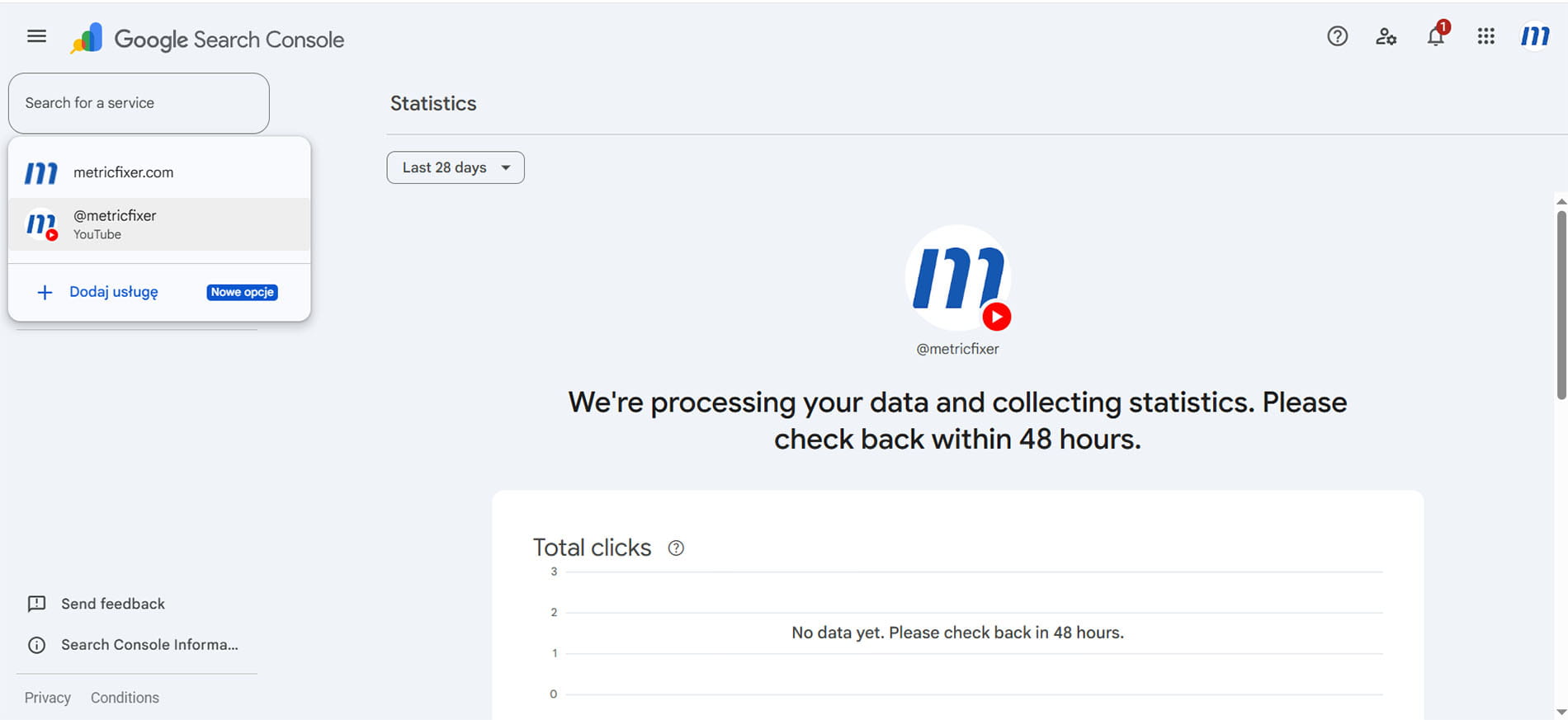
The live interface can show a message asking the owner to return within 48 hours, while Google's Help documentation uses the broader wording “a few days.” Teams should plan for several days before treating an empty chart as a setup failure.
New platform properties do not receive an unlimited historical backfill. Google says a recently created property may show partial data only for days since collection started. This makes early setup important: connect accounts before a campaign, launch or seasonal period that you expect to analyze.
The default range in both Insights and Performance is 28 days. The Performance report also supports a 24-hour view for recent spikes. If an external platform login expires, access to the property pauses until re-verification. After the owner verifies again, Google says the same report becomes available without waiting for a new data-accumulation period.
How to set up platform properties safely
- Choose the long-term verified owner. Use a brand-controlled Google account or a durable company identity rather than an individual agency employee's personal account.
- Open the property selector. Select Add property in Search Console.
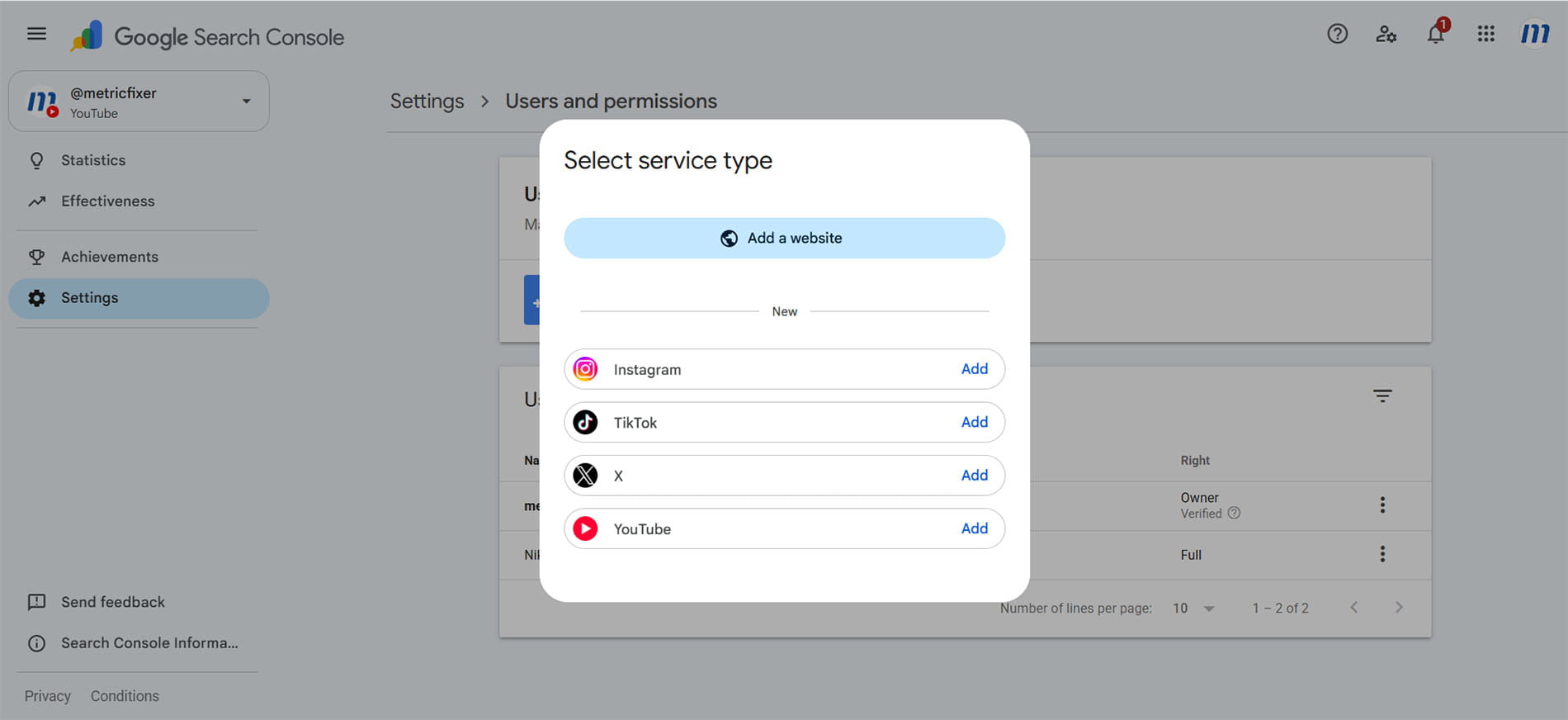
- Select a supported service. Choose Instagram, TikTok, X or YouTube.
- Authorize the connection. Follow the platform-specific onscreen steps and confirm that the correct account or channel is being connected.
- Repeat for every profile. Multiple accounts on the same platform remain separate properties.
- Wait for initial processing. Allow a few days and remember that data starts from the collection period available to the new property.
- Add collaborators in Search Console. Use Users and permissions to give agency, SEO, content and reporting teams the minimum access they need instead of sharing social-platform credentials.
- Monitor ownership status. Include platform-property re-verification in account governance and offboarding procedures.
A practical agency governance checklist:
- [ ] The brand, not only the agency, controls at least one verified-owner account.
- [ ] Every handle or channel has its own documented Search Console property.
- [ ] Agency staff use named Search Console access rather than a shared Google login.
- [ ] Full access is granted only where configuration or user management requires it.
- [ ] Client offboarding includes removal of agency users and confirmation that the brand retains ownership.
- [ ] The team records connection failures and re-verification dates.
- [ ] Reporting documentation states that these properties measure Google discovery, not native social reach.
How SMM specialists should use Search Console with native analytics
The new reports are most useful when they become one layer in a wider measurement model. Each system answers a different question:
| Measurement layer | Best source | Main questions | Typical metrics |
|---|---|---|---|
| Discovery on Google | Search Console platform property | Which Google queries, countries, devices, posts and formats create visibility and clicks? | Impressions, clicks, CTR, average Search position, query, content URL, country, device and surface. |
| Consumption and engagement on the platform | Instagram Insights, TikTok Analytics, X Analytics or YouTube Studio | Did people watch, retain, react, share, save, comment, follow or visit the profile? | Views or plays, watch time, retention, completion, likes, comments, shares, saves, engagement rate, follows and profile actions, depending on the platform. |
| Website and business outcome | GA4, first-party analytics, CRM and ecommerce systems | Did a social user reach the website, become a lead, purchase, subscribe or generate revenue? | Sessions, engaged sessions, events, leads, purchases, revenue, pipeline and customer status. |
No one layer should be used as a substitute for the others. A post can have strong Google impressions but weak native watch time. A TikTok video can go viral inside TikTok while receiving almost no Google visibility. A YouTube video can attract Google clicks but generate few website conversions. Those are different outcomes, not reporting errors.
Build a content-level join
For a useful weekly or monthly report, create one content table with at least these fields:
| Field group | Recommended fields | Purpose |
|---|---|---|
| Identity | Platform, account, content URL, native content ID, publish date | Creates a stable key across exports. |
| Editorial taxonomy | Topic, format, campaign, language, market, creator, funnel role | Allows comparisons beyond individual posts. |
| Search Console | Clicks, impressions, CTR, average position, top queries, country, device, surface | Measures Google discovery. |
| Native analytics | Views, watch time, retention, engagements, shares, saves, follows | Measures in-platform quality and response. |
| Website and CRM | Sessions, leads, purchases, revenue, qualified pipeline | Measures downstream business value. |
When a social post, channel description or profile link sends people to the brand's website, use a consistent campaign taxonomy. Search Console measures discovery of the social asset; UTM parameters measure the next click from that asset to the website. These are sequential stages. See metricfixer's Manual UTM Tagging in GA4 guide for a stable approach to utm_source, utm_medium, utm_campaign, utm_content and utm_term.
Do not add campaign parameters to the platform URLs merely to make Search Console rows more descriptive. Keep the public post or video URL stable, and add UTMs only to outbound links that lead from the platform to a trackable destination.
Practical analyses for SEO and social teams
1. Turn Google queries into a social content brief
Start with top, trending-up and trending-down query groups in Insights. Then open the Performance report to inspect the exact queries and content URLs behind the theme. Use the results to refine video titles, captions, descriptions, on-screen wording and future content topics.
The query data is particularly useful for identifying a mismatch between the language used by the brand and the language used by searchers. A company may publish “product education” content while users search for “how to fix,” “best for,” “comparison,” “price,” “review” or “near me” phrases. Those query patterns can influence both the social calendar and the website's editorial plan.
2. Diagnose visibility separately from click response
| Observed pattern | Likely interpretation | Recommended action |
|---|---|---|
| High impressions, low CTR | Google is showing the content, but the result is not earning many clicks for the queries where it appears. | Review title, caption, thumbnail, freshness, query alignment and competing result formats. Do not assume title alone caused the issue. |
| Low impressions, high CTR | The content is relevant when shown, but visibility is narrow. | Create related content, expand the topic, improve descriptive text and compare whether another format receives broader exposure. |
| Good average position, weak CTR | Placement is not the only constraint. | Inspect the actual result layout, brand recognition, thumbnail and intent match. |
| Rising impressions before clicks rise | A topic may be entering a discovery phase. | Monitor the 24-hour view, prepare follow-up content and cross-promote while demand is increasing. |
3. Compare formats using URL patterns
Google's own guide recommends URL filters and comparison mode:
- On YouTube, compare URLs containing
/watchwith URLs containing/shorts/. - On Instagram, compare URLs containing
/p/with URLs containing/reels/. - On YouTube, filter for
playlistto evaluate playlist pages separately from individual videos.
Use the same topic and date window where possible. A raw comparison of every Short against every long-form video can confuse format performance with topic, publication volume and content age.
4. Use the 24-hour report as an amplification trigger
The 24-hour view can reveal a post or older video gaining unexpected Google traction. The team can then:
- cross-promote it on another platform;
- pin or feature the original asset;
- publish a follow-up or “part two” while demand is active;
- add supporting website content;
- brief customer support, PR or sales teams if the trend reflects a wider issue.
The newest data is preliminary, so use it as an alert rather than a final performance report.
5. Find evergreen content that is returning
Native social reports often prioritize recent feed performance. Search Console can reveal older posts and videos that regain visibility because of seasonality, news, product releases or recurring questions. This is one of the feature's strongest uses: it measures the search shelf life of a social asset after the feed has moved on.
When an old asset rises again, consider updating its title or caption, adding a clearer description, producing a new version, linking to a current resource, or creating a durable website page for the same need. Add a Search Console annotation when you make a material change so the team can interpret the timeline later. The annotation records timing; it does not turn the change into a controlled experiment.
6. Compare platforms in an external spreadsheet
Google's guide tells users to export data from each property and combine it. That is important because the current interface treats each account as a separate property rather than offering a complete built-in cross-platform dashboard.
Normalize the analysis before comparing:
- use the same date range;
- separate Search, Discover and Google News;
- compare the same country and device where relevant;
- use common topic and format labels;
- avoid comparing Search Console clicks with native video views as though they were the same unit.
7. Turn social search demand into website opportunities
A social property can rank for questions the brand's website does not cover. Compare social-property queries with the website property's query set. When a YouTube video or TikTok post attracts repeated Google demand but the site has no useful landing page, article, FAQ, product guide or service page for that need, the social report has identified an editorial gap.
The reverse is also useful. A website query with strong demand can become a video, Reel, Short or post series. This creates a shared SEO and SMM backlog rather than two unrelated content calendars.
Recommended weekly workflow
- [ ] Check that every platform property remains verified and accessible.
- [ ] Review the 24-hour view for sudden spikes that need immediate amplification.
- [ ] Review the 28-day Insights view for top and changing query groups.
- [ ] Open the Performance report for the posts and videos responsible for the change.
- [ ] Segment by country, device and Google surface before drawing conclusions.
- [ ] Export content-level data and join it to the native analytics export.
- [ ] Add website sessions, leads and revenue where the content contains an outbound link.
- [ ] Mark title, caption, thumbnail or description changes with an annotation.
- [ ] Add successful search topics to the next social and website content sprint.
- [ ] Report Google discovery, native engagement and business outcome as separate stages.
What platform properties cannot tell you
- They do not measure total social performance. Content that is seen only inside Instagram, TikTok, X or YouTube is outside the report.
- They do not replace native engagement metrics. Search Console does not provide watch time, retention, completion rate, likes, comments, shares, saves, follower growth or native feed reach.
- A click is not always an outbound session. Video playback can open inside a Google viewer.
- New properties have limited history. Google describes data from the collection period after setup rather than a guaranteed pre-setup backfill.
- Each account is separate. Cross-platform analysis currently requires exports and an external spreadsheet or data model.
- Query data is incomplete by design. Anonymized queries can be omitted for privacy, and table totals may not equal headline totals.
- Average position has a limited scope. It applies to Google Search results, not as a general rank across Discover and Google News.
- Discover and Google News reports are conditional. They appear only when the property receives enough relevant traffic.
- Adding a property does not improve visibility. It grants reporting access but does not force indexing or change ranking.
- Automation is not yet fully documented for this property type. Google's platform-property materials explicitly describe report export, but they do not yet confirm platform-property support for every Search Console API, Looker Studio or BigQuery bulk-export workflow. Test automation in the actual account before promising a production dashboard.
- Only four platforms are supported. Facebook and LinkedIn remain outside the current product.
Frequently asked questions
Does connecting a social account improve its Google rankings?
No. Google says adding a property only enables performance tracking. Verification is not a ranking or indexing request.
Can a creator use platform properties without a website?
Yes. Standalone platform properties were explicitly designed for creators and publishers, including those without their own website.
How long does it take for data to appear?
The interface may show a 48-hour message, while Google's Help documentation says a few days. A new property can initially show empty or partial charts.
Why do Search Console clicks not match YouTube, TikTok or Instagram visits?
The systems count different stages. Search Console records a Google interaction, and a video click can remain inside a Google viewer. Native tools measure activity on their own platforms using different definitions and processing windows.
Will Facebook or LinkedIn be added?
Google has not announced either platform, a test, or a public timetable as of 1 August 2026. Future expansion is possible, but it should not be presented as confirmed.
Does Search Console show every query that found a social post?
No. As with website properties, some queries are anonymized or omitted for privacy. Use query themes as directional evidence rather than a complete search-log export.
Bottom line
Platform properties make Search Console relevant to teams that publish important content outside their own domains. The feature is not a replacement for Instagram Insights, TikTok Analytics, X Analytics or YouTube Studio. It fills a different gap: it shows how Google discovers, displays and sends clicks to social and video content.
The best implementation is a three-layer model. Search Console explains Google discovery. Native analytics explains viewing and engagement. GA4, first-party analytics and CRM systems explain downstream business outcomes. When those layers are joined at the content level, SMM teams can identify search-led topics, compare formats, revive evergreen assets, plan cross-platform distribution and turn successful social demand into durable website content.
Because new properties do not promise a full historical backfill, the practical next step is to verify the four supported account types now, establish brand-controlled ownership, and begin collecting data before the next important campaign or seasonal period.
Methodology and sources
This article is based primarily on Google Search Central and Search Console Help materials available on 1 August 2026. The review compared the December 2025 social-channel experiment, the July 2026 platform-property launch, the later global-rollout announcement, the dedicated analysis guide, reporting definitions, ownership rules and general Search Console counting limitations. The supplied live-interface screenshots were also reviewed to confirm the four-service selector, Users and permissions interface and initial data-processing state. Where Google has not published backend details or a roadmap, the article states that uncertainty instead of presenting an inferred implementation as a confirmed fact.
- Google Search Central: See how content from social and video platforms performs on Google Search
- Google Search Central: Platform properties roll out globally, plus a new social and video performance guide
- Google Search Central: Analyze your social and video platform content performance in Search Console
- Google Search Console Help: About platform properties
- Google Search Console Help: Add a website or platform property
- Google Search Central: Introducing social channels in Search Console
- Google Search Console Help: What are impressions, position and clicks?
- Google Search Console Help: Performance report for Search results
- Google Search Console Help: Performance report for Discover
- Google Search Console Help: Performance report for Google News
- Google Search Console Help: Achievements in Search Console
- Google Search Console Help: Performance report dimensions and anonymized queries
- Google Search Console Help: Managing owners, users and permissions
This article is for technical, SEO, social media and analytics planning only. metricfixer is not affiliated with Google, Meta, Instagram, TikTok, ByteDance, X, YouTube, LinkedIn or other platforms mentioned in the article. Search Console availability, supported platforms, verification flows, report fields, counting rules and data-export capabilities may change after publication. Verify current behavior in your own accounts and official documentation before using the data for contractual reporting, forecasting or performance guarantees.