
Published Aug 8, 2026
How to Build a Technically Correct 404 Page: SEO, Analytics, UX, and Application Architecture
A practical reference architecture for true 404 responses, helpful error pages, selective GA4/GTM measurement, bot-resistant logging, and correct behavior across SSR, SPAs, APIs, CDNs, and server frameworks.
Category: SEO & Web Marketing · By Mikalai Sasau
A technically correct 404 page is not just a branded message that says “not found.” It is a coordinated response across the web server, application router, rendering layer, cache, analytics stack, security controls, and search-engine signals. This guide explains how to return the right HTTP status, avoid soft 404s, handle missing routes in SSR and single-page applications, measure real user errors without polluting GA4, and keep scanners from turning random URLs into expensive application requests.
Practical default: let the server or application decide that a resource is missing before the response body starts, return a real 404 or 410, render a lightweight and helpful page, log the request server-side, and pass the status into GTM instead of asking GTM to infer it. Redirect only when there is a clear replacement URL.
Executive summary
The most important principle is simple: a 404 is an HTTP response, not a visual design. A page can look like an error while returning 200 OK; that is a soft 404. It can also return a correct 404 Not Found while displaying useful navigation, search, and recovery options. Search engines, browsers, caches, monitoring tools, API clients, and analytics systems act on the response status—not on the size of the “404” headline.
For SEO, missing URLs should normally return 404. Use 410 Gone when the application knows the resource was intentionally removed and the condition is expected to be permanent. Use 301 or 308 only when a genuinely equivalent replacement exists. Redirecting every deleted URL to the home page hides the real state of the resource, frustrates users, and can be interpreted as a soft 404.
For modern applications, the route and data lookup should determine the status before headers are committed. That is straightforward in traditional server rendering, but more complicated in SPAs and streaming SSR. If a static host serves the same index.html with 200 for every path, a client-side “Not found” component does not turn the HTTP response into a real 404. A noindex fallback can reduce indexation risk, but it is still weaker than returning the correct status at the server, edge, or framework routing layer.
For analytics, loading GTM on a 404 is not automatically wrong. The mistake is allowing the 404 to activate the same page-view, remarketing, heatmap, and conversion stack as a normal content page without a deliberate measurement policy. The application should expose http_status, page_type, and a tracking policy in the dataLayer before GTM loads. Sites with modest, mostly human 404 traffic can measure a flagged page view or a dedicated page_not_found event. Sites exposed to large crawler and scanner volumes should usually keep 404 traffic out of the primary business GA4 property and use server logs, edge logs, or a separate diagnostic dataset instead.
For performance and security, the 404 response should be cheap. It should not hydrate an entire ecommerce application, query multiple services, create an anonymous cart, load video APIs, or run every advertising pixel for a random path. Detailed technical information belongs in protected logs, not in the response. The requested URL must be escaped before display, query strings should be treated as untrusted input, and repeated 404 patterns should feed rate limiting or challenge logic based on behavior rather than a permanent IP-only blacklist.
The core principle: a 404 is a response, not a page
HTTP status codes describe the result of a request. Under the HTTP semantics standard, 404 Not Found means the origin server did not find a current representation for the requested resource, or is not willing to disclose that one exists. It does not say whether the condition is temporary or permanent. 410 Gone is the more explicit choice when the server knows the resource is intentionally unavailable and that this is likely to remain permanent.
This distinction explains why a “beautiful 404 page” can still be technically broken. The browser may display a perfectly designed error screen while the network response says 200 OK. Google can then consider the content for indexing and may classify it as a soft 404 because the body looks like an error. Conversely, a correct 404 can include the normal site header, useful links, a search field, and support information. Google ignores the content of a 4xx URL for indexing purposes, but the content still matters to the person who landed there.
| Situation | Preferred response | Why |
|---|---|---|
| The requested page or resource exists | 200 OK | The current representation is valid and may be processed or indexed. |
| The resource moved permanently to a clear equivalent | 301 or 308 | Signals a permanent replacement and sends users and crawlers to the correct destination. |
| The move is temporary | 302 or 307 | Keeps the original URL as the expected long-term location. |
| The URL does not map to a current resource | 404 Not Found | Correct default when the server does not know whether the absence is temporary or permanent. |
| The resource was deliberately removed with no replacement | 410 Gone | Expresses that the removal is intentional and likely permanent. |
| The resource exists but requires authentication or permission | 401 or 403 | “Missing” and “not allowed” are different conditions. A security-sensitive application may intentionally use 404 to avoid disclosing existence. |
| The client is sending too many requests | 429 Too Many Requests | Communicates rate limiting; it should not be disguised as a missing resource. |
| The service is temporarily unavailable | 503 Service Unavailable | Communicates an operational failure rather than permanent content removal. |
A missing page is not the same as an unavailable product
Ecommerce teams often remove a product route as soon as stock reaches zero. That is usually too aggressive. If the product may return, still has useful specifications, supports accessories, has warranty information, or can guide visitors to alternatives, the URL can remain a valid 200 page with an honest availability message. If a discontinued product has a direct successor, a permanent redirect may be appropriate. If the item has been permanently removed and there is no useful replacement, return 404 or 410.
The decision should follow the resource’s real state, not a blanket SEO rule. A 404 is not a penalty to avoid at all costs, and a redirect is not a universal way to preserve “link equity.” The replacement must make sense to the user who requested the old URL.
Reference architecture for a technically correct 404
A robust implementation separates responsibilities. The edge or reverse proxy handles cheap network controls and obvious abuse. The application decides whether the route and underlying resource exist. The renderer builds either the normal page or a lightweight error representation. The logging layer records enough evidence for operations and security. The tag layer receives an already determined status and applies the appropriate measurement policy.
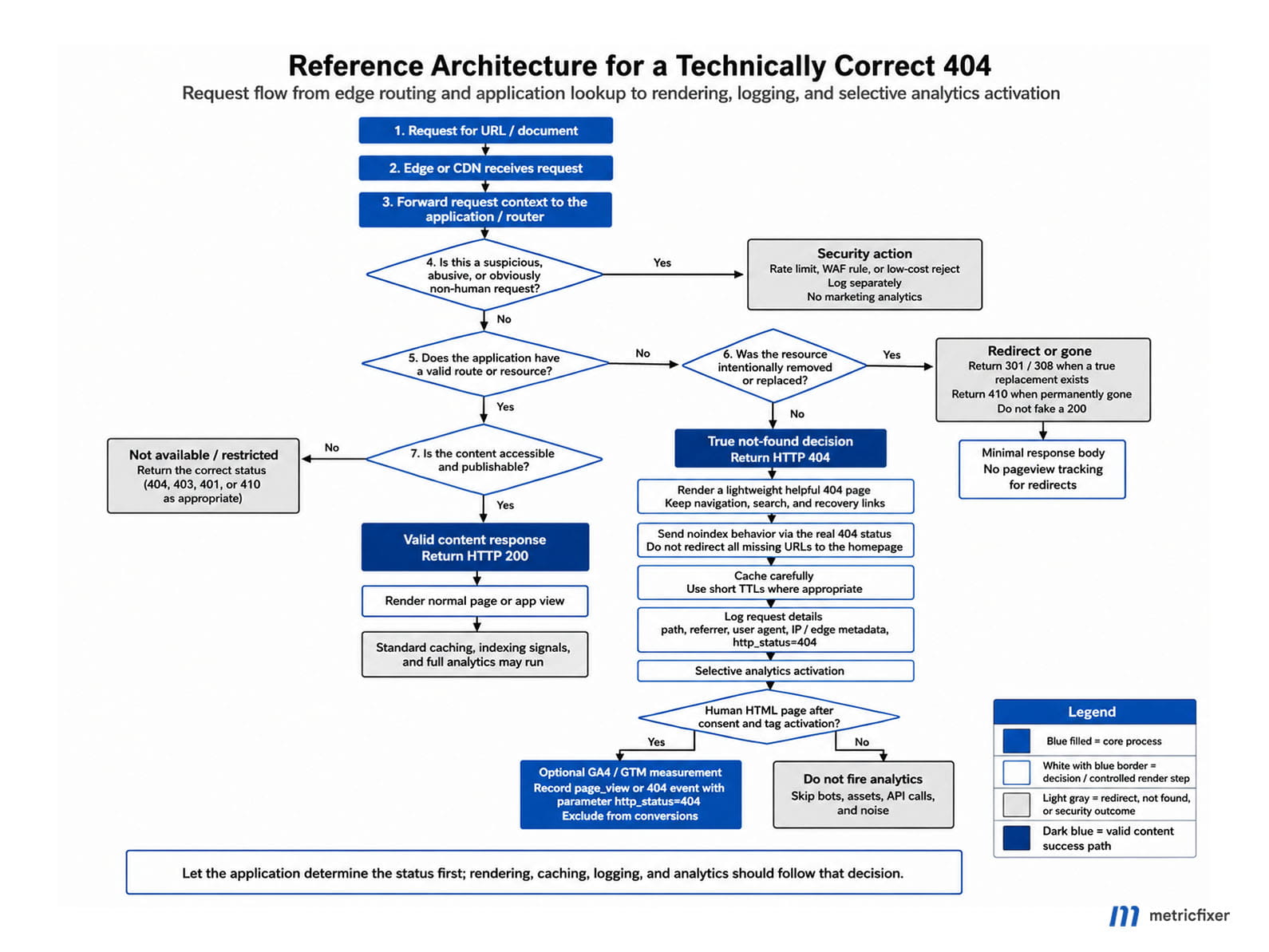
Recommended workflow: request arrives → edge or reverse proxy applies basic security and routing → application resolves the route and data → valid content returns 200, a real replacement returns 301/308, and a missing resource returns 404/410 → HTML visitors receive a lightweight branded error page while API clients receive a machine-readable problem response → the server records the event → the rendered HTML exposes the status to the dataLayer → GTM follows a restricted 404 tracking policy.
| Layer | Primary responsibility | What it should not do |
|---|---|---|
| CDN, WAF, or reverse proxy | Terminate TLS, route traffic, reject obvious attacks, rate-limit abusive patterns, and return cheap errors for missing static files. | Guess whether a dynamic database-backed page exists unless it has a reliable route manifest or application signal. |
| Application router and data layer | Determine whether the route is valid and whether the requested entity exists, then choose 200, redirect, 404, or 410. | Render “not found” text while leaving the response at 200. |
| Error renderer | Produce a useful, accessible, lightweight HTML page or API response. | Expose stack traces, SQL errors, filesystem paths, secrets, or unescaped request data. |
| Cache | Apply an intentional negative-caching policy and allow rapid purge when routes are created. | Cache user-specific error responses across visitors or retain a missing response longer than the content lifecycle allows. |
| Server and edge logs | Provide the authoritative record of all requests, including bots that never execute JavaScript. | Store secrets, session tokens, or unrestricted personal data merely because it appeared in a URL. |
| GTM and analytics | Apply the declared measurement policy using server-provided page context. | Decide whether the page is a 404 by scraping visible text or repeating the request. |
Implementation patterns by application architecture
Traditional server-rendered sites and CMS platforms
In a traditional application, the router or controller normally knows whether the requested record exists before rendering. The correct pattern is to set the status and render the custom error template in the same response. Do not redirect the user to a generic /404 URL simply to display the design; the original requested URL should usually remain in the address bar, and that response should carry the 404 status.
A web server can provide a last-resort static page for routes it owns, but interception must be scoped carefully. A global rule that replaces every upstream 404 with HTML can break JSON APIs, image requests, and other machine clients.
# Minimal Nginx fallback for HTML routes.
# Keep API locations separate so they retain JSON error responses.

location / {
    proxy_pass http://application;
    proxy_intercept_errors on;
    error_page 404 /_errors/404.html;
}

location = /_errors/404.html {
    internal;
    root /var/www/example/public;
}

location ^~ /api/ {
    proxy_pass http://application;
    proxy_intercept_errors off;
}
This pattern is useful for a small static fallback, but it should not replace application-level knowledge. A CMS may need to distinguish a mistyped URL, an unpublished page, an expired campaign, a deleted product, and a private route. The application is normally the only layer with enough context to choose the right response.
Nuxt, Laravel, and hybrid SSR applications
In an SSR application, the resource check should happen during server rendering. Nuxt provides error utilities that can carry an HTTP status through its server-side rendering pipeline. The important point is not the exact helper name; it is that the application throws or returns the error before the response is committed.
<script setup>
const route = useRoute()
const { data: page } = await useFetch(`/api/pages/${route.params.slug}`)

if (!page.value) {
  throw createError({
    status: 404,
    statusText: 'Page Not Found'
  })
}
</script>
Laravel follows the same principle. A controller can abort with a 404, and the framework can render a custom template from resources/views/errors/404.blade.php. In production, debugging output must remain disabled.
<?php

public function show(string $slug)
{
    $product = Product::where('slug', $slug)->first();

    abort_if($product === null, 404);

    return view('products.show', [
        'product' => $product,
    ]);
}
When Nuxt is the frontend and Laravel is the API or content backend, avoid converting an upstream API 404 into a frontend 200. The frontend should translate “entity not found” into a server-rendered 404 response. It should not treat every failed fetch as a 404: timeouts, authorization failures, and backend errors need their own statuses and monitoring.
Streaming SSR: status must be known before streaming begins
Streaming improves perceived performance by sending part of the page before every data dependency has resolved, but HTTP headers cannot be changed after the response body starts. That creates a subtle 404 failure mode: the framework may have already sent 200 when a later component discovers that the resource does not exist.
Next.js documents this explicitly for its App Router: a streamed not-found response can return 200, while a non-streamed response returns 404; the framework adds noindex to the streamed error output. The broader lesson applies beyond Next.js. If a real 404 status is operationally or SEO-critical, resolve the route and essential resource existence before the first streamed byte, or route missing slugs to a non-streamed error response.
Single-page applications and static hosting
A client-side router can change the screen, document title, and DOM, but it cannot retroactively change the HTTP status of the original navigation. If a static host rewrites every path to index.html with 200, an in-app “Not found” component remains a soft-404 risk.
The strongest options are:
- use SSR, SSG, or an edge function that can return the correct status for the requested route;
- generate a route manifest for known static pages and return
404for unmatched paths at the host or edge; - redirect missing client-side routes to a server endpoint that returns a real
404; - when none of those is immediately possible, add
noindexto the client-rendered error state as a temporary fallback, then plan a server-level fix.
Google specifically recommends a server-returned 404 or a dynamically added noindex for SPA error states that otherwise return 200. The latter can prevent indexation, but it does not correct logs, caches, uptime monitoring, or other clients that depend on the status code.
Static asset routes require special care. A missing JavaScript bundle, CSS file, image, or source map should return a real 404, not the SPA shell. Serving HTML with 200 for a missing script can create parsing errors, hide broken deployments, and turn one missing asset into a full application render.
APIs should return problem details, not an HTML page
API consumers need a machine-readable response and the real HTTP status. RFC 9457 defines the application/problem+json media type for structured error details. The numeric status in the JSON body is advisory; the actual HTTP response must carry the same status so generic clients, proxies, and monitoring systems behave correctly.
{
  "type": "https://api.example.com/problems/resource-not-found",
  "title": "Resource not found",
  "status": 404,
  "detail": "The requested product does not exist.",
  "instance": "/products/unknown-slug"
}
An API 404 should not load GTM, render a browser challenge page, or inherit the website’s visual template. Browser pages and API endpoints may share business logic, but their representations and security policies should be separate.
SEO rules for 404, 410, and redirects
Return a true 4xx for a missing resource
Google considers 2xx responses for processing and may report an error-like 200 page as a soft 404. For 4xx responses other than 429, Google does not use the response content for indexing; previously indexed URLs are removed over time, and crawl frequency gradually declines. This is the expected outcome for a URL that genuinely no longer represents content.
A true 404 does not require a separate noindex directive. The status is already the stronger signal. A noindex can be useful as a fallback when a JavaScript application cannot yet return a proper status, but it should not become a substitute for correct routing.
Redirect only to an equivalent destination
Use a permanent redirect when the old resource has a clear replacement: a renamed article, a consolidated category, a migrated product, or a domain move with a one-to-one URL map. Google treats 301 and 308 as strong signals for the destination, while temporary redirects are weaker signals.
Do not redirect every missing URL to the home page, a category root, or a search results page. That creates a misleading journey and can look like a soft 404 because the destination does not answer the original request. When no equivalent exists, a helpful 404 is the more honest and technically correct response.
Do not treat 410 as an SEO acceleration trick
HTTP semantics give 410 a clearer meaning than 404: the resource was intentionally removed and the condition is likely permanent. Google currently groups 404 and 410 with other non-429 4xx responses for indexing behavior. Use 410 because the content lifecycle supports that statement, not because of an assumption that it will always disappear from search faster.
Remove internal causes, not legitimate 404 responses
A correct 404 may still appear in Search Console. That is not automatically an error requiring a redirect. The useful question is how Google or users discovered the URL:
- remove deleted URLs from XML sitemaps;
- fix internal links, navigation, canonicals, hreflang references, structured-data URLs, and feeds that point to missing pages;
- redirect high-value external links only when a relevant replacement exists;
- leave random scanner paths, typos, and invented URLs as 404s;
- use URL Inspection to verify the live response and rendered output after a fix.
Do not block the missing URL pattern in robots.txt merely to hide a 404 report. A crawler must be able to request the URL to see the 404. Blocking can leave the old URL state unresolved.
Canonical tags, structured data, and social metadata
Because Google ignores content returned with a 4xx status for indexing, canonical tags and structured data on that response do not rescue or rank the missing URL. Global templates may still emit them, but they are not an SEO solution and can create confusing validation output. A dedicated error layout should normally omit product, article, breadcrumb, and other page-specific JSON-LD.
For the broader distinction between markup delivered in the response and markup added later by a tag manager, see the metricfixer review of server-rendered vs GTM-injected JSON-LD.
What a useful 404 page should contain
The response must be technically correct, but the person should not reach a dead end. Google’s guidance for custom 404 pages emphasizes a clear explanation, consistent site design, links to useful content, and a way to report a broken link. Accessibility guidance adds two basic requirements that error templates often miss: a non-empty, descriptive document title and a clear heading structure.
| Element | Recommended treatment | Common mistake |
|---|---|---|
| Document title | Page not found | Brand, localized when appropriate. | Empty title, original product title, or a generic title copied from every page. |
| Main heading | One clear h1, such as “We couldn’t find that page.” | Using “404” alone without explaining what happened. |
| Explanation | Briefly say the address may be mistyped, moved, or removed. | Technical stack messages or blame directed at the user. |
| Recovery options | Home, major categories, site search, account/help links, or context-aware alternatives. | Automatic redirect that removes the user’s ability to understand or recover. |
| Broken-link reporting | Optional, with the path safely escaped and sensitive query values removed. | Reflecting the raw URL into HTML or email without sanitization. |
| Visual design | Recognizably part of the site, but lighter than a normal commercial page. | Loading the entire application, product recommendation engine, video player, and marketing stack. |
| Language | Use the site or route language and provide normal language navigation. | Redirect loops caused by locale detection on an already missing route. |
Avoid a forced timed redirect to the home page. It removes the original URL before the person can copy it, report it, or understand what happened. It can also make browser history and analytics harder to interpret. Provide links and let the user choose.
The correct analytics and GTM design for 404 pages
GTM on a 404 is not inherently wrong
GTM is a delivery and decision layer. It can be useful on an error page because it lets the site apply consent settings, read server-provided page context, and choose a limited measurement policy. The poor practice is firing the same “All Pages” stack on a 404 without distinguishing it from valid content.
A mature setup classifies tags:
- site control tags: consent-management logic and other components needed for lawful, consistent navigation;
- diagnostic analytics: an optional flagged page view or
page_not_foundevent; - marketing and audience tags: Google Ads remarketing, Meta Pixel, Reddit, TikTok, and similar tags that should normally be suppressed on random error URLs;
- conversion tags: should never fire merely because an error page loaded;
- session-recording and heatmap tools: should be enabled only if the organization has a real UX use case and can separate crawler noise.
For a deeper audit of how Google tag and GTM identifiers affect runtime capabilities, see Google Tag Manager and the new prefix logic.
Pass the status into the dataLayer before GTM loads
The application already knows the response status. It should expose that decision directly. Google recommends establishing and populating the dataLayer before the Tag Manager container when tags need the values immediately.
window.dataLayer = window.dataLayer || [];
window.dataLayer.push({
  event: 'page_context',
  page_type: 'not_found',
  http_status: 404,
  tracking_policy: 'diagnostic_only'
});
GTM can then use Data Layer Variables and trigger conditions such as:
Normal analytics and marketing:
tracking_policy equals full

Diagnostic 404 measurement:
tracking_policy equals diagnostic_only
AND http_status equals 404

Suppressed measurement:
tracking_policy equals none
This declaration must appear before the GTM loader or before any tag that could send an automatic page view. Otherwise, an “All Pages” Google tag may transmit data before the exclusion becomes available.
Do not make GTM infer the response status
Client-side status detection is weaker than server-provided context. Modern browsers may expose responseStatus on Performance Resource Timing entries, but MDN marks the feature as limited availability. A Custom HTML tag that performs fetch(location.href) creates a second request, adds load, can follow redirects, and may receive a different cached or authenticated result. Looking for “404” in the page title, heading, or CSS class only proves what the template displays—not what the server returned.
Use browser-side detection as a debugging aid at most. Production tag activation should rely on the server, framework, or edge function that actually set the response.
Three valid 404 measurement models
| Model | Implementation | Advantages | Trade-offs |
|---|---|---|---|
| Flagged page measurement | Send one page_view with page_type=not_found and http_status=404; optionally send page_not_found. | Preserves the user journey, entrance, previous page, and recovery behavior. | Every JS-capable bot can create users, sessions, page views, geography, and engagement noise in the primary property. |
| Diagnostic event only | Disable the normal page view and send only page_not_found. | Keeps 404 analysis separate from ordinary page-view reports. | It is still a GA4 event and can participate in user and session reporting. Sessions without a page_view can also produce (not set) landing-page values. |
| No client analytics in the primary property | Do not send GA4 or advertising events from the 404; use server/edge logs, Search Console, or a separate raw diagnostic property. | Keeps business acquisition and conversion reporting clean when 404 traffic is dominated by scanners or browser automation. | Provides less client-side UX detail unless a separate diagnostic pipeline is maintained. |
Recommended choice: use flagged page measurement when human recovery behavior is important and bot traffic is controlled. Use diagnostic-event-only measurement when the team needs a distinct event but accepts that it remains part of GA4 traffic. Use no primary-property measurement when random and automated 404 traffic is material enough to distort acquisition, users, sessions, device, geography, or engagement.
This is why replacing page_view with page_not_found is not a complete anti-bot solution. GA4 is event-based: a custom event is still collected data. If the first measured interaction occurs on the error state, it can still create or participate in a session. The server log is the only complete record because it includes crawlers that block JavaScript and automation that never loads tags.
If the Google tag currently sends automatic page views, set send_page_view to false and send page views manually only after the application’s page context is known. Google warns that sending manual page views without disabling automatic measurement can create duplicates.
gtag('config', 'G-XXXXXXXXXX', {
  send_page_view: false
});
For SPAs, also review Enhanced Measurement history-change page views. A manual route-event implementation and automatic history tracking can both fire, producing duplicates even when the initial page view is disabled.
Keep the analytics schema low-cardinality
Useful 404 dimensions include:
http_status:404or410;page_type:not_found;route_class: product, article, category, account, asset, or unknown;not_found_reason: route missing, entity missing, unpublished, expired, or deleted;recovery_action: home, search, category, back, or report link.
Do not register the complete requested URL or raw query string as a custom dimension. It creates high cardinality and may capture email addresses, search terms, tokens, or other personal data. GA4 already carries page location when a page view is sent; detailed path analysis is usually better in protected logs or BigQuery with explicit retention and redaction rules.
Do not mark page_not_found as a key event. A recovery click can be measured as UX behavior, but the existence of an error page is not a business conversion.
Why 404 tracking can inflate Direct traffic
A browser automation tool can open a random URL with no referrer or campaign parameters, execute GTM, accept or retain cookies, and send a page view. GA4 may then classify the session as (direct) / (none). Repeated clean browser contexts can look like new users, while delays or multiple events can make sessions appear engaged. This is one reason an unexpected Direct spike should be traced through server requests, tag execution, and landing-page patterns rather than treated as genuine brand demand. See the related metricfixer guide to diagnosing Direct, (not set), and Unassigned in GA4.
Performance and caching: make missing requests cheap
Use a dedicated lightweight error layout
A 404 is frequently requested by typo traffic, stale links, broken assets, vulnerability scanners, and content scrapers. It should not cost as much as a product-detail page. A practical error layout can reuse the logo, typography, navigation, and a small stylesheet while skipping:
- full application hydration when it is not needed;
- product recommendation and personalization APIs;
- anonymous cart creation;
- video and map APIs;
- large sliders and product grids;
- all advertising and audience pixels;
- nonessential chat, survey, and session-recording tools.
Contextual alternatives can still help, but generate them from a cached route index or a safe prefix map rather than running expensive fuzzy matching for every random path. A scanner can manufacture unlimited URLs; the error handler must remain predictable under that load.
Set an explicit negative-caching policy
HTTP defines 404 and 410 as heuristically cacheable. That means an intermediary may reuse the response even when the site did not define a freshness policy. Explicit cache controls are safer because they align caching with the content lifecycle.
For public routes that are created only through controlled deployments, a short shared-cache lifetime can absorb repeated misses:
HTTP/2 404
Content-Type: text/html; charset=utf-8
Cache-Control: public, max-age=60, s-maxage=300
For authenticated, personalized, or security-sensitive error responses, use a private or non-stored policy:
Cache-Control: private, no-storeThe correct TTL depends on how quickly a currently missing URL may become valid. Long negative caching can hide a newly published page until the cache expires. Pair CDN caching with purge-on-publish, and keep locale, host, authentication, and content negotiation in mind when building the cache key.
Security, logging, and bot-resistant handling
Keep the public response generic
OWASP recommends generic error responses while preserving detailed evidence server-side. A public 404 should not expose:
- stack traces or framework exception classes;
- filesystem and deployment paths;
- database queries or table names;
- internal service names and IP addresses;
- debug identifiers that can be reused as credentials;
- raw user input inserted into HTML.
Production debug mode must be disabled. If the page displays the requested path, escape it as untrusted input. Avoid reflecting the query string, and never place raw request values inside inline JavaScript.
Log enough evidence—but not everything
Server and edge logs should support SEO diagnosis, operations, and security without becoming a second data leak. A useful 404 record can include:
- timestamp and request ID;
- host, method, normalized path, and response status;
- route class and the layer that generated the 404;
- referrer domain or classification;
- User-Agent or a normalized client class;
- edge/client IP under an appropriate privacy and retention policy;
- cache hit or miss;
- response size and processing time;
- rate-limit, WAF, or challenge outcome.
Do not log authorization headers, cookies, session IDs, access tokens, payment data, or complete query strings by default. Sanitize control characters to prevent log injection. Protect log confidentiality and integrity, rotate files, monitor disk usage, and design aggregation so a 404 flood cannot exhaust storage.
Separate broken links from scanners
Not every 404 deserves engineering work. Rank issues by evidence:
| Pattern | Likely meaning | Recommended action |
|---|---|---|
| Repeated 404 with an internal referrer | Broken navigation, template, canonical, asset, or application link. | Fix at source and add a regression test. |
| 404 from a high-value external backlink | Old or mistyped inbound link. | Redirect only if there is a relevant equivalent; otherwise keep the 404 and consider outreach. |
| 404 from paid campaigns, emails, or QR codes | Active acquisition failure. | Repair the destination immediately and audit campaign templates. |
| Many random paths with no referrer | Scanner, scraper, typo generator, or automated browser. | Keep 404 cheap; aggregate patterns; challenge or rate-limit abusive behavior. |
Requests for /.env, admin panels, backups, or injection payloads | Security reconnaissance. | WAF or server block, alerting, and review of exposed services—not a marketing redirect. |
| Missing hashed JS/CSS files after deployment | Stale HTML/cache or broken asset release. | Investigate cache invalidation and deploy atomicity. |
Rate-limit behavior, not only IP addresses
IP addresses remain a useful signal, but they are weak as the only identity. Bots rotate proxies; real users share corporate, mobile, and VPN addresses; and addresses are reassigned. Better controls combine request rate, number of unique paths, 404 ratio, route sensitivity, User-Agent consistency, session or clearance state, ASN/network context, and attack signatures.
A practical escalation model is:
Normal browsing
→ allow

High 404 ratio or many unique missing paths
→ rate limit or managed challenge

Known attack payloads, forbidden methods, or repeated evasion
→ temporary block and security alert

Verified monitoring, search crawlers, and business integrations
→ explicit, narrowly scoped exception
This can be implemented at a CDN/WAF or with server software such as Nginx, CrowdSec, or a WAF engine. The 404 architecture should work correctly either way: protection reduces abusive requests, while the application still returns the correct response for traffic that reaches it.
How to monitor 404 quality
No single tool provides the complete picture:
- server or edge logs show all requests and are the source of truth for volume, status, latency, and automated traffic;
- Search Console shows how Google discovered and interpreted selected URLs, including soft 404 and not-found states;
- GA4 shows only visitors for whom the tag ran and data collection was allowed, which makes it useful for UX but incomplete for crawler analysis;
- application monitoring distinguishes expected not-found responses from unexpected exceptions and backend failures;
- synthetic tests verify that representative missing URLs continue to return the intended status after releases.
Useful operational metrics include:
- 404 requests as a percentage of HTML requests;
- unique missing paths and top normalized patterns;
- 404s with internal referrers;
- 404s from paid and owned campaign destinations;
- 404 latency and response size;
- 404s that triggered application database or API calls;
- missing static assets by release version;
- soft 404 and not-found trends in Search Console;
- rate-limit and challenge outcomes for high-volume clients.
Alert on changes, not merely on the existence of 404s. A public website will always receive invented URLs. The actionable incident is a sudden rise in internal-link 404s, a campaign destination failure, a release that turns known pages into 404s, or a scanner wave that materially affects capacity or analytics.
Testing workflow before release
1. Test the HTTP response directly
curl -sS -o /dev/null -D - \
  https://www.example.com/definitely-not-a-real-page
Confirm the first line is 404 or 410, not 200 and not an irrelevant redirect. Repeat the test for uppercase/lowercase variants, trailing slashes, locale paths, query strings, encoded paths, and both www and non-www hosts where applicable.
2. Test the browser representation
- Open DevTools before navigation and inspect the document request.
- Confirm the document title and visible heading explain the error.
- Verify keyboard navigation, focus order, and recovery links.
- Check that the page does not load unnecessary application chunks, marketing pixels, video APIs, or expensive endpoints.
- Confirm the requested path is escaped and no debug information is exposed.
3. Test client-side navigation separately
Open a valid SPA route, then navigate internally to a missing route without a full reload. Compare that result with a direct request to the same URL. The title, heading, analytics policy, and rendered state should match, but a direct navigation must also return the correct HTTP status. Test browser back/forward behavior and ensure a stale page’s metadata or structured data does not remain in the DOM.
4. Test GTM and analytics
- Use Tag Assistant Preview to confirm
page_contextarrives before tag activation. - Verify that conversion and remarketing tags do not fire on
tracking_policy=diagnostic_onlyornone. - Confirm there is no automatic plus manual duplicate
page_view. - If a 404 event is retained, check its parameters in DebugView and confirm it is not marked as a key event.
- Repeat with accepted, rejected, and partial consent states.
5. Test crawler, API, and cache behavior
- Run a live URL Inspection test for a representative missing URL.
- Confirm the missing URL is absent from XML sitemaps and internal links.
- Request an API-missing resource with
Accept: application/jsonand verifyapplication/problem+jsonrather than HTML. - Request a missing static asset and verify it does not return the SPA shell.
- Inspect CDN headers and test whether a newly created route becomes available after publish and purge.
- Generate a controlled burst of missing URLs in staging to verify logging, rate limiting, and storage behavior.
Common 404 anti-patterns
| Anti-pattern | Why it fails | Better approach |
|---|---|---|
Error template returns 200 | Creates a soft 404 and misleads caches, monitoring, and crawlers. | Set the status in the router/controller before rendering. |
| Every missing URL redirects to the home page | No equivalent content; poor UX; can be interpreted as a soft 404. | Return 404 unless a specific replacement exists. |
Redirect to /404 | Changes the requested URL and often turns the original request into a redirect rather than a not-found response. | Render the error template at the original URL with status 404. |
SPA shows a 404 component after receiving 200 | The UI and protocol disagree. | Resolve at SSR/edge/host level; use noindex only as a temporary fallback. |
| GTM scrapes the page to determine status | Displayed text does not prove the response code; timing and browser support are fragile. | Push status and tracking policy from the server before GTM. |
| All tags fire on 404 | Pollutes acquisition, audiences, heatmaps, and conversion tracking. | Use a separate 404 tag policy and choose one measurement model deliberately. |
| No client analytics, but no server logging either | The team loses visibility into broken links and attacks. | Keep structured server/edge logs as the authoritative source. |
| Full application and cart initialization on random URLs | Makes scanning expensive and may create database/session noise. | Use a lightweight error layout and delay state creation until a valid action. |
| Permanent IP-only blacklist | Easy for bots to evade and can block legitimate users behind shared addresses. | Combine temporary controls with behavior, route, session, network, and attack signals. |
| Long negative cache without purge | A newly published URL can remain incorrectly unavailable. | Use explicit, short TTLs and purge on content creation. |
Implementation checklist
- [ ] Every missing HTML route returns
404or410on a direct request. - [ ] A valid replacement uses a one-to-one
301/308; unrelated URLs are not redirected to the home page. - [ ] The requested URL remains in the address bar when the error page is rendered.
- [ ] SPA direct navigation and client-side navigation produce consistent error UI and metadata.
- [ ] Essential route existence is determined before streaming commits a
200. - [ ] Missing static assets return
404, not the SPA HTML shell. - [ ] APIs return the real status and a machine-readable error such as
application/problem+json. - [ ] The 404 template has a descriptive document title, clear
h1, useful navigation, and no timed redirect. - [ ] The error layout avoids unnecessary hydration, API calls, cart creation, media libraries, and marketing tags.
- [ ] Cache behavior is explicit, scoped, and compatible with how quickly new routes can be created.
- [ ] Production responses reveal no stack traces, paths, queries, or raw unescaped request data.
- [ ] Server/edge logs capture status, normalized path, referrer context, client class, latency, and security outcomes without secrets.
- [ ] Internal links, sitemaps, canonicals, hreflang, feeds, and campaign destinations do not point to missing URLs.
- [ ] The application pushes
http_status,page_type, andtracking_policybefore GTM loads. - [ ] The team has chosen one of the three 404 measurement models intentionally.
- [ ] Automatic and manual GA4 page views cannot duplicate each other.
- [ ] Advertising, remarketing, conversion, and session-recording tags are suppressed unless there is a documented reason to keep them.
- [ ] 404 events are not key events, and raw requested URLs are not registered as high-cardinality custom dimensions.
- [ ] Rate limiting and challenges use behavioral signals rather than only permanent IP blocks.
- [ ] Release tests cover HTTP status, UI, client routing, tags, API responses, cache behavior, and Search Console rendering.
Final recommendation
The best 404 implementation is intentionally boring at the protocol level and helpful at the human level. The server says exactly what happened. The application makes the decision before rendering. The page offers a clear way forward. The cache reduces repeated cost without hiding newly created content. Logs preserve complete operational evidence. Analytics is optional and deliberately scoped rather than automatically inherited from “All Pages.”
For most production sites, the strongest default architecture is:
Default architecture: server or SSR router returns a true 404 → lightweight branded template with a descriptive title, clear heading, home/category/search links, and no automatic redirect → structured server and edge logging → short intentional negative caching where safe → server-provided dataLayer context → no advertising or conversion tags → either a flagged diagnostic measurement or no primary-property analytics, depending on bot exposure.
This approach works across WordPress, Laravel, Nuxt, Next.js, custom SSR, static hosting with edge functions, and API-backed applications. The framework syntax changes; the architecture does not.
Methodology and sources
This article is based on a review of current HTTP standards, Google Search and Google Tag Platform documentation, Google Analytics session and page-view behavior, OWASP error-handling and logging guidance, W3C accessibility materials, MDN browser-compatibility documentation, and official framework documentation for Nuxt, Laravel, and Next.js. Recommendations that go beyond a source’s explicit wording—such as the choice between primary-property and separate-dataset 404 measurement—are presented as operational architecture guidance based on the documented mechanics of HTTP responses, JavaScript execution, GA4 sessions, caches, and server logs. The review reflects documentation available in August 2026.
- Google: How HTTP status codes affect Google crawlers
- Google Search Central: Fix Search-related JavaScript problems
- Google Search Central: Redirects and Google Search
- Google Search Central: Technical SEO fundamentals and custom 404 guidance
- Google Tag Platform: The data layer
- Google Analytics: Measure pageviews and disable automatic page-view measurement
- Google Analytics: About Analytics sessions
- IETF RFC 9110: HTTP Semantics
- IETF RFC 9457: Problem Details for HTTP APIs
- OWASP Error Handling Cheat Sheet
- OWASP Logging Cheat Sheet
- W3C WAI: HTML page title is descriptive
- W3C WAI: Headings and page structure
- MDN: PerformanceResourceTiming responseStatus browser support
- Nuxt documentation: createError
- Laravel documentation: Error handling and custom HTTP error pages
- Next.js documentation: not-found responses and streaming behavior
This article is for technical and operational information only. It is not legal, privacy, accessibility, or security certification advice. HTTP behavior, search-engine processing, analytics interfaces, browser APIs, framework conventions, and third-party tag capabilities may change after publication. Test the final implementation in the site’s actual hosting, CDN, consent, routing, and deployment environment. metricfixer is not affiliated with Google, IETF, OWASP, W3C, MDN, Nuxt, Laravel, Next.js, or other third-party organizations mentioned in the article.