
Published Sep 6, 2026
Can One Server-Side GTM Container Serve Multiple Domains?
One server-side GTM container can serve several domains, but sharing a server does not merge identities or isolate client data. Learn how to route events, preserve consent, separate GA4 data, and allocate costs.
Category: Analytics & Conversion Tracking · By metricfixer Expert Team
One server-side Google Tag Manager container can receive data from several websites and domains, including sites that use different GA4 properties. The difficult part is not connecting the domains. It is keeping each site's cookies, destinations, consent rules, access permissions, and costs under control without turning one configuration mistake into a problem for every website.
Practical default: sharing a server container can work well for related websites managed by one trusted team. For unrelated agency clients, independent administrators, or materially different privacy requirements, start with separate containers and deployments. Share infrastructure only where the resulting access and operational risks are acceptable.
Executive summary: yes, but sharing has several meanings
Google's Tag Manager container specification explicitly supports multiple server-container URLs through taggingServerUrls. It also states that, when multiple URLs are provided, their URL paths must match. Multi-domain collection is therefore supported; it is not a workaround that requires pretending all websites belong to one domain.
However, three conclusions do not follow from that support. A shared server does not make an agency-owned collection domain first-party for every client. It does not merge visitor identities or consent across unrelated domains. And it does not create a security boundary between the websites whose data passes through the same container.
The architecture recommended in this article keeps those decisions separate: give each independent domain its own collection endpoint, resolve the site from validated request context, allow only its approved destinations, and apply its consent and data-handling rules. Then decide whether sharing the container, cloud project, administrators, and capacity is actually appropriate.

What exactly are you sharing?
There are four different components to consider: the web tags that collect events, the logical server GTM container that processes them, the hosting deployment that runs that container, and the GA4 or advertising accounts that receive the output. Google's server-side architecture documentation separates incoming requests, clients, events, and outgoing tags; its manual deployment guide uses CONTAINER_CONFIG to identify the container configuration and describes separate tagging and preview servers.
Consequently, one server container does not necessarily mean one machine. It can run on multiple instances for capacity and resilience. Equally, one cloud billing account can pay for several separate deployments. Combining billing does not require combining every client's tags.
| Model | What remains shared | Suitable starting point |
|---|---|---|
| One server container and deployment | Configuration, publication, runtime, and usually credentials, debugging, logs, and capacity. | Related sites with common administrators and compatible operating rules. |
| Separate containers and services in one cloud project | Some infrastructure, project-level administration, billing, and potentially quotas or the edge layer. | Sites needing independent configurations and releases, but not complete organizational separation. |
| Separate containers, projects, and access controls | Only deliberately shared layers, such as the billing organization or reusable deployment templates. | Independent clients or requirements for stronger operational separation. |
This is an architectural comparison, not a claim that any model is automatically compliant. Even separate projects need correctly scoped administrators, service accounts, secrets, logs, and network access. Conversely, a well-managed shared deployment can be reasonable when all participants accept the common trust boundary.
DNS and endpoints: give each domain its own front door
A collection subdomain and a same-origin path are different options
For two independent websites, a shared backend can sit behind two collection subdomains:
Website A: https://www.brand-a.example
Endpoint A: https://metrics.brand-a.example

Website B: https://www.brand-b.example
Endpoint B: https://metrics.brand-b.example

Both endpoints route to the same server GTM deployment.
Alternatively, route a reserved path on each website to the tagging service:
https://www.brand-a.example/metrics
https://www.brand-b.example/metrics
Google documents both subdomain and same-origin deployment in its custom-domain guide. In browser terminology, an HTTPS collection subdomain is normally same-site but cross-origin relative to the main website. A path on the exact same scheme, hostname, and port is same-origin. These are different browser boundaries, as explained in web.dev's origin and site definitions.
Using metrics.agency.example for both brands does not achieve the same result: it remains cross-site relative to either brand. Common ownership, a shared IP address, or a shared backend does not change the browser-visible relationship.
Standardize the paths when registering multiple server-container URLs: for example, use /metrics on every same-origin endpoint, rather than /metrics on one and /tracking on another. The URL list is configuration metadata, not a substitute for DNS, certificates, routing, or an explicit ingress allowlist.
DNS is only one part of the setup
Each hostname needs a working route to the service and a valid TLS certificate. A same-origin path also needs a reverse proxy or edge route; DNS cannot route a URL path. Keep the browser on the website's endpoint rather than redirecting it to the hosting provider's default hostname.
For a collection subdomain, use the DNS records required by the chosen ingress: for example, a CNAME to its configured hostname or A/AAAA records to load-balancer addresses. Both brands can use the same ingress, but it must accept both hostnames. With a same-origin path, the website's DNS can often remain unchanged; routing is configured at the proxy instead.
On Cloud Run, distinguish a production load-balancer or CDN design from the product specifically named Cloud Run domain mapping. Google's current domain-mapping documentation labels that direct mapping feature Preview and says it is not recommended for production. This limitation does not mean all custom-domain architectures are unsuitable for production.
For the reverse proxy, our recommended acceptance criteria are straightforward: preserve the required request methods, query strings, and bodies; forward the measurement cookies and response headers that are actually needed; and do not cache event-collection responses or replay one visitor's Set-Cookie to another. Static script delivery needs a separate caching policy.
Register the public endpoints under Admin > Container Settings > Add URL. Google's multi-URL preview instructions also describe choosing which registered URL to preview. Test every entry, rather than treating the first as representative.
Configure each website's Google tag with its own server_container_url. The websites can retain separate web GTM containers. Moving collection does not itself move JavaScript hosting: Google's combined gateway and sGTM guidance treats script-serving and measurement routes separately.
Client routing: a GTM Client is not an agency client
In sGTM, a Client is a protocol adapter. It recognizes an incoming request, converts it into one or more events, and makes those events available to tags. Clients are evaluated in priority order; once one claims the request, another does not get a second opportunity to process that same request. That is Google's request-processing model, not a customer-account hierarchy.
Therefore, duplicating the GA4 Client and naming the copies “Brand A” and “Brand B” does not isolate the brands. With overlapping activation criteria, the first matching client can claim both brands' traffic. A single GA4 Client is normally sufficient to parse GA4 requests from multiple sites; destination selection is a separate step.
There is also a misleading-looking setting worth checking. Default gtag.js paths for specific IDs enables JavaScript serving for paths such as /gtag/js?id=TAG_ID. Google's client settings documentation does not describe that list as an authorization rule for incoming measurement events. Adding a brand's Measurement ID there is not a substitute for validating collection requests.
Use an explicit site-to-destination registry
For a shared implementation, we recommend a small, version-controlled registry. The following is an illustrative policy, not a built-in GTM tenant feature. The domains and IDs are placeholders.
| Validated collection hostname | Expected incoming ID | Permitted processing |
|---|---|---|
metrics.brand-a.example | G-BRANDAXXX | Brand A's GA4 property and explicitly approved Brand A tags. |
metrics.brand-b.example | G-BRANDBXXX | Brand B's GA4 property and explicitly approved Brand B tags. |
| Unknown hostname or mismatched ID | Any | No downstream dispatch; record a minimal rejection reason. |
At the edge, allowlist hostnames and overwrite externally supplied forwarding or tenant-context headers. Some proxies replace Host with the upstream service hostname, so inspect what actually reaches sGTM. Use the public host validated by the trusted proxy, not whichever header happens to look convenient. Block routes that bypass this validation.
Inside the container, implement the registry with request-context variables, lookup variables, and narrowly scoped triggers. Require the intended Client, an approved site, and an allowed incoming identifier. A browser-supplied site_id, page_location, Measurement ID, Origin, or Referer is not authentication. Page location can be a useful consistency check for browser events, but it may legitimately be absent from backend events.
Conceptual routing policy, not executable GTM code:

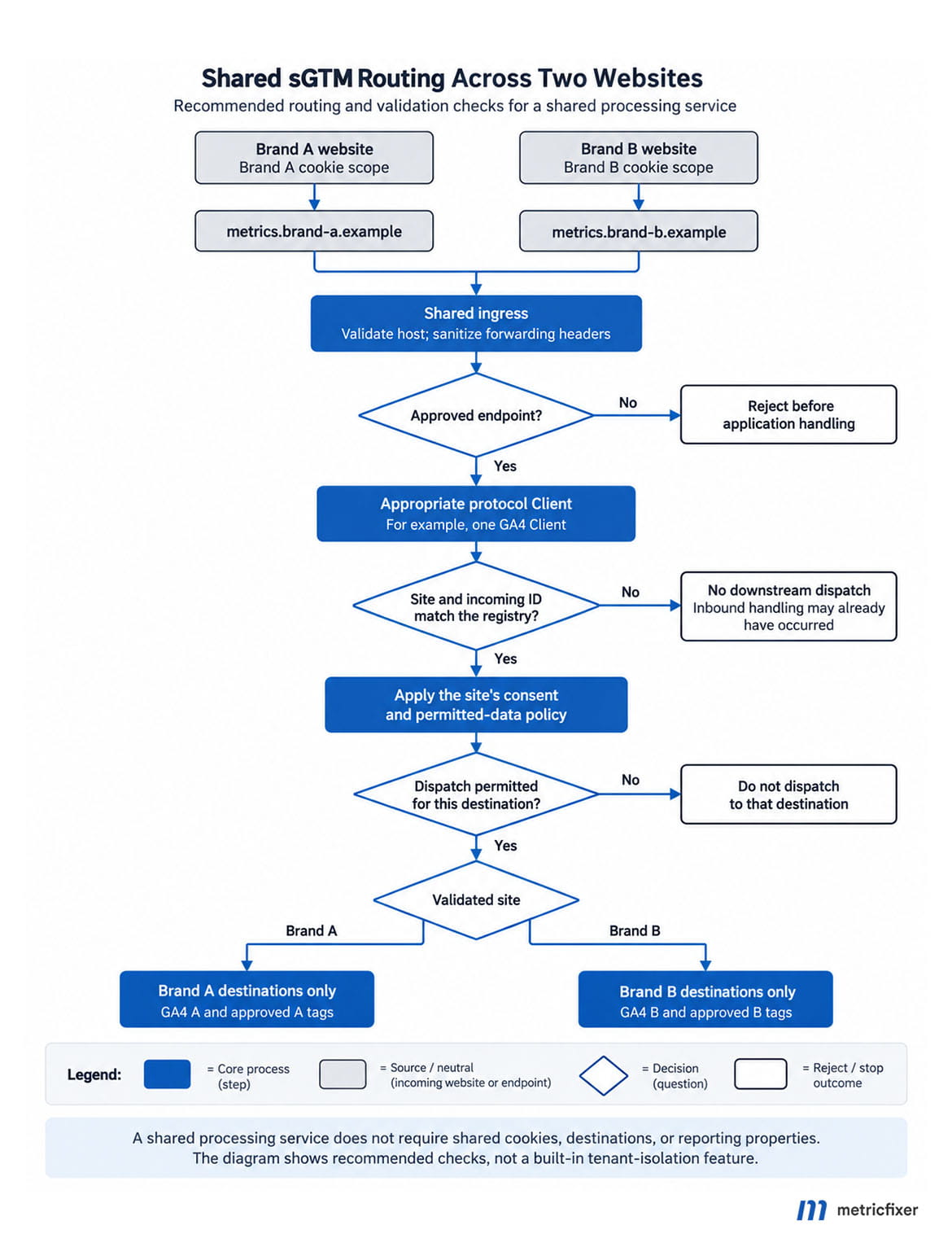
Resolve site from edge-validated collection hostname.
Require an approved client and request format.
Require incoming GA4 ID to match the site's allowlist.
Apply that site's consent and permitted-data policy.
Run only that site's approved destination tags.
On unknown or contradictory input: no downstream dispatch.
Host-based routing selects a configuration; it does not prove that a real visitor or purchase generated the request. For trusted backend events, authenticate the sender using server-held credentials or signatures and bind that identity to the permitted site. Do not put those secrets in browser tags. This distinction follows the early, validated tenant-context principle in OWASP's multi-tenant security guidance.
Important boundary: blocking a destination tag does not undo the incoming request, infrastructure logging, or cookie handling already performed by a Client. Where a policy requires rejection before those operations, enforce it at ingress or in an appropriately validated client implementation, not only in tag triggers.
Recommended processing workflow: the site's own endpoint → validated ingress context → the appropriate protocol Client → site and destination checks → consent and permitted-data rules → approved tags only. Unknown or contradictory requests have no fallback destination.
Different GA4 properties: one server does not mean one report
By default, the server-side GA4 tag inherits the Measurement ID and event parameters from the event generated by the GA4 Client. Google documents this in its GA4 server-side setup guide. Consequently, one forwarding tag can serve multiple properties when incoming IDs are correct and the trigger admits only approved site-and-ID combinations.
Separate server-side tags per site can nevertheless make consent rules, vendor destinations, and reviews easier to understand. The choice is operational: a shared forwarding tag reduces repetition; site-specific tags make differences more visible. In either model, prevent overlapping triggers and do not create a catch-all property for unrecognized requests.
When inspecting the parsed ID, you may encounter internal fields such as x-ga-measurement_id. Google's internal-parameter reference warns that these fields can change and should not be modified. Treat any validation relying on their current representation as something to regression-test, not a permanent public contract. Do not rewrite consent or destination internals to make an incorrect route appear valid.
Choose GA4 organization independently. Google's account and property hierarchy places access at account and property levels; separate web streams within one property are not equivalent to separate reporting access. Independent businesses usually need separately governed properties and, where appropriate, their own accounts, rather than one combined property with a brand dimension.
Cross-domain measurement is another configuration, not a server benefit
A business operating a marketing site and a separate checkout domain may intentionally need one continuous journey. Google's cross-domain measurement guidance requires the same tag ID from the same web data stream on the participating domains and uses linker information such as _gl. Sharing sGTM alone does not configure that continuity or merge separate properties.
Do not enable cross-domain linking between unrelated clients merely because they share hosting. For a legitimate cross-domain journey, test consent, redirects, client identification, and attribution together. metricfixer's guide to preserving campaign parameters and identifiers across domains covers the handoff problems that remain outside the shared-server decision.
First-party cookies: shared hosting does not share the cookie jar
Cookie scope follows the browser-visible domain, not the physical server. Under the HTTP cookie rules documented by MDN, a response cannot set a cookie for an unrelated domain. Therefore, metrics.brand-a.example cannot set Brand B's cookie simply because both names resolve to the same deployment.
The reverse problem appears with sibling subdomains. A cookie scoped to a parent domain can be shared across its subdomains; a host-only cookie is narrower. Two storefronts under one parent domain may therefore share identifiers unless the cookie configuration deliberately separates them. Separate GA4 properties do not themselves create separate browser cookie storage.
Forwarding headers can affect cookie scope
Google's server-side setCookie API documents how domain: auto derives the registrable domain: it checks Forwarded, then X-Forwarded-Host, then Host. That makes proxy-header handling relevant to cookie correctness as well as routing. Sanitize the complete header chain, and inspect actual response cookies for every public hostname.
Do not assume all cookies become HttpOnly merely because sGTM is involved. Check the Client's identification mode and the attributes of the cookies it actually writes. Also test returning visitors during a migration: changing from browser-managed to server-managed identification is not automatically a transparent change to identity continuity.
Keep application credentials out of the tagging pipeline
A same-origin collection route can receive the application's session cookies when their scope matches the request. A parent-domain cookie can similarly reach a collection subdomain. HttpOnly prevents JavaScript access; it does not prevent the browser from including the cookie in an HTTP request.
Our recommendation is to filter cookies before forwarding requests to the tagging backend, retaining only what the approved measurement implementation needs. Do not log authentication cookies, and do not forward an entire application session to vendors. A separate URL path is not a security boundary for cookie access.
Finally, an own-domain endpoint is not a promise of unlimited cookie lifetime or immunity from browser protections. WebKit's published CNAME-cloaking defenses describe limits on cookies set through certain third-party CNAME arrangements and discuss cookie exposure to those services. Treat this as a documented browser risk, not a universal lifetime rule for every current deployment. Test the browsers your audience uses.
Consent must remain specific to the site, visitor, and purpose
A shared server does not give Brand B permission to reuse consent collected by Brand A. Treat consent as part of each site's data-processing policy, not as a global server setting.
In Google's documented server-side Consent Mode flow, the website establishes consent, the collection request carries the relevant signals, the GA4 Client processes them, and supported Google tags adjust their behavior. The server does not replace the website's consent management platform.
With a basic implementation that blocks the relevant Google tags before consent, those tags do not send pre-consent measurement requests to sGTM. In an advanced implementation, limited cookieless requests may be sent. Neither approach authorizes the server to invent a missing permission, restore a prohibited identifier, or reconstruct events that the website intentionally did not collect.
Keep the consent purposes separate. Google's consent APIs distinguish analytics_storage, ad_storage, ad_user_data, and ad_personalization. A visitor agreeing to analytics is not the same as agreeing to every advertising use. Establish defaults before measurement tags run, and propagate updates when the visitor changes a choice.
Do not assume every server tag inherits Google's consent behavior
For non-Google templates, custom HTTP tags, warehouse exports, CRM enrichment, and backend events, define an explicit rule for each destination and purpose. Audit the template's actual behavior. A successful Google Consent Mode test is not evidence that every tag in the container follows the same policy.
Our recommended default is to withhold optional processing when its required consent state is missing or ambiguous. Do not silently translate “unknown” into “granted.” Carry appropriate consent context into delayed backend events, and never use a global cached consent flag for all visitors or websites. Consent withdrawal needs testing just as much as initial acceptance.
Geography also needs deliberate handling. Google's region-specific settings guide describes visitor-region information for server-side delivery. The cloud server's location and the website's domain suffix are not substitutes for the visitor context required by your policy.
For EEA, UK, and Swiss users, review Google's EU User Consent Policy alongside applicable law. First-party delivery and cookieless measurement do not by themselves establish legal permission. For operational troubleshooting, see metricfixer's guide to Consent Mode signals that appear configured but fail downstream checks.
Data isolation and security: triggers are not tenant boundaries
Separate destinations do not separate administrators
Google's Tag Manager permission model provides account and container permissions, including read, edit, approve, and publish. It does not make a folder named after a client a separate tenant with its own publication boundary. Workspaces help organize changes; they do not turn one server container into independently secured customer containers.
In a shared container, someone able to alter the relevant configuration may change another site's destination or data handling. Shared debugging and logging can expose information outside an individual site's GA4 property. Do not give an external client container access on the assumption that naming conventions will hide other clients' setup.
Transformations are useful, but they do not erase the original request
Google's transformations let you include, exclude, or change event fields for selected tags. They are useful for destination-specific minimization. However, a transformation is not an eraser for the inbound HTTP request, edge logs, or previously recorded debugging information.
The server-template permission reference also allows capabilities such as reading request data and making outbound HTTP calls. Review those permissions: a tag with access to raw requests is not limited merely by what a transformed event displays. Avoid broad request access, unrestricted destination URLs, and shared credentials with unnecessary privileges.
Server-side enrichment must still respect each destination's data rules. Google's Analytics PII guidance warns against sending identifying data through URLs, titles, and custom fields. Do not enrich ordinary GA4 events with email addresses or other prohibited personal information just because a server can access it.
Be careful with aggressive allow-only transformations. Removing internal Google parameters can break supported behavior, including consent-related processing. Minimize deliberately, with tag-specific regression tests, rather than stripping everything unfamiliar.
Protect the collection service and its neighbors
Our minimum operating controls for a shared deployment are an allowlist of collection hosts and supported routes, sensible size and rate limits, fixed approved outbound destinations, and minimal logs. Namespace any custom caches, deduplication keys, or enrichment records by site: brand-a:purchase:order-123 must not collide with Brand B's order. Do not build an open forwarding endpoint whose destination comes from a request parameter.
Do not use CORS as authentication. Browser CORS rules govern cross-origin access to responses; they do not establish a trusted sender for a public measurement endpoint. Credentialed cross-origin responses also cannot use a wildcard allowed origin. Test the actual transports used by your tags before tightening browser or proxy policies.
On Cloud Run, ingress restrictions can require public traffic to pass through the cloud load balancer instead of bypassing it through the default service URL. Preserve the preview service's required connectivity while closing unintended public routes.
Plan for one site's traffic spike, abusive requests, or slow integrations to consume shared capacity. Global scaling limits are not per-site quotas. Assign ownership of alerts, rejection thresholds, emergency tag shutdown, and recovery before onboarding another website.
Document ownership, residency, and an exit route
Hosting the collector in Europe does not guarantee that every log store, enrichment service, or downstream vendor processes data only there. Google's data processing terms, for example, distinguish roles and instructions and address processing locations and transfers. Review the full processing chain, not only the cloud region.
For agencies, document client instructions, hosting and vendor responsibilities, log access, retention, incident handling, deletion, and billing. Prepare an exit plan: export only the departing site's configuration, rotate its credentials, repoint or remove DNS records, update browser endpoints, and retire the old route. Sharing should not make a client's data or infrastructure impossible to hand over safely.
Costs: share the baseline, measure the workload
The strongest financial argument for consolidation is avoiding duplicated idle capacity and maintenance. It is not that additional websites generate no additional cost.
Google's Cloud Run setup guide illustrates roughly USD 45 per month per always-allocated instance with 1 vCPU and 0.5 GB of memory, and recommends at least two instances for redundancy. Its infrastructure planning lesson uses a rounded figure of roughly USD 50 per instance. These are configuration examples, not an all-inclusive per-domain quote.
Price the actual region, billing mode, and resource settings using current Cloud Run pricing. Add the preview service, scaling, load balancing or CDN, network transfer, logging, secrets, enrichment databases, monitoring, and operational work where applicable. A managed provider's domain limits, overages, and multi-client terms need a separate check.
Do not divide the bill by GA4 pageviews alone
For cost allocation, measurement reports are the wrong sole denominator. A request rejected before GA4 can still use infrastructure. Script delivery, retries, event batching, multiple destination calls, and different enrichment workloads also prevent a simple one-pageview-to-one-unit relationship.
Our suggested accounting dataset contains each site's validated request count, rejected requests, processed events, destination calls, and attributable transfer volume. Combine it with service-level utilization and latency. Google's monitoring guidance covers the resource and request signals to watch. Use aggregate site labels, not personal identifiers or complete URLs, as monitoring dimensions.
There is no exact per-site CPU bill hidden inside a shared concurrent runtime. For similar workloads, admitted requests may be a reasonable allocation proxy. For materially different tag stacks, use calibrated workload weights, and disclose that they are estimates rather than direct metering.

A transparent allocation model
The following is our accounting example, not a hosting price estimate:
Site cost = fixed shared cost / number of sites
          + variable shared cost * site's workload share
          + site-specific direct costs
Suppose three sites share USD 180 of fixed costs and USD 300 of variable costs. Their measured or agreed workload shares are 60%, 30%, and 10%; direct site-specific costs are USD 20, USD 10, and USD 0.
| Site | Fixed share | Variable share | Direct costs | Total |
|---|---|---|---|---|
| Brand A | 60 | 180 | 20 | 260 |
| Brand B | 60 | 90 | 10 | 160 |
| Brand C | 60 | 30 | 0 | 90 |
| Total | 180 | 300 | 30 | 510 |
Agree in advance how to charge for development, incidents, abuse-related traffic, unused reserved capacity, and onboarding or offboarding. Otherwise, the lowest-volume site can end up subsidizing the most complicated integration without anyone noticing.
Budget controls can create a shared outage
Distinguish an alerts-only budget from an enforcement control. As of 5 September 2026, Google also documents Spend Cap Budgets in Preview, including Cloud Run. They are scoped to one project and one eligible service, not to an individual website hostname.
The documented cap can pause new usage until manually lifted; enforcement is not instantaneous, overages remain possible, and some ongoing fixed costs continue. In a shared project, this is a potential common failure point, not a substitute for per-site controls. Review exactly what will stop before enabling a cap on production measurement.
A rollout plan that tests separation, not just delivery
Start with an inventory for every site: endpoint, web container, incoming identifiers, approved destinations, consent policy, cookies, owners, credentials, logging rules, and cost allocation. Then establish a test environment and prove the routing matrix before moving production traffic.
Google's setup course describes parallel measurement into a separate test property. Use that approach when comparing old and new collection; do not send duplicate browser and server copies into the same production property and assume GA4 will deduplicate every event automatically. Retire the comparison path deliberately at cutover.
| Test | Required result |
|---|---|
| Valid Brand A event, then valid Brand B event | Each reaches only its approved destinations. Check all outgoing tags, not just the visible GA4 report. |
| Brand A hostname with Brand B Measurement ID | No downstream dispatch and no fallback property. Confirm whether rejection must occur before cookie handling by the server-side Client. |
| Unknown host, bypass URL, or malformed request | Ingress and protocol controls behave as designed; no unintended forwarding or excessive logging. |
| Denied, partially granted, missing, and withdrawn consent | Each destination follows the site's policy; no unauthorized identifier storage, enrichment, or vendor dispatch. |
| Cookies on every hostname, including returning users | Correct domain and attributes; expected identity continuity; application credentials excluded from the tagging pipeline. |
| Authenticated backend event without page location | Tenant identity comes from authenticated context, not a guessed page hostname. |
| Duplicate test event and simultaneous site traffic | No unintended duplicate routing; custom state does not collide across sites. |
| A traffic spike or downstream failure on one site | Capacity, alerts, throttling, and recovery match the agreed shared-service risk. |
Repeat the checks outside Preview mode. Confirm browser requests and cookies, server-side outgoing requests, and destination receipts. Inspect all configured hostnames: a successful debug session on one domain does not prove that another domain's routing or cookies work.
Keep a small automated regression suite for the negative cases, especially wrong IDs, unknown tenants, and missing consent. A publication that changes a shared trigger or template should run those tests for every affected site.
When should you use separate server containers?
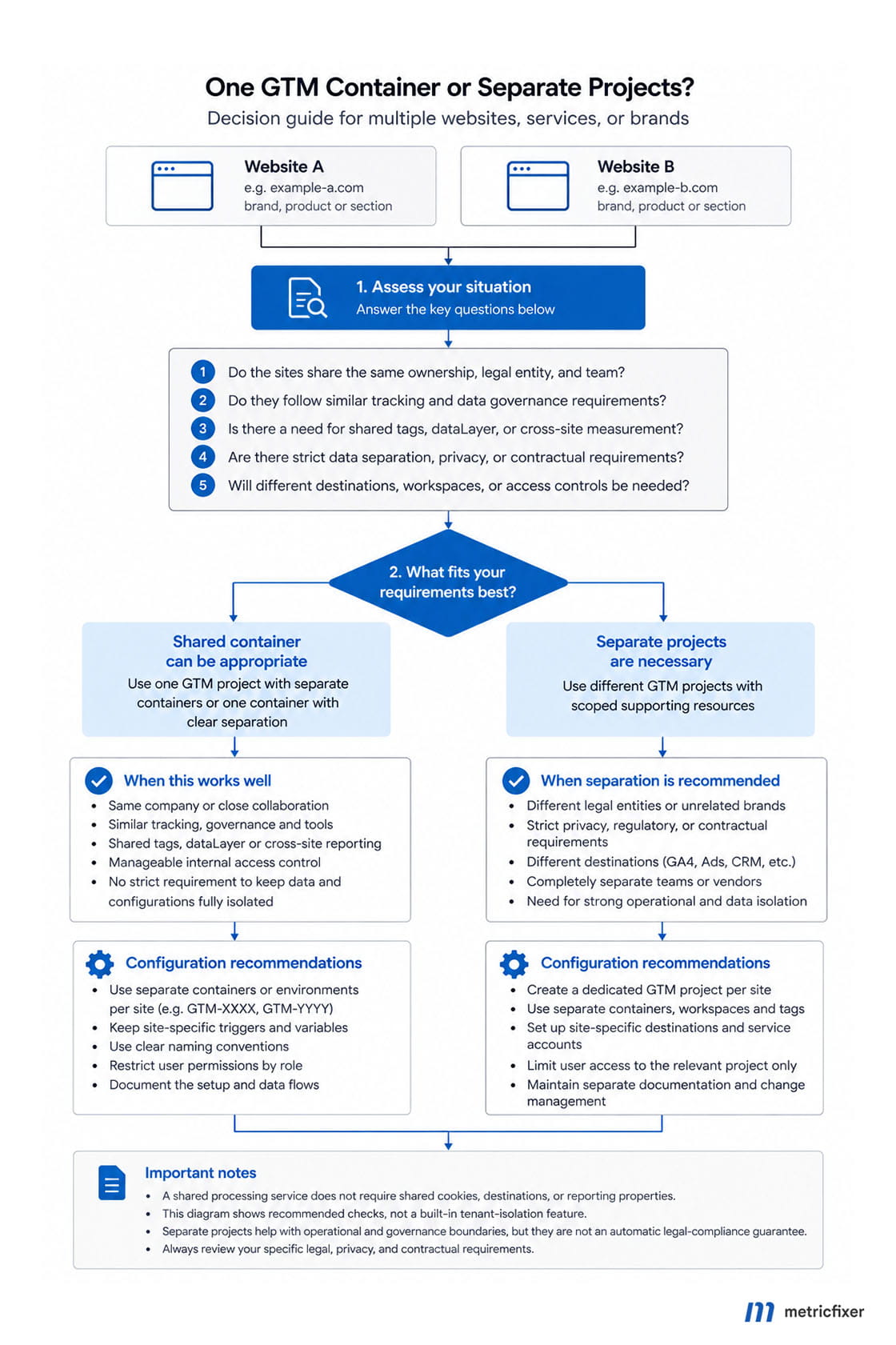
Our decision rule is to separate when the cost of a shared mistake exceeds the savings from consolidation. Independent access requirements are the clearest signal; different release schedules, sensitive data, incompatible retention policies, and sharply different workloads strengthen the case.
- Share deliberately when the sites have one trusted operating team, compatible policies, tested routing, and an agreed approach to incidents and costs.
- Separate containers and deployments when clients need independent configuration access, publishing, credentials, or handover.
- Separate projects and supporting resources as well when project administrators, logs, quotas, regional processing, or capacity must not remain shared.
There is no need to invent a universal rule such as “one container per domain” or “one container can safely host any number of clients.” The reviewed documentation establishes multi-URL support, not an unlimited capacity guarantee or a customer-isolation service.
The bottom line: one sGTM container can serve multiple domains, but it should behave as a deliberately governed shared service. Give each site the right endpoint, validate every route, preserve consent boundaries, and make isolation and billing explicit. For the wider benefits and limits of the technology, see Server-Side GTM: Real Gains vs Marketing Myths.
Methodology and sources
This article reviews documentation available on 5 September 2026, prioritizing Google's Tag Platform, Tag Manager, Analytics, Cloud Run, and Cloud Billing documentation. Browser behavior is checked against MDN, web.dev, and WebKit; shared-service security principles are informed by OWASP.
The deployment comparisons, routing registry, cost-allocation formula, and acceptance tests are metricfixer's editorial recommendations derived from those documented mechanisms. They are not a Google-provided multi-tenant configuration. Domains, IDs, and allocation figures are illustrative. No production deployment, provider capacity benchmark, or end-to-end consent experiment was performed for this article. Actual behavior depends on the hosting route, template versions, browser, consent implementation, and connected vendors.
This article is for technical and operational information only and is not legal, security-certification, or financial advice. metricfixer is not affiliated with Google, Google Tag Manager, Google Analytics, Google Cloud, or the other platforms and organizations mentioned. Privacy obligations, hosting prices, product availability, and browser behavior may change. Validate the complete configuration and obtain appropriate privacy and security review before using a shared deployment for independent clients or sensitive data.