
Published Jul 25, 2026
OpenAI Ads dynamic parameters: UTM tracking and GA4
A practical guide to OpenAI Ads URL macros, UTM templates, parameter overrides, API setup, product-feed tracking, and reliable GA4 and CRM reporting. Updated 12 September 2026.
Category: Online advertising · By Mikalai Sasau
OpenAI Ads dynamic URL parameters connect an ad click to the campaign, ad group, and ad behind it. This guide explains the supported ID macros, practical UTM templates, parameter overrides, API configuration, product-feed tracking, and the checks that keep GA4 and CRM reporting useful.
Updated 12 September 2026. This revision replaces the earlier UI-only assessment with documented support, adds API and product-feed configuration, and refreshes the GA4 and conversion-measurement guidance.
Practical default: keep utm_source=chatgpt, utm_medium=paid_ai, and a readable business campaign slug static. Use utm_id={campaign_id} and utm_content={ad_id}; capture the ad-group and account IDs separately when needed. Keep OpenAI's automatic oppref click reference intact. The source and medium values in this guide are metricfixer conventions, not mandatory platform values.
Executive summary
The main change is confirmation. OpenAI's reporting FAQ now documents dynamic macros and their delivery-time substitution. The previous version of this guide described a conflict between the interface and that FAQ; that particular conflict has been resolved.
The recommended reporting architecture remains useful: readable UTMs describe the marketing initiative, platform IDs connect records across systems, and the click reference supports OpenAI measurement. A campaign ID is shared by many clicks. It is not a unique visitor ID or a conversion ID.
Teams maintaining existing campaigns should start with an audit of the URLs already in use. A copied URL may carry an old campaign label or hard-coded ID. Updating a broad template will not necessarily fix that URL. The most valuable part of this update is therefore the migration and validation workflow, not simply a longer template.
What is documented now
In Ads Manager, open the relevant Campaigns, Ad Groups, or Ads page, select the object's three-dot edit action, and use Landing page query parameters. OpenAI documents the following priority for conflicting parameter values, from highest to lowest:
- The parameter already present in the ad's destination URL.
- The ad's parameter settings.
- The ad group's parameter settings.
- The campaign's parameter settings.
For implementation, distinguish the documented configuration from your own destination behavior. Redirects, form capture, analytics tags, partner links, and consent choices still need testing. There is no need to treat the feature itself as an undocumented experiment.
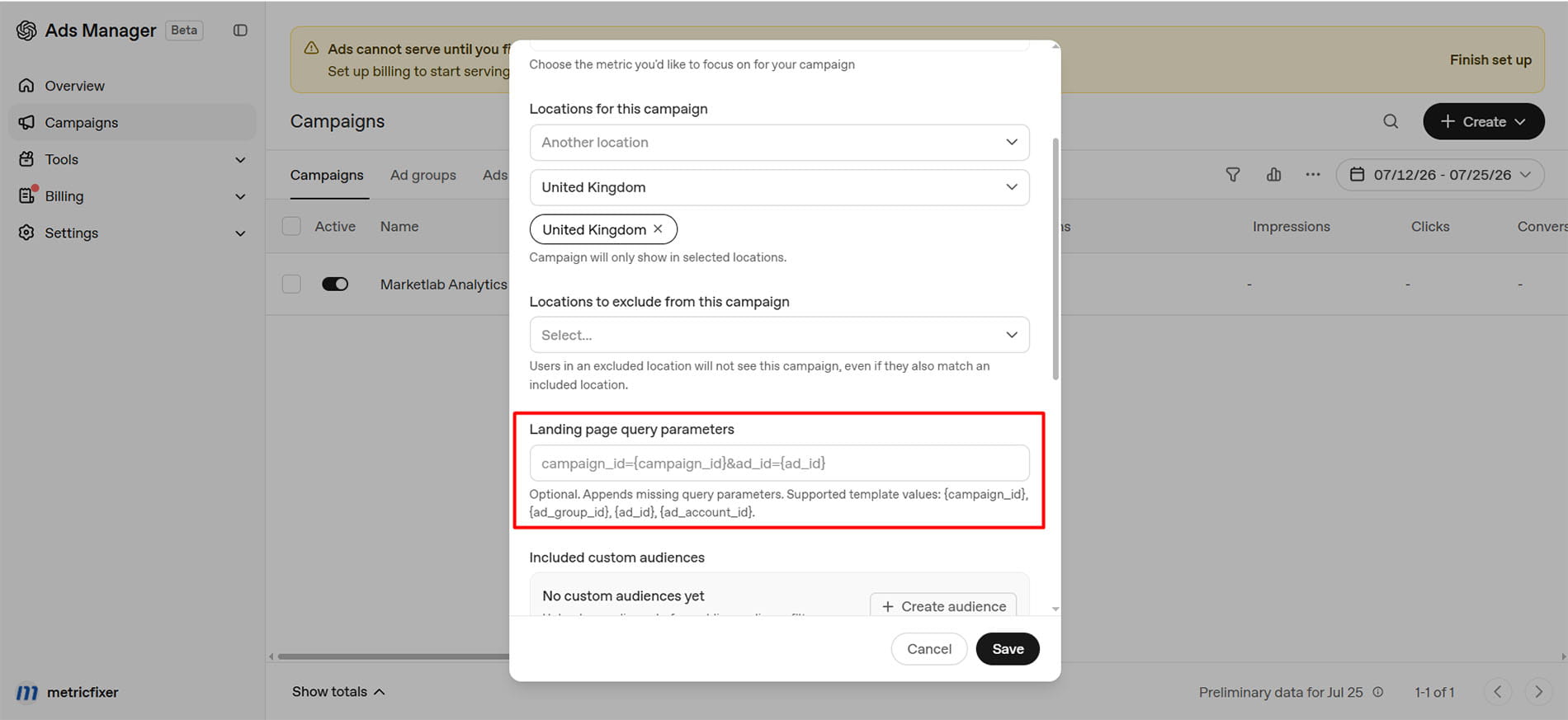
Enter a query string, not a replacement landing URL
Keep the destination page in its landing URL field. Put the tracking key-value pairs in the query-parameter field, without a leading ?. The examples below use this format:
utm_source=chatgpt&utm_medium=paid_ai&utm_campaign=q3-demo-push-emea&utm_id={campaign_id}&utm_content={ad_id}Do not import Google Ads syntax such as {lpurl} or {campaignid}. This guide's examples use OpenAI's underscore-separated ID macros and single braces. When editing HTML, & represents an ampersand in the source; when entering the actual field, use ordinary & separators.
Implementation workflow: define the reporting taxonomy → inspect existing URLs and overrides → save the tracking configuration → check a resolved destination and its redirects → verify analytics and form capture → reconcile the resulting records with platform reports.
OpenAI Ads dynamic parameter reference
The public FAQ names the following four ID macros. Treat this as the verified set for this guide, not a promise that no additional macro will ever be introduced. The example outputs below use the same object prefixes shown in OpenAI's public Ads API documentation. They are illustrative, not a guarantee that every account or UI rollout will display exactly the same formatting.
| Template value | Object represented | Illustrative resolved value | Best UTM or custom-field use | Practical note |
|---|---|---|---|---|
{campaign_id} |
Top-level OpenAI Ads campaign ID | cmpn_101 |
utm_id and/or oai_campaign_id |
The cleanest campaign-level join key for Ads Manager exports, the Insights API, CRM reporting, and cost reconciliation. |
{ad_group_id} |
Ad-group ID inside the campaign | adgrp_301 |
oai_ad_group_id; optionally utm_term |
Useful for theme, intent, context-hint, bid, and product-set analysis. It is not a paid-search keyword. |
{ad_id} |
Ad ID; for a product ad, the template object rather than an individual SKU | ad_501 |
utm_content and/or oai_ad_id |
Identifies the ad object. A product template may serve multiple items, and edited creative can retain the same ad ID. |
{ad_account_id} |
OpenAI Ads account ID | adacct_123 |
oai_account_id |
Especially useful for agencies, multi-brand organizations, shared landing pages, and centralized data warehouses. |
Do not guess additional macros
This review did not find public confirmation of URL macros for dynamic names or delivery metadata. Do not assume support for values such as {campaign_name}, {ad_group_name}, {ad_name}, {placement}, {device}, {country}, {context_hint}, {product_id}, or {objective}. A literal unresolved token can pollute GA4, CRM records, and redirect logs without causing an obvious landing-page error.
The lack of name macros is not necessarily a disadvantage. IDs are more stable than editable names. Keep a mapping table between platform IDs and readable names in your reporting layer instead of making the landing URL the only place where campaign structure is described.
Recommended UTM model for OpenAI Ads
Google Analytics defines utm_id as a campaign ID and utm_content as a way to differentiate creatives. Those definitions align well with the OpenAI campaign and ad identifiers. The remaining fields should stay readable and stable across platforms.
| Parameter | Recommended OpenAI Ads value | Static or dynamic? | Why |
|---|---|---|---|
utm_source |
chatgpt |
Static | Identifies the inventory where the user clicked. It also leaves room for OpenAI to add other ad surfaces later without changing the buying-platform field. |
utm_medium |
paid_ai |
Static | Provides a consistent paid medium across campaign objectives; a separate named channel needs GA4 configuration. Use cpc only if that is the organization's deliberate cross-channel convention. |
utm_campaign |
A controlled business slug such as q3-demo-push-emea |
Usually static | Keeps one initiative comparable across OpenAI Ads, Google Ads, Meta, LinkedIn, email, and partner media. Use the OpenAI campaign name only when naming governance guarantees that it matches this business layer. |
utm_id |
{campaign_id} |
Dynamic | Matches GA4's campaign-ID meaning and provides a stable key for campaign-data or spend joins. |
utm_content |
{ad_id} |
Dynamic | Distinguishes the ad or creative object without relying on a mutable ad name. |
utm_term |
Leave empty, use a controlled theme label, or use {ad_group_id} only by policy |
Optional | GA4 describes this as a paid-keyword field. OpenAI ad groups are not keywords, so a custom field is semantically cleaner. |
utm_source_platform |
openai_ads |
Static | Identifies the platform responsible for budget and targeting while utm_source identifies the current ChatGPT inventory. |
oai_account_id |
{ad_account_id} |
Dynamic | Agency, multi-account, and warehouse join key. |
oai_campaign_id |
{campaign_id} |
Dynamic | Technical backup for utm_id and a clearly named field for CRM or server logs. |
oai_ad_group_id |
{ad_group_id} |
Dynamic | Preserves the hierarchy without overloading utm_term. |
oai_ad_id |
{ad_id} |
Dynamic | Technical backup for utm_content and a clear ad-level join field. |
How to classify paid ChatGPT traffic in GA4
paid_ai is an editorial naming choice. Retain an established cpc convention if your reports already depend on it. Changing the label on active campaigns creates a reporting boundary, so record the date and adjust dashboards before making that change.
Google's default channel rules include a paid-medium expression matching values beginning with paid. Therefore paid_ai can qualify for Paid Other when no more specific rule applies. It does not inherently mean Unassigned, and it does not automatically create a channel named Paid AI.
The same reference now includes AI Assistant, associated with ai-assistant as the medium. Do not use that medium for your paid campaigns merely because the placement is ChatGPT. Keeping paid traffic separately tagged makes comparisons with unpaid assistant referrals more meaningful.
For a dedicated reporting bucket, create a custom channel group, position the specific rule before broader matching channels, and use that group in the relevant report:
Custom channel: Paid AI
Source exactly matches: chatgpt
AND
Medium exactly matches: paid_ai
If your existing medium is cpc, use that value in the rule instead. Check the actual session source and medium together: a channel name alone can conceal tagging mistakes.
What should stay static and what should be dynamic
- Keep static: source, medium, business campaign, buying platform, geography label, funnel label, offer name, and any value that must remain readable across channels.
- Make dynamic: platform object IDs that are difficult to type correctly and valuable for deterministic joins.
- Avoid dynamic names: they are not in the verified URL-macro set, and editable names are weaker historical keys than IDs.
- Do not put IDs in source or medium: doing so creates a new acquisition row for every object and destroys channel-level reporting.
Copy-ready OpenAI Ads query templates
Compact GA4 template
Use this when the main requirement is clean GA4 acquisition reporting with campaign- and ad-level identifiers:
utm_source=chatgpt&utm_medium=paid_ai&utm_campaign=q3-demo-push-emea&utm_id={campaign_id}&utm_content={ad_id}&utm_source_platform=openai_adsRecommended full template for GA4, CRM, and warehouse joins
This is the practical default for advertisers that need reliable downstream reconciliation:
utm_source=chatgpt&utm_medium=paid_ai&utm_campaign=q3-demo-push-emea&utm_id={campaign_id}&utm_content={ad_id}&utm_source_platform=openai_ads&oai_account_id={ad_account_id}&oai_campaign_id={campaign_id}&oai_ad_group_id={ad_group_id}&oai_ad_id={ad_id}The deliberate duplication of campaign and ad IDs is optional. It gives analytics tools conventional UTM fields while giving CRM, forms, server logs, and data pipelines explicit OpenAI-specific names.
Variant that uses utm_term for the ad group
Use this only when the organization's UTM specification already treats utm_term as a broader targeting or ad-group field:
utm_source=chatgpt&utm_medium=paid_ai&utm_campaign=q3-demo-push-emea&utm_id={campaign_id}&utm_content={ad_id}&utm_term={ad_group_id}&utm_source_platform=openai_ads&oai_account_id={ad_account_id}For a new implementation, the cleaner option is to leave utm_term empty and use oai_ad_group_id.
Illustrative resolved landing URL
Assume the ad's destination URL is https://www.example.com/demo?language=en. A resolved click could look like the following. The exact order of parameters and the actual ID values may differ:
https://www.example.com/demo?language=en&utm_source=chatgpt&utm_medium=paid_ai&utm_campaign=q3-demo-push-emea&utm_id=cmpn_101&utm_content=ad_501&utm_source_platform=openai_ads&oai_account_id=adacct_123&oai_campaign_id=cmpn_101&oai_ad_group_id=adgrp_301&oai_ad_id=ad_501&oppref=gAAAAAb123Do not add oppref to the template. OpenAI creates it automatically for eligible clicks.
Worked example: an old URL overrides a new template
Consider this configuration. These are illustrative inputs and an expected result derived from the priority rule, not the output of a live account test.
| Location | Value supplied for the same key |
|---|---|
| Campaign settings | utm_campaign=autumn-demo |
| Ad-group settings | utm_campaign=autumn-demo-enterprise |
| Ad settings | utm_campaign=autumn-demo-video |
| Destination URL | utm_campaign=summer-demo |
| Expected final value | utm_campaign=summer-demo |
The practical diagnosis is a stale URL, not a broken macro. Remove that old key only if the intended reporting design assigns it to a settings field. Then check which remaining override should apply. Do not leave obsolete tags in place merely because a new template has been saved.
For new setups, our recommendation is to place shared defaults at campaign level and record every deliberate exception. Keep each key unique within an individual URL or template. The hierarchy does not make duplicate keys inside one raw URL a sensible configuration.
Compatibility by configuration path
| Path | Evidence as of this revision | Practical approach |
|---|---|---|
| Ads Manager website ads | Dynamic query settings are documented. | Use the dedicated field and audit destination overrides. |
| Public Advertiser API | The OpenAPI schema includes the configuration on campaign, ad-group, and ad create/update bodies. | Use the structured field shown below; validate against the current schema. |
| Product-feed destinations | The product-feed guide explicitly directs advertisers to the same tracking configuration. | Keep product identity separate from the ad-template ID; inspect several product destinations. |
| Ads Manager bulk file upload | The public checklist does not specify a dedicated query-template column. | Start with a fresh export and use only columns actually provided. Configure tracking separately if needed. |
| Bulk API jobs | The documented bulk operation field list does not establish support for this configuration. | Do not assume parity with ordinary create/update endpoints. |
| Mobile measurement partner links | Partner link workflows are documented; full macro pass-through behavior is not established here. | Keep the partner-generated link and test its complete redirect and attribution flow. |
The bulk-file boundary follows the upload checklist; the separate job boundary follows the Bulk API operation table. Absence from those descriptions is a documentation limit, not proof that an account can never expose additional support.
Why CPM, CPC, and oCPC normally use the same UTM structure
OpenAI currently supports CPM, CPC, and conversion-optimized CPC objectives. The objective changes pricing and delivery optimization, but the website still receives a click when the user opens the landing page. A consistent source, medium, campaign, and ID model therefore makes cross-objective analysis easier.
Store objective and billing metadata in the OpenAI campaign table or reporting warehouse. Do not force it into utm_medium unless your organization explicitly wants separate channels for the same traffic source.
Product feeds: track both the template and the item
The product-feed guide says that the selected product supplies the destination and explicitly points to landing_page_configuration for URL tracking. The earlier blanket assessment that feed tracking was unconfirmed is no longer appropriate.
Product text placeholders such as {{product.title}} belong to creative templates. They do not establish support for an invented URL macro such as {product_id}. Likewise, {ad_id} identifies the template ad; it should not be used as a SKU.
For your own data model, preserve the item identity in a dedicated feed destination or map the landing page to the catalog. Use both feed and item identifiers if item IDs are not globally unique. OpenAI's Insights reference exposes product.feed_id and product.item_id. The following parameter names are advertiser-defined:
https://www.example.com/products/running-shoe?oai_feed_id=feed-uk&oai_product_id=sku-123This example deliberately leaves campaign tags out of the feed URL so they can be maintained in the tracking configuration. For a catalog shared with other channels, use channel-specific feed exports or a separate mapping rather than stamping an OpenAI source onto every shared product link.
Test products with different URL patterns and repeat after a feed refresh. Check that the feed generator does not restore an obsolete hard-coded campaign value.
Correction to the original guide: OpenAI now documents oCPC in open beta for both standard and product-feed campaigns. It optimizes for a selected conversion while billing per valid click. See conversion-optimized campaigns for eligibility and setup requirements. That change does not require a new UTM taxonomy.
API configuration: use the structured tracking field
The public OpenAPI schema contains landing_page_configuration.query_string_template in campaign, ad-group, and ad creation and update schemas. Some shorter reference tables omit it. The schema and product-feed guide provide stronger evidence than those omissions.
For an existing object, this is an illustrative partial update body:
{
  "landing_page_configuration": {
    "query_string_template": "utm_source=chatgpt&utm_medium=paid_ai&utm_campaign=q3-demo-push-emea&utm_id={campaign_id}&utm_content={ad_id}&oai_ad_group_id={ad_group_id}&oai_account_id={ad_account_id}"
  }
}
Use the relevant ordinary update route, with your own object ID:
POST /v1/campaigns/{campaign_id}
POST /v1/ad_groups/{ad_group_id}
POST /v1/ads/{ad_id}
Here the braces in the endpoint paths mean “insert the existing resource ID”; they are not URL-tracking macros. The configuration is a top-level request property, not a property inside creative. A creation request must also include that object's required fields.
Our recommended integration workflow is to read the current object, calculate the intended change, submit a minimal update, and read it again. Compare the saved template and then validate the destination. Do not treat a successful response as proof that downstream redirects or CRM capture work.
The schema permits null for the outer configuration on updates, but that alone does not specify every reset or inheritance outcome. Do not equate an omitted property, null, an empty object, and an empty string without testing the intended reset path.
Static URL generation remains useful for integrations that cannot send the structured field. Keep this as a fallback rather than the default workaround for a supposedly missing API feature. When maintaining creative.target_url, follow the Ads update requirements: if you send creative, provide its full required object rather than an incomplete URL-only replacement.
Mobile measurement partner links are not ordinary website URLs
OpenAI documents integrations with AppsFlyer and Adjust. For app measurement, the advertiser creates an attribution link in the mobile measurement partner and uses that link in the corresponding ChatGPT Ads campaign. Attribution settings and event sharing are then governed by the MMP configuration.
Do not replace an MMP link with a normal UTM-tagged app-store URL. Keep the partner link intact, then use only the partner's supported custom parameters. When combining a partner link with dynamic query settings, test whether the MMP receives resolved IDs rather than literal braces and whether its redirect chain preserves them.
UTMs and oppref solve different measurement problems
OpenAI uses the automatically appended oppref click reference for measurement. The Measurement Pixel captures it from the landing URL and stores it in a first-party __oppref cookie. Preserve the real reference for server-side measurement when available; do not generate a substitute.
| Identifier layer | Main purpose | Primary consumer | Implementation rule |
|---|---|---|---|
utm_* |
Source, medium, campaign, creative, and acquisition reporting | GA4, Adobe Analytics, Matomo, CRM, dashboards | Use a stable taxonomy and consistent casing. |
oai_* |
Deterministic platform-object joins and troubleshooting | CRM, server logs, data warehouse, attribution model | Capture deliberately; these are not automatically standard GA4 acquisition dimensions. |
oppref |
OpenAI click-to-conversion attribution | OpenAI Pixel and Conversions API | Never define it manually, overwrite it, or strip it in redirects. |
Redirect services, CMS rewrites, privacy tools, single-page applications, and URL-cleaning scripts can preserve UTMs while accidentally removing oppref, or preserve oppref while dropping custom parameters. QA must check all three layers together.
For the same conversion, use the same value in the Pixel’s event_id and the Conversions API event id, with the same Pixel ID and event identity; custom events also need matching custom_event_name. Neither {ad_id} nor oppref is a substitute for the conversion event ID. Multiple conversions can follow one click.
Implementation in GA4, CRM, and a data warehouse
GA4 acquisition layer
GA4 can populate manual campaign dimensions from standard UTM parameters. The baseline fields should therefore remain compact and readable:
utm_source=chatgptutm_medium=paid_aiutm_campaign=q3-demo-push-emeautm_id={campaign_id}utm_content={ad_id}utm_source_platform=openai_ads
Google recommends consistent, case-sensitive naming and specifically identifies utm_id as the campaign ID. Use one lowercase convention, because chatgpt, ChatGPT, and CHATGPT can become separate report values.
Custom parameters such as oai_ad_group_id do not automatically become standard traffic-source dimensions. If they are needed in GA4 reports, read them from the landing URL, send them as event parameters, and create the corresponding custom dimensions, following Google’s event-parameter guidance. Use only the fields that analysts will actually query; custom-dimension quotas and high-cardinality reporting make indiscriminate capture expensive.
A useful debugging detail: Google notes that UTM fields are omitted from the Landing page + query string and Page path + query string dimensions. Check Page location and the acquisition dimensions before concluding that a redirect removed your tags.
CRM and lead-form layer
For lead generation, capture the landing context and preserve it until the form is submitted, including when the visitor opens other pages first. Define separate first-touch and latest-touch fields rather than overwriting the original source on every visit. Hidden form fields can carry the selected values to the CRM, but must not be treated as trusted input. At minimum, preserve:
| CRM field | Suggested value | Reason |
|---|---|---|
| Original source | chatgpt |
Readable acquisition source. |
| Original medium | paid_ai |
Consistent channel grouping. |
| Marketing campaign | The static business slug | Cross-channel initiative reporting. |
| OpenAI campaign ID | oai_campaign_id or utm_id |
Campaign spend and performance joins. |
| OpenAI ad-group ID | oai_ad_group_id |
Audience, context, bid, or product-set analysis. |
| OpenAI ad ID | oai_ad_id or utm_content |
Creative and ad-level analysis. |
| OpenAI ad account ID | oai_account_id |
Multi-account and agency routing. |
| OpenAI click reference | oppref |
Available for server-side OpenAI conversion attribution. |
| Original landing URL | A controlled diagnostic copy of the first landing URL | Diagnostic evidence; redact unexpected personal or sensitive values and restrict retention and access. |
| First landing timestamp | Server or browser timestamp | Helps reconcile attribution windows, time zones, and delayed CRM events. |
Do not add emails, phone numbers, names, or other personal data to the query string. URLs commonly appear in browser history, server logs, analytics exports, support tickets, screenshots, and third-party systems.
Warehouse and spend-reconciliation layer
OpenAI Ads Manager can export reporting data, and the public Insights API supports account, campaign, ad-group, and ad scopes. Use the dynamic IDs as deterministic join keys:
- Store the required parsed parameters and, where justified, a redacted diagnostic landing URL for each session or lead.
- Export OpenAI performance or query the Insights API with campaign, ad-group, and ad IDs.
- Maintain an ID-to-name history table rather than assuming the current name was always used.
- Aggregate each dataset to a compatible date, time zone, account, and object level before joining spend to sessions, leads, opportunities, or revenue. Do not repeat an ad’s entire daily cost on every lead row and then sum it.
- Use campaign ID for broad reconciliation and ad ID for creative analysis; use ad-group ID when bid, audience, context, or product-set logic matters.
OpenAI notes that Ads clicks and analytics sessions can differ because the systems count different stages of the journey. Page-load failure, redirects, consent settings, browser blocking, UTM handling, attribution windows, and time zones can all create legitimate gaps. Compare the same time zone and date range before treating a discrepancy as a tracking failure.
Best practices for an existing tracking setup
1. Keep the reporting vocabulary stable
Readable campaign labels and platform IDs have different jobs. Preserve both where they serve actual reporting requirements. The optional oai_* names in this guide are your own fields; they do not activate a native OpenAI or GA4 integration.
2. Protect the campaign join key
Reserve utm_id for the campaign identifier. If an old destination contains a hard-coded ID, reconcile it against the intended campaign before removing or replacing it.
3. Keep source and medium predictable
Do not switch medium because a campaign changes its optimization strategy. Use separate reporting columns for objectives, bids, and billing models.
4. Audit deliberate and accidental overrides
Maintain a short list of exceptions: which key differs, where it is maintained, who owns it, and why. A URL copied from an earlier promotion is an especially common place to look.
5. Separate product identity from creative identity
Retain catalog mappings and the feed/item pair. When an ad’s text or image changes, retain a dated creative snapshot if you need historical variant analysis; the ad ID alone may not describe the exact version shown.
6. Migrate integrations deliberately
When replacing hard-coded tracking with the structured API configuration, migrate one representative object first. Review the saved result and the downstream record before rolling the change across the account.
7. Keep proportionate diagnostic evidence
Retain enough information to investigate broken attribution without collecting every URL indefinitely. Mask click references and unexpected personal data in screenshots and shared support materials.
8. Keep a dated tracking specification
Record the template, exception list, naming convention, test results, and change date. This is particularly useful when separate people maintain the feed, advertising account, analytics, and CRM.
9. Preserve a static fallback for unsupported workflows
If a particular uploader, partner link, or integration cannot carry the intended configuration, use verified static tags for that path. Record the limitation and avoid presenting it as a platform-wide restriction.
Migration checklist for readers of the earlier version
- Export the current configuration and retain a rollback copy.
- Inventory tags in landing URLs, object settings, feed exports, and redirect rules.
- Choose one owner for each shared value and document the exceptions.
- Keep valid existing source/medium conventions unless there is a reporting reason to change them.
- Replace the static-only API workaround where the structured field is suitable.
- Test a representative standard ad and, where relevant, multiple feed products and partner links.
- Check the captured CRM record and analytics request, then mark the rollout date in reports.
- Monitor new traffic. Updating a template does not repair historical records already collected with wrong values.
Common mistakes and troubleshooting
| Symptom | Likely cause | Recommended fix |
|---|---|---|
The landing URL contains {campaign_id} or another literal token. |
The account, campaign type, field, or click path does not support dynamic resolution, or the syntax was entered in an ordinary ad URL rather than the dedicated query-parameter field. | Check the saved field and supported macro spelling. Replace the dynamic layer with static values until a resolved click succeeds. |
| Only static UTMs appear; OpenAI IDs are missing. | The configuration was not saved, a more specific value took precedence, or a downstream redirect or integration dropped the IDs. | Read the saved settings at all relevant levels, inspect the destination URL, and validate the final request. |
Duplicate utm_campaign or utm_content keys appear. |
One raw URL already repeats a key, a value was concatenated incorrectly, or a redirect adds another copy. | Assign ownership of each key to one layer. Do not rely on downstream first-value or last-value behavior. |
| GA4 shows several rows for one OpenAI campaign. | Mixed casing, inconsistent static slugs, or a mutable campaign name is being used in utm_campaign. |
Normalize source and medium, use one stable business slug, and preserve the platform ID separately. |
| Ads Manager clicks exceed GA4 sessions. | A click does not guarantee a completed analytics session. Redirects, consent, blockers, slow loads, time zones, and UTM handling can differ. | Compare the same date and time zone, inspect final URLs, and reconcile against OpenAI CSV or Insights data. |
| OpenAI conversions are missing although GA4 conversions exist. | oppref was stripped, the Pixel or Conversions API is incomplete, the event does not match the campaign's configured conversion, or attribution timing differs. |
Validate oppref, the conversion event, event IDs, Pixel/CAPI delivery, and the selected campaign goal. |
| Product traffic cannot be joined to the product report. | No reliable catalog mapping or product identity was captured; the ad-template ID cannot identify the selected item. | Capture an item ID and feed context, or use a catalog mapping; reconcile with product.feed_id and product.item_id. |
| API-created ads do not contain dynamic IDs. | The integration omitted landing_page_configuration, placed the template in the wrong property, or retained an overriding static URL value. |
Send the structured configuration, read it back, and inspect URL overrides. Use a static fallback only where needed. |
| An MMP link opens the app but loses campaign metadata. | An unsupported query parameter was appended, or an intermediate redirect removed it. | Use the partner-generated link, follow the partner's accepted parameter model, and test the complete app-click flow. |
QA checklist before launch
Separate website QA from delivery QA. A manually assembled test URL proves your site can capture tags; it does not prove platform substitution or create a valid OpenAI click reference. A preview may also differ from a served ad. Validate delivery through a platform-supported test path where available, then inspect legitimate delivered traffic; do not generate repeated self-clicks to force a result.
- [ ] Locate the relevant query-parameter settings or verify your integration’s configuration field.
- [ ] Verify macro spelling and the complete saved configuration.
- [ ] Do not add a leading
?to the campaign field. - [ ] Keep static values lowercase and use one separator convention.
- [ ] Keep keys unique within each raw URL or template, document cross-level overrides, and confirm one final value per key.
- [ ] Test a destination with no existing query string.
- [ ] Test a destination that already contains unrelated query parameters.
- [ ] Test any destination that contains a fragment such as
#pricing. - [ ] Follow every redirect and inspect the final browser URL.
- [ ] Confirm that no unresolved macro remains, including percent-encoded braces such as
%7Bcampaign_id%7D. - [ ] Confirm that
opprefis present on an eligible click and survives redirects. - [ ] Inspect the analytics request and Page location during debugging; then verify processed acquisition dimensions and the chosen channel group.
- [ ] Verify that
oai_*values are captured by the website, forms, CRM, or server logs where required. - [ ] Run a test lead or purchase and confirm that the original IDs and
opprefreach the server-side conversion workflow. - [ ] Download an OpenAI Ads report or query the Insights API and prove that the captured IDs join to the intended campaign, ad group, and ad.
- [ ] Repeat affected checks after a tracking edit, URL change, bulk update, feed refresh, or MMP-link change.
- [ ] Keep a verified static fallback for any integration path that cannot carry the intended template.
Related tracking guides
For a cross-platform implementation, compare this model with our guides to Google Ads ValueTrack and tracking templates, Meta Ads dynamic URL parameters, LinkedIn Ads tracking parameters, and Microsoft Ads URL tracking. Keep the business naming consistent while respecting each platform’s own macro syntax and click identifiers.
Open questions and limitations
The remaining uncertainties are narrower than in the original guide: detailed encoding and malformed-input handling, empty-value and reset behavior, template-length limits, partner-link pass-through, and the exact fields supported by each bulk workflow. Public support for the main feature does not settle every edge case.
This revision is a documentation and schema review. It did not change an advertiser account, execute API mutations, or run a billable click. The JSON and URL examples are illustrative; saved values, redirects, analytics ingestion, and partner attribution still need implementation-specific validation.
Methodology and sources
Reviewed on 12 September 2026 against the supplied CMS source and the published metricfixer article. Product claims were checked against OpenAI’s reporting FAQ, product-feed and conversion guides, ordinary API references, downloadable OpenAPI schema, and bulk workflow documentation. Google’s documentation was used for UTM semantics, channel rules, and custom reporting. Direct source links accompany the relevant sections.
Where a concise API table omitted a field present in the schema, this article identifies that difference rather than treating the omission as proof of non-support. Configuration suggestions, naming conventions, migration steps, and worked examples are metricfixer’s implementation recommendations. Review dates describe when the evidence was checked, not an inferred product release date.
This article is for technical and operational information only. OpenAI Ads Manager is a beta product, and account availability, campaign types, dynamic template values, URL behavior, APIs, measurement features, and documentation may change after publication. Validate the configuration and destination flow before broad rollout, then monitor legitimate delivered traffic. metricfixer is not affiliated with OpenAI, ChatGPT, Google, Google Analytics, AppsFlyer, or Adjust.