
Published Nov 7, 2026
Merchant Center's 500-Pixel Rule: Affordable Image Fixes for Large Catalogs
Google Merchant Center is raising its image minimum to 500 x 500 pixels. For large catalogs without better originals, compare low-cost AI tools, desktop batches and image-CDN workflows, with realistic costs and checks that protect product accuracy.
Category: Online advertising · By metricfixer Expert Team
Google Merchant Center will enforce a 500 × 500-pixel minimum for product images from January 31, 2027. For a store selling hundreds of thousands of spare parts, fittings or building supplies, replacing every small photograph manually is not a realistic plan. This guide compares affordable ways to recover better originals, use category-specific alternatives and upscale selected images in bulk—without turning an accurate product picture into a convincing picture of the wrong product.
Practical default: audit the actual image files before buying an enhancement service. Recover larger originals, identify images Google has already optimized, and check legitimate alternatives for hardware and vehicle parts. Process only the unresolved images, test product fidelity before scaling, and publish replacements through a controlled feed update. More pixels alone do not establish compliance.
Contents
What changes in January 2027
Google’s 2026 product data specification announcement sets January 31, 2027 as the enforcement date for a minimum resolution of 500 × 500 pixels across product categories and marketing methods. It covers both image_link and additional_image_link. Fixing only the primary photograph can therefore leave other submitted images below the new requirement.
Separate the size requirement from the consequence of a particular issue. The current additional-image guide says undersized additional images may be withheld without disapproving the product. The new size rule still covers those images; diagnose main-image eligibility and additional-image display separately rather than assuming every warning removes the entire offer.
A Merchant Center reminder supplied for this review, dated November 4, 2026, repeats the deadline. This single account notification does not establish when every merchant was notified.
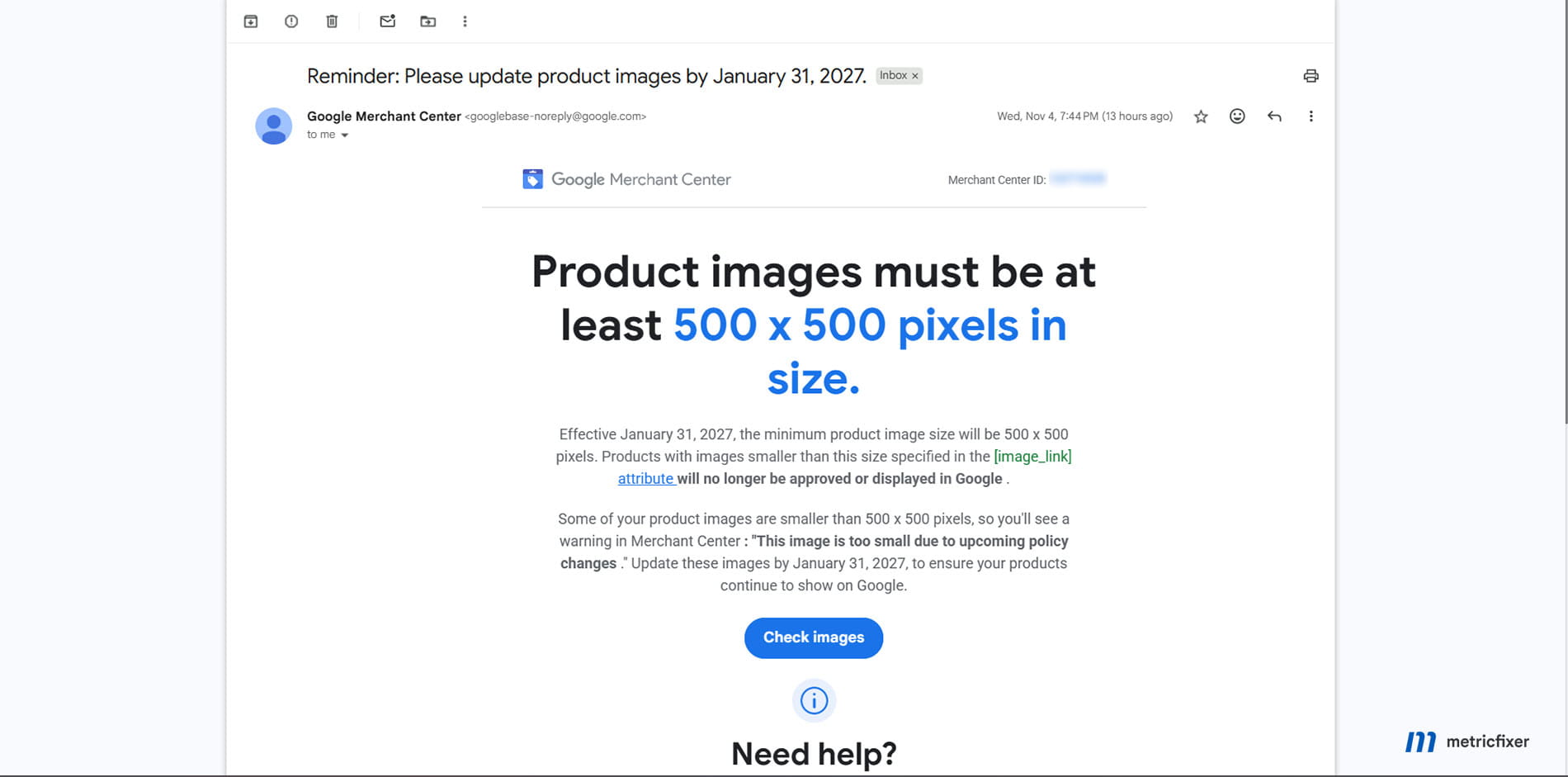
Google recommends 1500 × 1500 pixels or larger for stronger presentation across formats, but that is not the new minimum. Its image best practices also emphasize focus, a complete product silhouette and a product that fills roughly 75–90% of the frame. A large canvas containing a tiny, blurred object does not address those quality expectations.
Until enforcement begins, Google’s image-size troubleshooting page still describes the earlier 100 × 100 minimum for non-apparel and 250 × 250 for apparel. Its warning timeline is not completely aligned with the annual announcement: one mentions July 2026, the other April 14. Both identify the same January 31, 2027 enforcement date. Plan against that date rather than trying to infer a different deadline from when a warning first appeared.
Bigger images are not automatically compliant
There is an important tension in Google’s guidance. The product data specification discourages scaling up images and submitting thumbnails. Yet Google also offers resolution enhancement in Product Studio, and its annual announcement says it will optimize some undersized images automatically.
The defensible interpretation is not “all upscaling is prohibited” or “any AI upscale is approved.” A third-party upscaler produces a candidate replacement, not a compliance certificate. We found no blanket exemption guaranteeing that a resized or AI-enhanced supplier thumbnail will be accepted.
Keep three tests separate. First, does the downloaded file meet the dimensional and format requirements? Second, does it clearly and accurately represent the item? Third, has Merchant Center fetched and accepted that particular version? Passing the first test does not prove the other two.
Changing CSS dimensions, an HTML width attribute or a file’s DPI setting does not create a higher-resolution image file. Nor does placing a 150-pixel photograph inside a 600-pixel white square recover missing product detail. Treat interpolation as a comparison baseline, not a guaranteed route around Google’s rules.
For technical products, accuracy matters more than an attractive finish. A smoother photograph is a failure if it changes a connector, fills a mounting hole, invents a thread, rewrites a part number or makes brushed metal look polished. These are review risks to test for, not claims that every model will make those errors.
Reduce the work before processing images
Count assets, not just products
Export affected offers and join them to the complete image list from the feed or product information system. Google describes how to download impacted products from Needs attention and its issue-history views. Include additional images, not only the main link.
Build an asset register containing the offer identifier, image role, source URL, fetched file dimensions, format, file size, supplier, checksum and current issue. Fetch the image bytes: a filename containing “1000” is not proof of resolution, and a successful HTTP response might contain an error page.
Deduplicate identical files before processing. Different URLs can serve the same bytes, while the same URL can change over time. Preserve the mapping between each asset and every offer that legitimately uses it. Similar-looking bolts are not interchangeable; visual similarity is a review aid, not permission to merge product identities.
Look for a better file that already exists
Check the original media library, supplier exports, backups, product-page zoom images and documented CDN size variants. A feed may be submitting a 200-pixel derivative even though a useful master already exists. Fixing that mapping is preferable to asking AI to reconstruct information unnecessarily.
Do this by supplier or platform rule rather than editing URLs individually. Test each rule on a sample and confirm the returned file is the correct product. Removing a size suffix does not always reveal an original; it can return an error, another image or the same thumbnail. Use only sources you are authorized to access and reuse.
Check Google’s own optimization before paying twice
The annual specification update says Google will optimize some images below 500 × 500 and that those optimized images will meet the new requirement without merchant action. Check the actual item status and optimized rendition before treating an image as resolved. This is not a promise to repair the whole catalog.
Record these items as a separate monitored group. A Google-side fix does not automatically upgrade the merchant’s own media library or another marketplace’s feed. Also, do not assume the automatic image improvements setting, which also addresses problems such as overlays, is an on-demand bulk-upscaling button.
Illustrative workload: 300,000 offers might reference 120,000 distinct primary-image files. If 80,000 are undersized, 20,000 have recoverable originals and a separate 10,000 have a verified Google-side resolution fix, the immediate third-party processing queue is 50,000—not 300,000. These are invented planning numbers, not observations from a merchant account; additional images must be counted separately.
An important exception for hardware and parts
Google’s image-link rules explicitly allow generic images, graphics or illustrations in the Hardware category, ID 632, and Vehicles & Parts, ID 888. This matters directly to fittings, fasteners and automotive catalogs: a photograph is not the only possible source asset.
For a genuinely eligible item, an authorized manufacturer illustration or an accurate render from existing product geometry may be more useful than an aggressive reconstruction of a tiny photograph. A vector original can be rasterized at the required size without enlarging a low-resolution bitmap. The output still needs an accepted image format and appropriate dimensions.
That is an alternative sourcing route, not a loophole. Check the actual product category, rights and representation. Do not reclassify an unrelated consumable to claim an exception, or use a plausible generic drawing to imply an exact connector, finish or configuration it does not show. Category exceptions do not waive the size requirement or make misleading product information acceptable.
It is also not an instruction to replace every photograph with line art. Where buyers need to distinguish near-identical variants, a verified product-specific source remains the better editorial recommendation. Ask suppliers for usable technical imagery before commissioning thousands of individual retouches.
Which image-processing techniques to test
| Method | What it changes | Useful role | Main limitation |
|---|---|---|---|
| Recover a larger original | Replaces a derivative with existing source detail. | First choice when a master or authorized supplier asset exists. | Requires correct matching and access rights. |
| Conventional resizing | Calculates extra pixels from existing ones. | A low-cost baseline and a finishing step after genuine enhancement. | Does not recover missing evidence; simple enlargement is discouraged by Google. |
| Restoration-oriented super-resolution | Uses a learned model to estimate a higher-resolution rendition. | A controlled trial for otherwise usable small photographs. | Estimated edges and textures can be wrong. |
| Creative generative enhancement | Can reconstruct or invent substantial visual content. | Not our default for factual main product images. | A more impressive picture may be less faithful. |
| Background removal or added canvas | Changes composition rather than underlying product detail. | Only when framing genuinely needs repair. | Can erase thin features or hide the original resolution problem. |
ImageMagick and sharp provide conventional resizing without a neural-network service. Their filters and fit modes are not identical: sharp documents that some reduction kernels map to cubic interpolation when enlarging. Do not assume that a setting called Lanczos produces the same enlargement in every library.
Start with a modest target that the source can plausibly support. A 300 × 300 image enlarged twice becomes 600 × 600; a 100 × 100 image enlarged four times is still only 400 × 400. Automatically applying “4×” does not establish that either dimension reaches the minimum.
For aspect-ratio-preserving resizing, calculate the scale from the shorter side. A 400 × 200 source needs a factor of 2.5 to become 1000 × 500. A “fit inside 500 × 500” operation instead produces 500 × 250 and still fails the dimensional test. Do not stretch a long part into a square or crop off its ends merely to satisfy a box.
A 600-pixel shorter-side target can provide a small operational margin, but it is our suggested processing target, not a Google requirement. Avoid repeatedly enlarging already enlarged outputs. Return to the best original whenever settings or models change.

Services and open-source tools compared
The following is a procurement and workflow comparison, not a measured quality ranking. Public documentation and prices were checked on November 5, 2026. A free interface, a desktop subscription and an API allowance are different products; do not assume one includes the others.
| Option | Automation and environment | Where it fits | What to check |
|---|---|---|---|
| Google Product Studio | Free Merchant Center interface with an Increase resolution workflow. | Pilot images and selected high-value exceptions. | The reviewed guide describes image-by-image interaction, not a documented unattended 100,000-image job. Check account availability. |
| Upscayl | Free, open-source desktop software with batch processing; requires a compatible Vulkan GPU. | A low-cash-cost pilot or supervised batches on existing hardware. | GPU compatibility, output mapping and operational recovery. A graphical batch tool is not a complete catalog pipeline. |
| Self-hosted Real-ESRGAN | Python/PyTorch or a portable ncnn/Vulkan implementation. | Repeatable processing when an engineer can maintain workers. | Model and dependency versions, selected weights’ licenses, GPU memory and image-specific artifacts. |
| Real-ESRGAN on Replicate | Hosted model API; no local GPU required. | A low-entry-cost automated pilot before operating your own GPU workers. | Variable execution cost, concurrency, version pinning and prompt download of results. |
| Cloudflare Images | URL or Worker-based transformations, including AI upscaling. | A particularly relevant low-touch candidate for an existing Cloudflare image setup. | Explicit AI settings, both output dimensions, metadata, account billing and first-request latency. |
| Cloudinary | Managed image pipeline with the e_upscale effect. | Merchants already using Cloudinary’s media library and delivery workflow. | Special transformation charges and preparing outputs before Google requests them. |
| Claid / Let’s Enhance business tooling | API operations and custom enterprise workflows. | Teams seeking a supported, integrated enhancement process. | Separate web/API credits, output-size tiers, extra operations and a written volume quote. |
| Pixelcut API | Hosted 2×–4× upscaling API. | A straightforward integration or a comparison candidate for difficult batches. | The published $0.10 per-image rate can be substantial at catalog scale; output links are temporary. |
| Topaz Labs | Hosted API; Gigapixel also offers a separate desktop batch workflow. | Testing whether particular models justify their cost on difficult product imagery. | API versus desktop licensing, supported hardware, model choice and volume terms. |
Cloudflare: a potentially small integration, not just a resize URL
Cloudflare’s current transformation reference distinguishes upscale=generate, which uses ESRGAN, from default bicubic interpolation. It also documents a default fit=scale-down mode that will not enlarge a small source. Merely requesting a larger width is not enough.
For an audited square 300 × 300 source, this is an illustrative AI-upscaling URL—not a live asset or a universal recipe:
https://images.example.com/cdn-cgi/image/width=600,height=600,fit=scale-up,upscale=generate,format=jpeg/catalog/source-v1.jpgFor rectangular sources, calculate dimensions from the shorter side and validate the actual output. Cloudflare uses a single supported 2× or 4× AI pass, with further interpolation beyond 4×. Check the delivered file’s provenance metadata separately; this example does not solve metadata preservation.
Our recommendation is to pre-generate and inspect approved versions rather than making a Google image request the first production test. For a fixed migration, saving approved results to controlled storage can also separate the enhancement job from long-term image delivery.
Cloudinary and Claid: understand the unit being sold
Cloudinary’s upscale effect produces a 4× enlargement in each dimension, requires input below 4.2 megapixels and is not supported for fetched images. Upload-based workflows and eager preparation therefore matter. Its special transformation schedule lists 10 additional transformations below 0.25 MP input and 100 from 0.25 to 4.2 MP, on top of standard counts. An image with a short side below 500 can still fall into the more expensive area tier.
Claid’s API upscaling help page lists one credit for output up to 4 MP. Its API pricing page separates web credits from API credits and lists additional operations separately. The public pages reviewed did not expose a dependable cash quote for this catalog-scale purchase. Ask for the price of the exact output size and operation chain; do not equate one credit with one cent.
Desktop tools: convenient for a pilot, not automatically for a migration
Upscayl is useful for trying a repeatable local preset without building an API client. Topaz Gigapixel’s batch workflow provides another supervised route. Neither choice removes the need to map results to offers, log failures and prevent an interrupted run from silently dropping images.
The published desktop pricing lists Gigapixel at $29 on its monthly plan and Gigapixel Pro at $499 billed annually. The personal plan limits commercial use to organizations below $1 million in annual revenue; larger retailers should verify the appropriate Pro or enterprise license. Local rendering is not billed per image, which can make supervised desktop processing much cheaper than the API. It still requires capable hardware, sufficient processing time and reliable batch handling; a desktop license does not include API access.
For 100,000 images, avoid a workflow that requires a person to confirm each upload or download. Choose a resumable batch process, or reserve the desktop application for the exception queue.

What processing 100,000 images might cost
Budget by unique assets actually processed, then add failed attempts, review, storage, delivery and integration. The arithmetic below assumes one processing attempt or one requested variant per image. It excludes taxes, negotiated discounts and labor. The rows have different billing bases and are not equivalent quality offers.
| Route and basis | 100,000 images | 300,000 images | Interpretation |
|---|---|---|---|
| Cloudflare remote-image transformations: first 5,000 included, then $0.50 per 1,000 | $47.50 | $147.50 | Transformation component for one calendar month, assuming one unique variant per image and the allowance is unused. Not an all-in project quote. |
Replicate xinntao/realesrgan: displayed estimate of approximately $0.0028 per run | About $280 | About $840 | A variable, input-dependent estimate—not a fixed unit price or spending cap. |
| Pixelcut Upscaler API: $0.10 per image | $10,000 | $30,000 | Linear calculation from the public API rate, before any negotiated terms. |
| Topaz Enhance API: published plan rates of $0.08–$0.10 per credit; one credit up to 24 MP output | $8,000–$10,000 | $24,000–$30,000 | Unit-rate extrapolation, not a confirmed 100,000-image plan or enterprise quote. |
| Topaz Gigapixel Pro desktop: $499 annual license | $499 license, plus hardware and labor | $499 license, plus hardware and labor | One licensed seat and local rendering; no promise either workload finishes within a particular period. Not an API plan. |
| Claid or Cloudinary | Quote / account-specific calculation | Quote / account-specific calculation | Resolve credit or transformation conversion, other operations and delivery costs first. |
| Self-hosted open-source model | Measured worker time plus operations | Measured worker time plus operations | No per-image software fee for the selected open-source route; hardware and engineering are not free. |
The price references are Cloudflare Images pricing, the specific Replicate model page, Pixelcut’s upscaler rate and Topaz’s API plans. Cloudflare’s public schedule does not separately price the AI upscale parameter; verify the actual account’s metering and availability before relying on the transformation-only calculation. Re-requesting variants in later months can create later monthly transformation charges.
These numbers favor testing a low-cost hosted route before purchasing GPU hardware, but they do not establish a quality winner. A service that fails product-fidelity review has no useful price advantage.
Compute is often cheaper than handling exceptions
For self-hosting, use measured time on representative files. As a purely hypothetical sensitivity example, 100,000 images at three seconds each consume about 83.3 worker-hours. At an assumed $0.50 per hour, that is about $41.67 of processing. At ten seconds per image it becomes 277.8 hours and $138.89. Neither the speed nor the hourly price is a benchmark or a supplier quote; downloads, encoding, idle time and retries are excluded.
Human handling can dominate. At an assumed 15 seconds per image, touching 100,000 images once takes about 417 staff-hours. Reviewing a 2% sample takes about 8.3 hours at the same assumed pace, but such a sample does not prove the remaining images are correct. Review by risk, not just by a uniform percentage.
A useful internal measure is total remediation cost per accepted, faithful asset. Include sourcing, processing, rejected results, review and deployment. In the earlier illustrative queue, paying $0.10 for 50,000 unresolved images costs $5,000, compared with $30,000 for blindly processing all 300,000 offers. Avoiding unnecessary work can matter more than negotiating a small unit discount.
Technical environment and capacity
Do not run a large migration inside storefront request handling or an ordinary page-load plugin. Use a separate worker or managed service so processing can pause, resume and fail without slowing checkout.
| Route | Starting setup | Operational implication |
|---|---|---|
| Audit and conventional processing | A separate CPU worker with ImageMagick or sharp; an initial 4-vCPU, 8-GB-RAM allocation is a planning suggestion. | Measure decoding memory and concurrency. No neural-network GPU is needed for this stage. |
| Local neural upscaling | A supported GPU; for a first small-image pilot, budget 8 GB of GPU memory and 16–32 GB of system RAM as a starting assumption. | Not a universal minimum. Model, tile size, image dimensions and concurrency determine actual needs. |
| Hosted API | A lightweight orchestration worker, protected API credentials, a persistent job queue and output storage. | No local inference GPU; manage rate limits, retries, result downloads and spending caps. |
| Existing image CDN | An enabled transformation service, controlled source access and a stable derivative naming scheme. | Check metadata and cold-request behavior. Preflight the files that will enter the feed. |
These suggested allocations are not vendor-certified requirements. Upscayl specifically requires a Vulkan-compatible GPU and warns that many integrated GPUs will not work. A normal CPU-only virtual server is not a drop-in Upscayl machine.
The Real-ESRGAN project offers both Python/PyTorch and portable alternatives. For the Python route, pin a tested environment rather than treating old minimum dependency versions as a modern deployment recipe. The ncnn/Vulkan implementation avoids that Python stack and supports folder processing and tiling. Smaller tiles reduce GPU memory pressure, but output consistency still needs inspection.
For comparison, the reviewed Topaz Gigapixel requirements specify 16 GB of system RAM and 6 GB of dedicated GPU memory for the listed Windows configuration, with higher requirements for generative models. Linux and virtual machines are not supported by that desktop application. The hosted API is a separate deployment choice.
Budget storage from measured output sizes, not pixel dimensions alone. At an assumed average of 150 KB, 100,000 derivatives occupy about 15 GB before originals, intermediate files, backups and logs. Four times the width and height means sixteen times as many pixels, which can materially increase intermediate memory and disk usage.
For a one-off migration, renting or using a managed API avoids owning idle capacity. For a continuing supplier feed with substantial daily arrivals, a maintained local or cloud worker may become worthwhile. Compare total operating cost, not only the advertised GPU-hour price.
A batch workflow with a safe stop
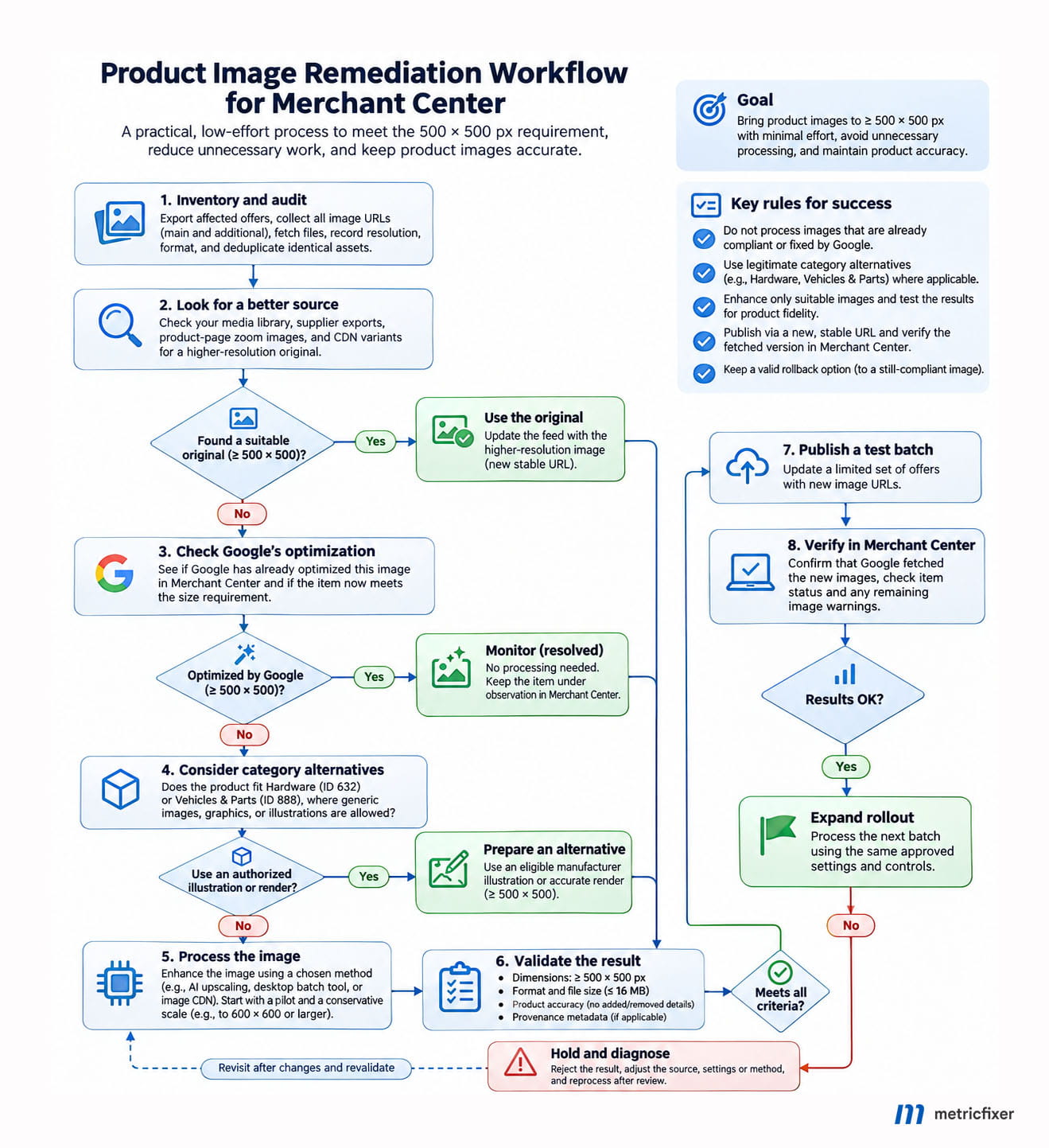
The proposed workflow below deliberately includes images that should not be processed or published. It is metricfixer’s editorial model, not Google’s internal approval process.
Working sequence: inventory and deduplicate → recover better sources → verify Google-side fixes and category alternatives → process only repairable candidates → validate dimensions, fidelity and provenance → publish a small batch → confirm Google’s fetched version and item status → expand or stop.
Keep originals immutable and jobs resumable
Give each job a key based on the source checksum, chosen model or transformation, settings and output version. Store the mapping from the original URL to the candidate and approved URLs. Mark states such as pending, processed, rejected, published and verified. A restart should skip completed jobs rather than repeat paid processing.
Set concurrency and a retry budget. Retry transient failures with backoff; stop repeatedly billing a file that is corrupt, unsupported or consistently wrong. For supplier URLs, use an allowlist, download limits and decoder limits rather than letting the worker fetch arbitrary addresses. Do not log secret API keys or place them in public feed URLs.
Use a non-AI baseline to expose what the model changed
For a local pilot copy, the following ImageMagick geometry example preserves aspect ratio and makes both dimensions at least 600 pixels without adding canvas or cropping. It is a comparison baseline—not our recommendation to submit conventionally stretched thumbnails as compliant images.
# ImageMagick 7; work on copies, not the source library.
magick input.jpg -auto-orient -filter Lanczos \
  -resize '600x600^' -quality 90 baseline.jpg

magick identify -format '%f: %wx%h pixels, %b\n' baseline.jpg
The ^ geometry sets a minimum bounding size; it does not force a square. This example can also reduce a larger input, so route only the intended small-source pilot files into it. Validate extreme aspect ratios, file-size limits and metadata separately.
Use a general-photo model, not a creative default
After installing the appropriate released ncnn binary and its matching model files, a folder-level pilot can use the documented command-line interface:
# Run from the extracted release directory with its models folder.
# Use an input folder with unique filenames and a separate output folder.
mkdir -p pilot-output
./realesrgan-ncnn-vulkan \
  -i pilot-input -o pilot-output \
  -n realesrgan-x4plus -s 4 -t 256 -f png
This is a pilot command, not a production migration script. It does not download source URLs, preserve every provenance field, validate product identity or update feeds. Check the installed binary’s help and available models; on Windows use its executable name. A fourfold pass still leaves a 100-pixel shorter side below 500 pixels.
Disable unrelated face recovery, creative reconstruction, relighting and background generation in tools that expose them. More processing is not automatically better. Any final conversion or downsize must preserve the approved visual result and the required metadata.
Quality control for parts and consumables
Start with a stratified pilot, not the first thousand convenient files. As an editorial planning suggestion, use roughly 500–1,000 images spanning suppliers, source resolutions, aspect ratios and difficult product types. Add a small set of trustworthy larger originals as references where available. This sample size is a practical starting point, not a statistical guarantee.
Compare the untouched original, the conventional baseline and two or three candidate enhancement settings at the same display size. Record processing cost, failures, reviewer time and rejection reasons. The objective is to find a predictable preset for a defined class of images—not the most dramatic before-and-after result.
| Image group | What to inspect | Reject when |
|---|---|---|
| Fasteners, fittings and connectors | Threads, mounting holes, pin count, edge profiles and orientation. | The output adds, removes or merges functional features. |
| Labels and packaged consumables | Part codes, units, quantities, hazard information and brand text. | Text becomes invented or appears reliably readable when it is not supported by the source. |
| Metal, timber, coatings and textured materials | Finish, color, grain and surface structure. | Enhancement changes a characteristic the customer is buying. |
| Long, thin or transparent products | Complete silhouette, thin edges and transparent regions. | Cropping or cleanup removes part of the item or distorts proportions. |
| Near-identical variants | Exact image-to-offer assignment. | An attractive image is mapped to the wrong variant. |
Automate file checks: decodability, both dimensions, output format, byte size, empty frames and missing mappings. Image similarity or sharpness scores can help prioritize review, but cannot prove that a thread pattern or printed part number is true. Keep sensitive labels and fitment-critical details in a higher-review group.
Set stop conditions before the pilot. A repeated geometry error should stop that model for the affected image class. A successful API response should not move an asset straight into the feed. No reviewer should be expected to “approve” detail that the source does not establish.
After visual approval, submit a small live batch and inspect the image Google actually fetched. A local pass and a Merchant Center pass are separate checkpoints. Keep an approved previous version for rollback where it remains valid; reverting to an undersized image after enforcement is not a compliance solution.
Publish replacements without breaking the feed
Use a new stable URL for a changed image
Google’s image-status guide recommends a new URL for an updated image. It describes new-image processing as typically within three days and warns that detecting changed bytes at the same URL can take up to six weeks. These are not a guaranteed deadline or an extension of the January enforcement date.
Use a stable revision or content-based filename, not a fresh timestamp on every feed generation:
https://cdn.example.com/products/part-123/front-source-a81f-sr-v2.jpgKeep offer identifiers unchanged. Update image_link and the affected additional_image_link values through the authoritative source: the existing feed generator, commerce connector, supplemental-data setup or Merchant API integration. Check precedence so the next scheduled sync does not overwrite the repair. Update the storefront’s imagery where appropriate, while retaining the same product identity.
Fetch the final public URL yourself before submitting it. It should deliver the approved image, without a login, expiring token, browser challenge or HTML error. Check access for Googlebot and Googlebot-Image. The related metricfixer guide on robots.txt without breaking Merchant Center explains why broad crawl restrictions can undo an otherwise correct migration.
Validate the served bytes, including format and provenance
Google’s additional-image specification should be checked alongside the main-image specification. For a predictable delivery profile, explicitly export a supported format such as JPEG, PNG or WebP, and keep files within the documented 16 MB and 64 MP limits. Do not assume a browser-oriented automatic-format setting always returns a Merchant Center-supported format.
The product specification requires provenance metadata for generative-AI-created images, including the relevant IPTC DigitalSourceType information, and says not to remove existing AI metadata. Preserve genuine provenance and establish how the selected enhancement method should be described; do not indiscriminately label all resized photographs as fully generated or strip tags to conceal processing.
Provenance needs an end-to-end check. A correct working file can lose metadata during export, compression or CDN delivery. Cloudflare, for example, documents a separate Content Credentials preservation setting. Preserving C2PA credentials and preserving an IPTC field are not automatically the same test. Inspect the actual downloaded derivative, and use controlled storage without another destructive transformation when necessary.
Do not submit a temporary enhancement-result URL as the permanent feed asset. Pixelcut states that output CDN images are deleted within 24 hours; Replicate deletes API prediction inputs, outputs and logs after one hour by default. Download approved results to durable storage under the merchant’s control.
Monitor the replacement, not just the upload
Track published assets, fetched assets, remaining image warnings, new quality disapprovals and offer eligibility separately. Monitor origin errors and crawler requests after a large update. An issue disappearing from one report is not proof that all images were reprocessed or that advertising performance improved.
For commercial evaluation, compare affected and unaffected product groups while accounting for changes in spend, stock and seasonality. A sharper image is not a measured conversion lift. The broader opportunity to use accurate product imagery is discussed in metricfixer’s review of multimodal search and visual SEO.
Recommended plan for large catalogs
For a merchant without a development team: begin with the affected-product export, supplier requests and existing image-service capabilities. Use Product Studio or a desktop batch tool to evaluate representative exceptions. For a very large queue, commission one resumable integration rather than committing staff to endless individual uploads.
For a merchant already using Cloudflare or Cloudinary: test the existing platform first. It may reduce integration work, but confirm the specific AI feature, total billing, image fidelity and metadata. An inexpensive CDN transform is not useful if it returns the wrong dimensions or loses required provenance.
For a team with an engineer but no GPU infrastructure: run a capped hosted-model pilot and compare it with one commercial enhancement API. Use the same source set, target sizes and acceptance criteria. Build the asset register and publishing controls so the provider can later be replaced.
For an ongoing, high-volume catalog pipeline: consider self-hosted inference only after measuring real throughput and maintenance effort. Process newly changed assets rather than recreating the entire catalog every night.
For images that cannot be repaired faithfully: stop. Seek an authorized replacement, a legitimate category-specific illustration or selective new photography for commercially important products. Do not invent missing product detail or substitute a lookalike. Keep unresolved assets out of the approved replacement batch and review the affected offers’ status before the deadline.
- Confirm the affected primary and additional images, deduplicate exact assets and preserve offer mappings.
- Recover native originals and verify Google-side optimizations before purchasing processing.
- Test a small, difficult sample; reject changed product identity, geometry, text or finish.
- Validate output dimensions, format, metadata, durable URLs and crawler access before feed updates.
- Confirm Google’s fetched versions, retain a valid rollback route and monitor unresolved offers through enforcement.
The least labor-intensive defensible solution is usually a routing system, not one universal upscaler: do nothing to good images, recover detail where it already exists, use legitimate alternatives where appropriate, apply conservative enhancement to suitable sources and stop where accuracy cannot be supported.
Methodology and sources
This review was prepared on November 5, 2026 from Google Merchant Center documentation, official provider pricing and technical references, and the maintainers’ repositories for the open-source tools discussed. The supplied November 4 reminder was treated as supporting evidence of an account communication; it was not treated as a dataset or attributed to metricfixer’s own Merchant Center account.
Sources are linked next to the claims they support rather than repeated in a numbered bibliography. Google’s requirements, provider-described capabilities, arithmetic examples and metricfixer’s recommendations are distinguished throughout. Vendor claims about better detail are not treated as proof of factual accuracy.
No comparative product-photo benchmark was performed. We did not process a merchant’s image library, purchase API credits, inspect a live Merchant Center account or measure approval rates, throughput or conversion effects. The pilot design is a proposed method. Public-price calculations exclude retries, labor and ancillary services unless specified; hypothetical workload and compute examples are explicitly labeled.
Important uncertainties remain: third-party upscaling has no blanket approval guarantee; automatic Google optimization is not promised for every image; model behavior varies by source; and account-specific billing or enterprise terms can differ from public examples. Recheck documentation, prices and actual account results before committing the whole catalog.
This article provides technical and operational information, not a guarantee of Merchant Center approval, commercial performance or legal compliance. Merchants remain responsible for accurate product representation, image rights, applicable AI disclosures and platform policies. metricfixer is not affiliated with Google, Cloudflare, Cloudinary, Claid, Let’s Enhance, Pixelcut, Replicate, Topaz Labs or the open-source projects mentioned. Features, prices and requirements may change after publication.
Expert help with this topic
 Advanced Web Engineering Support
Deliver agreed refactoring, architecture, complex integration or performance work, with validation evidence and a clear change summary.
 Auto-Updating Product Feed Implementation
Implement an agreed auto-updating product-data source with catalog mapping, update validation and operating handoff.