
Published Oct 7, 2026
Meta Ads Is Removing Ad-Set Placement Exclusions: What Advertisers Should Do
Meta is phasing out ad-set placement exclusions for result-optimized campaigns. This guide explains what remains, where hard exclusions still exist, how to rebuild creative and measurement, and what performance changes advertisers should expect.
Category: Online advertising · By metricfixer Expert Team
Meta is phasing out ad-set controls that let advertisers exclude placements, entire Meta platforms, device types, and mobile operating systems. This review explains what is currently known about the staged 2026 rollout, how value rules, account-level placement controls, and ad-level creative mapping differ from a real exclusion, and how advertisers should prepare campaigns whose performance or compliance depends on restricted delivery.
Practical default: audit every active exclusion before the control disappears. Classify it as a hard business requirement, a proven quality adjustment, a creative-format workaround, or a legacy habit. Use account-level controls only for restrictions that should apply to the whole ad account, use value rules as a soft auction signal rather than a ban, build placement-native creative, and evaluate the change with qualified leads, retained revenue, or post-install value—not only Meta's cheapest reported result.
Contents
Executive summary
During August 2026, some advertisers began seeing an Ads Manager notice that exclusions for placements, platforms, devices, and operating systems would stop being available at ad-set level. Early reporting described a limited rollout concentrated in Sales and Leads campaigns. A newer in-product observation from early October expands the expected scope to four objectives that optimize for a result: Engagement, Leads, App Promotion, and Sales. Meta has not published one public rollout announcement with a universal deadline, so the exact controls visible in one account may differ from those in another.
The operational change is broader than losing a few placement checkboxes. An affected advertiser may no longer be able to:
- exclude one placement, such as Audience Network, Reels, Stories, Marketplace, or a Messenger surface;
- remove an entire platform, such as Facebook or Instagram;
- restrict delivery to mobile or desktop;
- restrict delivery to iOS or Android.
Meta's proposed alternatives do not reproduce the old control:
- Value rules can reduce the auction weight for an eligible placement, but the maximum reported reduction is 90%. A placement remains eligible to win delivery.
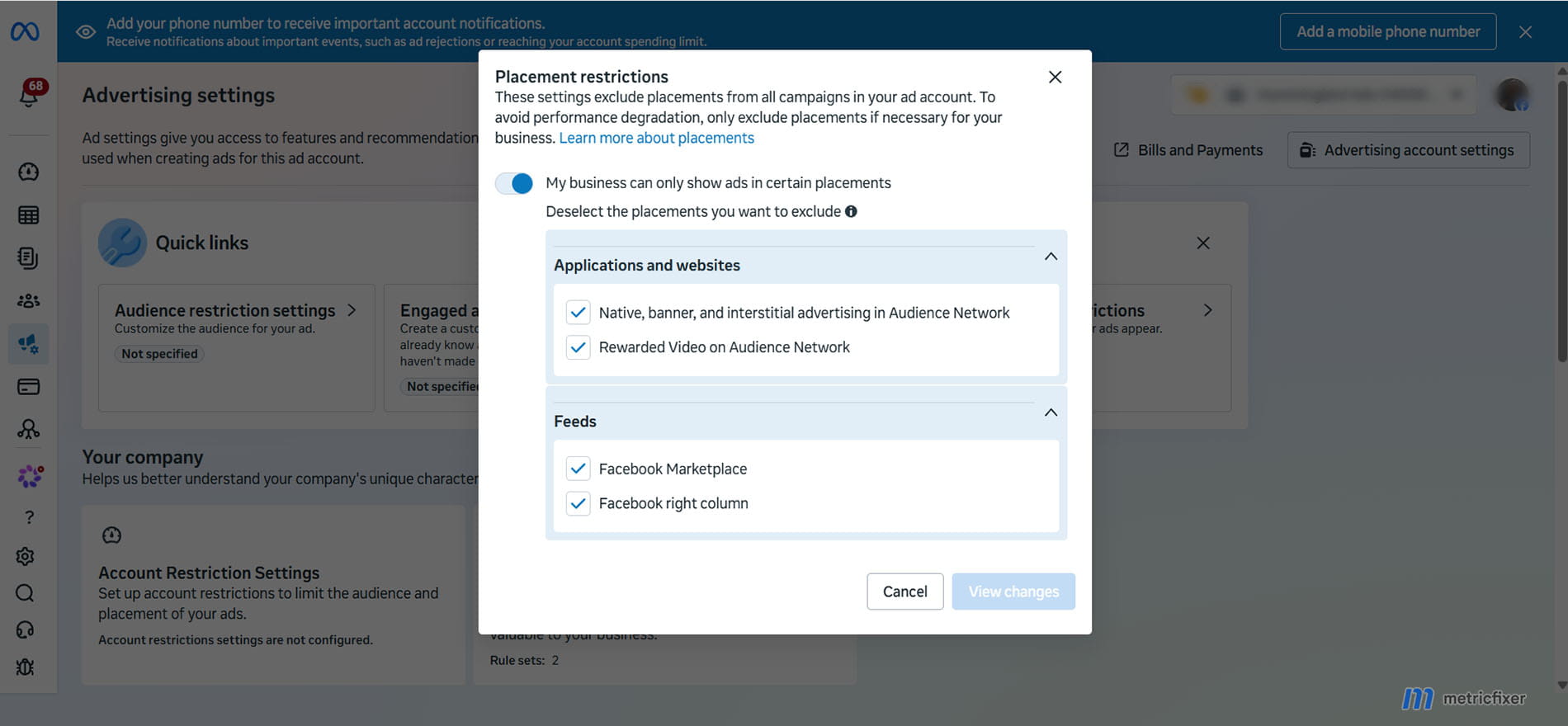
- Account-level placement controls can create hard exclusions, but the current list is limited to three Audience Network sub-placement groups, Facebook Marketplace, and Facebook right column. The setting applies across the ad account rather than to one campaign.
- Ad-level creative mapping can stop one media asset from appearing in a chosen placement, but the combined media set must still cover every eligible placement. It solves presentation problems, not delivery eligibility.
- Brand suitability controls can reduce undesirable content or publisher adjacency. They do not necessarily remove the placement itself.
The likely performance effect is not uniformly negative. Meta reports that Advantage+ placements produced an average 11.7% lower cost per action than manual placement settings in its own experiment. That supports broad delivery as a reasonable default, but it does not prove that every placement is equally valuable for every advertiser, nor that a platform-reported lead, install, or engagement has the same downstream quality across placements. The highest risk is therefore not always a higher Meta CPA. It can be a lower reported CPL or CPI combined with fewer qualified leads, weaker retention, lower net revenue, or a failure to meet a contractual placement restriction.
The safest migration strategy is to preserve evidence before the interface changes, move only genuine business-wide restrictions to account controls, use value rules for verified differences in economic value, supply native creative for every important surface, and feed Meta a deeper outcome than the easiest event it can optimize. Campaigns that optimize for purchases, qualified leads, subscriptions, retained revenue, or valuable in-app events are better positioned than campaigns that optimize only for clicks, raw forms, installs, or lightweight engagement.

What Meta is changing—and what is still uncertain
Current rollout status
As of 6 October 2026, the strongest evidence is the message appearing inside Ads Manager and repeated observations from advertisers and specialists. Jon Loomer documented the notice in August; Social Media Today and PPC Land reported the partial rollout; and an early-October Ads Manager observation describes the wider objective scope and the new ad-level media coverage model.
There is still no single public Meta announcement that answers all of the questions advertisers need answered: the final global date, whether every campaign subtype is included, whether any regulated or sensitive categories remain exempt, how legacy ad sets will be migrated, and whether an edit or duplication forces immediate conversion. Meta's public help material can also lag the interface; some pages still explain manual placement selection even while affected accounts show the removal notice.
| Evidence | What it supports | What it does not prove |
|---|---|---|
| Ads Manager notice reported from August 2026 | Meta intends to remove ad-set exclusions for placements, platforms, device types, and operating systems in at least some accounts. | A universal completion date or identical rollout state for every account. |
| Controls disappearing in some accounts | The change is not merely a future concept; it has reached live campaign-creation workflows. | That all existing ad sets have already been migrated or that every objective is affected equally. |
| Early-October notice naming Engagement, Leads, App Promotion, and Sales | The intended scope appears wider than the Sales-and-Leads phase reported in August and September. | That every configuration under those objectives has already lost the controls. |
| Meta help pages describing manual placement selection | Manual controls may still exist in unaffected accounts, objectives, or legacy workflows during rollout. | That the controls will remain available permanently. |
Before this removal notice, some Sales and Leads workflows had already introduced an Allow limited spending to excluded placements option. When enabled, Meta could spend up to 5% of the ad-set budget for each excluded placement when it predicted a better result. That intermediate feature did not remove the advertiser's ability to opt out, but it showed the same product direction: a preference for auction flexibility over binary campaign-level exclusions.
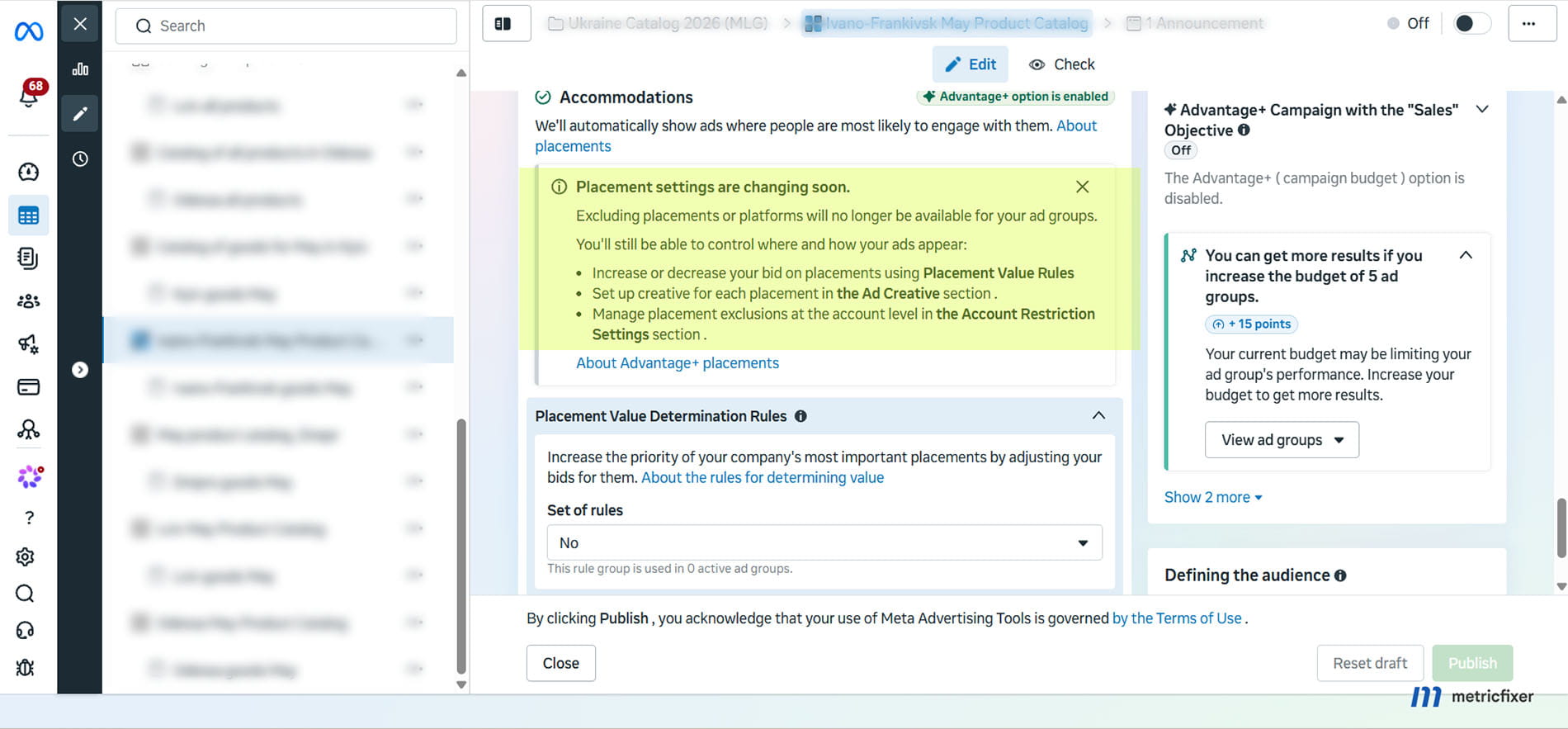
Controls leaving the ad set
The warning combines four different controls that advertisers often used for different reasons. Treating them as one setting hides the practical impact.
| Control being removed | Typical historical use | Closest remaining lever | Important gap |
|---|---|---|---|
| Individual placement exclusion | Remove Audience Network, Reels, Stories, Marketplace, search, in-stream, or another surface. | Placement value rule; limited account controls; creative mapping. | A value rule cannot guarantee zero delivery, and account controls cover only a short list. |
| Platform exclusion | Run Instagram-only, Facebook-only, or avoid Messenger/Audience Network. | No complete campaign-level replacement has been documented. | Creative mapping changes which asset appears, not whether the platform can receive delivery. |
| Device-platform restriction | Mobile-only offers, desktop-oriented B2B forms, or device-specific landing experiences. | Value rules where eligible; improve cross-device experience. | A bid reduction is not a hard device ban. |
| Operating-system restriction | iOS-only or Android-only app and web experiences, compatibility limits, or different unit economics. | OS value rules where eligible; app-store and destination eligibility; app measurement. | The ad-set control may disappear even when business value differs materially by OS. |
The old setting was also sometimes used as a creative shortcut: a team had only a landscape video or a square image, so it disabled vertical placements. That use case has a comparatively good replacement in asset customization. The harder cases are genuine platform restrictions, legal requirements, low-quality downstream outcomes, unsupported devices, or campaigns built around one social identity and one surface.
Affected campaign objectives
The current in-product wording reported in early October says the change is expected for objectives that optimize for a result and names Engagement, Leads, App Promotion, and Sales. Earlier reports described Sales and Leads only. The most defensible interpretation is that Meta began with a narrower test and is now signaling a wider rollout.
Awareness and Traffic are not named in the newer warning. That should not be interpreted as a permanent exemption or as a reason to choose the wrong objective merely to preserve manual placements. An advertiser seeking purchases or qualified leads generally should not move to Traffic just to recover a placement checkbox; doing so changes the population and behavior Meta optimizes for.
Value-rule availability may also differ from the headline objective scope. Meta's earlier public rollout of value rules focused on eligible Sales and App Promotion configurations, while later account observations indicate broader access. Before building a migration plan around value rules, confirm that the rule set can actually be selected for the exact objective, conversion location, special category, and optimization event in the account.
No reliable public rule confirms that existing campaigns will be grandfathered indefinitely. Some may retain their current configuration temporarily; other accounts may migrate controls, remove them on edit, or apply a new workflow during duplication. Preserve the current settings, but do not make “never edit this legacy ad set” the long-term strategy. Stale creative, broken measurement, or an outdated offer can cost more than the placement restriction saves.
What advertisers can still control
The replacement model separates four jobs that manual placement selection previously handled in one place: auction steering, business-wide prohibitions, creative presentation, and content adjacency.
| Tool | Level | Can it guarantee zero delivery? | Best use |
|---|---|---|---|
| Value rules | Rule set applied to eligible campaign/ad set | No | Tell Meta that a placement, device, OS, or audience segment has lower or higher economic value. |
| Account-level placement controls | Whole ad account | Yes, for listed placements | Enforce a durable restriction that should apply to every campaign in the account. |
| Ad-level creative mapping | Media asset inside an ad | Only for that specific asset | Give each placement an appropriate crop, format, duration, message, or visual treatment. |
| Inventory filters, publisher/content block lists | Brand suitability settings | For defined content or publishers, not necessarily the whole placement | Reduce unwanted adjacency while retaining the surface. |
Value rules: suppression, not exclusion
Value rules are the closest replacement for a campaign-specific performance adjustment. Current reporting describes adjustments from a large positive increase down to a maximum 90% decrease. The rule changes the value or bidding preference Meta applies in the auction; it does not make the placement ineligible. Cheap inventory can still clear the adjusted bid, so a placement with a -90% rule can continue to receive impressions and spend.
Current reporting describes rule sets with up to 10 ordered rules and up to two criteria per rule. Adjustments can reportedly range from a +1000% increase to a -90% decrease, and only the first applicable rule is used when several rules match. Availability, eligible criteria, and selectable placements can still vary by account and campaign configuration.
The difference matters:
- An exclusion answers: “May this placement receive delivery?”
- A value rule answers: “How much should Meta value the opportunity relative to other eligible opportunities?”
Do not assume that a 90% bid reduction creates a 90% reduction in spend. Auction outcomes are nonlinear. Spend depends on inventory price, predicted action rate, competition, budget, other rules, and the delivery system's optimization. The rule is a steering input, not a placement spend cap.
Rule governance also matters. Current value-rule documentation and reporting describe prioritized rule sets in which only the first applicable rule is used when several rules match. A broad placement rule placed above a more important margin, location, or customer-value rule can therefore produce an unintended result. Document rule order, eligibility, and the business reason for each adjustment.
Use a placement value rule when all four conditions are true:
- the placement is eligible for a rule in the account;
- the difference is economic rather than an absolute compliance prohibition;
- the conclusion is based on enough downstream data rather than a few cheap clicks or one volatile week;
- the team can monitor spend and outcomes after the rule is applied.
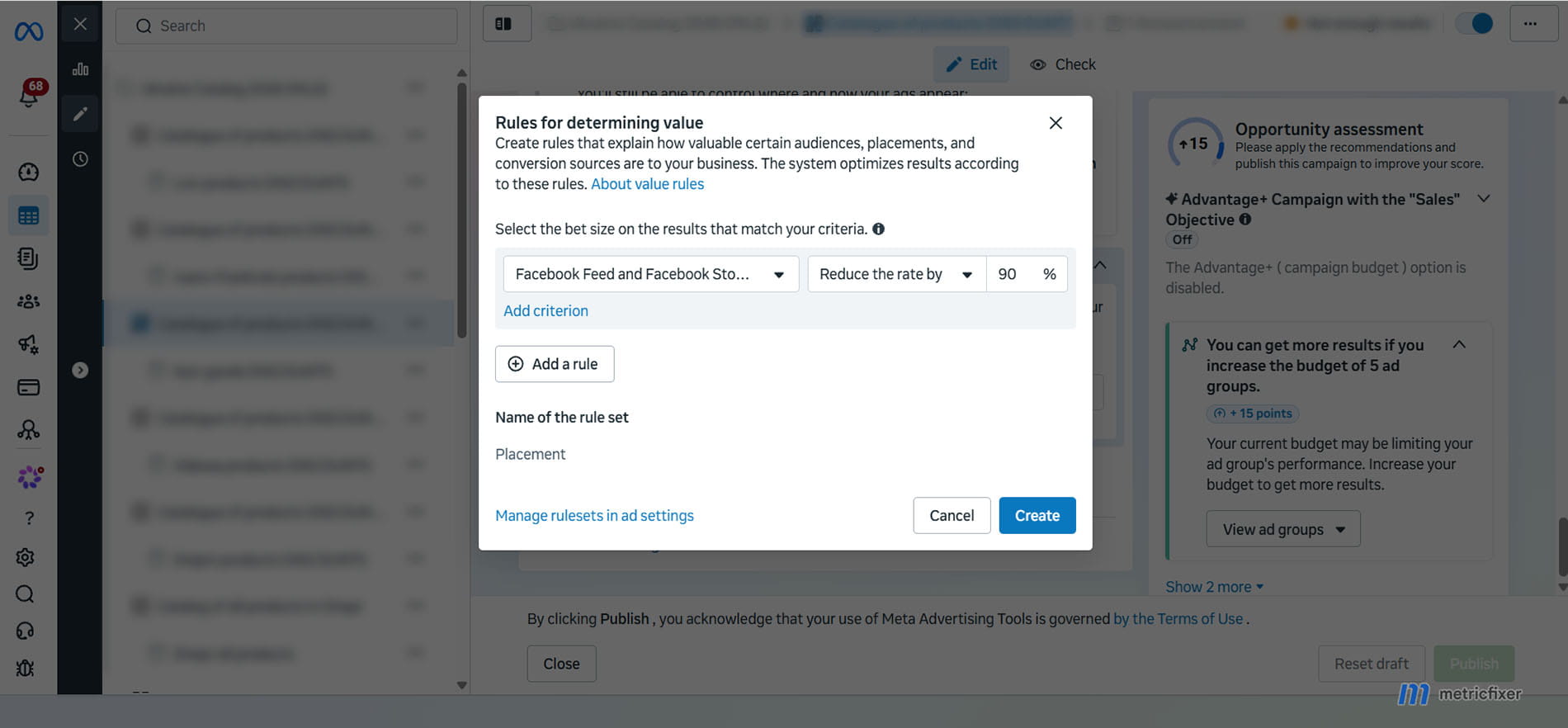
Account-level placement controls
The remaining hard switch is located in Advertising Settings under Account Controls and Placement Controls. Current implementations expose five individual controls covering three broad placement families:
- Audience Network native, banner, and interstitial;
- Audience Network rewarded video;
- Audience Network in-stream video;
- Facebook Marketplace;
- Facebook right column.
These controls apply account-wide, including to campaigns using automated placements. The control was originally documented for Advantage+ shopping workflows, and current integration documentation indicates that changes can take up to 48 hours to deactivate a deselected placement in existing ads. Because the setting affects every campaign in the account, it should be governed like an account policy rather than a media buyer's routine optimization.
Use account controls when a restriction is permanent across the business—for example, a contractual prohibition on third-party app inventory or a verified, account-wide quality problem that the business has consciously decided not to accept. Do not use the account setting to solve a single weak creative, one underperforming campaign, or a temporary test. A global exclusion removes inventory from campaigns that may have benefited from it.
The current list does not provide a hard account-level switch for every Facebook, Instagram, Messenger, WhatsApp, or Threads placement. It therefore cannot reproduce an Instagram-only strategy or guarantee “no Reels,” “no Stories,” or “no Messenger” if those surfaces are not available in the control list. Creating another ad account does not invent a missing control; it only changes the scope of the controls that already exist and should be done only within a legitimate business and governance structure.
Ad-level creative mapping
The new workflow gives advertisers more explicit control over which uploaded media file is eligible for which placement. This is useful, but it must not be mistaken for a placement exclusion. An advertiser may deselect Reels for one square image, for example, while assigning a vertical video to Reels. According to the current notice, the combined media set must cover every placement, so leaving a placement uncovered is not a durable way to block it.
A minimum creative coverage plan should include:
| Placement family | Recommended source asset | Creative QA |
|---|---|---|
| Reels and Stories | Native 9:16 video or image; audio-aware version where appropriate |
Keep logo, product, claim, subtitles, and CTA inside safe zones; make the opening understandable without a long setup. |
| Facebook and Instagram feeds | 4:5 or 1:1 asset with feed-length copy |
Check crop, first-frame clarity, headline truncation, and legibility on mobile. |
| Compact or secondary surfaces | Simple composition with one focal point and minimal embedded text | Confirm the value proposition survives small rendering and that automated cropping does not remove essential information. |
| Audience Network | Flexible asset with clear brand and CTA components | Test the landing experience in mobile in-app browsers and inspect post-click quality rather than relying on CTR. |
Meta's own Reels guidance reports that, in a set of 15 split tests, 9:16 video with audio and safe-zone compliance produced a 34.5% lower cost per result than still-image Reels ads. This is vendor research and not a universal forecast, but it demonstrates why “let Meta crop the feed asset everywhere” is a weak preparation plan.
Build creative variants around the same approved offer and claims. Placement customization should adapt the presentation, not create inconsistent prices, conditions, disclaimers, or promises. Review automated enhancements separately; a generated crop, expanded background, music choice, or rewritten text can create a placement-compatible asset that is still commercially or legally wrong.

Brand suitability controls
Inventory filters, publisher block lists, allow lists, and third-party content block lists can remain important when the problem is what appears next to the ad. They are not equivalent to removing a placement. A limited inventory filter may avoid more sensitive adjacent content while the campaign still serves in Feed, Reels, Threads, in-stream, or Audience Network inventory.
This distinction prevents two common mistakes:
- using a value rule to solve a non-negotiable brand-safety requirement;
- switching off an entire account-level placement when the actual requirement is to avoid a specific publisher, app, topic, or content category.
Use the narrowest control that satisfies the requirement, document the residual risk, and verify delivery reports where Meta or an approved verification partner makes them available.
Why Meta is making the change
Meta's product direction is consistent: give the delivery system a larger inventory pool, reduce manual fragmentation, and ask advertisers to express business value through objectives, conversion signals, creative assets, and value rules. The platform argues that automated placements can find lower-cost opportunities across Facebook, Instagram, Messenger, WhatsApp, Threads, and Audience Network instead of forcing each ad set into a manually selected subset.
Meta's Advantage+ placements material reports an average 11.7% lower CPA than manual placement settings. The figure is directionally plausible: more eligible inventory gives the auction more chances to find a predicted result, while narrow ad sets can create higher prices and less stable learning.
The figure still has important limits:
- it is Meta's aggregate result, not an independent guarantee;
- an average can hide vertical, country, objective, creative, and conversion-quality differences;
- manual-placement advertisers are not a random group—they are more likely to have unusual constraints or weak cross-placement creative;
- cost per platform-attributed action does not necessarily measure profit, lead qualification, retention, refunds, or incrementality;
- the comparison does not prove that every placement should receive spend in every campaign.
The strategic change is therefore not “Meta knows every placement is good.” It is “Meta wants the auction to decide unless the advertiser can express a stronger business constraint through the remaining systems.” Advertisers that provide only an easy top-of-funnel event leave the algorithm free to find the cheapest version of that event, even when it is not the most valuable version.
Which advertisers are most exposed
| Advertiser or campaign type | Main exposure | Likely symptom | Priority response |
|---|---|---|---|
| Regulated, contractual, or brand-policy restriction | A prohibited surface is not in account-level controls. | Campaign can no longer guarantee zero delivery in that environment. | Treat this as a compliance and channel-eligibility issue, not a bid optimization problem. Obtain a documented decision before continuing. |
| Instagram-only or Facebook-only strategy | Whole-platform exclusion disappears. | Spend and social context move to other Meta properties. | Reassess whether the restriction is truly required; prepare identity, comments, creative, and reporting for cross-platform delivery. |
| Lead generation optimizing for raw submissions | Cheap placements can produce easy forms, calls, or message starts without sales intent. | Reported CPL falls while contact rate, qualification rate, or close rate declines. | Send qualified and converted lead outcomes back to Meta where lawful and technically supported; use CRM cost per qualified lead as the decision metric. |
| Engagement campaigns | The algorithm can find inexpensive reactions, views, or interactions in surfaces with weak business value. | Cost per engagement improves without a corresponding lift in site visits, leads, or sales. | Define the downstream purpose of engagement and run a separate outcome measurement layer. |
| App Promotion optimizing for installs | Placement and OS mix can shift toward inexpensive installers. | CPI improves while activation, subscription, purchase, or retention weakens. | Optimize to a meaningful in-app event or value when volume allows; reconcile with MMP and store data. |
| High-volume ecommerce with clean purchase/value signals | Creative or landing-page mismatch, rather than weak outcome signal. | Short-term mix change, but the system has enough purchase evidence to reallocate. | Provide native assets, preserve purchase quality, and measure net revenue and margin. |
| Low-volume B2B or high-ticket sales | Meta sees too few final outcomes and may optimize to a proxy. | Cheap leads concentrate in placements that rarely become opportunities. | Improve offline/CRM feedback, extend the test through a full sales cycle, and avoid conclusions from raw CPL. |
| Desktop-only or OS-dependent experience | Device and OS restrictions disappear while the product or landing page remains incompatible. | Clicks rise but landing-page completion, checkout, or activation falls. | Fix the destination experience or use a channel/configuration that can meet the hard technical requirement. |
| Feed-only creative library | Vertical and compact placements receive weak crops or generic adaptations. | Lower hold rate, unreadable text, cut-off branding, and weaker conversion rate. | Build 9:16 and feed-native versions before broad delivery becomes mandatory. |
The groups least exposed are advertisers that already use broad placements, send reliable bottom-of-funnel events, maintain several aspect ratios and concepts, and reconcile Meta reporting with business data. For them, the rollout may mostly formalize a setup they already use.
Performance forecast for previously restricted campaigns
No responsible forecast can assign one universal percentage to this change. The direction depends on why placements were restricted, the quality of the optimization event, conversion volume, creative coverage, landing experience, and whether the original exclusion was supported by enough data.
A useful forecast separates three layers:
- Delivery economics: broader inventory can lower CPM and increase available reach.
- Platform-attributed result: Meta can often find more of the event it was asked to optimize.
- Business value: the event may or may not produce qualified pipeline, retained users, margin, or net revenue.
| Scenario | Likely Meta-reported effect | Likely business effect | Confidence |
|---|---|---|---|
| Old exclusions were based on habit or a small sample; strong purchase signal and complete creative set | CPA may stay stable or improve as Meta accesses cheaper auctions. | ROAS may remain stable or improve if purchase value and product economics are represented accurately. | Moderate |
| Old exclusions compensated for missing vertical assets | CPA and CTR may worsen initially because the same creative is stretched into unsuitable placements. | Performance can recover after native assets are supplied. | High on direction, not magnitude |
| Lead campaign optimizes to raw form submit or message start | CPL may fall as cheap conversions increase. | Qualified CPL and cost per sale can rise if intent is weaker. | Moderate to high where downstream feedback is absent |
| App campaign optimizes to install | CPI may fall and install volume may rise. | D1/D7 retention, subscription rate, or purchase value can fall if low-value installers dominate. | Moderate |
| Engagement campaign has no defined downstream outcome | Cost per engagement may improve. | Commercial impact is indeterminate; cheap engagement can be real but strategically irrelevant. | High that platform cost may improve; low on business value |
| Placement restriction is legal, contractual, or absolute | Performance may improve or worsen, but that is not the decision criterion. | The campaign becomes operationally non-compliant if a prohibited placement remains eligible. | High |
| Previously excluded placement has consistently poor qualified outcomes across sufficient volume | Blended Meta CPA can improve while spend moves into the cheap placement. | Blended qualified CPA or net ROAS can deteriorate. | Moderate, dependent on data quality |
The most common misleading pattern will be a better top-line platform metric and a worse downstream rate. For example, if raw CPL falls by 20% but the qualified-lead rate falls by 35%, the account did not become more efficient. The correct comparison is:
qualified CPA = total campaign spend / verified qualified outcomes
For ecommerce, replace “qualified outcomes” with paid, non-test orders or net collected revenue. For apps, use activation, subscription, retained payer, or another post-install event. For engagement, define the business action that the engagement is supposed to influence.
A -90% placement value rule should be expected to reduce delivery probability, not to create a stable spend-share reduction. In very cheap inventory, the placement may still win. In expensive inventory, it may receive almost nothing. Monitor actual placement spend rather than forecasting from the multiplier alone.
Small-budget and low-volume advertisers face additional uncertainty because placement rows can be noisy. Avoid rebuilding the account into many tiny campaigns or ad sets solely to simulate old placement control. That can fragment learning and make each result less stable. For more context, see metricfixer's guide to the Meta Ads learning phase in low-volume campaigns.
How to prepare before the controls disappear
1. Inventory every current exclusion
Export at least the recent period that represents normal business conditions and include campaign, ad set, objective, optimization event, spend, placement, platform, device, OS, and downstream outcome where available. Take screenshots of the current placement settings and store campaign/ad-set IDs. The goal is not to preserve every exclusion; it is to preserve the reason and evidence behind it.
Label each exclusion:
- Hard requirement: legal, contractual, brand-policy, technical compatibility, or product eligibility.
- Proven economic difference: enough data shows weaker qualified CPA, net ROAS, retention, or margin.
- Creative workaround: placement was removed because no suitable asset existed.
- Historical habit: inherited from an old playbook without current evidence.
2. Move only true account-wide restrictions
Review Advertising Settings → Account Controls → Placement Controls with the business owner, legal/compliance owner where relevant, and the media team. Enable a hard exclusion only when the decision should apply to every current and future campaign in that ad account. Record who approved it, why, and when it should be reviewed.
After changing an account control, verify existing campaigns over the next 48 hours rather than assuming the switch was immediate. Check placement breakdowns and delivery reports.
3. Prepare value rules, but do not treat them as compliance controls
For each economically weaker placement or device segment:
- confirm the rule is available for the exact campaign setup;
- choose a starting adjustment supported by unit economics rather than automatically using
-90%; - place rules in deliberate priority order;
- document which metric will decide whether the rule remains;
- set a review date and compare actual spend share, not just aggregate CPA.
A maximum negative adjustment can be reasonable for a placement that is economically poor but not prohibited. It is not a substitute for a zero-delivery requirement.
4. Build a placement coverage matrix
Create a row for every creative concept and columns for 9:16, 4:5, 1:1, short video, static image, audio-on, audio-off/subtitled, safe zones, and compact rendering. Assign an owner and QA status. The goal is not to make dozens of near-identical assets; it is to make each strong concept legible and native in the surfaces where it may appear.
Preview every mapped asset in Ads Manager, but also inspect the final ad after delivery where possible. Preview tools can miss automated enhancements, text truncation, comments, identity presentation, and real in-app browser behavior.
5. Upgrade the optimization signal
The less control advertisers have over placements, the more important the selected outcome becomes.
- Sales: send accurate purchases, value, currency, refunds or net-revenue context where the integration supports it, and reconcile against the order system.
- Leads: send qualified, converted, booked, or closed stages rather than teaching Meta that every form is equally valuable.
- App Promotion: map post-install activation, subscription, purchase, or value events through the SDK/MMP and confirm OS-specific event parity.
- Engagement: define what useful engagement should lead to and measure that downstream action independently.
For lead campaigns, metricfixer's review of why Meta can show more leads than WhatsApp or a CRM explains why platform counts should not be treated as a qualified-lead ledger. For ecommerce, use the Meta campaign and real-revenue reconciliation workflow to separate attributed purchases from actual retained orders.
6. Fix destination and device compatibility
Test landing pages in Facebook and Instagram in-app browsers, normal mobile browsers, and desktop. Check page speed, consent behavior, keyboard/form usability, payment methods, deep links, app-store routing, and OS-specific features. Losing device or OS exclusion will expose weaknesses that manual controls previously hid.
Where the product genuinely cannot work on a device or OS, treat that as a hard eligibility problem. A weaker bid cannot make an incompatible experience acceptable.
7. Create a rollout change log
Record the date the notice appeared, the date controls disappeared, campaigns edited or duplicated, account-control changes, value-rule changes, creative mappings, and measurement changes. Do not change all of them on the same day unless a hard deadline forces it. Otherwise, the account will have no interpretable before-and-after evidence.

How to measure the rollout correctly
Use a baseline period before the account changes and a post-change period that covers at least one normal business cycle. Match weekdays, seasonality, promotions, budgets, and attribution settings as closely as practical. If the account has Meta Experiments access and both configurations remain available, use a controlled A/B test. If not, use a staged rollout by comparable geography, product, or time window and avoid overlapping campaigns that bid against each other.
| Layer | Metrics to monitor | Why it matters |
|---|---|---|
| Delivery | Spend share, impressions, reach, frequency, CPM by placement/platform/device/OS | Shows where the broader eligibility actually changed allocation. |
| Click and landing | Outbound CTR, CPC, landing-page views, LPV/click rate, engaged sessions, bounce/engagement proxy | Separates cheap impressions and accidental taps from usable site visits. |
| Platform result | Results, CPA/CPL/CPI/CPE, conversion rate, reported value/ROAS | Shows what Meta optimized, but not necessarily final business value. |
| Lead quality | Contact rate, qualification rate, booked rate, sales-accepted rate, close rate, revenue per lead | Detects cheap placements that inflate form volume without pipeline. |
| App quality | Activation, D1/D7 retention, trial, subscription, purchase, payer value, uninstall where available | Prevents a lower CPI from hiding weaker users. |
| Commerce quality | Paid orders, average order value, gross margin, cancellations, refunds, chargebacks, net revenue | Measures the value the business retained rather than only attributed purchase value. |
For website campaigns, preserve delivery context in the landing URL. A practical template is:
utm_source={{site_source_name}}&utm_medium=paid_social&utm_campaign={{campaign.name}}&utm_content={{ad.name}}&utm_id={{campaign.id}}&adset_id={{adset.id}}&ad_id={{ad.id}}&placement={{placement}}The {{placement}} and {{site_source_name}} values help compare click behavior outside Ads Manager. They describe the website click path; they do not replace Meta attribution, provide view-through evidence, or solve Instant Form and direct app-install measurement. The full implementation and QA process is covered in metricfixer's Meta Ads dynamic URL parameters guide.
Watch for these diagnostic patterns:
| Observed pattern | Likely interpretation | Next check |
|---|---|---|
| Very high CTR, low landing-page-view rate, weak conversion | Accidental taps, slow in-app browser, redirect loss, or misleading creative. | Inspect placement, app/publisher reporting where available, page speed, redirects, and real click sessions. |
| CPL falls, qualification rate falls faster | Meta found easier but less valuable leads. | Review placement spend and CRM stages; send deeper lead outcomes. |
| CPI falls, D1 activation or subscription declines | Install optimization is attracting lower-value users. | Verify event mapping and optimize to a post-install event/value. |
| CPA rises after broadening, but vertical assets are missing | Creative mismatch may be the primary cause, not placement quality. | Add native assets and retest before suppressing the placement. |
| Meta ROAS improves while net revenue is flat | Attribution, refund, cancellation, or product-mix differences. | Reconcile order IDs, captured payments, refunds, and attribution windows. |
A -90% rule still receives spend |
Expected behavior: the placement remains eligible and can win cheap auctions. | Decide whether the residual spend is economically acceptable; use a hard account control only if available and appropriate. |
Practical decision framework and migration checklist
Use the following decision sequence for every current placement exclusion:
- Is zero delivery mandatory? If no, continue to economic evaluation. If yes, check whether the placement is in account-level controls.
- Is the required hard control available? If yes, apply it at account level only after account-wide approval. If no, a value rule or creative mapping does not satisfy the requirement; escalate the channel/compliance decision.
- Is the problem content adjacency rather than the placement? Use inventory filters, publisher/content block lists, allow lists, and verification instead of excluding the whole surface.
- Is the problem creative format? Supply a native asset and map it at ad level.
- Is there sufficient downstream evidence that the placement is worth less? Use a value rule where eligible, document its priority, and monitor actual allocation.
- Is the evidence weak or outdated? Start broad with correct creative and measurement, then test rather than preserving the exclusion by habit.
Migration checklist:
- [ ] Export current campaign, ad set, objective, optimization, placement, platform, device, OS, and performance data.
- [ ] Save screenshots and IDs for every ad set with manual exclusions.
- [ ] Classify every exclusion as hard requirement, economic adjustment, creative workaround, or legacy habit.
- [ ] Review account-level placement controls with the account owner and document account-wide consequences.
- [ ] Confirm which objectives and conversion locations can use value rules in the actual account.
- [ ] Review rule priority and avoid overlapping rules whose first-match behavior changes the intended logic.
- [ ] Create
9:16,4:5, and1:1coverage for each important creative concept. - [ ] Check ad-level media mapping and confirm the total media set covers all required placements.
- [ ] Validate landing pages, in-app browsers, deep links, store routing, forms, checkout, and OS compatibility.
- [ ] Add placement and platform URL parameters for eligible website-click campaigns.
- [ ] Connect CRM, order, payment, or MMP outcomes to the campaign measurement process.
- [ ] Define primary post-rollout KPIs before changing settings.
- [ ] Record the rollout date and every related edit in a change log.
- [ ] Recheck placement delivery after any edit, duplication, migration prompt, or account-control change.
- [ ] Review performance over a full business cycle and enough qualified outcomes, not only the first few days.
Avoid five common reactions:
- Do not switch to the wrong objective only to keep manual placements.
- Do not call
-90%an exclusion. - Do not block Audience Network, Marketplace, or right column account-wide by default without a hard requirement or reliable evidence.
- Do not split campaigns into many low-volume structures to simulate control if that fragments learning and measurement.
- Do not judge the rollout from CPM, CTR, CPL, CPI, or CPE alone.
Frequently asked questions
Are manual placements already gone everywhere?
No. The rollout is staged, and Meta has not published one universal completion date. Some accounts still show the existing controls, while others show a warning or a new workflow. Check the exact campaign objective and account rather than assuming another advertiser's interface applies to yours.
Are Engagement, Leads, App Promotion, and Sales definitely affected?
The early-October in-product observation names those four objectives as the expected scope. Earlier August and September reporting focused on Sales and Leads. This supports an expanding rollout, but it is not the same as a completed global deprecation for every subtype. Awareness and Traffic are not named in the current warning, but that should not be treated as a permanent promise.
Can a -90% value rule block a placement?
No. It can make delivery less attractive in the auction, but the placement remains eligible. It may still receive spend when inventory is cheap or the system predicts a strong result.
Can I upload no suitable asset for a placement to prevent delivery there?
The reported new workflow requires the total media set in the ad to cover every placement. You can prevent one asset from appearing in a placement by assigning another asset, but creative mapping is not a durable placement-exclusion method.
What can account-level placement controls block?
The current list covers three Audience Network sub-placement groups, Facebook Marketplace, and Facebook right column. It does not provide a complete switchboard for every Facebook, Instagram, Messenger, WhatsApp, Threads, or Reels surface.
Will existing campaigns keep their exclusions?
Meta has not published a reliable universal rule. Do not assume indefinite grandfathering. Save the current configuration, then recheck the placement breakdown after an edit, duplication, migration prompt, or interface change.
Will campaign performance get worse?
Some campaigns may improve because broader inventory reduces auction cost and gives the system more options. Others may show cheaper platform results but worse downstream quality, especially raw lead, engagement, and install campaigns. The result depends on the optimization signal, creative coverage, destination experience, and whether the old exclusion was evidence-based.
Should Audience Network always be blocked?
No. Audience Network includes third-party app inventory and can behave very differently from Meta-owned feeds, but an account-wide block should be based on a hard business rule or sufficiently strong outcome data. Inspect purchases, qualified leads, post-install quality, landing behavior, publisher/app reporting where available, and brand-suitability requirements before making the decision.
Can brand-safety controls replace placement exclusions?
Only when the real problem is unsuitable adjacent content or specific publishers. Inventory filters and block lists can narrow that context while retaining a placement. They do not generally mean that the whole placement is ineligible.
Should an agency change account controls without specific client approval?
No. Placement controls can affect every campaign in the ad account, including active and future campaigns. Treat them as an account policy, record the client's business reason, and document the expected performance trade-off.
Methodology and sources
This article was prepared on 6 October 2026. It uses an evidence hierarchy: current Meta product and Help Center materials for documented placement, creative, and Audience Network behavior; in-product Ads Manager notices and screenshots reported by identifiable practitioners for the unannounced rollout; established advertising trade publications for cross-checking dates and account observations; and metricfixer editorial analysis for the performance scenarios, migration framework, and measurement recommendations.
Meta had not published one standalone global announcement with a final deadline and complete migration specification at the time of review. The article therefore distinguishes between documented product behavior, observed rollout behavior, and forecast. No metricfixer client ad account, raw placement export, CRM, order database, MMP, or proprietary Meta experiment was accessed for this publication. Performance forecasts are directional and should be tested against each advertiser's qualified outcomes and business records.
- Meta Business Help Center: Ad placements across Meta technologies
- Meta Business Help Center: Advantage+ placements
- Meta Business Help Center: Choose ad placements in Ads Manager
- Meta for Business: Facebook and Instagram Reels ads
- Meta Audience Network: 2026 full-screen format updates
- Meta Audience Network policy best practices
- Jon Loomer: Meta is removing placement controls from ad sets
- Social Media Today: Meta removes the option to exclude ad placements
- PPC Land: Some Meta advertisers lose placement controls
- PPC Land: Placement-specific bidding with Meta value rules
- Bram Van der Hallen: early-October Ads Manager placement-control observation
- Jon Loomer: account-level placement controls
- Sprinklr: account controls for Facebook ad accounts
This article is for advertising, measurement, and operational information only. It is not legal advice and does not guarantee campaign performance. metricfixer is not affiliated with Meta, Facebook, Instagram, Messenger, WhatsApp, Threads, Audience Network, Jon Loomer Digital, Social Media Today, PPC Land, LinkedIn, Sprinklr, or other third parties mentioned in the article. Meta can change account interfaces, eligibility, placements, value-rule behavior, account controls, attribution, APIs, and rollout timing without a public global announcement. Verify the current options in the relevant ad account and obtain legal, contractual, or brand-policy approval where a zero-delivery requirement applies.