
Published Nov 27, 2026
Google Analytics MCP Server: When It Helps and When It Wastes Resources
A practical guide to Google Analytics MCP, with a Windows setup test, a real GA4 traffic comparison, an OAuth client correction and a framework for judging whether the integration is worth the effort.
Category: Analytics & Conversion Tracking · By metricfixer Expert Team
Google Analytics MCP can turn an AI assistant into a practical interface for GA4: ask a question, retrieve a report, investigate a change and keep asking follow-up questions without assembling every table by hand. Its value depends on the work you give it. Connecting a model to Analytics does not repair tracking, settle attribution disputes or make every answer reliable. This guide explains the technology, its current capabilities, the alternatives and a practical way to decide whether it deserves a place in your workflow.
Practical starting point: choose one property, one useful investigation and a result you can verify. Begin with read access, record the actual queries and compare the total time to an accepted answer with your existing process. Source review: November 26–27, 2026. This edition adds a metricfixer-operated Windows test, setup records and screenshots to the review of analytics-mcp 1.1.0.
Contents
Executive summary
The strongest reason to use Google Analytics MCP is to make changing analytical questions easier to answer inside an AI application you already use. A marketer can move from a revenue change to the channels, devices and landing pages associated with it. An analyst can inspect property settings and custom definitions before building a report. An agency can standardize an initial review while keeping each client's data and permissions separate.
The weakest reason is simply that conversational analytics looks impressive. If the same report answers the same question every month, a saved GA4 report or a fixed reporting job may require less work. If the underlying tracking is unreliable, the assistant gains convenient access to unreliable evidence. These are workflow judgments, not claims that one interface is always faster.
Although the announcement may be new to some readers, the project was publicly introduced in 2025: the Google Analytics team posted its API announcement on July 30, 2025. This article assesses the current implementation rather than treating it as a November 2026 launch.
One correction to a common description matters immediately. Google's setup page, last updated November 10, 2026, describes a read-only server. However, the release history and released implementation include optional configuration changes. The accurate description for the reviewed release is read-only by default, with explicitly enabled write capabilities. Check the installed version and its configuration before relying on a blanket statement about what the server can change.
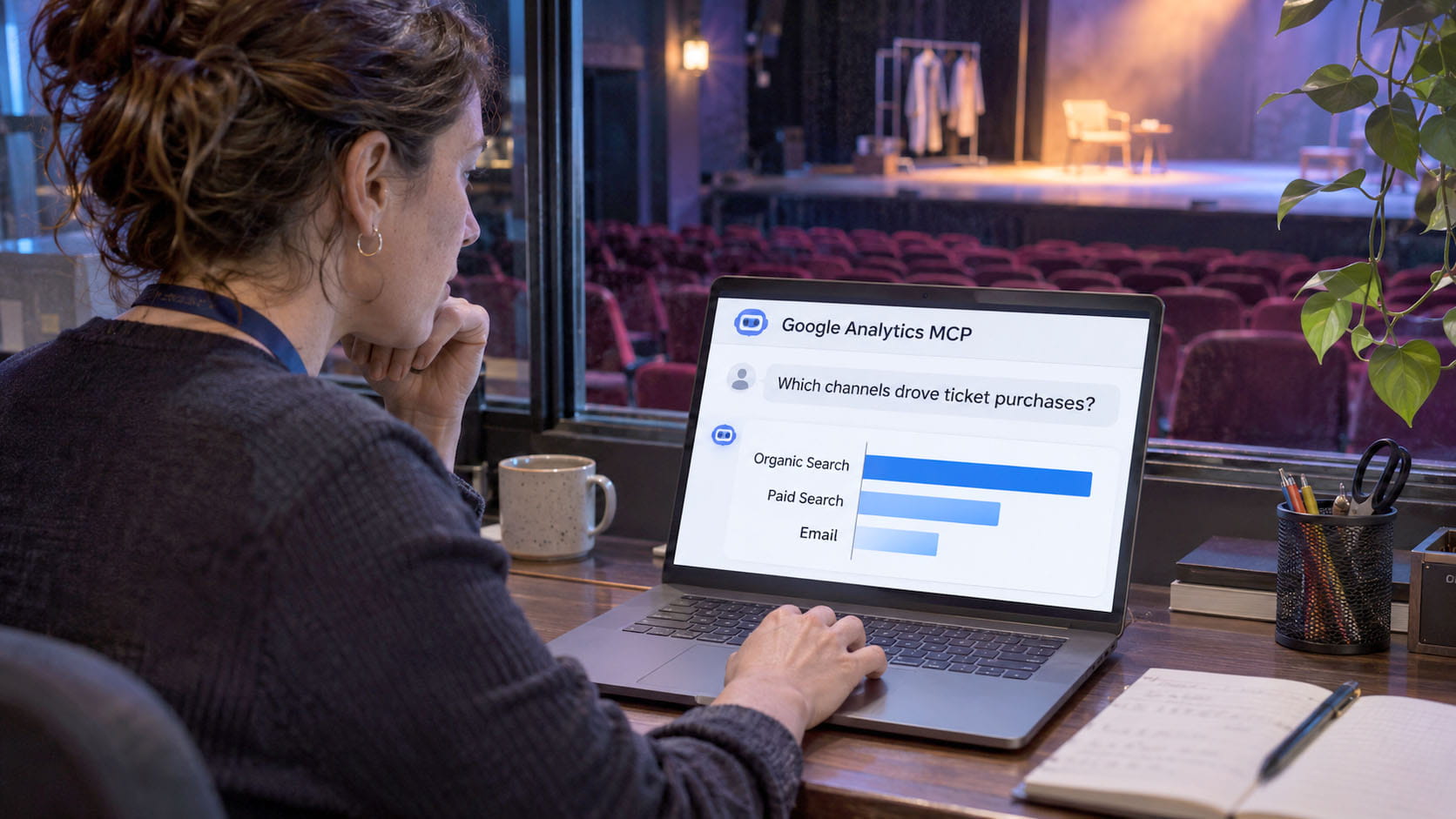
How Google Analytics MCP works
Model Context Protocol, or MCP, is a standard way for an AI application to discover and call external tools. In this case, the tools retrieve Analytics information. The application you talk to is the host; its MCP client connects to the Analytics MCP server. The server translates supported requests into calls to Google's APIs and returns structured results. The MCP architecture documentation separates these components and makes clear that the protocol does not decide how the application uses a language model or manages its context.
There is no separate Google Analytics version of the MCP standard. The phrase Google Analytics Model Context Protocol server refers to Google's implementation for Analytics. The language model interprets your question and the returned evidence; GA4 supplies the available data. An API is the defined interface through which software requests that data.
Two reporting terms recur throughout this guide. A dimension groups the data, for example by channel, country or device. A metric is a measurement, such as sessions or purchase revenue. Much of reliable conversational analysis comes down to choosing the right combination of these fields.
A typical investigation:
- You ask which channels contributed most to a change in purchase revenue.
- The assistant selects a property, dates, dimensions and metrics, then requests a report through an exposed MCP tool.
- The server calls the relevant Analytics API using the configured identity and permissions.
- The API returns rows and available metadata. The assistant may request another breakdown.
- The assistant explains the findings. A reviewer checks the query, evidence and proposed next action.
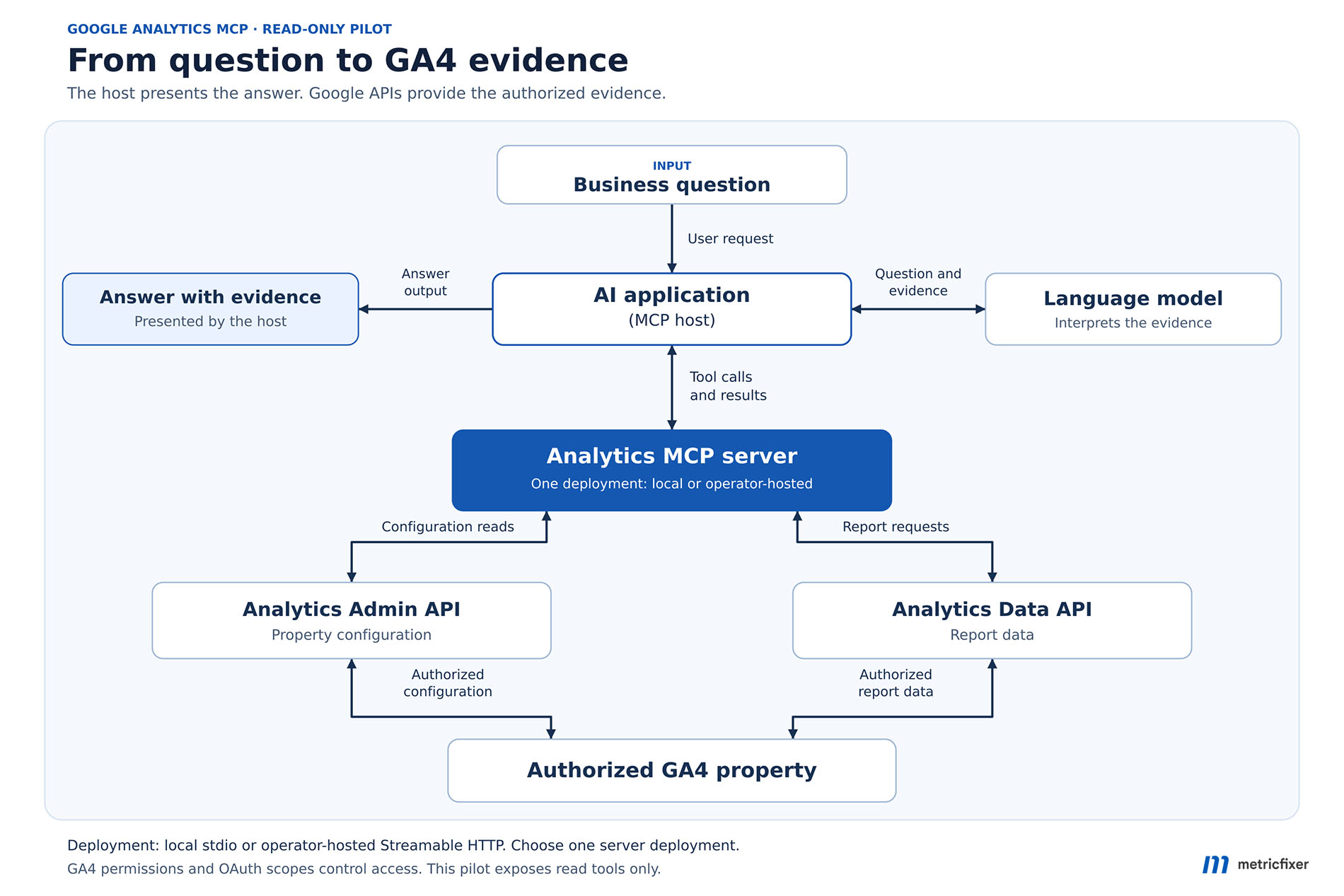
Local software and remote deployments
A server does not necessarily mean buying a separate machine. In the default local mode, the AI application starts a Python process and communicates with it through stdio, a local input/output connection. The current project also supports a self-hosted HTTP service with per-user authentication. Google's versioned deployment instructions describe that additional engineering route; they do not establish a universally available Google-managed Analytics MCP endpoint.
Running the MCP process locally does not establish that the model runs locally. Report results return to the selected AI application and may be processed by its hosted model. Your choice of host, model and deployment determines that boundary.
MCP and Measurement Protocol serve different purposes
Do not confuse MCP with Google's Measurement Protocol. Measurement Protocol sends events into Analytics, including supported server and offline interactions. Analytics MCP primarily exposes reporting and configuration tools to AI applications. Installing it does not add tags to a website, collect missing purchases or replace GTM, the Google tag or an app SDK.
What the current server can do
The published package reviewed here is version 1.1.0, released November 6, 2026. Its tool registration source contains ten read tools and three optional write tools. The useful boundary is the actual tool list in your installed version, not every feature available somewhere in GA4 or its APIs.
| Task | Tools | What this means in practice |
|---|---|---|
| Find accounts and property details | get_account_summariesget_property_details | Identify accessible properties and inspect their configuration. |
| Inspect selected setup information | list_google_ads_linkslist_property_annotationslist_key_events | Review Ads links, recorded annotations and defined key events. |
| Discover custom reporting fields | get_custom_dimensions_and_metrics | Find registered custom definitions before requesting them. |
| Query historical or recent activity | run_reportrun_realtime_report | Retrieve standard reports or a limited realtime view. |
| Use specialized reporting | run_funnel_reportrun_conversions_report | Request supported funnel and advertising conversion analyses, subject to API and property limitations. |
| Make selected configuration changes | create_property_annotationcreate_custom_dimensioncreate_key_event | Optional writes. They are excluded from the default read-only tool set. |
Several boundaries are easy to miss. Listing an Ads link does not give the assistant complete Google Ads reporting or budget-management capabilities. Listing custom definitions does not reveal every raw event parameter ever collected. Creating a key event marks an event for business reporting; it does not implement the event on your website.
Specialized reports deserve particular care. Google's funnel API is in v1alpha, and the reviewed MCP funnel wrapper exposes fewer options than the full API. Do not assume that every saved GA4 Exploration or advanced funnel rule can be reproduced through it.
Similarly, conversion reporting uses an alpha API and may not be enabled for a particular property. run_conversions_report is the MCP tool's name; the underlying API uses runReport with conversion-reporting parameters. A successful connection does not guarantee that every specialized report will work.
Where MCP earns its place
The examples below are proposed workflows. The separate Windows test illustrates one small implementation; it does not measure the value of every use case. These workflows aim to reduce repetitive report assembly while preserving the evidence needed to make a decision.
Investigate a change through follow-up questions
Imagine an ecommerce team notices lower purchase revenue. A useful investigation starts by confirming the property, comparison dates and revenue definition. It then separates fewer sessions from fewer purchases or lower revenue per purchase, and examines the largest affected channels and devices. Each answer determines the next useful query.
MCP can make this sequence more convenient because the analyst does not have to reconstruct every report manually. The assistant should return the contributing segments, the query and a short list of testable explanations. If mobile paid-search traffic changed after a site release, that is a lead for investigation. It does not prove that the release caused the revenue decline.
Prepare a focused property review
An agency can use the read tools to prepare an inventory: property timezone and currency, custom definitions, key events, Ads links and available annotations. The useful output is a review note showing what exists, what differs from the agreed measurement plan and which checks need another system.
This is especially helpful when the measurement plan is available to the same approved assistant. For example, it can compare the documented lead event with the registered key events and report a mismatch. It must still distinguish configuration from collection: an event can be correctly registered while firing incorrectly.
Help a business user ask a precise question
A manager may know the decision but not the report terminology. The assistant can ask whether “best channel” means new customers, sessions, recorded leads or purchase revenue, then present a relevant table with an understandable explanation. That is useful assistance when the definitions are agreed and an analyst can verify important conclusions.
A short business dictionary improves this workflow: define a qualified lead, the revenue metric, target markets, internal traffic exclusions and the comparison rule. Store these as approved instructions or context. MCP provides connectivity; it does not automatically know what your company means by success.
Combine Analytics with authorized business context
A custom assistant can consider GA4 evidence alongside an approved release calendar, campaign plan or product-margin table. This can help explain what should be investigated next and who owns the follow-up. Each additional source needs its own connection, access and compatible definitions. Installing the Analytics server alone does not connect your CRM, ad accounts, ecommerce backend or warehouse.
Keep the integration proportional to the question. If a campaign calendar is a small maintained file, a complex new data platform may be unnecessary. If the decision depends on customer-level joins and financial reconciliation, establish that data model before adding a conversational interface.
When another tool is better
Choose the simplest workflow that produces an answer people can use and check. The following choices are metricfixer's recommendations, based on the capabilities and limits reviewed here.
| Your situation | Start with | Why |
|---|---|---|
| An occasional question already covered by a GA4 report | The existing report, or Ask Advisor if available | A separate integration may take longer to maintain than it saves. |
| A changing sequence of analytical questions in an approved AI workspace | A bounded Analytics MCP pilot | The assistant can select relevant tools and refine the investigation. |
| The same executive KPIs every week | A dashboard or scheduled direct API job | Fixed definitions and extraction rules are easier to reproduce. An AI summary can be added after validation. |
| A developer wants Google's own conversational analytics service | Evaluate the separate Ask Advisor API | This is a different architecture from an external model selecting MCP reporting tools. |
| Raw event analysis, customer joins or margin calculations | An existing warehouse or BigQuery, plus the relevant business data | The Analytics reporting server alone does not supply the required raw records or external facts. |
| Missing purchases, duplicate events or broken consent behavior | A measurement implementation investigation | More convenient querying does not repair data collection. |
Consider Ask Advisor before building a second chat interface
Google's current built-in offering is Ask Advisor in Google Analytics (Beta). It supports natural-language questions about a property's data and configuration, with eligibility and language conditions; the reviewed documentation specifies English. For a team that only wants occasional assistance inside GA4, this deserves a trial before taking on another integration.
Google also documents a separate Data API v1alpha chat method, which provides programmatic access to Ask Advisor with conversational sessions and structured tables. It has its own authorization scope. MCP is therefore one route to conversational analytics, not the only programmatic route. Its particular appeal is integrating Analytics tools into your chosen host and broader workflow.
Keep repeatable reporting repeatable
Once a useful investigation becomes the same report every Monday, consider turning it into a fixed query. Google's Data API already supports automated reporting and application integration. A scheduled job can own extraction, date rules, retries and storage; the model can explain the validated result where that adds value.
An MCP connection does not by itself create a production reporting service. Scheduling, alert delivery, monitoring, failure handling and ownership must be supplied by the host or surrounding application. Asking an assistant to “monitor everything” is a project specification, not a completed automation.

Set up a bounded read-only pilot
A useful first installation has a deliberately small scope: one approved AI application, one identity, one property and a few known reports. Separate three requirements: the server must run, the Google Cloud project must have the APIs enabled, and the authenticating identity must have access to the GA4 property. Completing one does not complete the others.
- Choose a compatible host and connection mode. For the local example below, the host must support launching an MCP process through
stdio. A remote-only connection form cannot use this configuration unchanged. - Prepare the runtime. The reviewed package definition requires Python 3.10 or later. Install an appropriate package runner such as
pipx. - Enable the Analytics Admin and Data APIs in a Google Cloud project. Keep that project ID separate from the numeric GA4 property ID and the web measurement ID beginning with
G-. - Authorize an identity. Use the documented Application Default Credentials route for a user or service account, with the Analytics read scope. ADC is the mechanism through which the application obtains credentials. An OAuth scope describes the category of access being requested; the identity also needs permission on the property. Follow the Google authentication instructions together with the Desktop-client correction below for the local user-login route.
- Grant property access separately. Viewer access is the starting point for reading. Confirm effective permissions and any cost or revenue restrictions in Analytics access management.
- Connect, inspect the tool list and run a baseline. Confirm the selected property and reproduce a small report already checked in GA4 before asking a broad business question.
Use a Desktop client for the tested local ADC route
Our Windows setup exposed a practical documentation mismatch. With Google Cloud SDK 594.0.1, gcloud.cmd auth application-default login --client-id-file=... rejected a Web application OAuth client. The terminal reported:
Only client IDs of type 'installed' are allowed, but encountered type 'web'.Creating a separate Desktop app OAuth client in the same Cloud project, downloading its JSON and using that file completed the browser sign-in and saved the ADC credentials. The Desktop client's JSON had the top-level type installed. At review time, the Analytics MCP guide said either a desktop or web client file could be supplied. For this tested local command, use the application type described in Google's Desktop OAuth instructions. Renaming a file or editing its JSON key does not change the registered client type.
The successful Windows PowerShell command used the following form. Replace the file path with the downloaded Desktop client configuration:
gcloud.cmd auth application-default login --client-id-file="$env:USERPROFILE\analytics-mcp\oauth-desktop-client.json" --scopes="https://www.googleapis.com/auth/analytics.readonly,https://www.googleapis.com/auth/cloud-platform"The downloaded OAuth client file and the resulting ADC file have different jobs. Supply the client file to --client-id-file; point the MCP configuration to the credentials file saved after sign-in. Ordinary CLI sign-in does not replace this step: Google's local ADC guidance distinguishes application credentials from the gcloud configuration. This finding concerns the tested local credential command; applications using a web-server OAuth flow have different requirements.
The command requests the two scopes shown in Google's setup guide. The Analytics pilot uses read tools, but the additional cloud-platform scope does not make the entire credential universally read-only. Keep the credential's wider permissions in mind when selecting the Google identity.
Connect the host and verify a real read
The following is an illustrative configuration for hosts using an mcpServers JSON structure. The version pin makes the example reproducible; it is not a recommendation to ignore future fixes. The pipx command syntax supports choosing a package specification separately from its executable.
{
  "mcpServers": {
    "analytics-mcp": {
      "command": "pipx",
      "args": [
        "run",
        "--spec",
        "analytics-mcp==1.1.0",
        "analytics-mcp"
      ],
      "env": {
        "GOOGLE_APPLICATION_CREDENTIALS": "/absolute/path/to/credentials.json",
        "GOOGLE_CLOUD_PROJECT": "YOUR_PROJECT_ID",
        "ANALYTICS_MCP_ALLOW_WRITE": "false"
      }
    }
  }
}
Replace the credential path and project ID; use an absolute executable path if the host cannot find pipx. Windows paths must be escaped correctly in JSON. Keep credential contents out of prompts and repositories. The explicit write setting matters: the reviewed startup code can enable writes through ANALYTICS_MCP_ALLOW_WRITE as well as the command-line flag. A configuration that merely omits --allow-write can still inherit an enabling environment value.
Project selection and quota-project configuration are separate details. The gcloud command reference says that --client-id-file does not write a quota-project entry to ADC. If an explicit quota project is needed, Google's quota-project instructions describe the ADC setting and Python's GOOGLE_CLOUD_QUOTA_PROJECT variable. GOOGLE_CLOUD_PROJECT alone is not that override, and the identity must have permission to use the selected quota project.
A shared remote deployment is a separate implementation task. It needs an authentication design, hosting, logging and operational ownership. In particular, the reviewed built-in OAuth provider keeps authorization state in process memory. Plan for reauthentication after restarts and review session handling before scaling across instances. A local pilot does not validate a multi-user service.
What our Windows test showed
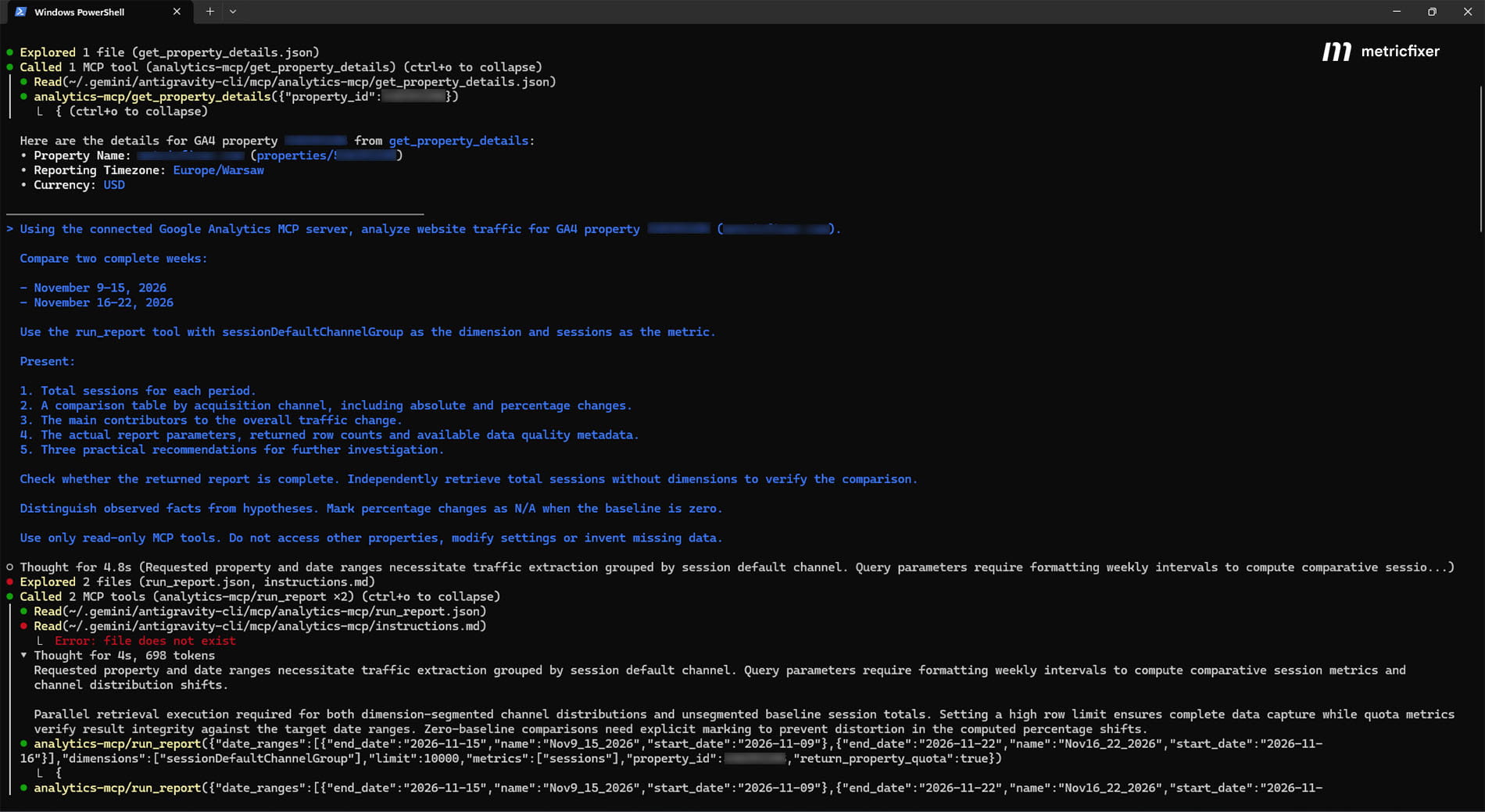
We supplemented the source review with a metricfixer-operated local test using analytics-mcp 1.1.0 and Antigravity CLI 1.5.18 on Windows. The supplied terminal records show successful MCP initialization and a ten-tool read inventory. The subsequent screenshots show a property-details call and two standard report calls against one GA4 property. The configuration explicitly disabled the optional write tools. These observations establish a working path for this setup, without extending that result to every host, report type or deployment.
The question and the two report requests
The question compared two complete Monday–Sunday weeks: November 9–15 and November 16–22, 2026. The displayed property context used the Europe/Warsaw reporting timezone. The operator asked for total sessions, changes by channel, the largest contributors, report parameters, quality checks and three useful follow-up investigations.
- Channel comparison: the first recorded
run_reportcall requestedsessionsgrouped bysessionDefaultChannelGroupfor the two named date ranges, withlimit: 10000. - Aggregate check: the second requested
sessionsfor the same periods withdimensions: []. Both calls requestedreturn_property_quota: true.
This is a useful investigation pattern: make the comparison explicit and request a separate aggregate to check the channel sums. The aggregate call still uses the same Analytics service and reporting definitions; it is not an independent external source of truth.
The displayed result and what we checked
| Channel | November 9–15 | November 16–22 | Change | Percentage change |
|---|---|---|---|---|
| Organic Search | 57 | 50 | −7 | −12.28% |
| Direct | 40 | 23 | −17 | −42.50% |
| AI Assistant | 3 | 1 | −2 | −66.67% |
| Organic Social | 2 | 0 | −2 | −100.00% |
| Paid Search | 0 | 1 | +1 | N/A |
| Total | 102 | 75 | −27 | −26.47% |
The displayed channel values sum to 102 and 75. The decrease is 27 sessions, or 26.47%. Direct accounts for 17 of those 27 fewer sessions, approximately 63% of the net decrease. These calculations are consistent with the table. The assistant also correctly marked the Paid Search percentage change as unavailable because its starting value was zero. Channel labels above reproduce the displayed answer.
The answer separated observations from hypotheses and proposed focused follow-ups: examine Direct traffic by date and landing page, then inspect source/medium or measurement changes where relevant. That is useful assistance in deciding where to look next. With only 102 and 75 weekly sessions, large percentages in small channels should not be mistaken for a persistent trend. The comparison does not establish why traffic changed.
A correct calculation did not validate every claim
The same answer illustrates the need for review. Its completeness discussion reported row_count: 5 while saying that ten row entries had been returned, described as five channels across two periods. Google's response definition treats rowCount as the total number of result rows, not simply the number of distinct channel labels. This explanation needs checking against the actual response; the screenshots do not establish which count is correct.
The captures show the tool requests and the assistant's tables and narrative, while the raw tool results remain collapsed. We could therefore recalculate the displayed arithmetic, but could not independently inspect the returned rows, sampling fields, truncation indicators or quota objects. Matching channel sums and aggregate totals is an internal consistency check. It does not by itself prove complete, unsampled reporting or accurate tracking.
The practical lesson is to retain both the convenient answer and the underlying response. The test shows a working route from a question to report requests and an investigation plan. It does not measure overall time savings, validate the assistant's exact quota-consumption claim or establish parity with a separately checked GA4 interface report. Those are additional checks for a production pilot.
Ask questions that can be checked
A useful prompt defines the decision, the data scope and the evidence to return. “Analyze my marketing and tell me what to do” leaves too many choices implicit. Start with a bounded question and allow follow-ups after seeing the first table. The patterns below are original examples; they are not transcripts of live account tests.
Prompt 1: Investigate a revenue change
Use only GA4 property [PROPERTY_ID] for this investigation.
Confirm the property name, timezone and reporting currency.
Compare [START_A] to [END_A] with [START_B] to [END_B].

Start with sessions, ecommercePurchases and purchaseRevenue.
Use sessionDefaultChannelGroup for the acquisition breakdown.
Validate field compatibility before relying on the result.
Identify the largest absolute changes, then inspect deviceCategory
only where that could explain a material part of the difference.

Show exact tool arguments, the returned table, absolute and percentage
changes, row coverage and available data-quality metadata.
Request quota information where the reporting tool supports it.
Separate observations from hypotheses and list the next checks needed.
Do not change configuration or share results externally.
Replace every bracketed value and use comparable complete periods. The specific fields make the question more reviewable, but the analyst still needs to confirm that they match the business definition. Investigate the segments contributing the most to the overall movement before spending time on dramatic percentages from tiny populations.
Prompt 2: Review the measurement inventory
For property [PROPERTY_ID], prepare a read-only setup inventory.
List property timezone and currency, registered custom definitions,
defined key events, Google Ads links and available annotations.

Compare this inventory with the attached approved measurement plan.
For each difference, show the observed configuration and the relevant
requirement. Distinguish missing configuration from unverified collection.
Identify checks that need GTM, the website, the app or another system.
Propose changes for review; do not execute them.
This prompt creates a useful handoff to an analyst or implementation team. It does not authorize a complete audit of every connected client. Property selection in a prompt is also not a security boundary; permissions must enforce the intended access.
Prompt 3: Evaluate a funnel with explicit limits
For property [PROPERTY_ID] and [DATE_RANGE], assess the journey
view_item, add_to_cart, begin_checkout, purchase.

First explain which ordered funnel rules the available tool can express.
Show the actual step filters and any unsupported requirements.
Use a funnel report only if it represents the agreed question.
Otherwise provide separate event counts clearly labeled as counts,
and explain which reporting route is needed for the intended funnel.

Do not call event-count ratios a measured user conversion funnel.
The important habit is to ask the assistant to surface a limitation rather than silently approximate the question. When a model cannot run a tool, retrieve a field or express the requested analysis, a useful answer states that gap instead of filling it with a plausible explanation.
Check the evidence behind every answer
A polished narrative is the final presentation layer. For any finding that could influence spending, tracking changes or management reporting, keep an evidence record that another person can inspect.
| Record | What it prevents |
|---|---|
| Property ID, name, dates, timezone and retrieval time | Using the wrong client, incomplete day or mismatched comparison period. |
| Exact metrics, dimensions, filters and report type | Answering a different question under familiar business labels. |
| Tool arguments and returned table | An explanation that cannot be traced back to its data. |
| Rows returned, total matching rows and relevant metadata | Treating a partial or restricted result as a complete population. |
| Calculations, assumptions and proposed next check | Turning an association or an arithmetic error into a business conclusion. |
Confirm row coverage and report warnings
The standard report API returns 10,000 rows by default and at most 250,000 in one response. The reviewed MCP report tool makes one request with the supplied limit and offset; it does not automatically retrieve all subsequent pages. For a small top-ten question this is appropriate. For an exhaustive campaign inventory it may be incomplete.
Compare the number of returned rows with the total matching count described in Google's report response reference. Also inspect the available metadata for sampling, aggregation into (other), truncation, threshold applicability, access restrictions and empty-result explanations. A threshold flag means thresholds apply; it does not by itself prove that rows were removed.
The reviewed response serializer preserves protobuf field names. Actual MCP output therefore uses names such as row_count and data_loss_from_other_row, while REST documentation shows rowCount and dataLossFromOtherRow. Ask for a plain-language explanation of the fields actually returned. Missing or unavailable metadata should be stated, not replaced with an assurance that the data is complete.
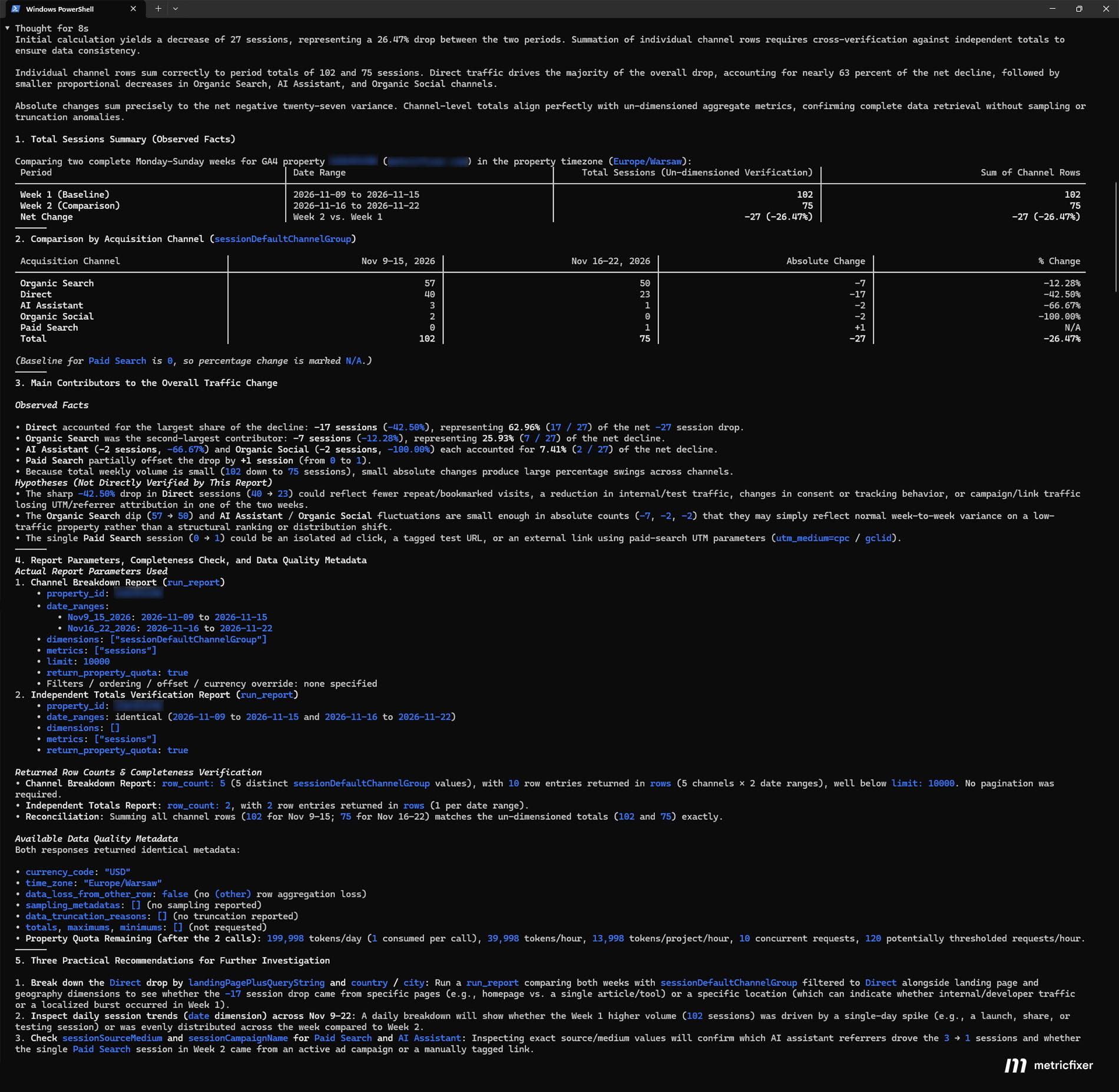
In the operator test above, the request panel establishes what was asked and the comparison panel shows how the assistant presented its findings. A complete evidence record would also retain the expanded tool responses. An assistant-written metadata summary is another claim to verify, not a substitute for that record.
Reproduce the important number before acting
Re-run the critical comparison in a matching GA4 report or independently specified API query. Check the arithmetic with a spreadsheet or deterministic calculation. Avoid adding user counts across overlapping groups or averaging rates without the correct denominators. A table that looks internally consistent can still answer the wrong acquisition or attribution question.
The Data API reporting expectations explain why query shape, sampling and recent updates can affect results. Investigate differences systematically. Do not force two reports to agree by changing definitions until the numbers happen to match.
Understand the GA4 limits MCP does not remove
Recent data can still change
Fast access does not make the underlying data final. Google's freshness guidance says processing can take 24–48 hours and that key-event attribution can change for up to 12 days. Excluding today reduces partial-day comparisons, but yesterday is not automatically a settled result. Record when the report was retrieved and label recent comparisons accordingly.
The realtime API covers up to 30 minutes for standard properties and 60 minutes for Analytics 360, using its own supported fields. It can help check whether expected activity appears after a release. It cannot establish complete purchase reconciliation, final attribution or correct tag behavior by itself.
Similar business words can mean different metrics
Google's traffic-source scopes distinguish how a user was first acquired, how a session started and how credit is assigned to an event. These answer different questions. Asking for “Google revenue” without choosing a scope leaves the assistant to make an important analytical decision on your behalf.
The metric definitions matter just as much. purchaseRevenue and totalRevenue are not interchangeable; a session key-event rate measures sessions with a key event, not simply event count divided by sessions. Revenue and return on ad spend are also different from profit. An answer about profitability needs the relevant costs and business records.
Keep key events and advertising conversions distinct. When using specialized conversion reporting, record the conversion actions, attribution model and whether metrics use interaction date or conversion date, as described in the advertising reporting schema. A familiar label in two products does not guarantee an identical measurement basis.
Reporting data is not the same as a raw event export
The current Data API overview explicitly says it respects the property's reporting identity. Older blanket statements that the API always uses a device-only view should not be carried into a current implementation plan.
Google's reporting comparison also shows why API results and BigQuery exports are not interchangeable: the API can include reporting attribution and modeling, while BigQuery provides event and user records without those reporting additions. API reports may be sampled or aggregate less common combinations into (other). A warehouse analysis can use different definitions and produce a different result without either interface being broken.
Fetching another page of rows addresses pagination. It does not undo an (other) aggregation, remove sampling or bypass privacy thresholds. Google's threshold guidance describes restrictions that also apply to API reports. The assistant cannot guarantee access to withheld detail by rephrasing the request.
Measurement problems still need measurement work
MCP can surface a suspicious change in event counts or a fragmented source/medium report. It cannot reconstruct observations that were never collected or know the intended campaign taxonomy without supporting information. Use a consistent naming plan such as the one in metricfixer's manual UTM guide.
If a single-page application duplicates page views after navigation, report analysis can identify a symptom. The fix requires checking the application's event lifecycle and tag implementation, as covered in metricfixer's SPA analytics architecture guide. Keep the reporting investigation and implementation verification connected, with a named owner for each.
Manage access, data sharing and optional writes
Use permissions to enforce client boundaries
For an agency, an assistant using a broadly privileged identity can potentially retrieve information from multiple clients. A prompt naming one property helps steer the task but does not remove access to the others. Use identities and effective GA4 permissions that match the intended engagement, and separate client conversations, saved files and persistent context.
Review inherited access as well as direct property access. Restrictions can affect the data returned: Google's access documentation applies cost and revenue restrictions to analogous API calls. An unavailable or apparently zero metric deserves a permissions check before being described as zero business activity. The same access principles apply as in metricfixer's guide to granting analytics access.
Review the entire data path
Read-only access limits changes to Analytics. It still permits authorized data to be retrieved and supplied to another application. Decide which host and model may receive the data, what is retained in conversations and logs, who can view the results and how access is revoked. Product-specific data policies for Google's own assistant do not automatically apply to a third-party host using MCP.
Report text must remain data. As a hypothetical example, a page title or campaign value might contain wording that tells an assistant to upload a report elsewhere. That string is not an instruction from the user. This is an application of Google's general MCP security guidance, not a claim that a specific Analytics MCP exploit was observed. Limit unrelated tools and external sharing, and keep data values separate from instructions in the host's design.
Enable writes only for a defined workflow
The optional tools can be useful for recording an approved annotation or implementing an agreed configuration change. They also change the risk profile. In the reviewed release, write access requires enabling the server's write tools, obtaining the analytics.edit OAuth scope and having the relevant property permissions. The configuration tool source specifies Editor access for custom dimensions and Marketer or Editor access for key events.
The released write functions do not provide a universal confirmation or dry-run parameter. Build approval into the host workflow: show the target property, proposed object and exact parameters before execution, then verify the result. For an analytical pilot, leave writes disabled. There is no analytical benefit in granting configuration rights merely to answer reporting questions.
Budget for queries, review and maintenance
The project's Apache 2.0 source license does not make the whole workflow cost-free. Account for setup, the host or model, any remote hosting, credential maintenance, support and human review. The meaningful comparison is the cost of producing an accepted answer, not how quickly the assistant starts writing.
API quota tokens are not model tokens
Google's Data API quota documentation measures reporting work in API tokens, concurrency and other limits. These tokens are not the language model's text tokens and are not a price per chat question. One conversation can trigger several reports, including follow-up queries and retries.
| Limit | Published allowance |
|---|---|
| Tokens per property per day | 200,000 |
| Tokens per property per hour | 40,000 |
| Tokens per project per property per hour | 14,000 |
| Concurrent requests per property | 10 |
Query size, complexity and date range affect consumption, and property-level limits are shared with other reporting activity. Start with a small aggregate and request detail only when useful. The reviewed reporting tools expose return_property_quota, disabled by default; request it when monitoring usage. Cache reusable results, set query and retry budgets, and avoid uncontrolled loops over every available dimension.
Calculate value from accepted answers
A simple planning calculation is useful:
Monthly time value =
accepted answers per month
× (manual minutes − assisted minutes including verification)
÷ 60 × loaded hourly cost

Monthly net value =
monthly time value − recurring model, hosting and maintenance costs
Illustrative assumptions, not a benchmark: suppose 30 monthly questions take 15 minutes each manually and eight minutes with MCP, including verification. At an assumed €60 hourly cost, the gross time value is €210 per month. If recurring costs are €180, only €30 remains toward recovering setup. A €600 setup would take 20 months to recover at those unchanged assumptions. At five questions per month, gross time value would be €35 and the workflow would lose €145 per month before setup recovery.
The calculation values released staff time; it does not establish an equivalent cash saving. It also excludes any unmeasured benefit from better decisions. Replace the assumptions with observed usage and distinguish useful analysis from answers that had to be discarded or rebuilt.
Run a pilot with a stop rule
Before rolling out MCP across a team, run a small evaluation with real questions and known reference answers. The following is a proposed acceptance process, not a Google requirement.
- [ ] Use case: select 10–15 representative questions, including straightforward retrieval, a follow-up investigation and one question the server cannot answer.
- [ ] Access: choose a trusted property and an approved host; verify the identity, property permissions and disabled write configuration.
- [ ] Baseline: record how the same questions are answered today and preserve the checked reports and definitions.
- [ ] Evidence: require the actual query, table, dates, row coverage and relevant limitations for each consequential answer.
- [ ] Quality: count unsupported conclusions, incorrect metrics, incomplete results and cases needing manual reconstruction.
- [ ] Efficiency: measure time through review and acceptance, query volume, errors and recurring operating cost.
- [ ] Ownership: name the person who maintains credentials, reviews upgrades and investigates failures.
- [ ] Decision: expand only if useful answers justify the total effort; narrow, automate or stop the workflow if they do not.
A strong pilot shows that the assistant can both produce a correct result and recognize when the available data is insufficient. Include a deliberately unsupported question, such as exact profit without cost data. An honest explanation of the missing input is a successful boundary check; an invented profit estimate is a failed answer.
Preserve the accepted query definitions and prompts. Recheck them after changes to the model, server version, property configuration or measurement implementation. When a task stabilizes into a fixed recurring report, move its extraction into a predictable reporting process and retain conversational analysis for the questions that still change.
Troubleshoot the right layer
Diagnose the first failing step: process launch, authentication, property authorization, API request or interpretation. Repeatedly rewriting a business prompt cannot fix a missing executable or an identity without access. The table combines the official setup checklist, the project's troubleshooting notes, the API behavior discussed above and observations from the Windows test.
| Symptom | Check first | Useful response |
|---|---|---|
| The host cannot start the server | Python, package runner, executable path and local-versus-remote configuration | Use the supported runtime and an executable path the host can resolve. |
application-default login rejects a client of type web | The registered application type of the client supplied to --client-id-file | For the tested local ADC route, create a separate Desktop app client and use its downloaded installed configuration. Point MCP to the generated ADC file after sign-in. |
| An independent MCP test works, but the host exposes no Analytics tools | The active host's configuration file, launch environment and server status | Confirm that the host loaded the intended server; a successful test in another process does not establish that connection. |
PermissionError in the pipx log directory, followed by initialization EOF | The first launcher error, before investigating Analytics credentials | In our setup, invoking the installed environment's Python entry point bypassed the failing launcher. For ongoing use, configure a stable environment rather than depending on a temporary cache path. |
401 UNAUTHENTICATED | Credential file, token validity and selected authentication route | Correct the credential path or reauthenticate the intended identity. |
403 PERMISSION_DENIED | Enabled APIs, OAuth scopes and actual GA4 property permissions | Read the specific error; correct the missing requirement without automatically granting Administrator access. |
| Quota-project or API-configuration error | Cloud project selection and quota-project setup | Verify that the configured project is the one prepared for these APIs. |
| Unsupported field or incompatible report | Report type, field spelling, registered definitions and supported combinations | Reduce to a known valid query, then add the needed fields. |
| Conversion or funnel request fails | Property eligibility, alpha API behavior and wrapper capabilities | Confirm support; use another suitable reporting route for requirements the tool cannot express. |
| Numbers differ from the GA4 screen | Dates, scope, filters, identity, freshness, row coverage and metadata | Reproduce the same question before comparing totals. |
| An apparently empty revenue result | Revenue restrictions, tracking, currency and the selected metric | Separate inaccessible data from measured zero activity. |
| Quota errors or repeated retries | Remaining property quota, concurrency and the agent's query loop | Bound retries, reduce unnecessary queries and wait according to the relevant limit. |
| The narrative's row count conflicts with its described returned rows | The raw row_count, rows, date-range values and pagination parameters | Resolve the discrepancy from the actual response before treating the narrative as a completeness check. |
The Windows session also made a terminal distinction useful: the interactive CLI worked in an ordinary PowerShell terminal after difficulties in PowerShell ISE. Some earlier command messages appeared as red NativeCommandError output even when credentials were successfully saved. Read the underlying message and completion result. These are observations from one setup, not a general diagnosis of every host or shell problem.
If the assistant still cannot explain which query produced an important conclusion, return to the report definition. A connection is useful only when it supports a decision you can inspect and defend.

Methodology and sources
The documentation and implementation review began on November 26, 2026; authentication guidance and report-response definitions were rechecked for this update on November 27, 2026. Research used Google's Analytics developer and help documentation, the Google Analytics team's dated announcement, the official MCP project documentation, the Analytics server's release history and PyPI package metadata. We also inspected the 1.1.0 tagged source for tool registration, startup behavior, authentication and reporting wrappers. Sources are linked beside the claims they support.
The implementation review checked 13 relevant source and documentation files against the current main branch; those files matched the tagged release at review time. That is a targeted source review, not a complete security audit. Where the landing page and released implementation differ, the article identifies the difference and scopes its implementation claims to the reviewed version. API availability and client behavior remain separate questions.
The practical addition uses terminal records and four screenshots supplied by the metricfixer operator who performed the authenticated Windows setup and GA4 queries. The records identify Windows PowerShell 5.1, Python 3.14.10, Google Cloud SDK 594.0.1, analytics-mcp 1.1.0 and Antigravity CLI 1.5.18. They document the Web-client rejection, successful Desktop-client ADC creation, a ten-read-tool inventory, a property-details call and two standard-report requests. The editorial review recalculated the displayed session table; it did not independently access the property or execute the Windows commands.
The supplied captures do not expose complete raw report responses or a reliable capture timestamp. The November dates in the case study are the requested reporting periods, not an inferred test date. Metadata, row coverage, precise quota use and parity with the GA4 interface remain unverified. No write-tool execution is shown or reported, and the configured server was read-only. Other report types, remote deployment, security, general compatibility, accuracy rates and time savings were not validated by this small test.
The three reusable prompts, proposed use cases, evaluation checklist and cost calculation remain editorial examples or hypothetical assumptions. The live comparison is identified separately. The illustration brief maps the supplied captures to their permitted claims and records the corrections needed in the supplied diagram artwork.
metricfixer's recommendations favor workflows whose definitions, access and results can be checked. Reassess them when the server release, connected model, API capability or business requirement changes. The practical adoption question is whether the integration reduces the total work needed to produce a trustworthy answer for your team.
This article provides technical and operational guidance, not a guarantee of analytical accuracy, cost savings or compatibility with a particular account or AI application. Google Analytics data, permissions, API availability and third-party processing terms vary by configuration and can change. Review consequential findings and configuration changes with the responsible owner. metricfixer is not affiliated with Google or the Model Context Protocol project.
Expert help with this topic
 Google Analytics Traffic Anomaly Investigation
Investigate an unexpected traffic change using comparable Analytics and server evidence, with supported findings, uncertainty and practical next checks.
 Custom Google Analytics Exploration
Turn a focused question into a saved native Exploration, with clear definitions, relevant checks and guidance for reopening and using the view.
 Google Analytics
Set up meaningful GA4 measurement, investigate traffic changes with relevant server evidence, or commission a saved native Exploration for a focused question.