
Published Nov 8, 2026
GTM dataLayer State: Why Old Ecommerce Data Appears in New Events
A new dataLayer push is not a fresh container for your data. Learn how GTM stores state, merges objects and arrays, resolves Data Layer Variables, and carries old ecommerce values into later events - with practical examples and a debugging checklist.
Category: Analytics & Conversion Tracking · By Mikalai Sasau
A new dataLayer.push() does not necessarily give Google Tag Manager a fresh set of data. This guide explains how GTM accumulates state, why objects and arrays can retain earlier ecommerce values, what Data Layer Variable versions change, and how to publish and test events without accidental carry-over.
Practical starting point: when a view_item event contains products from an earlier list, compare three things on that exact event: the pushed message, the variable read by the tag and the outgoing request. For a complete ecommerce replacement, clear ecommerce with null immediately before publishing the new event and its payload together.
Contents
Executive summary
A dataLayer.push() is normally a message that updates GTM's state, not an isolated analytics payload. An event name tells GTM when to evaluate triggers. It does not automatically clear the product list, coupon or transaction details left by an earlier message.
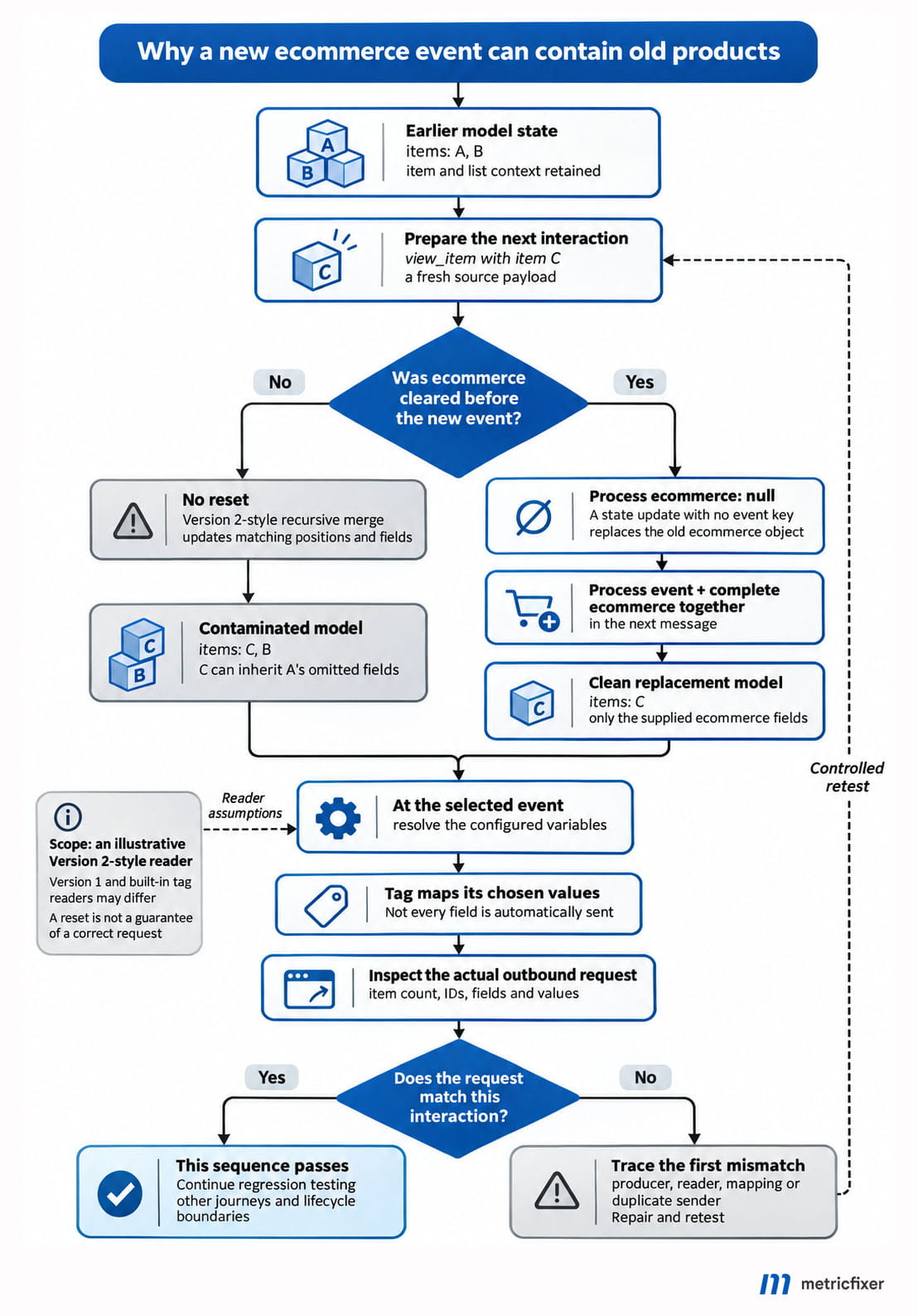
The distinction explains several apparently unrelated faults: a detail-view event containing an earlier list, a shorter array retaining extra products, and a variable returning a value that is absent from the selected push. Under Version 2-style recursive merging, old fields remain unless an update overwrites or explicitly clears them. Arrays merge by position, not by product identity.
For conventional GTM ecommerce implementations, the practical default is to prepare a complete payload, push { ecommerce: null }, and immediately push the event name together with that payload. This follows Google's ecommerce examples. It is a boundary for one namespace, not a command to delete history or reset analytics.
Do not stop at a correct-looking push. Verify the variable used by the tag, the tag's ecommerce source and the outgoing request. Different readers can interpret the same message stream differently.
Three different things: messages, model and request
It helps to follow one piece of information through three separate layers.
The message queue. window.dataLayer is usually a JavaScript array. Page code appends objects to it; other supported entries include functions and command-style messages. The array you inspect in the console is not itself a single, continuously updated ecommerce object.
The accumulated data model. GTM processes the messages and maintains values that its variables can read. Think of this as a working notebook: a new note may update one field without erasing the rest of the page. A Data Layer Variable is a reader of that model, not a search for a property in the latest array entry. This distinction is explained in Simo Ahava's original data-model investigation.
The outgoing request. A tag decides which values to use and how to map them to a destination. A push does not automatically send every field to GA4, and an arbitrary custom event name does not automatically create a GA4 event. Google's event-parameter setup guide treats variable selection and tag mapping as distinct configuration steps.
Working model: application data → queued message → GTM state update → event-trigger evaluation and variable resolution → tag mapping → outbound request.
This is a diagnostic model, not a claim that all tags use the same internal reader. A custom template, a Version 1 variable, a Version 2 variable and code that inspects the raw array can disagree without the array having changed.
How long does dataLayer state survive?
For the ordinary browser setup discussed here, the relevant lifetime is the current document, not the GA4 session. An event does not create a fresh document. Neither does a virtual page view in a single-page application.
A normal full navigation that creates a new document normally creates a new JavaScript environment. Values needed there must be supplied again. Google explicitly describes repopulating values on each page load in its data-layer persistence guidance. A back/forward-cache restoration can instead revive the document and its JavaScript memory. Test that path separately, along with any custom persistence code.
In an SPA, the URL, product and page title may change while the same GTM model remains alive. This is why list-to-detail transitions, quick-view modals, cart drawers and repeated checkout attempts deserve more attention than a single freshly loaded product page.
Conversely, continuity of an analytics session does not copy a JavaScript object between documents or domains. For that separate measurement issue, see metricfixer's GA4 cross-domain tracking guide.
Design consequence: define which values are persistent context and which describe only one interaction. A site language may legitimately survive several events. A purchase transaction ID should not become the default identity of a later cart interaction.
Data Layer Variable Version 1 vs Version 2
The version belongs to the variable's lookup behavior. It is not a GA4 version, an event-schema version or a switch that makes every tag in the container read data differently.
Google's variable reference documents the dot-notation distinction. Ahava's first-hand comparison of the two versions also demonstrates replacement versus recursive merging.
| Question | Version 1 | Version 2 |
|---|---|---|
What does ecommerce.items mean? | A literal top-level key containing a dot. | A path to items inside ecommerce. |
| A root object is pushed again | The new root value replaces the previous value for that lookup. | Compatible objects and arrays are recursively merged. |
| The root key is absent from a later event | The earlier root value can remain. | The earlier value can remain. |
| How to read the whole ecommerce object | Use the name ecommerce. | Use the name ecommerce. |
| Does it mean "this event only"? | No. | No. |
To inspect the first item's ID in a nested payload, a Version 2 variable can use ecommerce.items.0.item_id. Changing that variable to Version 1 does not make it a non-merging nested lookup: it changes the meaning of the name.
Version 1 can be useful when an implementation deliberately reads a complete replacement object from a top-level key. It is not a universal cleanup strategy:
window.dataLayer.push({
  ecommerce: { items: [{ item_id: "SKU-A" }] }
});

window.dataLayer.push({ event: "example_interaction" });

// A Version 1 variable named "ecommerce" still returns SKU-A.
// No new value was supplied for that root key.
A mixed container is especially easy to misread: a Version 1 variable for ecommerce can show the latest object while a Version 2 variable for ecommerce.items retains earlier entries. The relevant question is which variable the actual tag consumes.
For custom-template authors, Google's copyFromDataLayer API defaults to Version 2 and explicitly discourages Version 1. That is another reason to fix the data contract rather than globally changing readers to hide a merge problem.
How objects and arrays actually merge
Objects behave like partial updates
A recursive merge walks through the fields you supply. A missing field is not an instruction to remove the old field. The following example isolates the difference without introducing ecommerce tags:
window.dataLayer.push({
  product: { id: "SKU-A", colour: "blue", price: 40 }
});
window.dataLayer.push({
  product: { price: 35 }
});

// Version 1, name "product": { price: 35 }
// Version 2, name "product": { id: "SKU-A", colour: "blue", price: 35 }
This is useful when the message deliberately updates a product's price. It is dangerous when the second object describes a different product but omits its colour: the old colour can survive under the new identity.
Arrays are merged by index, not by item ID
window.dataLayer.push({ productIds: ["A", "B", "C"] });
window.dataLayer.push({ productIds: ["D"] });

// Version 2 result: ["D", "B", "C"]
// Not ["D"] and not ["A", "B", "C", "D"].
The first position is updated. Positions one and two are not mentioned, so they remain. This is not concatenation, even though the result may look like extra products were added.
When positions contain objects, the merge continues inside each position. A new item_id does not tell the model to discard the old object's category, variant, coupon or list name. The model is not joining a product catalogue by SKU; it is updating positions and properties.
| Earlier value | New value | Recursive-merge result |
|---|---|---|
{a: 1, b: 2} | {a: 9} | {a: 9, b: 2} |
["A", "B"] | ["C"] | ["C", "B"] |
[{id: "A", colour: "blue"}] | [{id: "C"}] | [{id: "C", colour: "blue"}] |
{a: 1} | {} | {a: 1} |
["A", "B"] | [] | ["A", "B"] |
{a: 1} | null | null |
These synthetic cases were checked locally against Google's public Data Layer Helper. Its merge implementation also makes the type boundary visible: arrays merge with arrays and plain objects with plain objects; other combinations replace the existing value. The helper is an explanatory reference, not the complete production GTM runtime.
Two practical consequences follow. A same-length replacement array is not automatically safe: omitted fields inside its item objects can still survive. And switching an array to an object may remove the old data while also breaking the destination's expected schema. An empty object is not a valid substitute for an empty items array.
A worked example: view_item_list contaminates view_item
Consider two interactions in the same document. A list shows a linen shirt and a canvas bag. Later, a separate product view reports a leather wallet. The details are deliberately different so that accidental inheritance is obvious.
Failing sequence:
window.dataLayer = window.dataLayer || [];

window.dataLayer.push({
  event: "view_item_list",
  ecommerce: {
    item_list_id: "summer_edit",
    items: [
      {
        item_id: "SKU-A",
        item_name: "Linen shirt",
        item_list_name: "Summer edit"
      },
      { item_id: "SKU-B", item_name: "Canvas bag" }
    ]
  }
});

// A different interaction later in the same document.
// Intentionally no reset: this is the failing example.
window.dataLayer.push({
  event: "view_item",
  ecommerce: {
    currency: "EUR",
    value: 79,
    items: [
      {
        item_id: "SKU-C",
        item_name: "Leather wallet",
        price: 79,
        quantity: 1
      }
    ]
  }
});
A Version 2-style read of ecommerce after the second message has this accumulated shape:
{
  "item_list_id": "summer_edit",
  "currency": "EUR",
  "value": 79,
  "items": [
    {
      "item_id": "SKU-C",
      "item_name": "Leather wallet",
      "item_list_name": "Summer edit",
      "price": 79,
      "quantity": 1
    },
    {
      "item_id": "SKU-B",
      "item_name": "Canvas bag"
    }
  ]
}
There are three separate defects. The canvas bag survives at index one. The wallet inherits the earlier first item's list name. The root-level list ID also survives. Checking only that the first item_id changed would miss all three.
This is a synthetic model example, not captured GA4 traffic. A tag that consumes this merged result can transmit the contamination; a tag using another ecommerce source may behave differently. Never turn a model-level explanation into an unsupported claim about every built-in tag.
Corrected sequence: replace the second push with the following pair.
window.dataLayer = window.dataLayer || [];

// Reset this event-scoped namespace, not the whole data layer.
window.dataLayer.push({ ecommerce: null });

// The event name and its complete payload belong together.
window.dataLayer.push({
  event: "view_item",
  ecommerce: {
    currency: "EUR",
    value: 79,
    items: [
      {
        item_id: "SKU-C",
        item_name: "Leather wallet",
        price: 79,
        quantity: 1
      }
    ]
  }
});
The first message replaces the existing ecommerce object with null. It has no event key, so it is a state update rather than a second ecommerce event for an event-name trigger. The next object therefore starts without the old item's fields or the old array tail. With the stated mapping, the expected items array contains only the wallet.
List information is not inherently wrong on a later interaction. Where the event specification and measurement plan call for it, carry the correct list context forward explicitly. The defect is accidental inheritance from an unrelated item or list, not the mere presence of item_list_name. Check the applicable fields in Google's recommended-event reference.
Missing keys, undefined, null and empty values
The following distinctions apply to ordinary data-model updates. They do not prescribe what GA4, a third-party pixel or a consent API will accept. A variable's default-value and formatting settings can also alter what you eventually see.
| Update | Meaning at the model boundary | Common mistake |
|---|---|---|
| Key omitted | No update for that key; its previous value can remain. | Assuming "not in this push" means "not available to the tag". |
undefined | An explicitly supplied JavaScript value can overwrite the old value with undefined. | Confusing this with omission, or assuming the key is physically deleted everywhere. |
null | An explicit null value replaces the previous object, array or scalar at that key. | Assuming it erases raw history, all other namespaces or already sent data. |
"" | An empty string replaces the previous value. | Using a string as a universal missing-value marker or an ecommerce object. |
{} | Against an existing plain object, it contributes no fields to a recursive merge. | Expecting all old child properties to disappear. |
[] | Against an existing array, it contributes no indices to a recursive merge. | Expecting an old products array to become empty. |
0 or false | Real numeric or boolean values. | Discarding valid values through a truthiness-based fallback. |
"null" or "undefined" | Ordinary strings, not the corresponding JavaScript values. | Serializing a missing-value marker as text. |
Why undefined sometimes appears not to clear anything
The clear instruction may never reach the queue. JavaScript objects can contain undefined; JSON cannot represent it as a property value. JSON serialization omits such object properties and converts undefined array entries to null.
const directUpdate = { ecommerce: undefined };
const jsonUpdate = JSON.parse(JSON.stringify(directUpdate));

console.log(Object.hasOwn(directUpdate, "ecommerce")); // true
console.log(Object.hasOwn(jsonUpdate, "ecommerce"));   // false
console.log(JSON.stringify({ ecommerce: null }));    // '{"ecommerce":null}'
console.log(JSON.stringify([undefined]));            // '[null]'
That distinction matters when a backend, a plugin, a message bridge or a home-grown clone converts the object to JSON before it is pushed. A direct undefined update and the JSON round trip above are different messages. It also explains why JSON output alone is weak evidence for whether a key was absent or explicitly undefined.
There is a related array edge case: a missing position in a sparse array is not an explicitly assigned undefined position. In the helper tests, the former preserved the earlier value and the latter overwrote it. Ecommerce item arrays should be dense, valid collections, not sparse-array patch commands.
Defaults can disguise a successful clear
After clearing a key, a configured default, a lookup table or custom JavaScript may return a replacement. Audit the entire variable chain. In particular, value || fallback treats 0, false and "" as missing; a nullish fallback treats only null and undefined that way. Neither convention should be selected accidentally.
For these generic updates, explicit undefined clears the readable value; it is not proof that no earlier copy exists. For ecommerce, null is usually the clearer boundary because it survives JSON serialization and matches Google's documented examples.
What ecommerce: null clears - and what it does not
The reset has a narrow purpose: stop the next ecommerce object from recursively combining with the previous one. It should not be treated as a ritual that makes all tracking correct.
It does not change the source payload. If a plugin already supplies three incorrect items, clearing the model and then pushing those three items still produces incorrect tracking. Assemble and validate the new interaction's data first.
It does not clear other namespaces. A top-level items, transaction_id or cart remains separate from ecommerce. A tag reading those fields needs its own explicit contract.
It does not clear every sibling when used lower down. Compare a root reset with this narrower operation:
// This resets items only. A previous ecommerce.coupon can survive.
window.dataLayer.push({ ecommerce: { items: null } });
window.dataLayer.push({
  event: "view_item",
  ecommerce: { items: [{ item_id: "SKU-C" }] }
});
It does not erase old messages or previous requests. Earlier entries can remain in the raw array, and already transmitted information is not withdrawn. A model reset is neither a privacy-deletion mechanism nor a request to amend historical GA4 events.
It does not make later events stateless. After the replacement push, the new ecommerce value remains available to subsequent readers until changed again. A broad generic tag can still attach that value to an unrelated event. Restrict ecommerce mapping to the intended event family; do not compensate for indiscriminate tag mapping with constant global resets.
It is not a consent update. Google's consent APIs have their own behavior and processing guarantees. Do not apply the ordinary-key table above to consent-state changes.
Why push order and event boundaries matter
Google documents FIFO processing: messages are handled in queue order, and an event's matching tags are fired before processing advances. This does not mean every network request or asynchronous operation finishes before the next message.
Within an ordinary event-bearing object, the data belongs with the event regardless of whether the event property is written first or last. Across separate messages, the order matters:
// Wrong order for a tag triggered by "view_item".
window.dataLayer.push({ event: "view_item" });
window.dataLayer.push({
  ecommerce: { items: [{ item_id: "SKU-C" }] }
});
At the event boundary above, the new items have not been supplied. A matching tag can read older data or an undefined value. The later push cannot retroactively repair a request that was already created.
Data first and event second can work when the sequence is controlled. Keeping the event and its associated data together makes that relationship explicit and avoids a second component firing an event between the two operations.
A clear and replacement cannot share the same property name
// Do not do this: there are not two sequential ecommerce updates.
window.dataLayer.push({
  ecommerce: null,
  event: "view_item",
  ecommerce: { items: [{ item_id: "SKU-C" }] }
});

// JavaScript keeps the final occurrence of the duplicate key.
// GTM receives only the object, not the intended preceding null.
As JavaScript object-literal rules explain, the final duplicate property replaces the earlier one before GTM sees the object. Likewise, there is no useful standard assignment syntax such as ecommerce: null || payload for issuing two model updates. Evaluate the payload first, then send the clear and event-bearing replacement as distinct messages.
A setup tag is not the same as page code before an event
A Custom HTML tag that pushes a reset while another event is already being processed can enqueue that reset too late for the current event. Google's tag-sequencing documentation specifically distinguishes queued push() updates from direct model set() updates for setup tags.
For a normal implementation, prefer preparing the data in the application before publishing the business event. Do not use an arbitrary timeout to guess when a product request will finish. Wait for the application's actual success or data-ready condition, then send the complete event.
The clear and replacement should be adjacent, with no await, timer or unrelated application work between them. This reduces accidental interleaving, but is not a transaction lock across every custom listener. Centralize event publication when several plugins or components write to the same namespace.
How to diagnose a variable that still returns old data
Start with the selected event, not the final state visible after the entire journey. Google's Preview workflow is designed to inspect tag firing and processed data before publication; Tag Assistant separates the API call, data-layer information and hit details.
| What you observe | What to investigate next |
|---|---|
| The raw event already contains wrong items | Application state, plugin output, reused arrays, duplicate emitters and payload construction. |
| The raw event is correct; the Version 2 value has extra items | Earlier messages, recursive merging, missing root reset and stale fields within each index. |
| The event omits the field; the variable still has it | Expected persistence, including with Version 1. Decide whether the field belongs to persistent context or this interaction only. |
| The event has the field; the variable is undefined | Wrong event timing, path, case, variable version, container or data-layer name. |
| The clear is visible; the tag still sends an older value | A different source variable, default, custom transformation, later read or repopulation by another writer. |
| The model is correct; the request is wrong | Tag configuration, template behavior, shared event settings, request construction or another tag. |
| The request is correct; the report looks wrong | Duplicate requests, destination configuration, reporting scope and downstream processing rather than assuming another merge fault. |
For a controlled reproduction, create a Version 1 variable named ecommerce, a Version 2 variable with the same name, and a Version 2 variable named ecommerce.items. Compare them on the same selected view_item event. Temporarily remove defaults and formatting that obscure the underlying value.
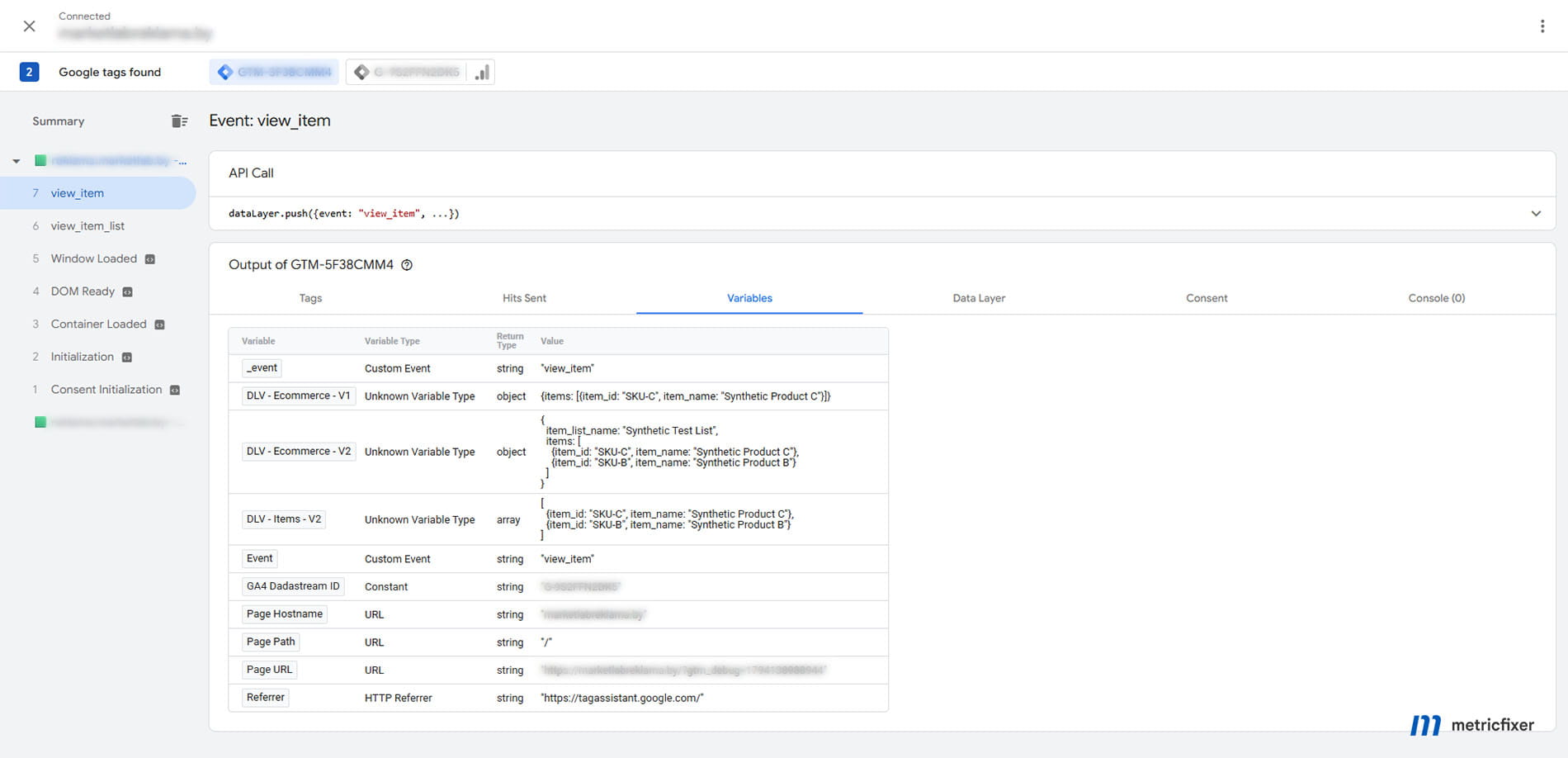
Inspect the actual outgoing analytics request as a separate step. A "tag fired" status is not evidence that its products, value or transaction ID were correct. Where permitted, use a test destination and confirm received parameters in GA4's debugging tools as well.
Also check the container and queue you are inspecting. A renamed data layer, multiple containers or an overwritten window.dataLayer can create a different class of fault. For installation-level issues, see metricfixer's GTM installation and compatibility review.
A reliable pattern for ecommerce event publication
The most maintainable fix is a small, explicit contract between the application and GTM: each ecommerce interaction supplies a fresh, complete snapshot for that interaction; the publisher resets only its event-scoped namespace; and tags read it only on the intended events.
"Complete" does not mean copying every field used by every ecommerce event. It means including what this event requires, and the optional fields that genuinely describe it. A view_item payload should not inherit purchase-only details simply because the previous event used them.
An application-side helper can make the boundary consistent:
// Application-side helper. Use only with plain ecommerce data.
// All callers must supply the complete payload for this interaction.
function publishEcommerce(eventName, ecommerce) {
  const allowedEvents = new Set([
    "view_item_list", "select_item", "view_item",
    "add_to_cart", "remove_from_cart", "view_cart",
    "begin_checkout", "add_shipping_info", "add_payment_info",
    "purchase", "refund"
  ]);

  if (!allowedEvents.has(eventName)) {
    throw new TypeError("Unsupported ecommerce event");
  }
  if (!ecommerce || typeof ecommerce !== "object" ||
      Array.isArray(ecommerce) || !Array.isArray(ecommerce.items)) {
    throw new TypeError("Expected an ecommerce object with an items array");
  }

  // Clone before resetting: a cloning failure must not clear valid state.
  // Requires structuredClone support in the site's browser baseline.
  const payload = structuredClone(ecommerce);

  window.dataLayer = window.dataLayer || [];
  window.dataLayer.push({ ecommerce: null });
  window.dataLayer.push({ event: eventName, ecommerce: payload });
}

publishEcommerce("view_item", {
  currency: "EUR",
  value: 79,
  items: [{
    item_id: "SKU-C",
    item_name: "Leather wallet",
    price: 79,
    quantity: 1
  }]
});
This example validates only a basic envelope. It is not a full GA4 schema validator: add event-specific checks for item identifiers, field types, currency, value, transaction IDs and the meaning of quantities. Decide explicitly which events may have an empty items array. Extend the event allowlist only for events the implementation actually supports. In production, catch and report instrumentation errors at the application boundary so an invalid analytics payload does not interrupt checkout or another business action.
structuredClone() creates a detached copy of supported data. Use an appropriate clone strategy for your supported browsers and keep analytics payloads to plain data. A JSON-based fallback changes undefined values, so it is not equivalent for every input.
Do not mutate a published payload or reuse a mutable item array for the next interaction. That can make the raw message history misleading and can affect consumers that retain references. Construct the next event from the application's source of truth rather than reading the current GTM model and hoping it represents the new action.
Choose one ecommerce mapping route per tag. Google's ecommerce guide offers explicit parameter mapping and the built-in Send Ecommerce data route. Verify the selected source rather than assuming the built-in route uses a particular variable version. Combining competing mappings without checking their precedence makes debugging harder.
Finally, put the reset at the ownership boundary. Clearing ecommerce before every ecommerce snapshot is understandable. Resetting the entire model before every click can destroy legitimate context and dependencies without fixing the real event contract.
Regression tests and release checklist
Test sequences, not just isolated events. A clean first page load often hides the problem because there is no previous object to merge with.
| Test journey | What must be checked |
|---|---|
| List of several items → one item detail | No old array tail; every field belongs to the displayed item. |
| One product → another, same item count | No inherited brand, category, variant, coupon or list fields. |
| Coupon present → coupon absent | No accidental carry-over at either event or item scope. |
| Several cart items → fewer items → empty cart | The chosen tracking contract represents each state correctly; an empty update does not silently retain old items. |
| Purchase → unrelated interaction | No leaked transaction ID or ecommerce mapping on the unrelated event. |
| Rapid interactions or overlapping data requests | Each published event describes its own action, not the response that happened to finish last. |
| SPA navigation, back navigation and full reload | Correct state boundaries under each navigation behavior, including restoration where applicable. |
| Direct JavaScript update → JSON-mediated update | Missing-value instructions survive the actual transport and serialization path. |
For each case, compare the source message, resolved variables and outbound request. Record the item count and every relevant item's fields. A correct first SKU is not a sufficient acceptance test.
- [ ] The event name and its payload are published together after the application has the required data.
- [ ] The reset covers the namespace actually read by the tag, with no delay before its replacement.
- [ ] Variable names, versions, defaults and formatting are documented.
- [ ] The producer, model reader and tag mapping agree on field locations and types.
- [ ] The failed sequence and corrected sequence have both been reproduced in a controlled test environment.
- [ ] Outgoing requests contain the intended items and values, and duplicate emitters have been checked.
- [ ] Production behavior is monitored after deployment; a local fixture is not treated as end-to-end proof.
Keep test events out of production analytics and advertising destinations. Preview is a debugging mode, not an automatic guarantee that tags cannot send live data. Use synthetic products, a test destination or an explicit blocking arrangement.
Advanced methods and shortcuts to treat carefully
Reading the current model
Google documents pushing a function whose this value exposes model methods. A diagnostic read can be useful:
// Diagnostic only: run on a test page with a web GTM container loaded.
// This reads state when this queued function is processed, not a past event.
window.dataLayer.push(function () {
  const ecommerce = this.get("ecommerce");
  console.log("Current ecommerce state:", structuredClone(ecommerce));
});
This reads the state when that function is processed. It is not a time machine for an earlier event and not a replacement for selecting the relevant event in Preview. Run it only where the copied values are safe to expose in the console.
set(), reset() and _clear
The documented set(), get() and reset() methods serve different purposes from an ordinary event message. A model update through set() is not itself a business event. A full reset() should be an explicitly designed lifecycle operation, not the default cure for one stale ecommerce object.
You may also encounter _clear: true, described in Ahava's data-model techniques and the public helper materials. Its role is to suppress recursive merging for affected values, not to purge all history. It is not the primary pattern in Google's ecommerce implementation guide. Treat it as an advanced, reader-dependent technique requiring dedicated tests, rather than silently replacing the clearer documented null-reset sequence.
Do not use window.dataLayer = [], dataLayer.length = 0 or deletion of earlier entries as a model-reset API. Reassignment can detach future pushes from the processor; removing processed messages does not, by itself, remove the state already derived from them.
Do not transfer these rules blindly to gtag()
gtag('event', ...) and a plain object containing event may use the same underlying queue, but they are not interchangeable protocols. Google's Google tag API reference defines event, destination and global parameter scopes. Diagnose inheritance in that API using its scope and precedence rules, not only the GTM Data Layer Variable table.
The practical takeaway is narrower and more useful than "always clear everything": make the lifetime of each namespace explicit, publish complete event data at the right boundary, and verify the values that actually leave the browser.
Methodology and sources
Review date: 8 November 2026. This is a documentation-led technical explanation of browser-side GTM object pushes, not a report of a production incident on metricfixer or a client website.
The primary references are Google's data-layer, variable, custom-template, tag-sequencing, ecommerce, event-parameter and Tag Assistant documentation, linked at the relevant points in the article. Google's open-source Data Layer Helper and its merge implementation provide an inspectable model of recursive updates. Ahava's original demonstrations supply additional evidence for GTM variable-version and data-model behavior. MDN is used for JavaScript serialization and copying semantics.
For this article, 24 synthetic assertions were run locally under Node.js against the published helper distribution and native JavaScript behavior. They covered omitted fields, object and array merging, inherited item fields, null and undefined resets, narrow resets, empty values, sparse arrays, JSON serialization, raw-array removal and the worked list-to-detail example. All 24 assertions passed. The products and amounts are illustrative, not measured business results.
Limits: the public helper is not the complete proprietary GTM runtime. These tests did not execute Data Layer Variable Version 1 in a live container, inspect a live GA4 tag template, capture analytics requests or verify a production implementation. The examples describe the stated model and reader assumptions; the release checklist is required to confirm the behavior of an actual container and destination. The advanced _clear route was not part of the local test matrix.
Recommendations about namespace ownership, complete snapshots, cloning and regression coverage are metricfixer's engineering interpretation of those mechanisms. They should be adapted to the site's event contract, supported browsers and consent configuration.
This article is for technical and operational information only. metricfixer is not affiliated with Google, Google Tag Manager or Google Analytics. Code examples use synthetic data and are not a complete implementation or a guarantee of accurate measurement. Test changes in a controlled environment, verify the destination's requirements and consent settings, and avoid sending personal or sensitive data to analytics. Platform behavior, interfaces and documentation may change after publication.
Expert help with this topic
 AI-Assisted Google Tag Manager Container Optimization
Review an existing GTM container with AI-assisted analysis, specialist-controlled small fixes and validation of affected paths.
 Custom Google Tag Manager Implementation
Scope non-standard GTM requirements through preliminary review, discovery where needed and a bounded custom implementation.
 Google Tag Manager
Choose GTM cleanup, browser or ecommerce measurement, an extra destination, iframe tracking, schema, Gateway, server-side or custom implementation.