
Published Aug 7, 2026
Meta Pixel and Conversions API Event Lifecycle: From Browser Trigger to Campaign Reporting
Follow a Meta conversion event from browser or server trigger through receipt, matching, deduplication, custom conversion rules, campaign optimization, and Ads Manager reporting. The guide explains what Pixel Helper, Test Events, Events Manager, and the Results column actually prove.
Category: Analytics & Conversion Tracking · By Mikalai Sasau
This practical guide follows a Meta conversion event from the moment a person completes an action through Meta Pixel or Conversions API delivery, receipt by Meta, identity matching, browser/server deduplication, custom conversion setup, campaign optimization, attribution, and Ads Manager reporting.
Practical default: debug one boundary at a time. Meta Pixel Helper proves that browser-side Pixel code was detected and an event fired on the page; Test Events proves that Meta received a test signal; Events Manager shows data-source processing and quality diagnostics; Ads Manager shows only campaign-attributed results. None of those screens replaces the CRM, order system, or backend event ledger as the source of business truth.
Executive summary
There is no single status called “the conversion worked.” A Meta event must pass several different gates, and every gate answers a different question:
- Did the business action really happen? A successful payment, accepted form, created account, or CRM status transition must exist before advertising code is considered.
- Did the implementation trigger? Browser JavaScript, a tag manager, a platform integration, a webhook worker, or a CRM connector created an event.
- Did the event leave the source system and reach Meta? A browser request or Conversions API
POSTwas sent and accepted at the transport layer. - Could Meta process and match it? The event name, time, source, parameters, and customer information were usable enough to connect the event to a Meta account where possible.
- Was the event deduplicated correctly? If the same action arrived through both Pixel and Conversions API, Meta recognized the two copies as one event rather than two conversions.
- Was the event turned into the right conversion definition? A standard event, custom event, or custom conversion rule represented the intended business action.
- Was that definition selected and eligible for campaign optimization? The campaign used the right data source, conversion location, performance goal, and event.
- Could Meta attribute the event to an ad interaction? The person had an eligible click, view, or other supported interaction within the applicable attribution setting.
- Did the result appear in the expected report? The date range, account time zone, selected columns, result metric, processing state, and attribution rules all aligned.
The most common support mistake is to use evidence from one gate as proof of all later gates. A green tag in a preview tool does not prove that Meta received the request. An event in Pixel Helper does not prove that Conversions API worked. An event in Test Events does not prove campaign attribution. An event in Events Manager does not have to appear in the campaign’s Results column. A high Event Match Quality score does not guarantee that every event will be attributed to an ad.
Meta’s current documentation describes the Meta Pixel as browser JavaScript that sends website activity and uses matching to support campaign analysis and optimization. It describes Conversions API as a server connection that sends website, app, business messaging, and offline events to a Meta dataset, where server events can be used for measurement, reporting, and optimization in a similar way to events from other connection channels. Meta also explicitly recommends verifying receipt, matching, and deduplication as separate setup tasks. These are related stages, not synonyms.
The best production architecture therefore starts outside Meta. Define the event in the business system, assign one stable event ID, record when and why it occurred, send browser and server copies where appropriate, preserve the same ID across retries, and reconcile Meta’s accepted-event and attributed-result totals against the CRM or order database. Meta is a measurement and optimization destination; it should not be the only record that a lead or purchase existed.
The event lifecycle at a glance
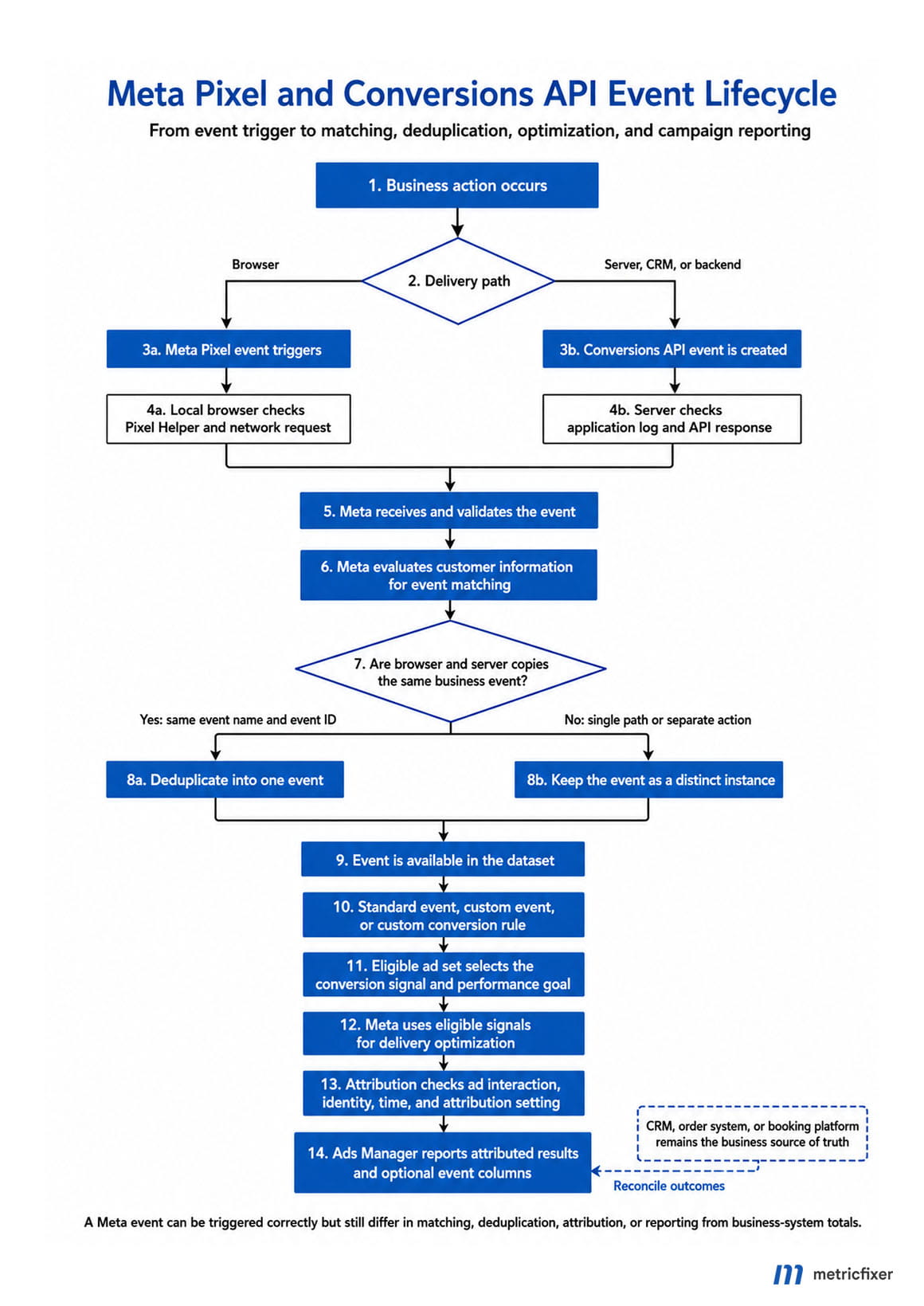
Meta does not publish a complete deterministic scheduler for every internal processing step. Matching, quality evaluation, deduplication, attribution, and reporting may overlap, be delayed, or be recalculated. The sequence below is an operational troubleshooting model: it shows the gates an implementation must satisfy, not a claim that every Meta system runs as one strict linear queue.
Meta event lifecycle: business action occurs → Pixel and/or Conversions API trigger → event request leaves the browser, server, platform, or CRM → Meta receives and validates the event → customer information is evaluated for matching → overlapping browser and server copies are deduplicated → the standard event, custom event, or custom conversion becomes available for the relevant workflow → the campaign uses the selected conversion signal for delivery → Meta checks attribution eligibility → the attributed result appears in Ads Manager and can be reconciled with business-system totals.
| Stage | Main question | Best verification surface | What that evidence still does not prove |
|---|---|---|---|
| 0. Business truth | Did the lead, registration, purchase, or CRM transition actually happen? | Backend, payment system, CRM, booking platform, or order database | That an event was sent to Meta or attributed to an ad |
| 1. Trigger | Did browser or server logic create the intended event? | Tag-manager preview, application log, webhook log, local debugger | That the request left the source or reached Meta |
| 2. Dispatch | Was the Pixel request or Conversions API request transmitted? | Browser network tools, server delivery ledger, API response log | That downstream matching, deduplication, or attribution succeeded |
| 3. Receipt | Did Meta receive a recognizable event? | Test Events, Events Manager event activity, API diagnostics | That the event is a campaign result |
| 4. Matching | Can Meta associate the event with an account or advertising interaction? | Event Match Quality, match-key diagnostics, Dataset Quality API | That the person clicked or viewed the campaign within the attribution setting |
| 5. Deduplication | Were browser and server copies of the same action counted once? | Event deduplication diagnostics and shared event_id audit |
That the surviving event has the correct business value or attribution |
| 6. Conversion definition | Does a standard event, custom event, or custom conversion represent the intended action? | Events Manager and Custom Conversions | That a campaign is using that definition |
| 7. Optimization | Is the campaign configured to optimize toward the right event? | Campaign and ad-set conversion settings | That every received event is eligible or attributed |
| 8. Attribution | Does the event qualify for credit under the selected attribution setting? | Ads Manager attribution and conversion columns | That Meta’s source assignment will match GA4, the CRM, or another ad platform |
| 9. Reporting and reconciliation | Does the expected attributed count appear in the selected report period? | Ads Manager, Ads Insights API, CRM/order reconciliation | That all platforms will report the same number or source |
Stage 0: define the business event before implementing the tag
The lifecycle should begin with the business action, not with fbq(), Google Tag Manager, or an API payload. A tracking system can perfectly transmit the wrong event. That is why the event contract must specify:
- the exact business condition that creates the event;
- the authoritative source system;
- the stable business-object ID and event ID;
- the event occurrence time;
- whether the action can happen more than once;
- the value, currency, product, lead-stage, or content parameters that must accompany it;
- the consent and data-use conditions under which it may be sent.
A button click is usually evidence of intent, not proof of a lead. A thank-you page is evidence that a browser reached a URL, not proof that a payment was captured. A new WhatsApp conversation is not automatically a qualified lead. A booking request is not always an attended appointment. The event name should describe what the business can prove at the moment of emission.
| Business outcome | Recommended authoritative trigger | Stable ID | Common weak substitute |
|---|---|---|---|
| Lead | Form accepted by the backend or lead record created successfully | Lead ID or submission ID | Submit-button click before validation |
| Purchase | Order reaches the documented paid/confirmed state | Order or transaction ID | Checkout button click or thank-you-page load alone |
| Registration | User account successfully created | User or registration ID | Registration form opened |
| Qualified lead | CRM state transition that meets the written qualification rule | Lead ID plus transition type | Any inbound message or call |
| Appointment value | Booking completed, attended, or paid according to the campaign goal | Booking ID | Calendar widget opened |
For external payment flows, the safest pattern is a backend payment state and idempotent event rather than a browser return page. The related metricfixer guide, How to Reliably Track Purchases When Customers Do Not Return from an External Payment Gateway, explains the webhook, order-state, and delivery-ledger architecture in detail.
Stage 1: the Pixel or server integration triggers
Browser-side Meta Pixel trigger
The Meta Pixel is a JavaScript library. The base code initializes a Pixel ID and normally sends a PageView. Additional standard events use fbq('track', ...); business-specific custom events can use a custom event name and the appropriate Pixel method. Meta’s Pixel installation guide and Pixel reference document the standard event interface and supported parameters.
A browser trigger can come from hardcoded application code, a platform plugin, Meta’s Event Setup Tool, or a tag manager. Regardless of the implementation method, the trigger should be tied to a reliable state change. A tag firing in a preview window only proves that its trigger condition evaluated to true. It does not prove that:
- the Pixel library loaded successfully;
- the correct Pixel or dataset ID was used;
- the browser request was not blocked;
- the parameters had valid values;
- Meta received the event;
- the event was matched, deduplicated, or attributed.
A basic browser event with a deduplication ID can look like this:
fbq(
  'track',
  'Purchase',
  {
    value: 149.00,
    currency: 'EUR'
  },
  {
    eventID: 'order_8472'
  }
);
Meta’s Pixel reference recommends passing eventID as the fourth argument when the Pixel is implemented alongside Conversions API. Note the browser spelling: eventID. The corresponding server field is event_id.
Server-side Conversions API trigger
Conversions API can receive events from a website backend, ecommerce platform, app, CRM, offline system, or business messaging workflow. Meta’s Conversions API overview says server events are linked to a dataset and can be processed for measurement, reporting, or optimization in a similar way to events sent through other connection channels.
The phrase “server-side” does not automatically mean “backend-confirmed.” A server container can simply relay an event that originated in the browser. If the browser never generated that input, the server container may receive nothing. For purchases, qualified leads, subscription renewals, and offline outcomes, the strongest implementation usually starts from the commerce backend or CRM state—not from a mirrored page event.
For a direct CAPI integration, the server should write a delivery record before or when it sends the request. At minimum, preserve:
event_nameandevent_id;- the internal order, lead, booking, or user ID;
event_timerepresenting when the action occurred;- the target dataset or Pixel ID;
action_sourceand source URL where applicable;- which matching parameters were present;
- value, currency, and business parameters;
- consent or data-processing state;
- attempt number, request time, HTTP status, and response body.
This ledger is what makes it possible to distinguish “the business event existed,” “our server tried to send it,” and “Meta later reported it.”
Stage 2: the request leaves the browser or server
Dispatch is a transport question. For Pixel, browser developer tools can show whether a request was attempted and which parameters were attached. For CAPI, application logs should show the request outcome. Neither is a substitute for downstream verification.
Meta’s current Conversions API parameter reference lists the event fields used for attribution and delivery optimization. For website events, it requires client_user_agent, action_source, and event_source_url. Core server-event fields include event_name, event_time, user_data, custom_data, event_id, and action_source.
A simplified server payload paired with the browser example above could look like this:
{
  "data": [
    {
      "event_name": "Purchase",
      "event_time": 1760000000,
      "event_id": "order_8472",
      "action_source": "website",
      "event_source_url": "https://example.com/checkout/complete",
      "user_data": {
        "em": ["<sha256_email>"],
        "ph": ["<sha256_phone>"],
        "client_ip_address": "<client_ip>",
        "client_user_agent": "<user_agent>",
        "fbp": "<browser_id>",
        "fbc": "<click_id>"
      },
      "custom_data": {
        "currency": "EUR",
        "value": 149.00,
        "order_id": "8472"
      }
    }
  ]
}
The timestamp above is illustrative. Production code should use the real Unix event time, preserve that time across retries, and keep the same event_id when retrying the same business action. A retry is not a new conversion.
Meta requires hashing for fields such as email and phone and says not to hash identifiers such as fbc, fbp, client IP address, or user agent. Hashing is a formatting and security requirement; it is not permission to collect or transmit data. The implementation still has to follow the applicable privacy, consent, and platform terms.
An HTTP success or an API response showing received events is important transport evidence, but it is not proof of final campaign reporting. Meta’s own recommended workflow separates API implementation from the later step of verifying that events were received, deduplicated, and matched correctly.
Stage 3: Meta receives and surfaces the event
Receipt should be tested in layers. The most useful tools are not interchangeable:
| Tool or surface | What it is good for | What it cannot prove |
|---|---|---|
| Tag-manager preview or application debugger | Confirms that local trigger logic ran and shows values available before dispatch | Network delivery, Meta receipt, matching, deduplication, or attribution |
| Meta Pixel Helper | Detects Pixel code on the current page, shows browser-side Pixel events, and surfaces implementation warnings | Pure server-side CAPI delivery, campaign attribution, or CRM correctness |
| Browser Network panel | Shows whether a browser request was attempted, blocked, retried, or sent with unexpected parameters | How Meta later processes or attributes it |
| Server delivery log | Shows the payload version, event ID, request attempt, response, and retry history | That the event was matched to a person or credited to an ad |
| Test Events | Shows test-tagged browser or server events near the time they are sent, including source and parameter details where available | That a production campaign will optimize on or report the event |
| Events Manager Overview and Diagnostics | Shows production event activity, connection channels, diagnostics, and quality signals for the data source | A raw event-by-event business ledger or a campaign attribution report |
| Dataset Quality API | Supports programmatic monitoring of quality dimensions such as match quality, freshness, coverage, and deduplication across datasets | Why one specific CRM record did or did not receive campaign credit |
| Ads Manager or Ads Insights API | Shows ad performance and attributed conversion metrics under reporting settings | Total business outcomes across all sources or a platform-neutral source of truth |
What Pixel Helper actually proves
Meta describes Meta Pixel Helper as a Chrome extension that reviews pages for Meta Pixel code. Its badge indicates the number of Pixel events fired on the current webpage, and its panel reports which Pixels were found, whether they loaded, and which warnings or suggestions apply.
That makes Pixel Helper a browser-side implementation tool. It can answer questions such as:
- Is the expected Pixel ID present on this page?
- Did
PageView,ViewContent,Lead, orPurchasefire in this browser? - Did the event contain obvious parameter problems?
- Did the event fire twice during one interaction?
It does not independently prove that a server event was sent. It also cannot prove that the browser event was matched to a Meta account, deduplicated with a server copy, selected for optimization, or attributed to a campaign. A support ticket that ends with “Pixel Helper is green” has only completed the first part of the investigation.
What Test Events actually proves
For server testing, the Conversions API supports a main-body test_event_code. The current code should be taken from the selected data source’s Test Events workflow and attached only to controlled tests. A conceptual test request adds the field at the same top level as data:
{
  "data": [
    {
      "event_name": "Lead",
      "event_time": 1760000000,
      "event_id": "test_lead_8472",
      "action_source": "website",
      "event_source_url": "https://example.com/thank-you",
      "user_data": {
        "client_user_agent": "<user_agent>"
      }
    }
  ],
  "test_event_code": "TEST12345"
}
Test Events is valuable because it moves the investigation from “our code fired” to “Meta surfaced a received test event.” It can help check the event source, name, time, ID, and parameters, and it is often the fastest place to validate browser/server deduplication during implementation.
However, Test Events is a diagnostic feed, not a campaign performance report. Seeing a test event does not establish that:
- the production integration is sending the same payload without the test code;
- the event will be matched with sufficient quality;
- a custom conversion rule will classify it as intended;
- a campaign is configured to optimize for it;
- the test user had an eligible ad interaction;
- the event will appear in the campaign’s Results column.
After testing, remove the test code from production delivery and create a separate controlled production event for end-to-end reporting validation.
What Events Manager actually proves
Events Manager is the operational control surface for the dataset, Pixel, server connection, event activity, and diagnostics. It is where teams should verify that production events continue to arrive after the one-time Test Events session ends.
Events Manager is closer to Meta-side truth than a browser extension, but it is still not an immutable raw log and not a campaign attribution table. Its event count can include activity from paid traffic, organic traffic, direct visits, employees, QA devices, integrations, and every campaign connected to the same data source. The Ads Manager count is narrower because it only includes events credited to advertising under the relevant reporting rules.
Stage 4: Meta evaluates customer information for matching
Matching and attribution are different problems:
- Matching asks: can Meta associate this event with a Meta account or usable advertising identity?
- Attribution asks: did that matched person have an eligible interaction with this ad, campaign, or account within the applicable setting?
An event can be accepted but poorly matched. An event can be well matched but still have no eligible ad touch. An event can be attributed even when another analytics platform gives the conversion to a different channel, because each platform applies its own identity and attribution rules.
For CAPI, matching information is supplied in user_data. Meta’s parameter reference includes hashed fields such as em, ph, fn, ln, city, postal code, and country, as well as un-hashed fields such as client_ip_address, client_user_agent, fbc, fbp, lead_id, ctwa_clid, and other identifiers for supported event sources.
The correct strategy is not “send every field at any cost.” It is:
- collect only data the business is allowed and needs to use;
- normalize and hash fields exactly as Meta requires;
- send accurate browser and click identifiers when they legitimately exist;
- preserve identifiers from the original interaction into the backend or CRM;
- never invent an identifier, copy one from another person, or substitute current server details for the original user context.
How to read Event Match Quality
Meta’s setup-verification guidance describes Event Match Quality as a measure of how effective the customer information sent with server events may be at matching those events to Meta accounts. The current guidance says that, where possible, implementations should generally aim for a score of 6.0 or higher and use the detailed recommendations to improve it.
That number should be treated as a diagnostic target, not as a pass/fail certificate. Event Match Quality is not:
- the percentage of events attributed to campaigns;
- a guarantee that the event will appear in Ads Manager;
- proof that the event fired at the correct business moment;
- proof that value and currency are correct;
- proof that browser/server deduplication works;
- a reason to send customer data that should not be sent.
A low score usually points to missing, malformed, or weak matching inputs. A high score means the event carries stronger matching information, but the event still needs an eligible ad interaction and the correct campaign configuration before it can become an attributed result.
Stage 5: Meta deduplicates browser and server copies
Running Meta Pixel and Conversions API together is intentionally redundant. The same purchase or lead may be sent once from the browser and once from the server so that Meta still receives the action when one connection is unavailable. Redundancy becomes overcounting unless both copies carry the same deduplication identity.
Meta’s Pixel reference and current implementation guidance use two key values:
- the same event name, such as
PurchaseorLead; - the same unique event identifier—
eventIDin the browser call andevent_idin the server payload.
Adobe’s current Meta Conversions API extension documentation describes the same pattern: shared browser and server events should include an event name and ID in both channels, after which Meta applies deduplication strategies and keeps the relevant event data.
Deduplication should be designed at the moment the business action is created:
- Generate one ID for one event instance.
- Give the browser access to that ID if a browser copy is sent.
- Store the same ID with the order, lead, or booking.
- Send the same ID from the backend or server integration.
- Reuse the ID and original
event_timefor retries. - Create a new ID only for a genuinely new business action.
| Deduplication failure | Likely consequence | Correction |
|---|---|---|
| Browser and server generate independent random IDs | Meta may treat one business action as two events | Generate once and transport the same ID through both paths |
| Same ID, different event names | The pair may not be recognized as the same event type | Use the same canonical event-name mapping in both channels |
Only the server event has event_id |
No shared key exists for the browser copy | Pass eventID in the Pixel event call |
| Thank-you-page reload creates a new ID | Repeated page loads can become repeated purchases | Read the stable order-level event ID instead of generating on page load |
| One ID is reused for several valid purchases | Distinct transactions may be collapsed or diagnosed incorrectly | Use one unique ID per transaction/event instance |
| Retry creates a new ID and current timestamp | A transport retry looks like a second conversion | Keep the original ID and occurrence time across retries |
Browser sends Purchase, server sends a custom name for the same order |
The two channels represent different event definitions | Normalize event taxonomy before implementation |
Do not use deduplication as a substitute for internal idempotency. The backend should still prevent one payment notification, webhook replay, or CRM update from creating multiple outbound conversion jobs. Platform-side deduplication is the last safeguard, not the first.
Also do not assume that deduplication “merges every parameter.” The safe objective is one counted event with consistent values across both channels. If browser and server payloads disagree on value, currency, order ID, or event time, fix the source data rather than relying on Meta to resolve the conflict in the desired way.
Stage 6: distinguish standard events, custom events, and custom conversions
These three concepts are often used as though they mean the same thing, but they live at different layers.
| Object | What creates it | Example | Operational role |
|---|---|---|---|
| Standard event | Pixel or CAPI sends a Meta-recognized event name | Purchase, Lead, CompleteRegistration |
Provides a predefined semantic event that can support reporting, audiences, and eligible optimization workflows |
| Custom event | Pixel or CAPI sends a business-specific event name | PricingCalculatorCompleted |
Records an action that does not cleanly map to a standard event |
| Custom conversion | A rule is created in Events Manager around a URL, standard event, custom event, or event parameters | “Enterprise demo booked” based on DemoBooked plus plan=enterprise |
Defines a named subset for reporting or eligible campaign selection; it does not send another event |
| Campaign result | Meta attributes the selected result metric to an ad under campaign and attribution settings | 12 attributed purchases in the Results column | Advertising report output, not the raw number of events received by the data source |
Standard events
Use a standard event when its meaning matches the business action. Meta’s Pixel reference defines recognized events and their parameter expectations; for example, Purchase requires value and currency. Standard naming gives Meta a consistent semantic signal and usually produces the least ambiguous campaign setup.
Do not choose a stronger event name simply because it sounds more valuable. Firing Purchase on an order-start click or Lead on every contact-button click trains and reports on the wrong behavior even if the code is technically valid.
Custom events
A custom event is data sent to Meta under a name defined by the business. It is appropriate when no standard event accurately describes the action. The name should be stable, readable, documented, and consistent across browser and server implementations.
A custom event appearing in Events Manager proves that the data source received that event name. It does not automatically create a separately named custom conversion. Depending on the current campaign type and account interface, custom events may be exposed in reporting or selection workflows, but the most maintainable pattern for a rule-based subset is often to create a custom conversion around the underlying event.
Custom conversions
A custom conversion is a configuration object, not a tracking request. It evaluates an underlying event and optional rules. Jon Loomer’s practical comparison of standard events, custom events, and custom conversions shows the common options: a URL-only rule, a rule based on a standard event, or a rule based on a custom event, with additional URL, referrer, or event-parameter conditions.
This distinction explains several common cases:
- A custom conversion cannot recover an event that was never sent.
- A custom conversion cannot improve identity matching by itself.
- A custom conversion does not deduplicate browser and server copies.
- A broad URL rule can count page reloads, employee visits, or non-converting visitors.
- A parameter rule returns zero if the parameter is missing, misspelled, formatted differently, or nested in the wrong place.
- An event can be visible in Events Manager while the custom conversion count remains zero because the rule did not match.
Create and test custom conversions before campaign launch. Do not make a production plan depend on uncertain historical backfill or assume that a newly created rule will reconstruct every past event exactly as needed.
Stage 7: the campaign uses the conversion signal for optimization
Event collection and campaign optimization are separate configurations. Meta Blueprint’s current campaign objectives and conversion settings course distinguishes campaign objectives from the conversion location, conversion event, and performance goal selected in campaign setup.
For a website conversion campaign, check all of the following:
- the selected objective supports the intended conversion workflow;
- the conversion location is correct;
- the correct dataset/Pixel is selected and accessible to the ad account;
- the intended standard event, custom event, or custom conversion is selected;
- the event definition matches the campaign’s real business goal;
- the event is receiving enough recent, valid activity to be a useful learning target;
- value and currency are present when optimizing for value or evaluating return;
- the attribution setting matches the expected decision cycle;
- permissions and asset sharing are correct across the business portfolio, dataset, and ad account.
An event can be visible and selectable but still be a poor optimization target. If it happens rarely, changes definition, mixes several lead stages, or contains false positives, the delivery system receives a weak learning signal. There is no universal event-volume number that guarantees good performance across every account and campaign. The right goal is a stable, frequent enough, business-valid outcome—not the deepest possible event at any cost and not the highest-volume click disguised as a lead.
Changing the campaign’s optimization event does not change what the Pixel or CAPI collects. It changes which event the campaign uses as its delivery target. Likewise, fixing an event implementation does not automatically update an existing campaign’s selected goal.
Stage 8: attribution turns a received event into an Ads Manager result
Ads Manager does not report every event received by the dataset. It reports advertising performance. A conversion event becomes a campaign result only when Meta can connect it to an eligible ad interaction and apply the campaign’s attribution and reporting rules.
For conversion-focused campaigns, the event selected in setup commonly supplies the primary Results metric. Other standard events, custom events, or custom conversions can be added as separate columns. Jon Loomer’s guide to Meta Ads conversion results illustrates this distinction: the selected conversion event fills the Results column, while other events can be added through customized columns.
A production event can appear in Events Manager but not in the Results column for legitimate reasons:
- the event came from organic, direct, email, search, another ad account, or an employee test;
- Meta could not match the event to a usable account or advertising identity;
- the person had no eligible ad interaction;
- the conversion occurred outside the applicable attribution setting;
- the campaign optimized for a different event or result type;
- the wrong dataset or custom conversion was selected;
- the asset was not shared with the ad account correctly;
- the event was filtered, deduplicated, rejected, or delayed during processing;
- the report date range, time zone, attribution comparison, breakdown, or column configuration excluded it;
- the custom conversion rule did not match the event parameters;
- privacy and consent choices limited collection or use of the signal.
The reverse can also happen: Ads Manager can show more attributed results than a CRM report. The event trigger may be broader than the CRM definition; Pixel and CAPI copies may not deduplicate; a URL-based custom conversion may fire on reloads; one person may complete the action more than once; view-through or other eligible attribution may give Meta credit where the CRM uses last click; the systems may use different time zones or date semantics; or the CRM may exclude cancelled, duplicate, unqualified, or existing-customer records.
Meta’s Ads Insights API provides programmatic access to many of the performance metrics available in Ads Manager. It is useful for repeatable reconciliation, but it returns Meta’s reporting model—not a raw export of every received event and not a neutral cross-channel attribution ledger.
Why Pixel Helper, Events Manager, custom conversions, and Ads Manager show different numbers
| Observed pattern | Most likely layer | Checks to run first |
|---|---|---|
| Tag preview says fired, but Pixel Helper shows nothing | Pixel initialization or browser execution | Correct Pixel ID, base-code order, consent state, JavaScript errors, ad blocker, trigger timing |
| Pixel Helper shows the event, but Test Events does not | Transport, test session, or data-source selection | Correct dataset, browser network request, active Test Events session, filters, blocked request |
| Server log shows success, but no server event appears in Test Events | CAPI test configuration or payload | Correct test_event_code, dataset ID, access token, event time, response body, required website fields |
| Test Events works, but normal Events Manager volume stays at zero | Production configuration | Remove dependence on test code, verify production endpoint and token, inspect production delivery logs |
| Event appears in Events Manager, but custom conversion remains zero | Rule definition | Underlying event name, URL condition, parameter spelling, type, value, case, and rule scope |
| Custom conversion has activity, but campaign Results is zero | Campaign setup or attribution | Selected conversion event, data source access, eligible ad interaction, attribution setting, report dates |
| Browser and server events both arrive, but totals are inflated | Deduplication | Exact event-name alignment, shared eventID/event_id, stable ID across page reloads and retries |
| Deduplication looks good, but purchase value is wrong | Business payload consistency | Backend total, taxes/discounts, currency, browser/server value parity, custom-data mapping |
| Event Match Quality is strong, but Ads Manager shows few results | Attribution or campaign relevance | Paid-touch eligibility, attribution window, selected event, traffic source mix, report configuration |
| Ads Manager results exceed CRM outcomes | Definition, duplicates, or attribution model | Trigger condition, reloads, custom conversion breadth, repeated actions, view attribution, CRM exclusions |
| CRM outcomes exceed Ads Manager results | Coverage, matching, or attribution | Missing Pixel/CAPI events, blocked browser requests, weak match keys, no eligible Meta touch, late events |
A reference QA workflow from trigger to campaign reporting
The fastest reliable audit follows the lifecycle in order. Do not begin by changing attribution settings or recreating campaigns when the underlying event has not passed the earlier gates.
- Write the event contract. Define the business condition, event name, authoritative source, stable ID, event time, value logic, and consent rules.
- Trigger one controlled action. Use a test product, lead, registration, or booking whose internal ID is known.
- Confirm the business record. Check that the order, lead, or booking exists in the source system exactly once.
- Inspect browser logic. Use tag-manager preview, application logs, Pixel Helper, and browser network tools to confirm the expected browser event and parameters.
- Inspect server logic. Confirm that one CAPI delivery record was created with the same event name, event ID, occurrence time, value, and source context.
- Use Test Events. Verify browser and server sources, parameter structure, and the shared deduplication identity.
- Test retries. Resend the same server job and confirm that the event ID and occurrence time do not change.
- Verify production receipt. Send a separate controlled event without the test code and check Events Manager activity and diagnostics.
- Review matching quality. Confirm that legitimate matching parameters are present and formatted correctly; review Event Match Quality recommendations.
- Review deduplication quality. Confirm that shared browser/server events are recognized as redundant copies rather than separate conversions.
- Test the conversion definition. For a custom conversion, prove that the expected event matches the rule and a near-identical non-converting event does not.
- Audit campaign selection. Check the data source, conversion location, performance goal, selected event, and attribution setting.
- Create an attributable live test. Where practical and compliant, use a controlled ad interaction and a real production conversion rather than assuming an organic browser test will populate Ads Manager.
- Inspect the report correctly. Use the correct date range, account time zone, result column, custom conversion column, and attribution comparison.
- Reconcile aggregates. Compare business events, browser sends, server sends, Meta receipts, deduplicated events, and attributed results by day and event type.
Maintain an event delivery ledger
A production CAPI integration should be observable without opening Events Manager. A practical ledger can contain:
| Field | Purpose |
|---|---|
event_id |
Stable identity for one business event and all of its delivery attempts |
event_name |
Canonical Meta event name used by browser and server |
business_object_type and business_object_id |
Links the conversion to the order, lead, booking, subscription, or registration |
occurred_at |
Actual business-event time, distinct from dispatch time |
browser_sent_at |
Evidence that a browser copy was emitted where applicable |
server_sent_at |
Timestamp for each CAPI attempt |
dataset_id |
Prevents cross-account or wrong-data-source delivery |
value and currency |
Supports revenue and value consistency checks |
match_keys_present |
Records which legitimate customer-information parameters were available without storing unnecessary clear-text data in the log |
consent_state |
Documents the state applied when the event was sent |
http_status and response_body |
Separates transport success, permanent rejection, and retryable failure |
retry_count and next_attempt_at |
Supports controlled retries without new conversion identities |
implementation_version |
Links anomalies to a deployment, plugin, connector, or schema version |
Do not expect Meta to return an event-level campaign attribution record that can be joined back to every internal event. Reconciliation is often aggregate: the internal ledger proves what was eligible and delivered; Events Manager proves platform receipt and quality; Ads Manager proves how many outcomes Meta credited to advertising.
Three worked lifecycle examples
Example 1: website lead form
A visitor completes a form. The browser’s submit handler runs, but the email address fails backend validation. If Lead fires on the button click, Pixel Helper will show a technically successful event even though no lead exists.
The stronger sequence is:
Lead flow: form submitted → backend validates fields and creates lead L-8472 → response returns the stable event ID → browser sends Lead with eventID=L-8472 → backend or delivery worker sends CAPI Lead with event_id=L-8472 → Meta receives both copies → deduplication keeps one conversion event → campaign receives credit only if the person has an eligible ad interaction.
The CRM may later disqualify the lead. That does not mean the original Lead event was wrong if the event contract defined it as an accepted form submission. It means the business needs a second downstream event—such as a documented CRM-qualified stage—to optimize toward quality rather than volume.
Example 2: ecommerce purchase
The browser reaches a confirmation page and sends Purchase, while the backend receives a payment webhook and sends the same event through CAPI. Both use order 8472 as the stable event identity.
The lifecycle can still fail in several ways:
- the browser sends gross value while the server sends net value;
- the thank-you page generates a new ID on every reload;
- the payment webhook is retried and the backend creates a second outbound job;
- the browser event uses
Purchasewhile the server maps it to a custom name; - the CAPI event uses the dispatch time rather than the original purchase time;
- the order is visible in Events Manager but has no eligible Meta ad interaction.
A robust purchase architecture makes the paid order the source of truth, treats the browser event as an additional fast signal, and uses the same order-level event ID across both channels.
Example 3: custom conversion for an enterprise demo
The site sends a custom event called DemoBooked with parameters such as plan, market, and meeting_type. Events Manager shows the custom event correctly. The marketing team creates a custom conversion called “Enterprise demo booked” with a rule requiring plan=enterprise.
If the custom conversion remains at zero, the Pixel or CAPI may be working perfectly. The failure can be entirely in the rule layer: the implementation sent plan=Enterprise, the value was nested differently, the parameter was omitted in the server copy, or the custom conversion was based on a different data source. This is why event receipt and conversion-rule matching must be tested separately.
When to use Pixel, CAPI, or both
| Architecture | Strength | Main limitation | Best use |
|---|---|---|---|
| Pixel only | Fast browser context, page and interaction events, straightforward debugging | Dependent on browser execution, consent state, blockers, page lifecycle, and client-side data quality | Low-risk browsing events or constrained implementations |
| CAPI only | Can originate from backend, CRM, app, offline, or messaging systems | May lose browser context if identifiers were not captured; server-side does not automatically mean accurate | CRM outcomes, offline events, subscription changes, backend-confirmed conversions |
| Pixel plus CAPI with deduplication | Redundant delivery and combined browser/backend context for the same event | Requires a shared event-ID strategy, parameter parity, monitoring, and idempotent retries | High-value website leads, purchases, registrations, and other core optimization events |
Meta Blueprint’s current Pixel and Conversions API course presents the two connections as complementary. Meta’s advanced direct-integration course separately covers event preparation, testing, deduplication, and troubleshooting.
For Click-to-WhatsApp campaigns without a website, the browser portion may not exist at all. In that case the chain begins with native WhatsApp referral data, a webhook, the CRM, and a business-messaging CAPI event. See How to Track Click-to-WhatsApp Ads by Campaign, Ad, and Creative Without a Website for the closed-loop architecture and use of ctwa_clid.
Production monitoring: what to watch after launch
A successful one-time test does not prove that the integration will remain healthy after a site deployment, token change, plugin update, consent-platform change, checkout redesign, or CRM migration. Monitoring should cover both quantity and quality.
Daily operational metrics
- business events created by event type;
- browser events sent where observable;
- CAPI jobs created, accepted, retried, and permanently failed;
- event latency from
occurred_atto dispatch; - duplicate internal event IDs;
- missing value, currency, source URL, or required fields;
- browser/server event-name and value parity;
- share of events carrying expected matching parameters;
- variance between business events and Meta-side event activity;
- variance between Meta-side event activity and attributed campaign results.
Meta quality metrics
Meta’s Dataset Quality API exposes server-event quality dimensions that include Event Match Quality, Data Freshness, Event Overview, Event Deduplication, and related coverage diagnostics. Meta explicitly positions the API for advertisers, partners, and agencies that need to monitor integration quality at scale.
Meta Blueprint’s Optimize Conversions API course groups the same operational priorities into event coverage, match quality, deduplication, and data freshness. These are useful health dimensions, but they should be read alongside the business ledger:
- Coverage asks whether the intended events are arriving through the expected connections.
- Match quality asks whether customer information is useful for matching.
- Deduplication asks whether redundant browser/server copies are handled correctly.
- Freshness asks whether events are arriving close enough to occurrence time to remain useful.
- Business accuracy—which Meta cannot fully validate—asks whether the event represented a real lead, purchase, or qualified outcome with the right value.
How to reconcile Events Manager, Ads Manager, and the CRM
Exact equality should not be the starting assumption because the systems measure different populations:
| System | Population it represents | Typical date basis | Primary purpose |
|---|---|---|---|
| CRM or order database | All business records meeting the internal definition | Lead, order, payment, or stage-transition time | Operational and financial truth |
| Pixel Helper | Browser events observed during the current page session | Local trigger time | Implementation debugging |
| Test Events | Controlled test signals received by Meta | Test event time and receipt context | Near-real-time technical validation |
| Events Manager | Events processed for the selected data source across paid and non-paid activity | Platform event-processing views | Data-source health and diagnostics |
| Ads Manager | Results Meta attributes to ads under campaign and reporting settings | Advertising report and attribution semantics | Campaign optimization and performance analysis |
A useful reconciliation report shows several ratios rather than one unexplained difference:
- CAPI delivery coverage: accepted server events ÷ eligible business events;
- browser coverage: observed browser events ÷ eligible browser-visible actions;
- dual-channel coverage: actions with both browser and server copies ÷ actions intended for redundant delivery;
- deduplication health: correctly paired shared events ÷ dual-channel events;
- Meta attribution share: attributed campaign results ÷ eligible business events;
- qualification rate: CRM-qualified outcomes ÷ raw lead events;
- value variance: Meta-reported conversion value versus finance-approved value under aligned scope.
The attribution-share ratio is not expected to be 100%. It depends on how much of the business originated from Meta, how well events matched, whether ad interactions were eligible, the chosen attribution setting, and the reporting period. The delivery-coverage ratio, by contrast, should be close to the implementation’s documented target. Mixing these ratios creates false alarms.
Common design mistakes that survive basic testing
- Firing on an interface action instead of a business state. The tag is technically healthy but measures button clicks as leads or checkout starts as purchases.
- Using two unrelated event-ID generators. Pixel and CAPI both work, but they count independently.
- Generating the event ID on page load. Refreshing a confirmation page creates new conversions.
- Sending the same event ID for every user. Valid events lose their unique identity.
- Changing event names between browser and server. Deduplication and reporting taxonomy drift apart.
- Reusing current server IP or user agent as customer context. The event describes infrastructure rather than the person who acted.
- Assuming a server container is an authoritative backend. It may only forward what the browser already sent.
- Creating a custom conversion to fix missing tracking. Rules cannot classify an event that does not exist.
- Using a URL-only purchase rule on a reloadable page. The same order can match multiple visits.
- Comparing Events Manager totals directly with campaign Results. The first includes non-attributed events; the second applies ad attribution.
- Comparing Meta with the CRM under different dates and definitions. One report may use ad-interaction logic while the other uses conversion or stage-transition time.
- Using a good Event Match Quality score as a complete QA result. Matching strength does not validate event truth, value, deduplication, or attribution.
- Leaving
test_event_codein a production connector. Real traffic continues through a diagnostic path instead of the intended production workflow. - Logging raw customer data unnecessarily. Observability should record field presence and delivery outcomes without creating an uncontrolled sensitive-data archive.
Implementation and audit checklist
- [ ] Every conversion event has a written business definition and authoritative source.
- [ ] The trigger occurs after the business action is confirmed, not merely after a click.
- [ ] Browser and server use the same canonical event name.
- [ ] One stable event ID is generated per action and shared as
eventID/event_id. - [ ] Retries preserve the original event ID and occurrence time.
- [ ] Purchase events contain correct
valueandcurrency. - [ ] Website CAPI events include the required source and browser-context fields.
- [ ] Matching fields are normalized, hashed where required, and not hashed where prohibited.
- [ ] Consent and data-processing state is enforced consistently across browser and server paths.
- [ ] Pixel Helper, browser network tools, CAPI logs, and Test Events have each been checked for their own boundary.
- [ ] A separate production test confirms normal Events Manager receipt after test mode.
- [ ] Deduplication diagnostics confirm redundant browser/server events are counted once.
- [ ] Custom conversion rules have positive and negative test cases.
- [ ] The correct dataset and conversion event are selected in campaign setup.
- [ ] The attribution setting matches the intended customer decision cycle.
- [ ] Ads Manager uses the correct Results and custom conversion columns.
- [ ] Reconciliation aligns date range, time zone, event definition, value basis, and attribution scope.
- [ ] Alerts exist for event-volume drops, CAPI failures, latency, deduplication problems, and schema changes.
Frequently asked questions
Does a successful Pixel Helper check mean the conversion will appear in Ads Manager?
No. Pixel Helper confirms browser-side Pixel activity on the page. Meta must still receive and process the event, match it where possible, deduplicate any server copy, apply the conversion definition, and attribute it to an eligible ad interaction before it becomes a campaign result.
Does an event in Test Events mean Conversions API is fully configured?
It proves that Meta received the controlled test payload through the selected data source. It does not prove that the production connector sends the same event without the test code, that matching quality is sufficient, that deduplication remains healthy at scale, or that campaigns are configured to use it.
Why can an event appear in Events Manager but not in Ads Manager?
Events Manager includes data-source activity regardless of whether it came from paid traffic. Ads Manager requires advertising attribution. The event may be organic, unmatched, outside the attribution setting, tied to another data source, filtered by report configuration, or different from the campaign’s selected result.
Is a custom conversion the same as a custom event?
No. A custom event is sent by Pixel or CAPI. A custom conversion is a rule in Events Manager that classifies an underlying event, URL, or parameter combination. The rule does not generate the event.
Should the browser and server send the same event?
For important website conversions, redundant browser and server delivery is often the preferred architecture. Both copies must represent the same action, use the same event name, and share the same event identity so Meta can deduplicate them. A server-only event is also appropriate when the authoritative action occurs in a CRM, payment backend, offline system, or messaging workflow.
Can a high Event Match Quality score fix missing events?
No. Match quality evaluates the usefulness of customer information on events Meta receives. It cannot create events that the browser or server never sent, correct a false trigger, fix a custom conversion rule, or manufacture an eligible ad interaction.
Why does Meta report more purchases or leads than the CRM?
Common causes include broad trigger definitions, duplicate browser/server events, reloadable URL rules, repeat actions, different qualification logic, different date and time-zone rules, and Meta attribution that includes eligible ad interactions the CRM’s source model does not credit.
Why does the CRM report more outcomes than Meta?
The business can receive outcomes from all channels, while Ads Manager reports only those attributed to Meta ads. Additional losses can come from blocked browser requests, missing CAPI delivery, weak matching information, invalid or delayed payloads, consent restrictions, and events outside the selected attribution setting.
Should CAPI use the time the server sends the request?
Use the time the business event actually occurred. The dispatch time belongs in the delivery log. If the request is retried, preserve the original event_time and event_id so the retry remains the same conversion.
Can Meta Pixel or CAPI be the source of truth for revenue?
No. The order and payment systems should determine whether money was collected and how much revenue is recognized. Meta receives a measurement event derived from that truth and applies its own attribution and reporting logic.
Bottom line
The event lifecycle is not “the tag fired, so the campaign should show a conversion.” It is a chain of independent gates:
Use each tool for the boundary it can actually observe. Pixel Helper is a browser debugger. Test Events is a Meta-receipt debugger. Events Manager is a data-source health and configuration surface. Custom conversions are classification rules. Ads Manager is an attribution report. The CRM, payment system, or backend remains the record of what the business actually received.
When those layers are separated, most apparently mysterious discrepancies become diagnosable: the problem is no longer “Meta tracking is wrong,” but a specific broken link—trigger, transport, receipt, matching, deduplication, rule, campaign selection, attribution, or report configuration.
Methodology and sources
This article was prepared from a review of Meta’s current developer documentation, Meta Blueprint training, and practical implementation materials available on 5 August 2026. Official Meta documentation was weighted most heavily for Pixel behavior, Conversions API parameters, setup verification, quality monitoring, campaign conversion settings, and Ads Insights. Adobe’s implementation documentation was used to cross-check browser/server deduplication guidance. Practitioner material from Jon Loomer was used for the operational distinction between standard events, custom events, custom conversions, and the Ads Manager Results column, where Meta’s help-center interface can be account- or login-dependent.
The timeline is an operational troubleshooting model. It does not claim access to Meta’s proprietary internal processing order, and exact interface labels, availability, attribution options, and diagnostics can vary by account, region, campaign type, integration method, and product rollout.
- Meta for Developers: Meta Pixel Get Started
- Meta for Developers: Meta Pixel Reference
- Meta for Developers: Meta Pixel Helper
- Meta for Developers: Conversions API Overview
- Meta for Developers: Conversions API Parameters
- Meta for Developers: Verify a Conversions API Setup
- Meta for Developers: Dataset Quality API
- Meta for Developers: Marketing API Insights
- Meta Blueprint: Set Up the Meta Pixel and Conversions API for Ad Campaigns
- Meta Blueprint: Set Up Conversions API with a Direct Integration
- Meta Blueprint: Optimize Conversions API
- Meta Blueprint: Selecting Campaign Objectives and Conversion Settings
- Meta Blueprint: Optimize and Troubleshoot the Meta Pixel
- Adobe Experience League: Meta Conversions API Extension Overview
- Jon Loomer: Standard Events, Custom Events, and Custom Conversions
- Jon Loomer: Meta Ads Conversion Results
This article is for technical and operational information only and is not legal advice. Conversions API is not a workaround for consent, privacy, or platform-policy obligations. metricfixer is not affiliated with Meta, Facebook, Instagram, WhatsApp, Adobe, Meta Blueprint, or the third-party publishers referenced in this article. Meta documentation, interfaces, attribution settings, diagnostics, event eligibility, and reporting behavior may change after publication; validate the current account configuration and applicable requirements before deployment.