
Published Sep 19, 2026
Why Shopify Purchases Go Missing in GA4 — and How to Improve Tracking
Shopify purchases can go missing in analytics because of consent gates, payment returns and disconnected event sources. Compare native Google Ads recovery, Advanced Consent Mode, GTM custom pixels and paid tracking apps.
Category: Analytics & Conversion Tracking · By metricfixer Expert Team
A successful Shopify order does not guarantee a recorded GA4 purchase or an attributed Google Ads conversion. Consent settings, payment redirects, checkout event delivery and competing integrations can all create gaps. This guide explains how to diagnose those gaps, what native server-to-server measurement can recover, and when a paid integration or custom implementation is worth the additional complexity.
Practical starting point: audit the existing Google & YouTube app and regional privacy settings before replacing anything. Verify the direct Google Ads purchase connection separately from GA4. Add backend purchase recovery only where it closes a demonstrated gap, and treat Advanced Consent Mode as a separate measurement and privacy decision, not as a cure for failed payment returns.
Executive summary: fix the missing layer, not just the tag
Shopify purchase discrepancies are not one problem. An order can exist without a browser event; an event can arrive without usable attribution; and two accurate reports can disagree because they count different things. A useful audit identifies which of these happened before prescribing a new pixel.
Two documented facts change the implementation decision. Shopify says checkout_completed might never fire when the page on which it should occur fails to load. Google separately documents a native Shopify connection that sends purchases server-to-server to Google Ads, supplementing browser measurement. A custom browser pixel cannot replace the first missing event; an independently generated backend event can address that failure mode. See Shopify's checkout event specification and Google's Shopify server-to-server integration documentation.
Our recommended default is a verified native setup, consistent consent handling, and order-level reconciliation. Escalate to a managed server-side service or a custom backend when testing establishes a requirement the current stack does not meet. More tags, more observed purchases and more accurate business reporting are not automatically the same thing.
First define what counts as a purchase
Before comparing Shopify with GA4, agree whether the business wants to measure an order placed, payment authorized, payment captured, or net revenue after refunds. These are different milestones. Shopify documents that checkout can complete while payment remains Pending or Authorized; Paid can mean captured funds or an order manually marked as paid. A completed checkout is therefore not a universal bank-settlement confirmation. See Shopify's order and payment statuses.
A cash-on-delivery order is an obvious example: counting it when placed can be appropriate for order acquisition, but it is not evidence of collected cash. For a paid-only objective, reconcile against the corresponding backend payment milestone. Shopify's Order paid trigger explicitly excludes partially paid orders and authorizations that have not been captured.
Also agree on revenue. Google's documented Shopify browser integration sends a purchase value adjusted for item and order discounts, excluding shipping and taxes. That should not be compared blindly with a Shopify total that includes those components. Check the current Shopify event parameter definitions, including currency, transaction_id and item fields.
We recommend keeping three separate views: commercial truth from orders and payments, observed measurement from events actually collected, and advertising attribution from the platform assigning credit. A fourth view, modeled measurement, is an estimate rather than another order register.
Where Shopify purchase measurement can break
Use this diagnostic map to choose the next investigation. It is a troubleshooting framework, not a ranking of how often each failure occurs.
| Symptom | Possible failure | First useful check | Appropriate response |
|---|---|---|---|
| Purchases disappear after a privacy change. | The pixel is blocked, or the CMP and Shopify disagree. | Compare initial consent, explicit choice and pixel execution in a fresh session. | Repair the consent connection; do not manufacture consent. |
| Paid orders exist, but no browser purchase follows payment. | The completion page or event did not run. | Trace payment status, return navigation and checkout_completed separately. | Use independently generated backend recovery where permitted. |
| Purchases arrive, but marketing attribution deteriorates. | Browser/session context was lost or not linked. | Inspect permitted identifiers, session linkage and payment referrals. | Repair attribution separately from purchase collection. |
| Events double after an app installation. | Two independent senders measure the same order. | Inventory destinations, transaction IDs and conversion actions. | Assign ownership and test destination-specific deduplication. |
| Revenue differs, but order IDs match. | Different discount, tax, shipping, refund or currency definitions. | Compare one order's components, not aggregate totals. | Align the measurement contract. |
| Shopify totals exceed the website funnel. | The denominator includes orders outside that funnel. | Separate online-store orders from POS, subscriptions and other channels. | Compare equivalent populations. |
One newer channel boundary is particularly clear: Shopify states that Google Analytics and custom client-side pixels do not fire in Google AI Mode and Gemini's direct checkout. This is a different surface from the merchant's online-store checkout. Treat those orders separately when auditing a website funnel; see Shopify's direct-checkout limitations.
3D Secure and payment returns: the order can survive while the browser event does not
What the checkout event actually guarantees
Shopify documents checkout_completed as occurring once per checkout, typically on the Thank you page. With post-purchase offers, it can occur on the first upsell offer page instead and does not fire again on Thank you. Crucially, Shopify says that if its expected page fails to load, the event does not occur. This is a documented browser-event limitation, not a guarantee that every completed backend order emits a browser purchase.
That creates a plausible failure path: the customer completes the required bank interaction, payment succeeds, but the browser closes, loses connectivity or fails to load the return page. The store can retain a valid order while the analytics listener receives nothing. Whether that happens with a particular gateway must be tested; a 3D Secure challenge is not itself proof of a missing event.
There is a second scenario: the customer does return, but the pixel remains blocked, its code fails, or the analytics request never completes. Adding a longer timeout to the return page cannot solve the first scenario, and adding another listener cannot solve a consent restriction.
Do not use a bank authentication success screen as the sole payment truth. Shopify distinguishes authorization from capture, and some payment methods complete asynchronously. For example, its Klarna documentation describes a returned checkout becoming an order with payment still pending.
How to test the failure instead of assuming it
With merchant authorization, run a normal-return purchase and a controlled no-return purchase using the same payment method and consent state. For the no-return case, first establish that payment succeeded independently of the browser, then prevent the completion page from loading. Record the order, payment timeline, browser event, outgoing analytics request and any backend delivery evidence.
If the backend order exists and no browser completion event occurred, the missing component has been identified. If a server integration still delivers that purchase, it demonstrates recovery for that tested scenario. It does not prove that every payment method, delayed payment or consent state is covered.
Purchase delivery workflow: payment outcome and Shopify order state form the commercial record. The browser completion event is one measurement path. An eligible backend order event is a separate path. Both require appropriate data-use controls, and overlapping deliveries need a defined deduplication strategy.
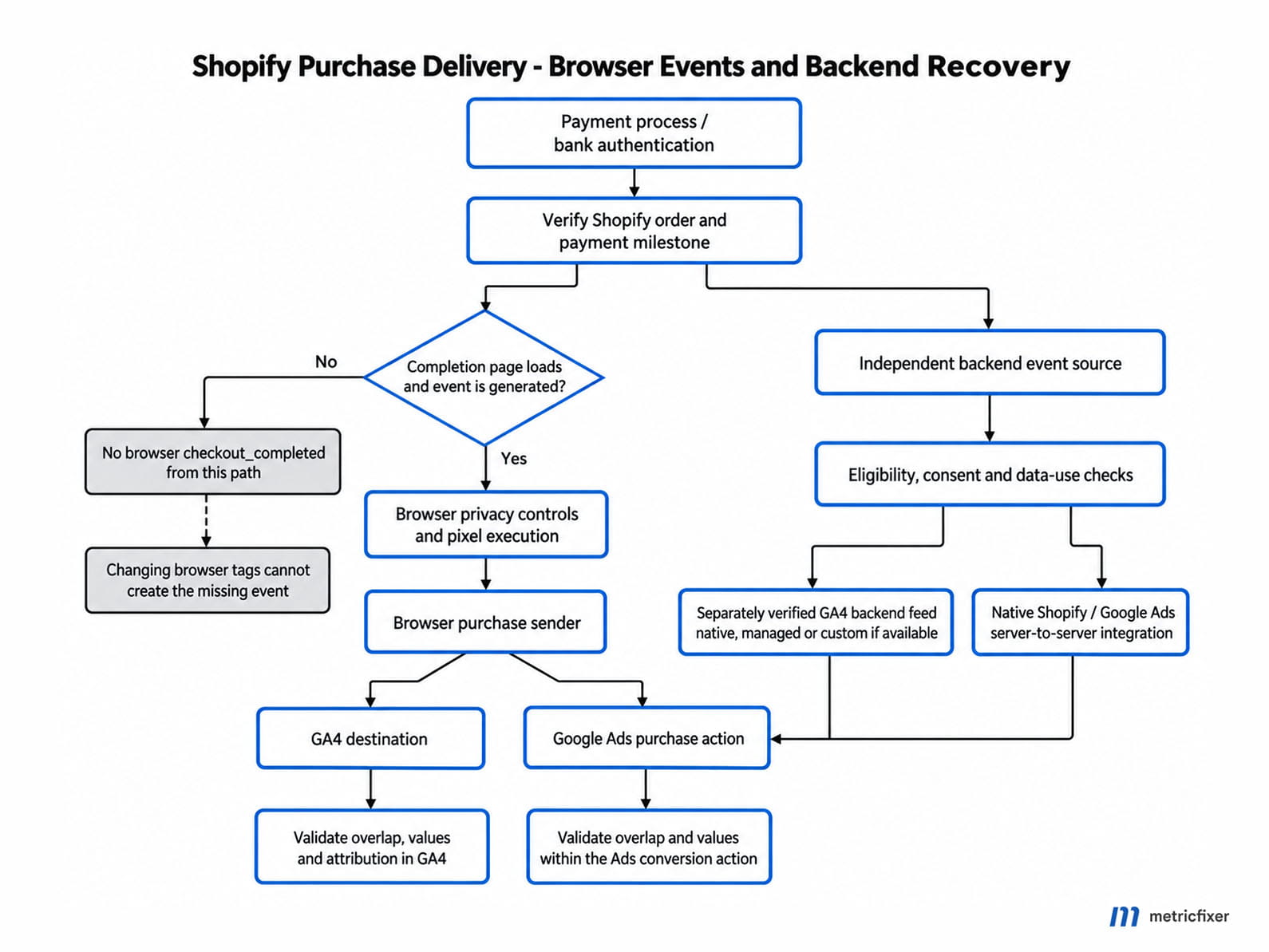
For the implementation pattern behind this distinction, see metricfixer's guide to tracking purchases across external payment gateways with webhooks.
Shopify privacy settings and Google Consent Mode are different layers
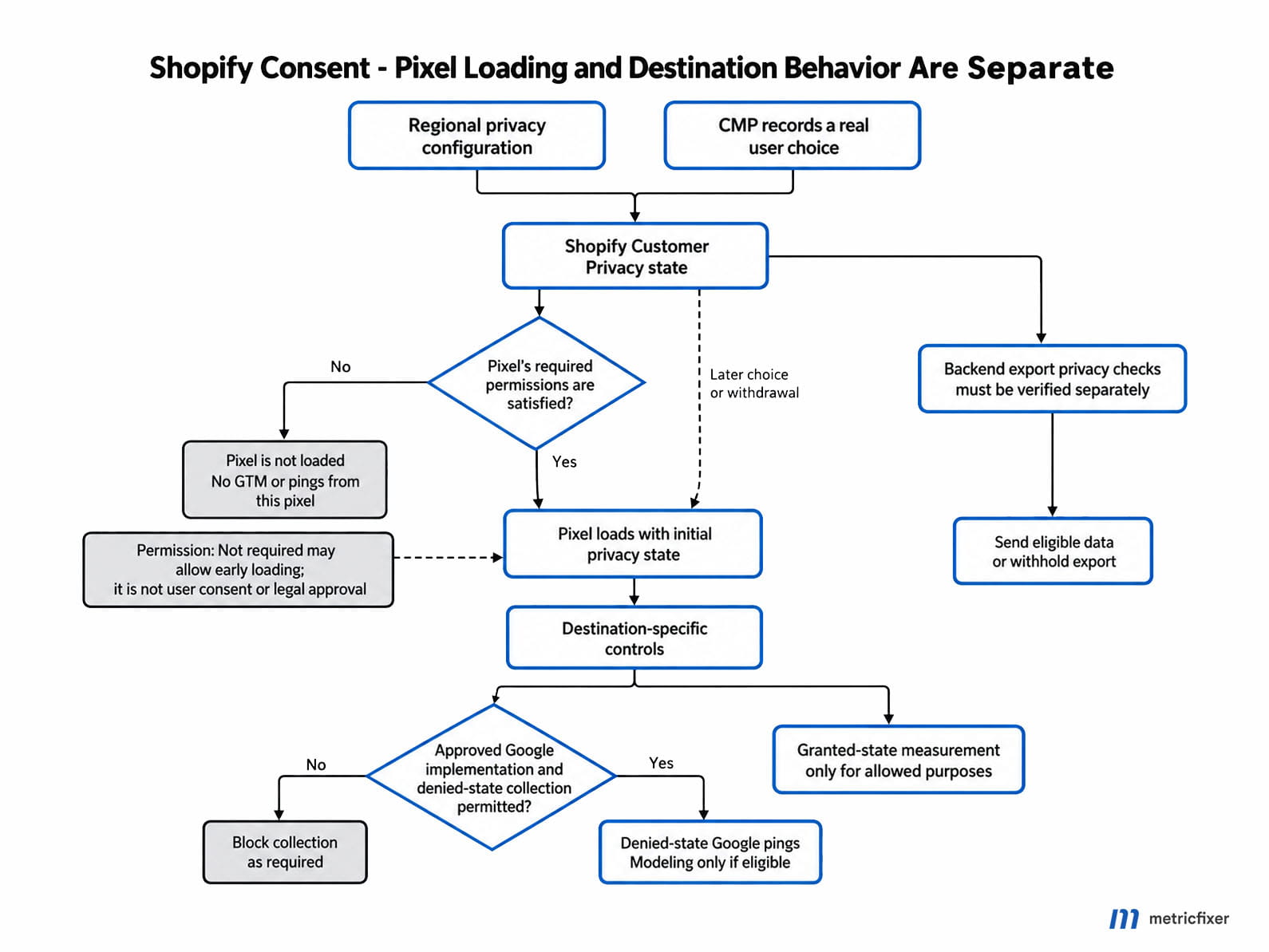
Shopify decides whether a pixel may run. Google Consent Mode determines how a loaded Google tag behaves. Confusing these layers leads to a common mistake: configuring Google tags for denied-state measurement inside a pixel Shopify never loads.
Shopify's Customer Privacy API combines the merchant's privacy configuration, the visitor's region and their recorded choice. Its processing permissions, such as analyticsProcessingAllowed(), are therefore not identical to evidence that someone clicked Accept. The API separately exposes currentVisitorConsent() and getRegion(). Read them together, following the Customer Privacy API documentation.
This explains why consent signals can exist without a visible banner. That observation alone proves neither correct consent collection nor a broken setup. Investigate whether the browser has an earlier choice, whether the detected region matches expectations, and whether that region is configured to require consent.
For an EEA visitor who has made no previous choice, an unexpected fully permitted state warrants investigation. It is not evidence that Google has detected improper consent and secretly discarded purchases. Separate the site's privacy configuration from the destination's actual collection and attribution behavior.
A third-party CMP needs a Shopify connection
A consent management platform can replace the banner interface, but not by maintaining an unrelated state only in the theme or a top-page GTM container. Shopify instructs merchants to align custom banner regions with the third-party configuration. Its documentation also warns that manually installed third-party tracking may need additional consent logic. See Shopify's third-party banner configuration.
Our recommended design is one user choice with several synchronized consumers: the CMP records the choice, Shopify receives it through its API, loaded measurement code receives an initial state and updates, and backend exporters enforce their destination-specific rules. Test both refusal and withdrawal, not only acceptance.
Inside a pixel, Shopify provides init.customerPrivacy and a visitorConsentCollected subscription. The initial snapshot matters because a visitor may already have a stored decision when the page loads. Waiting only for a new click misses that case. See Shopify's pixel privacy API.
A read-only diagnostic for the storefront
Run this in the storefront's top-frame console after the Shopify Customer Privacy API is available. It reports state without granting consent, loading tags or changing cookies. It does not inspect the separate GTM sandbox or prove legal compliance.
(() => {
  const privacy = window.Shopify?.customerPrivacy;
  if (!privacy) {
    console.warn("Shopify Customer Privacy API is not available here.");
    return;
  }

  const read = (name) => {
    try {
      return typeof privacy[name] === "function"
        ? privacy[name]()
        : "Unavailable";
    } catch (error) {
      return "Error: " + String(error);
    }
  };

  console.log({
    region: read("getRegion"),
    recordedChoice: read("currentVisitorConsent"),
    processingAllowed: {
      analytics: read("analyticsProcessingAllowed"),
      marketing: read("marketingAllowed"),
      preferences: read("preferencesProcessingAllowed"),
      saleOfData: read("saleOfDataAllowed")
    }
  });
})();
Capture the result before a decision, after Reject, after Accept and after withdrawal, then repeat in the checkout-supported diagnostic context. Our Consent Mode v2 diagnostic guide explains why a configured consent interface is not sufficient evidence that every destination receives the intended signals.
Advanced Consent Mode: useful, but not a transaction-recovery system
Version 2 and Advanced Mode are not synonyms
Consent Mode v2 includes the advertising signals ad_user_data and ad_personalization alongside storage controls such as ad_storage and analytics_storage. Basic versus Advanced describes deployment behavior. In Basic Mode, Google tags are blocked until consent; in Advanced Mode, they load with appropriate defaults and can send cookieless pings while consent is denied. Google's Consent Mode overview separates these concepts.
Advanced Mode can provide additional inputs for modeling. Basic Mode should not be described as having no modeling under any circumstances: Google's Basic and Advanced comparison distinguishes a more general conversion model from advertiser-specific modeling.
Neither deployment creates a missing backend order event. If no browser page or purchase event runs after payment, there is no browser purchase ping for that listener to send, regardless of how well its consent defaults were configured.
Modeling is conditional, not a guaranteed uplift
Google's published prerequisites for GA4 behavioral modeling include Advanced implementation across the relevant pages, at least 1,000 daily denied-state events for seven days, and at least 1,000 daily users sending granted-state events on seven of the preceding 28 days. Meeting these thresholds does not guarantee eligibility. These are behavioral-modeling requirements, not a universal threshold for every Google Ads or GA4 model.
A smaller store should therefore not buy an implementation on the promise that cookieless pings will automatically restore its entire funnel. Check eligibility and the reporting identity actually used.
Also distinguish estimates from records. Google's reporting-surfaces comparison explains that modeled data is not included in BigQuery export, while collected cookieless pings can be. Modeled totals cannot be treated as a recovered list of missing transaction IDs.
Cookieless does not settle the legal question
Denied-state pings are still data transmission. Google's technical description includes request information and consent signals; the absence of an analytics cookie is not a blanket declaration that no personal data or regulated device access is involved.
The ICO's storage and access technology guidance covers more than cookies, including pixels and scripts. CNIL likewise describes conditions and national variation around audience-measurement exemptions. Neither source is a general approval of every Advanced Consent Mode deployment.
Before enabling pre-consent collection, have the actual payload, purpose, regional requirements, notices, retention and downstream use assessed. A vendor's compatibility claim or Google certification does not replace that assessment. The correct objective is lawful, useful measurement, not making a rejected visitor appear consented.
The overlooked option: native Shopify purchases sent directly to Google Ads
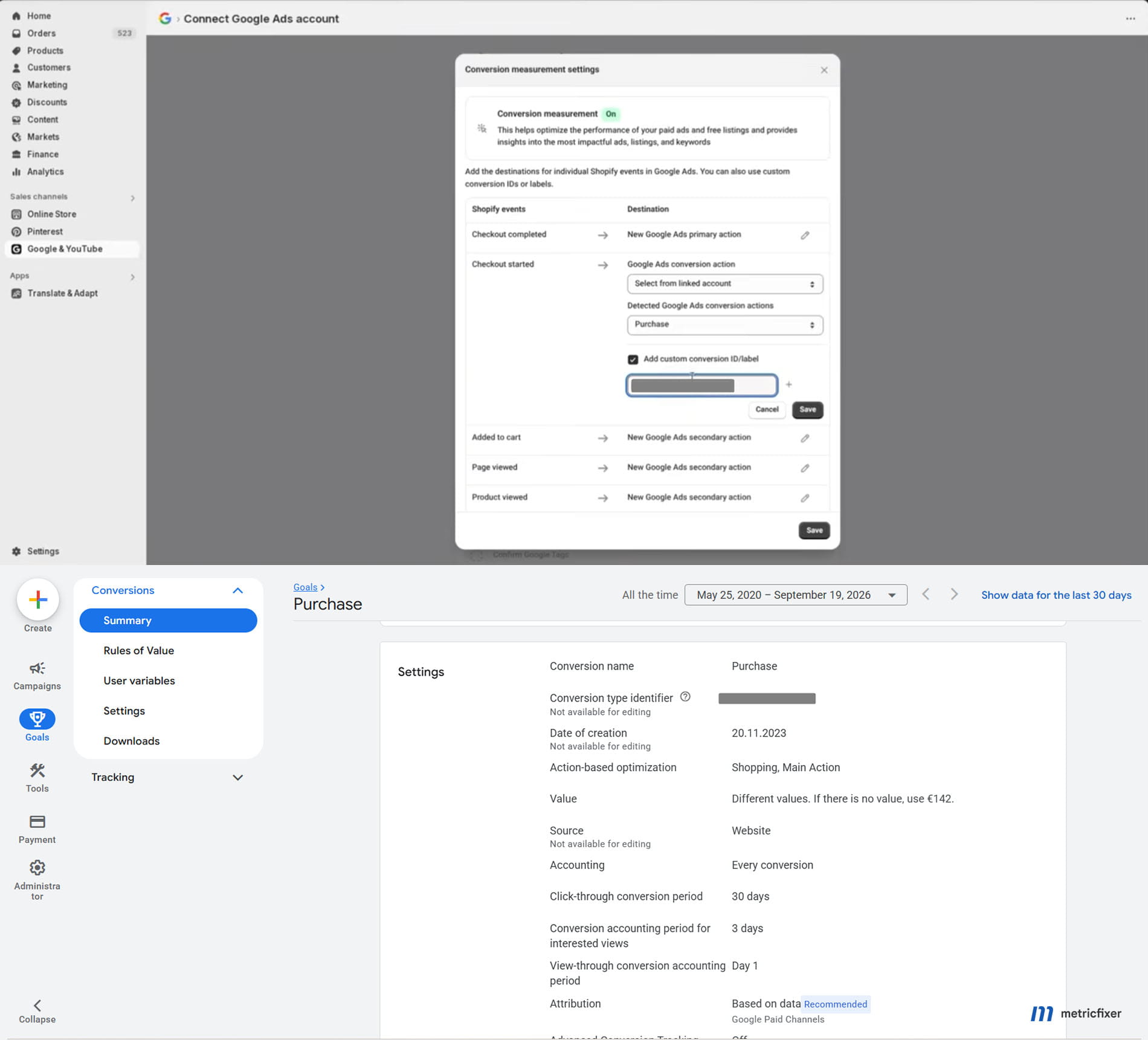
Google documents an upgraded Shopify connection through Data Manager that sends purchase data directly from Shopify's servers to Google Ads. It complements the Google tag, deduplicates overlapping deliveries and passes the result into Ads attribution. The documented event coverage is currently Checkout complete, not the whole ecommerce funnel. Activation depends on the Google & YouTube setup, conversion configuration, permissions and applicable terms; verify it in the account rather than inferring it from the app being installed. See Google's Shopify integration guide.
This changes the diagnostic question. Instead of asking only whether the browser sent purchase, also ask whether the intended Ads conversion action received an eligible server-origin event. That additional path can address a missing browser return, but its usefulness still depends on the event qualifying for measurement and attribution.
Shopify explicitly notes that server pixels remain subject to customer privacy settings. Server transport is not permission to send every customer record to advertising platforms.
Audit the destination and bidding configuration
In the Google & YouTube app, inspect the Checkout complete mapping. In Google Ads, inspect the resulting conversion action, its source and diagnostics, and the campaign goals using it. A Customer Match audience connection is not the same evidence as a working purchase feed.
For sales campaigns, our default is one validated purchase action for bidding, with duplicate measurement sources or funnel microconversions kept for observation where useful. Google's conversion-goal documentation explains that Primary status works together with the campaign's selected goal. A Secondary action inside a custom goal can still be used for bidding, so checking the label alone is insufficient.
Do not assume native Ads purchases and a separately imported GA4 purchase automatically collapse into one action. Google documents deduplication within a multi-source conversion action, not across independent actions. Keep transaction IDs consistent and avoid counting the same business result twice in the goals used for optimization.
One migration trap deserves special attention: Google's Shopify guide says disabling Checkout completed measurement in the linked account disables both its browser and server-side purchase measurement. Removing a browser duplicate through the wrong control can therefore remove the recovery path as well.
Why this can improve Smart Bidding without repairing GA4
A direct Ads feed and a GA4 feed are separate destinations. Recovering an eligible purchase in Ads does not automatically insert that purchase into GA4. Where GA4 remains browser-dependent, Ads may gain a useful signal while GA4 still misses the transaction.
Conversely, do not assume every current GA4 setup is browser-only: inspect any native, imported, managed or custom server purchase source already present. Google's web purchase diagnostics distinguish Google tag, Measurement Protocol and imported data issues. Verify GA4 coverage independently before commissioning another sender.
The commercial benefit to evaluate is a more complete and correctly valued eligible bidding signal, not numerical equality between all Shopify orders and Ads-attributed conversions. After a measurement change, annotate the date: higher reported conversions can reflect better capture rather than better sales performance.
Custom Pixel plus GTM: technically possible, but not a supported Google shortcut
Shopify still exposes standard customer events through its Web Pixels API, including product, cart and checkout progression events. Custom pixels can subscribe to these events and pass selected information to their own dataLayer. A diagnostic subscription to all_standard_events is possible, but production mapping should be explicit because event collections can evolve. See the Web Pixels API.
The familiar mapping remains useful: product_viewed to view_item, product_added_to_cart to add_to_cart, cart_viewed to view_cart, checkout_started to begin_checkout, and checkout_completed to purchase. These are event subscriptions, not unrestricted access to checkout HTML.
However, a Shopify tutorial is not a cross-platform support guarantee. Shopify's GTM tutorial describes an advanced, unsupported customization. Google is more explicit: running Google tags inside Shopify's custom pixel sandbox is not a supported implementation.
Google identifies potential limitations affecting enhanced conversions, cross-domain measurement, automatic events, URL passthrough and diagnostics. Seeing a GA4 request in Network does not demonstrate that these other features work. Nor does it establish reliable Google Ads attribution.
Custom pixels run in a lax sandbox. Treat their window, document and data layer as a separate execution context, not the storefront's top frame. Use Shopify-provided event context and the supported browser API where needed. A banner, DOM-based trigger or cookie operation that works in a theme container cannot simply be assumed to work identically inside checkout's pixel environment.
Can a custom pixel enable denied-state measurement?
Architecturally, yes, but it is a specialist option with separate technical, platform-support and legal questions. Shopify lets a merchant configure a custom pixel's required permissions or choose Not required. If the pixel is blocked pending a required purpose, no GTM code inside it can send pre-consent pings. If it can load earlier, its implementation must correctly enforce the allowed behavior itself. See custom pixel privacy settings.
This is a change in where collection is controlled, not a reason to falsify Shopify consent. Do not call setTrackingConsent() with invented positive values to unblock a pixel. Shopify's API documentation specifically requires that updates reflect the visitor's choice.
A defensible design needs consent established before relevant tags execute, an initial snapshot plus later updates, minimized denied-state payloads, and separate blocking for destinations that cannot use those signals. Consent Mode does not automatically make Meta pixels, session replay tools or arbitrary Custom HTML tags safe to run before consent.
Keep the CMP interface in its supported storefront or checkout integration, outside the tracking sandbox. Test direct-to-checkout entry as well as a shopper who first visited the storefront. Build this only when a named engineering owner accepts the sandbox limitations and maintains regression tests. It is not our default recommendation for a merchant seeking the simplest reliable Google setup.
Real backend recovery is different from a server-side relay
Consider two designs. In the first, a browser event goes to a server-side GTM endpoint, which forwards it to GA4. In the second, an authoritative Shopify order or payment transition generates a backend event independently of the browser. Both involve servers, but only the second can originate a purchase when the browser event never existed.
For a custom backend, our recommended design is an authenticated event receiver, durable queue, explicit order-state rules, destination-specific consent checks and a persistent delivery ledger. The ledger should record the shop, order, event purpose, destination, attempt and outcome. That makes investigation possible without relying on a screenshot of a fired tag.
Shopify documents webhook signature verification, possible duplicate deliveries and reconciliation using its APIs. Implement idempotent processing: receiving the same business event twice should not create a second purchase. See Shopify's webhook delivery guidance. A successful webhook acknowledgement is not proof that Google accepted and reported the downstream event.
Backend collection also needs attribution design. For web-stream Measurement Protocol requests, Google specifies that client_id should match the ID generated by the site's Analytics tag. An arbitrary order ID, Shopify customer ID or newly generated visitor ID is not a substitute for that browser linkage. See Google's Measurement Protocol sending guide.
Preserve permitted identity and session context before it is lost, and follow the chosen ingestion method's timing and consent requirements. Do not fabricate identifiers or consent to force an attribution match. Our GA4 Measurement Protocol attribution guide covers why receiving a server event and attributing it to the intended session are separate tests.
For purchases sent through more than one path, agree on the same transaction ID and value definition, then test the destination's overlap behavior. Do not treat a second purchase as a universal update command. GA4, Google Ads and advertising APIs have different processing rules.
Paid Shopify tracking apps: what the public evidence supports
A paid app can reduce implementation and maintenance work. It does not remove the need to ask where purchases originate, how consent is enforced and what identifiers reach each destination. The following comparison concerns documented capabilities, not measured accuracy or a performance ranking.
| Option | Documented capability | What still needs verification |
|---|---|---|
| Fueled Attribution Suite | Its Shopify listing advertises browser/server tracking for GA4 and advertising destinations. | Current Advanced Consent Mode behavior on both storefront and upgraded checkout; declined-consent exports; payment-state and identity rules. |
| Littledata | Its Consent Mode documentation explicitly describes Advanced Mode and cookieless pings through Shopify Customer Privacy integration. | Actual behavior for the selected plan, CMP, checkout surface and server destination; no-return purchase recovery and attribution quality. |
| Elevar | Its v2 integration guidance and March 2026 release notes document consent controls, including an optional Strict Consent Mode. | Which selected settings block collection entirely and which permit limited Google measurement; storefront/checkout consistency and purchase-source independence. |
Has Fueled implemented Advanced Consent Mode?
The public material reviewed does not establish a current, verified answer for the complete Shopify checkout scenario. This is not the same as concluding that the feature is absent.
There is more evidence than just a roadmap promise: Fueled's co-founder published a June 2023 article explaining denied-state GA4 measurement and positioning its apps as a solution. But an older explanation and broad product claim do not establish current storefront-plus-checkout behavior, v2 coverage, plan availability or backend treatment of declined consent.
The implementation docs also describe a custom pixel for checkout steps. That is evidence of a checkout integration, not by itself proof of pre-consent cookieless measurement or of a browser-independent purchase trigger.
One concrete configuration risk is documented: Fueled offers different transaction ID formats, including a hashed ID, Shopify's original ID and an order number, and a choice between subtotal and total purchase values. Check these GA4 connector settings before retaining another purchase sender. Different identifiers for the same order can undermine an intended overlap strategy.
For procurement, request a demonstration with the proposed plan and a fresh EEA browser: before any choice, after Reject, after Accept and after withdrawal. Ask for the network payloads and backend export decisions, not only a statement that the product supports Consent Mode v2. Obtain the release/version and checkout coverage in writing.
What stronger vendor evidence looks like
Littledata's explicit Advanced Mode documentation makes that feature easier to evaluate than a generic consent-compatibility badge. Its pixel setup guide also describes permitting its advanced pixel to load while handling consent through Shopify's API. These are vendor-documented mechanisms, not an independent compliance certification or a guarantee of recovered transactions.
Elevar's banner compatibility guide requires initial consent, changes and defaults when a banner is absent. Its optional Strict mode deliberately prevents collection before consent. Ask which mode will be deployed: the same product name can cover materially different measurement behavior.
Across all providers, ask who originates purchase, which order milestone it represents, whether a no-return order is still delivered, what is withheld after refusal, and how overlapping native events are handled. No app should be selected solely because its marketing page says server-side.
Which architecture should a Shopify store choose?
Our recommendation is to choose the least complex setup that passes the required tests, rather than the architecture with the largest number of components.
| Store requirement | Recommended starting point | Reason to go further |
|---|---|---|
| Reliable Google Ads purchase bidding with modest engineering capacity. | Verify the native Google & YouTube setup, direct Ads purchase feed and campaign goals. | Demonstrated coverage, value or business-rule gaps remain. |
| More complete GA4 purchases. | Inventory every existing GA4 source and reconcile observed transaction IDs. | Eligible orders are missing and no current backend path recovers them. |
| Denied-state measurement and modeling. | Assess legal basis and modeling eligibility; evaluate an explicitly documented managed implementation. | Supported options cannot meet a documented requirement. |
| Paid-only conversions, complex order changes, subscriptions or several destinations. | A managed or custom backend with explicit state, consent and delivery rules. | Greater control justifies its development and operating cost. |
| A fully customized event pipeline. | Specialist engineering with sandbox-aware testing and a named maintenance owner. | Accept the Google support limitations before choosing GTM inside a custom pixel. |
Do not replace a working native connector merely to gain a more familiar GTM interface. Conversely, do not keep an opaque integration solely because it is native when the business requires auditable paid-only measurement it cannot demonstrate. The acceptance tests should decide.
Budget for monitoring, regression testing and incident investigation, not just installation. A small setup with known limitations is often more useful than a larger stack whose owners cannot explain why a particular order was sent twice or withheld.

A practical audit and acceptance-test plan
1. Preserve a baseline and inventory every sender
Before changing code, record the current app configuration, custom pixels, theme tags, legacy scripts, server endpoints and conversion actions. Include any implementation created during a checkout migration. Google documents that an un-migrated legacy Analytics setup could have been converted into a custom pixel, with resulting limitations; see its Google tag migration guide.
For every destination, name the owner of each business event. Identify whether a server receives browser telemetry or originates events from Shopify's backend. A public HAR cannot show a server-to-server request made between Shopify and Google, so network inspection alone cannot complete this inventory.
2. Build a comparable order cohort
Select a period that allows the relevant reporting and payment delays to settle. Separate sales channels, payment methods, currencies, refunds, test orders and the agreed purchase milestone. Distinguish visitor location from shipping country: a Romanian delivery address does not prove the buyer browsed from Romania.
For each GA4-eligible order, compare the canonical order ID with observed transaction_id, amount, currency and source evidence. Keep unknown consent state as unknown; do not silently classify it as granted to improve a capture ratio.
3. Test consent before testing optimization
Use fresh browser profiles in the regions that matter to the business, plus returning profiles with saved choices. Record consent before interaction, after refusal, after acceptance and after withdrawal. Verify storefront, direct checkout and return-from-payment behavior. Inspect both browser storage and requests; a banner screenshot is not enough.
Check server destinations separately. Ask for evidence of withheld exports where required. A compliant browser does not establish that a separate backend upload follows the same rules.
4. Follow each event through the pipeline
Confirm the sequence view_item, add_to_cart, view_cart, begin_checkout and purchase in the scenarios where each should occur. Do not require a cart-page event when the customer used a direct-buy route and never viewed a cart page.
Shopify's GTM tutorial recommends the Shopify Pixel Helper for custom-pixel testing and identifies limitations with Google's troubleshooting tools in the sandbox. Use pixel execution evidence, network payloads and processed destination data together. A tag marked as fired is only one checkpoint.
5. Run a controlled checkout matrix
The following is our recommended acceptance matrix. Execute it on real desktop and mobile browsers used by customers, not only responsive desktop emulation. Use test-mode payments where representative; any real payment tests require merchant approval.
| Scenario | What to establish | Expected evidence |
|---|---|---|
| Accepted consent, normal payment return. | Baseline browser and any backend paths. | Correct order milestone, payload, destination and no unintended duplicate. |
| Accepted consent, successful payment but completion page blocked. | Whether purchase recovery is browser-independent. | Backend order plus server-delivery evidence despite missing browser completion. |
| Return page loads but analytics request is blocked. | Whether transport recovery works. | Browser failure isolated from any successful server delivery. |
| Rejected consent, then checkout. | Basic versus permitted Advanced behavior and backend restrictions. | No disallowed collection; only the explicitly approved limited measurement, if any. |
| Accepted analytics, rejected marketing. | Purpose separation. | Analytics and advertising destinations follow their respective permissions. |
| Cancelled or failed bank challenge. | False paid conversions. | No paid-only purchase without a qualifying backend payment state. |
| Pending payment, later capture. | The chosen order-versus-payment definition. | Events follow the agreed milestone rather than an arbitrary page visit. |
| Refresh, back navigation and repeated webhook delivery. | Repeat handling. | No additional business purchase from the repetition. |
| Discounts, several quantities, another currency and refund. | Value semantics across destinations. | Amounts reconcile to the documented revenue definition. |
A positive no-return result establishes coverage only for that payment method, order state, consent state and integration version. Repeat meaningful variants rather than claiming universal accuracy from one successful test.
6. Verify processing and attribution separately
In GA4, check processed purchases and transaction IDs, not just DebugView. Where available, review purchase diagnostics for missing identifiers or poor transaction-ID overlap. In Google Ads, distinguish a received event from an attributed conversion. A test order without an eligible advertising interaction is not expected to prove campaign attribution.
Do not promise an order-by-order export from standard Ads reports: Google's transaction-ID guidance explains its role in deduplication, rather than providing an order register. Use the evidence exposed by the integration and destination, document visibility gaps and reconcile the commercial record independently.
7. Measure improvement without hiding the remaining gaps
Report observed coverage using an explicitly defined denominator, such as unique eligible online-store orders at the agreed milestone. Track unexplained missing orders, duplicate deliveries, value mismatches and attribution changes separately. Keep modeled totals out of the observed-ID reconciliation.
Record the deployment date, changed sources and bidding-goal changes. Compare like-for-like cohorts before and after the change. A reporting increase with flat backend sales is measurement improvement, not evidence of revenue growth caused by advertising.
- [ ] Each purchase destination has a named source, owner and business definition.
- [ ] Consent refusal, acceptance and withdrawal are tested across relevant surfaces.
- [ ] Normal-return and no-return payment paths have separate evidence.
- [ ] Transaction IDs, amounts, currencies and repeated deliveries are reconciled.
- [ ] Bidding uses the intended purchase action without unintended double-counting.
- [ ] Remaining unknowns, processing delays and monitoring responsibilities are documented.
The best solution is a verified combination, not a universal replacement
For a typical Google-focused Shopify store, start with a correct native integration, aligned privacy settings and a confirmed direct Ads purchase path. That is a more defensible first move than rebuilding every event inside GTM.
Where GA4 still misses eligible orders, choose an independently generated backend feed with appropriate identity, consent, value and repeat-handling rules. Where consent-related modeling is the goal, assess Advanced Consent Mode separately and validate the actual implementation rather than relying on a feature label.
Payment-return recovery, consent-aware collection and attribution are three different jobs. The most reliable architecture gives each job an explicit owner and proves the result with controlled tests. It does not claim that a cookieless ping, a server endpoint or an installed app makes the entire funnel perfectly observable.
Methodology and sources
This review was prepared against public documentation available on 19 September 2026. The technical baseline is Shopify's checkout events, Web Pixels, Customer Privacy and webhook documentation, together with Google's Shopify integration, custom-pixel limitations, Consent Mode, purchase diagnostics and conversion-goal guidance. Source links are placed beside the relevant claims.
The architecture recommendations and acceptance matrix are metricfixer's proposed evaluation framework. They are not results from a controlled benchmark of the named services. We did not conduct live merchant payment tests or inspect private app, GA4 or Ads accounts for this publication. No percentage of lost or recoverable purchases is asserted.
Vendor capabilities are attributed to the vendors' own listings, documentation and release notes. Fueled's current end-to-end Advanced Consent Mode behavior could not be established from those materials. Lack of public verification is not proof that the feature is unavailable.
The verified native server-to-server description in this review is destination-specific to Google Ads. Public reports of a separate GA4 Shopify rollout were not sufficient to establish its precise technical behavior or activation for every store against an accessible primary specification. Consequently, this review does not assume that every native GA4 setup is browser-only or that every store already has backend GA4 recovery. Confirm the actual source inventory before making changes.
This article provides technical and operational information, not legal advice. Consent obligations depend on jurisdiction, purposes, data flows and implementation; cookieless or server-side collection is not automatically exempt. metricfixer is not affiliated with Shopify, Google, Fueled, Littledata, Elevar or the consent providers mentioned. Product behavior, integrations, eligibility and interfaces can change. No implementation described here guarantees complete attribution, recovery of every transaction or a particular advertising result.