
Published Nov 10, 2026
Meta Detected Offers: How to Audit and Stop Unwanted Ad Discounts
Meta can surface website offers in copied ads even when promotions were disabled in the original. Learn where to check the controls, test coupon validity and prevent unwanted discounts.
Category: Online advertising · By metricfixer Expert Team
Meta can display offers found on an advertiser's website and in its ads through a Commerce Manager setting that is easy to overlook. A reported duplication notice also warns that promotions can appear in a new ad even when they were disabled in the original. This guide explains what the evidence establishes, where to check Detected offers, and how to catch expired, restricted or commercially inappropriate discounts before customers encounter them.
Practical starting point: open Commerce Manager and review Settings → Offer merchandising → Detected offers in the correct business context. Where every promotional claim requires approval, disable detected-offer display, verify the saved state, and review other promotion sources separately. Then test suspicious offers against the store's actual checkout rules. Research reviewed: 9 November 2026.
Contents
Executive summary
The immediate issue is not that Meta has invented an entirely new kind of discount. It is that the place where an advertiser edits an ad may not be the only place controlling which offers accompany it.
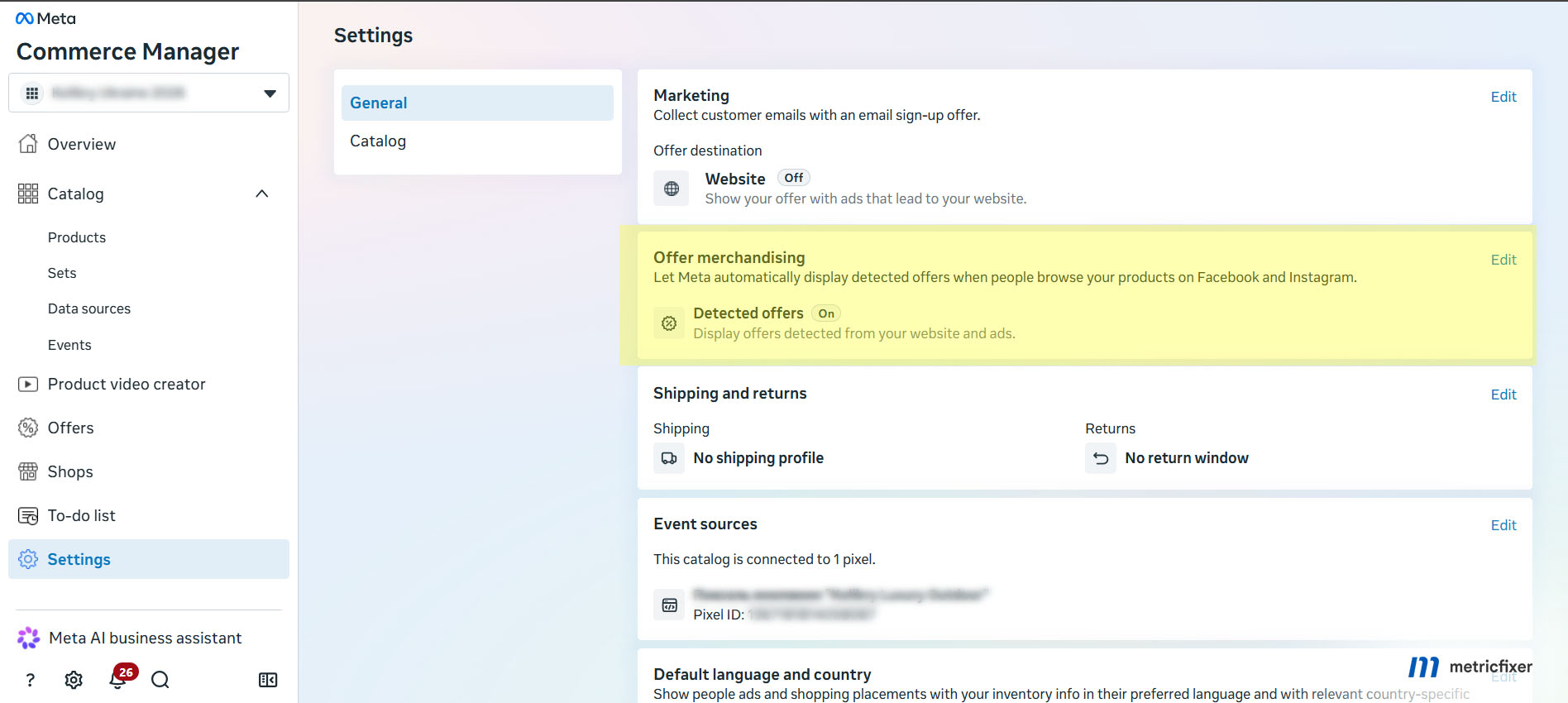
Bram Van der Hallen's public observation, covered on 6 November 2026, shows an ad-duplication warning and the Detected offers setting in Commerce Manager. The warning concerns the newly created copy: promotions disabled in the original may still be eligible for the new ad. The pictured control allows offers detected from the website and ads to be displayed.
For advertisers, the useful response is a three-part check: permission to advertise the offer, accuracy of the customer-facing claim, and successful redemption under the promised conditions. A valid coupon can still be wrong for a campaign. An expired coupon can still be mentioned on a live page. A correct settings screenshot does not establish what every customer saw.
Our recommendation is to use an approval-first approach where discounts are restricted, margins are sensitive or the team cannot respond quickly. Controlled automation is an option for simpler offers, but only after source cleanup, checkout testing and a clear decision about which advertising contexts are acceptable.

What the evidence shows
The strongest recent evidence is a visible interface warning, not a published worldwide launch schedule. The 6 November observation does not establish that every existing ad was changed, that every account has the control, or that the checkbox is enabled by default everywhere. Treat those as separate questions requiring account-specific evidence.
Automatic offer discovery also predates this report. Coverage published on 22 July 2024 described Meta detecting offers from a URL entered during ad setup. Jon Loomer has separately documented Offers in Ad Sources. The current operational concern is therefore the interaction between promotion sources, Commerce Manager controls and newly duplicated ads, rather than a claim that website scanning began in November 2026.
In the interface reproduced in PPC Land's 6 November report, the settings are divided as follows:
| Control | Where it appears | What the displayed description covers |
|---|---|---|
| Detected offers | All ads | Offers detected from the advertiser's website and ads. |
| Sale events | Ads leading to shop or product browsing | Sale events detected from ad creative text. |
| Seasonal event names | Ads leading to shop or product browsing | Seasonal names displayed beside related offers. |
These are the labels in the reported interface, not a complete eligibility specification. In particular, All ads is not evidence that one change covers every business, shop, catalog and ad account managed by an agency.
Where to turn off Detected offers
The route shown in the public observation is Commerce Manager → Settings → Offer merchandising → Detected offers. Use it as the starting point for this account-specific check:
- Confirm the selected business and commerce assets. Record the relevant shop or catalog and associated advertising account where identifiable. Do not change a similarly named client's settings by mistake.
- Capture the current state. Record the date, selected asset and checkbox state before changing it. An enabled setting indicates a configuration, not proof that a particular offer received impressions.
- Disable Detected offers when automatic display is not authorized. Save or confirm the change as the interface requires. Reopen or refresh the page and check that the disabled state persists.
- Review the adjacent controls separately. Decide whether sale-event and seasonal-label automation is appropriate for the shop or product-browsing experience. Do not assume they are interchangeable with the detected-offer control.
- Inspect the available offer inventory. Follow Manage all offers where present. Compare entries with approved promotions and inspect any available source, dates, status and exclusions. Do not assume every field or a per-offer exclusion is available.
- Review a new draft copy before publishing. Check promotion-related settings, available placement previews and the destination. Recheck after changes rather than relying on the original ad's configuration.
When the control is missing: confirm the asset selection and ask the owner to check your permissions. Record the setting as unverified, not disabled or irrelevant. Use an available official support route to ask about that account's control and scope. Do not create an unnecessary shop or disconnect a working integration just to make a menu appear.
Disabling this source should not be treated as a universal removal command. Review offers written into creative, manually configured promotions, catalog prices and connected commerce sources as separate audit items. Never assume that the switch changes the store's coupon rules.
A working code is not an approved offer
An offer needs to pass three different tests. Commercial validity asks whether the business currently intends to honor it. Redemption validity asks whether the checkout applies it correctly. Advertising suitability asks whether that promise belongs in this ad, for this audience and destination.
The following are scenarios to test, not measured incident rates or claims that Meta always makes these mistakes.
| Scenario | Why a simple code test is insufficient | Required decision |
|---|---|---|
| Expired sale still visible | The page promises a discount that checkout rejects. | Retire the live promotional claim and stop affected advertising. |
| Old code still redeemable | The checkout accepts it, but the business no longer approves its use. | Confirm retirement with the offer owner; do not mistake a missing end date for approval. |
| Welcome or loyalty discount | A test account qualifies, but many ad recipients may not. | Check customer eligibility and whether the restriction can be communicated clearly. |
| Selected products or markets | The tested item or delivery country qualifies; others do not. | Match the claim, advertised products and destination to the offer's real scope. |
| Minimum spend, cap or exclusions | The headline omits a condition that changes the saving. | Test boundaries and reject advertising formats that cannot represent essential terms. |
| Service-recovery or private code | The code may legitimately work for a narrow purpose. | Exclude it from public promotion without automatically removing a valid customer entitlement. |
There is no evidence in the reviewed material that this feature can freely read a store's private discount database. Nevertheless, check whether private offers have been exposed through public pages, ad text or connected systems. The audit should establish a route, not assume one.
Audit the sources, not just the landing page
Start with the offers customers could encounter now. Review active ads and recent duplicates, their destination pages, shared banners, product templates and the offer inventory available in Commerce Manager. Then examine previous sale pages, reusable CMS blocks, translated versions and old promotional creative.
Source separation matters. In his first-hand walkthrough of highlighting promo codes, Jon Loomer describes sourcing from creative, existing ad inventory, the website and synced Commerce Manager offers. That is useful background, not proof that every historical control behaves identically in the current interface.
For Shopify and other connected stores, inspect the integration as well as website discovery. A product-price sync, a shared discount link and a detected website offer are different mechanisms. Shopify's product-publishing documentation, for example, says product-detail changes sync from Shopify to Meta. Trace an incorrect catalog price to its authoritative source instead of assuming the Detected offers checkbox will correct it.
Create a small offer register
For each suspicious or actively advertised offer, record its owner, code or identifier, approved wording, start and end time with time zone, eligible products and customers, markets, minimum spend, discount cap, stacking rules, public-advertising approval, known source locations and last test result. Keep private codes and customer information in a restricted operational record, not a public article or analytics URL.
Use the register to compare three things: what the business approved, what the customer sees, and what checkout enforces. Record unresolved differences explicitly. A blank expiry field should trigger a question, not be interpreted automatically as an evergreen promotion.
Find stale material efficiently
Search CMS exports and ad inventories for known expired codes, discount symbols, sale phrases and historical dates. Include relevant languages. Group findings by reusable component: correcting one global banner can be more useful than editing hundreds of individual pages.
A text scan is only a candidate list. Review image banners and video overlays separately, and compare rendered mobile pages with the underlying published content. This is an audit recommendation, not a claim that Meta reads every format or crawls the whole domain. Search-engine results can help locate forgotten URLs, but cannot prove that no other source exists.
Test suspicious offers at checkout
Do not stop at the discount administration screen. Test the customer journey and the conditions surrounding the claim. The procedure below is our recommended quality check, not a Meta certification process.
Establish the expected result
Ask the offer owner for the intended result before testing. For an expired offer, the expected result is normally that it is no longer promoted and cannot be redeemed, subject to any deliberately retained customer entitlements. For a restricted but current offer, the expected result includes both successful eligible redemption and correct rejection outside its scope.
Shopify's discount-code documentation illustrates why these checks matter: dates, usage limits, minimum order amounts, product eligibility and combination rules are configurable. Scheduled times use the store's configured time zone. Do not assume that the ad account, store and customer's local clock agree.

Use clean and eligible customer contexts
Begin with a fresh session and an empty cart, then test the required customer state. A staff account or returning customer is not a valid substitute for a first-time buyer. Where relevant, test guest and authenticated checkout, the intended delivery country and currency, and both a normal mobile browser and the Facebook or Instagram in-app journey.
Be particularly careful with discount links. Shopify documents that a discount applied through a shareable link can remain associated with the cart and browser. Reusing that session can make a later test appear to work for the wrong reason. Record whether the saving came from the submitted code, an automatic discount or an already-applied offer.
Test positive and negative cases
| Test | What to try | What to record |
|---|---|---|
| Eligible purchase | The advertised item or variant, qualifying customer and valid date. | The actual discount, currency and final payable amount. |
| Threshold boundary | A qualifying subtotal just below and at the minimum, using the store's actual calculation rules. | Correct rejection below the boundary and the expected saving at it. |
| Excluded purchase | An excluded item, customer group or delivery market. | No unauthorized discount and a comprehensible explanation. |
| Cap and combinations | A larger basket and another active promotion. | The maximum saving and whether discounts combine as approved. |
| Expiry and usage | An already-expired code or a controlled test of a usage limit. | Rejection for the correct reason, rather than an unrelated cart error. |
| Ad-to-checkout journey | The actual destination and available mobile journey, including any product-browsing step. | Consistent promise, eligible products and redemption instructions throughout. |
Discount combinations deserve a separate check. Shopify's combination rules distinguish product, order and shipping discounts, with configuration and eligibility conditions. A failed combination is not automatically an expired coupon; an unexpectedly large saving may be a stacking problem.
For a future expiry, verify the configured timestamp and schedule a check after it passes. Do not move a live production offer's dates merely to force a test. Use a sandbox or an authorized test offer for destructive boundary and usage-limit checks.
Usually the basket and checkout calculation can be checked without completing payment. If order completion is necessary, use an approved test-order process and prevent test activity from contaminating business reporting where your setup permits. Never consume a customer's single-use benefit or submit a real order without authorization.
Separate configuration, preview and delivery evidence
Retain the saved setting, the draft or preview, checkout results and any genuine delivered-ad evidence as different records. A preview containing an incorrect offer is enough to stop publication. A preview without one is not proof that every delivery variation is clean.
The Meta Ad Library is a supplementary check, not an immediate clearance test: its published interface says new ads and updates can take up to 24 hours to appear. That is a library-update interval, not a Detected offers refresh or removal guarantee.
Respond to an incorrect offer
When a wrong offer is confirmed, contain the exposure before spending time on a complete historical audit. Capture enough evidence to identify the ad, claim, time and context, but do not leave a harmful promotion running merely to improve the incident record.
Stop the affected advertising where necessary. Pause the relevant ads or a broader unit when the scope cannot be isolated safely. Disable unauthorized detected-offer display where accessible and verify the saved state. Keep affected delivery paused when the corrective control or its scope remains uncertain; do not wait for an assumed recrawl deadline.
Repair the actual source. Update the page or shared banner, correct promotional creative, amend a manually managed offer, or fix the originating feed or integration as appropriate. Where a globally retired coupon still works, have the store owner deactivate it. Where it remains legitimate for specific customers, restrict public advertising instead of blindly invalidating their benefit.
Preserve useful historical content. An old sale article may remain as an archive, but should not retain a live-looking redemption module or current purchase promise. Correct the published source and relevant cached versions. Do not treat CSS hiding, noindex, a robots rule or a structured-data date as a verified opt-out for this advertising feature: the evidence reviewed here establishes no such control.
Retest and release deliberately. Recheck the source, saved configuration, fresh draft or duplicate and checkout. After authorized publication, review available live evidence and customer feedback. If the unwanted offer persists or the origin cannot be established, keep the affected scope contained and escalate with redacted evidence. Do not promise an immediate platform-wide purge.
Give customer service the approved explanation and remedy process. Decisions about honoring a disputed claim require the business's own policy and applicable legal advice, not an assumption that advertising automation removes responsibility.
Build an expiry and recheck workflow
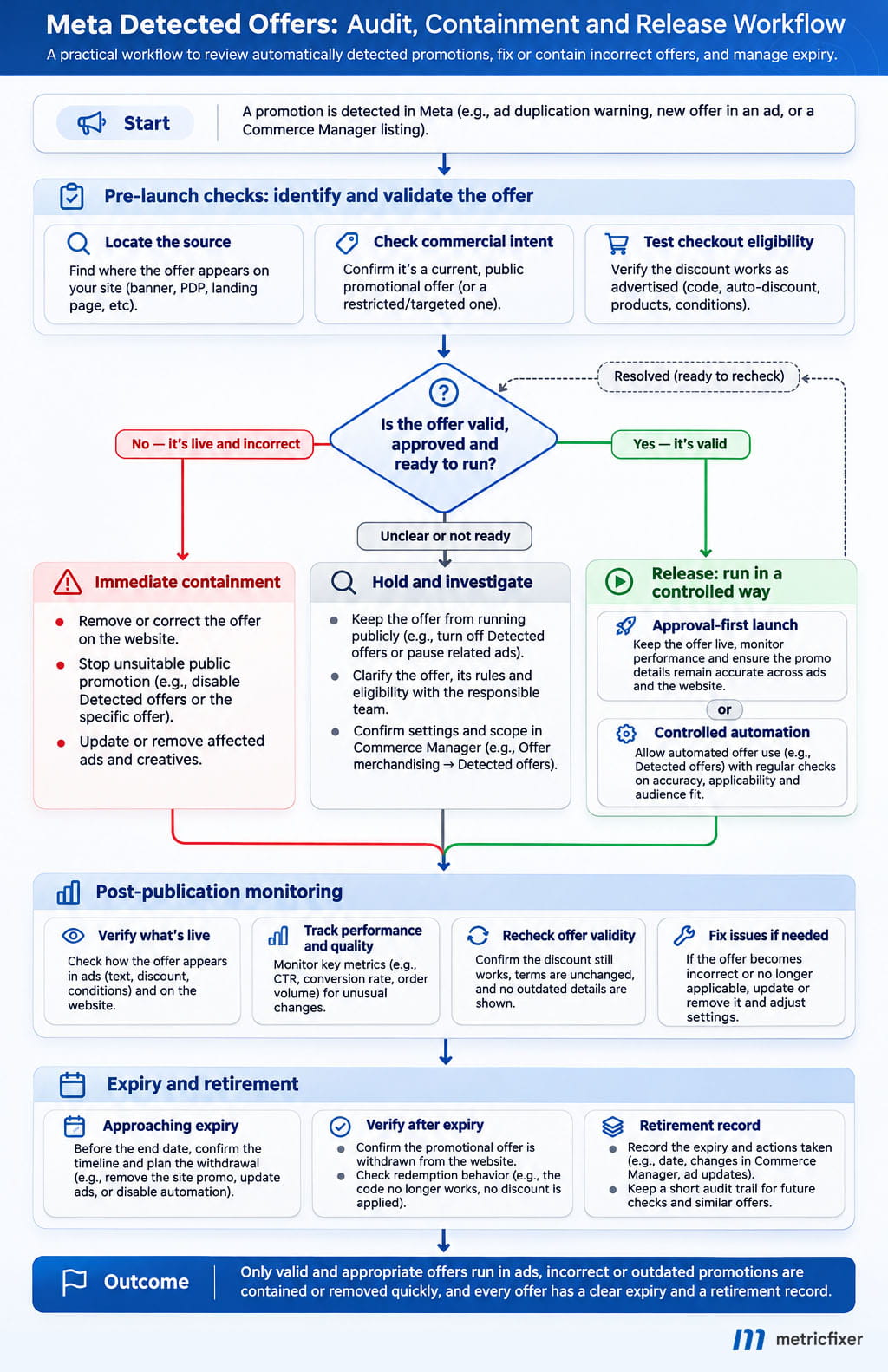
The most reliable long-term improvement is an offer lifecycle owned jointly by ecommerce and paid media. The promotion should have an owner before publication and a retirement action before its end date arrives.
At expiry, review the website, paid creative, available offer inventory, connected commerce sources and checkout together. Removing a banner is not a complete retirement record. Neither is disabling a coupon while advertising still promises the saving.
Recheck after changes that could invalidate the previous approval: an ad duplication, new campaign phase, code edit, product exclusion, market expansion, integration change or website release. Around a major sale, assign checks at launch, at each offer change and immediately after expiry. Add monitoring frequency according to exposure and response capacity; these are operating recommendations, not Meta refresh intervals.
For larger catalogs, automate comparisons against the approved register and send exceptions to an owner. Useful alerts include an expired code still present in a banner, an advertised product outside the eligible set, an unexpected discount in orders or a settings change without approval. Keep a human decision point for commercial intent and ambiguous conditions.
Decide whether to use automation
Choose approval-first management when claims require prior sign-off, customer groups receive different prices, restrictions are complex, private codes are common or the business cannot tolerate an unapproved first impression. Disable detected-offer display, verify the scope, and manage approved promotional material through the controls actually available in the account. Manual wording is not a reason to ignore other automatic sources.
Consider controlled automation when offers are simple, public, current and appropriate across the affected advertising contexts. Require a maintained register, reliable checkout rules, margin approval and an owner who can stop exposure. A valid offer with conditions that cannot be expressed accurately is not a suitable candidate.
Do not describe an experiment as isolated merely because only one campaign is being studied. First establish the scope of the commerce setting and other affected assets. If the required boundary cannot be enforced, the proposed campaign-level test is not an adequate control.
Measure the business impact
More orders are not automatically a better result when the discount changes the economics. Track net sales after discounts, refunds, average order value, contribution after variable costs and advertising, and the share of orders using unexpected codes. Reconcile platform results with actual orders rather than treating a stronger return on ad spend as proof that the offer was appropriate.
Illustrative arithmetic: an order with EUR 100 of revenue and EUR 60 of variable costs contributes EUR 40 before advertising. A EUR 20 discount, with those costs unchanged, reduces that contribution to EUR 20. The example excludes tax complications and is not a benchmark; it simply shows why conversion growth and profitability can move in different directions.
Record promotion-setting changes alongside creative and budget changes. Otherwise a creative comparison can quietly become a comparison of different commercial offers. The distinction between delivery and a deliberate experiment is covered in our guide to Meta Ads creative testing.
Keep stable ad identifiers and consistent campaign tagging where supported; our Meta Ads URL-parameter guide explains the implementation. Order-level discount records can reveal what was redeemed, but do not by themselves prove which automatically displayed offer a person saw. Shared codes, missing identifiers and cross-device journeys limit that inference.
How this compares with Google Ads Automated promotions
The governance problem resembles the one in our earlier Google Ads Automated promotions preparation guide: content published on a website can become an advertising promise without someone manually composing each promotional asset.
The controls and eligibility rules are different. Google's current documentation describes eligible Search and Performance Max campaigns with location assets and no manual promotions currently running, and an opt-out in account-level automated asset settings. Those conditions should not be imported into Meta's Commerce Manager workflow.
Likewise, Google's described sub-24-hour serving eligibility, with possible renewal, is not a Meta freshness promise or a guaranteed removal deadline. Reuse the offer register, customer-journey tests and retirement process across platforms; verify each platform's saved controls separately.
Pre-launch checklist
- Scope: the correct business and commerce assets are identified; the saved Detected offers state is documented.
- Sources: website material, creative, manual offers, catalog pricing and connected systems have separate owners and checks.
- Approval: each advertised offer is current, publicly authorized and appropriate for the promoted products and customers.
- Redemption: eligible purchases succeed; exclusions, thresholds, caps, combinations and expiry behave as approved.
- Release: new copies are reviewed independently; a clean preview is not treated as universal delivery proof.
- Response: someone owns expiry, monitoring, customer complaints and the authority to pause affected ads.
The useful question is not simply whether Meta found a real discount. It is whether the business is willing and able to honor the exact promise, for the customers who receive it, at the moment they try to buy.

Methodology and sources
This article is based on a public-source review completed on 9 November 2026. The recent interface evidence comes from Bram Van der Hallen's original observation and the accompanying screenshots, cross-checked against dated trade reporting. Earlier first-hand walkthroughs and July 2024 coverage establish historical context, not the availability of current controls in every account.
Current Shopify documentation supports the examples about discount rules, time zones, combinations, persistent discount links and product synchronization. Google's official feature documentation supports only the Google comparison. Sources are linked beside the relevant claims rather than repeated as a technical reference list.
Meta's relevant Business Help Center pages, including its promotions guidance and offer-details guidance, could not be retrieved as readable help content during this review. They are provided for account-side verification, not presented as independently reviewed evidence for a universal opt-out scope, Shopify-sync exception or processing deadline.
No logged-in advertiser account audit, controlled delivery experiment or measured error rate is claimed. The risk scenarios, test matrix, incident procedure and diagram are metricfixer's editorial recommendations. Screenshot placeholders require genuine captures before publication; they are not evidence from metricfixer production accounts. Default status, full account eligibility and refresh or removal timing remain unverified.
This article is for technical and operational information only and is not legal advice or a guarantee of advertising performance. metricfixer is not affiliated with Meta, Facebook, Instagram, Google or Shopify. Features, labels, availability and control behavior may vary by account and change after publication. Advertisers should verify saved settings, offer terms and the customer journey in their own business context.
Expert help with this topic
 AI-Assisted Meta Ads Account Audit
Investigate a Meta Ads question with specialist-planned, AI-assisted analysis and a reviewed PDF report.
 Expert-Led Meta Ads Account Audit
Get a Meta Ads diagnosis led by a specialist with at least 8 years of PPC experience and delivered as a prioritized PDF report.
 Meta Ads Full Setup
Launch Meta Ads from an agreed strategy with conversion readiness and 30 calendar days of initial management.
 Meta Ads
Investigate a Meta Ads account, configure Pixel and suitable CAPI measurement, launch campaigns, or arrange ongoing management.